Home Blog Page 108

Find Out Why Speed Is Necessary for WordPress Websites?

0

Why is website loading speed important? In this guide, we will discuss a series of actions that can be taken to speed up a WordPress website. Do you know how vital your website speed is? In today’s fast-paced business environment, customer expectations are higher than ever. 

The average user would want the website to get loaded within 2 seconds. Yes, it only takes 2 seconds! Website speed is one of the top-ranking factors officially announced by Google. It means that your WordPress website’s speed on desktop and mobile devices is crucial for your success.

Important Factors

Speed is the most crucial factor in the WordPress site. Today’s ultra-fast-paced business environment requires it. You may remember that one billion pages need to be viewed every day for daily work and business purposes. So, if the system is not functioning correctly, how can we generate more data and explore more options every day?

At the same time, you need to be aware that we should keep the WordPress website’s loading speed at a maximum of 2 seconds. Otherwise, we may lose the highest traffic source. Another thing worth reminding is the Google ranking factor. You may already know that Google releases updates to its terms and policies every year. 

The most important element here is that Google wants the site speed to be maintained for 1 to 5 seconds. Otherwise, it will not rank. As you may know, ranking is crucial for your business growth.

If you want to speed up your WordPress website, you should add an “Expires Headers” to your website. But what is that? Why are they so important? how should you get it added to your website? Here is a piece of content by AliveBetter.com for a proper explanation.

Why is Speed Crucial? 

Now we can discuss it more practically. Google first emphasized the website speed in 2010. And its influence has only increased since then. Slow website speed may affect your SEO and lower your search engine rankings, resulting in fewer new customers. At the same time, you will also lose some existing valuable customers.

Slower websites will always give competitors advantages. How? You may ask. They will attract your consumers every time and stand out more than you. You’ll never want that to happen. Because of the performance statistics, users always have a specific website selection list.

According to a new report, a 2-second delay in the transaction process can result in an 87% abandonment rate. Slow website operations can affect brand loyalty. Visitors want quick results, regardless of sources. As a result, slow websites can damage brand reputation.

If Amazon slows down the loading speed by even one second, they may “lose more than $1.5 billion in sales” each year. Recent statistics prove that website speed directly affects sales and conversion rates. Alibaba reports that the delay time during the transaction is about 2/4 seconds, which may increase the abandonment rate to more than 80%. 

Increasing website speed can help you with a higher search engine ranking. And also an increase in sales. Users can undoubtedly switch to your website if you provide faster support and better-performing websites. You will gain a competitive advantage. Besides, increasing the speed of your WordPress website will increase your customer satisfaction, which is essential for every business. Simultaneously, for both the desktop and mobile versions, you need the fastest loading time. Most users are now using gadgets to browse the Internet to fulfill their purposes.

According to recent statistics, we found that you can increase consumer satisfaction by improving the speed of your WordPress website. However, increasing your website’s speed is essential for all businesses. And it will also increase customer satisfaction.

Check Speed

Some free online tools, such as Google PageSpeed ??Insights, allow you to check your website’s loading speed on desktop and mobile devices.  The online report will highlight the problem and provide suggestions on improving your WordPress site’s speed. 

However, some suggestions for improvement can be more technical than others. And it may require your web hosting service provider’s support.  It is best to take the initiative to increase the speed of your website. Check it regularly instead of waiting for search engine rankings and website traffic to drop.

Important Tips

There are many tips and tricks to reduce the loading time of your website. Here are the important ones. You need to optimize images, use lightweight themes, and update plugins regularly because newer versions contain smaller compressed packages. You might encounter an HTTP related problem. Please try to avoid using external HTTP requests.

You also need to optimize your content in the following way, you need to break large posts into smaller ones. You can distribute a wide range of content by splitting.  At the same time, you can also interpret it as multiple target pages. Also, add video links (embedded) to reduce loading speed.

Follow these Tricks

You can use these following steps to ensure a high-speed loading for your WordPress website.

SSD

SSD storage function can be a beneficial factor. You need to transfer the website to the SSD because it has a super-fast speed. Responsible for reducing delays. SSD storage is highly recommended for reducing loading speed.

CDN

CDN must be used, this will help you reload content more easily. It can also function generally based on the geographic location of your users.

Update

Frequently update themes and plugins. As mentioned earlier, themes and plugins must be updated regularly. 

They can provide you with super performance and eliminate loading time. There are also auto-options for an update whenever they appear. 

Monitoring

Another vital point is that you need to monitor the loading speed of your website continuously. Reliable hosting services can also reduce the weight of your website without losing quality.

Conclusion

Therefore, reducing your website loading time is even more critical. In this article, we have tried to mention all the necessary factors. 

Use all the tips and tricks smartly and increase your workload every day. Always stay wise and handle all issues in a better way. 

How Technology is Affecting Agriculture?

0

Agriculture is not really the first industry that most people would think of technology having an impact, but technology is actually playing a vital role in agriculture. After comparing agriculture to the old days and the techniques that we used to use, it has come a long way and will likely continue to get more sophisticated.

Agriculture has improved and become way more efficient recently, and this post will point out just a few of the major ways. Some of the points are fairly obvious, but they are often overlooked because of the lack of understanding that some people have of the industry.

technology used in agriculture

Drones in Agriculture

Everyone knows that drones are coming full force into the market and used in industries like retail and the military, but actually, farmers are seeing a huge return from the usage of drones.

In the past, farmers would drive out to their field and check the health of crops manually. They would also manually check the state of the soil and how well it was suited to produce crops that particular year.

With drones, farmers can actually be sitting in the comfort of their own homes and check on a field that is miles away if they have the proper drone equipment to do so. The drone technology is timesaving and can let a farmer focus on other things instead of taking the time to check everything manually. Companies that produce software for agriculture are proving to be very special to the industry.

Satellite Imaging

Relating to the last point about drones, satellite imaging takes a lot of the manual work out of what farmers used to have to do on a daily basis. Satellite imaging can help people in the agriculture industry notice where soil, rain, or other elements are suited to grow crops.

Applying technology like this takes the guesswork out of what people in agriculture used to have to do, and instead, it lets them make informed decisions and yield more crops. It is tough to dislike the use of technology in agriculture because it is a win-win situation for everyone.

Robotics

The last major section that I will mention is the use of robots. Robotics and agriculture are not two things that used to go hand-in-hand, but actually, there are huge benefits for farmers.

Any dull task that people in agriculture used to have to do can now be fully automated by robots and save all of that labor to be put into tasks that are more complex and could yield better results than a normal year without robotics.

It is easy to see the benefits in agriculture that come from automating easy tasks for a robot to do. Also, other technology advancements like drones and satellite imaging are proving to be more and more effective and worth the investment because it is arguably more accurate and less time-consuming.

It will be interesting how many more advancements come into the agriculture space and disrupt the old practices.

What’s Goodwill Online Auctions – Complete Guide to Find the Best Deals

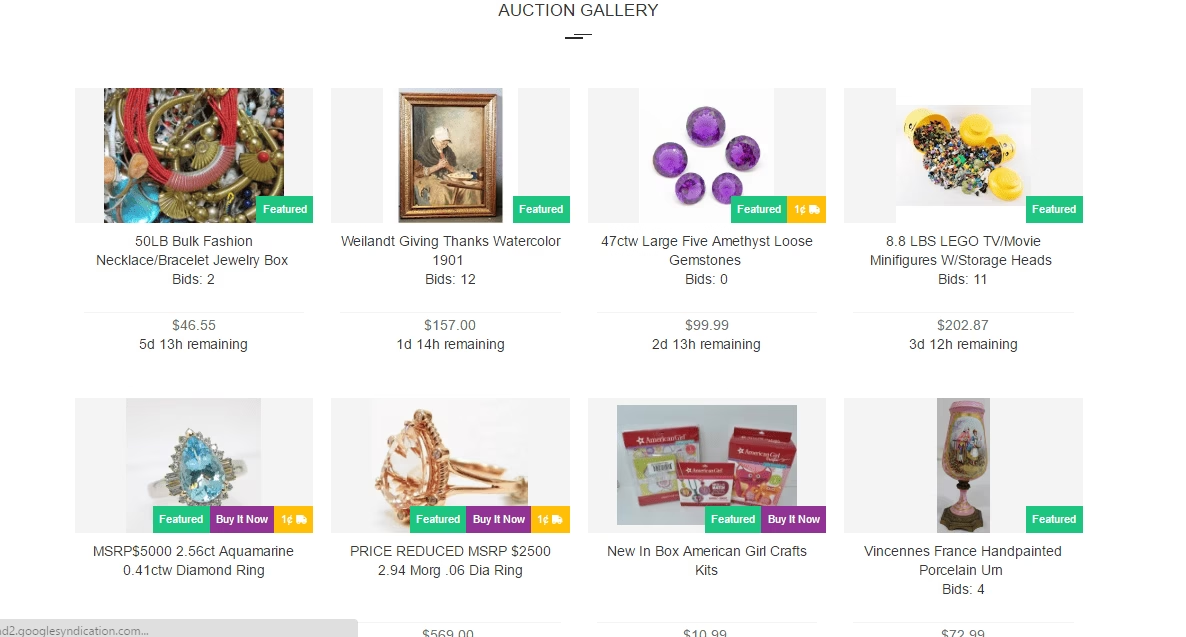
Goodwill was started in 1902. It is the first auction site. It is developed, possessed and run by an unprofitable organization. Goodwill conducts retail stores to establish money for disabled people who need a helping hand for their living. If you are searching antique items or anything else and looking for best deals online, you can get on Goodwill online auctions. ShopGoodwill.com is the online auction site of Goodwill.

It was founded by Goodwill of Orange County in Santa Ana, Calif in 1999. Goodwill organization has initiated goodwill online auctions to offer an influential range of all kind of products. It is a bidding site, selling astonishing types of tools, sports equipment, cameras, cars, clothing, jewellery, books and homes at bargain prices. 

Online Auctions

Shopgoodwill.com is a considerable place to bargain and shop from the comfort of your home. Goodwill is considered as the ruler of economy stores. Goodwill auctions sell its generous stuff online also through other websites (e.g. eBay and Amazon). Many regional stores have also conspired with goodwill. Goodwill online auction is an excellent place to expand your collection at very affordable prices. You can buy special and unique items here from a broad range of collectables and antiquities.

The money earned by these goodwill online auctions is used for a strong cause. So by shopping at shopgoodwill.com you can contribute to help thousands of disabled people who actually need help. Income from the goodwill auctions finances for education and job placement programs for people having ailments and other hurdles. 

C:\Users\rads\Desktop\Capture.PNG

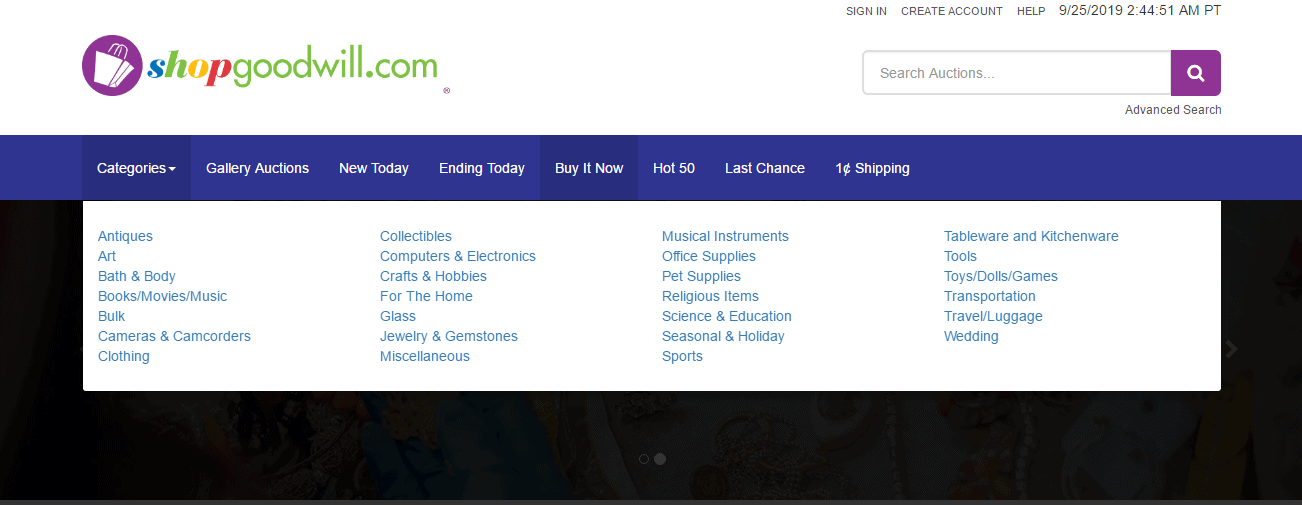
Variety of categories you can choose from:

Antiques, collectibles, musical instruments, tableware and kitchen ware, art, computer and electronics, office supplies, tools, bath and body, crafts and hobbies, pet supplies, toys/games, books, home, religious items, transportation, bulk, glass, science and education, luggage, cameras and camcorders, jewelry and gemstones, seasonal and holiday, wedding, clothing, miscellaneous and sports.

C:\Users\rads\Desktop\categories.PNG

Best categories to shop on goodwill online auctions :

  • uncommon items to exclusive interest
  • Pop culture valuables
  • Expensive décor and furniture
  • Highly advanced electronics
  • Superior toys
  • High-end apparel, jewellery and accessories

Basic things you should know before you start with shopgoodwill.com:

Shopgoodwill.com has over 94 million users all over the world. Auctioned products come from donations given at goodwill auctions stores. You are not allowed to sell your products at shopgoodwill.com. You don’t have to pay any signup or bidding fee here. Bidding and buying at goodwill auctions online are fairly easy.

Everything on the website is easy to navigate. You can enhance your purchasing experience using “my shop goodwill” on the homepage where you can view the auctions you are involved in. Here you can also add the information about a particular product you are looking for, and goodwill will notify you through the mail if similar kind of item is posted on the website. So you can consider goodwill online auctions as a shopper-friendly online shopping platform.

Now the question is how to find the best deals at goodwill online auctions? You should know some pretty essential ways of bidding and buying to pick the best deals when shopping on shopgoodwill.com

Here I have shared some amazing tips and tricks which can help you grab the best deals at goodwill auctions online.

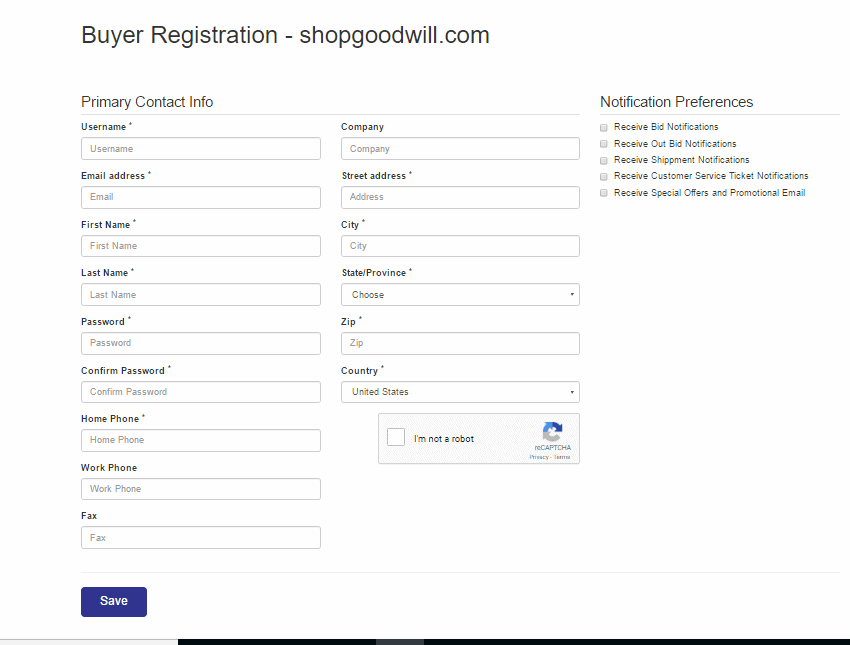
  • Anyone can open the website and see available stuff. But to bid and buy at shopgoodwill.com you have to sign up first. It is free of cost. Create your account at shopgoodwill.com to get registered. Now you can start the interesting bargain hunting. If you are a new user, you can bid on up to 15 listings at once.
C:\Users\rads\Desktop\registration.PNG
  • There are many ways to find the items of your interest on the goodwill auction site. You can browse the items by categories or you can simply search for a particular item you are looking for.
C:\Users\rads\Desktop\advanced search.PNG
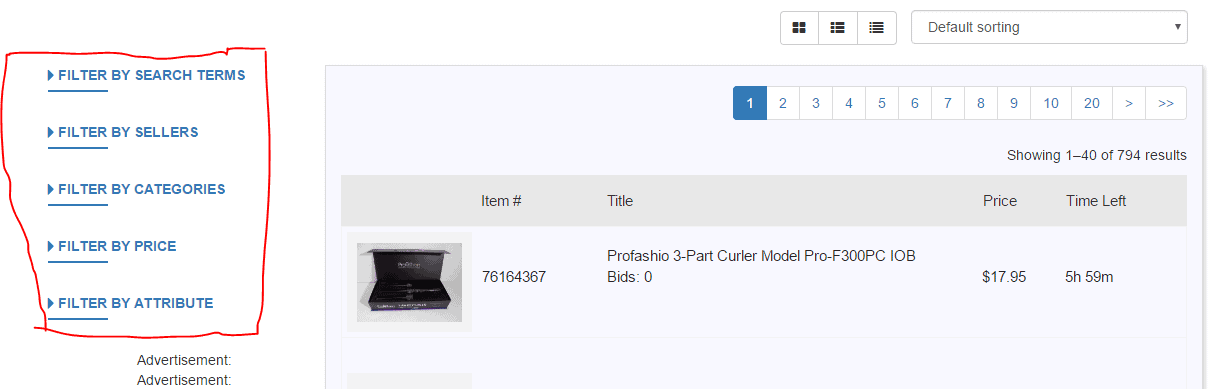
  • If you want to explore more items in a specific category, then you can browse by categories. To precise your choices in that particular category you can apply filters. By applying filters you can set a price range (minimum to maximum). “Seller box” filter option allow you to choose a location if you want to buy the items offered by a particular goodwill location.
C:\Users\rads\Desktop\filters.PNG
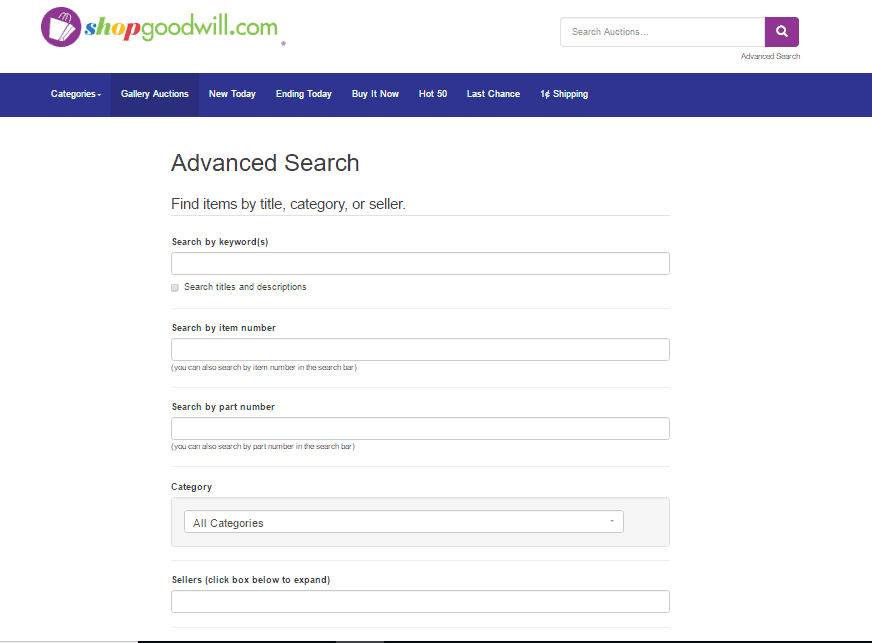
  • If you are someone who prefer to browse by search method when shopping online. Then at shopgoodwill.com you can go for “advanced search” option (available just below the search box). With advanced search feature you can search within a specific category, browse products sold by a particular seller location and set your preferred price range. You can browse by feature that means website will show you the items with inarguable offers like “buy it now products”, “pick up only products”, “hide pickup only products” and “1 cent shipping item only”. With advanced search option you can also find the auctions which gives international shipping.
C:\Users\rads\Desktop\Capture.PNG
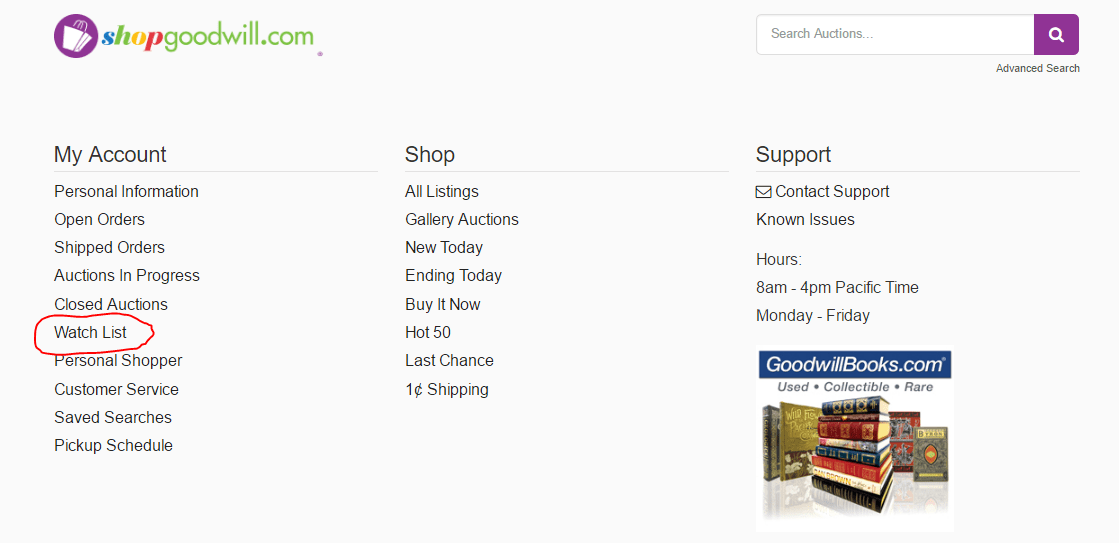
  • Add desired products to your “watch list”. In this way you can stay updated about the stuff you are watching. When you hold a product in the watch list, you can track the progress of proposals without placing any bids.
C:\Users\rads\Desktop\watch list.PNG
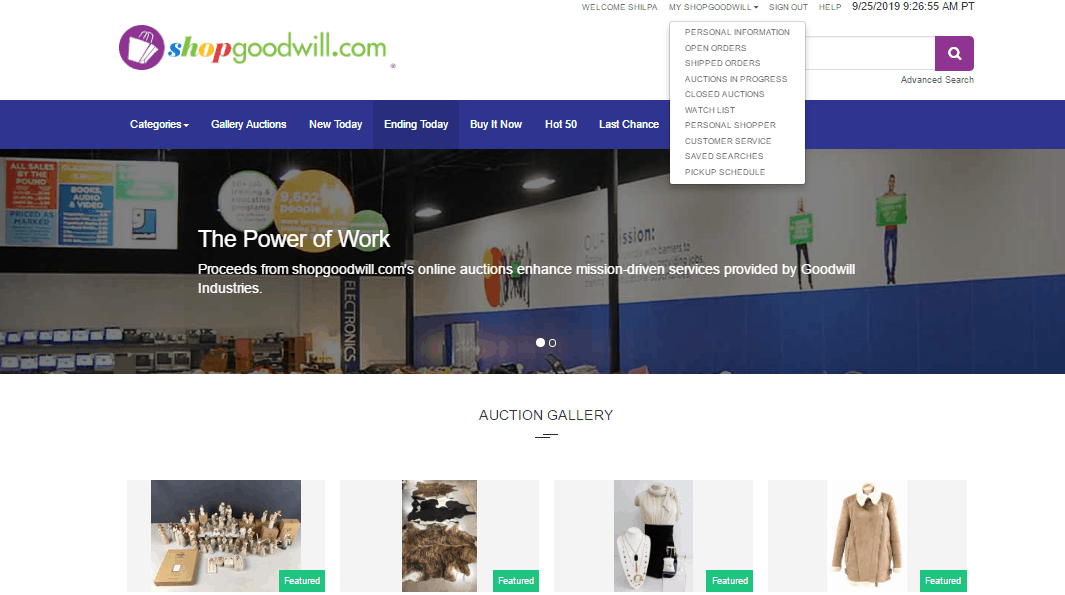
  • You can also use “personal shopper” feature. To use this option click “my ShopGoodwill “ at the top (right side) of the main page then choose “personal shopper” and click “add to list”. Apply the filters as per your requirement and choose an email frequency and duration then click “save”. “My ShopGoodwill” also give you access to all your open and shipped orders, closed and in progress auctions you have bid on, your watch list and your saved searches. 
C:\Users\rads\Desktop\Capture.PNG
  • Never bid in a hurry. Have patience. Always wait before you bid. Visit the website during the last 15 minutes of auction. When you bid during the last 5 minutes, you can surely get some mind-blowing steal deals.
  • If you can’t wait, then another option is, checkout the items with “buy it now” feature. These are the items which are not sold in past auctions so goodwill has put those on sale with “buy it now” listing. So you can get an awesome deal. 
C:\Users\rads\Desktop\1.PNG
  • If possible, then check out the auction when the auction is about to end. Because last minute bid can definitely help you get what you desire at amazing price.
  • Make sure that you are bidding on the stuff that belongs to a renowned company to avoid the quality issues. Always check the details of the product carefully to get best deals.
  • Check out the auctions in prime times. Visit the goodwill online auctions during the ending of a season. At that time, there are chances to get new stuff and bigger selection at cheap prices. 
  • You may have seen various listings (last chance and going, ending today or going gone) on the main page of goodwill website. Bidding on these specific listings can be an efficient way to become more familiar with the site. It can also increase the chances to grab your most desired items. But firstly it is important to know the difference between these 3 listings. Ending today (ending within 24 hours), going gone (ending within 5 hours) and last chance and going (ending within 30 minutes and having one bid on them). 
  • Browse regularly. If you love shopping at thrift stores and you want to grab excellent deals at goodwill online auction then you should browse frequently at different times. This is how you can holdup considerable items just before the end of biding. When you check regularly there are more chances to get steal deals. You never know when you will get all your desired stuff at awesome prices so keep checking repeatedly.
  • Look for the items you know very well. When you are shopping at goodwill online auction, you can see a lot of stuff. So don’t get confused. First of all go for the item you actually know about. For e.g. I look for books, kids clothing and women clothing because I know the quality and which size will fit me or my kids.
  • Go for the listings with “one cent shipping” feature. The listings include many kinds of items at different prices but probably the shipping price is almost same. These listings have low shipping rates so you can bid for required products with less shipping amount.
  • Always checkout the shipping options carefully before you bid for a product. Shipping is an essential part of online shopping. Shipping prices and options vary depending on weight of the package, type of packaging and shipping method etc. You can see a shipping cost estimator for every listing. You can use that to know that the product would be an inexpensive buy for you or not.
  • When you shop at shopgoodwill.com, usually your orders are shipped within 5 working days of the payment. Many sellers offer products to be picked up (by buyer) from their locations. If you love the listings of a goodwill auction seller, and that seller lives near your location then make sure to call the seller before you bid, to ask about the pickup option. If the option is available then you can select “pickup item” as shipping option during the payment.
  • If you are buying more than one (multiple) products from same goodwill seller within a week, then you can request for the combined order (all products can be shipped together). It may help you get some rebate in shipping cost. In that case you have to do the payment for all items at the same time. For such type of combined orders there is a limit of 20 pounds weight. If your order contains fragile products then these products may need to be shipped individually. So make sure to check everything carefully when you are placing a combined order. 
  • When browsing goodwill online auction, make sure you refer to all details of listings before you place a bid. If a product does not match the information mentioned on the site then you can refund it within seven days of delivery but you will not get the refund if the product is damaged or product information include untested. 
  • You can research the product to make yourself satisfied about the price. Search for the same item online. Check how many similar item sold on eBay or other website and at what price and also properly read about the product. It can help you be sure about the product you are buying, that the product is treasure and you are getting at unbeatable price. 

Conclusion: 

Shopping at saving stores is very exciting. It is just like a gem hunt because here you can get the secret treasures at unbelievable prices. Goodwill online auctions offer endless treasures to find and bid on.  The things available for bids at shopgoodwill.com come from engaging goodwill locations around the country. All the sellers are member management of goodwill industries. So there is no need to take tension about unethical sellers or fraud listings. Goodwill online auctions have got positive feedbacks. So don’t worry and shop with assurance because your buys are managed by well informed and mature employees of goodwill. 

9 Basic Ways you can make your Laptop Battery Last Longer

It’s no longer news that power supply can be epileptic in some regions. As a result of this, most laptop users prefer a laptop that has a stronger and long lasting battery over other features. Sometimes, however, our laptop battery do not last because of our user behaviors.

In this post we will highlight 9 basic things you can do to make your laptop battery last even longer. Applying these recommendations, your laptop battery will last for an additional hour or even more, except if your battery is in bad shape.

1. Reduce Brightness

Brightness is what consumes battery most in every laptop. Reducing it can save you about 20% battery life or more. To reduce brightness is very easy, some laptops have keys to this effect, although in some laptops you may need to do this in your power settings option. I will advise you reduce your laptop screen brightness to about 30%. Alternatively, if your laptop supports “Power Saver” I will suggest you set to “auto activate” once not plunged to power. Reducing brightness does not just save your battery, it also protects your eyes from brightness effect.

2. Don’t Use Screensaver

Screensaver keeps your laptop screen on, even when it is not in use. Some also run in the background while you are working on your system. Though screensaver makes your laptop look nice, but at the same it drains your battery life and contributes to app sluggishness. Don’t use screen saver if you want your battery life to last longer.

3. Always Keep Laptop on Airplane Mode

Remember to activate “airplane mode” on your laptop when you are not using any Wi-Fi network, Bluetooth or any other wireless connections. This will help your battery life last even longer. This option is capable of saving about 10% battery life.

4. End up All Tasks Not in Use

Doing this may differ depending on the operating system version your laptop is running on. To do this, locate your system Task Manager (shortcut: Ctrl-Alt-Del); it will display all running tasks, end all tasks not in use.

5. Ignore “Sleep”, Use “Hibernate”

Both ‘sleep’ and ‘hibernate’ mode will enable you to continue using your laptop from where you left it. While sleep mode keeps your memory running and slows down processor, hibernate shuts down your laptop completely after saving your current status.

6. Temperature Matters

Always use or keep your laptop in a normal room temperature, an extremely high temperature will run down your laptop battery faster, and also reduce battery life span. This seems not to matter much but on a long run it contributes more to reducing battery life span or even damage the battery completely.

7. Unplug External Devices

Unplug all external devices connected to your laptop when they are not in use, this includes Flash Drives, Modem, External Keyboard, External Mouse, Phones, Gamepad and so on. Each external device connected to your laptop detects battery life ranging from 5% while some phones like tecno camon 12 pro or infinix hot 8 can reduce battery life up to 18%. Charging your mobile phone with your laptop if not plugged to power even drains battery life more than most external devices.

8. Avoid “auto run” Applications

Avoid installing applications that run automatically without launching and disable auto run (if available) installed applications. “Skype” and “Yahoo Messenger” runs automatically on default, remember to change their settings. Also, most screensaver apps falls within this category, I will advise you keep away from screen saver apps.

9. Use Only Recommended Charger

Laptop charger output voltage varies. Use only the manufacturer’s recommended charger and never try to customize your charger. Using a wrong laptop charger just because it shares the same charging port may damage your laptop battery or even make your laptop get unnecessarily hot which may lead to further issues.

Rounding Up

Generally, having good user behavior over your laptop contributes majorly to how the battery lasts. Doing otherwise will not only make your laptop battery not last, it will also reduce the life span of the battery. Most of the tips mentioned above are not hard to implement but they sure have positive impacts on your laptop battery life.

10 Proven Instagram Trending Tips

Instagram is one of the blazing social media platforms right now. It was launched in 2010. At that time it was just an app to add unique filters to your pictures and sharing them with your friends. But now it has numerous advanced features. It has over 800 million active users monthly. Social media is a great way to reach more and more people. 

People use instagram for personal use (for sharing pictures and videos with friends) as well as to market their businesses. Instagram is also a great place for ecommerce businesses. Most business entrepreneurs prefer instagram to help grow their businesses. Instagram is a profitable tool that can be used by both startups and well established businesses because; this is the place where you can attract number of customers. 

Here I am going to tell you instagram trending tips which can help you get more likes and followers. If you are an ecommerce business then you can grow your business with the help of these tips. 

Posting at the right time: 

Whenever you are planning to post a photo or video one thing you have to keep in mind is the time zone of your audience. Do a little research to find out; at what time they login usually. Most instagram users are online in the morning and in the evening when they are returning from their work, college or school. Understand your target audience and then post by keeping their schedule in mind. It will help you reach more target audience. 

Interesting photo captions: 

If you are an active user of instagram then you must know the importance of caption. An eye catching caption attracts people. So make sure you put an attractive caption under your photo or video. One of the top ways to get more likes on your post is ask a question in your caption. In this way you can easily drive both likes as well as comments. 

Trending Hash tags: 

Hash tags (#self-love, #fashionista, #relationship etc.) are something which is more relatable to instagram. If you are not using trending hash tags, it means only your followers can see your posts. Hash tags help your profile reach more audience. If you want to reach more audience, use 10-15 appropriate hash tags. Trending hashtags can help you get more likes on your posts, more followers and also more sales. You can try more trending hashtags from the Instagram marketing agency

Use other apps: 

Use best photo editing apps (you can also consider instagram apps) to increase the quality of your pictures before posting on instagram. There are so many apps which are very easy to use. You can try Instaframe (free app to create amazing photo collages), Squaready (instagram lay outer that allows you to crop your picture in the shape of a square) and Picfx (it has 100+ frames, effects and textures to choose from).

Collaborate with instagram celebrities: 

If you are a new business or small business (product based) and you want to take the advantage of instagram. Conspire with instagram celebrities. These celebs have huge fan following and have excellent online influence. They can help you introduce your brand to their followers. Ask them to mention your account or brand in their posts or videos. It will definitely help your brand build a relationship with large number of people.

Don’t disregard the bio part: 

You know, bio is an important part of your instagram page. It leaves the first impression on your viewers. Make appropriate use of this space to feature branded hash tags, web links and a call to action. If your bio is impressive people will show interest in your page or business and start following you. 

Stay consistent: 

No matter what is your page about, make sure to stay consistent. If you are a brands or business make sure to post regularly to stay tuned with your followers. If you have a personal instagram profile then also you should post regularly to stay engaged with your followers. If you are not consistent, your followers will unfollow you.

Create a schedule: 

Create a posting schedule for example post daily or post every second day or fix some days to post. Your followers wait for your content. So, in this way your followers will be hooked with your content. You can’t grow if you are not able to maintain this type of consistency because every post is like a chance to grab new followers.

Post pleasing and sharable content: 

Your content should be interesting and relatable but it should also be beautifully likable and sharable. Nobody is going to screenshot your post if your watermark is covering the whole stuff. Nobody would love to share that kind of content which means, nobody will promote your content. When somebody reposts your content they are actually growing your account.

Pay attention to your stories: 

Stories part is very important for your content planning. Right now the stories symbolize a clear preference for instagram. The stories part of instagram contains so many innovative features which you can use to enhance the quality and attractiveness of your content. You don’t need to burnish your stories, just keep those regular and interesting.

Add more videos: 

Instagram videos are as successful as stories. No one can disagree that visual content is always compelling. Videos are the elite tool to boost the amusement value of your feed. Innate instagram apps such as hyper lapse and boomerang are great for making bite sized videos. 

Interact with your followers: 

Don’t ignore your devoted followers who like and comment on your photos regularly. Make them feel loved and valued. Reply their comments and checkout their profile and like their posts.  

Conclusion: 

Instagram is an incredible platform around the globe. Above mentioned tips are well tested. If you are using instagram for personal use then above mentioned tips can help you build large following. If you are using instagram for business purpose then these tips can help you promote your brand and enhance your sales. 

How To Choose The Right Surveillance Camera for Your Home

When you’re building a home security system, at its core is a surveillance camera. That’s what lets you see what’s happening in your home at any time, and what has happened in the past if there’s any kind of issue.

Therefore, choosing the right surveillance camera for your home security system is crucial. But with so many options on the market, how do you pick which one is right? How do you know what info from the spec sheet is important, and what’s basically a marketing ploy to get you to spend more money than you’d like to?

Copyright: Pexels | CC0 Public Domain

Well, it’s not that easy. Therefore, below you will find some of the most important aspects of choosing a surveillance camera, and you’ll know where your money should be going.

First things first note the resolution

The most important aspect of a surveillance camera is the resolution. The resolution is the number of pixels (both horizontally and vertically) that the camera can record, and more pixels usually equals more details.

With today’s cameras, the absolute bare minimum you should accept is 720p. This is a resolution of 1280×720, and it’s the minimum resolution that will let you distinguish faces and other significant details. However, this only applies when you’re looking for a camera to put in a room that’s always well lit. For everything else, 1080p (1920×1080) should be your go-to. That’s a lot more pixels than 720p, and it will capture a lot more detail, especially in tricky and dim situations.

While we’re at the resolution, we believe the frame rate should also be mentioned. The frame rate indicates how many frames per second the camera captures. More frames per second equal a smoother video. There are some cheap cameras that only do 10 to 15 fps, but try to avoid them and get something that has at least 30 frames per second.

What’s the field of view?

With a home security system, you’ll want to cover as much of your home as you can. A solution is to place more cameras, but that’s costly. On the other hand, getting fewer cameras but with a wider field of view will get you the same thing.

Most modern variants come with at least 130 to 150 degrees, which is excellent. This means that placing the camera in a corner captures the entire room, as opposed to a small angle, one at which it is pointing. You can also get some more premium models that have 180 degrees field of view, which is impressive.

What kind of storage does it use?

Conventional cameras a few years ago used to have a cable running to a centralized DVR, which was a recording device that stored all the footage. However, today things are a bit different.

Copyright: Pexels | CC0 Public Domain

The best option is to have a camera that stores everything on the cloud. You can access that footage from anywhere, and you can’t have a dead hard drive deleting it. There’s also the option for local storage, but make sure to back that up every once in a while. 

Does it have a dedicated night recording solution?

Most of the surveillance cameras you’ll find boast that they’ve got excellent night time recording capabilities. However, in order for them to see and record anything at night, there needs to be some kind of light that illuminates the scene. Without it, the camera is blind and you won’t get usable footage.

Therefore, try to get a camera that has IR LEDs. Infrared LEDs emit a beam that illuminates the scene even when it’s pitch black, and it’s a beam that’s invisible to the human eye. While a potential burglar might think that they’re safe, they’re actually being recorded, and usually with pretty good quality.

Is it connected?

Connected devices are basically always online. They use your home network to give you access to them from pretty much anywhere. And don’t worry, the data is encrypted, so nobody else has access. A connected camera not only records, but also lets you control it, and view it live, from more or less wherever you are.

All you need to do is have an internet connection and a simple app on your smartphone, and you’re seeing what your camera sees as well. Some more advanced models even have things such as rotation, so you can control it from outside your home as well.

How inconspicuous is it?

While some consider that a visible camera is better since it deters thieves, it’s actually the opposite – a visible camera might make the thief think it’s fake. Therefore, you’ll want to have a camera that’s out of sight. A small camera is more difficult to spot, you don’t have to have a massive camera that’s an eyesore for anyone approaching the house.

Wrapping things up

As you can see, choosing the right surveillance camera for your home doesn’t have to be that much of a chore. Just make sure to pay attention to the things above, and you should be good to go.

How to Fix Windows Update Stuck or Frozen Issues: Proven Solutions

How to Fix Windows Update Stuck?

To fix a Windows Update stuck issue, restart your PC, then run the Windows Update Troubleshooter from Settings > Update & Security > Troubleshoot. If unresolved, clear the update cache by stopping the Windows Update service, deleting files in C:\Windows\SoftwareDistribution, and restarting the service for a smooth update process.

Windows updates are necessary because they guard your computer system, allow the operating system run smoothly and crush awful bugs. If you don’t keep your computer system up to date then it becomes exposed to Ransomware and other bugs. Windows updates protect your PC from security breach. Outdated operating system and programs may lead to compatibility issues. But the problem is, windows updates are not always smooth. Even Microsoft has put some extra efforts to make the recent versions of windows and update processes as trouble free as possible but still there are always some chances of surprising problems. 

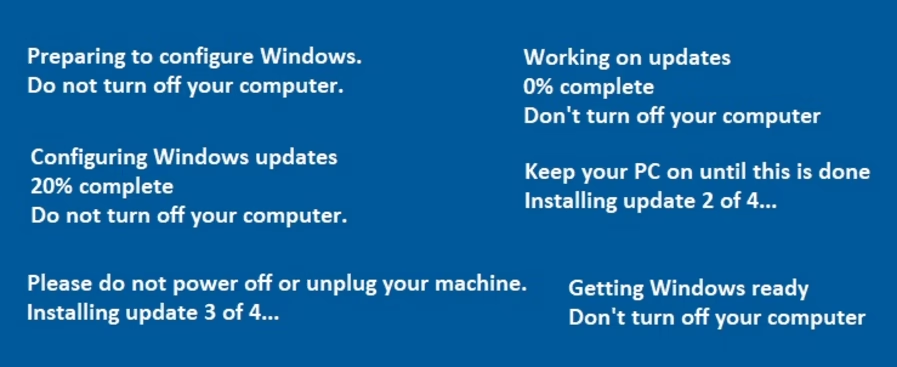
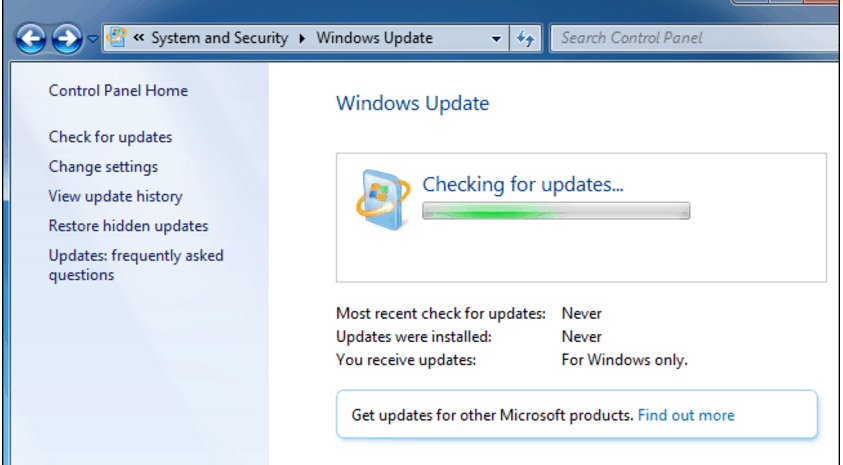
Many users complained about the windows update stuck or frozen which means during the windows update process, downloading gets stuck or the update gets frozen. In that case you are not able to update your windows even if you leave your computer system downloading updates for the entire day.  Usually windows update stuck when you check for the windows update for the first time or you reinstall windows on your computer. I know it is annoying but you can solve this issue easily by yourself. 
C:\Users\rads\Desktop\main.PNG

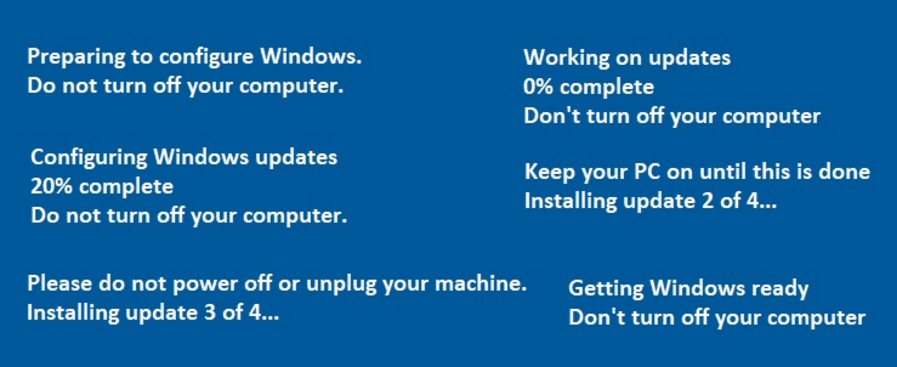
When your windows update get stuck or frozen you will see the following notifications on your computer screen:

C:\Users\rads\Desktop\notifications.PNG

Any operating system of Microsoft can experience windows update stuck or frozen issues. This problem appears due to various reasons.  Mostly it occurs because of unnoticed software disturbances. I will share the best resolved solutions with you to make your windows update processes smooth and pain free. You can prevent this problem by maintaining your computer system. Always check your windows updates through control panel and make sure to install all the updates as recommended. Don’t forget to install the updates as soon as you get update related notifications to prevent errors. Always install trustworthy antivirus software to exclude virus, malware and other harmful files which can meddle with updates. 

Before jumping to the resolved solution part, try these quick fixes to remove this fault:

  • Restart your system and try installing the windows updates again. Sometimes windows update may hang due to simple errors and restarting your computer can fix the issue so try this first. 
  • Windows update processes may take long or does not show progress, if your internet connection is slow. So check your network and if it is slow, it may take 8 to 10 hours to finish the updates.
  • If there are multiple updates running at the same time then try downloading one by one manually. If you see the progress then do it like that and if not then try below mentioned solutions. 
  • Sometimes the windows get frozen or stuck at a specific part of installation process. Press “ctrl+alt+delete” keys together. It will take you to the login screen. Login as you do normally. Then check the windows update working successfully or not. 

Now coming to the resolved solutions to windows update stuck or frozen:

First of all make sure that your windows update is actually frozen or not. Typically it takes few hours to install the updates. If you try the fixes for an issue which does not exist actually, it may cause other problems. So make sure the updates are surely stuck. If the windows updates are not showing any progress for 3 hours or more and you have tried above mentioned quick tips that means updates are actually stuck. Check your hard drive activity light. If you see no activity at all that means the windows update is stuck and if you see continuous and short flashes of light that means it is not stuck.

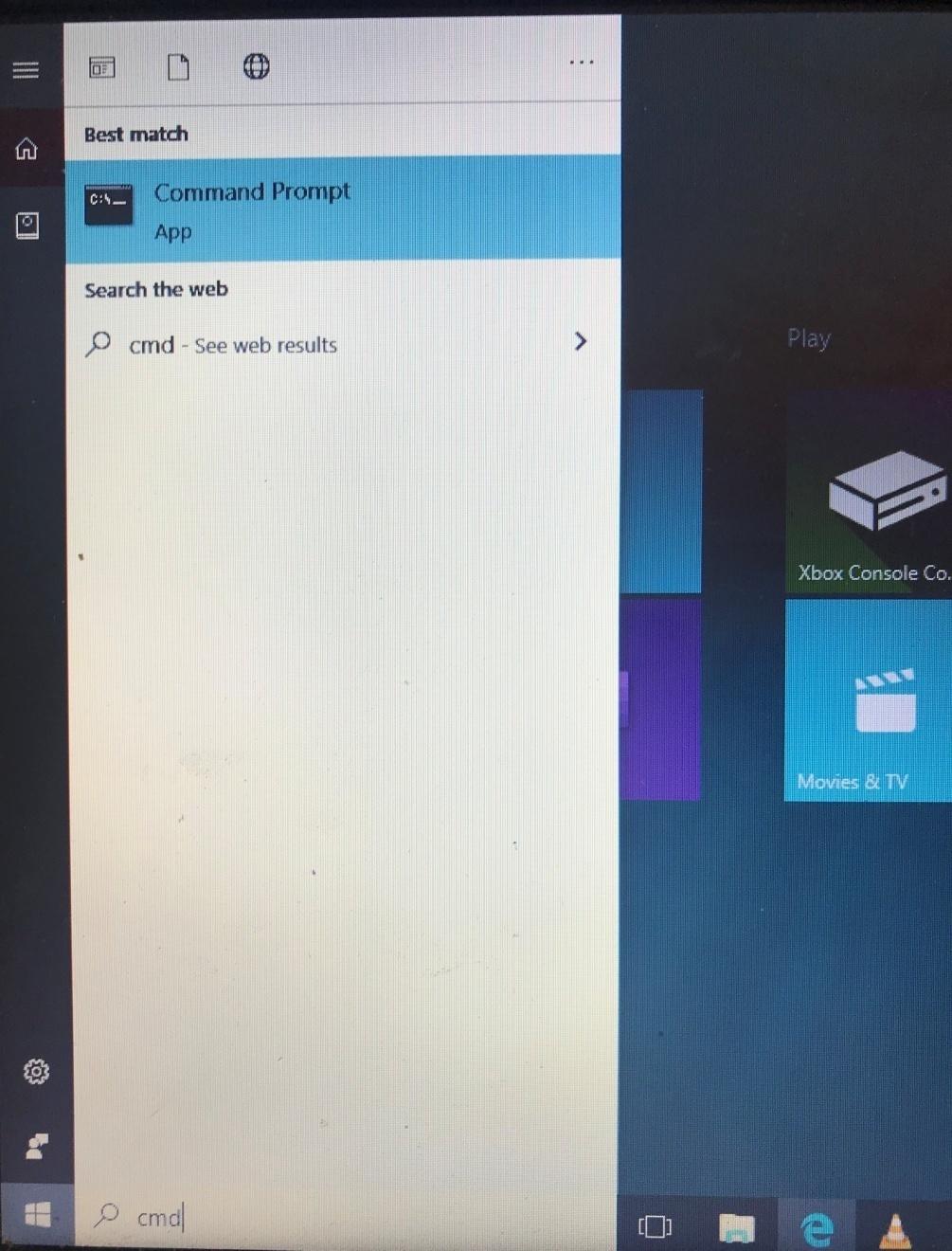
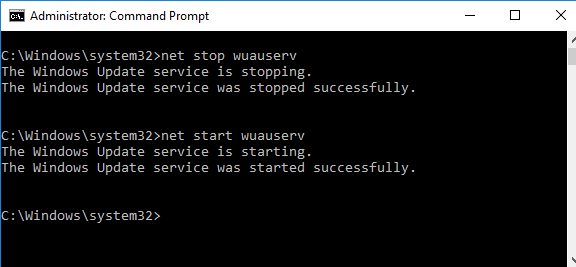
Manually restart the windows update: if your windows update got hang then you can fix it by restarting the windows update manually. 

C:\Users\rads\Desktop\IMG_0044.jpg

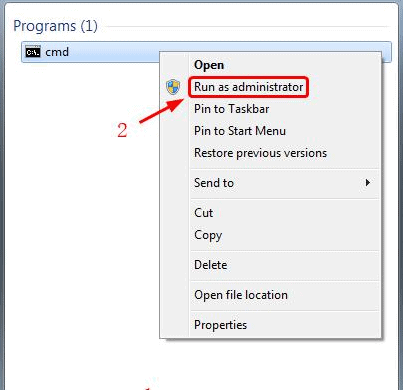
Step1: click “start menu” in the left side at bottom of your screen and type “cmd” in the search box.

Step2: Then right click on it. Now choose “run as Administrator”.

C:\Users\rads\Desktop\1.PNG

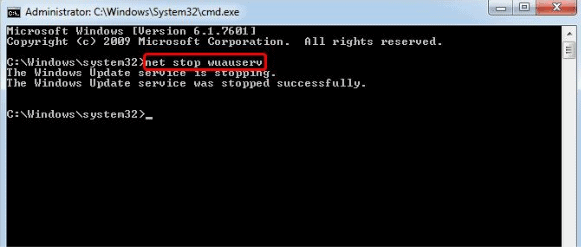
Step3: type “net stop wuauserv” on the black screen and press “enter”. Then you will see a massage (windows update service was stopped successfully) on your screen. 

C:\Users\rads\Desktop\2.PNG

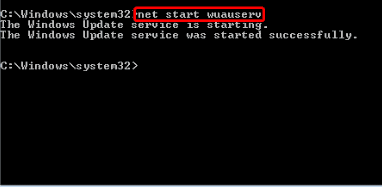
Step4: again type “net stop wuauserv” and hit “enter” on your keyboard. And your windows update starts again. Now check if it works successfully.

C:\Users\rads\Desktop\3.PNG

Windows update troubleshooter: whenever you have an issue with windows updated, the simplest way to fix it is to run the troubleshooter. When you run windows update troubleshooter, it restarts the windows update process and also clean windows update caches. This method mostly works for the windows update related faults. 

Follow these steps to run the windows update troubleshooter:

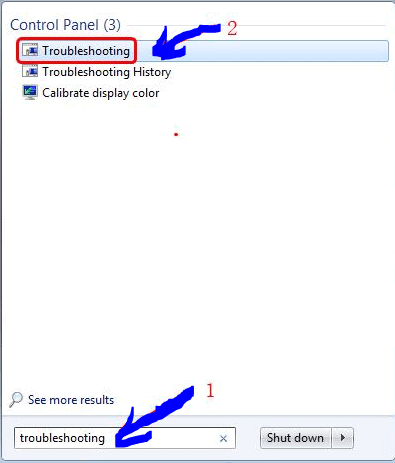
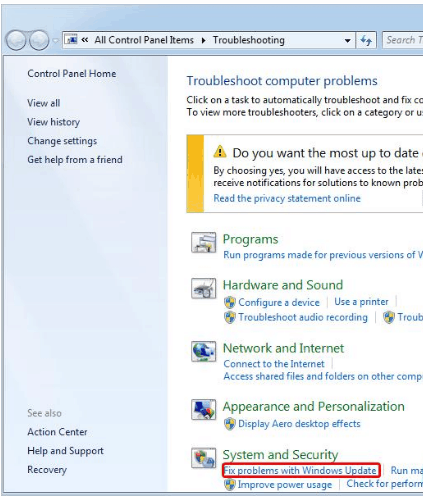
Step1: click “start” button in the left bottom corner. Type “troubleshooting” in the search bar and then choose “troubleshooting”. 

C:\Users\rads\Desktop\1.PNG

Step2: now click “fix problems with windows update” option available under “system and security” column. 

C:\Users\rads\Desktop\2.PNG

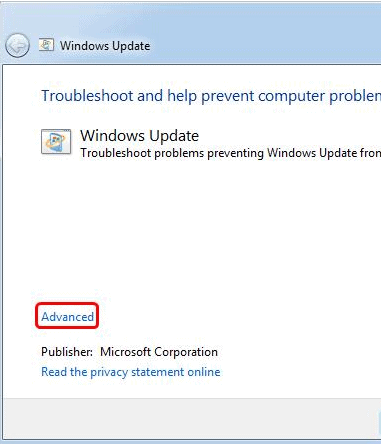
Step3: then click “advanced” at the left side of bottom.

C:\Users\rads\Desktop\3.PNG

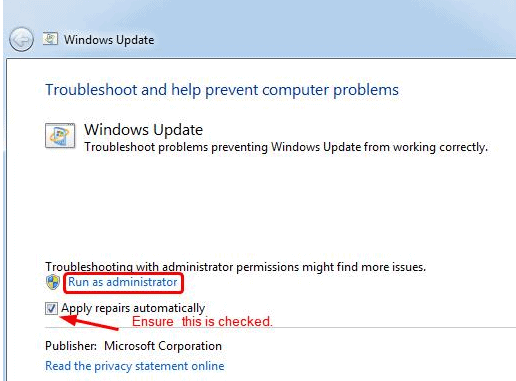
Step4: click “run as administrator” and make sure to mark the box next to “apply repairs automatically”. Now click “next” and the windows will find and solve the issues necessarily. This process requires maximum 5 to10 minutes to resolve the issue.

C:\Users\rads\Desktop\4.PNG

Confirm that windows update services are running: check for windows update services, these are actually running or not.

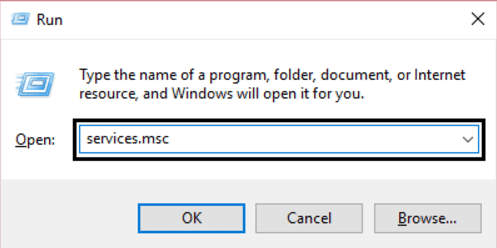
Step1: press “window+R” keys. Type “services.msc” in the box appeared on the screen then press “enter”. 

C:\Users\rads\Desktop\1.PNG

Step2: select following services

“Windows update”

“Cryptographic service”

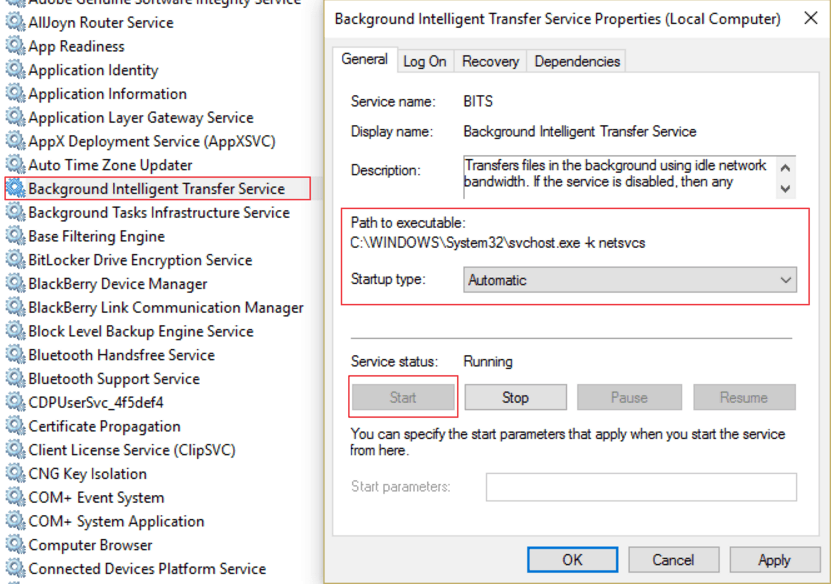
“Background intelligent transfer service”

“MSI installer”

Double click on all of these columns one by one and set their “startup type” column to “automatic”. Make sure to click “start” under “service status” column for each service.

C:\Users\rads\Desktop\2.PNG

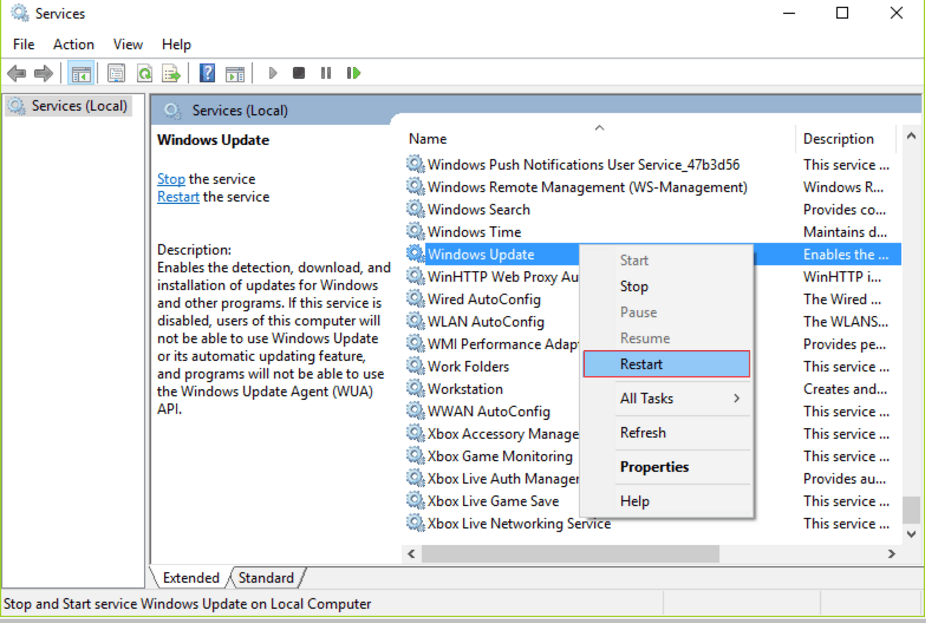
Step3: right click on “windows update” and click “restart”. Then click “ok” and restart your computer to save the changes.

C:\Users\rads\Desktop\3.PNG

Unplug the connected units (devices): 

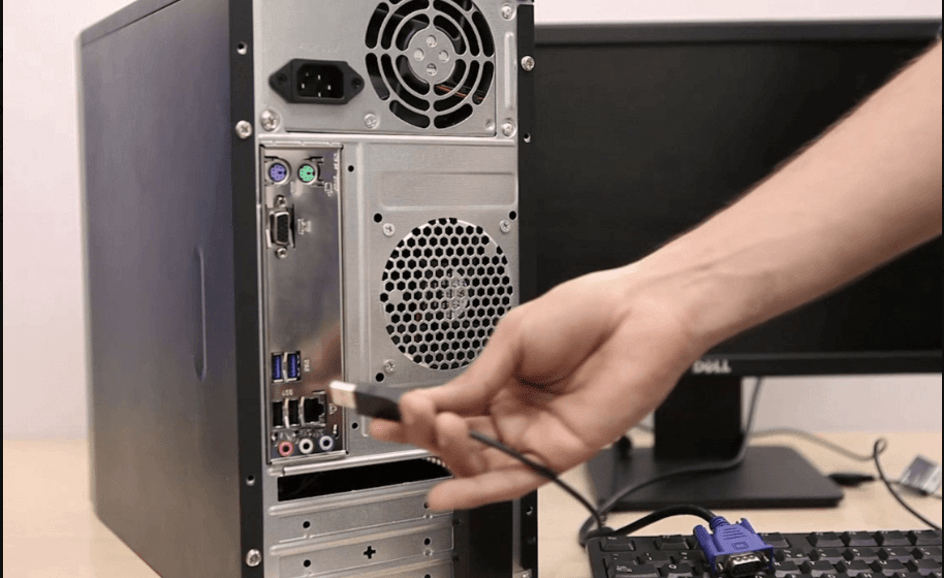
Assorted users revealed that plugging out the peripheral devices (hard drive, printer, and flash drive) can solve windows update stuck error. Because if these kinds of devices are plugged into the system during windows update, these may stuck the update processes.  So unplug USB devices if connected and then reset your computer system by cycling power. Numerous users resolved the issue with this method. So give it a chance. 

C:\Users\rads\Desktop\Capture.PNG

Try system reinforce option: 

Restoring your computer system bring it back to its normal state. It can help avoid errors occurred recently and run the update process smoothly. 

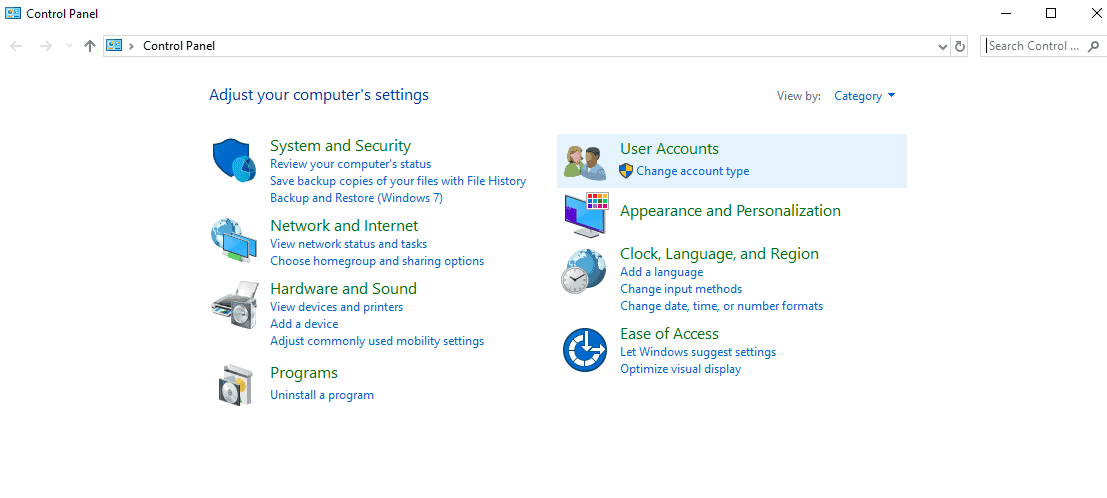
Step1: type “control panel” in the search box. 

C:\Users\rads\Desktop\1.PNG

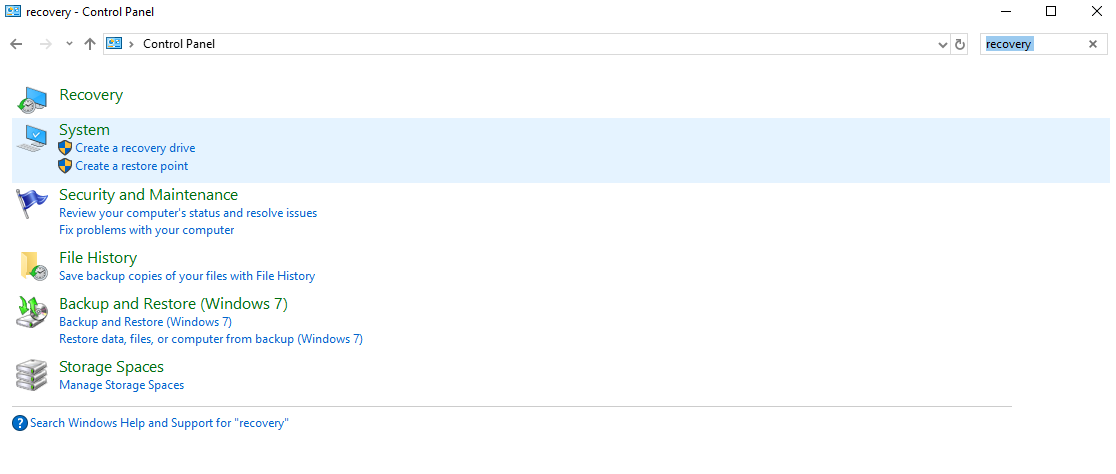
Step2: now type “recovery” in the search box in the right side top.

C:\Users\rads\Desktop\Capture.PNG

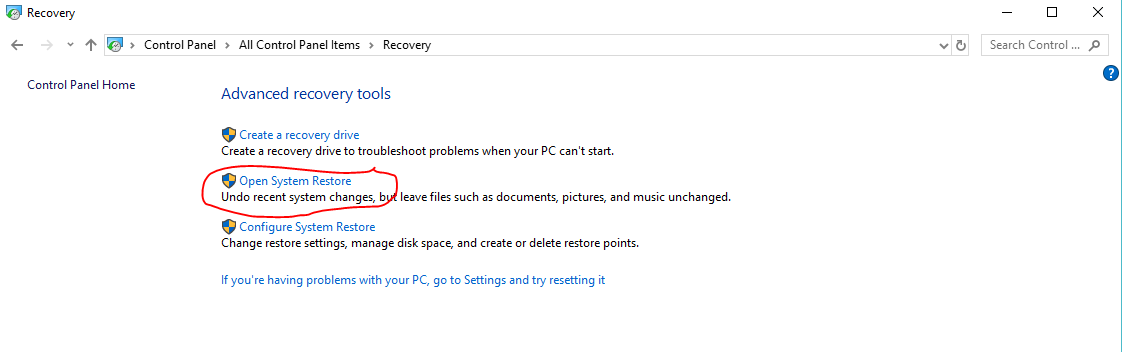
Step3: now click “recovery” and then click “open system restore”.

C:\Users\rads\Desktop\Capture.PNG

Step4: click “next”. 

C:\Users\rads\Desktop\Capture.PNG

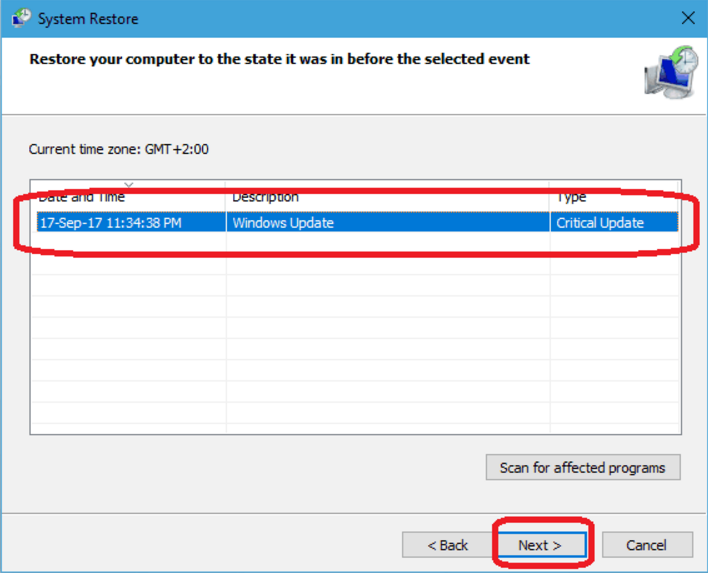
Step5: choose “previous restore point” and click “next”. 

C:\Users\rads\Desktop\Capture.PNG

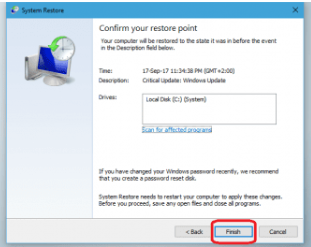
Step6: click “finish”. Once the system restoration process finished, check for the updates again. 

C:\Users\rads\Desktop\1.PNG

Clear windows update cache file:

Windows update may get stuck due to overloaded (filled with old updated files) windows update cache folder. Clearing these cache files can fix the windows update stuck or frozen issue.

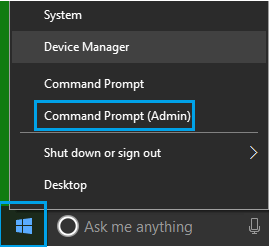
Step1: right click the “start menu” button and click “command prompt (admin)”.

C:\Users\rads\Desktop\1.PNG

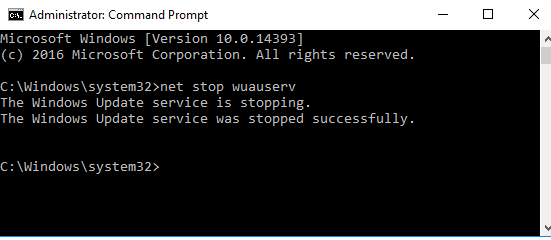
Step2: you have a command prompt window on your computer screen. Type “net stop wuauserv” and hit “enter” key. It will resume windows update service on your system. Now leave it as it is make sure you do not close it.

C:\Users\rads\Desktop\2.PNG

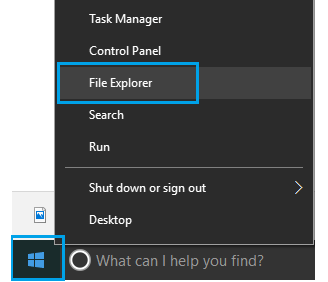
Step3: right click “start” and click the “file explorer”.

C:\Users\rads\Desktop\3.PNG

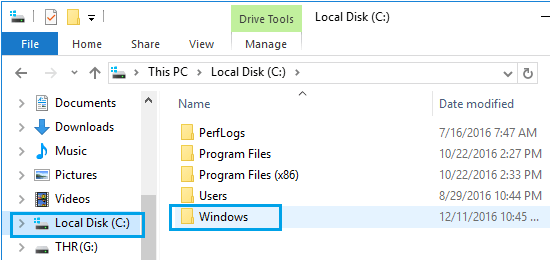
Step4: in the “file explorer” go to “local disk (C) and then “windows” folder.

C:\Users\rads\Desktop\4.PNG

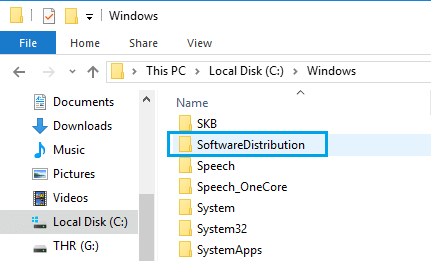
Step5: now click “softwareDistribution” folder (make sure to copy this folder on your desktop for backup purpose).

C:\Users\rads\Desktop\5.PNG

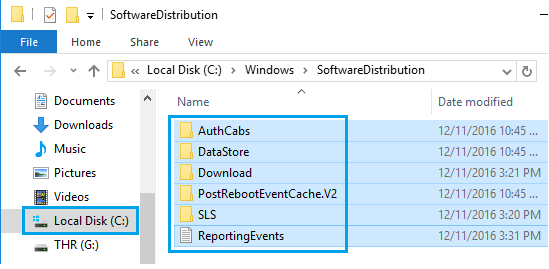
Step6: delete all the files of “softwareDistribution” folder (window will create these files again from the scratch because these are temporary files).

C:\Users\rads\Desktop\6.PNG

Step7: after finishing the delete process restart the windows update. For that type “net stop wuauserv” in command prompt window and hit “enter”.

C:\Users\rads\Desktop\7.PNG

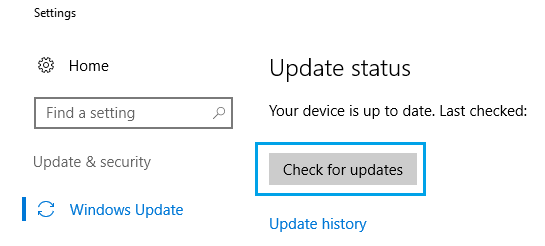
Step8: Then navigate to settings -> update and security -> windows update and click “check for updates”. It will fix the windows update related issue. 

C:\Users\rads\Desktop\8.PNG

Run full system scan:

Your windows update may hang if some infection, virus or malware interferes with your system files. It can stop your computer system from downloading updates. So run a full system antivirus scan and remove the malwares and viruses. Usually the Window defender discovers and repair malware issues but it may miss some infections. So you can download trustworthy antivirus software to ensure the protection of your computer system. I recommend using powerful and advanced antivirus software to protect your computer and prevent errors. 

Conclusion: I have shared most efficient resolved solutions for windows update stuck or frozen.  Above mentioned solutions are easy to apply and appropriate for any windows operating system. These solutions have helped many users. You don’t need to try all of these. Just go your way and try which you find easier.