Home Blog Page 336

Net Meter-Keep a track on your internet usage

Net Meter is a software that monitors network traffic through all network connections on the computer it’s installed on, and displays real-time graphical and numerical downloading and uploading speeds. Net Meter supports display transfer rates of multiple network connections at the same time. It also logs network traffic and provides daily, weekly, monthly, and traffic reports summary. Start days of week and month are can be customized. What’s more?  Net Meter allows one to setup a notification to get an alert when you exceed a certain amount of bandwidth usage and traffic stopwatch enables to test bandwidth speed of connections.

Net Meter Features 

  • Net Meter monitors traffic of all the network connections installed on the current computer.
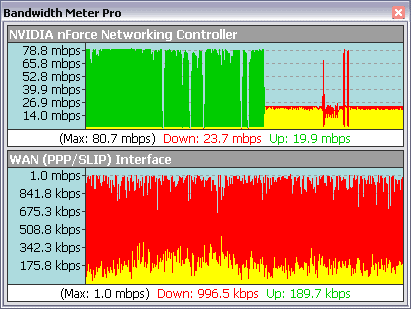
  • It displays real-time graphical and numerical data transfer rates.
  • Net Meter supports multiple network connections simultaneously.
  • Bandwidth usage notification is done by playing sound, computer beep, sending email, or running a program.
  • Log transfer rates provide daily, weekly, monthly, and summary traffic report, and export to .txt, .html, and .csv file.
  • Net Meter is provided with a traffic stopwatch that checks bandwidth speeds.
  • Traffic recorder that records transfer rates and saves to plain text or Microsoft Excel CSV file.
  • Work with most of the network connections including phone modems, DSL, cable modem, LAN, satellite, wireless, VPN, and more.
  • It is provided with a Rate scale that indicates traffic rates value.
  • Network connection speeds can be customized.
  • Shows real-time network traffic graph in system tray.
  • Traffic graphs are shown in line or column style.

User Interface
Net Meter

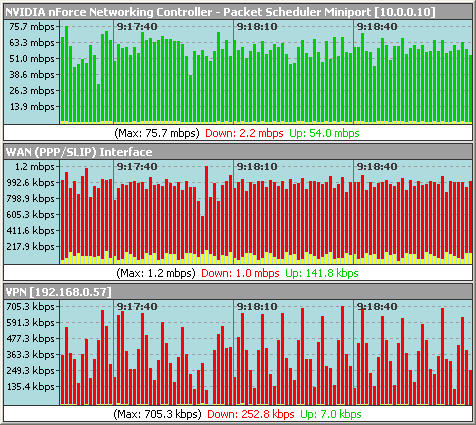
Net Meter has an agreeable user interface. It comes with a semitransparent window showing the current download and upload speeds of current network being used. Speeds are indicated using line graphs or column graphs. Also multiple network traffic can be monitored simultaneously.
Net Meter

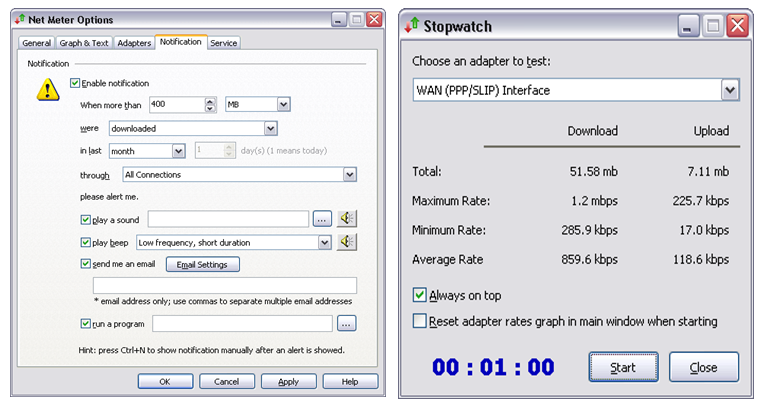
A notification can be ordered to alert the user of exceeding bandwidth usage. This is a really cool function provided by Net Meter. Just by setting the usage level users can get an alert in form of a sound, beep, email or also by running a program. Along with this traffic stopwatch is provided to check speeds and usage for a specified interval of time.

Final thoughts on Net Meter

Net Meter is powerful software to keep track of bandwidth usage of all networks installed on a computer. It comes with various interesting features of which most useful being the “Bandwidth usage notification” keeping its user alerted. Net Meter proves to be a good tool to users using limited bandwidth plans to track and keep their usage within the prescribed plan limits.
Optoma PK201 Pico Projector review

0

The iPad Projector is one of the most important accessories that you can buy for your iPad, as few other devices make it easier for you to enjoy your tablet as easily. iPad projectors are made to be incredibly portable, and the battery life is usually long enough to last for an entire movie or presentation. Finding the right iPad projectors is important, and the Optoma PK201 Pico Projector is one of the top products currently being sold on the market.

optoma projectors

Optoma PK201 Pico Projector: Details

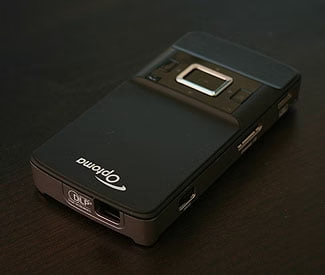
The pico iPad projector is designed to be as lightweight and easy to carry as possible, weighing in at 8 ounces and only 4.6 inches long, 2.4 inches wide, and .7 inches thick. This miniature projector can easily fit in any bag or travel case, but the 66 inch projection of the iPad projectors make it one of the best devices currently available. There is a Micro SD card slot on the side that enables you to expand the memory up to 16 GB, making it the best device for you to play your movies and TV programs.

The LED light is designed to last up to 20,000 hours, and the HDMI connection makes it easy for you to connect your iPad projectors to any portable device. You can use the device with your iPod and iPhone as well as your iPad, and the simple device even comes with a remote control that lets you control your iPad projector from a distance. You can even plug in your USB drive to play videos directly, making it the perfect device for instant entertainment.

Optoma PK201 Pico Projector: Pros

  • The high quality device is actually fairly cheap for the specs, as most of the competing products of equal quality retail for at least $100 more.
  • All of the cables needed to connect the device to your iPad come with the projector.
  •  The device has expandable memory that makes playing all your favorite media much easier.
  • Pretty much any device can be connected to the projector.

Optoma PK201 Pico Projector: Cons

  • The battery life of the device only lasts for an hour, but it can easily be plugged in to be recharged.
  • It is not very bright, meaning that the room has to be completely dark for the screen to be bright and clear.

Final Thoughts

For the price of the device, the Optoma PK201 Pico Projector is one of the best on the market. You will find that there are few devices that are as economical while still providing such high value, and your iPad accessories case will not be complete without this unique device. While it may be a high expense, you will find that it will be well worth it to enjoy all your favorite portable media.

Best blogging tools for your Android tablet

6

If you read my last guest post you might have started using your BlackBerry to promote your blog. The BlackBerry, like most smartphones, is a wonderful tool for getting things done while you’re away from your computer. Yet there’s an even better and more powerful tool that can help you take your blog to even new heights.

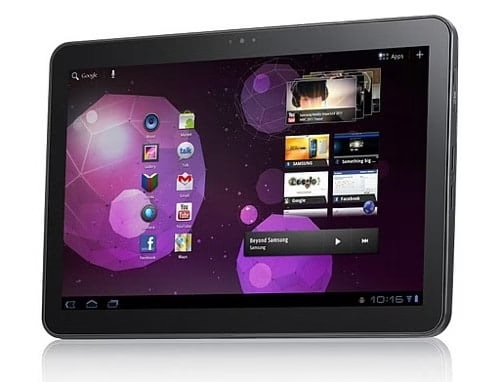
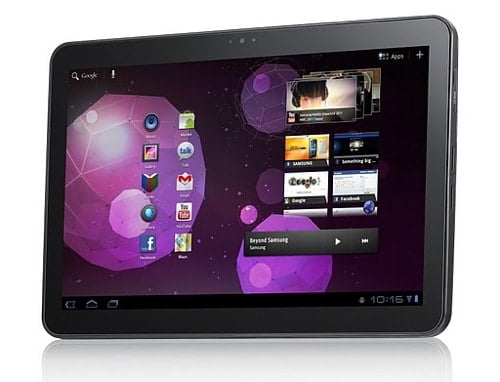
Tablets are the new craze, and it seems like there’s a new one coming out every week. Most of these are Android tablets, and there are some powerful ones, like the Samsung Galaxy Tab 10.1, that can act as a powerful tool for your blogging needs. Here are a few applications that can help you get the most out of your Android tablet.

Net Meter

WordPress

While WordPress isn’t the only blogging platform, it’s certainly the most popular. It combines a powerful content management system with a large array of plugins and themes to create a custom blogging experience. Best of all, WordPress works great on any Android tablet.

There is a WordPress for Android app, which you can download for free, but that’s better for smartphones. It has only a few features, and it’s not laid out much like the desktop version. However, because tablets have larger screens and faster processors they can handle more than a smartphone. You can easily load up your WordPress Dashboard right from your Android browser.

You can even download the Dolphin browser for tablets, which provides an even better WordPress experience than the Android browser.

Splashtop Remote Desktop HD

What if you could get the contents of your desktop or laptop right on your tablet? Wouldn’t that make life a lot easier? You could access your documents and spreadsheets, your images and your music. All of this helps in the blogging process. And with Splashtop Remote Desktop HD, it’s a reality.

You can access both PCs and Macs with Splashtop. Just follow the app’s instructions and you can use almost anything on your computer. This is great for accessing proprietary software, such as Microsoft Office, that might not be available for your tablet. It also gives you a few more browsing options — which is even better, because you can access your bookmarks and other customizations.

For an app this powerful, USD$4.99 is a steal. You can get it from the Android Market.

Thinking Space

Ever get stuck when writing a blog post? it happens to the best of us. When I get writer’s block I try to perform a mental exercise that might help me find a breakthrough. Thinking Space is a tool that can help you do that. It’s a mind mapping application that can help you get past an idea that’s stumping you. And who knows: maybe this tool will help you put a better spin on the post you’re writing. Maybe it will give you an idea for a new post, too.

Mind mapping is a powerful tool for any writer, and bloggers can benefit greatly from it. It’s available for free, too, so you can download Thinking Space from the Android Market.

TouchUp

One tool every blogger needs is an image editing tool. These can be of the simple variety, or they can be as complex as Photoshop. On your tablet you probably want something a bit more lightweight. As long as you can crop, resize, and add a few touches to your photos you’ll be just fine. TouchUp provides these tools right on your Android tablet.

TouchUp provides a number of photo editing tools that are great for portraits. You can adjust hue and saturation, contrast and brightness, and other color features. For images you can rotate and flip, resize, and crop. This will probably take care of 99 percent of your photo editing. Once you’re done you can upload it right to your WordPress blog, along with your post.

Best of all, TouchUp is free. You can download it from the Android Market. There is a premium version TouchUpPro, that costs $3.99. But you can probably get by with the free version.

And so much more

This is just a quick introduction to the blogging tools you’ll find on an Android tablet. The Android Market has hundreds of thousands of apps, and many of them will help you with your specific blog. It’s starting to look like the future of blogging is on the tablet.

Conference Call Made Easy with Powwownow – The Best you can find on the web.

2

powwownow conference call techgyo reviewAs the technology is growing beyond our expectations, our world is becoming a small village and also serving the new possibilities to this new generation.  Telecommunication is such an industry where the price is getting cheaper every day. People who used to spend hundreds of bucks for making a conference call in the past can now make it absolutely for free. Powwownow is such a major Conference Call free conference call Providers which is providing this service for free. In this service you and your guests only pay the price for the call.

Features of Powwownow Conference Call

Powwownow Conference Call provides the innovative service to the clients. With the 24X7 service you can make instant conference calling without booking or billing. With the Powwownow you just pay the cost of your own 0844 call. The primary features of Powwownow include-

  • Net MeterFree Mobile App for all platforms: Powwownow has developed multi-platform apps to start the conference with one-touch button which is capable to run in iPhone, Android, Blackberry and Nokia smartphones. This simple app let you easily join the calls, set automatic call alerts and store and manage your personal details as well.
  • Free web conferencing: Powwownow Web is client app which can be downloaded and used for web conferencing systems. It has a simple interface so that everyone could work with ease, it allows you to show your computer screen to the connected members. Your viewers need not required to install this app as they can view it in their browsers itself.
  • Free scheduler tool to invite participants: You can schedule the time to invite the participants once you sign-up for the free account. After specifying the details about the participants scheduler automatically sends the invitation with given details. Powwownow allows you to have up to 50 participants on a call at any one time without having to book in advance and you should inform them if you are about to invite more members.
  • International dial-in access @ cheapest price: Powwownow has set the cheapest price for international dial-in access. This helps to join your overseas conference in a very low budget.
How to start with Powwownow Conference Call?
  • Fetch your PIN by specifying your email address
  • Make a schedule for conference and provide your pin to other participants
  • Dial the Powwownow’s dial-in-number and start talking!.. That’s it.
Final Words

Powwownow provides the secure service and allows you to have the full control on your conference call, you can lock the conference, count the members or roll call the participants. The free package is enough and has almost all the basic features for standard conference. Corporates who need more services and features can go for Powwownow’s premium service. In all the aspects Powwownow stands first comparing to other conference call providers.

Link: Powwownow

How to Create Quality Links for your Website

2

No SEO campaign is complete without a solid link building strategy. And when it comes to links, more is always better. But one factor that is often overlooked by many is the quality of the links generated. The problem is that many of us have focused on creating links thru link farms or purchasing these that we end up with hundreds of useless links.

get high quality backlinks

Focus on Websites of the same Niche

Some would say that getting links from a website with high Page Rankings can give better links. But this is only half the truth. In my opinion, getting backlinks from a site with a good Google Page Rank of the same niche is better than just focusing on any website with a high PR.

If you’re trying to create links for your sporting goods website then creating backlinks from sports related websites is a good place to start. Focus on websites that are highly relevant. Just link looking for keywords to use

Search Rankings

Ideally, the best places to get links from are those located in the first pages for targeted searches. Getting links from direct competitors who are higher up the ladder may be impossible but there are other sites who could give you similar high quality links.

If you’re targeting specific searches for your blog for example try to look if the website you’re trying to place links on figure anywhere near the first pages.

Google Page Rank

Google still remains to be the biggest name in search engines and any information coming from Big G still counts for something. Some may be skeptical about Google’s Page Rank but using it doesn’t hurt either. The name of the game is to get as much juice going to your website. And a large part of how Google looks at the quality of links is based on where these come from.

Link Placement

You should also consider where you place these links in the article. Guest posting for example allows guest bloggers place links within the content and the author bio. Links located at the first paragraph and main body of the content are great places to create links. Just like keywords, search engine spiders focus its attention at the first paragraphs of the content.

Anchor Text

What you use as your anchor text also plays a large role in determining the quality of your link. Using your target keyword for example is the best way to create the anchor text. This helps you rank higher for certain keywords while improving link quality.

BDlot DVD ISO Master- The Ultimate Freeware to Backup DVD

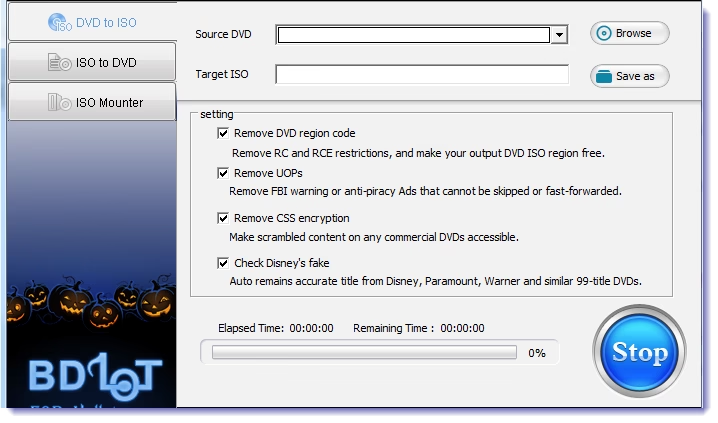
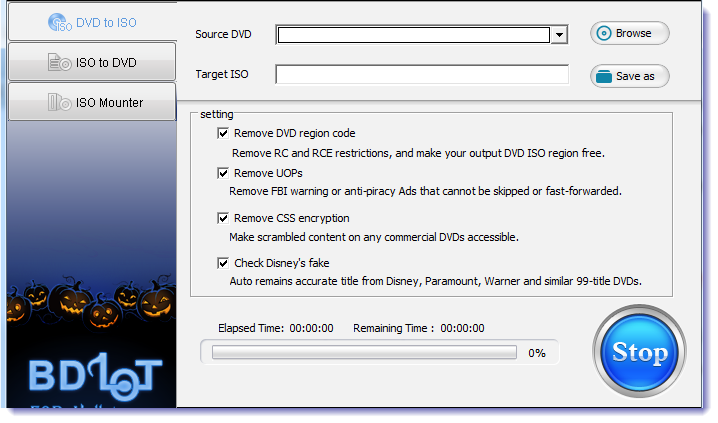
BDlot DVD ISO Master is the ultimate freeware to backup the DVDs and write the ISO file to DVD/CD/BD. Using DVD ISO Master it is possible to backup DVDs without any video or audio quality loss. The simple interface makes the software user-friendly.

Also read:

backup dvd to iso

Features of BDlot DVD ISO Master

  • Backup Protected DVD & Burn ISO to DVD : Using DVD ISO master you can easily save regular and encrypted DVD to ISO as well. The software is able to remove both DVD region codes and other DVD protections like CSS, CPRM, CPPM, APS, UOPs, ARccOS, Rip-Guard, and Disney X protection. You need not required to install any third party decrypting software as the DVD ISO Master has the built in decrypting technology.
  • Robust Readability to Support DVD Formats: BDlot DVD ISO Master supports almost all DVD formats including DVD-ROM, DVD-RAM, DVD+/-R, DVD+/-RW, and DVD+/-DL. Therefore the software stands as the one-stop resource to backup all your DVDs safely in your computer.
  • Backup DVD to ISO without Compression or Quality Loss at Lightning Speed: BDlot DVD ISO Master is coded to backup the DVD without any kind of video or audio loss therefore when you burn the saved ISO with BDlot DVD ISO Master you can enjoy same quality as of original DVD. This freeware usually takes less than 7mins to backup an entire DVD in ideal conditions, which has been tested to take the lead in backup speed among all similar DVD to ISO software on the market.
  • ISO Mounter: BDlot DVD ISO Master has a built in ISO mounter to mount ISO image to the virtual drive. Just select the ISO file to be mounted and specify the drive letter. That’s it now you can see the saved ISO without any third party disk image mounters.
  • Error Proofing Technology for Secure Burning: BDlot DVD ISO Master has a built in Error Proofing technology which makes the burning process secure. Its advanced initiative cache burning technology assures the integrity and sequence of DVD data after burning.

Basic System Requirements

Microsoft® Windows 98, NT, 2000, 2003, XP, Vista (32 & 64 bit), Windows 7 (32 & 64 bit)
1GHz Intel/AMD processor or above
256MB RAM or above
256MB RAM graphic card

Conclusion

All in all BDlot DVD ISO Master is a useful freeware to mess with DVD with no loss of quality of any kind. The software is designed to serve you the error free backup and avoid the possible difficulties like scratches and finger prints on the discs. Visit http://www.bdlot.com/dvd-iso-master/ to give it a try!

iCloud-Apple’s new Cloud Computing Technology

Apple is transforming the way one can interact and store the content of value with its new “iCloud” cloud computing technology. Mac forms the center of synchronization and content by making it another ‘device’ equivalent to iPad or iPhone. iCloud forms the central hub for the valuable information to be stored shared and interacted with.

Synchronization made simple

iCloud provides an attractive mode of synchronization. Apple’s devices now work just as you would want them to. Just push your information to all your devices and it’s done! An interesting feature of the new iCloud is that it allows pushing of shared calendars across iCloud accounts. That is to say everyone sharing a calendar will be immediately updated with fresh events.

 iCloud  Synchronization

iCloud allows easy access to all the apps downloaded in past and also synchronizes them to all your wireless devices. . iCloud allows access to all your previous downloads, letting you pull them onto whichever devices you like, while also causing new books to be pushed to all your devices. And even better, iCloud will store your place in a book and push that information across all your devices and you never lose you position again. . iCloud allows all the apps from the iWork suite to save your documents, automatically  in the cloud. You can quit whenever you like and resume anywhere on any connected device again. Also one will now be able to seamlessly have paintings, games, or stocks synchronized across all your devices. Backup with iCloud works exactly as one would dream of. Backup saves in accordance to time and space only backing up information that’s been changed so that you never lose anything, ever. And another benefit of iCloud is the restoration of a device by logging on to your Apple ID to get it back. All your data comes back in no time. That’s the magic of iCloud!

Photo Streaming

iCloud  Streaming

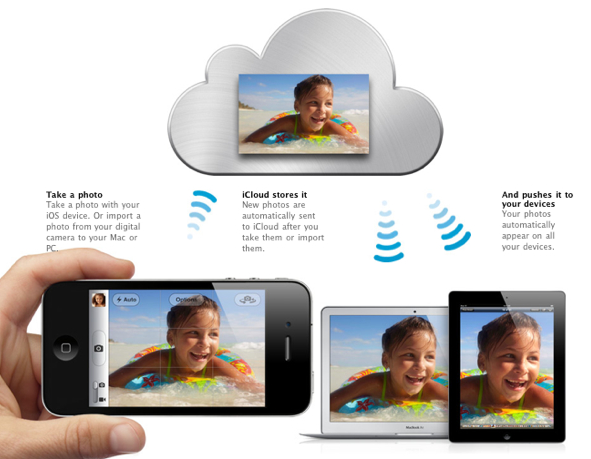
Photo Streaming is based on the idea that having your photos always with you can just happen. Transferring photos from device to device and saving them frequently can just be forgotten by using iCloud’s “Photo Stream”. Photo Stream synchronizes any new photos across all of your devices, automatically.  You want to view a photo from your iPhone on your iPad, you have it! iCloud allows its users to save a rolling collection of last 1000 photos and all new ones for 30days.

iTunes in iCloud

Net Meter

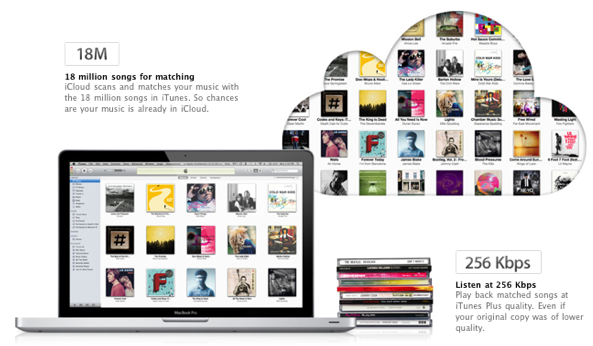
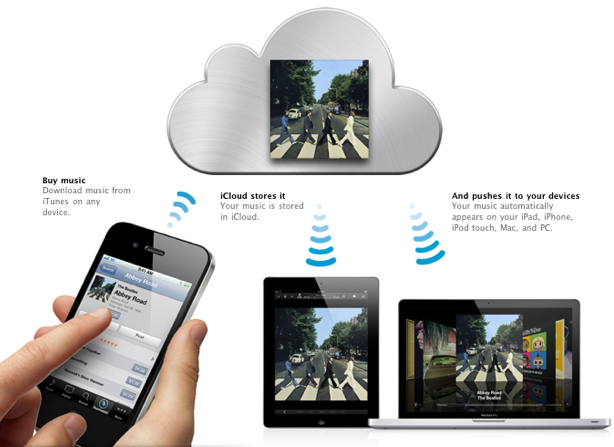
One can automatically have every song purchased on all devices, and can download entire history of iTunes purchased. “iTunes Match” brings all the benefits of iTunes in the Cloud. One can have iTunes match all of your collection against the database of 18 million songs, and allow you to stream them all from the cloud. iCloud will upgrade the quality of all of the songs it can match to 256-Kbps and also iCloud will upload and store all of the songs that it can’t match.

Final thoughts

Here’s how Apple defines its new technology.

“The cloud the way it should be: automatic and effortless. iCloud is seamlessly integrated into your apps, so you can access your content on all your devices.”

iCloud is a huge step towards transforming the way we use our computers, interact with and store our content, and share it. It not only gives a wonderful synchronization but also allows information to be shared anywhere, anytime without much effort.

For more information visit iCloud.