Home Blog Page 269

How to Retrieve Deleted Photos on Samsung Phone

0

Samsung Galaxy series is one of the most popular ranges of mobile phones introduced by Samsung Electronics. It is considered the most popular line of smartphones developed on Android. This smartphone series includes Galaxy Tab series, Galaxy Note series and Galaxy S series. I am also a user of Samsung Galaxy s20 and love my phone very much because of its excellent camera sensor, and fabulous picture quality. I use to take lots of videos and photos on my phone. My Samsung Galaxy phone has 16 GB inbuilt memory and I use 64 GB memory card as extended memory. Now, you can imagine how much data I used to store on my phone.

 Once I was just checking my phone and deleting some unused applications, suddenly I do not know how I deleted all of my media files. After doing this, I was shocked! And was not able to think, what should I do now, my all photos were gone. I started looking for solutions and guess I got to know how to retrieve deleted photos on Samsung phone.

 If you are also going through the same situation, do not panic and read the article carefully. It is the fact with electronic storage media that the deleted photos and other media files have never completely removed from it. When you delete any photo from your Samsung Galaxy, it is only removed from the file directory by the operating system, and avail the storage space of deleted file to be overwritten. Therefore, after deletion, your deleted photos are still stored in your Samsung Galaxy phone. You just have to use a photo recovery software on it and you will be able to recover deleted photos from the phone from the built-in storage or extended SD card, depends upon the location.


How to Retrieve Deleted Photos on Samsung Phone:

 I used Stellar Phoenix Photo Recovery tool and it worked awesome with my phone. You just need to download and install it on your computer and connect your Samsung Galaxy phone with computer USB. The computer will detect your phone and software will ask you to scan it for recovery. You just have to follow some steps and you will be able to recover deleted photos from the phone.

  1. Run the Stellar Phoenix Photo Recovery and click ‘Recover Photo, Audio, & Video’ option.stellar photo recovery
  2. It will show you the available external and internal storage drives, select your Samsung galaxy phone drive and click ‘Scan Now’
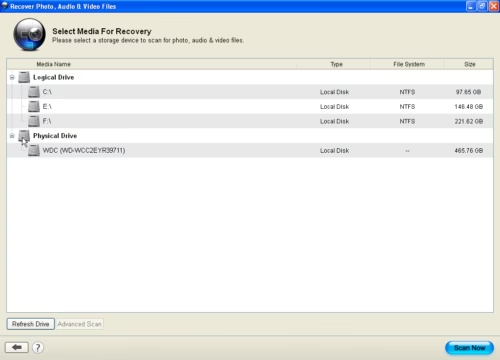
    how to retrieve deleted photos on samsung
  3. Here you can also select ‘Advanced Recovery’ option, which allows you to recover based on file types. You can select the format according to your phone support.
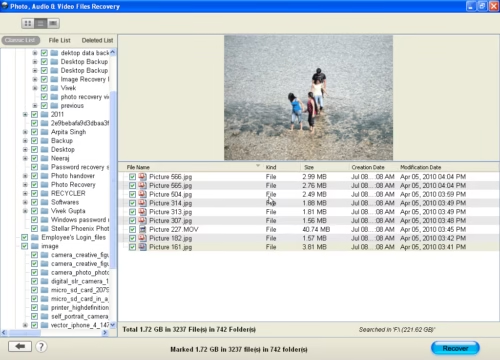
  4. After the scanning process, it will show you all the photos and other media files in a tree structure in the left window pane.
    how to retrieve deleted photos on samsung
  5. You can click on the photos and view them
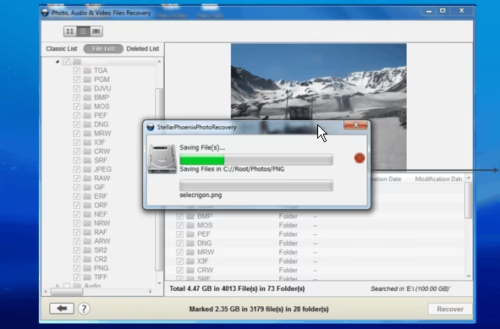
  6. To save the recovered photos click ‘Recover’ button.
    how to retrieve deleted photos on samsung
  7. Choose a location to save your recovered images and save them

Tips and Tricks to Secure Your Samsung Galaxy Photos from Loss:

  • Take automatic backup of your photos from your Samsung Galaxy Phone. These phones have a feature of automatic sync which uploads your camera photos with your Gmail online storage
  • Do not use your Samsung Galaxy camera in low battery, it can corrupt the photos and make them inaccessible
  • scan your memory card with an anti-virus software regularly.
  • Format your memory card once it is filled after taking a backup of your photos


Reasons for Photo Loss in Samsung Galaxy Phone

There are two major reasons of data loss in mobile devices

Logical Reason of Failure: If the mobile device is running but some data or files become inaccessible for logical reasons like overwriting, reformatting, accidental deletion, lost volume, or software corruption is called a Logical failure.

Physical Reason of Failure: If the mobile is not responding properly due to some physical reason such as destructive and accidental means of damage, dropping, liquid damage, overheating, abuse, and normal wear and tear, etc are called a Physical failure.

If your Samsung phone is suffering from a physical reason then you have to take it to the service center of Samsung but if the reason of data loss is local, then you can recovered photos from Samsung Galaxy phone by Stellar Phoenix Photo Recovery tool with ease. Click to see how

Here are some common reasons of Samsung Galaxy phone data loss that you should avoid:

  • Hardware or System Malfunctions
    If your hardware is getting damaged because of any wrong activity then this type of error occurs. To avoid such issues you must use a good power supply for your phone and also do not use your phone in low battery status.
  • Human Errors
    You must avoid the error, which is in your hand such as accidental deletion or formatting the phone.
  • Software Corruption
    This type of issue occurs when your phone is shut down suddenly without no reasons. This issue mostly occurs when we use so much memory of our Samsung Galaxy phone and the ram is also full. To avoid this always keep some space free and try to restart phone once in a day.

Computer Viruses and Malware
It is a very common issue of SD card data loss. To avoid such issues you must install anti-virus software in your phone.


Author Bio: Jazz is a freelance writer.  She loves to write articles related to latest technology, photography and gadgets
Note 4 vs iPhone 6 Plus: At a Glance

0

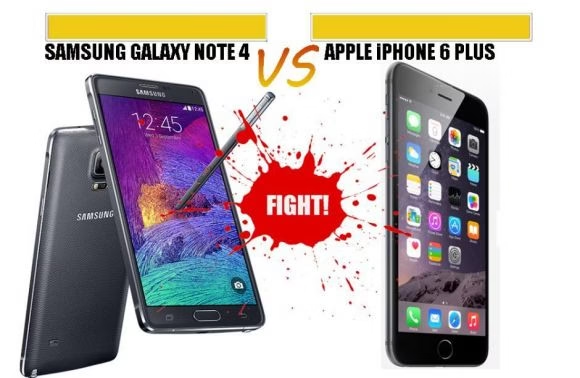
In last month two top mobile phone manufacturers — Samsung and Apple, unveiled their flagship smart phones powered with world-class technology. This time Apple iPhone 6 Plus has launched its first ever big screen phone in a category created by its arch-rival Samsung. Having said that, Samsung too had recently unveiled its flagship phone-Galaxy Note 4 a successor of Galaxy Note 3. Now that Apple has also launched a bigger screen, the question arises whether it will take a lead over Note 4 or vice-versa. Let us take a closer look of Note 4 and iPhone6 Plus.

iphone 6 vs note4 comparison

Design

iPhone 6 Plus: The device is very thin and measures just 7.1 mm. It seems Apple has bored ‘the thinner the better’ trend with device measuring just 7.1mm whereas Note 4 is not as thin as iPhone 6 and measures 8.5mm.

Both devices sport a power button onto the right side, but of course their body is made up of different material. iPhone 6 is made of metal but Note 4 is more of a plastic body and less of metal.

Display

iPhone 6 Plus sports 5.5-inch Retina HD display with 1920x 1080 pixels which basically means an LCD screen. As claimed by the company, viewing angle in Plus has been improved as compared to iPhone 5S. On the contrary, Note 4 comes with 5.7-inch super AMOLED display with 2560×1440 pixels that looks promising and beats iPhone 6 Plus pixel count.

iPhone Plus can now work on horizontal mode which note 4 can obviously do, but it seems a breakthrough for Apple.

Processors

iPhone 6 Plus encompasses a brand new processor known as Apple A8, which is a 64-bit chip that offers 50% faster graphics than its predecessor. In one line iPhone 6 Plus is 50x faster than prototype iPhone. 64-bit processor is rarely found in android devices and Note 4 possess quad-core Qualcomm snapdragon 805 alongside 2.7GHz, which is nowhere related to 64-bit. Nonetheless, Note 4 processor is very powerful with 3GB of RAM. It is, however, difficult to say which one process faster.

Operating system

Galaxy Note 4 is an android based phone like all its predecessors but iPhone 6 Plus has its own processor known as iOS. The former one is powered with the latest version of android i.e. 4.4.4 and the latter with latest version of iOS i.e. iOS 8.

Apple is learning the changing habit of its potential buyer and therefore making the necessary changes accordingly. Bigger screen of iPhone 6 Plus is one of its examples. Looking at the modification made to these devices, Price difference between these two devices won’t be that shocking. However, we will have to wait to know the exact prices of both devices to judge the price-performance ratio. For more info, visit the website of the companies.

Both iPhone 6 and Samsung Galaxy Not4 has however failed the bend test. But they are currently the top trending smartphone launches this season. If you are planning to get hands on one, then its iPhone 6 best selling among the latest contract phones from Virgin Media. If you are a samsung fan, then Note 4 is the best launch till date.

Assistance for the Assistants – The System That Helps IT Technicians

In every company, large or small, there is someone who seems to always be overlooked when it comes to receiving thanks or praise from the powers that be at the top. Sometimes people can slog their guts out trying to resolve other people’s problems, dropping their own tasks to come to their rescue, and often having to be in before anyone else or staying later than other employees to ensure that everything is working effectively and efficiently.

image

IT support technicians are a fine example here. The kind of people who we take for granted around the office and many will very rarely acknowledge their presence in the building until we need them to come to our rescue. It’s just assumed that they sit at their desk clicking a few buttons and waiting for the moment that someone hits the panic button and they come rushing in like a combination of Batman, Superman and Spider-Man to save the day with their incredible knowledge of all things technical.

However, this couldn’t be much further from the truth. Sure, these guys come to our rescue whenever we need them, but the truth is they’re never simply sitting around waiting for their time to shine. Instead they’re working tirelessly to ensure that all of the systems and processes around the office are working sufficiently – and all the time getting asked to drop what they’re doing and resolve certain issues.

A lot of the time these requests for help are made by phoning the support desk, sending an email or catching them as they walk by; which, while often effective for us, can throw the schedule of the IT-whizz into chaos. Fortunately, there are ways around this in the form of computer systems like the SysAid IT service management (ITSM) system. This cloud-based package has taken away the potential for chaos and allowed all employees – no matter what their role in the business may be from IT support to apprentice web designer or even CEO – to make requests for help in a much more organised, official manner.

Rather than receiving requests for help with this and that, along with “while you’re here can you just…” employees are now encouraged to log in to the system and request help in the form of a ticket system – a bit like the queue in a shop – and by entering details such as the nature of the problem and how urgent it is, the IT support staff can prioritise issues accordingly, resolving those that have the biggest potential to bring productivity to a halt first and then getting to those less pressing afterwards. It also allows them to structure their own days, working out how long each task should take and how many they can deal with on an individual basis so that they can work around existing appointments and, importantly, their lunch breaks, they’re entitled to one just like you are!

Running a help desk efficiently is just as important as running an individual department within the business – it is one itself after all – or the business as a whole. With everything in one place, including requests for help and analytical data to monitor the performance of various systems and processes, those working on the help desk are able to provide invaluable support that can enhance the performance of the whole business. So, remembering everything you have read here, don’t underestimate the value of your IT support staff, you’d be lost without them!

Challenges of Network Management

0

Wireless and cellular networks have thrived in our world over a last few decades. Starting from a single transmission to the most advanced networks of today networking technology has changed the world. Wired and wireless networking has helped humanity in saving lives to the most common applications. However, the most basic things are very complicated to realize in nature. Network Management is an essential and critical technology needed for everything in today’s world to run smoothly.

network management

A few challenges in network management that are observed are discussed below.

The issue of Security

The internet is full of information both good and bad. However, there are more real threats than these. Personal, business or for purposes involving critical aspects, data is vulnerable unprotected. Protecting data over networks against millions of threats is a challenging task.

Wired and Wireless Networking

We all use Wi-Fi every day for various purposes. A wireless network equipped with a perfect protocoling technique stands apart from the crowd. Maintaining such excellent methods along with updating periodically is not an easy job as millions of devices are connected to providers and standalone devices. Serving each of them equally without compromising quality is a difficult one.

Long Range Cellular Networks

Various companies and organizations like AT&T, Vodafone, Virgin etc. have well established networks. Despite such efforts, we still have issues with network many a times. These are due to erratic issues popping up out of nowhere in the networking technology or management. Multinational Network providers strive hard for an excellent network management technology.

Voice over IP or Calls on Internet

A latest technology by the use of internet emerged in the past few years. The same service that was traditionally provided by Cellular network companies is now being somewhat provided via Internet. The internet is full of threats and threat assessment is another highly complicated work.

A few organizations like Amcom, provides network management services. Having solutions for several above discussed challenges, Amcom delivers network management services of greater quality. Managed Security, Voice, Wireless and other Networks Amcom serves its clients with cutting edge high quality service.


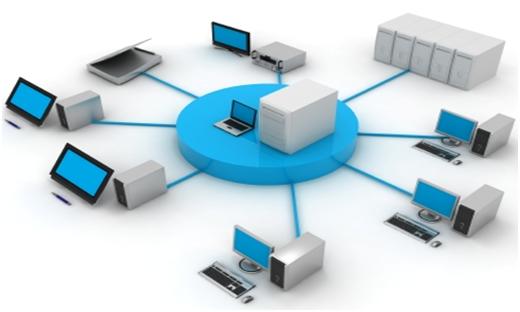
Below is an infographic on the benefits of Network Management software.


network management infographics

Bigger iPhones- How will they affect the app designs?

0

Apple has already set a benchmark in the smartphone world by launching innovative iPhone models that are available in varying sizes. The latest to join the group of immensely amazing iPhones is the iPhone 6. Unlike the prior iPhone versions, this new model has a much bigger screen, thereby making iOS developers wonder about the development of apps for this particular iPhone model. With pixel-perfect screen designs being the trademark of native iOS development firms, developers are gravitating towards responsive approach for designing iOS apps. This blog of mine is very useful for every proficient iPhone Application Developer and designer as it speak more about the effects of bigger screen-sized iPhones on the designs of iOS apps.

 Apple has finally entered the big-screen waters

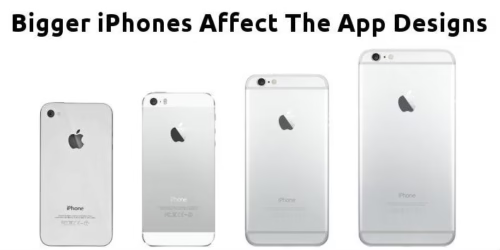
iphone 6 bigger screen comparison

After having released a range of small screen-sized iPhones, Apple is planning the release of a larger iPhone that would serve as a ‘sweet’ surprise for iPhone fans. With that good news, there’s also something to worry about. The hundreds and thousands of iOS app developers who’re already into the habit of developing apps for smaller iPhones will find it extremely problematic to design apps for iPhones with bigger screens. That means app design and development would now pose a challenge for traditionally-proficient iOS developers.

And now, let’s come to the ways in which the bigger iPhones will affect the app designs

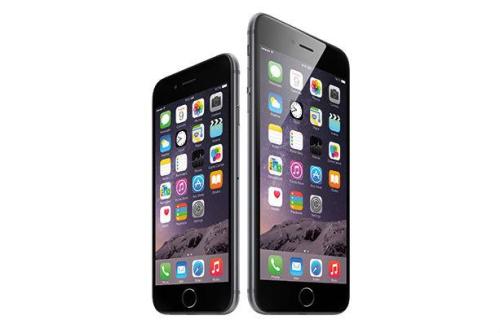
apple iphone 6 and iphone 6 plus

  1. Screen Resolution will be a crucial point of concern

Ever since the release of different iPhone models, a majority of iOS designers and developers have been concerned about the resolution and not the size of the screen. For example, although iPhone 4 and 4S have the same screen size, the pixel density was doubled as compared to the former iPhone 3G/3GS. Thus, iOS app developers had to follow a different approach for building apps that could run on the iPhone 4 series. The same scenario holds true for the iPhone 6 as well. For the iPhone 6, Apple could choose to keep the current resolution of the iPhone 5S(1,136 x 640) as it is and increase the screen size to either 4.5 inches or 4.8 inches. If this is what happens then iOS designers and developers won’t have to do any moderations to the app designs.

  1. Fragmentation is a ‘BIG’ question

Device fragmentation is one of the key reasons that drive designers and developers towards iOS development as opposed to Android app development. iOS developers who have to scale their apps for different chipsets and OS versions would definitely find it a bit tedious to design apps for bigger screens. With the introduction of the iPhone 6, the iOS development community is all geared up for creating tools that would aid in developing some finest apps that target a wide range of screen sizes and resolutions.

  1. All important controls to be moved towards the bottom of the screen

Unlike the present scenario where the iOS developers stick useful buttons to the top corners of the screen, the inception of iPhone 6 will mark a revolution in the placement of important controls. Since on larger screens, the top bar is too far to reach via one’s thumb, it is being suspected that the iPhone 6 apps would have all the main user engagement options placed towards the bottom of the screen instead of the top or upper right area.

  1. Proliferation of Splitscreen iOS apps

In contrast to the smartphones where the content is presented in one pane, the innovative iPhones with bigger screens will witness the usage of apps that run in the split screen mode. With Apple supporting the split screen feature with its iOS8, the supersized iPhone 6 and iPhone 6 Plus will witness apps like Mail, which will run in the spit screen mode. And that’s not all, with an easy access to brand new API-level tools, iOS designers and developers will be able to leverage the full potential of the split screen feature. The brand new Apple SDK(Software Development Kit) will also allow iOS developers to specify whether or not they wish to go for split screen. For example, an iPhone 6 user will be able to take the advantage of the split screen to run the GPS for a better navigation experience. In a split screen iOS app, you’d be required to use both your hands for balancing the display on your iPhone. Even the UI navigation within such an app would expect you to use both your thumbs.

  1. Gestures would replace Buttons

Offering fabulous navigation gestures to users has always been a prime concern of Apple. With its new bigger screen sized iPhone 6, it is expected that consumers would just avail a gesture- a simple swipe for reaching at a particular location on the screen. iOS developers have started devising techniques using which they can ensure the better experience for the iPhone 6 users. They have been focusing on replacing buttons with gestures. This is not something that’s new. Prior to the iOS8, the iOS7 came with a swipe-right-to-go-back gesture that complemented the bigger screen of the iPhone 5s and iPhone 5c. It is pre-assumed that this gesture would become a necessity for the soon-to-be-released iPhone 6.

Wrapping Up

Looking at the constantly growing popularity of iPhones, it is easy to say that iOS developers wouldn’t stop experimenting with the designs of their apps. The release of iPhone 6 will pave a way for the design and development of apps that will be fully functional and visually appealing.

About the Author: 

Lucie Kruger is an eminent Senior Content Editor and IT consultant for Mobiers Ltd, a reputed iPhone  application development company. You can also contact her if you are looking forward to hiring skilled iPhone application developers for premium services.

How to Prepare for and Mitigate DDoS Attacks

DNS-based DDoS attacks are one of the most common cyber crimes on the Internet. These highly destructive attacks are carefully designed to manipulate and target DNS infrastructure. Unfortunately, it’s all too simple for cyber criminals to generate them, putting all companies at risk. These attacks are not always easy to spot, as they’re generated in a variety of forms, such as Teardrops, Pings of Death and Smurfs. It’s essential for companies of all sizes and cybersecurity professionals to adequately prepare for a DDoS attack, as the consequences can be substantial.

mitigate ddos attack

DDoS 101

A Distributed Denial of Service (DDoS) attack occurs when an online service is forcefully made unavailable by saturating it with traffic from a variety of sources. Attackers are paid to target all different types of online resources, barring access to them. Arbor Networks notes more than 2,000 daily DDoS attacks, totaling one-third of all downtime incidents.

Attackers infect computers by spreading malicious software through emails, social media and websites ? creating networks called “botnets.” These computers can be controlled remotely to launch attacks. Most of the time, the owner of the computer will not even realize it has been infected and is part of a botnet.

Botnets use a variety of methods to drive an immense amount of traffic to the target, effectively shutting it down.  Attacks have been so intense they’ve been known to take down a country’s international cable capacity. Botnets and individual DDoS attacks can be purchased for just $150 on Internet marketplaces by anyone, making all organizations vulnerable.

Preparing and Mitigating DDoS Attacks

Monitoring your DNS infrastructure can help to identify DDoS attacks. First, determine your query load to set a standard baseline, so you’re well aware of what abnormal activity looks like. Then examine your Internet-facing infrastructure to check for any weak spots. Geographical distribution of your external authoritative name servers can help to mitigate attacks by avoiding single points of failure.

Overprovisioning your infrastructure is one of the easiest ways to avoid DDoS attacks. You’ll need to determine your server’s capacity first, so you know exactly how much to overprovision your servers.

Employing Anycast ? or shared IPs ? is another way to combat a DDoS attack, allowing one DNS infrastructure to use multiple name servers from different hosts. Using Anycast, the hosts supporting your name servers runs a dynamic routing protocol to present neighboring routers with a new IP address that your server name listens. The routing process is configured to stop promoting this path if the local name server fails to respond. You can use your own code to glue the routing daemon to the health of your name server or purchase a product that will do it for you.

Additionally, you can employ Anycast and wide geographical distribution simultaneously by using a cloud-based DNS provider. Companies like Dyn and Neustar can host your zones and answer queries from your data using one of their Anycast name servers in several data centers worldwide. You’ll maintain control over your zone data by having the provider configure its name servers as secondary servers for your zone, loading data from a master name server and controlling it internally. However, remembering to run the master hidden is essential, as you don’t want to risk being targeted as a single point of failure.

All companies are susceptible to DDoS attacks. Taking measure to protect your organization from the work of a malicious attacker is essential, as anyone can be next. Employing strategies like Anycast is a great way to be ready to combat an attack if you’re targeted, to ensure it won’t take your system down.


BrandsWalk Wants to Protect and Display 499 Beautiful Pairs of Headphones in Rose Gold

Guest post by: Space Invader

Announcement: BrandsWalk (the exclusive distributor of the gold HeadStand) just launched a giveaway for tech fans in which your readers can win $300 Sennheiser headphones and the limited-edition gold HeadStand to complete their desks. The contest is ongoing now, and ends Nov 15. All important details can be found at the link below: http://brandswalk.com/contests/photo_contest.html

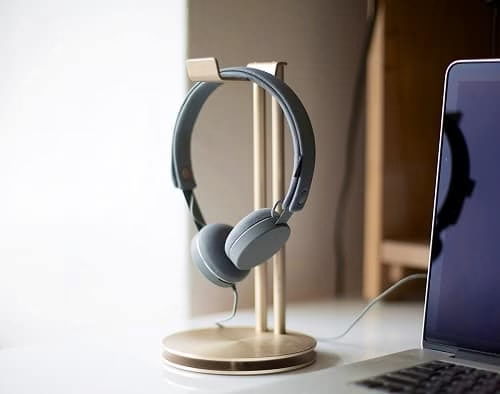
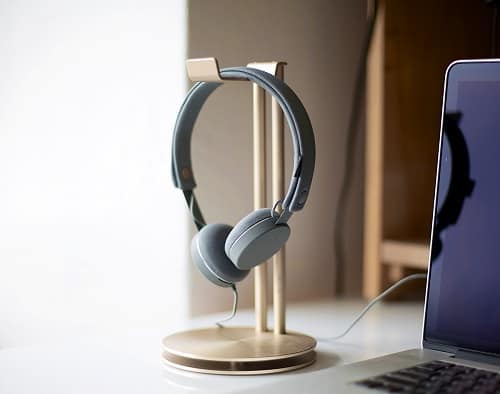
You’ve probably seen a HeadStand (headphone hanger) on a friend’s desk or two (probably in silver), but you’ve never seen one in the rare color Rose Gold. This sleek desk accessory is meant to turn your high-design headphones into a centerpiece of your desk, and only 499 were manufactured in this rare color. Being one of the very few reviewers that actually got his hands on one of these, I feel super lucky just for that reason.

Completing the Desk Environment

Up until I put one of these on my desk, my workplace just never felt complete. It never felt right. It’s weird that this is never touted as a selling point. I’d always have my headphones in random places, sometimes stuffed into busy drawers or hanging off speakers, sometimes shoved behind my monitor. Being a kind of neat freak, I can’t stand it, so having a place to hang my ‘phones so that they become a decorative element of my environment (instead of poorly shunned to whatever part of my desk I’m not using) is a major relief.

Really think about the passion and effort that a designer put into designing your headphones. Is that something you want to hide away? No, like a nice watch, it needs to be seen.

HeadStand Lifestyle 4

Protecting Your Headphones

What’s also weird is the company never touts perhaps the strongest selling point of the device: The problem with buying nice, well designed headphones is it’s really hard to take care of them.

You might think you’re not damaging your headphones when you shove them into your bag or drawer, but really think about what you’re doing. All the delicate seams, stitches, glues and plastics are constantly being tugged on, scratched at and stretched as your drawer opens/closes or your bag gets tossed around on your side. When that happens everyday, that has a huge effect on the lifespan of your ‘phones.

After all, what are are the first two things to break on a pair of ‘phones: the cable or the ear cup. That’s almost always a result of your headphones getting shoved around in bags or drawers because, really, honestly, who is so violent with their headphones that pieces just start tearing and falling off? Nobody! But your bag or drawer and all the stuff inside, it isn’t so considerate of your gadgets.

A High Design

We’ve broken down the functionality of the product, but what about it’s design? It’s clearly a well manufactured piece of equipment. However, it comes disassembled, so the construction is only as good as you’re assembly skills. But if you tighten the screws just right and line everything up correctly, it’s a very solid piece of equipment.

HeadStand Lifestyle 5

The metallic finish pairs well with the metallic finish on Apple products. The rose gold becomes a royal accent to a Mac-based desk setup, so no complaints here. It looks fantastic; however, if your desk setup is absolutely reliant on your Mac’s silver metallic color with black accents, there are silver and black HeadStands available. But these are not limited edition, and pretty much anyone can have one.

On the other hand, only 499 Rose Gold HeadStands have been manufactured and will ever be manufactured, and the remaining units are only available at BrandsWalk.