Home Blog Page 255

Google Is Testing Auto-Optimizing Web Pages For Mobiles

0

Folks at the search engine giant – Google is busy testing and introducing a new feature that enables them to automatically optimize your web pages on devices that have slow web connection.

Google-Auto-Optimizing-Web-Pages-Slow-Data-Connection

In the release note of this feature, on their blog, the search engine giant commented that:

“We believe everyone should have fast and easy access to information online. However, many people still have slow and costly mobile connections. To speed up the experience of our users on slow connections, we recently launched streamlined search results.

However, we wondered if we could also speed up the web pages themselves, so they don’t load slowly or consume too much mobile data. So we’ve developed a way to optimize web pages to be faster and lighter, while preserving most of the relevant content.”

What Is The Feature Anyway?

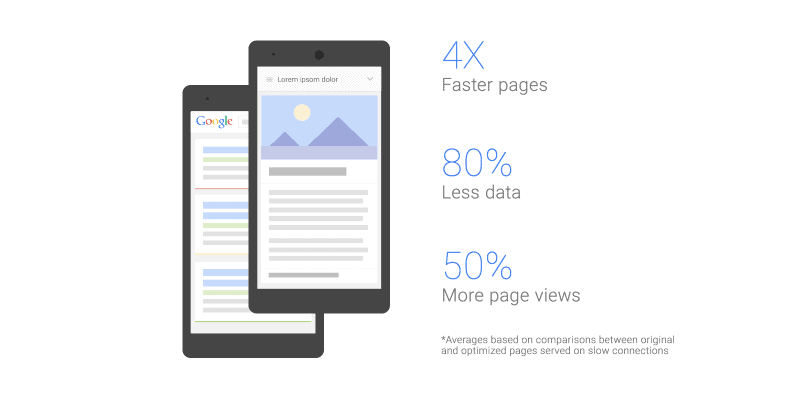
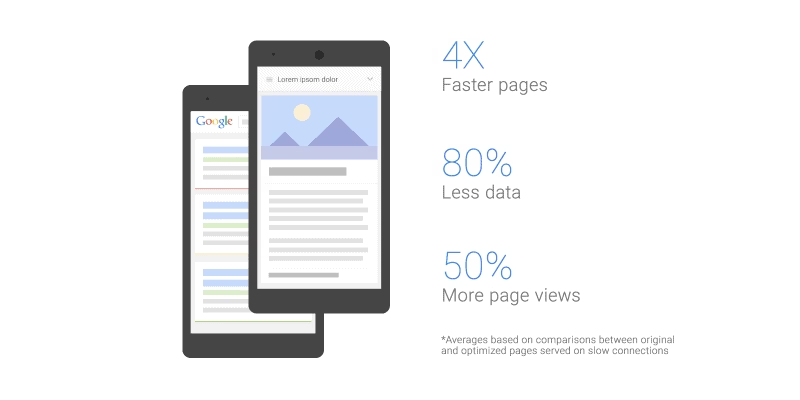
With the help of this feature, Google will be showing a lighter version of your web page to the visitor of mobile devices with slow data/internet connection. The lighter version will exclude images and videos from the content of the page and render it on mobile device to give users a faster web experience. Google’s test of this feature revealed that such pages use 80% less bytes and witnessed 50% of increase in web traffic.

Testing Your Web Page In Slow Mobile Devices

Google also announced a testing tool that gives webmaster an overview of how your webpage will look on mobile devices with slow data connection.

To test out how the lighter version of your web page will look on mobile device with slow connection, go to the URL http://icl.googleusercontent.com/?lite_url=[your_website_URL], replace [your_website_URL] with the URL of your web page.

Unhappy With Google’s Lighter Version Of Your Web page? You Can Disable The Feature!

If don’t like the lighter version of your web page suggested by Google, you can disable the feature and instead prefer showing your actual, original web page on the devices.

However, if you do not wish Google to strip-off media content and instead prefer showing your original, actual web page. Just add the code “Cache-Control: no-transform” to your HTTP header.
For FAQs on this, visit Google’s official FAQ page here.


About the author:
Moin Shaikh is a social media manager, webmaster and web analyst for an Australia based IT firm – Intesols. I look after design, development and promotion parts of website. I also contribute for Mozilla Firefox. love to blog and tweet often! Connect with me @moingshaikh

How can technology help in managing remote teams

In today’s technology driven age, working across the continents is no different than working across the cubicles. Today, nearly 35% of the workforce in U.S. includes freelancers, which clearly indicates the growing need to  manage remote teams efficiently. With right tools at your disposal, you can easily connect with individuals and teams located in different geographical locations.

remote management teams

In a research conducted by Frank Siebdrat in 2009 on 80 software firms around the globe, it was found that more dispersed teams often outperformed “co-located” teams. As per their analysis, the major factor behind the success of a remote team was the systematized processes which ensured that each member of the team contributed fully into the project. Along with this, adequate support, proper scheduling and smooth communication were paving the path towards better performance.

However, when choosing the right technology to manage remote teams, working across the distance do bring some challenges including different time zones, languages, cultures, team size, etc. The need is to make a smart choice by considering these challenges while selecting the tools.

Let’s discuss here some of the major aspects to manage a remote team successfully with the technological aids available out there.

Get the communication flowing:

One of the major reasons why remote teams fail is the lack of proper communication. Just because individuals in the team are not present at one physical location, they tend to work in isolation and hardly communicate or collaborate with each other as much as they need to. However, using a project management tool with inbuilt chat like ProofHub can be a ideal way to quickly connect with the team. Need to call a meeting? Create a chat group by adding required people and start your meeting in no time. Saves a lot of time and effort.


Keep up with the progress: 

Are you one of those managers saying “I’ve no idea what my team is doing”. Well, its nothing difficult. Gantt charts are an easy way to keep up with the progress of the project tasks at any moment of time. Also, reports can help you get a quick overview of who is doing what and in which areas your supervision is required. Go for online tools like TeamGantt, Zoho Reports, etc. to reduce the chaos of repeatedly pinging the team for project updates.


Share ideas promptly:

Ideas have no time and no place! And we all know that its hard to resist the urge of sharing when a great thought or solution hits our mind. But what to do when your team is far away? How would you approach them? Well, there’s a simple solution for that – online notes. Idea sharing tools like Evernote, OneNote, etc. allows you to instantly scribble down the flowing ideas and add collaborators to it. It’s a great way to stay inspired and boost team spirit.


Set clear goals and expectations:

Since your team is far-off, it is highly crucial to make them clearly understand their targets, otherwise things can go off the track as a result of confusions and lack of understanding. Use a task management tool where you can create to-do lists, can assign tasks to team members and can set task priorities as well. Furthermore, adding time estimate for task completion helps assigned team members to stay focused towards the deadlines.

Ensure fast feedback:

Rather than sending emails back and forth to make alterations to a design or document, why not take advantage of online proofing tools like Proof Mini, Cage, etc. that’d streamline and fasten the approval process. Simply share the document or design with the approval authority and they can give their feedback on the file itself using markup tools. Try it once and see the difference yourself!


The bottom line is that remote workers are a flexible workforce which offer tremendous benefits to the companies including savings in infrastructure. Therefore, in order to reap the best out of your remote team, you need to be creative with how you manage and collaborate with them. Certainly, those traditional pen-paper and emailing tools won’t work when your team is miles apart. So get smart and welcome technology to your daily teamwork.


However, there’s no defined rule that you need to use disparate tools to fulfill your different management and collaboration needs. Always bear in mind that “Fit no stereotypes. Don’t chase the latest management fads. The situation dictates which approach best accomplishes the team’s mission.”


You can go for all-in-one tools where you have access to almost all features within a single platform. For instance, if you’re looking for a basic management tool then go for Basecamp. You can also raise your managing capabilities a little higher using simple yet advanced project management tools like ProofHub, Wrike, etc. Try them out and see what suits you the best!


If you’re someone managing a remote team or working as a remote employee, then do share which tools you prefer to use. I’d love to hear from you!


Author Bio-

Kanika Sharma works as a writer at ProofHub. For the past 2 years, she has been writing for various technology blogs. Being an engineering graduate, her background allows her to connect with cutting edge technologies and relate them with real world scenarios. When she is not writing, she can be found in the abode of Himalayas, as exploring nature excites her the most. Her future plans include joining a writing community, a vacation in Paris and riding a white horse. Follow Kanika on Twitter to know more about her.


How Internet of Things Helps Control physical objects in the digital world

Internet of Things (IOT) has been changing lives, transforming businesses and liquefying markets. With the combines growth of cloud, social and analytics, we are perpetually in a vortex of a giant storm – a storm that will be changing the way we perceive and interact with the rest of the world. A simple but highly significant example is the mobile technology. All of these have significantly contributed to the growth of contextual computing and the quantified self movement that has been the backbone of Internet of Things. Referred to as the market of wearable, IOT has been the trend that is continuously connecting/creating a virtual profile of physical objects in the digital world.

internet of things

Understanding the concept

Wearable technology concerns apparels/textiles connected to the digital platform. Internet of Things (IOT) on the other hand concerns with unique computing devices that presents advanced platform for communication between devices, systems, services and applications and covers a wide range of domains and protocols. IOT, as such can refer to several categories of digital services including sensors embedded in automobiles, biochips used in wildlife tracking and even devices that assist rescuers and firefighters in case of an emergency. All of these fall under the “smart” technologies that have been changing lifestyles globally.

As per the trend

Coming back to the wearable market (eye gear, jewelry, belts, shoes, e-textiles, arm wear, skin patches, etc), the growth has been quite significant. Wearable electronics have growth to an industry valued over $14 billion in 2014 and is expected to grow by another $56 billion in another 10 years. The most dominating sector in this industry will be the healthcare industry and products like massager, e-biometrics, Google Glasses and as such. Several big brands have been working upon the market of wearable combines with Internet of Things and include names like Accenture, Adidas, Nike, Philips, Samsung, SAP, Fujitsu, Apple and Roche.

internet of things statistics 2020

According to industry experts, we are actually in the second generation of the market of wearable and Internet of Things. Devices and services are being thought in terms of improved build quality and integrated with easy to use SAAS (Software as a Service). While, it can still be said that the industry is in a very fragmented end, mane of the devices are being manufactured to benefit both the user and the ecosystem while making it easier for developers to conceive new technologies. Even when we think that the smart phone market is reaching a saturation limit, there are still plenty of opportunities to redefine the concept and make a surge in the demands.

The future’s call

By the end of 2024, wearable electronics will be thoroughly affected by advanced informatics and truly disruptive technologies will see a growth in the fashion, military, commercial and industrial sectors. “Hardware is the new software” as they define the intellectual property such as in sensing, woven fibers and several other new patents. Cost reduction is also a key advantage provided by Internet of Things on the Market of Wearable. Overall, it is comforting to say that immense growth is in the making.

Bonus video: Internet of Things explained

Related Infographic

internet of things IOT infographic stats
Wearbles-Infographic-Stained-Glass-Labs-20131

Benefits of Solid State Drive vs Hard Disk Drive Explained

Not so long ago buying a hard drive was a straight-forward thing to do. You would find a few of the highest capacity drives you could afford, compare the speed of each drive and then order the fastest one.

Now, with the introduction of SSD (Solid State Drives), it’s a little more difficult when it comes to making your decision. Before you even start looking for a new drive, there is one fundamental question which you need to know the answer to Which is best, SSD or HDD/SATA?

SSD vs HDD, new and old technology

The answer, hands-down, is SSD, and here are the reasons why:

Access Time

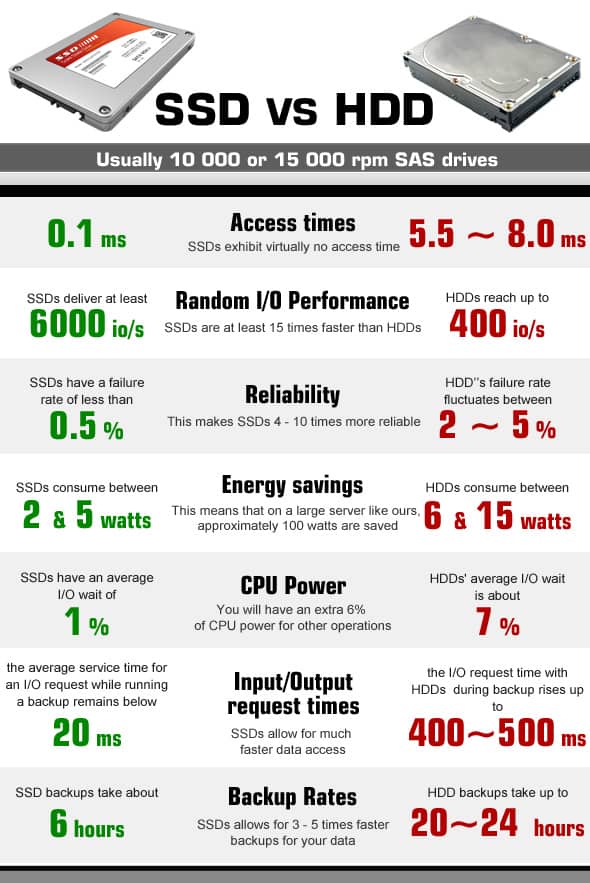
Traditional HDD access data in about 5,000 – 10,000 micro-seconds, while an SSD will access the same data in just 35 – 100 microseconds, almost 100 times faster. Having access speeds this much faster allows your programs to run more quickly, especially for programs like your operating system which need to access a large amount of data. Computer start-up times can be as little as a few seconds when using an SSD.

Video: Solid State Drive VS Hard Disk Drive Performance Test

Reliability

Thanks to SSD having no moving parts, they are much more reliable than traditional HDD which wear down the more use they get. SSD failures are a rare occurrence, unlike HDD failures which are fairly common.

Power

SSD uses a considerable amount less power than traditional HDD, notably because SSD doesn’t have to power any movement of the platters like they do with HDD. This means it will save costs on your electricity bill over time, and when used in laptops, means a longer battery life.

Noise

If you have a computer with traditional HDD, you have more than likely noticed the noise it makes when it’s in use, you can hear the drive spinning away – either during start-up or while saving or retrieving data. This is not a problem with SSD, thanks to the fact that they have no moving parts, they are completely silent.

Size

Although the size of a drive won’t make much of a difference to most users, it can play a big part in the decision for power-users. SSD is available in 2.5”, 1.8”, and 1.0”, while HDD is usually 3.5” for desktops and 2.5” for laptops.

Solid state disk SSD-VS- hard drive disk HDD comparison chart
SSD vs HDD

Heat

SSD generates a lot less heat than HDD because it doesn’t have any moving parts, this helps to increase its lifespan, its reliability, and keep the temperature inside your computer lower.

Magnetism

Again, magnetism won’t be a problem for most people, but it’s worth noting that an SSD is not affected by magnetism at all. HDD on the other hand relies on magnetism to write information to the drive, so your information could be erased from an HDD if it comes in contact with strong magnets.

Unfortunately, there are a couple of disadvantages with Solid State Drives too, not in terms of use or performance, but price and capacity:

Price

Solid State Drives are much more expensive per GB than a traditional Hard Disk Drive, which is why you can often find computer systems making use of a Solid State Drive to install the Operating System and any software and then using a traditional Hard Disk Drive for file storage.

Capacity

Hard Disk Drives can easily be found in sizes up to 4TB, while Solid State Drives are more common in sizes of 512GB or less. You can find Solid State Drives in larger sizes, but they are often beyond the budget of most shoppers.

As you can see, the benefits clearly outweigh the disadvantages of an SSD, and for most people, SSD is the obvious choice. Some users who require large amounts of storage space would find it more cost-effective to combine SSD and HDD, using the SSD to install your operating system and software, and using the HDD to store your data. But, if you don’t need Terabytes of storage space, standalone SSD is definitely the way to go.

Four Effective Ways to Avoid Customer Churn

0

It would be great if businesses knew that, once a customer was through their doors for the first time, they were going to be a customer for life. Unfortunately, that’s not realistic in the majority of cases. A certain amount of churn takes place in every business. 

But first of all, what is customer churn? Simply put, it’s the percentage of customers who stop using your goods or services over a set period of time — also known as customer turnover, customer attrition, or customer defection.

reduce-customer-churn

Some churn may be due to changing requirements on the part of the customer. Alternatively, in a competitive market where comparisons with the competition are easier than ever, it could be because existing customers have found what they perceive to be a more suitable deal elsewhere.

But while some churn is inevitable, it is nonetheless something companies should work to avoid — and, certainly, work to avoid reaching an unwanted high level. A high churn rate means losing customers rapidly as you gain them. Since acquiring new customers can cost many, many times what it costs to retain existing ones, high churn means that you have to spend considerably more money just to stay in the same place that you were before. It slows or reverses growth, and limits the resources and time that you have to expand as a business.

What are some of the steps you can take to reduce customer churn? Here are four top ones.

Better understand your audience

It’s easy to think that, because a customer is using your business, that must make the two parties well-suited to one another. That’s not always the case, however. To ensure a long-lasting relationship with the people who use your business, you have to research the audience to understand what they are looking for. 

Customer persona profiles are a common way for business operators and marketing teams to build up a picture of the people who use their business, or who they want to appeal to. These can be gathered in a number of ways — whether by reviewing data analytics about site interactions, direct engagement via social media, or other approaches.

Properly researching customer personas can help businesses to identify the goals and pain points their customers have with regards to business and purchasing decisions. This can aid with addressing problems that could cause customers to look elsewhere for a service that better meets their needs. 

(As an added bonus, this can also help find new customers more cheaply by letting you know at which prospective customers to aim advertising or marketing offers at.)

Analyze, analyze, analyze

The good thing about analysis is it can help you pinpoint information such as what exactly happened during a customer journey that stopped them coming back. That’s a positive if it means you improve that pain point the next time around. The great thing about modern analytic tools, however, is that they can be used to not just carry out post mortems on why a customer journey ended badly, but what you can do <em>right now</em> to avoid that happening. Churn prediction modeling tools can be used to spot the customer attributes and behaviors which suggest that they represent a churn risk. If you can know, in near-real time whether a customer is pleased or not with a service they have received, you can follow up with customer service that could turn a customer’s positive experience into a very positive one or reverse a bad experience. 

Utilizing these tools will help improve the customer experience, reduce churn, and differentiate your brand from those of competitors who fail to take these steps.

It’s all about onboarding

Think of the difference, at the start of a vacation, between a smooth trip from the airport to your hotel and a stressful, convoluted journey and check-in. It’s possible to have a great vacation that starts badly, but it doesn’t get things started on the best note. Most customers are nowhere near as invested in a prospective business as they are with a vacation they’ve already paid for. A confusing, unintuitive onboarding process adds a hurdle that, in many cases, can put customers off a service that they’d potentially be interested in. 

Failure to do proper onboarding is frustrating because prospective customers have already shown they have an affinity for what you’re selling. Optimizing onboarding can help identify and drive users to the features and products that will most matter to them, enhance the stickiness and satisfaction rate, and result in more successful trial conversion. Tools like automated onboarding and strong troubleshooting can be a game-changer in reducing churn.

Don’t stop getting better

As the old saying goes: “A work of art is never completed, but merely abandoned.” This is true also for businesses. It’s easy to think, particularly when you reach a level of success, that there’s nothing you can do to get better. That’s a big mistake. Especially if you’ve proven your business is successful there will be other companies looking to find ways to offer a superior service to steal away your customers. Continuously searching for ways to iterate and improve is essential. There are almost always pain points that can be addressed — whether it’s to do with website speed, the complexity of pages or features, the cost of a service, a lack of personalized offers, or whatever else. 

Constantly looking for where those problems might exist, and how to solve these, is what every business should be doing. As a business, you don’t want to always be in the position of having to look for new customers just to survive. But you should always make sure that you’re winning over your existing customers as though they’re new ones.

Top 3 New Tablets of 2015!

0

Technology has gotten so advanced in such a short time that it seems like only yesterday that the first tablet came out in the market. And at the pace that we’re going, it wouldn’t be a big surprise if laptops are irreversibly replaced by the very handy tablets. You might have heard about their mind blowing features in the form of teasers, seen their sleek designs in advertisements or heard about them in the news. But once you get to know them better, you would most definitely want to own one.  The price wouldn’t be a matter of compromise anymore. Thanks to Compareraja Tablet Offers, you’re bound to get a great deal for any device you choose to make your own. So, here we list 3 tablets that have done exceptionally well in the first half of 2015.

Nvidia Shield Tablet

Nvidia Shield Tablet_mini

All the gamers behold! You’re about to meet the device that is meant just for you! With a new Tegra K1 processor, Nvidia Shield carries a lot of graphic punches. What’s more, it comes with add-on wireless game controller which enables connected TV support for sofa gaming and streaming-video entertainment.

Compact with matte finishing and mostly made of plastic, the device is quite cool looking and handy. The device runs Android 5.0 Lollipop, also has a 802.11n MIMO dual-band Wi-Fi (2.4 and 5GHz), Bluetooth 4.0 LE, and GPS. Not to forget, the Shield comes with a stylus for note-taking or doodling.

Dell Venue 8 7000

A photographer’s paradise, Dell Venue 8 7000 is up for some serious photography projects! The biggest innovation the product offers is Intel RealSense depth-sensing camera and the pre-loaded Dell gallery which works as a central photo hub. The gallery is set up to sync with Dropbox, Facebook and Picassa accounts.

 Dell Venue 8 7000_mini

Also, it is currently the thinnest tablet available in the market. Certainly the makers of the device have taken the saying ‘size matters’ very seriously. The 8.4 inch tablet runs the pure version of Android 4.4 KitKat and it is said that an update for Lollipop 5.0 will be rolled out soon.

The device packs an Intel Atom Z3580 2.3GHz quad-core CPU with Imagination PowerVR G6430 GPU and a 2GB RAM. It also provides Bluetooth 4.0 and 16GB of internal storage. The internal storage can  be expanded to 512 GB via  a microSD card slot.. If that isn’t enough for you, we don’t know what else would be.

Amazon Fire HDX 8.9

Amazon Kindle

The first tablet with Dolby Atmos audio-enhancing technology and Amazon’s item-identifying Firefly function, Amazon Fire HDX 8.9 came in the market with a solid intention. It is one of the best looking and thinnest tablets around which comes with a Bluetooth keyboard and origami cover to keep the tablet in a comfortable position for you to access.


It runs on Amazon’s latest operating system Fire OS 4 Sangria which makes sharing the tablet with family members simpler and extending the battery life easier. The Amazon Fire HDX 8.9 ships with a Qualcomm Snapdragon 805 system-on-chip which consists of a 2.5GHz quad-core Krait 450 CPU and Adreno 420 GPU with 2GB of RAM and is one of the best tablets available at the moment.


Google Adds Breadcrumbs to Mobile Search (Guide To Implement It In Your Site)

Call it the end of a long, really long story, or the beginning of a whole new chapter! The search engine giant Google has indicated that it will have an all new search snippet in its mobile search result page starting today where it will show a website’s site name and its breadcrumb instead of the site’s URLs in the search results.

Google today announced on its official blog that starting today they will be replacing the website’s URLs with the site’s real-world name instead of its URLs or domain name. Google will also show the URL structure of the site in a breadcrumb-fashioned format.

google mobile search add breadcrumbs

Introduction of support for schema.org structured data

Along with the update to its mobile SERP snippet, Google also introduced support for schema.org structured data for websites. This will allow webmasters to feed website’s site name and breadcrumb data in an easier and effective way.

How to use new schema.org markup to show your site name and breadcrumb in Google SERP?

If you are wondering how to get started with all this newly introduced schema.org markup, here’s a set of quick tips to get you started!

Choosing preferred site name for structured data in SERP

The newly introduced structured data markup allows you to indicate the preferred name you want Google to display in Search results. You can also feed more than one possible site name for your website and let Google choose between them and when Google completes crawling and indexing your updated page, it can then use the provided name in Search results.

Site name requirements

Google has laid down following set of requirements for you to choose your preferred site name:

Your preferred site name should be:

    • Similar to your domain name
    • A natural, logical name used to refer to the site, such as “Google,” rather than “Google, Inc.
    • Unique to your site, must not have been used by other site


    • Matching your site description and shouldn’t be a misleading one.


    Requirements to implement the markup

    To get Google recognize your site name markup, make sure you follow below implementation guide:

    • Use schema.org vocabulary in JSON-LD, RDFa, or microdata format
    • Implement and publish the markup on the home page of your official website
    • Do not block pages with markup using the Robots Exclusion Protocol
    • Include a WebSite item in your markup using the relevant properties:
      • url = the URL of your official website (mendatory)
      • name = the preferred name of your website (mendatory)
      • alternateName = an alternate name you want Google to consider (optional)


    Testing and publishing your markup

    It’s always good idea to test your code before-hand, prior to publishing it live. Once you’ve followed and implement this guide, verify that the markup you have added is at par with Google’s recommended format and is accessible by Google.

    Use Google’s Google Structured Data Testing Tool to test your code.

    Copy and paste the HTML source of your just marked-up page (or just the <script> block) into the Google Structured Data Testing Tool. The validator will tell you if your markup is good, or has any issues like incorrect syntax.

    Getting your site result updated in SERP

    Once you have published the markup, Google will start processing the site name when it’s indexing algorithm will crawl your site next time. You can keep checking your site name in Google search by making random searches on Google Search Engine Results Page (SERP).

    Tips to troubleshoot your markup

    Google showing wrong site name in SERP

    In case if Google is displaying a site name that you don’t like for your website, re-check your markup code using the structured data testing tool and make sure that your homepage contains markup that specifies a suitable name. In most cases, if markup is specified, the name displayed will either be the name you provide, or your domain name.

    Google not showing a site name at all in SERP

    In case if Google is not showing up any site name for your website in SERP, use the structured data testing tool to check if your homepage contains markup that specifies your preferred name. Please note that Google may take some time to index your code to update your website name in Search results. In most cases, if markup is specified, the name we show will either be the name you provide, or we will fall back to the regular domain name.

    You can also ask Google to re-crawl your URLs if you don’t see a change to presentation of your site in Google SERP after some weeks.

    About the author:
    Moin Shaikh is a social media manager, webmaster and web analyst for an Australia based IT firm – Intesols. I look after design, development and promotion parts of website. I also contribute for Mozilla Firefox. love to blog and tweet often! Connect with me @moingshaikh