Home Blog Page 159

RealMe 2 Pro First Impression – Power packed spec to disrupt the market segment.

If there’s one mobile brand currently in the Indian market that’s grabbing everyone’s attention – it’s the RealMe. What began as a sub-brand to the much recognized Oppo brand is now a separate entity in itself.

The RealMe1 which released less than a year ago was truly a disruptive mobile in the Indian market since it offered almost everything you’d expect in a budget range device (<10,000). Due to the success of their very first device in India, the RealMe brand saw potential and therefore wanted to enter it’s products in future as it’s own, without Oppo.

The first release for RealMe as a brand in it’s own came in the form of RealMe2. At the very outset we’d say that the RealMe2 probably wasn’t a successor to the RealMe1. It was basically a much more budget oriented, notch displayed smartphone which offered plenty of features for a budget buyer to not just be happy but rather ecstatic.

The buzz over the last one month though, has all been about the RealMe2 Pro. This we all expected to be in the true sense, the “successor” to the RealMe1. In this article, we review the RealMe 2 Pro and give our verdict on whether it’s the go-to mobile in today’s highly competitive Indian mobile market.

Looks, Display & Build Quality

In our experience, we liked having used the RealMe 2, which comes with the diamond-like quoted back – giving a truly fashionable look when posed against light. The RealMe 2 pro doesn’t exactly incorporate that but is still quote fashionable since the whole look seems to be more polished. Initially due to not having that diamond-edge look, the mobile feels to be made out of glass – which is a tremendous achievement by the brand.  That however is not obviously the case. Saying which, the back of the mobile doesn’t feel to be made out of cheap plastic, it doesn’t give that cheap hold. Rather, it justifies it’s prize range in terms of the build quality.

At just 174 gms, it’s impeccable that the company has loaded so many features. We also need to point out that the RealMe 2 Pro comes with a 6.3 inch screen, same as the RealMe1 – while RealMe 2 came with 6.2

As has been the case with all RealMe mobiles, you get the sim tray – which supports 2 4G sims and 1 MicroSD card (upto 256 GB). The RealMe 2 Pro supports a 3.5MM headphone jack at the bottom and that’s where you’ll find the speaker as well (which performs reasonably well).
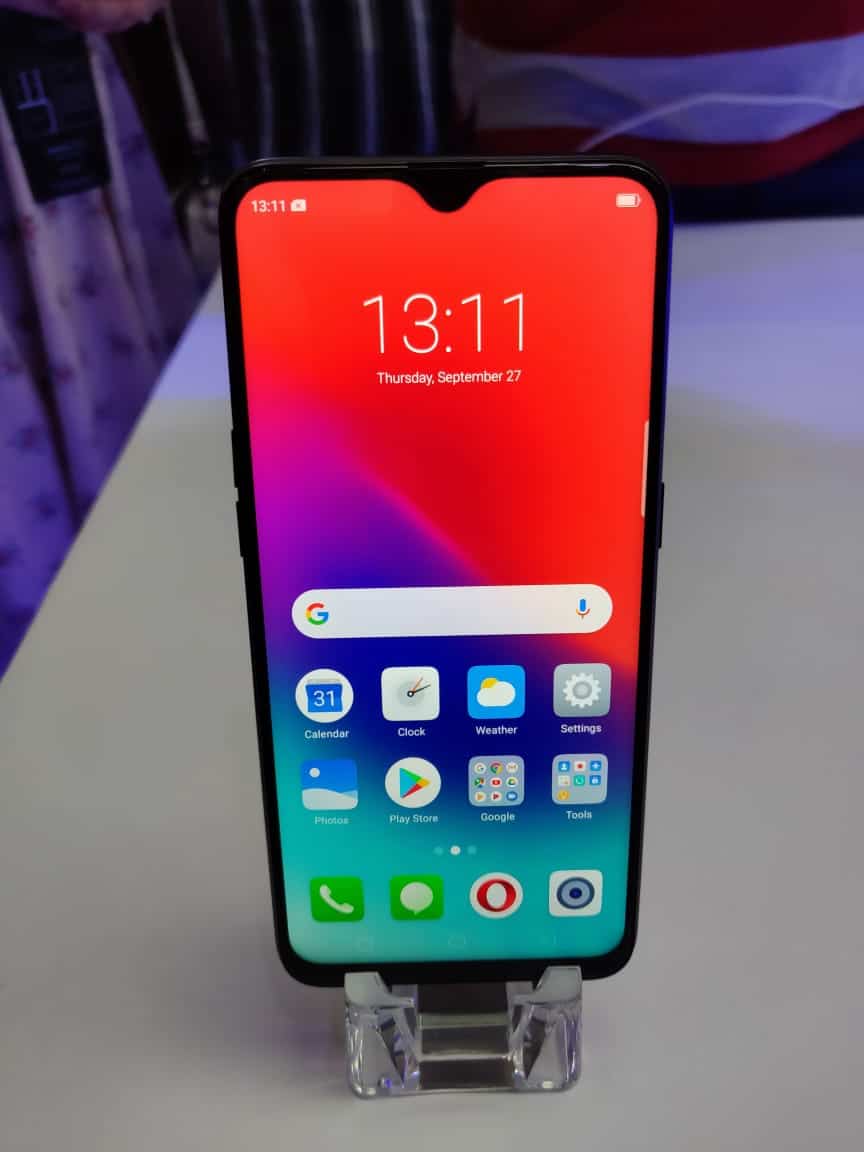
With a 6.3 TFT LCD 1080×2340 display – you can be rest assured of a high quality resolution on heavy ended games or videos. The notch is much smaller as compared to the RealMe 2, which gives the mobile a near perfect 90% screen to body ratio.

The RealMe 2 Pro comes in 3 colour variants – Ice Lake, Blue Ocean and Black Sea.

Hardware

Backed by Snapdragon 660 AIE SoC, this device is truly a successor to the RealMe 1 which came with Snapdragon 450. RealMe has rightly tapped into the usage of the Indian consumers and has provided with plenty of RAM to ensure that the mobile doesn’t slow down within a couple of months of usage. The RealMe 2 Pro comes with 8 GB of RAM and 128GB of storage.
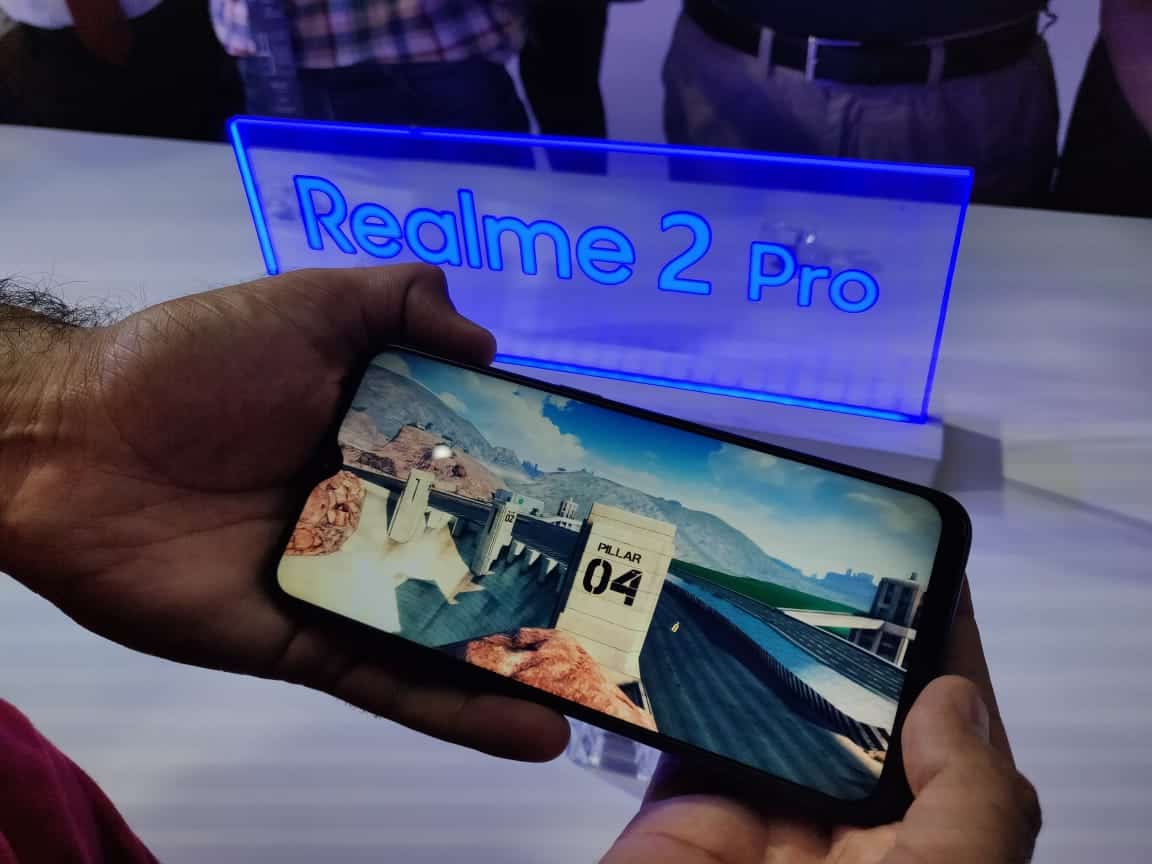
In the battery department is where we felt that RealMe 2 Pro could’ve done better. With 3500 mAh battery, the performance isn’t bad. It’ll still last you up to a  day on normal usage. However, Real Me 2 which comes at almost Rs9,000 is backed by 4200 mAh battery – which shockingly can last upto 1.5 days on moderate-heavy usage. Therefore, not giving the same battery life to RealMe 2 Pro does make us wonder but it’s not a deal breaker since battery performance in RealMe devices has been good thus far.

Both front and back cameras are 16MP – with f/1.7 aperture. The device is running on the Android 8.1 with ColorOS 5.2.
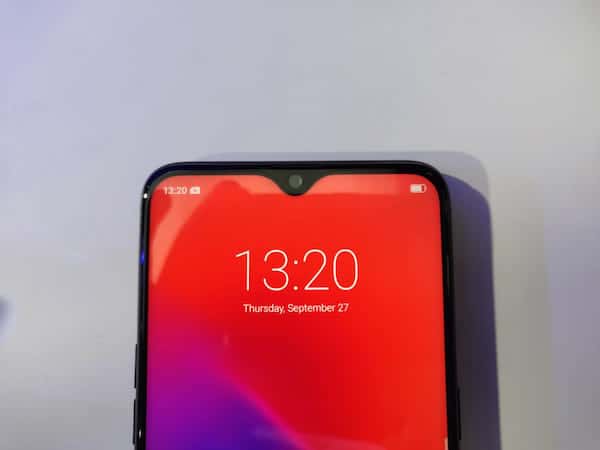
Just like RealMe 2, we’re given both the finger sensor and the face sensor with the RealMe 2 Pro. The finger sensor works just fine and what we can gather from our experience of the facial recognition so far, it’s much quicker than the RealMe 2.

Camera & Performance

The camera point is one of the most key aspects in today’s Indian buyers choice making. A good camera can truly make a mobile sweep away the Indian market or vice-versa, regardless of how good other specs are; if the camera isn’t good enough, the mobile probably isn’t as well.

With 16MP back and front cameras respectively, the RealMe 2 Pro does everything to ensure that it doesn’t disappoint. Since RealMe 2 didn’t impress massively in this department (understandable, it was budget ended), the hopes from the RealMe 2 Pro were much higher.

The f/1.7 aperture backs the camera to do well. We wouldn’t say that it gives the most exceptional performance in a smartphone out there in this range but it also doesn’t make you complain. The daylight shots are actually quite good and will leave the photographer in you rather satisfied.

The Bokeh Mode is present along with plenty of face enhancers and modes – which we wouldn’t get much into, it depends on user to user as to how likely they’re to use these features and whether they matter or not. The camera quality in general doesn’t disappoint.

Pricing & Competition

The RealMe brand has made a name for itself in the Indian market with RealMe 1 and 2 but it’ll be fair to say that their “real” journey will start from the RealMe 2 Pro. This is simply because the RealMe 2 provides much more than you’d expect in a smartphone priced at just 13,990 (4GB), 15,990 (6GB) and 8GB (17,990).
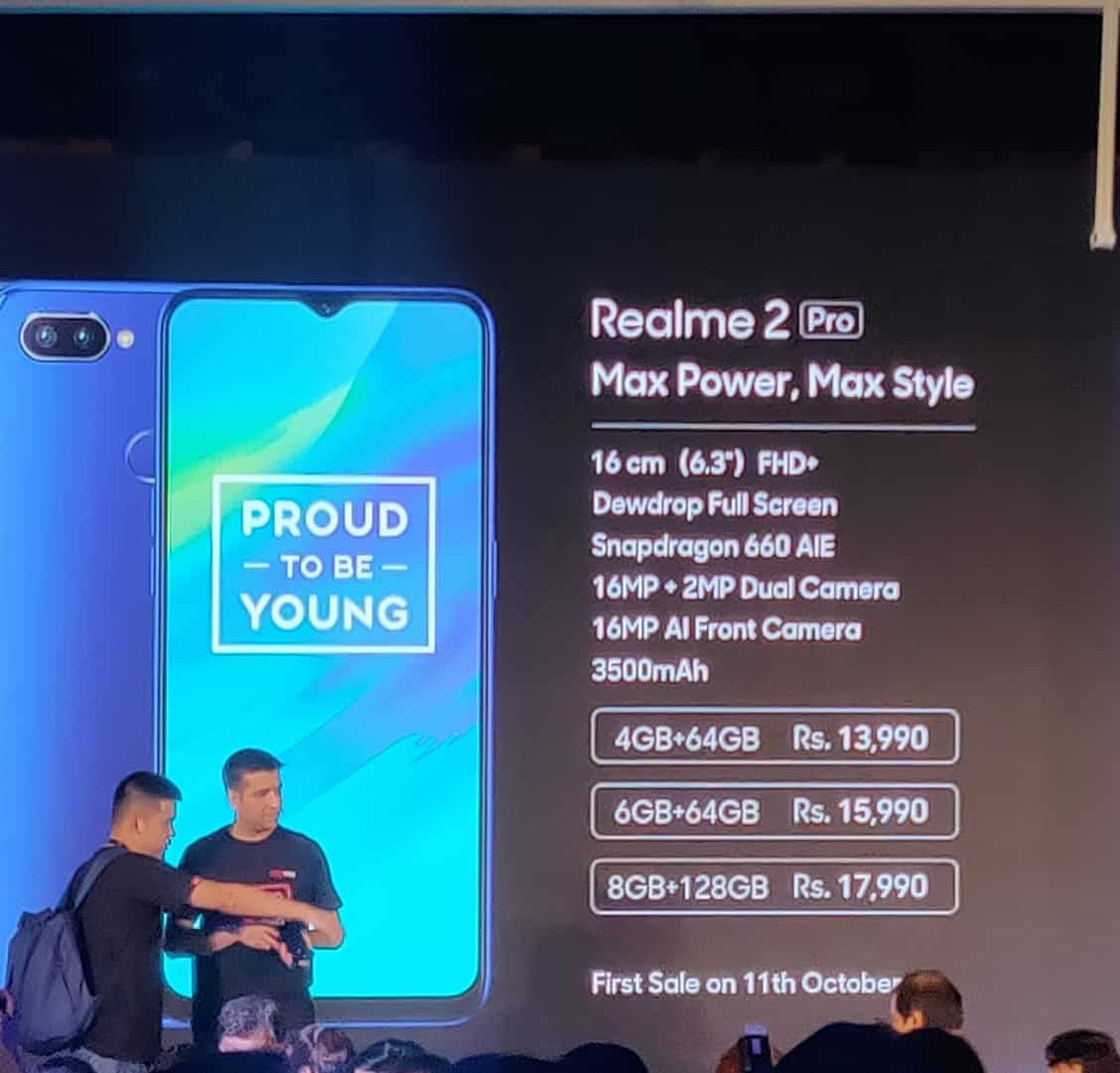
The RealMe 2 is in direct competition with Xiaomi Redmi Note 5, Asus Zenfone Max Pro 1 & Motorola One Power. All of these 3 smartphones are bound to be hugely affected by the launch of RealMe 2 Pro – since for starters, it’s screen size is a massive 6.3 inch and yet doesn’t feel uncomfortable to hold in your hand.

The Snapdragon 660 is a beast when it comes to performance. Realme 2 Pro is a terrific update from the RealMe 1 and purely on that basis, the Indian consumers will look forward to trying out this “upgrade” to the RelaMe 1.

Verdict – the RealMe 2 Pro impresses in all aspects. The pricing point of this device has been kept aggressive to attract the Indian consumers since the RealMe brand, having shifted from Oppo, is still making a name for itself as an individual brand.

With the specs it has on offer, along with the build quality and a fairly good camera – the RealMe 2 Pro shall be the market leader at it’s price range. We truly believe that if you’re looking for a smartphone in the range of 13,000-18,000 the RealMe 2 Pro can be your perfect choice.

The RealMe 2 Pro goes on sale via Flipkart on the 11th of October, 2018.
Why We Choose VideoProc to Process and Reduce GoPro 4K File Size

0

Video processing has become a standard requirement of the day to day life of anyone who is even remotely into the digital industry. You don’t necessarily have to be a YouTuber to learn some video editing skills. But here comes the most basic and the most horrid part of video editing, which is- Video Processing. It sounds like such a simple task, just processing the video, can’t be that hard right? I wish it was easy as it sounds. Attempting to process a video without getting your laptop hot enough to cook an omelette on or having to restart it a hundred times because it keeps freezing, can prove to be quite a headache.

We have tried a bunch of free and paid video processing softwares, but the hunt for the best one just could not end. This time, we decided to try out VideoProc by Digiarty.

We had heard quite a bit about it being smooth as butter when it comes to processing high-quality videos. This was a perfectly timed opportunity to try out this product because we had a bunch of GoPro 4K footage to process from our latest campaign. Before, we talk about that, here’s a little background of the parent company. We have created a separate article On Gopro: A Comprehensive Perspective of Gopro Camera.

ABOUT DIGIARTY:

Digiarty has been in the business of offering easy and creative solutions of free DVD ripping, DVD copy, DVD burning, HD video conversion, online video downloads, media play, iPhone file management and more for over 11 years now. It is safe to say that Digiarty is one of the world-leading providers of video-applications based on Windows and macOS.

THE REVIEW: VideoProc

Our experience with the VideoProc software has been extremely pleasing, we had no idea that videos with 4k resolution could be processed so quickly and easily. The major elements of surprise were:

  • My laptop did not heat up or freeze.
  • There was no rocket science involved, I completed the whole thing with hardly 3-4 steps.
  • It did not drain my battery, there was hardly a difference.
  • Needless to say, the software did not crash even once.

My main problem with all the other tools I tried like Final Cut or Adobe Premiere was that they would severely lag my PC, and the rare times they would not lag or freeze, just understanding the functionality and how they work was so difficult to comprehend. I used to also worry about the videos diminishing in quality. With VideoProc, I faced no such issues. Just with this and the pointers mentioned above, I was sure this was going to be my go-to processor from now on, especially for my GoPro footage.

Just to give you a clearer idea about this software, let’s test it on the basis of four main parameters: Usability, Accessibility, Value for money, and Utility.

USABILITY

  • Set up-

My experience with VideoProc was efficient, intuitive and satisfying. The downloading and installation process could not get any simpler. With just a few clicks I had the software up and running in my laptop. Download > Install > Launch and you’re done! It supports both Windows (Windows 7, Windows 8, Windows 8.1 & Windows 10) and Mac OS.

  • User Interface (UI) –

Digiarty has done a great job with the design of the software. The clean and minimalistic design along with the use of soft tones makes it very easy for the user to find exactly what he needs. The different options like Trimming, downloading, converting, recording are all very neatly placed on the homepage. It has a very easy on the eyes layout.

  • Features-

It gives you a variety of editing options for your GoPro video footage. You can crop, split, cut, rotate, flip, and merge video clips with ease. My requirement was just for a little cropping and cutting here and there. But I did play around with some other options offered to me like adjusting video color effects (brightness, contrast, hue, gamma, etc), removing shakiness and noise from your video, correcting fisheye distortion, and converting your video to M3U8. All of these features were quite impressive to work with.

On the overall judgment of the Usability factor of VideoProc, I would rate it a solid 9/10.

ACCESSIBILITY

  • Supports 370+ Built-in Video Audio Codecs –

You can work with almost all types of video formats on VideoProc. I personally used it to process my HEVC videos but it also supports other formats like H.264, MPEG-4, AVI, MKV, MOV, M2TS, MOD, MP4, etc. In my opinion, it does the best jobs for multi-track HD videos and 4K @60fps videos from GoPro. It’s a range, however, lies from ISO images to multi-track HD videos from DJI, DSLRs, Blu-ray, Apple iPhone X, and Android smartphones. It also manages any kind of video conversion.

  • 420+ Profiles for Apple Android Devices –

It’s almost impossible to share your GoPro footage with your friends and family on our standard media players. VideoProc makes it a piece of cake by making any incompatible videos friendly with SNS, HDTV, or any portable players. You can now share your GoPro footage on Youtube, Vlog, or enjoy it on iPhones, iPads, Xbox, Android tablets, smartphones and more.  The entire, software is pretty user-flexible it will cater to all you converting and video processing needs without any hurdles.

  • Step by Step tutorials –

The official website of VideoProc will be like a personal assistant to you with regards to the software. It has an ocean of tutorials on a lot of topics right from installation and editing to more complex subjects like Converting GoPro 4K HEVC to H.264, Video Stabilization, Removing fisheye from videos and more.

  • Record Videos From Your Screen/ Webcam

You can also record screencasts in full HD (1080p) quality in formats like MP4, FLV, TS, MKV, MOV, etc. If you are into creating course content or gaming videos or conducting webinars. This is a gold feature for you. It also provides feature widgets like paint tool, mouse-show, adjustable window and more.

On the basis of Accessibility, I would rate it 9.5/10. It literally leaves no stone unturned in this area.

UTILITY

  • High Speed –

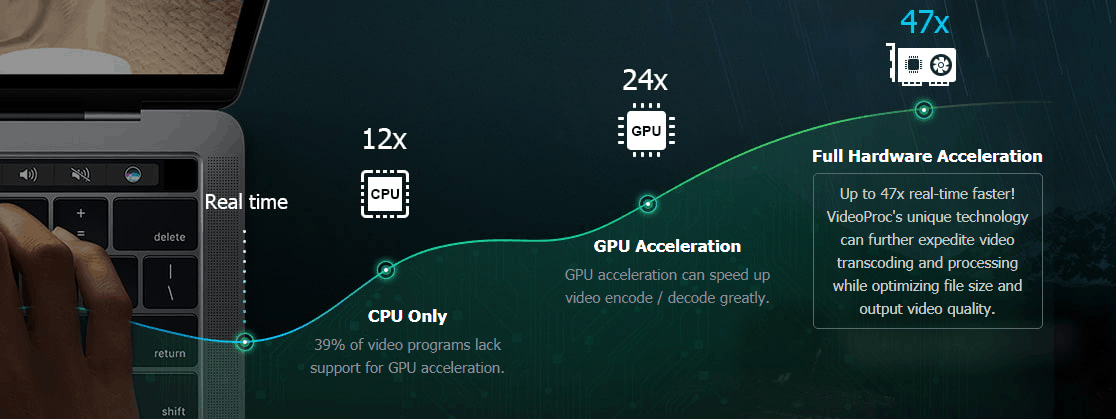
One of the biggest factors that we look for in our video processing tools is the speed. VideoProc is said to be 47x times faster than the real-time speed of the other software. The secret behind the speed I’m guessing is its key strength features like level-3 hardware acceleration, Video Audio Passthrough (Auto Copy), Hyper-threading and AMD 3DNow Tech.

  • Easy Resizing

Because of the hardware acceleration, VideoProc delivers over 90% compression ratio for resizing large video footage in a smooth and in an efficient manner. I thought it would lose marks here considering the huge sizes of 4k GoPro videos, but nope, it worked fine without any issues. It did not even hamper the quality of the video in the slightest.

  • High Quality At The Smallest Size

VideoProc has an embedding de-interlacing engine called the “Yadif Double Frames” which can reduce noise, optimize the image quality and adjust the definition to make the video crystal sharp.  The cutting-edge GPU acceleration is the winning factor of VideoProc. With it, a high-resolution file can be reduced into a much smaller file without hampering the video quality even one bit. It also takes full advantage of Intel QSV, AMD and Nvidia CUDA/NVENC to convert and process videos with the fastest possible speed.

  • Download Music And Videos With Ease

Another utility factor of VideoProc is its ability to download 4k/1080p videos and audios from popular sources like Vevo, Vimeo, Soundcloud, Yahoo, DailyMotion, etc. Not just that, you can even save live-streams, playlists and more. I did not personally try this feature out because I did not require it. But I’m sure a lot of people can benefit from this feature.

I would like to give Video Proc a full score of 10/10 on the Utility factor, it beats all the other software I’ve known, in my opinion.

VALUE FOR MONEY

  • Free Trial

Our last factor to be considered, probably the most important one is, is it worth its the price! The best part about VideoProc is that they give you a free trial. So if you are not satisfied with the services you do not have to buy it!

  • VideoProc New Release Celebration Sweepstake

Digiarty has started a New Release Sweepstake where you can get the permanent version of VideoProc at half its market price. The original price is $59.90 but with this amazing discount, you can get it only for $29.95! This sounds like a sweet deal to me!

Based on the value for money factor, I would rate this software a 9/10.

More, the developer Digiarty prepare GoPro Hero 7 and accessories contest in the Six Methods to Process and Resize GoPro 4K Video page which include

1x GoPro HERO 7 Black ($399)

2x GoPro Karma Grip ($299)

10x GoPro Dual Battery Charger + Battery ($49)

VideoProc

The Importance of HARDWARE ACCELERATION for GoPro

We have mentioned this term quite a few times, which is why I want to take a moment to talk about Hardware acceleration and the major role it plays in processing 4K videos with full GPU acceleration. When it comes to video encoding and decoding GPU accelerations beats CPU acceleration without a doubt. But, hardware acceleration will increase the speed of the processing speed by a huge range without disrespecting the quality. When you are using GPU to process videos of a large volume or intensity, then the type of video should also specifically run for GPU based hardware acceleration, i.e your operating system should be configured with corresponding hardware like Intel and Nvidia. If you are playing a 4K video recorded from a GoPro or a drone it has a high possibility of crashing, stuttering or lagging. There can even be loading and reading errors.  

These high standard gadgets like drones and GoPros collect raw video data signals which may again cause an explosion of data due to pressure on the CPU calculations causing permanent damage to the CPU. Because of all these factors hardware acceleration plays a really big role while dealing with your GoPro content. So for someone who uses a GoPro, VideoProc sounds like a necessity.

CONCLUSION

Considering all the factors that we discussed in this review, my overall experience with VideoProc has been pretty smooth. And I might as well add it as a permanent member in my laptop. I would say this is a must-have product for GoPro users, because it will definitely save you a lot of your time. It is a great product at its price.

FactorMarks
Usability9/10

Accessibility
9.5/10

Value for money
9/10
Utility10/10

The 3 major takeaways would be:

  • It is a great tool to process 4K UHD videos, large sized videos, and high-speed videos shot with 120fps/240fps (slow-mo videos)
  • It delivers buttery smooth (4K) video editing and transcoding without compromising the quality.
  • And also provides both easy-to-access presets and advanced video audio parameter adjustment options.

If you want more information about VideoProc, please visit their official website.

THE ANCHOR TEXT 101

0

The web relies on hyperlink as a core technology, reflected in its versatile capability and unique character.  Constituting the bulk of the web, hypertext documents have had a tremendous impact on the information technology world. For more on Implementing API using Flask in Python.

WHAT IS AN ANCHOR TEXT?

An anchor text is the all too familiar underlined blue text on a web page or documents that is the visible and clickable part of a hyperlink.

HOW IT WORKS

A link would look like this:

<a href=”https://techgyo.com/top-minimalist-blog-design-inspiration-2018″>bloggingdesign inspiration</a>

The URL is within the quotes while the succeeding words denote the anchor text. Python training.

TRACKING ANCHOR TEXT

Google Webmaster is a good search engine optimization tool which allows you to see the most common words in anchor text linking to their site.

Img Source: Elliance,

SPECIAL CONSIDERATIONS

It would be impossible to know what is being linked to without it either being stated in the anchor text or being clear from the context.

Since the visually impaired may use screen readers, they tend to take elements such as anchor links out of context when scanning the page. If the anchor text is not meaningful, then the screen reader reads the anchor text out loud without communicating anything about the linked page.

TYPES OF ANCHOR TEXT

Exact Match – The anchor text reads out the exact topic of your linked page.

Partial Match/Phrase Match – The anchor text contains the topic keyword you are looking to rank for.

LSI Keywords – The anchor text is a synonym or is closely related to the target keyword.

Naked URLs – This is the URL address just as it would appear on your URL browser.

Generic – These are unspecific words that exclude your target keyword

‘this article’

 ‘this site’

 ‘click here

Branded – the anchor text is your brand

Title Tag – your page title. (It is often also a partial match).

Author 

Image links

OPTIMIZING PAGE FOR SEARCH ENGINES

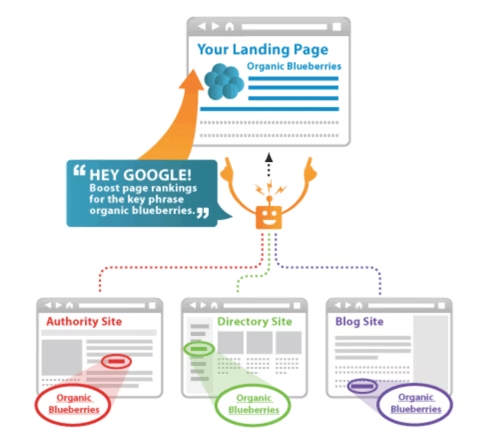
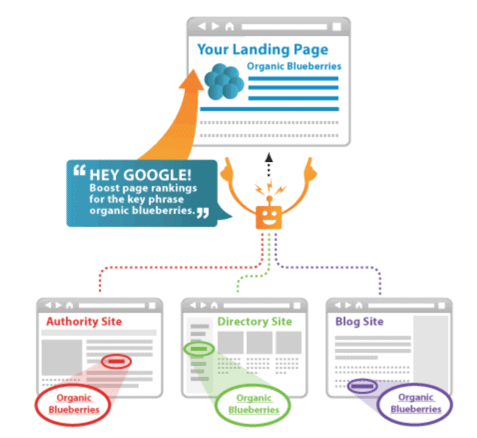
Link relevancy is one of the criteria considered by search engines when determining rankings. Search engines can determine what your linked page is all about. The source page’s content and the content of the anchor text help determine link relevancy.

Therefore, incorporating important key-words in the anchor text can substantially improve the ranking of your page.

HOW ANCHOR TEXT INFLUENCES SEO RANKINGS

While the importance of anchor text in SEO has declined, an anchor text indicates the page topic, specifying which keywords it should rank for.

In other terms, it signals that the page linked is a good fit for that query.  By this virtue, the more sites that link with the anchor thereof, the more search engines will rank the linked page in response to that query.

ANCHOR TEXT HISTORY

While the role that anchor texts play in search engines’ algorithms seems straightforward, this is not always so. Since their inception, anchor texts provided descriptions of web pages. However, this was not without some drawbacks.

Search engines became exposed to manipulation since all you had to do to improve ranking was to point multiple links at your page “link-building”. This escalated to the more amusing instances of ‘Google Bombing’ further showing how easily anchor text links could be manipulated.

PENGUIN PENALTY

In 2012, The Penguin Algorithm was rolled out hitting 3.1% of English language search engine queries and effectively wiping some sites out of search. Ever since the filter has evolved through 10 documented updates, and as of 2017 became part of Google’s core algorithm.

CONCLUSION

You might be left wondering whether to set up lots of anchor texts to shoot up your website in the search engine ranks or to just avoid setting any anchor text links lest risk being penalized.

I would recommend the moderate use of naturally-sounding anchor texts that do not signal link building.  In the case of multinational platforms, use of a foreign language in your anchor text is also considered safer.

It is important to avoid exact-match anchor texts as they tend to look unnatural and overtly promotional, putting you at risk of the Penguin Penalty while also driving away potential visitors from your page!

Is Downloading Torrent Legal or Illegal, And How Safe Is It?

0

Is torrenting legal? Is torrenting safe? What are the consequences of getting caught downloading torrents? How can I protect myself when downloading torrents? These are some of the questions most torrenters grapple with.

In this post, we will provide answers to these questions and discuss ways to stay safe when torrenting. But before we delve into these issues, let’s briefly go over what a torrent is.

A torrent is a computer file that contains metadata about files to be distributed. It’s important to note that a torrent does not contain the content to be distributed but rather the information about the files such as size, folder structure, and names. Torrenters can use a BitTorrent software to easily download the torrent files to their personal computers.

Is Torrenting Legal?

Torrenting per se is not illegal. The practice only becomes illegal when you acquire copyrighted content – content that you do not have the right to own or distribute.

Consequences of Torrenting

There are several risks associated with downloading torrents including:

• Malware risks – torrents are a common source of viruses and malware. This is especially true of games and software which must be installed on your computer.

• Hack attacks – torrent files contain a list of network location trackers which make your IP address public to download peers. While this helps the torrent client to connect to users, it makes you vulnerable to hackers looking to steal identities and personal information.

• ISP penalties – torrenting uses a lot of bandwidth making it costly to your ISP. Consequently, your ISP may take certain actions to discourage you from downloading torrents. These include threatening to hand over your personal information to a copyright troll or throttling your Internet connection.

• Copyright trolls – copyright trolls are companies that snoop around torrent networks to locate people who illegally download copyrighted material. These companies get permission on behalf of the copyright holders to take legal action against such torrenters.

Copyrights trolls use aggressive and opportunistic strategies to extort money from people. They work by sending a list of IP addresses and settlement letters to Internet service providers (ISPs) who then forward the letters to their customers. In some cases, the company trolls send you the settlement letters directly via email, mail or deliver them by hand. The letters often ask for money or threaten legal action.

Settlement letters are not injunctions or legally binding documents. Therefore, if you receive such a letter, ignore it. Should the situation escalate, we recommend seeking legal advice.

How to Download Torrents Anonymously

While the number of torrenters who get caught is miniscule, it is best to protect your privacy. Here’s how you can anonymize your torrent activities:

1. Use a VPN when torrenting

One of the best ways to make your torrent activity virtually untraceable is to use a proxy or VPN. A VPN encrypts your device’s connection to the internet and routes it through a secure server in a location of your choice. This shields your device’s IP address making it hard for copyright trolls to trace it. It also prevents ISPs from deciphering your internet traffic.

2. Use Tor

Tor works in a similar way to a VPN – it routes your internet traffic through an overlay network while encrypting traffic. While the network is secure, there have been incidents of spy bodies such as the National Security Agency (NSA) and the Government Communications Headquarters (GCHQ) attacking computers. Due to privacy concerns, you may consider using a VPN instead of Tor.

3. Disable seeding

Another way to protect your torrent activity is to turn off seeding. This stops your computer from uploading files to the BitTorrent client. Avid torrenters would call this selfish but it’s a great way of enhancing your privacy while torrenting.

Torrenting isn’t bad, but downloading intellectual property and copyrighted material is. Some of the repercussions of downloading copyrighted content include receiving warning letters, your connection being throttled, large fines and even a jail term. To avoid legal problems, it’s best to anonymize your torrent activity or stop torrenting completely.

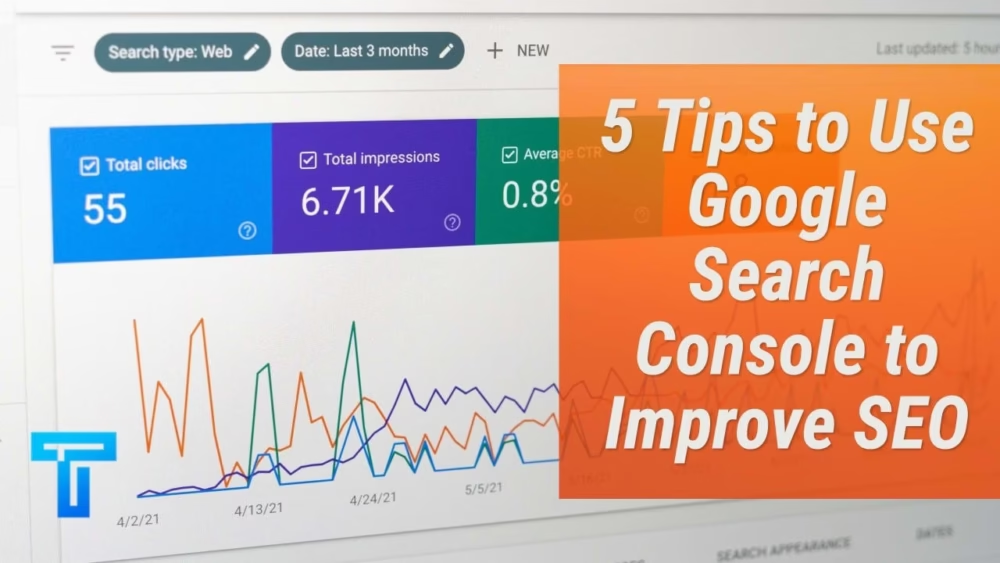
5 Tips to Use Google Search Console to Improve SEO

0

There is no dearth of tools when it comes to enhancing the SEO of websites. Several of these are paid resources, while the others are unpaid tools that come with a unique set of metrics to take care of all aspects of SEO. One such tool that is free to use and can handle a large chunk of your SEO and keyword tracking requirements is Google Search Console. 

Google Search Console can be described as moderately easy to understand and use, and when it comes to Search Engine Optimisation you might need more insights. You could either take help from a professional SEO marketing agency for the purpose or follow our guide to understand 5 ways you can use Google Console to improve SEO. 

Google Search Console Improve SEO

What is Google Search Console? 

Google Search Console is a free tool built and offered by Google that allows businesses to optimise their websites for higher search engine rankings. Besides providing a ton of crucial information needed for augmenting your SEO performance, Google Search Console also answers several queries related to the subject.

For instance, you can easily track which keywords your website performs best for, what is your search engine ranking for these keywords, what is the click-through rate for your website after visitors type in a query. Google Search Console also offers a ton of other valuable insights such as backlinks to your website, crawling errors on Google, mobile-friendliness of your website, and so on.

You can even get answers to both simple and advanced queries such as Google’s guidelines and violations. In all, this free tool is a powerhouse of information and is a must-have resource for any business looking to make a mark on Google’s search result pages. 

How to Set Up Google Search Console?

Setting up Google Search Console is pretty simple. Simply visit Google Search Console’s website, create an account (or sign in if you have Google Analytics already set up for your business). 

Once logged in, you need to select the property type that you want to work with the SEO of – domain or URL prefix. Google will ask you to verify whether or not you own the website you have entered information on. Google Analytics tracking ID is the most common medium for the purpose (you can log in to your Google Analytics account, go to Admin>>Property Settings>>Basic Settings>> Tracking ID). 

That’s all you need to get started with Google Search Console. The tool is accessible directly from the Google Analytics home page as well, on the sidebar. 

The Basics of Using Google Search Console

Before we get started on the nitty-gritty of understanding Google Search Console’s significance for SEO, we must learn about the basics of this resource. As mentioned above, you can use the platform to find out what keywords your site or content ranks for. Secondly, it is possible to see how users are interacting with your website in the Google SERPs. 

Also, you can find out where your pages are ranking for chosen keywords and how many of your website pages are in Google’s index. You can easily submit a page from your website for Indexing, and identify crawl errors and unindexable pages using this method. You can even submit a sitemap, ensure mobile responsiveness of your webpages and look at various backlinks to your site. 

5 Tips on Using Google Search Console to Improve SEO

Let’s face it, getting high rankings on SERPs matters a lot, and Google Search Console can help you optimise your pages for the best SEO performance. A single dashboard on the platform allows you to manage all your basic SEO metrics including search queries driving the most traffic to your website, pages generating the most impressions and clicks, average click-through rate (CTR), average search engine result ranking of your page, and so on. 

There are a few tips and tricks you could keep in mind when using Google Search Console for this purpose:

Diving into a Combination of Important SEO Metrics

While some experts believe that it is beneficial to look at only one metric out of all the ones described in Google Search Console, our bet would be to look at their combinations. Clicks have emerged as the most widely pursued numeric goals for websites. However, combining clicks with click-through rate (CTR), impressions and average position could give you a much more well-rounded insight. 

Looking at just one metric might sometimes mislead you into thinking that you are performing better or poorer than reality. When looking at a combination of data instead, it is easy to surmise where you actually stand. 

Every Section of the Website is Important

The Performance Report on Google Search Console is like a plethora of information waiting to be exploited. Each section of your website is usually analysed in helpful detail, and it is in your benefit to keep a tab on all of these insights. 

Make sure that you use the filter button to view or remove each section, such as “blog”, “services”, and so on. You can view key metrics such as CTR, clicks, and so on, filter them based on the targeted location and devices and view their demand over time. The idea is to get a better picture overall in terms of understanding the intent and performance of keywords and the user’s response to them. 

Keep a Tab on Local Keyword Performance

The “Exact URL” page filter in Google Search Console helps you distinguish between the standard organic clicks to a page and local organic clicks to a page. Such granular term information can play a key role in advancing local SEO performance, which forms a backbone of your website’s overall performance window. 

These days, Google is focussing on hyper-localisation when it comes to search engine results, and those who are playing the game with a focus on accurate city-level or town-level keywords are winning the game better. 

Keywords that you assume could work for bigger areas could end up ranking quite poorly at the local level, for there is a lack of local keyword optimisation. What you need to do is pay special attention to geographic filters in Google Search Console, and optimise your content keeping Google’s preference for hyper-localisation in mind. 

Competitor Research

Google Search Console allows you to check your results relative to your biggest competitors, so why not use this feature to its fullest? Keep a tab on what kind of tactics they are deploying which you might have given a miss. Give a tour to your competitor’s insights now and then for some inspiration, and you will find that these ideas are much better than what you could come across in books and blogs. 

The Mobile vs Desktop Traffic 

Most people tend to ignore the fact that Google Search Console presents device comparisons within its report for a reason. The majority of web traffic for most businesses usually comes from mobile devices. Therefore, mobile responsiveness forms a major part of improved SEO for any website these days. If your SEO game is working, it should ideally reflect in the “devices” section, in the form of greater traffic from mobile phones. 

Thinking of Getting more from Google Search Console? Contact an Expert!

Google Search Console could seem pretty easy to set up, but a tad bit detailed when it comes to navigating it for the best insights. In our opinion, it is best to get in touch with a professional SEO marketing agency to take care of enhancing your SEO performance through relevant tactics and using Google Search Console to monitor outcomes. 

Meet Vera: The All-New Self-Driving Electric Truck From Volvo

0

With the E-commerce empire expanding rapidly, the freight transportation needs have increased by a huge number since the past year. And the growth of the education sector has made it hard to find people who are willing to be truck drivers. Volvo, the world’s second-biggest truck producer joined these two statistical statements and created a magical invention with the roots of Artificial Intelligence and some extra-ordinary engineers. Now you don’t really need a driver to carry around huge commercial goods in bulk. Volvo has made it’s very first Self-Driving Electric Truck without a cab called- Vera!

Vera

Vera And Its Features:

The origin of the word Vera denotes ‘faith’ which is a perfect name considering the huge amount of faith that the company is putting into technology and Artificial Intelligence. It is great to see such massive and rapid changes coming about in the way we do day to day activities. Vera, the automatic truck is designed to carry loads weighing up to 32 tons, which can be attached to any standard trailer. The truck will coordinate with a cloud service. The driving of the truck shall be monitored online. The control centre will have constant information about the live location of the truck through GPS tracking features. The monitor will also have other details like the type of goods that the truck is carrying, the maintenance requirements, direction information and much more.

Vera is expected to contain the 185kW electric motor which is also found in their FL truck model. This electric motor is said to produce 174bhp and 425Nm of torque with a 2-speed gearbox. The motor is also equipped with a 100-300kWh lithium-ion battery which will guarantee the smooth functioning of the vehicle. The best feature about this automated truck is going to be the zero-emulsion. It will pacify the increasing damage that’s been caused to mother nature. It is also expected to have a much lesser maintenance cost compared to the traditional trucks with a better driving range.

Vera is not going to completely replace the conventional truck anytime soon because it is still in its developmental stages. But it can be initially deployed in places like logistics centres and large ports. Safety is becoming a huge issue with inventions based off of Artificial Intelligence. However, Lars Stenqvist, the chief technology officer of Volvo announced in a recent Berlin conference that Vera will have a driver behind the steering wheel for the foreseeable future until it’s known to completely safe. But the future of self-driving vehicles doesn’t seem to be too far. UBER Announces 100% “Electric Rides” by 2030!

This truck will be saving a lot of time and the flow of goods and services will become much faster as the need for day-time only workers will diminish and the work can continue round-the-clock be it day or night. This will indeed cut down a lot of stockpile issues and take productivity to the next level.

Here’s what Claes Nilsson, the President of Volvo Trucks has to say about the idea behind Vera, “The full potential of the transport industry is yet to be seen. Everything suggests that the global need for transportation will continue to significantly increase in the coming decade. If we are to meet this demand in a sustainable and efficient way, we must find new solutions. In order to secure a smoothly functioning goods flow system we also need to exploit existing infrastructure better than currently. The transport system we are developing can be an important complement to today’s solutions and can help meet many of the challenges faced by society, transport companies and transport buyers.”

He did make some pretty strong points about meeting the rapidly increasing e-commerce demands but between all these technological advancements, there’s a high risk of occupational hazards, because of people being replaced by machines. With every passing day, the need for people to perform repetitive tasks is decreasing. Technology has been disrupting the nature of jobs pushing people to obtain skills which are irreplaceable and non-repetitive. In this world of machine learning, knowledge and education seem to be the only way to survive.

Nonetheless, Vera is definitely going to be a huge step in the e-commerce and heavy equipment transportation industry and will bring about a lot of positive changes in the name of technology. Volvo officially announced that Vera, the all-electric, autonomous, self-driving truck is still under development and they haven’t mentioned a particular date when it will be commercially available to the masses. More detailed specifications of Vera are yet to be announced. Till then, we can expect a lot more of these AI-based inventions to surprise us in the near future.

Agile & ITIL How They Complement Each Other

0

There are many different approaches to IT management. As with management in other fields, IT has developed its own certified and carefully researched management methodologies. You’ve likely heard of many different ones with ITIL and Agile Management being among the ones most commonly mentioned. Despite the two appearing very different at a brief glance companies are trying to combine these two approaches to create a superior management framework.

The Differences between Agile & ITIL are chiefly based on philosophy ITIL values a structured planned approach while the Agile method prefers flexibility and responsiveness. However, despite these apparent contradictions these two management methods can work well together and are not as adversarial as they first appear. Agile management courses can help trained ITIL experts to incorporate these two methods into their management approach.   

Understanding Agile Management

If you’re seeking to understand agile management you should focus on its core approach to flexibility. With agile management, it divides large projects into easier to manage parts. This allows you to focus on each part as needed and respond accordingly to any needs or changes. It’s an approach that allows quick responses to changing circumstances make it easier to change course when issues arise.  

ITIL An Overview

By comparison, ITIL (which formerly stood for Information Technology Infrastructure Library) is a structured approach that is focused more on results. The idea is to deliver value to your customers and assist them in meeting their goals. Where IT shines is in organizing the often complex and messy process of IT work and development. It also favors open communication and transparency allowing for greater cooperation towards a stated goal.  

Bring The Two Together

As each has its own well-defined management approach it can a challenge to see how these two different methods can work together. Agile management, however, is an excellent addition to your existing ITIL strategies as the two methods are more compatible than they first appear. Here are four common traits of agile management and how they can complement your existing ITIL methods.

  1. Individuals and Interactions over processes and tools: a well-defined process and toolset certainly make projects go smoother but they are nothing without skilled people to make use of them. Agile Management with its focus on individuals can strengthen a well crafted ITIL based plan. With proper communication, a process can be refined and the tasks assigned to the employees best suited to handle them.     
  2. Working Software over comprehensive documentation: the IT industry as a whole is known for impressive detail-rich documentation. However, it’s entirely possible to get too caught up in the process as opposed to fixing problems. A quick fix of “no changes to our apps can be made without lengthy QA testing” can prevent bad features from sneaking into the software. Detailed documentation about how app changes should be submitted, tested, and the various steps of this process can (and should) be written later.   
  3. Customer Collaboration over contract negotiation: it is entirely possible to meet all the stated goals of a business contract and still have an unhappy client. Your IT company has to do a bit more than simply guarantee uptime and functionality you have to listen to customers. By listening to your clients you can see what their issues are in terms of expectations such a usability, features they want, and so on. This creates a much happier business relationship while still meeting all your agreed upon service goals.   
  4. Responding to Change over following a plan: a well thought out and detailed plan is a useful thing, however, a plan shouldn’t be so complex and so detailed that it becomes inflexible. Inflexibility can cause other wider reaching problems such as a lack of innovation, which has put more than one well-known company out of business. To simplify have a plan but make sure it is adaptable and responsive to outside challenges.   

Final Considerations

The differences between ITIL and Agile Management is what makes them so compatible. Each is focused on different things which make for systems that when properly combined complement each other nicely and make the other stronger. If this article was helpful, also do checkout Scrum software review.