Home Blog Page 123

How to Delete Google Maps History on the App and Browser Easily

Screenshot_10.png

If you use Google Maps a lot, then you should know that it keeps a detailed history of all the places you went to. Also, even if you haven’t used the navigation, the travel and location history will be saved in Google Maps. The Map precisely maintains records of every place that you had been to with your phone in hand. You might have noticed that it suggests the places and locations that you had been to, searched recently, reviewed, or answered a question about.

For a few, this can be handy, but everyone is not comfortable with their whereabouts to be recorded. Also, there are times when you would never go back to a certain location or might have entered an incorrect address. So, there is no use of having such information saved in the app’s data.

That is why; it is a good idea to erase the Google Map history once in a while. You can either delete the entire history or choose particular locations to delete. And, while you are doing so you may also want to erase the application data which includes cache.

How to delete Google Maps history through the App

You have the option to either delete selected places or erase the entire history from Google Maps. Here is how you can do both:

  • Tap on the Google Maps icon on your homepage of your device.
  • Now, tap on the Menu button on the side
Screenshot_14.png
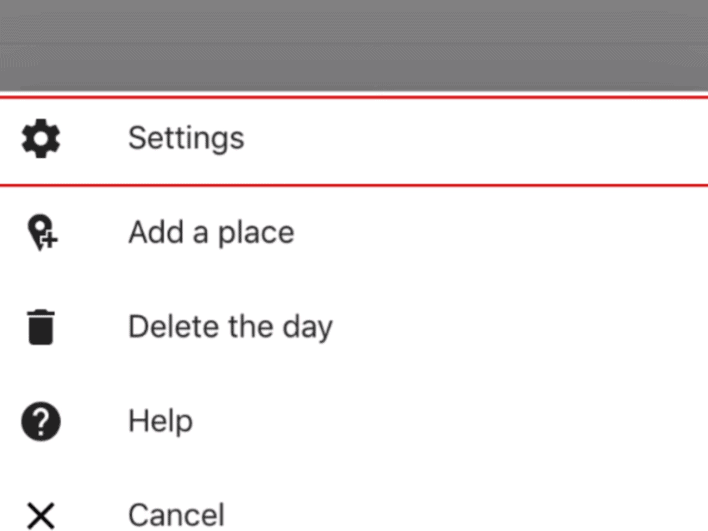
  • On the next screen, tap on “Settings”.
Screenshot_15.png
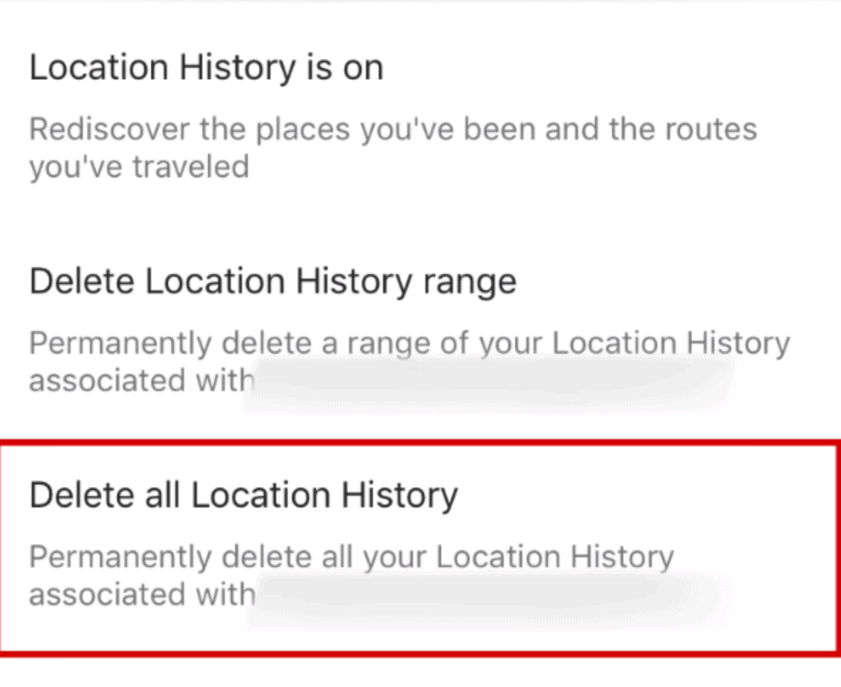
  • Scroll down and tap on “Location settings”  and then select “Delete all Location History” 
Screenshot_7.png

**Alternatively, if you prefer deleting specific locations from the Google Maps history, then you can delete one item at a time.

What you have to do is from the Menu tab, go to “Settings” and navigate to the “Map history”,

Now tap on “X” next to the entries that you wish to erase. 

Next, tap on “Delete”. And it will be done.

How to turn off your location history in Google Maps in the App

To go a step further and turn of history in Google Maps;

  • Open Google Maps and go to “Settings”—-“Maps History”
  • On the top right hand corner of the screen, tap on the Menu Button and then “Activity Control”
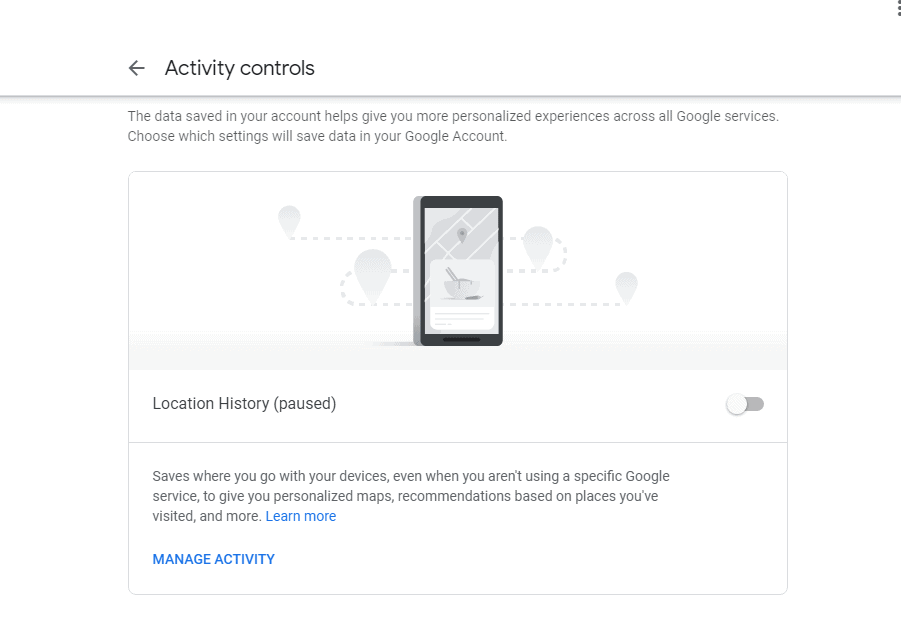
  • Scroll down and turn off the “Location history” toggle.
  • Tap on “Pause” on the next screen.

How to delete Google Maps history in the Browser

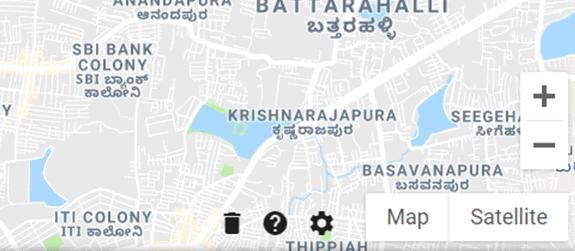
If you are using your desktop, then simply 

Screenshot_12.png

How to turn off your location history in Google Maps in the browser

You can actively manage your travel history and also turn off location history altogether. Here is what you need to do:

Screenshot_1.png
  • You will be taken to the “Activity Controls” page, just turn off the “Location History” toggle and you are good to go.
Screenshot_2.png

How to clear off the Google Maps App data

While you In order to clear off the offline maps, and cache data, all you need to do is:

  • Launch Google Maps in your device.
  • Tap on the Menu Button and then “Settings”
  • Scroll down to About, terms & privacy”
  • In the next screen, scroll down and tap on Clear application data”.
  • Tap on “Ok” in the pop-up to confirm.

That is it! Erasing the Google Map history through the application and browser is fairly easy. Once you delete Google Maps history, you will no longer get suggestions when navigating to a nearby location. It is important for you to know that turning off location history and delete the data doesn’t mean that your device’s location services have been turned off as well. Turning off the location history on Google Maps would simply render that application from saving your locations; however you can still use it for navigation.

We hope you find this guide informative and helpful.

Top Apps to Reach Your Top Effectiveness

There is never too much work. Every time you think that there is a limit and your pipeline cannot be tougher, you get even more tasks. Everyone was faced with a period when tasks pile up in a snowball; deadlines ruthlessly approach; as a result, you have to sit at work until 9 pm without even having lunch. Even now, you may need to write an important report, but you are instead spending time on the Internet. If you still think that spending 5 minutes on social networks does not affect your productivity, install the following applications on your computer or smartphone to find out how your precious minutes are actually spent.

#1 – Rescuetime

If you want to optimize your time for your hobbies then the Rescuetime solution will help you. The program automatically runs on the machine it is installed in and counts the time spent on the “bad” sites. You can specify these online platforms to be tracked yourself and make changes to the list any time you need it. The paid version for $9 per month blocks particular sites for a given period and monitors the execution of tasks from your list.

#2 – Crocotime

The program is designed more for corporate than for personal use. With its help, you can see what one or several employees do during the day, as well as analyze the effectiveness of their work. There is no free version; only a trial period of 14 days is offered.

#3 – Freedom

The program works in any browser, on any computer and phone. Unfortunately, there is no free version, but an annual subscription will cost you only $2.42 per month. A program can block websites, applications, and even access to the Internet if you specify it in program settings.

#4 – Stay Focused

It is a Google Chrome extension that improves your productivity by blocking access to sites that you list as unwanted while you work. You can use it for free but only in one browser. In case any extra access is needed, you should pay for the subscription.

#5 – SelfControl

Set a time period, add the sites that prevent you from working to the blacklist, and press the “Start” button. As a result, you won’t be able to access at least one of them ahead of time even if you restart your computer or uninstall the application.

#6 – Pomotodo

It is a timer that will help you cope with all the tasks on time. You just need to fill out your to-do list in advance and start the application. The rules are simple: after every 25 minutes, there should be a break for 5 minutes, while after 100 minutes of work, a break of 10-30 minutes is needed.

#7 – Forest

It is an application for iOS and Android that helps you not to be distracted by the phone, concentrate on work, and “grow a tree” in the application. To run Forest, you just need to set a timer and start doing things you need. While you work, your tree will turn from a small sprout into a strong plant. If you decide to exit the application or switch to another program, the tree will die.

How to Finish the Work on Time?

When the deadline is close, and you have not yet started working on a task, you need to go to extreme measures. The above applications will prevent such a situation and will help you achieve great results in no time. Try it yourself!

The 5 Best Android Firewall Apps 2020

0
Screenshot_7.png

For any Android user, managing the applications and their individual data usage is a hefty task. You have no control over how frequently an application is able to access your Internet connection.

When a particular application is using your Internet services in the background, it also puts your private information at a high risk because there are many malicious applications out there which send your data without any permission.

If you are looking for ways that can help you save some data and increase security for your Android device, then your best possible solution is getting a Firewall application which gives you multiple options to block access to the Internet. A firewall app acts a monitoring tool which will actively record the incoming and outgoing traffic, thereby giving you good control over how your Android device communicates with the Internet.

The Firewall app can block suspicious traffic, thus maintaining your security. When you install a firewall app in your Android device, you get to allow/block Internet access for individual applications.

Now, that you know what exactly a firewall app does; you can very easily download and install one to increase the security of your Android device. The best part is that these firewall apps are available on Google Play Store, so you wouldn’t struggle in finding one. 

To make it further easy for you, here is a list of 5 best Firewall Apps for Android that you can get in 2019:

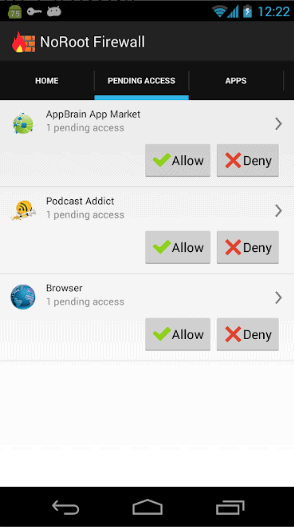
NoRoot Firewall-The best Firewall App for Unrooted Android Devices

Screenshot_2.png

The first app in our list definitely has the best features when you compare it with other available options for an unrooted Android device.

NoRoot Firewall manages all your apps and allows you to have total control over which applications can have access to the Internet including both mobile data and Wi-Fi. You will be able to monitor and analyse the Internet usage for individual apps.

It will prevent your private information from being sent to the Internet and you can use the app to block the access to particular websites. In the beginning, the app’s user interface may seem a bit complicated for a beginner with all the configuration options. However, once you get a hang of it, things will certainly become simplified. The only downside of the app is that it won’t work on IPv6 addresses, but this doesn’t make the app less useful.  For all the amazing features and free cost, if you want to give it a try, then you can download NoRoot Firewall app from here.

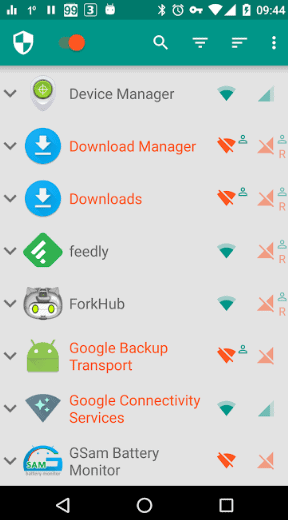
NetGuard- Simple to use Firewall App

Screenshot_3.png

Another, great firewall app to block Internet access for individual applications, NetGuard will provide you both simple and advanced options to increase your device security.

With NetGuard, you will be able to individually give permission to apps and websites to use your Internet services. The app has an in-built VPN, which needs to be enabled in order to configure all the apps and addresses in the device.

The best part is that NetGuard helps you in saving data consumption and increases your device’s battery life. It will monitor and record the data usage for each app in your device and will notify you when a particular app gets access to Internet.  The app also has some advances features such as blocking specific IP address for individual apps, the option block while roaming, etc.

NetGuard is constantly developed and supported. Even though the app is available for free, but to unlock the more advanced features you have make in-app purchases. 

With a clean interface and simple settings, this open-source firewall application is quite handy and will give you a one-tap solution to manage all apps in your Android device. 

Get NetGuard from here.


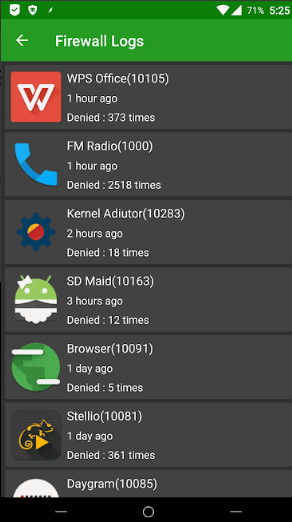
AFWall+ – Needs Rooted Android Device

Screenshot_4.png

AFWall+ provides you a total control over the applications; however it needs root access to your device. So, you have to root Android device before you get it installed. 

Once you have rooted your Android, you can monitor and control internet access for both system and installed applications. It

When it comes down to features, AFWall+ wouldn’t disappoint you. it comes with a variety of configurations and filters that you can play around with such as hiding apps, option to lock app settings, export rules, change preferences, multiple profile support, etc. The app supports LAN, VPN, and tether. 

It is basically a front end app which lets you prevent apps from accessing data services in a fine-tuned manner.

Rooting you device can be a little tedious task, but aside from that AFWall+ has a very simple interface which works well on almost every Android device. If you want a firewall app that offers ultimate control and security, then get AFWall+ from here. And, it can be downloaded for free from here. 


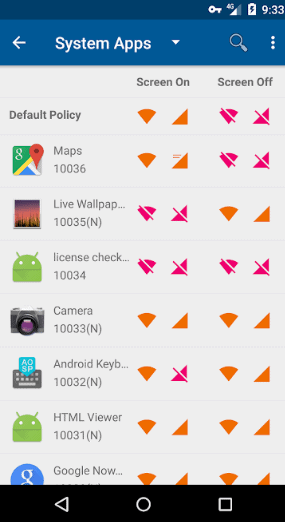
Mobiwol: NoRoot Firewall- Simple, No-Nonsense Android Firewall App 

Screenshot_5.png

Mobiwol takes the prize for the amazing visuals and intuitive user interface. With a single tap, you can restrict internet connection for both system and installed applications.

The best feature of this firewall app is that it allows you to restrict individual apps from accessing Internet after a certain usage limit. Once the application reaches a particular usage limit, Mobiwol will block further data usage. It will also alert you when a new application tries to access the Internet service.

Mobiwol offers you both foreground and background options to allow or block access to Internet for selected applications.

This is the perfect app, if you are looking for something less complicated. The app can be downloaded for free, but it does run a lot of annoying ads. Get Mobiwol from here.


NetPatch Firewall-Blocks Traffic even when the Screen is Off

Screenshot_6.png

Similar to other firewall apps in this list, NetPatch also provides control over individual applications in your Android device for both mobile data and Wi-Fi. However, what makes this particular firewall app stand out from other available options is that you can allow/ block the apps from using internet while the device screen is off. This feature helps you save a lot of data and battery of your device.

NetPatch also allows you to block specific websites, addresses and create your own domains, settings, etc. It will protect your private data and alert you in any application is trying to access the Internet. 

Also, it exclusively supports Shadowsocks and ShadowsocksR proxy which is usually not found in other similar apps.

The application is free and works without root. However, for more advanced features such as ability to view network logs, block domain names, etc. you can go for in-app purchases. 

Get NetPatch from here.

Wrapping up:

That’s it for now. There are a lot of other options that you can find in Google Play Store. However, the ones listed here will indeed fit all your application management needs. These listed firewall apps will give you freedom to customize the network traffic and control over the data usage. 

We hope you find this post informative and helpful.

10 Best Hacker TV Series and Movies Every Techie Must Watch in 2020

0

Screenshot_9.png

With the ever growing world of television, it is no longer peculiar to show some of the latest technology. In fact, hacking which was once limited to just a few scenes in a TV show or movie just to add some mystery and charisma, has now taken the main plot of the story.

If you are a technology enthusiast who is done with the same prosaic and exaggerating drama series, and looking for some intriguing content based on hacking to watch, then this is the right perfect post for you.

We have brought together a list of some of the best TV series and movies that a tech buff should absolutely not miss. Without further ado, let’s dive in to the top 10 hacker TV series and movies that you can start watching today.

# TELEVISION SERIES

Mr. Robot (2015)

Screenshot_1.png

Mr. Robot revolves around an introverted cyber security expert named Elliot Alderson who gets recruited by a vigilante group of hackers who call themselves as FSociety, to bring down corporations by erasing all debts and financial records across the globe.

The protagonist is constantly struggling with anxiety disorder and depression while battling with his job as a cyber security engineer during the day and being a part of the hacker’s group by the night.

The show has millions of viewers worldwide and has received astonishing reviews for the close to perfect depiction of various technologies, programming, devices, and hacking to penetrate a secure network to destroy the evil corporations. You probably wouldn’t be able to find a movie or television series like Mr. Robot which shows this realistic world of computing.

Silicon Valley (2014)

Silicon Valley focuses on the startup culture and illustrates the ups and downs of a corporation run by a bunch of engineers. This television series is based on the life of Richard who is a computer programmer.

Richard and his friends decide on creating a compression program that has the potential to change everything. The series does show a lot of tech and hacking but with a comic touch. Revolving around the high-tech gold rush of Silicon Valley, it shows that people who are more qualified are getting tough competition from the stooges.

Person of Interest (2011)

Screenshot_3.png

One of the best television shows based on geeks, Person of Interest has been acclaimed for the accurate depiction of technology and how AI it can help in solving criminal cases. It is based on the life of an ex-assassin and a wealthy programmer who are trying to make life better for people.

They together create a super computer sentient Artificial Intelligence which identifies civilians who would soon become the victims of crimes.

Named as the Best Action Series, Person of Interest premiered its last season back in 2016.

Halt and Catch Fire (2014)

Screenshot_4.png

Don’t like watching a series and then waiting for the next season? Well, then good for you because Halt and Catch Fire premiered its final season back in 2017. You can watch all the four seasons of the series on Netflix now.

The series is based on the tech world which set in the early 80’s where it portrays the personal computer roar through the perspective of an engineer, a visionary, and a prodigy who fight the conventional mindset of those times. The series has gained worldwide popularity after the third season.

The IT Crowd (2006)

Screenshot_5.png

This British sitcom revolves around three people who make a team and work in a fictional corporation. Even though the series doesn’t depict a lot of technology, but it shows various incidents of hacking. It ended back in 2013, after running successfully for eight years. The IT Crowd is still popular among the television aficionado and all the 27 episodes are available on Netflix.

This comedic series of technical support workers will definitely hit home for those who are a part of the Information Technology industry.

Scorpion (2014)

Screenshot_2.png

Scorpion is another popular show which took inspiration from the real life of Walter O’Brien who had hacked NASA at the age of 13 to get blueprints for his bedroom. 

In the series, the protagonist creates a network of super-geniuses across the world as his own risk management company to fight against the intricate threats of the contemporary world.

# MOVIES

Hackers (1995)

Screenshot_7.png

With Angelina Jolie and Jonny Lee Miller as leads, Hackers is based on a group of teenage hackers who plan on stealing millions from a company. When their plan gets exposed, former hacker Eugene Belford accuses the group of a corporation extortion conspiracy. The Movie follows the protagonists struggling to prove their innocence while hiding from the authorities. 

WarGames (1983)

Screenshot_6.png

Start with this particular movie, if you are someone who is new to the genre of hacking. One of the classics, WarGames stars Matthew Broderick who plays the role of young David Lightman. 

David, who is searching for games online, ends up hacking the supercomputer of the US Military. However, things take a drastic turn when he accidentally activates the nuclear weapon.

The movie revolves around David’s struggle to somehow stop the nuclear arsenal and prevent a global crisis. WarGames received enormous popularity and positive reviews for accurate portrayal of hacking back in the 80’s.

The Matrix (1999)

The movie is based on the life of a computer programmer Thomas A. Anderson who is living two lives. By night Anderson takes the role of a hacker named Neo, who is constantly questioning his reality. When contacted by a government declared terrorist- Morpheus who is also renowned hacker, Neo finds himself in a world which is taken over by a race of machines. The story revolves around Neo’s rebel against the machines which are feeding on human body heat and imprisoning their minds in an artificially created world- The Matrix

Blackhat (2015)

Screenshot_8.png

Based around convicted but extremely talented hacker Nick Hathaway, Blackhat is indeed an incredible movie. 

Nick is asked to work for a joint US and China Team where he needs to track the criminals responsible for the cyber attacks that happened in Hong-Kong and China. The opportunity helps him in finding a way out of his prison sentence of fifteen years, however he eventually falls victim to the power game between the two countries. 

Critically acclaimed worldwide, this movie will definitely fascinate you if you love the amplifications of hacking and cyber security. For a techie, the movie may seem a little exaggerated; however, once you give it a try, Blackhat will unquestionably make it up in your most favorite movies list.

Wrapping up:

Television series have ample of time to depict hacking in the right standpoint; however that is not the case with a 2 hour movie. But, the ones listed in this post will never disappoint the tech geek inside you. This list was based on the movies and television series which had got the best ratings and depict the hacker culture in the true sense. 

Also, this list is definitely not exhaustive. Once you are done with these, you can also give a shot to CSI: Cyber, Intelligence (2014), Stitchers (2015), Almost Human (2013), The Conversation (1974), Open Windows (2014), Algorithm (2014), The Imitation Game (2014), Untraceable (2008), Firewall (2006), Ghost in the Shell (1996), The Matrix, and Office Space.

Useful list of WordPress plugins for content marketing

So, you want to create some killer content for your website. What do you do? Well, apart from getting some solid writing skills yourself, you have to consider several tools and plugins that will make writing in WordPress easier for you. Such tools are designed to improve your content, make your blog posts more appealing, give them a fresh twist. Below are some of the most relevant reasons why you need similar plugins, but also some of the best plugins available for WordPress that will improve your writing tremendously. 

content marketing wordpress plugins


Who do you need WordPress plugins for content marketing?

Many businesses usually guess which the best content marketing approach is, in their case. This generates millions of new copies each day. And, of course, with so much content floating in the online, the competition between publishers is keen. In this case, guessing and creating content based on your guess is far from being the best strategy you can embrace. 

You need smart tools to create rock-solid content, and you need to choose the best ones out there. Fortunately for you, the ones presented below will help you embrace a more data-driven content marketing strategy, to generate more traffic, make your copies more sharable and grammatically correct. All these are relevant enough for content marketing. Overlook one of them and you compromise an entire campaign. So, let’ get down to some of the best WordPress plugins and tools you should consider. 

#1. SEMRush

This incredible tool is used by hundreds of SEO experts all over the world. This gem allows you to gather information on competitors and their SEO campaigns and strategies. This way, you can improve your own SEO strategy.

This plug-in offers you more insights on your competitor’s organic keywords, their ad campaigns, their backlink strategy, and more than this. This plugin also allows you to have a better image on your own campaigns’ success and development. It can help you have a better look at your backlinks, keywords, and offers a ton of other useful data, plus, insights on the keywords you can easily rank for. This will allow you to improve your content strategy. 

#2. Grammarly

If we’re discussing online grammar checking tools, Grammarly may be the best out there. It works wonderfully for WordPress users, but it also comes as an extension for Google Chrome, Microsoft Edge, and Firefox. 

When installed on WordPress, a small index will pop up at the bottom right corner of your writing area. Here, you will see the number of errors in your content. The type of errors included varies from spelling errors to grammar mistakes and contextual inconsistencies. These will all be highlighted as you write your content. The plug-in also offers suggestions and corrections, making a great tool for both native or non-native content writers.   

#3. reSmush.it

When it comes to WordPress speed and performance, these variables can be affected by a series of things. Image loading speed is one of those, and it can place your website down on the Google search results. This usually means you have to find effective ways to optimize your images for the content you write before uploading them. Well, fortunately for you, reSmush.it is the perfect WordPress image compression plugin you can find. 

It compresses images to the perfect size for them to load fast, but without reducing their quality. The best part about this tool? It can be used on older images to optimize and make them load fast and make your website rank higher. 

#4. Yoast SEO

Everybody has heard about the Yoast SEO WordPress plugin. This is the tool that helps you optimize your website and ensure Google recognizes it. Although Yoast SEO is one of the most powerful WordPress plugins, its power is usually underestimated. Rarely, people use it at its full potential. The plugin has both a free and a premium version, and if you’re not using it already, make sure to install it ASAP. Because it beautifully packs all the features you might ever need, Yoast is used by both professional and amateur marketers. The features that will come in handy the most? 

  • Readability checker;
  • Content analysis features – these will help you check if your content is SEO-friendly enough;
  • Keyword and internal linking suggestions;
  • META title and description features;
  • XML sitemap generator;
  • Canonical URL features, that will help you avoid duplicate content and the penalties that come with it. 

#5. Canva

Content images matter more than you think. But copyright issues usually come to burden your search for the best images for your copies. Canva is here to solve this burning issue in a simple and straightforward way. The plugin allows content marketers to create appropriate images for their blog posts, thanks to the impressive number of editing features it has. It also offers content marketers a lot of flexibility. The tool can be used to create an array of imagery because it offers plenty of templates, icons, banners, graphics and infographics you can use. Once you create the right type of image for your blog posts, just export it and upload it un your WordPress blog. 

#6. OptinMonster

Over 75% of the online users worldwide are unlikely to return to a website once they leave it. Well, OptinMonster will help you overcome this small issue. Designed to grow your subscriber base in an easy and effective way, this WordPress plugin will just make a subscribe form to pop up. The word goes that this amazing tool has high converting opt-in forms and succeeds at encouraging visitors to come back to your platform. 

#7. Hemingway

If you want to create powerful and concise content, the Hemingway Editor is the tool you’re searching for. Although it doesn’t offer the same in-depth overviews like Grammarly, this tool can still help you improve your writing style. The best way to use it is online, at http://www.hemingwayapp.com/. Once you Copy & Paste your text into the editor, you will notice different sentences are colour coded. The legend on the right side of the screen is pretty self-explanatory, too. 

  • Structurally complex sentences are highlighted in yellow. Work on these until you reach a simpler form. 
  • Sentences confusing to the reader are highlighted in red. Adjust your wording until you reach a better form. Once you succeed this, the red highlight will vanish. 
  • Words highlighted in purple are fancy ones, and you can replace these with simpler forms. 
  • Words highlighted in blue are adverbs, and your copies would sound better without these. 
  • Passive voice use in highlighted in green. Although passive voice use is acceptable in some sentences, others are ruined by it. 

Overall, aim to reach a readability score of 8 or lower. This means your copies have the right balance between complex and simple sentences. 

#8. Infogram

Readers love data. But to make it more accessible and increase reader engagement, think about creating some infographics for them. It has been proven that graphics, charts, maps, and infographics have better reader responses. Whether you want to give your content a creative kick, make it more informational, or engage better with your audience, give Infogram a try. This amazing tool allows you to create charts and infographics in an easy and straightforward way. 

#9. Easy Word Count

Most content online is word count-based. The explanation is easy. No matter how well-written, resourceful, and insightful your content is, make it too short or too long, and you lose readers from the start. Easy Word Count is a tool that WordPress users can enjoy to tell them exactly how long their content is. You may think the word count you see in Microsoft Word gives you an accurate number, but the number is usually a bit lower than what it shows. To make sure you make the most of your content and you achieve the desired number of words per copy, use Easy Word Count. It shows word count with and without spaces, and you can work around the text you have to make it reach the ideal number of words. Aim for blog posts anywhere between 750 and 2000 words. 

#10. Monster Insights

Want to take a better look at how users find and use your WordPress platform? Monster Insights is the tool you need! This little gem allows you to manage in detail Google Analytics website tracking services. It allows users to add, track, change, and personalize all the data coming from Google, but its features go beyond these ones. For instance, you can view the top blog post, the money-making pages on your website, the referral source, and more. 

Besides, you can simply install the plugin and see all this beautiful data from your WordPress dashboard. The plugin does all the hard work you have struggled until today! 

#11. Content Style Guide and Grammar Checker

Spelling and grammar mistakes can spoil the quality of your content. A great idea shadowed by a typo. This isn’t ideal, but we are humans, and we are prone to making mistakes. No matter how experienced you are as a writer, you can never trust your own proof-reading skills. You’re subjective and you are already familiar with the content – you already know what you were trying to say. This clouds your judgment a little, but Editist’s Content Style Guide and Grammar Checker is here to help! What makes this plugin perfect for savvy content writers? Well, there are a couple of features you should know about. 

  • Improve your writing style by following some of the best writing practices;
  • Work on the text that doesn’t follow those. You can easily identify it by the highlights shown by the checker. 

#12. Just Writing

Many content creators struggle with the writing experience they have in WordPress. The process itself can be daunting, but Just Writing is a plug-in which can help improve the overall writing experience. By adding the “Writing Mode” button in WordPress, you will be able to enjoy a series of smart and entertaining features, like different background colours, fonts, separators, and more.

#13. Revive Old Posts

This smart tool helps you bring old blog posts back to life! By adding this plugin to your WordPress account, you can share automatically old content on hype social media platforms, like Facebook, Instagram, and Twitter. 

This tool is great for timeless content, the type of copies that will never be dated. To make the most of it, you just have to go to the Account tab and click on the social media platforms where you want to share your old copies. Besides, you can use the following features to give these a fresh vibe. 

  • Video and image share
  • Hashtag use
  • You can also eliminate certain posts that are no longer relevant for your brand

By bringing back old content to life, you will be able to make the most out of useful pieces of advice and grow website traffic. 

#14. WP Social Sharing

Since we already are at the social media share part, WP Social Sharing is another amazing tool you can use to make your content more sharable. This plugin helps you include more dedicated buttons on your website and make your content more sharable instantly. You know high-quality content is only half of your job, so make it easier to share, to make your campaigns more efficient! 

#15. Editorial Calendar

This content organizer tool will help you improve your content creation process. It allows writers to keep a close eye on the evolution of their copies and ensure they’re always on track. The smart features of this Editorial Calendar make it flexible and suitable for a series of parts of the writing process: from content creation to publishing and management, the easy drag-and-drop build of the plug-in makes organization a breeze. 

Pick and choose plugins from the ones presented above. Experiment and choose the ones which make you happier with your work and with the results of your content marketing campaigns. Used as advised, they can help you improve the overall quality of your campaigns tremendously. 

#16 RoundupWiz

RoundupWiz is a WordPress plugin that will helps with your website SEO Content Strategy. You don’t need to write a single article in the traditional way. Instead, the content can be easily updated frequently. You can use affordable writers and still have amazing content. With RoundupWiz, you can be much smarter and more strategic with your cold pitches. How-to articles and listicles can be created and then reach out to influencers and experts to share their knowledge. They will fill out a simple form with their tips and it gets published right into your article. You will get unique content and they get attribution.

About the Guest Author

Adriana Veasey is a content creator, editor, and writer with a Digital Marketing Master’s Degree. She is an active collaborator on platforms like Forbes, WoWGrade.net and Studicus.com, with hundreds of online marketing-oriented articles. 

How To Improve Your Website Traffic To Your Website

0

All of your efforts to come up with an innovative and responsive website will be useless if you’re not getting any traffic. No traffic means no online visitors, and no online visitors means no profit. This is probably every entrepreneur’s worst nightmare. If you have no idea how you can improve website traffic, let this article help. You’ll be surprised how simple tips can go a long way to improve traffic on your website.

Before implementing any strategies to improve your traffic, you should know the amount of 

traffic your website receives first. You can do this by checking your website traffic stats or by using online tools that are usually available for free. Once you’ve determined the quantity and quality of traffic your website has, consider implementing the following tips:

1.    Optimize Your Web Content

This is one of the easiest ways to improve your website traffic. If you want online visitors to check your website, give them reasons to do so. Depending on the nature of your business, publish content that is relevant to your target audience. If you’re selling apparels for young professionals, write articles on how the proper attire can boost their confidence at work or help them land a job. All of the content on your website should be aimed to educate your target audience and let them know how their lives will improve once they patronize your products and services. 

If you’re planning to use articles, make sure that it’s written using simple words. Put yourself in the online visitors’ shoes and determine what possible keywords they could use when looking for your website. The more relatable the keywords are in your content, the easier it’ll be for them to reach your website. 

2.    Use Social Media

Contrary to popular belief, improving your website’s traffic doesn’t have to be daunting or expensive. With the right platform, you’ll be able to improve your website’s traffic in time—and using social media is a good start in achieving this goal.

You can do this by creating a profile in different social media platforms and use these for business purposes. Since a lot of people are on social media, you can post the link of your website to attract more traffic. This will make it easy for online users to be redirected on your website. However, to ensure that all of your social media efforts will actually bring in traffic to your website, be careful about which platform to use and what time should you post. These factors are vital for your online reach. 

3.    Do Some Guest Posting

If you have been using various digital marketing strategies for your business, you’d know how important content is. The quality and number of content you publish can significantly affect the traffic your website can receive. Aside from making sure that your website has high-quality content, consider reaching out to other websites for guest posting. This is an effective way of marketing your website while creating healthy relationships with other players in the industry. 

Guest posting is simply the process of writing a blog or article for another website. This strategy is often used by small or new businesses in order to gain more traffic. These businesses will usually tap the help of bigger businesses—ones that have a lot of followers and good track record online—for their articles to be published. 

4.    Study Your Competitors

Finding solutions to improve your website’s traffic is like swimming in an open sea: you’ll be bombarded with a lot of options that you’ll be clueless which works and doesn’t. To help you narrow down your search, take the time to study your competitors. This means going through their website and taking note of the strategies they’re using to improve website traffic.

For example, if you see that your competitors are using Google to entice more online users, focus on using Google Ads on your website. The key here is to look for strategies used by your competitors, benchmark on these strategies, and use these as your own. It’s safe to assume that what works for your competitors will also work for you, given that you’re targeting the same audience. 

Consistency Is Key

Regardless of the technique you’re eyeing to use, remember that you can only improve your website’s traffic if you’re consistent with your efforts. No matter how expensive your technique is, if you’re only going to use it for a day, don’t expect that your traffic will improve. The longer you use a specific technique to improve your website’s traffic, the better the results you’ll experience in the long run. 

The Best Xbox Emulator for Android in 2020

0

Even though the latest enhanced versions of Xbox seem bigger and better than ever before, but there are few gamers out there who still want to play the original Xbox games. If you are one such vintage game enthusiast then, then fortunately there is an excellent way to play all your old-time favorite Xbox games collection without spending lot of money in buying an Xbox console. By downloading an emulator for your Android device, you can play games whenever you want on the go. An emulator will virtually emulate the experience of the original Xbox on your Android.

xbox games for android

In a nutshell, finding and installing an Xbox emulator for Android is a bit of tedious process. There are plenty of emulators available on Google play for other gaming consoles, but you would not find any Xbox emulators on the Google Play Store. It is challenging to get an emulator because Microsoft has very strict policies when it comes to hardware rights.

However, in the post we have specified the best method to download an Xbox emulator that would work perfectly for you. Before we dive into the process, you need to know how exactly an Xbox emulator works.

What is an Xbox Emulator?

The Xbox emulator is actually an APK (Android Package Kit) file which allows you to run applications on your Android device. This APK file is a collection of different files including audio, video, source code, etc. which are need for installation. 

Also, since this APK app is not approved by Google Play, you have to download the file from an unauthorized source. That is why, it is crucial to search for a trusted source as often these APK files available online can be plagued with malware which can harm your device. 

Once you download and install the APK file on the Android device, it will imitate the Xbox gaming screen. You will get the buttons on your device’s screen which can be used as a controller while the game is running.

How to download and install the Xbox emulator (APK File)

To download the APK app from the internet, you have to make a few changes in your Android device settings. First, make sure that your device runs on Android 4.0 or a higher version. 

Here is what you need to do then:

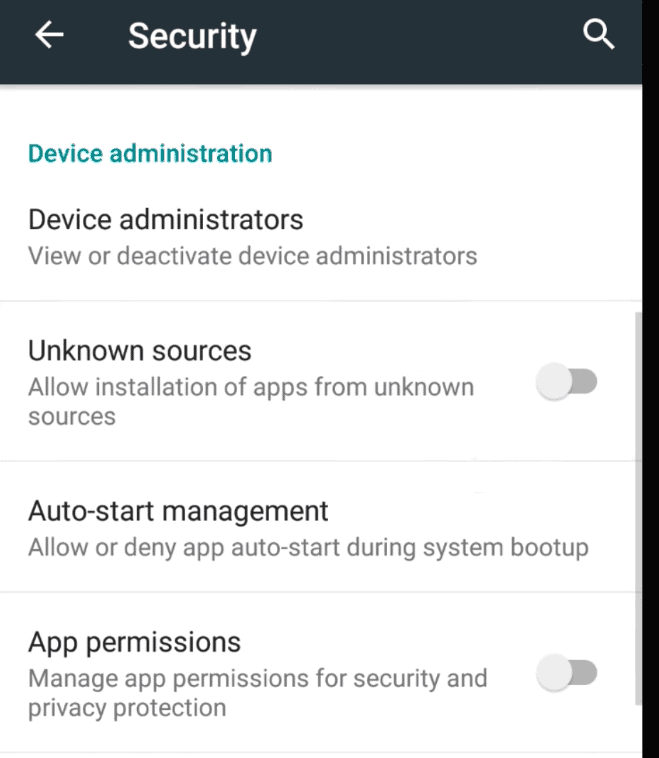
  • In your Android device, navigate to “Settings” and then scroll down to “Security”
  • Under the security tab, enable “Unknown Sources”
Screenshot_1.png

Now, you can download the Xbox emulator file from here (Proceed at your own risk)

Simply proceed with the instructions displayed on the screen to install the file in your device. 

Once you have successfully installed the APK file, reboot the Android device and you are good to go.

You can now use your Android device to play Xbox games. (You would have to download the game file that you want to play and transfer it to the SD card in your Android device.)

Not able to download the Xbox emulator?

One of the most common reasons for not being able to install the Xbox emulator is the restriction of a particular region to access the download website.

To download and access the Chinese APK, you may need to install a Virtual Private Network (VPN).

With the VPN extension, you will be able to change the region and get the APK file even if you are in a restriction area.

Wrapping up:

There is no denying to the fact that Xbox is indeed the best gaming console out there and every game lover would want to try Xbox games at some point of time. As, it is not that easy to play Xbox games on an Android device, an emulator comes off as a great aid in such case. An Xbox emulator can easily turn your Android device into a temporary Xbox gaming console and once you are done playing, you can also get rid of the file.

The best aspect of have an Xbox emulator for Android is its portability, you can take the device wherever you want without being restricted indoors. This particularly comes handy when you are on a vacation and don’t want to miss on your beloved game.

The other benefit that you get with these emulators is obviously cost-effectiveness. Even though Xbox console is a powerful machine with some really amazing features, but it doesn’t fit in everyone’s budget. Therefore, an emulator is the next best available option if you want to enjoy your favorite Xbox game. However, you should know that you wouldn’t be able to play all the Xbox games on your Android device with an emulator. 

Again, ensure that you are cautious enough while downloading the APK file off from the internet because the emulator is a third-party file. We hope you find this post helpful.