Home Blog Page 106

What are Underwater ROVs and Interesting facts about ROVs

0
The remotely operated vehicle Deep Discoverer being recovered after completing 19 dives during the Windows to the Deep 2019 expedition. Image courtesy of Art Howard, Global Foundation for Ocean Exploration.

ROV’s or remotely operated underwater vehicles are robots that accomplish underwater tasks for crews. The crew is mostly on the surface of a boat to which this ROV is tethered. A beneficial product the same helps in search or recovering items. 

Inspection, repair of equipment, scientific analysis and cable laying among other benefits. The ROV’s that are sent in deep water are tethered by a stable system to avoid any discrepancies and here we tell you some features and the types of Underwater ROV’s that you should be aware of.

Features 

The ability of an ROV is measured by what kind of instruments is attached to it. On an outset, an ROV can have a camera, lights, and aquatic thrushers on it without any problems. Some other instruments that you would see predominantly on an ROV are sonar, magnetometers, mechanical manipulators, other camera types, cutting and shearing tools.

 Apart from that, you can also have other instruments that help in monitoring the environment and its characteristics. Electrical systems can be outfitted in the watertight compartments filled with oil. On the other hand, high power tools receive power from hydraulic pumps. 

Types of ROV’s 

There are five types of ROV’s that you can choose from and here is a brief detail of each:

Small electric ROV’s- These are the smallest of ROV’s that can be used. They do not have a hydraulic pump with them. Hence, they can only delve into depths of 1000 feet at maximum. You can use these ROV’s only to make any observations hence making their purpose limited.

High capability electric ROV’s- They also do not have a hydraulic pump however you can use them for purposes like deep-sea observations and deep-sea illuminations. Most of the high capability ROV’s can go into depths of 20000 feet so they are considered suitable for military and scientific industries.

Work class ROV– This type of ROV has a small iteration of hydraulic pump use. It can be modified to be used for specific applications and is used for deep-water drilling and any kind of construction work. The depth limit, in this case, is 12,000 feet at the maximum.

General class ROV- The general class ROV is run with electricity but has primary features like manipulator and sonar. It also has a five-horsepower motor to provide underwater movement.

Heavy class ROV- They are supposed to be the most useful ROV as such. A heavy class ROV is provided with multiple functionality manipulators and the motors can produce several hundred horsepower energy. Though the working depth is limited to 10,000 feet, they can lift to 12000 lb weight.

Conclusion

A remotely operated underwater vehicle offers you more scope than any other. It is a quick method to get your underwater tasks handled in the most efficient manner possible. While purchasing one make sure to do your share of research so that you are not fleeced with an average quality product. The ROV you buy should give you a benefit of all the above features and tackle your tasks with utmost efficiency.

5 Ways SEO Is Different From Other Forms of Marketing

0

By now, you may have already learned and read a lot about SEO (Search Engine Optimization) all over the World Wide Web. SEO refers to the processes and techniques in place that help website land the top page results in search engines. In a very competitive digital industry, landing on the first search results should always be a top priority goal. Hence, the need for website owners and creators to fine-tune their SEO techniques.

But, why is SEO so important and effective? What sets it apart from other forms of marketing? Read through below to find out.

1. Attracts Quality Traffic

SEO doesn’t just attract ordinary traffic. It brings in quality traffic to your site. This is unlike any other form of marketing. Hence, the reason why SEO stands out against other forms of marketing. People are searching actively for answers to their problems and questions over the Internet. This means that they’re searching for the solutions you provide for their problems.

Through this, you don’t even have to call or pull people to your site. The content of your website is already your marketing strategy in itself. People are searching for it, and they’re persuaded enough to read what your site has to offer. Thus, whenever a user keys in a search, this means that they’re already interested in the products and services that you’re posting.

2. Cheaper Than Any Other Form Of Marketing

Marketing and advertising can be costly. This can even comprise the most significant bulk of your company’s expenses. If you’re looking for a more cost-efficient way of advertising, SEO is the way to go. 

The only costs that come into place happen when you hire the help of competent SEO agencies to work for you, such as FloodLightSEO.com. But, if this is something that your team has already mastered, you don’t even have to hire anyone else anymore.

SEO is cheap, easy, and, most of the time, even free. Examples of techniques that you can apply in SEO include:

3. Very Measurable

Applying different marketing strategies is not enough. You also need to know how effective these strategies are. Thus, whenever you apply a marketing strategy on your site, you need to be able to measure the efficacy of these strategies. That way, you’re able to see if these are indeed working well or not. If your strategies don’t translate to the goals you intended to achieve, you can correct it early on.

With SEO, you’re working with a very measurable form of marketing. Here, you’ll be able to see how much traffic is coming in and out of your website. You can also study the activity and trend of every site visitor. 

Activities that you can also measure include:

  • Posting call to actions on your website
  • Study hard data and analytics
  • Post contact forms
  • Redirect numbers

4.  Results To The Highest Conversions

The traffic that’s coming to your website shouldn’t just stay as visitors. This population should result in a conversion. This means that upon entering your site, this traffic population is converted to paying customers. 

With SEO, you’re assured of higher conversion rates than any other form of marketing. This is because, with SEO techniques in place, you’re competent in meeting the needs and the demands of Internet users.

5. Builds Strong Brand Awareness

Yes, other forms of marketing can also build brand awareness. But, out of all the different types, SEO is the best. 

SEO can achieve this by putting you right ahead of the target audience that you wish to attract. Whenever Internet users search, they use words to type on search engines. These words are more than just ordinary words. They’re keywords that you’re able to incorporate effectively through SEO.

That said, here are tips on how you can effectively use keywords on your site:

  • Make a list of the words that you’d usually type when you’re looking for particular information that you provide.
  • Use keyword search tools.
  • Create a list of keywords that you’re going to use in every post or content.

Conclusion

Without a doubt, SEO is one of the most powerful forms of marketing. One cannot merely discount its effectivity. Plus, it’s very straightforward since you get your message right away to your visitors. 

If you haven’t already started practicing SEO on your site, perhaps now’s a good time for you to get started.

How to Download Facebook Data – Complete Guide to Backup Facebook Profile

Facebook is a well established social networking website. Your facebook data may include photos of you and your family, places you have visited, some posts disclosing your political beliefs, facebook search inquiries and a lot more personal about you. Facebook has made it simpler to manage your data. But many facebook users have not even any idea about that. Many users do not even know that they can download their facebook data.  

Facebook has put extra efforts to explain privacy controls and help users find accurate information about what and how much Facebook knows about them. It also launched a new feature called access your information. This feature has a more user friendly interface discovering, downloading and deleting personal facebook data. Some users use third party engines and browser developments to download facebook data. But that is not required because facebook offers this feature to download all facebook data through facebook. 

What does your facebook data contain?

  • About me (personal information including name, education, work, relationship status etc)
  • Account status history (when your facebook account was activated, deactivated, reactivated or deleted)
  • Active sessions (all active sessions including time, date, device, IP address, browser information and machine cookies)
  • Advertisements clicked (time, dates and titles of advertisements clicked by you)
  • Address (your current and past addresses you had on your facebook account)
  • Alternate names (list of alternate names you have on your account)
  • Photos and videos (you have uploaded or you are tagged in or you have shared)
  • Applications (all applications added by you)
  • Birthday perceptibility (how your birthday appears on your facebook timeline)
  • Chats (complete message history including the messages you have deleted or you never respond)
  • Check-ins (the places you have visited and checked into)
  • Credit cards (in case you make purchase on facebook)
  • Current location (the current location you have added to your timeline)
  • Deleted friends (your facebook friends you have removed)
  • Events (you have joined or invited to attend)
  • Family (your facebook friends you have indicated as family members)
  • Followers (list of people following you)
  • Hidden news feeds (friends, pages or apps you have hidden from your news feed)
  • Logins, logouts (complete history)
  • Pokes (list of people who poked you or whom you poked)

Why to download facebook data:

There can be many reasons to download facebook photos or other data. 

  • You have lost or deleted your old photos; you can get back from facebook photos (if you have uploaded there).
  • You want the backup of your facebook messages.
  • Lost your mobile phone and you have all your photos on facebook then you can get back.
  • You want to know what kind of information Facebook has about you or you want to backup whole facebook data.

Below I have mentioned a step by step guide to determine, download or delete the facebook data. 

Step1: 

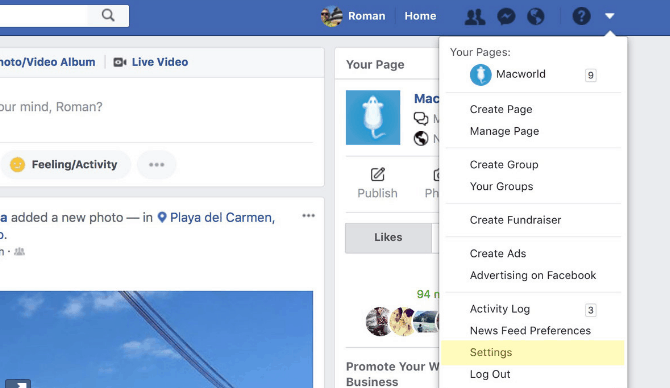
To access the facebook information just login to your facebook account on a web browser. You can’t perform this action through the Facebook application. In the top right corner of the homepage you can see a downward pointing icon (next to the quick help icon). Click that icon and you have a list of options. Select and click “settings”.

C:\Users\rads\Desktop\1.PNG

Step2: 

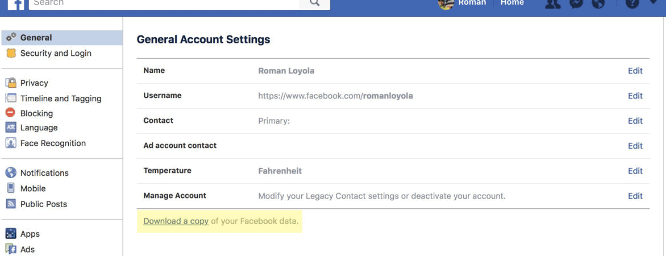
Go to “general account setting” option. On this page you can see your account details such as name, username and contact etc. See the last option on this page “download a copy of your facebook data”. Click this option. 

C:\Users\rads\Desktop\2.PNG

Step3: 

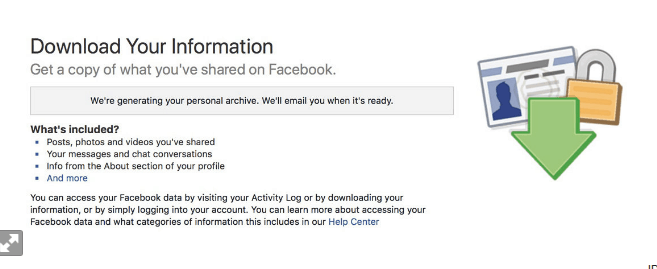
Now the next page contains the information about the download process. You can see the heading on the top of the page “download your information”. Click the link “start my archives”. Facebook will send you a notification saying “it may take a few minutes to create your achieve”. Facebook sends an email to the email address associated with your facebook account to inform you that your data is requested to download. Then it sends another mail to inform you that your Facebook data is ready to download. 

C:\Users\rads\Desktop\3.PNG

Step4: 

Leave your email open to check the notifications regarding facebook data download. Facebook shares a link through email to make sure that the data download request is genuine. 

Step5: 

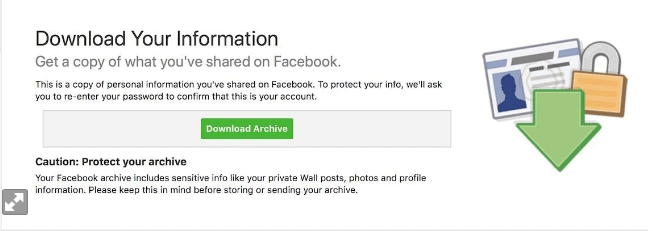
Click the link. After clicking the link you will be navigated to your browser (download your information page of facebook). You have the “download archive” link on your screen. Click this link to start the download process.

C:\Users\rads\Desktop\4.PNG

Step6: 

After that a pop up window will appear on your screen asking you for your facebook password. Type your password (to prove and verify your identity) and click submits to proceed. 

Step7: 

Now the download process has begun. The downloading time varies depending on the file size, amount of data available on your facebook account. If you were an active user then there must be a huge amount of data to download so it will take more time. 

When you download your Facebook data, it is in the form of a local mini website. All the files are arranged in a folder. When you click this folder you have an index.hdm file. If you open this file it will launch in your browser. The first page that appears is your facebook profile page containing a summary of your personal information on facebook. To see what else is there in your facebook data click any of the links present below your profile picture. There may be some major points of interest you want to check before anything else such as messages, photos or security.

So now you have this complete information at one place in your ownership. Now you can keep it or delete it. Click clear to delete everything or click the down arrow for the right of any photo or post to delete it separately. Once you delete something from your facebook account it takes 90 days to disappear from the servers of facebook. 

Conclusion:

So I think this is a very cool feature of facebook.  Many times we lose our precious photos and videos due to various reasons. In that case we want to get that data back. But downloading the photos or videos one by one from the facebook takes a lot of time. So downloading whole data in this way is a better option. So guys, if you also want to get back the photos and videos from your facebook account, then follow these steps and get back easily. I hope the people searching for “how to download facebook data” on Google, now got their answer. 

Why You Should Consider Forex Trading in 2020 ?

0
Forex trading online

The foreign exchange market, often shortened to the forex market or just FX, is the biggest market in the world based on daily turnover. Every day, the market averages over 5 trillion dollars in turnover which means it beats all other markets with huge margins.

The main reason for this is that nations trade currencies to stabilize their and their region’s economy and, naturally, a nation has the ability to trade enormous amounts of currency at once. Although, a considerable amount of that daily turnover is created by retail traders and professional day traders.

In fact, there are many reasons as to why you should consider trading forex and in the post below, we asked the highly-experienced forex traders from BullMarketz.com to share their best tips.

1. Potential Extra Income If Mastered Correctly

The reason why anyone should consider trading forex or any other asset for that matter is the potential of making a profit. It’s the best driving force there is and it’s hard to motivate taking the risks you’ll eventually have to, without a potential pay-off that ways up for the said risk.

With that said, learning how to trade forex properly is not easy and it requires both a lot of time and dedication. The truth is that most people that do trade forex actually loses funds.

So, even though there is a potential to make a lot of money trading forex, you can’t expect it to be a “get-rich-quick-solution. Rather the opposite. But as long as you put in the time and make sure you’re constantly learning and improving, there is nothing stopping you from making extra cash or even creating a completely new income from forex trading.

2. Diversifying a Portfolio Is Crucial

If you’ve already dabbled in investments and trading you need to consider diversification. Keep all your eggs in one basket is never a good idea and if you, for example, already have invested in stocks, then forex trading could be a smart method of diversification.

Now, keep in mind that trading and investments are very different from each other and that it’s often best to try and combine both a diverse investment portfolio with a diverse trading portfolio.

Cryptocurrencies are another great asset class where you can both invest and trade and so are commodities and indices.

3. Learning the Basics of the Financial World

In foundation, the act of learning how to trade forex is learning how the forex market works and how you analyze assets based on news, market updates, and more technical indicators.

In turn, these skills can easily be translated to other markets and financial patterns which could serve you well in other parts of your life, not only as a mean for trading. Generally speaking, an understanding of economic markets is a skill that can be applied almost everywhere.

4. Get Control of Your Emotions

One thing that all successful traders will tell you is that you need to be able to control your emotions in order to trade like a professional. All forms of trading, including forex trading, is associated with risk and you can never let your emotions get the best of you.

Subsequently, all traders lose money at times and placing bad trades is something we all have to get used to. Therefore, trading can be a great life lesson in terms of being able to keep your head in the game even under extreme pressure. 

5. Substantial Leverage Compared to Other Markets

A more technical advantage of the forex market is the use of leverage. In fact, compared with most other markets in the world, forex is the one with the highest levels of leverage on offer.

Leverage is basically a loan offered by your broker that helps you optimize your exposure on each trade which, in turn, can increase your profits. Nevertheless, leverage is a double-edged sword and it can also increase your potential loses so it has to be used carefully.

Bonus tip: Many forex brokers offer other assets besides exchange rates and currency pairs. Forex brokers in Europe tend to support Contract for Difference (CFDs) on everything from stocks and commodities to mutual funds and even cryptocurrencies.

In other words, forex trading can be a natural stepping stone into other markets and investments that you otherwise wouldn’t have had access to.

Comparium App Review: Web-Testing Made Simpler Than You Think?

Comparium is your one-stop destination for cross-browser website testing on widely used platforms like Windows, macOS and Linux. This is especially true in today’s digital age as web page performance and reliability plays a big role in enticing prospective buyers and clients for making a business both successful and popular at short notice. 

Comparium review

Importance of Comparium Web Testing Tool

Web developers and designers are now contemplating new ways to optimise the client website with cross-browser web testing for analysing the stability and behaviour patterns of any given web page across popular OS (Windows, macOS and Linux) and browser platforms (Opera, Safari, Firefox and Chrome).

The stability and resilience of any website can be determined by the Comparium compatibility test, which also checks for broken links and unoptimised coding that could lead to redundant server errors.

Features of Comparium – Cross-Browser Web Testing Tool

Comparium helps you to do a quick review of the website on multiple platforms through a single test via simulation software. Such a feat will save your precious time and effort that can be used for other productive work.

Although cross-browser test can be done manually by checking each version of browser against all available OS platforms, it is a highly tedious and redundant job. Such repetitive task could often lead to unforeseen human error due to the complexity of the number of manual trials required to complete the job.

Comparium replaces the mundane number of steps with a simple click with an automated test procedure. This test can run offline and hence save your precious time and bandwidth as you no longer have to babysit the process.

One can test infinite number of websites with limitless iterations for free. The tool itself is universally compatible with the latest OS and browser versions in the market. That makes your life a bit easy as you won’t run into the hassles of finding a different tool for each new platform or a recently updated browser.

You can also get the screen-grab reports to be personally emailed to the designated person as the report is generated offline and does not require you to babysit the process until the testing is done.

The screenshots portraying your web-page design will help you identify browser related technical problems or incompatibility issues with certain versions through a simple test in just 2 minutes.

For the uninitiated, here is the official list of supported browsers with the Comparium cross-browser web testing tool: Microsoft Internet Explorer 11.0, 8.0, Google Chrome 75.0, 74.0, 73.0, Mozilla Firefox 68.0, 67.0, and Safari 11.0.

Future Development of Comparium Application 

Comparium promises a bright future for web designers and developers as it will enable them to run their selenium scripts to verify a multitude of new functionalities on their platforms.

Offline scheduled testing is another game-changing feature that will debut with Comparium in its upcoming iterations. Besides, starting with version 2.5, Comparium is expected to add support for real-time web testing on any operating system of your choice, using a virtual machine.

Gain real-time knowledge about how your website behaves when users from different cross platforms try their luck with this tool in the near future. An API access is also on the cards as Comparium is destined to become a universally acceptable cross-browser web-testing tool soon. 

How It Works?

Just navigate to Comparium’s official website and enter the client’s web URL in the designated field, choose any browser and operating system of your choice, or select all of them in one go and hit the Test button.

Once the testing completes, the results are populated on a new page wherein you will see a list of screenshots arranged in rows. Server errors and unsupported configurations are clearly marked in grey to help you identify the limitations with certain OS and browser configurations.

How We Tested?

We ran three individual tests on MakeMyTrip, Flipkart, and Amazon India to identify their compatibility issues across various operating systems (OS) and browser platforms.

Comparium App Test Results

MakeMyTrip

Our first test on makemytrip website yielded mixed results as the latest versions of Windows 7 and Linux (running Safari) were unsupported. 

An incompatibility issue was also reported with Opera v58 on both MacOS and Windows 7 platforms. Besides, server errors were reported with Chrome v75 of Windows 7 and Linux as well as Chrome v77 on MacOS platform.

On the brighter side, the following configurations completed the Comparium web test with flying colours: MacOS latest version with Safari, Firefox v68 on Windows 7 and Linux, and Opera v60 on Linux.

Flipkart

Along similar lines, we also tested Flipkart website for any incompatibility issues or broken links. We found that the following configurations were unsupported or incompatible with the website’s hard-coded design: Latest version of Safari on Windows, latest version of Safari on Linux, and Opera v58 on Windows and MacOS platforms.

On the flip side, there was no server errors reported while testing the Flipkart website.

The following OS and browser configurations cleared the web test on Flipkart without any hassles: Chrome v77 on macOS, Chrome v75 on Windows and Linux, Firefox v68 on Windows/Linux and macOS Dark, Safari latest version on macOS and finally Opera v60 on Linux. 

Amazon India

Amazon India also showed great resilience and stability with zero server errors like Flipkart during the web test.

The leading ecommerce portal has passed the test with a handful of OS and browser configurations as listed below:

 Chrome v75 on Windows and Linux, Firefox v61 and Chrome v77 on macOS, Firefox v68 on Windows/Linux and macOS Dark, Opera v60 on Linux as well as Safari latest version on macOS.

However, there were a handful of incompatible or unsupported configurations reported during the test. You can find the incompatibility list as follows: Safari latest version on Windows and Linux, and Opera v58 on macOS and Windows.

Comparium App

Pros

  • Lightweight and compact web-page monitoring and analysis app that can be run on both desktop and mobile devices
  • Supports parallel, simulated runs on multiple operating systems including Windows 7, macOS and Linux
  • Supports simultaneous web page testing on multiple browser platforms including Mozilla Firefox, Google Chrome, Safari and Opera
  • Final test results seen in the screenshots depict the individual web page being tested, which helps us identify the incompatible versions of the OS and browser platforms with that particular web page.
  • Comparium helps improve the accuracy of the site by highlighting the errors with certain operating system and browser configurations with detailed results after the test.
  • Automated test screenshot is emailed to the designated recipient soon after the test completes. There is no need to babysit the entire process and thus saves your precious time and increases productivity.

Cons

  • It doesn’t support lengthy URL formats as it accepts only shorter URLs. You will need to shorten lengthy URLs using bitly, before you run the Comparium app test on your web pages.
  • No support for testing Windows 10 and Android operating systems yet.

Verdict

Comparium is a revolutionary product that could soon turn into a paid service as the demand for its services will increase over time. The idea of offering this app for free is to measure its market value through user feedback and then revamp its functionalities according to the market needs. 

Once the new upgrades are launched, we might actually see various trial and Pro versions of Comparium for Home/Personal and Commercial use.


Explore and Analyze Broad Digital Certificate Data With Spyse

0

The protection of your webpage is the foundation for a successful web-based?\ business. You should take care and guard your own data (as well as your users’ personal data) with a wide variety of techniques. One of the techniques is through the use of the encoded communication protocol — SSL/TLS digital certificate.

SSL Certificate and its inheritor, TLS (Transport Layer Security), both issue encoding that connects servers and users. At the time of installment, SSL/TLS render the messenger’s info indecipherable to all other than the known beneficiary and ward off cyber aggressors and frauds from getting ahold of credentials or other personal info.

However, cyber-thieves will forever seek out for fresh vulnerabilities. Even the smallest vulnerabilities can lead to breaching the whole system.

A poorly configurated or out of date SSL/TLS may subject your site to vulnerabilities, therefore it is obligatory to capture problems ahead of time and sustain your certificate to prevent all vulnerabilities or breach points from scammers. 

Multiple methods exist for inspecting ssl certificate data; although, web search tools are quicker, easier to use, and set you up with more understandable data.

Spyse: All-In-One OSINT Reconnaissance Tool

A great deal of websites and services can grant SSL certificates data. And so we bring to you one of the newest developments. It is Spyse – a new OSINT tool. Spyse is a search engine that collects, and processes petabytes of data by applying OSINT techniques. They keep all collected data within their databases in order to allow the users a chance to get fast and easy admission.

With the use of Spyse you can obtain the data listed below regarding SSL certificates:

  • Issuer;
  • Serial number;
  • Key length;
  • Signature algorithm;
  • Expiration details.
  • SSL/TLS version. 

In addition to this, you’ll be able to upload the collected data so that you can get offline entry all the time.

Who Gains From The Use Of Spyse

The data collected off Spyse’s search engine is able to give itself to a number of different utilizations. It can make the influx of work go faster as well as be a desirable financial-correct choice for the following: 

Site Owners – Managing a site at all times can be difficult, as hackers are constantly on the search towards security vulnerabilities. The managers of sites are able to keep their digital certificates, searching for dates of expiration, and verifying renewal on a timely basis.  

Pentesters and Security Engineers — Security specialists have to have a dependable SSL lookup tool to assess the security capacity of the given system and protect against hackers who are trying to manipulate the systems’ weaknesses. Furthermore, Spyse can give perspective into a business and consult them on which varieties are to be trusted.

Certificate Resellers — This group can gather an index of almost out of date digital certificates, after which they can go after businesses and individuals who could possibly want to renew them. This application can assist in surveying areas with the most published certificates and organize them according to their variety: DV (domain validation), OV (organization validation), and EV (extended validation).

Also From Spyse

The function of Spyse goes to great lengths past just gathering data concerning SSL. It is an intricate and customized search engine that gives itself to numerous different operations. And in its use you’ll be able to conduct in-depth searches on the components of a system, features listed below: 

  • Domains and subdomains (they maintain the biggest subdomains database on the market)
  • IP addresses and subnets
  • Encryption certificates
  • Protocols
  • Open ports
  • WHOIS records
  • Autonomous Systems (AS)

This is just one aspect of Spyse’s overall usage. In the near future, the deployment of Spyse will stretch out to different regions of system’s security, bringing highly valuable tools to surveillance professionals from all sectors of business. The main aim is to make others alert to the dangers of cybercrime and to mold a danger free global web for businesses and people alike.

Conclusion

Web security is high on the world’s radar of concern with the increase in cyber invasion being what it is and the loss of valuable data. Hackers are ceaselessly on the prowl for a limping system, so it is absolutely vital to be alert and on the defense in order to counteract such predation. Although Spyse is fresh on the scene, it has so far demonstrated its dependability and is of your own best interest to try it out.  

Also not to mention, the fellas over here at Spyse are handing out three complementary credits to those who’ve just recently registered, and one whole credit per month. Sign yourself up and give them a shot.

How To Upload On Instagram From PC

0
Upload to Instagram from mac

Instagram is a staple app which almost everyone has in their phone by default. With over 5 billion daily users, it becomes a must for every brand to own a business Instagram page. Instagram photos posted by brands or famous models and celebrities, or even people with day jobs, often go through multiple high-end editing software which usually are accessed through a PC. One of the major drawbacks of Instagram is it’s the inability to post pictures through a computer. Transferring the photos from the computer to the phone after all the editing seems like a very tedious task to do.

But no worries, these days we have hacks for everything. Here’s a sneaky way in which you can post on Instagram directly through your PC. Just with a little coding magic! Let’s look at the steps.

Step 1:  Log in to Instagram

Open any web browser like Google Chrome and go to www.instagram.com. Then log in to your account by inserting your credentials. Once you have successfully logged in, press the right click of your mouse and click on ‘Inspect.’ Or simply press Ctrl+Shift+I on your keyboard. Your screen will now be split into a code section. The huge amounts of code might scare you if you are not from the coding background but don’t worry we have to ignore most of it anyway.

Upload On Instagram From PC


Step 2:

On the top panel of the coding section, you will see a phone icon, click on that. You will now find a tab under the name of ‘Responsive’ just click on the drop-down menu under that choose a phone which is closest to your phone.

Upload On Instagram via PC


Step 3:

You are almost there! Now close that code tab. One last step would be to click on the profile button on the top right corner of the feed which takes you to your profile. And Refresh your page. Voila! You should now be able to see an upload button at the bottom!


Upload to Instagram through PC

Once you click the upload button, it will automatically open your folders from where you can select the image you want to upload and then as you normally would, add a filter and write a nice caption to it. Wasn’t that very simple?  Now let’s see how you can do the same on Safari.

How to Post on Instagram from a Safari browser

Posting on Safari is a little different than posting through Google Chrome. However the steps are as simple as before. Let’s begin.

Step 1:

Open Safari and go to www.instagram.com. Log in to your account by inserting your credentials. You will now see the typical desktop news feed with all the pictures and stuff.

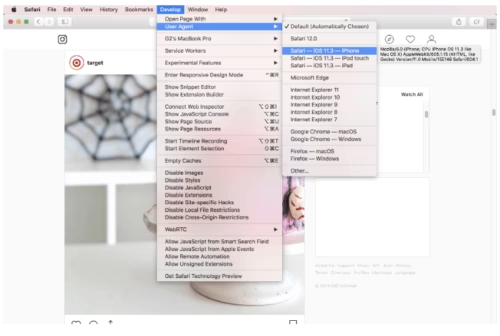
Step 2: We will again have to change the user agent. On the top bar of the browser, you will see a tab called ‘Develop’  Click on the drop down menu and you shall see an option called ‘User Agent’, click on that. This will lead onto another drop down menu. From there, click on  “Safari – iOS 11.3 – iPhone”.


Step 3: That is all! You should now be able to see the Upload button on your screen. And you will see your Instagram feed exactly how you see it on your phone. If you still don’t see an upload button, like last time, you can go to your profile page and refresh the page.

There you go, posting on Instagram through your PC is quite simple, isn’t it? However at the end of the day it is a hack, so it does come with a few drawbacks. Here are some things which you cannot do while posting on Instagram through your PC:

  • You cannot post multiple photos at once as you can do on your phone.
  • You can add filters however you cannot use all the other editing tools like, cropping or adjusting brightness.
  • You cannot tag any accounts in the picture, but you can tag your locations.

If you do want all these options, there are a lot of web applications, paid and free through which you post on Instagram on your PC without missing out on any features. Some examples of these apps are, Deskgram, Bluestacks, etc.

Easy Peasy Lemon Squeezy! With this simple and cool hack you don’t have to go through the hassle of transferring your photos from your PC to your phone every time you want to post a picture! Happy Instagramming!