Home Blog Page 80

Here’s How To Password Protect External Hard Drive in 2 minutes.

Why There Is a Need to Password Protect External Hard Drive?

There are many good reasons to password protect external hard drive. These small handy devices come with a lot of benefits like portability, huge storage, etc. People carry these devices from home to office and vice-versa so that they can access the files whenever they want to but the files which they carry are sensitive and confidential. So, it is very necessary to encrypt external hard drives so that no other person can access important files or data. Analyze your hard drive and repair it in the easiest possible way, 7 Best Hard Drive Repair Software to Analyze Your Hard Drive

Password protect external hard disk

Best ways To Password Protect External Hard Drive

In this article, we have provided easy solutions through which you can password protect external hard drive in just a few simple steps.

Solution 1 – Password Protect External Hard Drive Using BitLocker Drive Encryption 

BitLocker, an Encryption feature available in Windows 10, is used to password protect hard drives connected to the computer. The important thing here is that BitLocker is only available for Pro and Enterprise editions of Windows 10. It is not available in Windows 10 Home version.

If you are using Windows 10 Home, you can use the other methods mentioned below to password protect external hard drive.

If you don’t know which version of Windows 10 you are using, you can find it out by using the following method – 

  • Open Settings on your PC and select ‘System’.
  • Scroll down to the bottom and click on the ‘About’ option.
  • Under ‘Windows Specifications’, you will find the version that you are using.

There are many other methods also by which you can easily find which version of Windows 10 is running on your PC. After doing this follow the below-mentioned steps to password protect external hard drive using BitLocker –

Step 1 – Insert your external Hard drive and open ‘This PC’. Now, right-click on the external hard drive and select ‘Turn on BitLocker’.
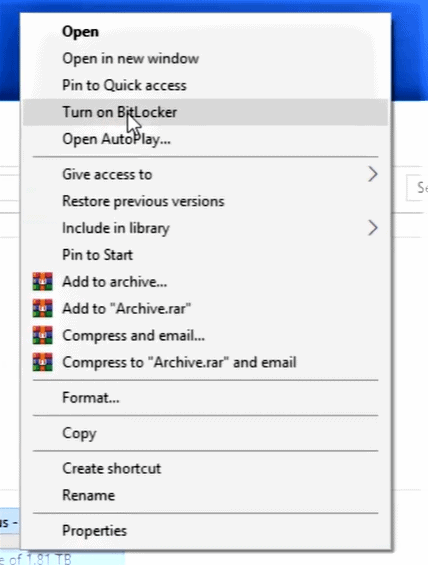
password protect external hard drive

Step 2 – Chose the option ‘Use a password to unlock this drive’ and enter a password. Click Next.
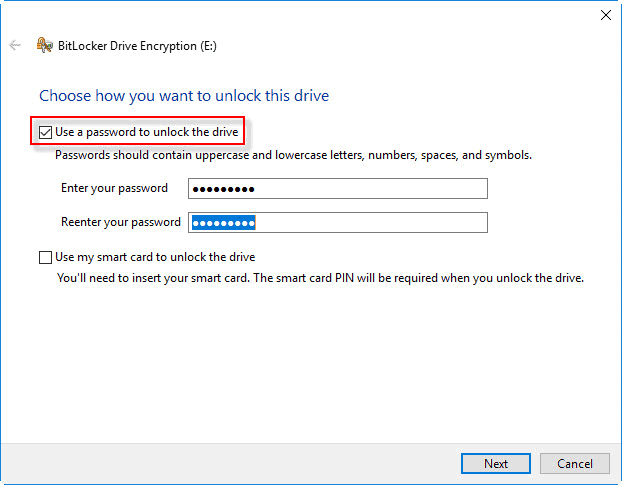
password protect external hard drive

Step 3 – There may be a chance that you forget the password and hence, it is important to keep a backup of the password you created. Choose any option through which you want to save the password. Click Next.
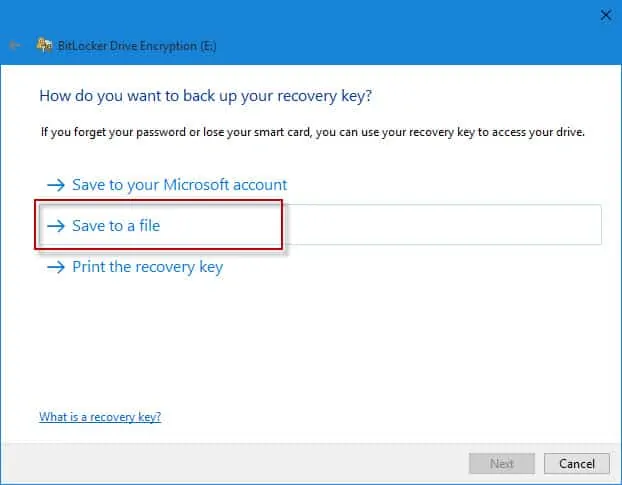
password protect external hard drive

Step 4 – After this, two options will be shown for how much part of the drive you want to Encrypt. You have to choose this according to your requirements. Click Next. Choose Compatible mode and again click Next.
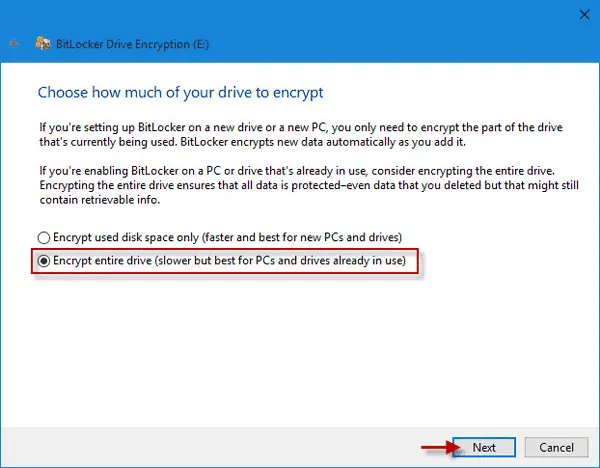
encrypt external hard drives

Step 5 – Click on ‘Start Encrypting’ to start the process of Encryption.
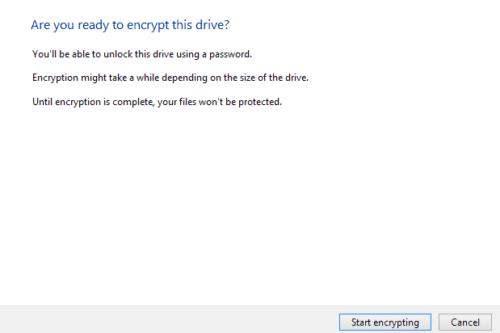
encrypt external hard drives

Step 6 – This will take a few minutes depending on the size of the hard rive you are encrypting.
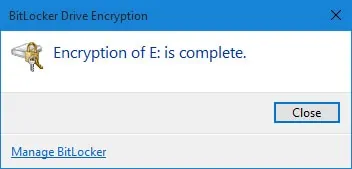
encrypt external hard drives

Solution 2 – Password Protect External Hard Drive Using Third-party Encryption Software

If you do not use Windows 10 Pro or there are some issues while using the above methods to password protect external hard drive then you can use third-party software like TrueCrypt, AxCrypt, VeraCrypt, or StorageCrypt. We will take the example of VeraCrypt.

Step 1 – First, download it through the primary website of VeraCrypt. After downloading and installing it, connect your external hard drive to the computer. The encryption program or software that you have installed should be able to read it.

Step 2 – Click on the ‘Create Volume‘ button.
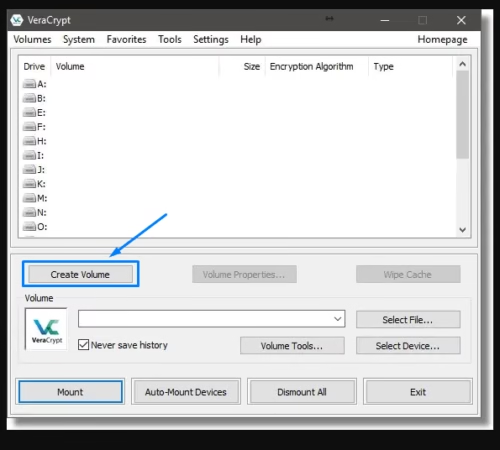
password protect usb drive

Step 3 – VeraCrypt provides 3 options and since, you have to password protect external hard drive, click on the “Encrypt a non-system partition/drive” option.
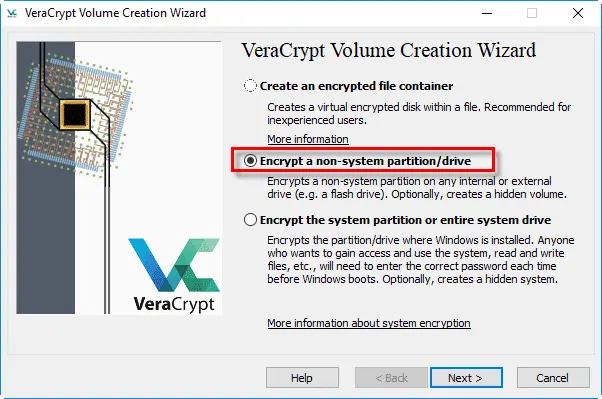
password protect usb drive

Step 4 – Click on the ‘Select VeraCrypt volume‘ option and then Next.
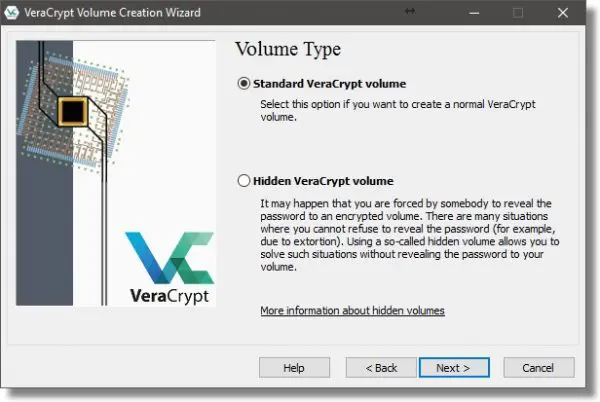
password protect usb drive

Step 5 – First click on ‘Select Device‘ and then select the hard drive and then click ‘OK‘.
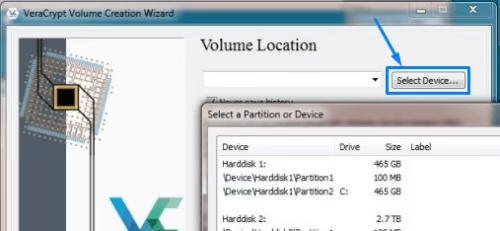
how do i password protect a usb drive in windows 10

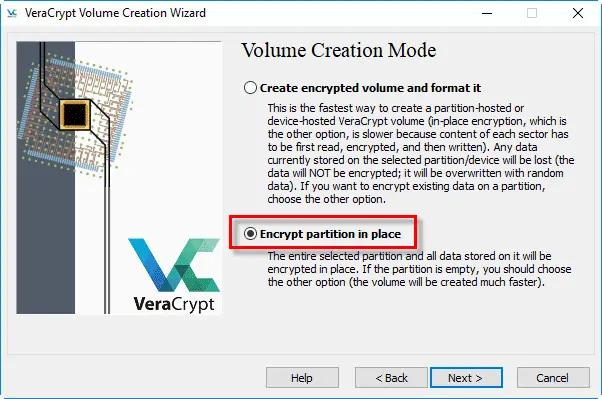
Step 6 – A screen will be shown asking you about the Volume creation mode. The first option will create and encryption and format all the data on it. So, if you want to save the data then first copy it on your computer and then proceed with this option. If you don’t want to format the data, go with the second option. It encrypts the external hard drive and keeps the data safe.
how do i password protect a usb drive in windows 10

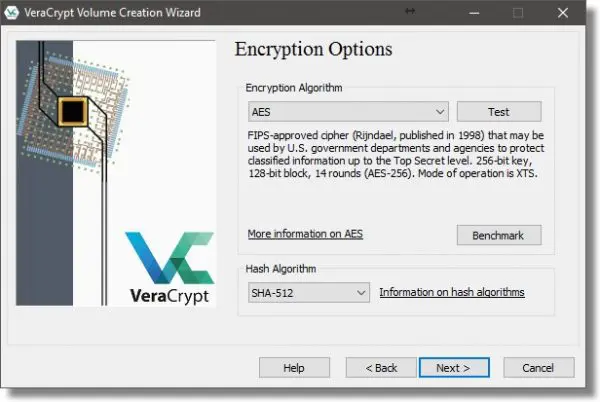
Step 7 – All the algorithms that veraCrypt supports will be shown and if you want any specific ones, you can change the default option. Although, it is best to go with the default settings. Click Next.
how do i password protect a usb drive in windows 10

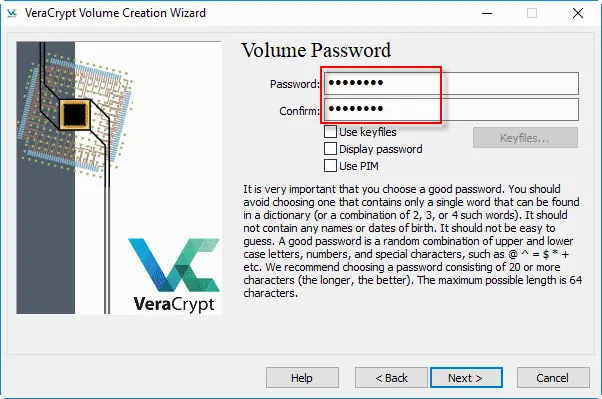
Step 8 – After selecting and confirming the volume size, a screen will be shown on which you have to create a password. Choose a strong password, confirm it and then click Next.
how do i password protect a usb drive in windows 10

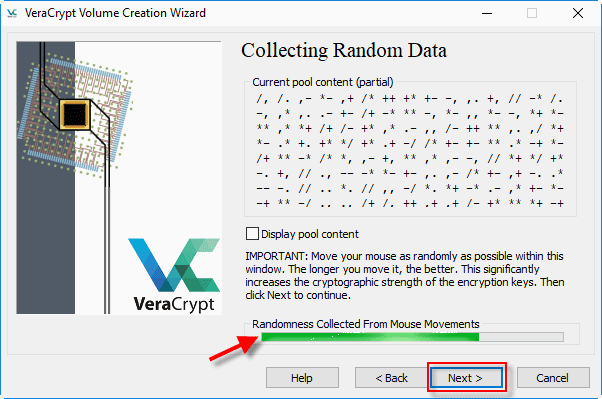
Step 9 – A progress bar will be shown on your screen. You have to move your mouse randomly so that the bar gets completely filled. Click Next.
password protect external hard drive

Step 10 – Click ‘Encrypt’ or ‘Format’ according to the option shown on your screen. If you are formatting it, then one or two warnings will be shown to you about the confirmation. Click Next. The hard drive will be encrypted in a few minutes.

Conclusion

Hope you find our guide helpful. Did we miss another method to encrypt a hard drive? If yes, please write to us from the contact page and we’ll be happy to update the article.


This AI Outreach Tool Can Tick All Your Marketing Goals Instantly Without Increasing Costs

In this revolutionizing online world, digital marketing is evolving rapidly. Businesses survive on the sturdy pillars of marketing and reviews/feedback, all that a better outreach tool can get for you. The compliments or even the complaints evaluate a product or service and augment its visibility. Knowing your customers and their requisites form the backbone of any functional system. 

Ai outreach tool for finding bloggers and journalists

Presenting your business at the right time to the right audience is the key to success, and that’s what fosters your business. Consider a startup that is just paving the way to brag the attention that it is all about or maybe any business in full shape craving for growth. Either way, you are calling for strong marketing outreach. 

Pitching all the information about your product or services to some bloggers, journalists, or influencers to promote your business is the smart way to proceed. Yes! I am talking about the PR outreach.  

It is a proven fact that enthralling entrepreneurs with the best marketing skills, strive hard to receive press outreach, at times. 

That is why you can completely count on Postbag

With its most revolutionizing merit-based outreach, Postbag boasts of the finest awareness building and content promotion. Regardless of the product or service that needs promotion, the triumph of marketing outreach dramatically depends on targeting the audience and reaching out to them. 

Usually, creating a list of potential audiences and their contact details is a tedious and time-consuming process. Wherein, one has to manually perform the web search, build a list of possible web pages to showcase their products, and then figure out people responsible for these web pages. Finally, tracing their email addresses, if possible. Only after this list is established, one would be ready for starting their outreach email campaign. 

So, as you can derive from the discussion, this whole manual process traditionally claimed lots of time and resources in the form of an assorted set of tools, efficient cost management, etc. 

With its completely automated process based on AI technology, this outreach tool- Postbag can build your personalized outreach list in minutes. All including extremely targeted web pages with outreach potential. Not only the search, but Postbag conveniently hand over to you a complete contact package with respective owners and their email addresses.

How do they do it after all?

Postbag is the most efficient outreach tool that endures on the idea of simplicity. Guided by the 3 step process, Postbag brings an uncomplicated ladder all for you to achieve exponential growth. These steps involve

  1. The search 
Outreach tool,Postbag

Identifying and making personal contact with the right people served with the most efficient AI induced automated assistance is the patronage of this leading player. You need to introduce your niche with a phrase, and Postbag’s best AI bot does all the work for you. It executes searches through its web index and explores all the news publications, websites, and blogs. They most likely do constitute the articles written by prominent journalists, bloggers, and webmasters about products and services similar to yours. 

2.Outreach list

Outreach tool,Postbag
PIC: Outreach Tool

In addition to the online content that organically promotes your business, the AI bot also tracks the direct owners and their contacts. All the information is scrutinized and presented to you as an interactive outreach list. 

This is the most time-consuming task in the overall process of outreach, and you can just sit and relax while the AI bot does it for you.

 3. Personalized emails

An integrated email editor is invoked with this outreach list, which aids in sending personalized emails. By preserving the human touch, the Postbag template engine drastically minimizes the time-to-send. 

 The best feature of the Postbag is its continuous outreach. Yes! With the most reliable web crawls, you can discover the recent updates on outreach opportunities every month. 

What is in your bag with this outreach tool?

1. Personalized Outreach list with direct contacts.

 The Postbag AI bot helps you understand the contact tiers in the listed outreach opportunity. Three contact labels, specifically tier 1, tier 2, and tier 3 are displayed in the application. The tiers pronounce the availability of direct contacts and their addresses.

Tier 1 contacts deal with people who directly own the page, in regards to which you’re reaching out. Tier 2 contacts help you reach out in regards to a page for which direct contact was not found. If no direct owners or the sources to direct owners could be found, then the list is labeled as tier 3. Here, tier 3 doesn’t mean that the opportunity has no potential. As against this, quite often tier 3 is marked for better relevant opportunities.

2.  Integrated Email editor assistance

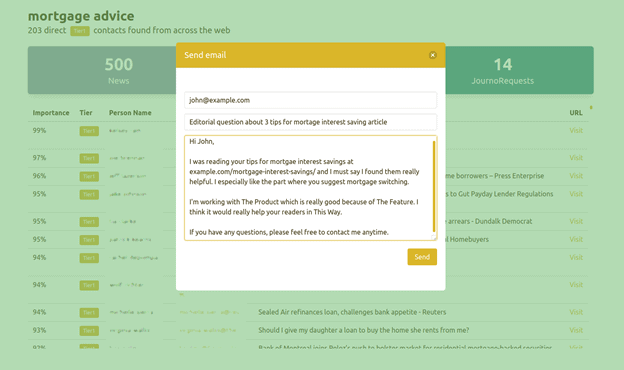
Providing an interactive outreach list is not just what the Postbag offers. Along with it, Postbag assists you to send personalized emails, totally aided by the integrated email editor. 

Access to the integrated email editor is as shown in the figure:

Outreach tool,Postbag

Thus, Postbag allows you to personally contact your outreach list from your personalized email and thereby, acknowledge the replies, across all your devices.

3. Marked processing opportunities with this outreach tool

Maintaining a record of the list of contacts, who are already contacted and to be contacted is as vital as the whole process. While the outreach campaign is being executed, more and more contacts on the list are being reached. Meanwhile, when the list of contacted people keeps invading, the exact reason for which the connection is made is to be kept a track of.  This avoids multiple communication concerning the same outreach opportunity. A special tracking facility to mark the already processed outreach opportunity from the internal outreach tool list.

4. Unmatched Opportunities with this outreach tool

The tier 3 label in the list conveys a list of outreach opportunities that do not exhibit a piece of the direct contact information or any source to the same. Nevertheless, they still stand a chance equivalent to the tier 1 opportunities. Postbag calls this list as unmatched opportunities and guides you through the proven steps to make a connection to the outreach possible.

5. Continuous Outreach

The best facility that tops the list of all the entrepreneurs is the continuous outreach that Postbag pledges. Staying on top of the constantly evolving web to discover the new pages that would further promote your business, is Postbag’s commitment that is taken care of by the smart monthly web crawls.

So, never miss a chance to promote your business through connections and the leading campaigns, all supported in a package with the Postbag.

Is it safe to update BIOS on Windows? Here’s the answer

0

BIOS (Basic Input and output system) is the tiny chip on the motherboard, which kick-starts your PC when you press the power button. It makes your system ready to use by initializing different hardware on your systems like CPU and other chipsets on your motherboard. Nowadays, UEFI (Unified Extensible Firmware Interface) has replaced these BIOS chips, which has the same functionality as BIOS.

is it safe to update bios

If you think updating BIOS on Windows is the solution to resolve any issue, then you are the one out of thousands of people ready to gamble. You need to give a good look at the Pros and Cons of the result if you update BIOS on Windows 10 before taking action and you can start with this how to boost your windows 10 system performance using simple tips. This will help in overall enhancement.

Is updating BIOS advisable?

We have listed down the pros and cons of updating BIOS on Windows. Please take a few minutes to go through it as it will help you make a decision, and there will be no regrets later on.

Pros:

  1. If new hardware is added like processor, RAM, or if your PC’s processor is upgraded, then BIOS updates or flashing BIOS will help the motherboard correctly identify new hardware.
  2. Enhances the security of PC and protects them from tampering and viruses. 
  3. Manufacturers can sometimes use BIOS update as a method to deal with issues of the motherboard and make it bug-free. 
  4. BIOS update enhances CPU performance.
  5. BIOS update improves memory compatibility.

Cons:

  1. Failure of the BIOS update will leave you with nothing! You have to buy a new PC/Laptop altogether.

Still, if you cautiously follow each step, then BIOS can be updated in the following three ways.

  1. Update BIOS on Windows using a USB drive.
  2. Use a Windows-based program to update BIOS on Windows. 
  3. Create Dos USB drive and update BIOS on Windows using it.

Warnings! Before you update BIOS on Windows 10.

Before even reading forward, please go through these warnings and consider if you really have to update your BIOS.

  1. There should be no power cut-off while BIOS is updating, so ensure that you have UPS back-up if you are doing it on PC, and fully charge your laptop’s battery if you are doing it on your laptop. 
  2. Keep ready an empty USB drive (not required if you follow the window-based program to update BIOS).
  3. Continuous internet connection.
  4. Disable all the security programs as it sometimes interrupts during the updating process, and will cause all sorts of problems.

Please follow the below-given procedure step by step carefully to update BIOS correctly: 

Update BIOS on Windows 10 using a USB drive

Please follow the below-given steps carefully to update BIOS on Windows 10 using a USB drive.

  1. Back-up of previous BIOS setting:
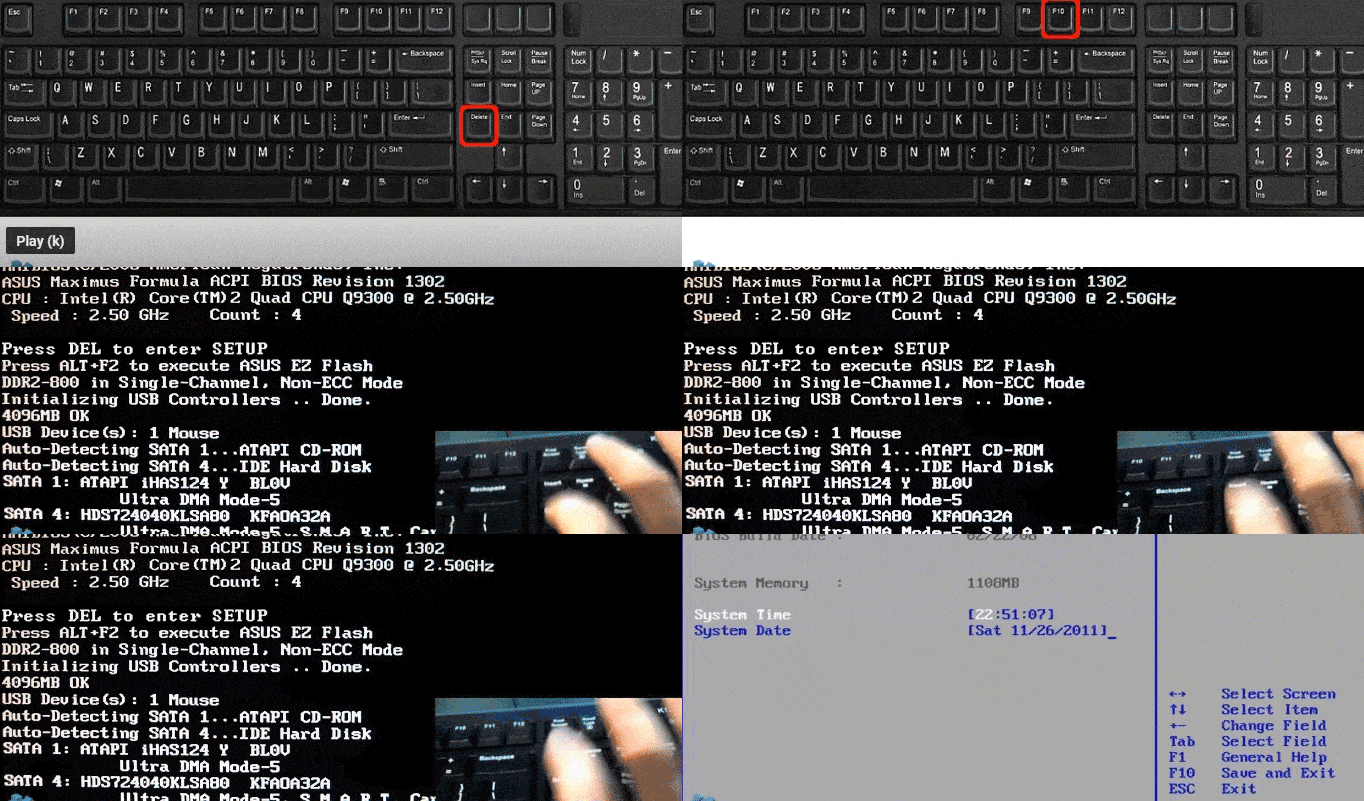
  • Boot your computer and press DEL, F1, F2, or any other appropriate key depending on your System’s model to access BIOS settings, for that be keen to notice the message that tells you to press some key to open the SETUP option.
How to open BIOS settings.
Image: how to update bios
  • Note down any essential data like saved passwords, boot order, etc., as it will help to restore previous settings after BIOS is updated.
  1. Open System Information:

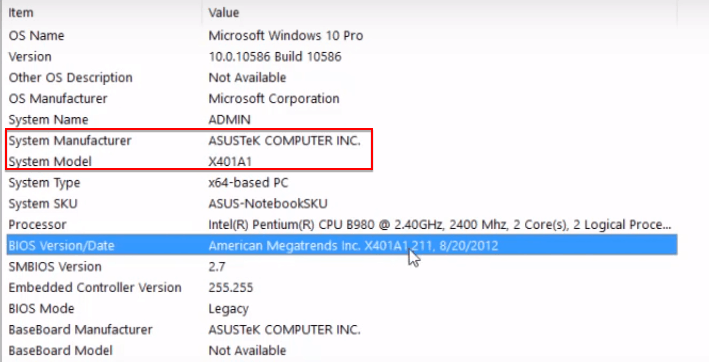
System information comprises relevant data like Manufacture name, model no., BIOS version of the System, which is required while updating the System.

  • Press “Window key +R”  to open the “Run” box. 
  • Type “msinfo32” and then click “Ok” to open the System Configuration window.
  1. Check BIOS version:

Note down the name of System Manufacturer, model number, and BIOS version.

In the below case, as you can see, BIOS version no.; is” System Manufacturer + System model no.+ BIOS version + Date.

ASUSTeK COMPUTER INC. X401A. 211.8/20/2012.

Note: If you have a custom-build computer, you will need a motherboard model number instead of the System’s model number using any hardware information tool like CPU-Z. 

System Information window
  1. Search updated BIOS version’s file:
  • Type System Manufacturer’s name, model number, and  ‘BIOS’ on Google and click on the search button. 
  • Then select the appropriate link; usually, it is the top-most link.
  • Note: It is vital to download the BIOS update file from the official manufacturer’s website of your model.
  • In the below case, after typing ‘ASUSTeK COMPUTER INC X401A BIOS’.
  • We are picking up the manufacturer’s website, https://www.asus.com/Laptops/X401A/specifications/.
  1. Download BIOS file:
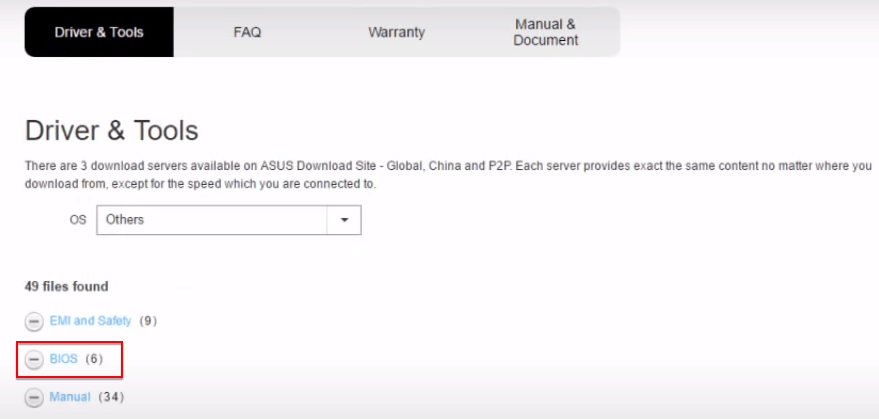
  1. Depending on the website, you may have to choose and open the “Updates,” “Download,” “Support,” “Driver & Tools,” or “BIOS” column.
  2. In the below case, after opening the support/download column, the BIOS link is displayed.
  3. Choose the “BIOS” link.
website link to get BIOS updates for Windows 10.
Image: how to update bios
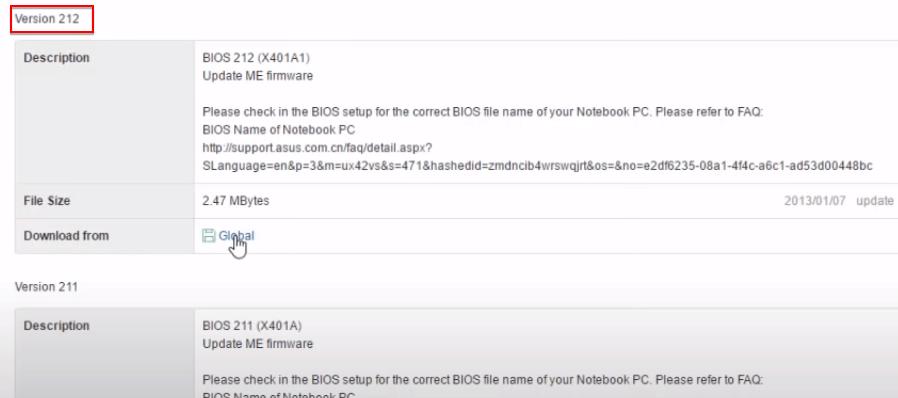
  1. Then select the latest version of BIOS, mostly it is the top-most link. In my case, I am choosing the 212th version of BIOS, as I already have a 211 version on my PC.

Note: Ensure that the BIOS update file is precisely for your System’s motherboard model.

  1. Then click on the download link and download an executable file of BIOS updates in a folder of your computer. It will take a couple of minutes. 
Versions for BIOS update.
Image: how to update bios
  1. Extract files in USB drive:
  • Keep USB Drive Plugged-in to your computer during the process to save the BIOS file.
  • Extract the BIOS update file from the folder of your computer to the USB drive.
  • Note: Ensure your USB drive is empty, and it has no other files. 
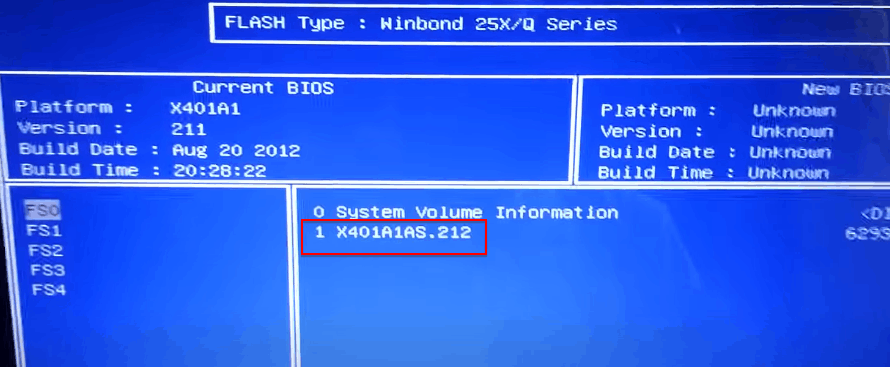
  • In my case, the file “X401A1AS.212” is copied in my USB drive.
  1. Update  BIOS:
  • Check “readme file” that mostly comes with the particular BIOS update as the process is different for each motherboard. 
  • Then reboot your PC by pressing DEL, F1, F2, or any other suitable key. 
  • Click on the “Boot” tab.
  • Enable “Launch CSM” and “Launch PXE OpROM” options.
Boot menu options.
  • Then click on “Advanced tab” and choose the option Start Easy Flash. 
  • Keep your USB plugged during this process, so that BIOS can see an update file that was saved in your USB drive. 
  • You will be shown options to choose the BIOS update file; here, I choose option 1 to execute X401A1AS.212.
  • Then click the “enter” key.
Flash option of boot menu.
Image: how to update bios
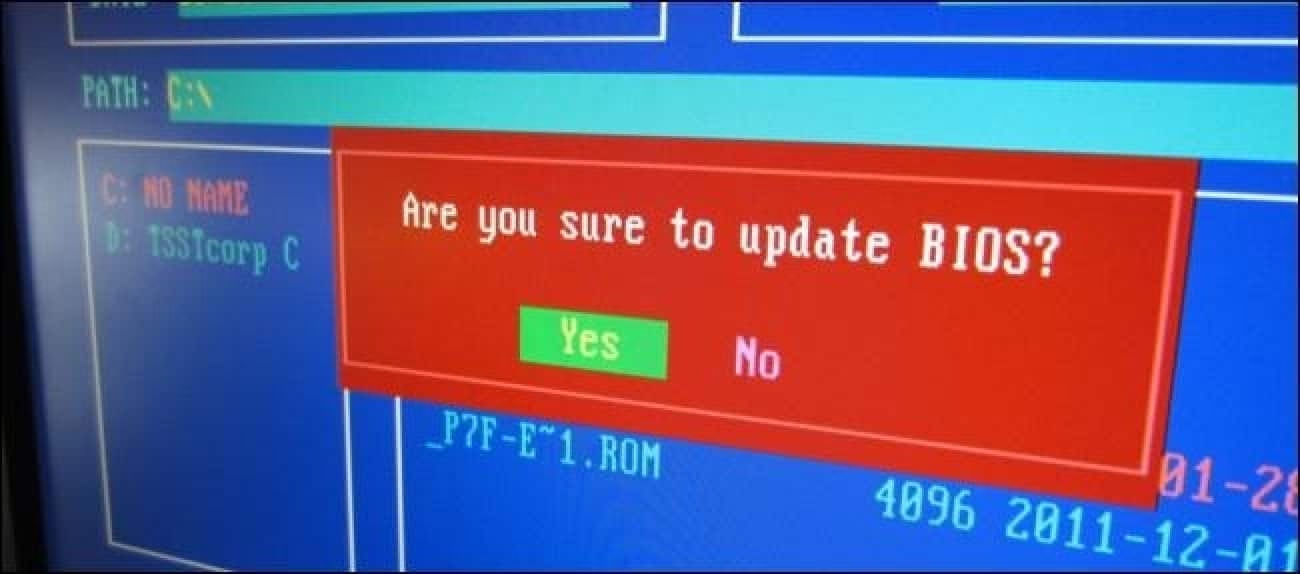
  • Your system will take the last confirmation before updating BIOS; just click on the “yes” option.
  • Wait for a few minutes till BIOS is updated, make sure there is no interruption during this process.
  1. Reboot PC:

Once completed, your PC will automatically shut down. You need to restart it. 

  1. Cross-check BIOS’s version number:

Open System Configuration, as described above in the 2nd step, and check for the BIOS version. Voilà! BIOS version is updated!.

Limitation for the above method:

If you download and use incorrect BIOS update files, then it will kill your motherboard and make your PC completely non-working.

Use the Windows-based program to update BIOS on Windows:

This is the simplest way to update BIOS on Windows 10. Many manufacturers provide an in-build interface to update BIOS in just a few minutes. For e.g., the WinFlash utility program runs in the Windows environment to restore, refresh, and back-up BIOS. 

The following steps are for Updating BIOS on the ASUS model of PC/Laptop using WinFlash.

Open WinFlash:

  1. Download and install Winflash from here.
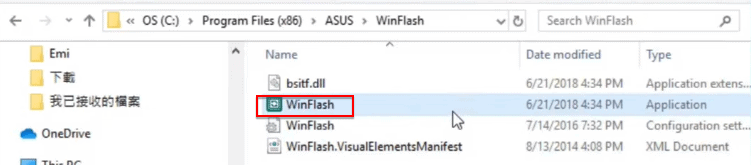
  2. Search for “WinFlash” application  from “C:/Program Files x(86)/ASUS/.
  3. Double-click on “WinFlash” to start it.
WinFlash utility program.
Winflash utily

Choose BIOS update Source:

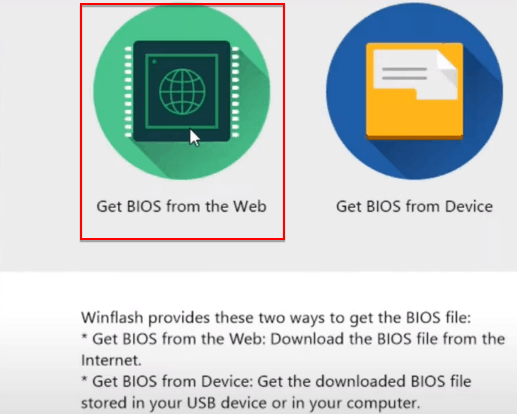
Once the WinFlash app starts, it will ask to choose from two options.

  1. Choose BIOS from the web option.
Options to update BIOS on Windows 10 using WinFlash.
Image: how to update bios

Choose BIOS version:            

  • The application will automatically search on the web and retrieve the latest version of the BIOS file for your System.

Note(You should  have a continuous internet connection to update BIOS on Windows correctly.)

  • It will prompt the message displaying the current version and update the version of BIOS.
  • Click on the update option.

There it is! BIOS update is done. You can cross-check it by checking the BIOS version in System Information.

Limitation of this method:

Installed software can interfere in the update process and cause BIOS updates to fail and crash your PC.

Create Dos USB drive and update BIOS on Windows using it.

This is the old-fashioned, tedious way to update BIOS on Windows.

  1. You need to create a bootable flash drive using an external tool like Rufus.
  2. Then copy the BIOS update file into that drive.
  3. Execute the batch file with extension.bat provided with the BIOS update file to start the update process.
  4. Sometimes scripts have to be downloaded separately from the web.

Bottom line: Updating BIOS on Windows is a critical process and you should go for it one only if there is no other workaround to resolve some specific hardware issues. And you have to double-check each step before implementing it to avoid any failure.

Digital Marketing Courses That’ll Make You a Marketing Pro!

0
Digital Marketing Skills
Picture by StartupStockPhotos on Pixabay 

With the mass movement of businesses to the web, digital marketing has become quite the coveted skill. But to think of it as just one skill wouldn’t do it justice. 

Yes, it’s the communication between businesses and their prospects online to make a sale. But there are many skills involved throughout the process of bringing prospects to your website and getting them to buy whatever your website sells. 

As a result of the high value of digital marketing skills, many courses have sprung up. They all claim to have the secret to help digital marketers improve their careers. After some rigorous research, we’ve come up with 7 important skills you can learn through online courses to improve your digital marketing success.

Content Writing 

Outreach tool,Postbag
Picture by StartupStockPhotos on Pixabay 

Content writing involves using text and graphics to create and distribute valuable information to prospects and customers. Social media posts, email newsletters, blog posts, and forum interactions are all jobs of a content writer. 

To be a good content writer, you should be familiar with SEO because you’ll need to distribute your blog posts and index them on search engines like Google and Bing. Hashtags are quite similar to keywords as distribution tools on social media platforms like Instagram, Linkedin and Twitter.

Search Engine Optimization 

Outreach tool,Postbag
Picture by Templune on Pixabay 

Search Engine Optimization (SEO) is basically an organic distribution system where businesses try to reach their target market through website content. Google is the biggest search engine platform with its sister company, YouTube, being its video equivalent. 

An SEO specialist helps align a business’ website with those who could be possible buyers of their products. Say a skin cream company in New York City, wants to be in front of New Yorkers searching for solutions to their skin problems. They’ll hire an SEO specialist to help them rank on Google for skin care and treatment questions/keywords that prospects have asked. SEO specialists usually work hand-in-hand with content creators and copywriters. 

Copywriting 

Outreach tool,Postbag
Picture by mohamed_hassan on Pixabay 

Copywriting can easily be confused for content writing. They differ when it comes to intent behind communication.

Content writers  write to educate prospects. Copywriters write to sell to prospects. As a result, you’ll find copywriters at the back-end side of a marketing campaign — converting leads into customers. 

Some of the work copywriters do include search engine ads, social media ads, sales emails, landing page copy, and sales letters. 

PPC Specialist 

Outreach tool,Postbag
Picture by mohamed_hassan on Pixabay 

Per pay click is a system of advertisement where businesses can run ads on search engines, social media or other ad networks, and pay only when a viewer clicks their ads. 

In an ad campaign, you’ll have graphic designers, copywriters, photographers, filmmakers, software developers, data analysts and the director of this group — the PPC specialist. They’re in charge of monitoring running campaigns, pruning the system of failed ads and backing the winning ones. They also galvanise other professionals we listed above to make the overall ad campaign a profitable one.

Graphic Designer 

Outreach tool,Postbag
Picture by stux on Pixabay 

With millions of businesses flooding the internet, standing out is becoming a priority. From the design of your website pages to social media graphics, businesses have to be intentional with their appearance at every level of customer contact. 

Graphic designers help businesses with logos, website themes and app design. Those with tech skills work as frontend developers and help with websites, apps, landing pages and more.  Others work on product packaging, logos, blog and social media graphics.

Web Development 

Outreach tool,Postbag
Picture by 200degrees on Pixabay 

The internet is built with blocks of code. Software developers are the masons. Big businesses with unique website requirements don’t go for cookie-cutter solutions of companies like WordPress. They hire web developers and software engineers to build their own software for them. 

Of course, this is a capital intensive endeavour and thus is left for companies who can afford them. But web developers can work with marketers to create unique buyer experiences through additional website functions. 

Photography and Filmmaking 

Outreach tool,Postbag
Picture by mohamed_hassan on Pixabay 

We as human beings are visual creatures and communication is best done with video, graphics and pictures. The text had its place just like the newspaper did. But Radio and TV took the cake when it came to mass communications. The same goes for the digital landscape today. 

Blogs are powerful but podcasts and YouTube videos will be the main form of communication in the future. Even blogs take advantage of pictures and graphics to stimulate the visual senses of its readers. 

Photography and filmmaking are used in content creation and advertisements. They, including copywriters, make up the creative aspects of ad campaigns.  It’s where the magic happens. With the obsession with marketing and ad tools to analyze data and optimize campaigns, the art aspect of marketing becomes a virgin ground to explore and adopt fresh ideas that bring in more sales.

How To Improve Your Digital Marketing Skills 

Digital marketing is as vast as it gets. It’s about communication and there are really no boundaries to the possibilities and opportunities. To improve your Digital Marketing skills, find mentors who are willing to guide you on the fastest path to competence. 

Good mentors can be scarce so it’s not uncommon to struggle to find one who’s willing and able to help you grow. A second, but the equal alternative is taking free online courses. It’s basically a digital version of mentorship at scale. They can be taken at your leisure and anywhere in the world. And there are usually fellow students and an instructor to bounce ideas off.

Success in digital marketing requires a passion for learning because the landscape of online communication is constantly changing and thus the learning will never end.

How Low Code Platforms Can Make Remote Work Easier?

There has been so much advocacy for remote work as a result of technological advancements in the marketplace. Additionally, the current health advisories brought about by the current Covid-19 pandemic necessitate remote work as many employees are encouraged to work from home. This is, therefore, the best time to adopt low-code app development. 

low code platform work from home
PIC:Low Code platform

Low code platform is particularly common among startups together with the disruptive technology sectors. They are however not just meant for smaller ventures, but for more established businesses as well. One biggest reason why low code is tremendously expanding is that IT departments continue to realize that they won’t be in a position to handle the many tasks programs need. The outbreak of Covid-19 has really pushed many IT leaders to the edge, straining time and resources. 

While every government has kept it straight that everybody should stay at home as much as they can, businesses have no better alternatives other than to digitize or strengthen their existing digital processes. This means many applications are needed more urgently as opposed to earlier demands in the absence of the pandemic. Low code software makes it easier to create more applications faster. 

Companies and businesses that intend to or have been forced to work from home, therefore, continue to face high demand for applications and software that can make these situations more successful. From enhanced to free access to platforms that accelerate app-building to increased access to employee safety as well as document generation software, low code platforms work pretty well in facilitating a smoother transition from the physical offices to remote working environments. 

Here are a few ways Low Code Platform works to make it much easier for businesses to work from home

Workplace safety 

Low code is currently instrumental in the development of workplace safety enhancement software. By creating high impact business applications to handle workplace security and safety, they ensure every sector engages the right tools for maximum success. 

Every organization is joining hands with their counterparts to build a world that is safe for all. IT companies, therefore, come up with low code software that is meant to help workers stay safe by helping them to track and manage health issues, safety and general availability of the workforce. 

Cloud based project management

In order to manage projects in a better way, communication and information sharing needs to be centralized in a more unifying and easily accessible place. Low code facilitates remote working by enabling the development of cloud-based project management tools. 2020 will, therefore, be remembered as the year with the highest low code adoption particularly for organizational project management, coordination of teams and communication.

Cloud based project management
PIC:Low Code platform

Speed 

App developers care more about the amount of time spent in bringing up a new app. The high speed and agility brought by low-code development platforms ensures that companies become more effective in app development with higher ROI in times of crisis. Especially at a time when working from home is a requirement, low code works harder to reduce development time for tech companies.

Businesses, therefore, adapt faster to market demands as well as respond to new opportunities brought by the health and government directives. Low-code makes businesses more agile in the wake of changing market spaces that keep disrupting unprepared sectors. Customer management apps such as CRM software, therefore, become more responsive and are built with more adaptable features. In addition, low-code enables tech developers to develop cloud applications with tools that integrate easily with other cloud-based code applications. This way, it becomes easier for companies working remotely to access service portals, engage customers, deliver products and still meet and exceed customer expectations.

Visual workflow planning and management

As a visual environment, the platform makes it easier for citizen developers to plan and manage workflows. As opposed to manual coding tools requiring high tech coding skills together with many hours of IT expert time, low-code platforms require need no prior coding skills, which makes it a platform for both developers and business professionals to plan and execute projects. This makes remote work much easier as teams can engage in more profitable activities even with little skills without requiring long training hours. 

Integrating with other apps 

Integration is a key low-code feature for remote work. Social media integration is particularly very crucial to all businesses that intend to embrace online. The ever online clientele base is therefore much easily reached and engaged on social media through integration with workflow management low-code platforms. By simplifying the process of app synchronization, low-code platforms define object simulations and can auto-generate UIs for multiple devices.

In addition, low-code platforms enable corporates to incorporate apps such as email and calendar. These, in turn, enable companies to generate and track orders and other business operations including their flow. Consequently, this functionality is integrated with exchange accounts and all the events created on the calendar for instance, also reflect on the exchange calendar. This way, low code platform makes business communications seamlessly easy. 

How To Delete Win Log Files In Windows 10

You are running out of disk space on Local Disc (C:). To free space on this drive by deleting old or unnecessary files, click here…”

Outreach tool,Postbag
Low Disk Space Message

We all must have seen a window popping up with the above message on it at times when we try to store some more data to the drive. When the system’s C drive is full, you’re likely to witness the following changes in your system:

  • The windows OS will slow down.
  • Availability of low storage space; probably not enough to install Windows Update.
  • Program installation is not available.

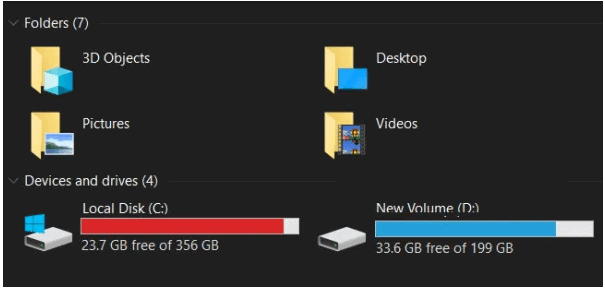
When the C drive is full in Windows 10, its shown in red as below:

Outreach tool,Postbag

But, why does the drive keep filling up unnecessarily?

Following are the answers to the above question:

  1. In order to meet the performance parameters and reduce the loading time, windows tend to generate many temporary files. Some of these can’t be removed automatically resulting in these files taking up the storage space.
  2. A lingering virus or malware is indeed the biggest suspect. These malicious files are programmed to multiply on a certain input, and these eventually eat up the hard disk space.
  3. Many System Restore files are also responsible for taking your system’s disk space.

All the above reasons could be the hosts to a plethora of errors showing up in Windows. 

Windows keeps a record of these errors in WINDOWS EVENT LOG.

What is the Windows Event Log?

A log is basically the digital exhaust of all the events occurring on Windows. 

Win Log is a complete record of system, security and application notifications stored by the Windows OS that could be used to detect and diagnose system problems.

However it’s really important to clear these files for 2 major reasons:

  1. This event log can end up saving a lot of information leading to a reduced storage space. 
  2. These files represent privacy concerns.

Before we dive into various methods to remove the Win Log Files from our PC, let’s know about the locations where these files are stored in our PCs. There are two main folders depending on your system, where you can find these files:

  • %windir%\System32\Winevt\Logs\
  • %windir%\System32\config\

Windows is infamous for filling up the storage .So far we’ve come across the fact that the Win Log Files do play a subsequent role in taking up space on a cramped hard drive. The next segment lists various methods using which you can delete the Win Log Files from your system.

How To Delete Win Log Files In Windows 10?

1.Using Command Prompt:

  • Press Ctrl + Shift + Enter to launch the command prompt. You can even do so from the Windows search Context Menu.
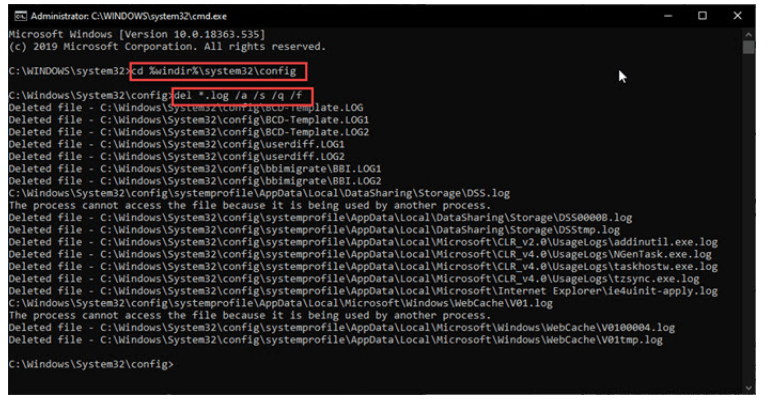
  • Enter cd %windir%\system32\config in the cmd window, to go to the event viewer default path.
  • Type del *.log /a /s /q /f in the cmd window and press enter to delete all the Win Log Files.
Outreach tool,Postbag

All the files with a .log extension will be deleted from your system. In case you want to remove individual log files, the following steps are required:

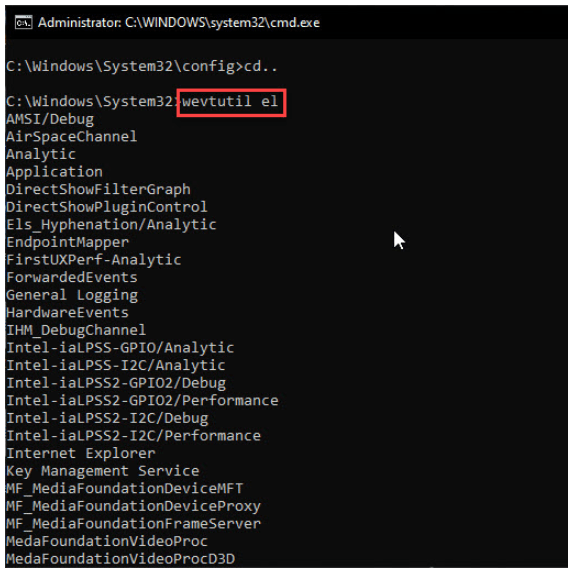
  • Open another admin command prompt.
  • Type wevtutil el to list all the log files in your system.
Outreach tool,Postbag
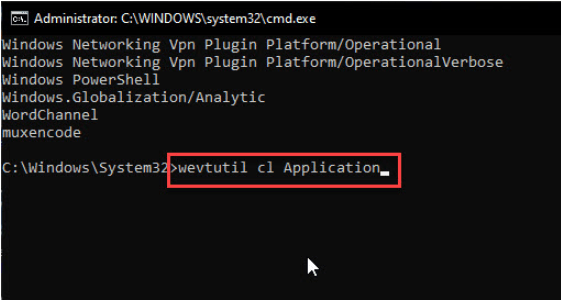
  • Type wevtutil cl <name of the log> to delete the files individually as per your requirement.
Outreach tool,Postbag

There you are! 

That particular log from the Event Viewer is deleted. Here are some extra command prompt details like 12 Windows Command Prompt Tricks That Will Make You Feel Like A Genius.

2. Use The Event Viewer GUI:

In Windows 10, the Event Viewer GUI is very easy to navigate through the settings and is an alternative to the command prompt method of removing the Log Files.

  • Open a Run Dialog
  • Type eventvwr.msc and then press Ctrl + Shift + Enter to launch the Event Viewer with admin rights.
  • Click the small arrow next to the folder icon in order to expand the folders.
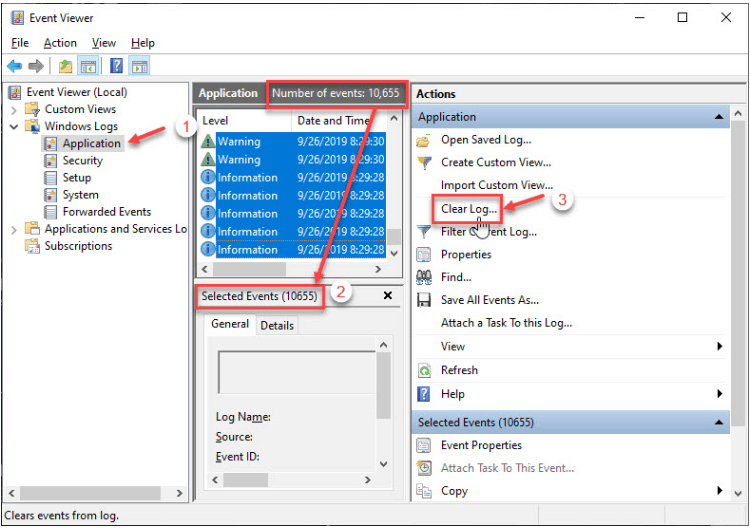
  • Select the entry from the middle pane in the list of entries and click  Clear Log from the action section in the rightmost pane.

Tap to see the entire process.

  • Repeat the  above steps for all the entries you want to delete.

Note- You can use the Shift key to select a range of entries in the middle pane.

Outreach tool,Postbag

3. PowerShell Clear All Event Logs:

  • Open Power-shell as an admin. You can do this from the start menu or the Winx Menu.

Note- If you haven’t replaced Power-shell with CMD in windows, follow the above step.

  • Type wevtutil el | Foreach-Object {wevtutil cl “$_”} and press enter.

 This will clear all the log files on your system.

Outreach tool,Postbag

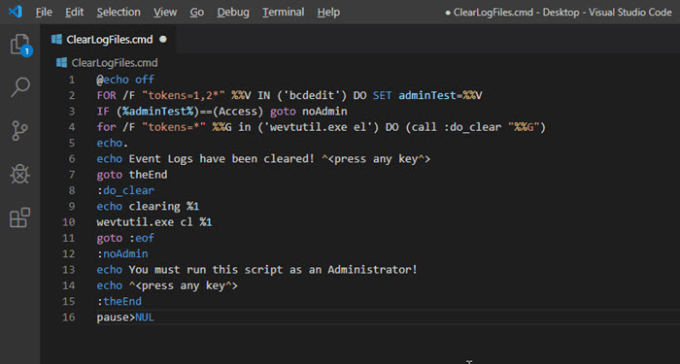
4. Make A Command File To Automatically Clear Log Files:

  • Open a text editor like Notepad or MS visual Code.
  • Type the following code in the editor:

@echo off

FOR /F “tokens=1,2*” %%V IN (‘bcdedit’) DO SET adminTest=%%V

IF (%adminTest%)==(Access) goto noAdmin

for /F “tokens=*” %%G in (‘wevtutil.exe el’) DO (call :do_clear “%%G”)

echo.

echo Event Logs have been cleared! ^<press any key^>

goto theEnd

:do_clear

echo clearing %1

wevtutil.exe cl %1

goto :eof

:noAdmin

echo You must run this script as an Administrator!

echo ^<press any key^>

:theEnd

pause>NUL

Outreach tool,Postbag
  • Save the name of this command with a .cmd extension in any location of your preference.
  • By choosing the correct option from the right-click context menu, Run this command file as administrator.

A command prompt will open and all the log files will be cleared automatically.

5. Clearing Log files with CCleaner:

  • You can easily scan for Windows and App log files, and delete them if you use the CCleaner, which is a drive maintenance program.
  • Open the CCleaner program – 1. Cleaner menu opens 2. Click windows tab 3. Scroll down.
  • Click the checkbox marked as Windows Log Files and select Run Cleaner.
  • After the system is analysed for the files which can be cleared, click the button again to remove the Win Log files.

So there you have it!

These were the 5 methods using which you can remove the Win Log files and free up your system’s space.

7 Common App Design Mistakes to Avoid

0

A lot of apps are rolled out daily, yet only a few of them succeed. While some have poor design, others don’t focus on improving the user experience enough for it to be worthy of use. 

common app design mistakes

As a creator, you should be wary of the most common and avoidable mistakes in an app that can keep you from proper user engagement.

Bad First Impression

Many users will take a look at your app for the first time and decide if they want to keep it or uninstall it. The features and workings of your application will determine the kind of experience users will get from it. 

If your design element is dull or confusing, users might uninstall your app within 20-30 seconds of installing. Therefore as a developer, your first emphasis should be on creating a UI that is user friendly and captivating. It is highly recommended to make use of an app builder to design flawlessly.

Inconsistent Design

The one thing that degrades the user experience of an app is inconsistent design that varies from one page to another. The signup page follows a different color theme, and the inner pages look entirely different. This lack of coordination and consistency hurts user-experience, and makes your app look clumsy, 

The bottom line here is to be consistent in terms of design – from icons, to buttons and visuals – make sure everything is well-planned and themed.

Ambiguous Call To Action

Your app will have many call-to-action buttons, and where you place these buttons will depend on how your users interact with them. These buttons will determine precisely how your lead capture will work. When you put them on the right places on the screen, with adequately defined aspects, they can be extraordinarily effective in enticing users.

Remember The Actual Design Elements

The design elements of the app, photos, banners, or videos are what makes your app realistic and look consistent. It varies from Android to iOS, and will even change from one app screen to another. The images and icons that you have added on the app, the icons, how your content flows between screens – should all be flawless. Test vigorously, with alpha and with multiple beta testers to ensure your design elements are working correctly.

Add App Walkthroughs

Your users may have difficulty understanding the functions of the app or simply prefer to have a little help in the beginning. If you want to create a truly interactive app, consider  adding  a walkthrough when the app is opened the first few times. Some apps can be extremely complex, and it might not be possible to explain every feature, all at once. In such cases, make sure that your users can get help through walkthroughs when they try a particular functionality. While you are at it, make your walkthroughs interactive, easy to understand, and engaging. And be sure to add a button that gives your users a chance to close/skip the walkthrough if they don’t want help.

Cognitive Overload

Apps can get too cluttered to use. When your user has opened the app, their brain can take some time to get used to the layout and understand what action to take. There is a little bit of a learning curve in the beginning. This is when you have to convince your user that your app is easy to use. 

The layout, navigation, and functionality should be instinctive. Punching in too much information on the same screen will confuse your users. You can avoid this by removing the design elements that are not necessary for a page or using micro-copies. That way, you get a great UI that does not overwhelm the users.

Don’t Be Boring

Inspiration can be hard to come by. This is why we see so many apps that look and operate the same way. Don’t do the same thing and commit plagiarism. Research your user base, understand your competitors and see what they are doing to entice the users. Then implement the same ideas with your own design element. Don’t copy-paste the same old outlay and expect magic to happen overnight. Experimenting with advanced, unique coding and design ideas will also allow you to troubleshoot. This way, you get to have an in-depth knowledge in building apps while sharpening your skills.

Conclusion

This brings us to the end of this article. Although these were a few common app design mistakes that most of us are guilty of making, do not let this shake your confidence. Play your cards right, and focus on user-experience. Learn from your mistakes, and keep a close eye on your competitors. With these things in mind, you will surely be able to master the art of application development.