Everyone on the internet today has is linked to some social networking. However we often do not want to share our real photos. And there are various reasons for that, however that is not relevant to my topic. So today I will show you how you can make cool manga styled avatars for your social networking sites and instant messengers. It also works fine with your skype and other similar software’s.
This is a great online tool that lets you create a manga styled avatar to use at all your favourite haunts. The Web site has loads of choices and offers easy integration with several popular social networking sites
It has happened to us all a many times. In our busy schedule we make a Email account, and submit it’s password to Outlook or similar programs and forget it after sometime. We only remember about it when we need to edit some preferences or something else from the web mail. And even do forget the recovery questions.
Now in these tricky situation what would be the best and quickest option to recover the Email or IM password?
What Do I Do Now?
Nothing is really impossible in this world. I suggest you to follow, these steps before going for more exhaustive steps to find the Password. However it will only work if the password is saved in your Outlook. It is a small software which unmasks the saves password for you from the hidden password field.
How To Use It?
To use the software simply download the software and extract it in your desktop. Now open the folder and click on the .exe file to run the software.
Now open the Outlook or other similar software and open the account settings, of the account you want to reveal the password. Now click on the “X” symbol of the software and then holding the click drag it to the password field and you can see the password revealed. You can also use it for some IM which saves the password natively in windows.
I created a test account for showing you the results, with account name test and password as testtest. Now you can see the, how the password was revealed by the software. It is a free software for personal use and can use it for any number of times. If you liked my post, it would take only a moment to leave a comment.
This is a guest post by Amit who is a budding blogger. If you like to write for TechGyo, read: TechGyo’s 100% Adsense revenue sharing program.
Let’s be honest; you’ve used your computer at work to view non-work-related Web sites. Heck, if you are reading this article at work, you might already be guilty as charged. More than 70 percent of the adult online population has accessed the Internet at work for personal use at least once, according to a September 2000 eMarketer study. Employees are sending personal e-mails, playing games, viewing pornography, shopping, checking stock prices and gambling online
during working hours. With a simple software application, your boss can be tapping into your computer and see what you’re doing in real-time. Whether you are guilty of wasting company time or not, your computer might be under surveillance. You can be monitored without your knowledge. The growing number of employers who are monitoring their employees’ activities is a result of the low cost of the monitoring technology, a growing percentage of employees using their computers for personal use and an increase in employees leaking sensitive company information. Computers leave behind a trail of bread crumbs that can provide employers with all the information they could possibly need about an employee’s computer-related activities. For employers, computers are the ultimate spy. There’s little that can stop an employer from using these surveillance techniques.
There are basically five methods that employers can use to track employee activities:
A packet sniffer is a program that can see all of the information passing over the network it is connected to. As data streams back and forth on the network, the program looks at, or “sniffs,” each packet. A packet is a part of a message that has been broken up.
Normally, a computer only looks at packets addressed to it and ignores the rest of the traffic on the network. But when a packet sniffer is set up on a computer, the sniffer’s network interface is set to promiscuous mode. This means that it is looking at everything that comes through When you connect to the Internet, you are joining a network maintained by your Internet service provider (ISP). The ISP’s network communicates with networks maintained by other ISPs to form the foundation of the Internet. A packet sniffer located at one of the servers of your ISP would potentially be able to monitor all of your online activities, such as:
* Which Web sites you visit
* What you look at on the site
* Whom you send e-mail to
* What’s in the e-mail you send
* What you download from a site
* What streaming events you use, such as audio, video and Internet telephony
Every time you provide some form of input for your computer, whether it’s typing or opening a new application, a signal is transmitted. These signals can be intercepted by a desktop monitoring program, which can be installed on a computer at the operating-system level or the assembly level. The person receiving the intercepted signals can see each character being typed and can replicate what the user is seeing on his or her screen. Desktop monitoring programs have the ability to record every keystroke. When you are typing, a signal is sent from the keyboard to the application you are working in. This signal can be intercepted and either streamed back to the person who installed the monitoring program or recorded and sent back in a text file. The person it’s sent back to is usually a system administrator. However, keystroke intercept programs are also popular among “hackers.”
Hackers often use desktop monitoring programs to obtain user passwords. Intercept programs, because they record keystrokes, also make users susceptible to having their credit-card numbers and other sensitive personal data stolen. Employers can use the desktop monitoring program to read e-mail and see any program that is open on your screen. Desktop replicating software captures the image on the computer screen by intercepting signals that are being transmitted to the computer’s video card. These images are then streamed across the network to the system administrator. Some prepackaged programs include an alert system — when a user visits an objectionable Web site or transmits inappropriate text, the system administrator is alerted to these actions. Your computer is full of log files that provide evidence of what you’ve been doing. Through these log files, a system administrator can determine what Web sites you’ve accessed, whom you are sending e-mails to and receiving e-mails from and what applications are being used. So, if you are downloading MP3 files, there’s more than likely a log file that holds data about that activity
In many cases, this information can be located even after you’ve deleted what you thought was all the evidence — but deleting an e-mail, or a file, doesn’t erase the trail. Here are a few places where log files can be found:
* Operating systems * Web browsers (in the form of a cache) * Applications (in the form of backups) * E-mail
So take care while sending personal information using your workplace computer or devices. The best way to avoid harassment is not to use the office computer for personal purposes. Learn how to surf the Internet without disclosing your identity.
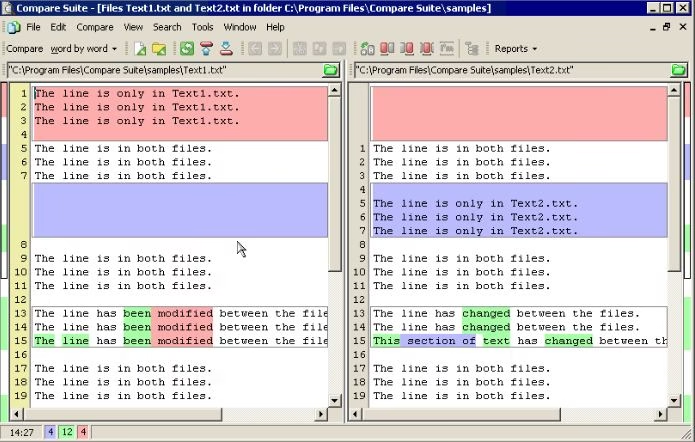
We have found a great way to compare between two files with any type of contents ranging from normal text, source codes, Rich text, Office files to even Image and Multimedia files.
Normally we would be comparing two different versions of a file manually, in a text editor. But this is really a time consuming and a hard task. You may run out of patience and the results may contain errors and won’t be so accurate as machines, Isn’t it? So We’ve researched and found the best solution which not only saves a lot of time but also improves productivity with the help of lots of features.
Have you ever checked how many minutes, seconds and hours you lived? Here’s a cool website to check the Date, Day, Star Sign, birthstone, season, Chinese year, days for your, days old, hours old, seconds old.
Here’s a demo of my own.
In addition you will also get a list of famous people born on that date.
Please let me know if you know more of such websites by commenting below. I’ll be glad to update this post for you.
Ever feel like the internet’s got more eyes on you than a nosy neighbor? From creepy ads to data-hungry ISPs, your every click’s tracked—unless you go stealth. A 2024 Pew Research stat says 73% of folks want more online privacy, and surfing anonymously is your cloak of invisibility. This guide’s your ninja handbook to dodge snoopers on any device—Windows, Mac, Android, iPhone, you name it. No black hat skills needed—just some savvy and a VPN. Ready to vanish into the web? Let’s cloak up and roll!
Browsing the web anonymously shields your online activity from prying eyes, offering privacy on any device with a few simple steps. To bolster your defenses, top ethical hacking tools let you test your setup, ensuring your anonymity holds up against potential threats. On Android, how to block websites pairs perfectly with private browsing, keeping unwanted trackers at bay. For a speedy, secure experience, how to speed up your Android phone ensures your device runs smoothly while you stay incognito.
📋 Step 1: Know the Shadows (Your Anonymity Prep)
Before you ghost the internet, get your ninja gear ready:
📊 Why Hide?: Ads stalking you? Government peeking? Pick your privacy poison.
🔒 Threat Level: Casual browsing or deep secrets? More risk, more tools.
💻 Device Check: Phone, laptop, tablet—methods tweak per gadget.
🛡️ Internet Smarts: Free Wi-Fi’s a trap—secure your connection first.
Fun Fact: X users in 2025 say anonymous surfing cuts ad spam by 60%—sweet silence!
🧰 Step 2: Pick Your Stealth Tools (The Ninja Kit)
Here’s your arsenal for web invisibility—mix and match:
📥 VPN (Virtual Private Network): Masks your IP—top picks like SmartProxy or ExpressVPN .
💾 Tor Browser: Onion routing for max anonymity—free, slow, but ironclad.
🔐 Private Browsers: Firefox with privacy add-ons or Brave (free, ad-blocking built-in).
📂 Proxy Servers: Quick IP swaps—try Hide.me (free tier)—less secure than VPNs.
🌐 Secure DNS: Cloudflare 1.1.1.1—encrypts DNS queries, free and fast.
Pro Tip: X privacy buffs in 2025 crown NordVPN king—45% say it’s the anonymity GOAT!
You’re now a web ninja—slipping past trackers with VPNs, Tor, or Brave. From dodging ads to unlocking geo-gems, anonymous surfing’s your superpower. X users in 2025 call it a privacy must—73% say it’s worth the tweak. Pick your tool, test your cloak, and glide through the internet unseen—snoopers don’t stand a chance!
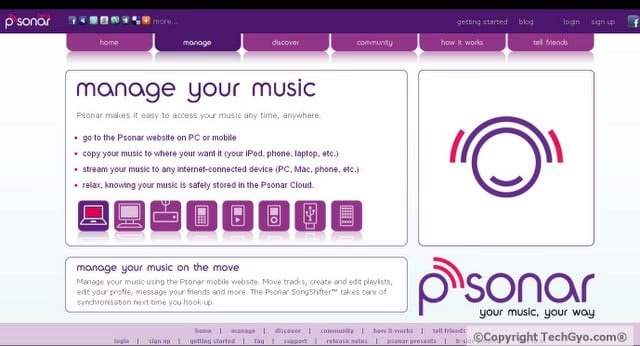
I hope you’ve read my previous post on 300 popular useful softwares for free. In Psonar website you can upload all your music online and enjoy it or sync it from anywhere in the world.The Web site requires registration and streaming is now unlimited!
Manage your music using the Psonar mobile website. Move tracks, create and edit playlists, edit your profile, message your friends and more. The Psonar SongShifter™ takes care of synchronisation next time you hook up. Psonar makes it easy to access your music any time, anywhere.
These are the features you can enjoy in Psonar.
You can access Psonar website on PC or mobile
You can copy your music to where your want it (your iPod, phone, laptop, etc.)
You can stream your music to any internet-connected device (PC, Mac, phone, etc.)
All your music is safely stored in the Psonar Cloud with high security.
Is your website unique? Or do you know about any interesting website in this world? Then, here’s a chance to post it on TechGyo.com by just clicking here. and You will be credited for the info you provide!


 Everyone on the internet today has is linked to some social networking. However we often do not want to share our real photos. And there are various reasons for that, however that is not relevant to my topic. So today I will show you how you can make cool manga styled avatars for your social networking sites and instant messengers. It also works fine with your skype and other similar software’s.
 It has happened to us all a many times. In our busy schedule we make a Email account, and submit it’s password to Outlook or similar programs and forget it after sometime. We only remember about it when we need to edit some preferences or something else from the web mail. And even do forget the recovery questions.
 number of times. If you liked my post, it would take only a moment to leave a comment.