Home Blog Page 371

Learn Any Foreign Language For Free

 learn foreign Language

Learning a foreign have never been so fun. But nowadays you can find almost anything in the universe in Google, Bing, yahoo and other search engines.But what if you didn’t get any answer for what you are searching for? Don’t worry, just read my previous posts “Find answers hard to get on Google” and that will set you.

Now back to our topic. Have you ever wanted to learn Chineese? Learn Korean? Then Lingt.com is the site you should give a shot. Coz this is a free service that lets you learn any language with fun. yes I really mean FUN. But currently they only support Chinese. More languages are coming soon

They say they have five features/rules that they are unique from others:

  • Schedule your learning.

    – They let you add lists and to figure out the optimal time for you to review information based on your performance.

  • Add, create, share.

    – Create your own lists or use lists made by other users. Work through their Lingt Lists to start with the basics and progress through the 1,200 most common terms in the language.

  • Build stats. Earn achievements.

    – Your goal on Lingt is to crank your mastery up to 100% on as many terms as you can. Along the way, you can also earn points by inviting friends, earning achievements, and logging in every day.

  • Break out of your schedule by cramming.

    – The most efficient way to learn is to follow your schedule, but if you need to do some quick-and-dirty studying, click the cram tab at the top. Here, you can customize exactly how and what you study.
    Break out of your schedule by cramming.The most efficient way to learn is to follow your schedule, but if you need to do some quick-and-dirty studying, click the cram tab at the top. Here, you can customize exactly how and what you study.

If I’ve missed any sites/tools that might be out there, please post a comment letting others know.

Top Ranked Blog Directories to submit your Blog

8

Did you know that every single second a blog is created in this blogosphere , It seems like blogs control the continuous flow of internet traffic in this world. To have Googles Juice of SER (Search Engine Results),  It would be a very good idea to submit your blog to Blog Directories with high Page rank.


Search engine rankings has come to a level where your anchor text and the amount of links you get matter the most.
Even before the blogs coming into scene or Google was in power, webmasters would submit their websites to as many directories as possible to get any traffic they can. It can still be used today to increase your Google PageRank value by submitting to directories without nofollow in their links: SEO Friendly Blog Directories.


If you know more Just drop your comments and I’ll update this post on your name on credits!

How to Install Open Firmware Software in Your Router

What is a Router?

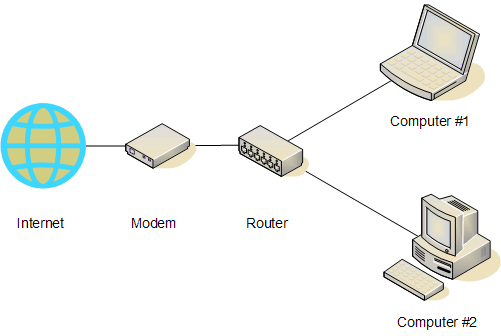
Everyone knows what is a router. In case you its not so, I would like to tell you in lucid language that its a device used to interconnect two or more networks, for interchanging data between them.Router

What is a Firmware?

It is a small program that is used to control a electronic device. some examples are mobiles, Routers etc..

Now a days these programs are loaded into a small EEPROM (Electronically Erasable Programmable Read Only Memory). It is done so because, most of the times, when a product is launched, the firmware it contain may contain bugs, or the company might look onto adding new features to the device later. Which eases the process.

Bypass mega download limit

Waiting is really frustrating especially when you are in a hurry. There are many ways to increases bypass mega download limit and how much you can download on Rapidshare and other file-sharing websites. You may try the steps given below to increases bypass mega download limit. It doesn’t work if you use a proxy though.

Bypass mega download limit and waiting time by:

  • Manually by sending a request for a new IP address from your ISP (Internet service provider) server.
  • Using any force download Software.
  • By installing a Firefox add-on
  • Javascript code.

This trick will apply to:

  • Rapidshare.
  • Megaupload.
  • Filefactory.
  • Depositfiles.
  • Megavideo.
  • Netload.
  • Mediafire
  • Uploaded.to
  • zShare
  • Sharebee
  • DepositFiles
  • Sendspace
  • Divshare
  • Linkbucks
  • Link-protector
  • 4shared

Let’s try resetting the IP from ISP:

This method depends on your ISP. It also depends fully on whether or not your IP is static or dynamic.

  • Step 1: Launch Command Prompt: Start -> All Programs -> Accessories -> Command Prompt. (Or Start -> Run… and type in cmd) In Vista just press Windows+R ( +R) the Run Command box will open instantly.
  • Step 2: When Command Prompt is opened, enter the below text one by one in the Command Prompt Box:
@echo off
 echo ipconfig /flushdns
  ipconfig /flushdns
 echo ipconfig /releaseipconfig /release
 echo ipconfig /renewipconfig /renew
 exit

Step 3: Command Prompt will exit once you press “Enter Key.

The Lines marked in RED will appear as soon as you enter the text above the RED line and that indicates that the action is performed correctly.

2. Now let’s check out how to do that using a Software:


Rapidshare Auto-Download is a free download manager for the Rapidshare website.
These are the features offered by the publisher:

  • Download a group of links from  Rapidshare (one by one).
  • Download incomplete downloads until all links are downloaded.
  • Auto Shutdown.
  • Support of 3 Languages: English, Farsi, French.
  • No more waiting for the link to be generated!
  • Versatile schedule for your downloads.

3. Bypass Waiting time using Firefox Addons.

Wherever you need to click through ads or wait for countdowns, SkipScreen will be there to make your life easier. SkipScreen automatically clicks through the hoops to get to the content you want.
This add-on works like what the name says.

You can download the SkipScreen add-on

You may also try Switch Proxy

4. Javascript code method.

The Javascript-based on Bookmark-let will disable the waiting time on some websites.

Follow the steps:

Step1. Open Internet Explorer, then bookmark the below code.. (You may also try other web browsers but the operation is not guaranteed.)

http://javascript%3Cb%3E%3C/b%3E:var%20c=0;

Tip! Press CTRL+D to bookmark a page in Internet Explorer, Firefox and Chrome.

If the warning message appears, then select YES to the warning that the bookmark may be unsafe.

Name the bookmark as “RapidShare No Wait”. Click on the Links folder (if you want to display it in your IE toolbar) Now, close and reopen IE and make sure that the bookmark we saved earlier is saved.

Go to Rapidshare.com and click the bookmarklet when the countdown begins.

Did you find more? Just drop your comments and we’ll update it with your name as a contributor!

Why should I use a Firewall?


What is a Firewall?

If you are using internet at home or office,you might have come across this term,firewall.Here’s what you need to know about it-
A firewall is a program that filters all the information coming through the internet to your private network.It will prevent flagged information from entering your network and harm your computer,through filters.

A firewall is very essential for any connection,especially in big companies where many computers have access to internet. In such case,the company can set some rules,like say only one of the twenty computers can have access to FTP or other web servers. A firewall gives a company great control over how people use the network. Companies can hire a company like Firewall Technical IT Services for an extensive set up.

Tipsbase: Get tips from Dating to personal finance and share your tips to earn money.

From dating tips to personal finance advice, today’s site is all about sharing neat tricks with the world at large.TipsBase contains a huge collection of “life hacks”, on topics such as fashion, pets, cooking, sexuality, music, sports, travel, fitness, computers, parenting, and many more.Visitors rate the tips according to their usability, and can even contribute their own points by signing up.All in all, it’s a web site you should have give a try.

tips+and+other+great+idea

Find words or lyrics of your favorite song or album.

3

Have you had urge to sing along with your favorite artist? But who can remember the exact words or lyrics of that song.  IF you don’t then Lyricsfly.com is a website you should give a shot. Lyricsfly.com  have an exhaustive database of nearly 6 lakh songs, the ‘popup-free’. Search lyrics on your own convenience  this website lets you search lyrics from categories based on Artist, Song, or Album.  And one thing really cool about this site is it shows  links to related online videos for you. hey wondering how? All of the contents were contributed and uploaded by the users of this website, and you can do it too..

These are the other sites that let you find lyrics.