 Quite often, bloggers and developers ignore ALT text or just forget to add the alt attribute to images in a web page, most people think that it is not so necessary or many doesn’t know how to add alt text. But many doesn’t know that Google’s Image Search Engine is not yet programmed to understand any image, so Google image bot (Google’s robot which crawls and collected information from web pages) simply rely on ALT attribute, title to determine the type of image. Although there are some other factors like title of the image, structure of the link, caption, and text around the image which comes in play, ALT is the important part among them.
Also read: Importance of adding Images & Videos to Blog Posts For SEO
Why Should You Add Text Attribute to your images?
Traffic from Image Search Engines
When you search for some image in Google, how do you think Google classifies images in order to display in images.google.com
Google Bots pull out the images from the web based on filename (ex: Red_Roses_Flower.jpg) , title, link structure (eg: http://site.com/image/Red_Roses_Flower.jpg), text surrounding the image, the ALT text, and they are not yet so advanced to detect the image digitally, but they will be soon coming with some new technology. By including your page keywords in your alt text, you raise your chances of showing up in image searches, and getting subsequent visitors from those image searches. The words used within an image’s alt attribute should be its text equivalent and convey the same information or serve the same purpose that the image would.
Browser Friendly
Some users who are blind have some special web browsers which have the ability to read text to voice. When such special browser which converts texts to voice comes to read an image, the browser can’t add to the user’s experience if there is no alt text. Visually impaired users should definitely be able to get the gist of images like the rest of us, so please take a few minutes and write some alt text to describe the image.
Google Money from Adsense
Did you know that they make a good 98% of their money through paid ads (Adsense/Adwords)?. The more users on Google properties, the more chances that users will click their ads, and add to the bottom line. The better the experience that users have surfing sites through Google, the more they will return. Of course it makes sense for Google to reward complete, fully-usable content to hover near the top of their indexes.
Better Rankings In Google
Although some SEO experts claim that adding alt text is of minimum use, It doesn’t mean it’s worthless. It is yet another way to declare your relevance to the keyword in your page or blog post. Such little things add up to big things together, so I strongly recommend not to ignore them. Personally, So make the most of each opportunity where you get a change to improve traffic and better user experience.
So from now don’t forget your image alt text.
How and where to add ALT text?
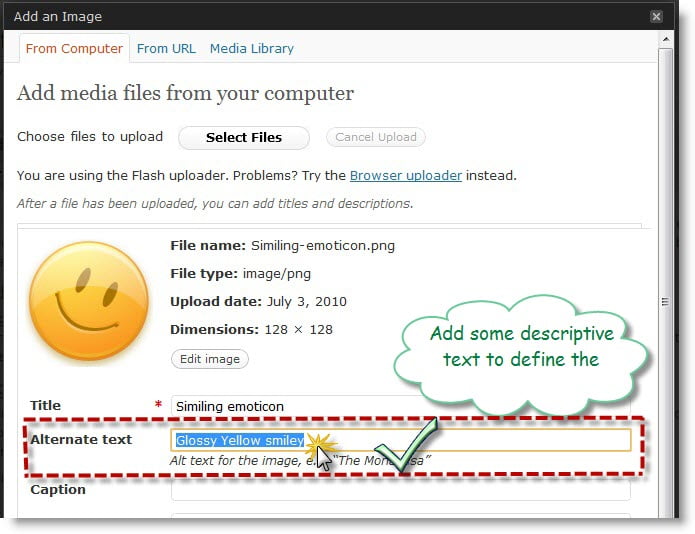
If you are in WordPress, then adding ALT text is simple, you can add some descriptive text while uploading the image. Just have a look at the below image.
And if you are in Blogger, there is no default option to add ALT to images when you upload them, But you can surely do it manually.
To add ALT text to images: While editing the post, just select “HTML Mode”.
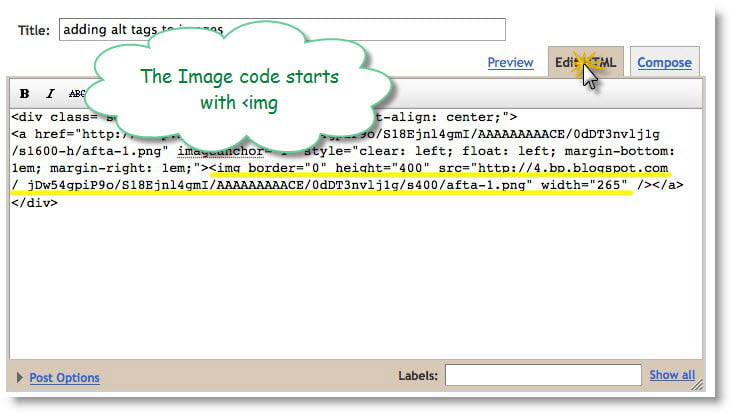
Once you open the blog post for editing in HTML mode, look for the image code which looks like:
<img title=”Adding alt text to image example” src=”https://techgyo.com/wp-content/uploads/2010/07/Adding-alt-text-to-image-example.jpg” width=”695″ height=”534″ />
Now, just add the text ALT=”some text description” before />.
<img title=”Adding alt text to image example” src=”https://techgyo.com/wp-content/uploads/2010/07/Adding-alt-text-to-image-example.jpg” alt=”Adding alt text to image example” width=”695″ height=”534″ />
How to add relevant ALT Text to your images?
- If a search button is a magnifying glass or binoculars its alt text should be ’search’ or ’find’ not ’magnifying glass’ or ’binoculars’.
- If an image is meant to convey the literal contents of the image, then a description is appropriate.
- If it is meant to convey data, then that data is what is appropriate.
- If it is meant to convey the use of a function, then the function itself is what should be used.
Some Alt Attribute Guidelines:
- Always add alt attributes to images. Alt is mandatory for accessibility and for valid XHTML.
- Alt text should be determined by context. The same image in a different context may need drastically different alt text.
- Try to flow alt text with the rest of the text because that is how it will be read with adaptive technologies like screen readers. Someone listening to your page should hardly be aware that a graphic image is there.
- Remember that it is the function of the image we are trying to convey. For instance; any button images should not include the word “button” in the alt text. They should emphasize the action performed by the button.
- For images that play only a decorative role in the page, use an empty alt (i.e. alt) or a CSSbackground image so that reading browsers do not bother users by uttering things like “spacer image”.


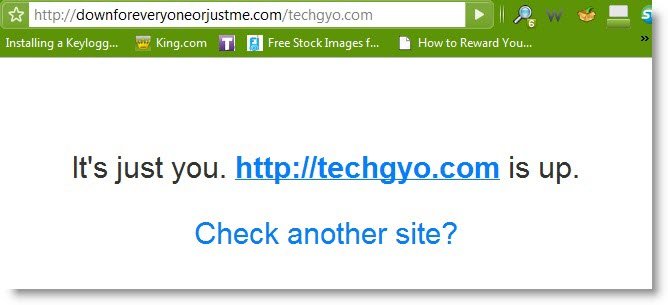
 There are times when some websites just doesn’t load, and you don’t find any of your friends online to check whether he is able to open the page. At this time, we get really need to make sure that the issue is not at your part. Wondering how to check if a website is down for all or just for you? Wonder no-more, just go to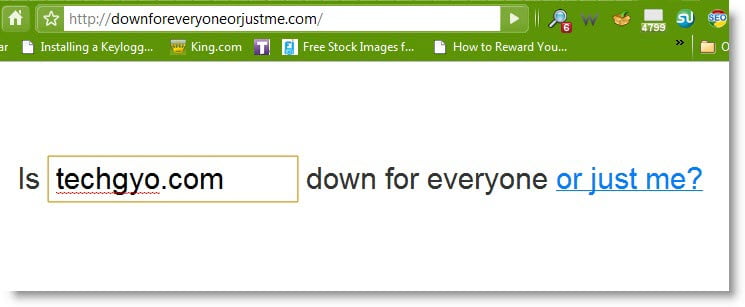



 URDB is an open platform for world records. Which is similar to Guinness World Records and Limca Book of records. Universal Record Database is a place where you can get involved, whether discussing records, beating records or setting new ones of your own. this is the place where you can not only find world records but also make and register your world records. There is no limit how far human being can push the limits of what mankind can do. The only limit is your imagination!