Home Blog Page 306

Post-Penguin Blog commenting Dos and Don’ts

2

The release of Google’s Penguin as an update to the algorithm of causing quite the stir for SEOs all over the world. It was thought that the use of blog commenting as a link building Strategy had lost its value.  In this article, we will look at how commenting remains to be of incredible importance and how you can still exceedingly l benefit from it. Here are the dos and don’ts of commenting in lieu of the Penguin algorithm update.

DOs

1.       Value Sharing

Link Building

The act of posting comments on a blog that are insightful and directly relevant to the topic has always been a good way of inviting good rankings into your own site. When you engage the owner of the blog through discussions in the comment section, you are opening a can of butterflies! These are doors opened that will eventually lead to your own success. The insightful ideas and feedback that you generously provide will add value to the owner while at the same time benefiting you as well. This may also open up opportunities for meeting other readers which will of course increase your reach in building links. Remember, providing valuable and stimulating comments will spark an interest in you to other readers, and this interest in you will eventually lead to an interest in your own blog.

2.        Commenting within your Niche

Commenting on topics that you are not entirely familiar about is not necessarily a bad thing. However, it is really more beneficial if you will engage through comments the blog author, and any other fellow reader on topics that you are familiar with. By engaging in discussions on topics that you are knowledgeable about you are labeling yourself as a good foundation of new ideas and also a good source of feedback.

3.        Comment Naturally

It isn’t really necessary to comment three hundred times a day; most people might actually even find that pretty extreme. Google’s algorithm might tag your actions as suspicious and that is never a good situation to be in. In fact, contrary to being an extreme commuter, you might find that doing it in a more “natural” way to be more beneficial. It will practically be impossible to create comments of value if you’re dishing them out by the hundreds each day. Keep in mind that comments with value will show others that you have something decent to share, and they might just be interested in knowing more about you and click on your links.

4.       Find Similar Minds

Be on the lookout for blogs and websites that are similar or somewhat related to your own. A simple search and a little research will get you tons of results. Once you find these blogs you must interact with them. Give them a buzz on the comments section just to let them know that you took an interest in them. More than likely, the owners of these blogs will respond, you can then take this as an opportunity to engage in discussions. Comments made by you that are read by the audience of another author, will increase the span of your reach. Being that these blog are of similar interests to yours, it is only natural for it to have viewers that are also into the same interest; this is a very good vantage to gain sight of your opportunities to rise in the rankings increase!

5.       Come Back Regularly

It’s a really great feeling when we get to make new friends by just being active in the comments section; it feels even grander when our traffic increases because of this. A good way to keep traffic flowing into your blog is to keep in touch with blogs that you have made connections from. Chances are these people will get fond of you and be avid followers of your own blog.

Don’ts

google-penguin

1. Don’t comment when you don’t have something valuable to share.

Giving out comments just for the sake of increasing your rankings will only disappoint you and probably even annoy other readers, not to mention the blog owner thus decreasing your value as a blogger and a link builder.

2. Don’t comment just to build links.

Yes we are all worried about whether our likes will be followed but this should not be your basis on commenting. This will not really increase your rankings. In fact, it might even do the opposite. Posting comments without any real value attached to it might annoy blog owners and other readers.

3. Do not spam comments to increase follow ups on your links; most people will label you as a spammer and will avoid you. Evasion is the last thing we need!

Google penguin has made link building a more applied process, meaning it needs all the attention you can give. Reliance on SEO tools is no longer very effective. In order to stay in the game you have to be more personally active by doing stuff manually. This is why the value of comments is as crucial a factor as ever. Now shall we practice by leaving a comment below? Have fun!

 

Top 5 Free Tools to Bring Back the Missing Start Menu in Windows 8

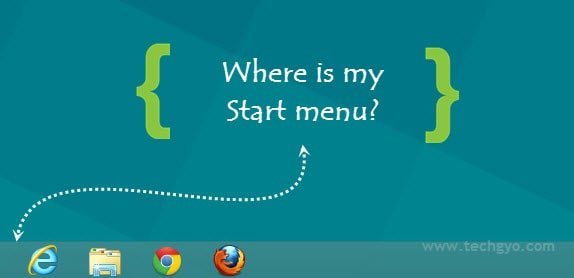
Are you feeling weird using Windows 8 without Start menu? Of course you miss start menu if you are familiar with Windows 7, Windows Vista or XP. Microsoft has removed the Start menu which was brought together with Windows 95 and updated along with the new versions. In the most recent versions start menu was very handy as there was a search box was there to search for a program instead of going through the long list. Here are some free tools to bring back the missing Start Menu in Windows 8 operating system.

Also read:

how to restore windows 8 start menu?

Free Tools to Restore the Start Menu in Windows 8

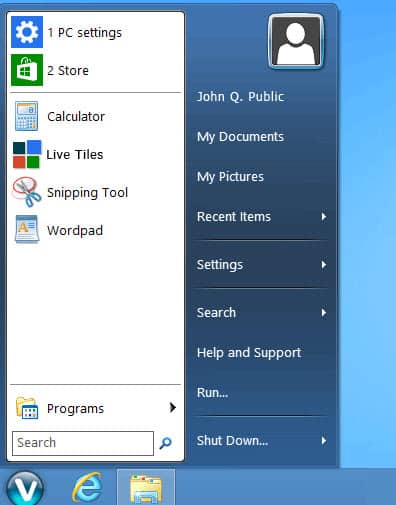
Viva Start Menu

vivastart

Viva StartMenu will help you to bring the start menu in windows 8, this tiny app just of 1.65 MB. Viva start menu keeps the start button and opens up the start menu in Windows 8 when clicked. You also get a shortcut to open the modern desktop with metro interface. It includes the search box to search installed programs just like 7. Get your copy of Viva Start Menu here.

Start8

start8

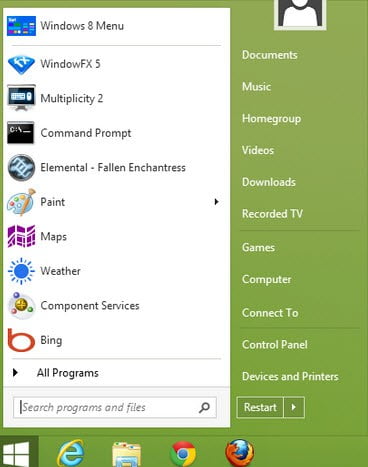
Start8 by Stardock is free start menu tool for Windows 8. It keeps the rounded start button on the bottom left corner of windows that opens up the start menu that looks like Windows 7 with the same features including a search box. It also allows you to pin frequently used apps so you can quickly access them, you can even open music, documents, and videos and shut down your PC with single click. Start8 even let you boot directly to the Windows 8 desktop instead of metro interface. You can either try it free or go for the paid version. Fetch Start8 tool over here.

Vistart

vistart

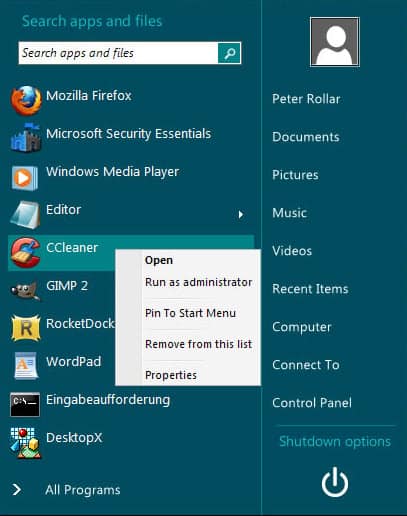
Vistart is a cool app to fetch the Start menu for windows 8 operating system. You just feel that you are using the same old Windows 7 start menu while using Vistart. You can even apply various skins to Vistart, it has a search box to search the apps and it arranges all the frequently used apps for easy access. Download it here.

Pokki

pokki

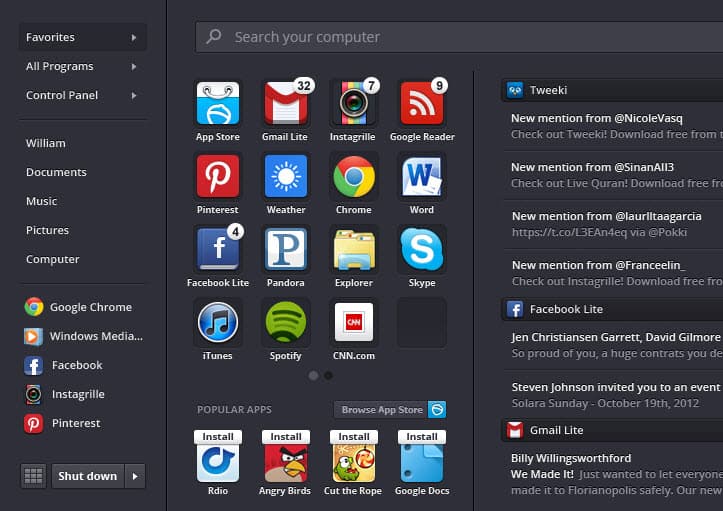
Pokki is more than just a start menu, it doesn’t look like classic windows startmenu, it is a newly designed app with cool user interface. It allows you to Search for a specific app using the search box and add frequently used programs and folders to quick access. In Pokki you will also get facebook and gmail notifications. Download Pokki here.

Power 8

power8

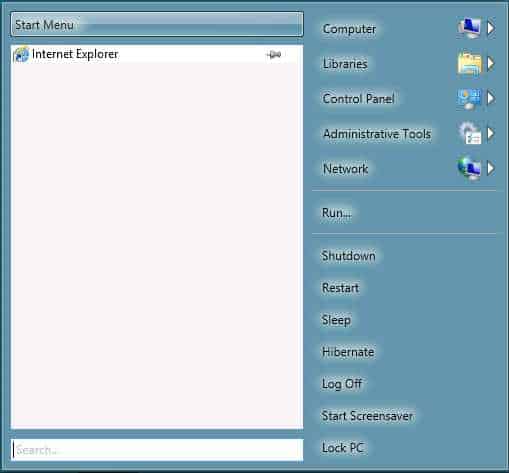
Power 8 is an open source project, it is similar to Windows 7 startmenu with the list of recently used software, just like classic Windows 7 start menu you will get the Computer, Control Panel, Library and Run etc., it also includes power options such as log off, hibernate and shutdown etc. Download your copy of Power 8 here.

Top 5 Free Alternatives to Apple iBooks

Most of the people prefer to use their iPad or iPhone as an eReader, they don’t want to buy costly eReaders such as Amazon Kindle or Kobo Touch eReader. As we know iOS comes with a built-in app for reading books i.e iBooks. iBooks has nice user interface but it lacks many useful books, Apple’s BookStore where we purchase the books doesn’t have ample collections of books comparing to Amazon Kindle or other eReader services. Here we have listed Top 5 Free Alternatives to Apple iBooks for a better reading experience on your iPad, iPhone or iPad Mini. Let’s look at the useful features of these e-reader apps.

Also read:

List of Free Alternatives to Apple iBooks

Kobo eReader

kobo ereader

Kobo has the wide range of eReader devices including Kobomini, Koboglo, KoboTouch and KoboArc but you don’t need buy these devices to access Kobo book library, Kobo has designed a free iOS app for iPad and iPhone to browse and buy over 2.5 million eBooks along with 1 Million free eBooks. Kobo eReader is a best alternatives to Apple iBooks Kobo iOS app automatically syncs your purchased ebooks to all the devices you use so you can access your library anywhere and enjoy the reading.

Kobo eReader app is customizable according to your needs; you can change font size, style and switch between day or night modes for comfortable reading. Kobo eReader is compatible with iPhone, iPod touch, and iPad with iOS 5.0 or later.

Stanza

stanza reader

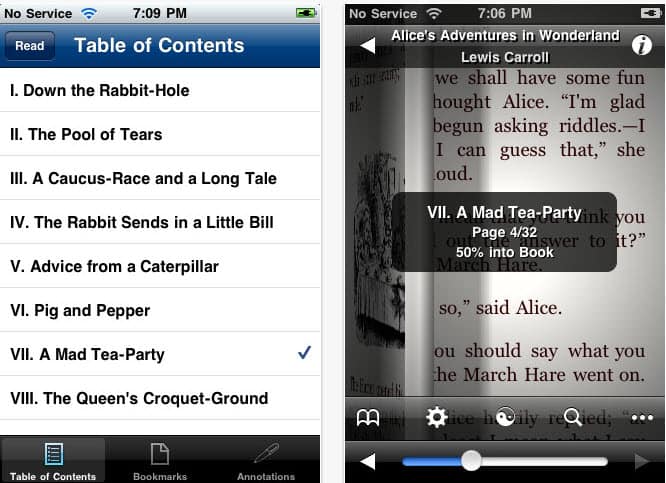
Stanza allows you to read ebooks on apple devices including iPhone, iPod Touch and iPad as well, not only you can read but you can organize them category wise in an attractive and user friendly interface. You can read the free ebooks from Project Gutenberg, Feedbooks and other sources using Stanza.

Stanza has great customization features, you can change the theme or text color and paper color as well. For now this app does not support syncing between devices and may be available in future versions.

Kindle

kindle ereader

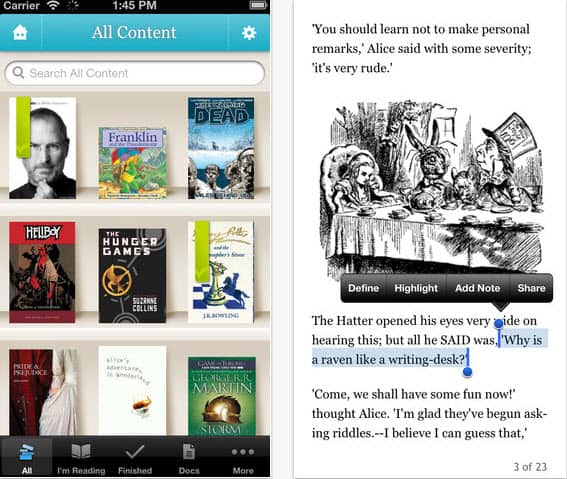
Kindle by Amazon is the most popular device for reading ebooks but it also has an app for iPhone, iPad and other iOS devices that can be used to access purchased ebooks from amazon online book store, so don’t worry if you don’t have a Kindle reader, just install Kindle reader app in your iPhone or iPad and enjoy reading.

By using this app you can buy your favorite books from over 800000 books collection at Amazon Kindle store, you can also read PDFs attachments from your mail. Kindle iOS app allows you to customize margin size, background color and font size etc.

ShuBook

shubook

ShuBook is more than just an eReader because along with e-books you can also view Microsoft Office generated file formats including documents, spreadsheets and presentations etc. By using ShuBook you can browse and read through OPDS (Open Publication Distribution System). ShuBook allows you to sort your collection by title or author, you can even change text styles.

Nook

nook

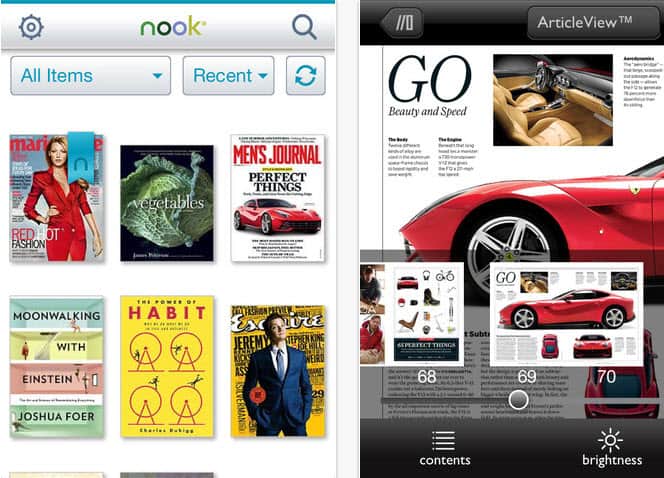
NOOK by Barnes & Noble is the best e-reader app for iPhone, iPad, iPad mini. By using this free app you can access over 2.5 million e-books, magazines and newspapers as well. Nook saves your last viewed page and opens it next time when you run this app in any other device. It has a built in dictionary and allows you to get the synonym of difficult word, along with this you can also add notes and bookmark your favorite chapters. Nook allows you to change background and text colors and also apply various themes.

Top 5 Free Addictive Android Games [All New Time Killer Games]

0

There are thousands of free android games available on Google Play but some games make you so addictive to them that you even forget your food and sleep. This is not a joke but many users experience it. If you are bored with playing fruit ninja, angry birds and temple run then check this fresh list of games, here we have listed the most addictive free android games of various game categories including racing, sports, arcade and action. Let’s have a look on them.

Also read:

List of All New Free Addictive Android Games

Hill Climb Racing

Hill Climb Racing by Fingersoft is the time killer game which comes in racing category, this one is the physics based driving game. First of all you will get a jeep and a hill, you can go as much as you can, make money and buy other cars and also unlock available levels. Here you can ride on jeep, monster truck or on a racing car. By making money you can unlock desert, arctic, highway, moon, mars and aliens valley levels. This game has got 4.6 star ratings, check out this free addictive android game here.

Speed Car II

Speed Car II is simply awesome, Speed Car I was just had a straight highway but here in Speed Car II you will mess with turning roads that adds more fun to your game. You can control your car with gravity sensor and boost the car speed by touching the screen. Various cars and levels are available over here to shop and unlock. This new version also supports tablets. Speed Car II has got 4.3 star ratings in Google Play, download and have fun with this free game here.

Cricket T20 Fever 3D

Cricket T20 Fever 3D by Indiagames is a must play game who love cricket especially the T20. This one is HD 3D graphics game with stunning gameplay. It comes with multiple game modes including quick match, ODI and T20 etc. You can choose from six different play grounds around the world and play with your desired cricket team. Hmm.. even cheer girls are there to support you!. This game has got 4.2 star ratings, check out this free addictive android game over here.

Air Control Lite

Air control lite by Four Pixels is a free and addictive air traffic control game where you have to land the airplanes and helicopters without collision, at the beginning game looks easy but becomes harder when you go with it and addictive too. The game has simple yet catchy graphics. The game has got 4.5 star ratings, have a look at this free game over here.

Bus Parking 3D

Bus parking 3D by riv3r is a free addictive android game with 3D environment. Your job is to park the bus by rotating the steering and pedals. Even this stuff seems easy on the start but becomes tough when you move on. Bus parking 3D has got 4.5 star ratings, get this game over here.

How to Make Google Author Rank Work for You

0

How to make Google Author Rank work for you

For bloggers, web authors and website owners alike, the introduction of Google Author Ranks is a huge leap in the journey to rank your content or web pages accordingly. Whether you’re an SEO fanatic, or just getting started out in the search engine optimization game, the combination of Google’s Page Rank and Author Rank can help put your posts at the top of the list, or as close as possible all depending on your overall reputation, as judged by Google. Your work will be graded and this will determine your place on the Google’s search engine results. It’s never been easier to find out where you rank and how to move up with the overdue-release of Author Ranks. Basically Google is on a search to find and highlight the best web writers and journalists on the net, and if you think you might just be one of them, here are a few tips to use Author Rank to your advantage.

Google Plus and Authorship

Firstly, you’ll need to set up a Google+ account if you don’t already have one. Yes, some people might see this as Google’s way to get Google+ the users it has lacked from the beginning, but really, there’s no harm in over-exposure when it comes to launching your blog/website/personal brand on social media. So ignore those conspiracy thoughts and sign up. Now link your Plus profile to Google’s also recently launched Authorship program, which allows you to link all the content you create on the web straight to your Google Plus profile. It’s definitely a handy little innovation from Google! Now ensure you keep those links updated and showcasing all your best stuff, as this is how Google will be ranking and rating you in the very near future. Build that puppy up so when Google’s Author Rank finally kicks in, you’re ready and waiting to use it to its fullest potential.

Quality

Probably the most difficult yet most rewarding tip of all is to keep the quality and relevancy of the content you create at the highest standard possible. Make sure it’s exactly what your audience want to read and also what they are going to want to share with their friends. As we know, social media is everything and getting your content circulated will shoot you straight up the search engine ladder. How do you do this? Well if you’re a good enough writer, it shouldn’t be too difficult. If not, then research is always key. Find out what’s trending, what’s getting a lot of attention these days and who your target audience is, so you can deliver content that is on point and most of all, worthy of a place at the top of the search engines. If you’ve got nothing to say, move on. No point in wasting your reader’s time and lowering your rankings.

Get Niche’d

No one likes to take advice from someone who thinks he’s an expert in everything. So find what you’re most passionate about and enter the niche market, rather than posting a bunch of unrelated and unintelligent content. Focus on a topic that’s rare and roll with it. You might think all the good ideas are gone but no matter how small your topic is, I bet you there will be thousands of readers out there who are searching for some good insight on that specific topic every day. Don’t underestimate the number of users on the web today, also don’t underestimate their intelligence. Make it clever, make it easy to understand and get niche’d!

Verdict

If your content sucks and no one is reading is, then there’s not much helping you. But if you’re onto something great and all that’s missing is the eyes of a million Google users, then Google’s Author Rank can really help you optimize your content and get those eyes clicking on your content instead of the usually top-ranking floaters. Follow these steps and you’re certain to gain some well-deserved traffic for your fancy words. Remember, Google Plus is the way to go if you want all your links in one place and the chance to be ranked by the Google A.I bots. Sign up, watch your quality and get niche’d! Happy ranking!

Atlas.ti ; Qualitative Research with ease

Well i know you must be thinking what is this qualitative research, Qualitative research softwares like ATLAS.ti helps people to manage, shape and make sense of unstructured information. It will not do the thinking for the user but provides a sophisticated workspace that enables him/her to work through their information. To put it more specifically, Qualitative research is a method of inquiry appropriated in many different academic disciplines, traditionally in the social sciences, but also in market research and further contexts.

qualitative research

Atlas.ti is one great software if you want qualitative research to be done in a perfect way. Although there are other options as well but be sure the feature list of Atlas.ti outmatches them all.

Features that will make your Qualitative Research easy

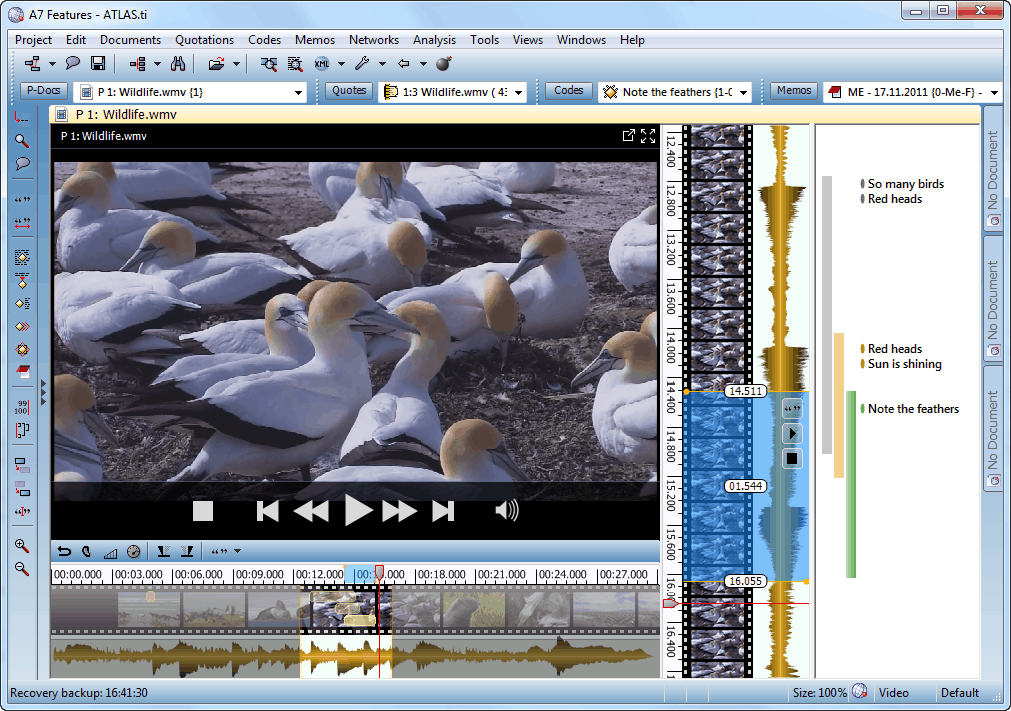
The most important thing about any software is the interface and Atlas.ti brings a great interface which is truly intuitive as it emulates the traditional paper & pencil desktop style, the menus can be accessed easily which makes way for some great ease of use. The power users who love multitasking will also find themselves at home as Atlas.ti allows users to open combination of functions to be together.

qualitative research

When you are doing some qualitative research, you will need data to research, data management is also great as it supports huge number of data formats such as plain text, Rich Text or PDF formats, work with audio files in mp3, au, wma, or wav format, with video files in mpeg, wmf, or avi formats, with graphic files like tif, multi page tif, gif, emf, jpeg formats, or with live Google Earth documents, kml and kmz formats (and many more). ATLAS.ti uses an external referencing system for your data files you will need in your qualitative research. This makes it possible to work with a large data files like video files or with a large amount of data files. In case you have errors in your data file, you can even edit that in the software itself. All languages and characters are supported. You can also easily backup your files.

You also get great organization and usability with features such as object explorer, drag and drop coding, powerful, integrated object management etc..  The users who want some great coding will not be disappointed by the Atlas.ti software as it has unlimited coding and features such as automatic segment selection, code transparency, color coded codes, grouping and filtering codes, auto coding and a very powerful code manager.

qualitative research

Memos and comments also work great as every object in Atlas.ti is fully annotable and you can even output all annotations. Coming to comments, you get document comments, quotation comments with visualisation and output. For memos, you get extremely flexible memos, multiple use memos, multi use memos. You get full access to memos which you fully visualise.

Atlas.ti offers linking at data level, atomic linking, intelligent links and you get full control with hyperlinking.  All objects (documents, quotations, codes, memos, families of objects and icons of other network views) and their relation to each other can be graphically displayed. Visualisation features are truly great in Atlas.ti which makes up for a great experience in qualitative research. You can pretty much see everything visually.

You can easily work with variables with intelligent data handling. If a list of variables already exist, these can be imported via an Excel table, thus allowing for a smooth integration of qualitative and quantitative data. You can even export variables and use variables for searching.

Other features include searching for your database, quantification, transcription, GeoData, survey import teamwork. All in all Atlas.ti makes up for a great qualitative research software and with the new Atlas.ti 7 which brings some really intuitive features, its hard to look at any other qualitative software to get your work done. There are numerous areas in which users will be delighted to find significant changes with Atlas.ti. They make working with the program even smoother, easier, faster, safer, and more productive than ever before.

Licenses and Prices

qualitative research

For a single user license,

Currency:

U.S. Dollar ($)
CommercialGovernment*Educational*
License Type
Single User License 1 User2300 $1290 $670 $

For a multi use license, you can get either purchase a license or take it on lease,

Prices: Purchased License

Currency:

U.S. Dollar ($)
CommercialGovernment*Educational*
License Type
Multi-User License 5 Users8500 $4650 $2500 $
Multi-User License 10 Users16500 $9300 $4800 $
Multi-User License 15 Users23800 $13150 $6900 $
Multi-User License 20 Users30700 $17550 $8900 $
Multi-User License 25 Users36500 $22000 $10600 $
Multi-User License 30 Users41400 $26300 $12000 $
Multi-User License 35 Users46200 $30700 $13400 $
Multi-User License 40 Users51400 $35000 $14900 $
Multi-User License 45 Users55200 $40000 $16000 $
Multi-User License 50 Users60000 $43800 $17400 $
Multi-User License 55 Users65200 $48000 $18900 $
Multi-User License 60 Users71000 $52500 $20600 $
Multi-User License 65 Users74800 $57000 $21700 $
Multi-User License 70 Users80700 $61500 $23400 $
Multi-User License 80 Users93500 $70000 $27100 $

Prices: Leased License

Currency:

U.S. Dollar ($)
CommercialGovernment*Educational*
License Type
Multi-User License 5 Users
– Lease / Subscription
3100 $ (annually)1950 $ (annually)900 $ (annually)
Multi-User License 10 Users
– Lease / Subscription
5800 $ (annually)3600 $ (annually)1400 $ (annually)
Multi-User License 15 Users
– Lease / Subscription
8300 $ (annually)5200 $ (annually)1700 $ (annually)
Multi-User License 20 Users
– Lease / Subscription
10700 $ (annually)6600 $ (annually)3100 $ (annually)
Multi-User License 25 Users
– Lease / Subscription
12800 $ (annually)8000 $ (annually)3700 $ (annually)
Multi-User License 30 Users
– Lease / Subscription
14500 $ (annually)9000 $ (annually)4200 $ (annually)
Multi-User License 35 Users
– Lease / Subscription
16200 $ (annually)10100 $ (annually)4700 $ (annually)
Multi-User License 40 Users
– Lease / Subscription
17900 $ (annually)11250 $ (annually)5200 $ (annually)
Multi-User License 45 Users
– Lease / Subscription
19300 $ (annually)12150 $ (annually)5600 $ (annually)
Multi-User License 50 Users
– Lease / Subscription
21000 $ (annually)13230 $ (annually)6100 $ (annually)
Multi-User License 55 Users
– Lease / Subscription
22700 $ (annually)14200 $ (annually)6600 $ (annually)
Multi-User License 60 Users
– Lease / Subscription
24800 $ (annually)15500 $ (annually)7200 $ (annually)
Multi-User License 65 Users
– Lease / Subscription
26200 $ (annually)16400 $ (annually)7600 $ (annually)
Multi-User License 70 Users
– Lease / Subscription
28300 $ (annually)17800 $ (annually)8200 $ (annually)
Multi-User License 80 Users
– Lease / Subscription
32700 $ (annually)20520 $ (annually)9500 $ (annually)

Student prices

License TypePrice
Student License (duration of degree program)$ 99€ 75£ 65
Semester License (six months)$ 51€ 39£ 34

Conclusion


With superior functionality, great usability, unique multimedia capabilities and some great security, reliability and flexibility, qualitative research was never so intuitive. ATLAS.ti is much less susceptiple to common security threats and remains more flexible and expandable in its capabilities than other products so you can do some secure qualitative researchfor your company.

Don’t agree with us, you can experience some great qualitative research for yourself as you can get an unlimited trial version is available at www.atlasti.com.

Should I go for a 4G smartphone upgrade?

The UK’s first 4G mobile network arrived in October along with a whole array of smartphones to tempt users. But for many there will be questions that need to be answered before they blindly call up their operator and tell them they want to upgrade to the new super-fast service.

Should you switch to 4G Smart phone

Here are a few of the most pertinent and frequently asked questions answered:

 Is it even available near me?

If you live or work in Belfast, Birmingham, Bristol, Cardiff, Derby, Edinburgh, Glasgow, Hull, Leeds, Liverpool, London, Manchester, Nottingham, Newcastle, Sheffield and Southampton, then you should be able to use the 4G signal. EE plans to roll out the service beyond these initial key cities in the New Year, but you may want to see out your existing contract if you live off the beaten track somewhere.

 What will it cost me?

EE has already announced the pricing for its 4G smartphones, with plans available that start at £36 per month and give you up to 500MB of data each month. In addition to this, you’ll get unlimited calls and texts on any of the contracts they have, though it’s important to note that these go up to £66 per month depending on how much data you need, the term of your contract and the cost of the device you choose.

 How much data will I need?

Well, this all depends on the kind of user you are, but if you are looking to stream video and music content when you are out and about you could need quite a bit – more than the lowest allowance of 500MB will offer anyway. Of course, if you are more inclined instead to use social networks, email and browse while away from Wi-Fi, you may find the lower data packages to be enough.

 Can I switch my broadband too?

If you do choose EE as your 4G network of choice, you may want to take a look at the fixed line and mobile broadband deals they are also offering to customers. The main reasons for this, besides the fact that they claim to be way faster than what is currently in the market, is that you’ll only have one bill to worry about for your mobile, broadband and mobile dongle – if you choose one.

Obviously, there are many other things people will want to think about before making the leap to 4G – and it’s worth remembering that there will be more competition in the market in 2013. However, if you’re the early adopting type, the temptation is likely to be very strong, so act now and have bragging rights over all of your friends!