Home Blog Page 23

How to Recover Data from Laptop Hard Drive that Won’t Boot?

0

Can’t boot into your laptop? You may not be able to access your laptop or data stored therein because the hard drive might be faulty or defective. How can you get your data back? This blog will show you how to retrieve data from a laptop which won’t turn on. Stellar Data Recovery Professional is a powerful tool that can be used to recover data from unbootable computers or laptops.

Many people have asked questions such as “laptop won’t turn on because of faulty hard drive” on various technology platforms. Your hard drive may be corrupted or faulty if your laptop won’t turn on. The hard drive may be logically corrupted, bad sectors, or drive corruption. This could cause BSOD errors, or even crash your entire system. If the hard drive is physically damaged it can cause system failure and permanent data loss. No matter what the circumstance, you could lose access to your data.

Below are a few DIY techniques that will allow you to recover files from a crashed or unbootable laptop or PC

Method 1: Use Backup

Even if your laptop isn’t turning on, data can still be recovered if you have a backup. You can recover data regardless of whether you have a backup or used Windows’ built-in recovery and backup utilities like File History, Backup and Restore and Previous Versions. Data recovery is simple if there is a backup.

However, if the users have not backed up then check out the following steps 

Method 2: Use a Powerful Data Recovery Software

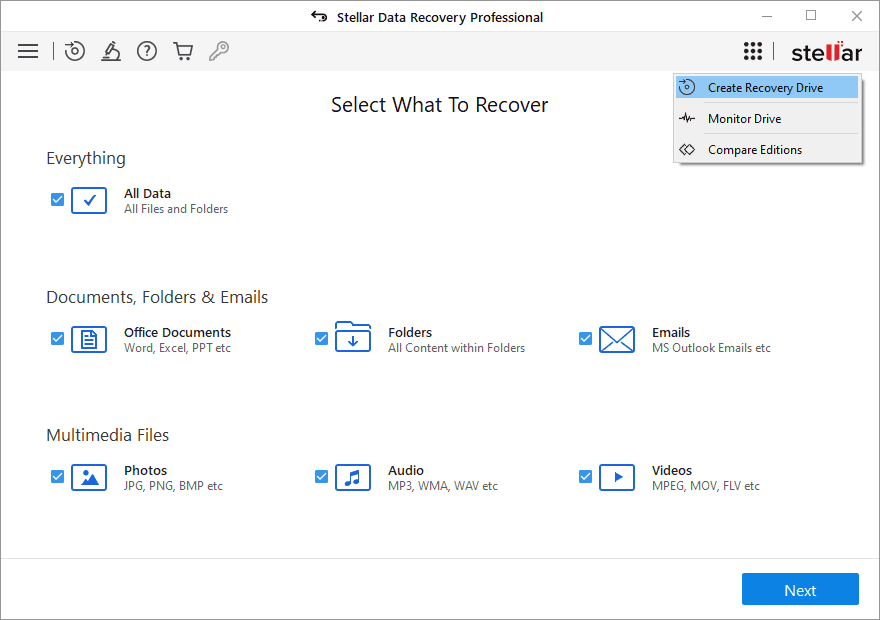
Stellar Data Recovery Software for Windows can be used to retrieve corrupted or lost data from a computer or laptop. This powerful tool will help you recover data from a crashed computer or laptop. To create a bootable media drive, you can use the utility ‘Create Recovery Drive’. This will allow to restore your data to non-bootable systems. These steps will help you to save files from being blocked by Windows.

  • Connect a USB drive to a laptop that is new or formatted. Download Stellar Data Recovery software, install it, and run it.
  • The screen titled “Select What To Recover” will open. Click the ‘Waffle icon to select ‘Create a Recovery Drive’.
  • Next, choose the USB that you have connected to your laptop and click Create Recovery Drive > OK.
stellar data recovery
  • Connect the USB bootable media device to the crashed or unbootable laptop.
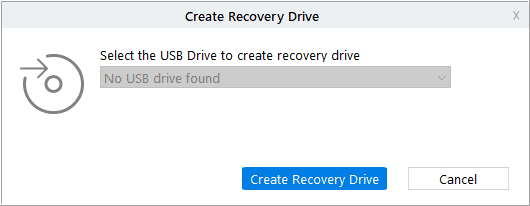
create recovery disk
  • Turn on the laptop and press F12 to view the USB media connected to it.
  • Select to boot the system using a bootable media device.
  • After the laptop boots from USB you will see the “Select What to Repair” screen.
  • Select the data type or click “All”>Next.
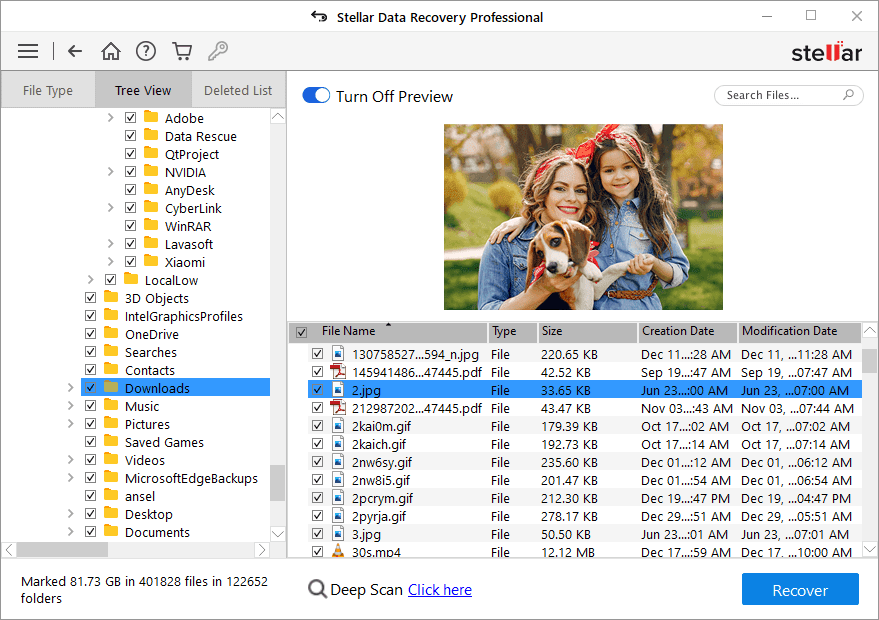
  • Click on the drive/location where you wish to retrieve the data, and then click Scan.
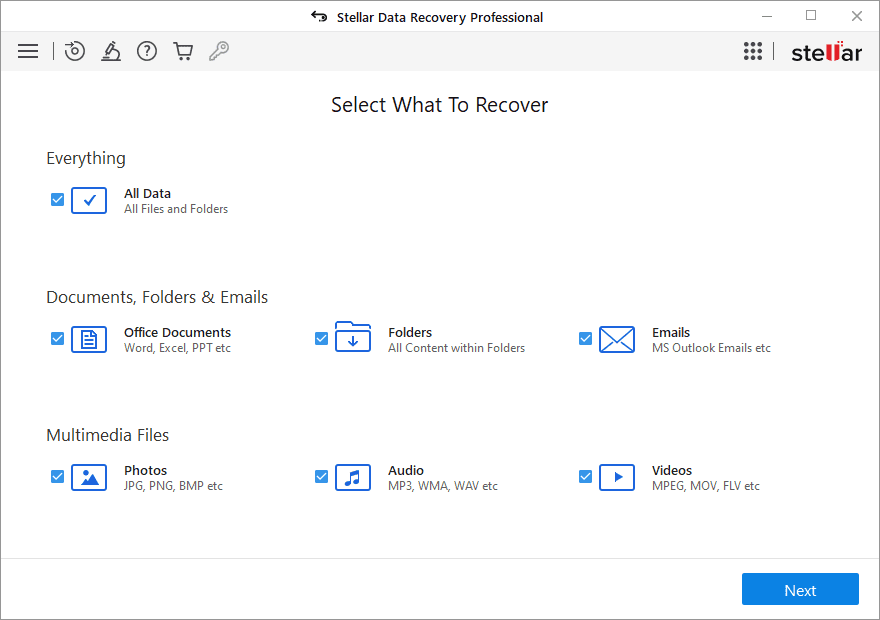
ssd recovery

The scanning process will begin. The results of the scanning process will be displayed on the screen once they are complete.

  • To run an advanced scan, click the ‘Click Here’ button beside Deep Scan.
  • Select the files you wish to restore. 
professional data recovery
  • Click Recover when you are satisfied with the results.
  • Click Browse to select a location where you want to save the files. 

Note: To store the data that you have retrieved, use an external storage drive.
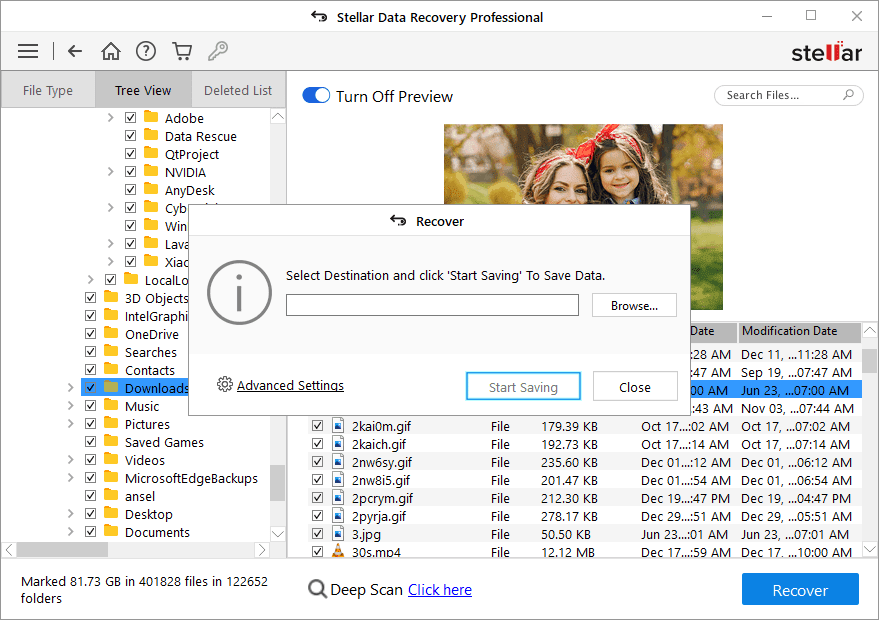
stellar data professional
  • Click ‘Start Saving’ to save your data. 

Method 3: Take the hard drive out of your laptop and connect it with another laptop

Windows users have also reported questions such as “my laptop won’t turn on” or “how can I recover my data from a laptop that won’t start up?” You may be able to quickly recover data if the hard drive is already working on another laptop.

Warning: Unplugging the hard drive can cause your warranty to be voided. You should not attempt this task on a laptop that isn’t designed to be opened. Instead, contact a professional data recovery company to help you restore your data. This method may be used if your laptop is old and out of warranty. If your hard drive stops working, it is faulty and must be repaired or replaced.

Method 4: Choose Hard Drive Recovery Services

If your laptop doesn’t start, it could be because the hard drive is physically damaged. Stellar can help you recover data from your laptop. Stellar’s data recovery services that open the drives and open the hard drives them in a clean room of class 100 to reduce dust particles, and increase data recovery chances. They can assist you in accessing a computer that isn’t turning on and guarantee 100% data recovery.

Conclusion

The problem with your hard drive may cause the laptop to not boot. You can retrieve data regardless of whether your laptop’s hard drive is damaged, defective, or physically damaged. To retrieve your data, you can use your backup. You can use a data recovery tool to retrieve files from hard drives that aren’t capable of booting windows if you don’t have one. Stellar Data Recovery Services, a hard drive recovery service provider, can help you retrieve your data even though the hard drive may be physically damaged or destroyed.


7 Ways To Determine Your Software Testing Tools & Vendors

Every software product has one thing in common: testing. Every product is tested from start to finish before reaching the end-user. The entire software world relies on testing, whether it involves databases, devices, development platforms, or programming languages. 

In short, testing is a mandatory part of the software development lifecycle. With the scale of software development being churned out every day, the need for software testing is bursting at the seams. So, how are testers handling the demand? With software tools, of course! 

software testing

A software tester’s job cannot exist without their arsenal of testing tools- not in the current era powered by software. Tools are their omnipotent weapon and go-to solution. Justifiably, the knowledge of testing tools is a prime requirement for QA jobs in USA and abroad. With tens of hundreds of testing tools available for every testing requirement, knowing how to pick the right one makes a world of difference. 

What to Look For When Choosing Software Testing Tools

There is something unique about every project and every test environment. Therefore, as a seasoned software tester, how will you determine what’s best for your project? To match the software product with the optimal testing tool, consider these factors:

  • Team members who will use the tool 
  • Problems it can solve
  • Domain or industry
  • Open-sourced or prepackaged
  • The technology stack it supports
  • Flow of data and its supported environments
  • Security features available

In the end, you will be left with an answer that will help you find a matching testing tool that aligns with your requirements. But are these factors enough? After all, selecting an appropriate testing tool is like looking for a needle in a haystack. Hence, you need to dig deeper. What you need are in-depth criteria that will help you look beyond the superficial factors. 

Consider these criteria to make your final selection of software testing tools: 

Assess if it is compatible 

The first criteria for any software testing tool is OS compatibility. It would be an invaluable asset if the tool supports multiple OS configurations. The tool you pick should also support the older OS versions to make reverse compatibility possible. 

2. Check for platform compatibility

Your testing tool must cater to current and future requirements by supporting all your applications and platforms. Check if your testing tool is compatible with desktops, mobiles, client-server applications, and web-based applications. 

3. Determine its versatility

Similar to platform compatibility, the tool you select should be versatile enough to last for the long run. Your testing requirements will change as your product evolves with additional sophisticated features. Hence, it’s imperative to pick a tool that scales with your requirements. While some add-ons can bring the versatility factor to the tools you use, they may incur additional expenditure. 

4. Analyze if it is easy to maintain

With so much to do in testing, maintenance cannot be a headache. The tools should be able to generate automated test cases that can be reused or changed as needed. In addition, the tool should provide detailed error logs to allow for quick identification and correction of any script errors. As a result, test management is simplified, and maintenance is easier.

5. Check if it is easy to use

The ideal testing tool is uncomplicated and offers several solutions to complete a task. It should be easy enough for anyone to handle it- even fresh recruits who’ve just commenced their testing careers. 

6. Evaluate the expertise requirement

Some testing tools can be highly challenging and require a high level of proficiency to make them work. Rather than choosing a complicated tool, go for one that supports simplified test cases and codeless automation. Look for project-based and model-based tools that your team members are comfortable working with. 

7. Calculate the cost of license and support

Lastly, consider whether the investment is worthwhile. Your expenses don’t end here. Moving forward, there will be licensing and add-on costs along the way. Consider these cost-related factors carefully so that your testing tool doesn’t strain your budget. 

Software testing tool selection is not an easy job. It requires expertise and experience. Making uninformed decisions will cost you time and money and end up compromising the product quality. From there, things will go spiraling downward. 

Currently, many organizations are outsourcing their manual and automated testing work to vendors. Outsourcing helps to save valuable resources and eliminates the need for in-house testing teams. But, there’s a catch- you need to pick the right vendor, and there are thousands of them. The following tips will ensure an easygoing selection process to choose your vendor. 

5 Pointers To Select Your Ideal Software Testing Vendor (H2)

Know your requirements

If you’ve decided to outsource, the next thing to do is list your areas, types of testing and coverage that should match the scope of your work. Your list should also include your target devices and platforms. You can choose your vendor’s services from these four categories under application testing:

  1. Web
  2. Enterprise
  3. Mobile
  4. Desktop

Know your vendors

This is the tricky part where you need to select from a long list of vendors. To short-list, the best ones, find out what your vendor’s service model and testing processes look like. Next, check if the same will work for your testing objectives. Short-list the vendors whose solutions match your goals. 

Cross-check the facts

When you seek out their services, all vendors will provide a list of appealing details about themselves. Recruit your ex-employees to check the details. Step up your investigation on social media platforms. Call up other companies using similar services from your short-listed vendors and verify the facts. Arrange for one-on-one interaction with their experts to gauge their expertise. Don’t stop until you’ve made a thorough analysis. 

Analyze and decide

Discuss your findings with your tech team. Get opinions and weigh them with the possible outcomes. Talk to your financial team about the outsourcing budget. When you are satisfied with your comprehensive assessment, sign your contract with your chosen vendor! 

Conclusion

There is no hard and fast rule to choose a testing tool that complements your testing requirements. It requires a lot of collaboration, discussion, and cross-referencing to pick the right choice. If you are unsure about the process, always seek the guidance of an expert to make your efforts worthwhile. 

The Importance Of Public Relations Marketing

0
Public Relations Marketing

Public relations plays such a major role in digital marketing. Decades ago, PR staff would share the latest promotions and programs of the company in the form of a press release and television broadcasting (read more). These days, there are much easier ways to promote almost anything, the staff doesn’t even have to work harder to deliver the same task on various platforms. 

The Basic Understanding Of Public Relations

Nothing is better than having an effective public relations team to implement and enhance your chosen marketing strategies. In this age, online reputation is determined through the hard work of your team. The more promising their strategy is, the higher return of investment (ROI) a company has and the better their public standing.

Still, public relations has a slightly different purpose than general marketing. Their essential role is to overcome some problems that the marketing department might face during the promotional process, and making sure that the good name of the business is preserved – if not, made better

Their main focus should be to increase the credibility of a brand. This means there are some statements that the PR needs to inform the public that relates to the product or service of a company. There is also wrongful information going around that they would have to manage.

Businesses have to build rapport amongst their customers if they want people to patronize their products. Also, building trust is critical in getting new buyers to come in. This is why effective PR marketing is always of utmost importance.

Which One Is More Important: Marketing Or Public Relation?

There are many questions that arise which are associated with the role of PR and marketing. Well, both of them relate to each other (link: https://www.forbes.com/sites/forbesbusinesscouncil/2021/03/10/the-difference-between-marketing-and-pr—and-why-it-matters/?sh=223496415529). Any enterprise which boosts its reputation through various practices of public relations can increase the chance of getting new customers and maintaining loyal ones. In this case, public relations should raise the quality of press releases, stories, and audiovisual content.

Marketing creates the best content for readers to acknowledge certain products or services. While they have to boost the existence of the promotional media to the public effectively, the public relations department should go along with the best stories and press releases about the product or service’s good aspects. By releasing stories behind the products or services, public relations will change how people consider them in positive ways.

Areas That Needs Improvement For Every Team

Basically, public relations should deal with any promotional method in a much easier way. There are lots of ways to promote products or services in real-time. Press releases, for instance, can be broadcasted in real-time as well.

Everyone connects to digital platforms every second, so things can be done in the fastest way possible. Keep in mind that there are certain factors that public relations service can provide to its clients. They include:

Spreading The Message From Client

Many companies don’t know how to spread the marketing content to the right place. Even if they hire their own public relations staff, a professional PR company is already experienced in the industry. It can deliver the best service that relates to spreading press releases, social media content to the right people for strengthening the brand image.

Professional Tools

PR companies own tools that can triumph over challenges that may become the real culprit of a company’s failure in marketing its products or services. The tools are updated and relevant to the needs of search engine optimization and online advertising.

The Ability For Tracking SEO Analytics

PR Marketing

With the help of professionals, any company doesn’t have to bother with SEO analytics. This is one of the most crucial parts of improving the company’s existence in this high competition era. With the right SEO tools, any public relations service provider can help boost a website’s popularity in which leads to higher revenues.

Creating The Best Content With The Form Of Interesting Storytelling

Nothing beats the importance of having quality content. Digital marketing means nothing without it. Public relations service provides with an excellent reputation can create the best contents that combines quality writing and precise SEO tools. It will give the best content which can influence readers and inspire them to convert content into sales.

What Clients Should Expect From Their PR Service Provider

Promoting content is not as simple as posting comments on social media platforms. It requires a series of efforts to increase the chance of a website reaching the first page of Google.

The efforts need to be consistent and precise. Or else, a company cannot reach its potential market successfully. This is where companies like okeeffepr offer support and help the business expand. Instead of having to delegate the time and budget to train your own team, outsourcing can be more of an advantage.

First things first, any PR service provider should pay attention to backlinks. Getting backlinks is easy when those links are less authoritative sites. On the other hand, getting even a single backlink from a world-class website is very valuable. When it happens, potential markets will find the product or service is reliable enough.

A reliable PR service provider has a special team for dealing with each task of online advertising. The team has members who have different roles, in which all of them merely focus on ensuring effective promotion. Besides, the team can focus more on improving content based on the latest trend that potential readers want to know. Without such efforts, targeted markets will try to find competitors to satisfy their needs. 

How Do Loyalty Schemes Work at Online Casinos??

0

Many of the best internet-based casinos offer loyalty clubs and VIP programs. What is the point of these schemes, though, and do they really benefit players? As it happens, they do. Join us as we explore the ins and outs of these reward programs right here. If you want to learn more about casino loyalty goodies, let’s get started.

Most Casinos Offer Loyalty Rewards

Loyalty rewards are not a one-off occurrence. While it is true that there are casinos that don’t provide these goodies, most of the best sites do. The exact nature of a loyalty scheme may vary, though. Some may be tier-based programs open to all. Others may offer comp points or a club shop, and some only offer VIP clubs for the most favoured players. Let’s explore what each delivers next.

The Tier-Based Loyalty Club

The tier-based loyalty club is the most common reward scheme at online casinos. As they play slots and table games, players will earn points. These can be used to climb the totem pole that is the loyalty club. It may have any number of levels, but the general rule is that the higher you climb, the better the goodies become. Perks can include free spins, cash bonuses, exclusive goodies and more. You may also receive cash bonuses for referring friends to the casino.

Comp Points and Loyalty Shops

Comp points are a common occurrence at casinos. Like the points used in loyalty clubs, players can earn comp points by betting on table games and slots. However, this time, they can be accumulated and redeemed for real money cash bonuses. Other casinos choose to let you spend accumulated loyalty points in a club shop. You can purchase free spins, cash bonuses and sometimes even merchandise there.

Perks for VIP Players

The biggest spenders (whales or high rollers) and frequent bettors will likely become VIP members over time. VIP players will likely claim far more extensive rewards than those members of a regular loyalty club. These perks can include higher withdrawal limits, faster withdrawal times, access to VIP tournaments and games, invitations to exclusive red-carpet events, and much more. Some casinos do not have a regular loyalty club and only offer a VIP club. Other sites have the former and not the latter, while many offer both to their members.

Trusted Casinos with Great VIP/Loyalty Schemes

Ultimately, the experience you can have with casino loyalty clubs, rewards schemes and VIP clubs will vary depending on where you play. For that reason, we always recommend playing at top internet casinos with proven rewards programs, like Rollers.io. If you want to know more, we recommend heading over to one of these top casinos and exploring their loyalty clubs and VIP programs before signing up. This will give you a great idea of what to expect when you become a member of the casino.

Why Do People Dislike Online Ads?

0

It is not hard to imagine why people dislike ads. Imagine your scrolling on your favorite news website, and your experience is disturbed by some ad that is not even targeting you. An absolute nightmare that will make you exit that page. With every year, ads are becoming more and more intrusive. Yet, no one likes to believe that they are just a scam in the advertising world or a secret algorithm that will steal their data.

Online Ads

Moreover, we think not the ads are the real problem, but the businesses using those cringe ads. In the end, people will run from your company because of your annoying ads. For example, let’s say you are an online fashion store. And someone is looking on your website for some item, but it’s not ending buying that item. After that, that person is followed by ads everywhere online, on Instagram, on Facebook, etc. Do you think that the person will convert into an actual buyer because some ads follow online? No, the result will be the opposite. And that’s why the majority hates ads.

What can people do to avoid the ads?

Let’s say that businesses will work to retarget and make better ads without becoming intrusive. But people still don’t want to see any more ads while surfing online. Not only because these ads are intrusive, but because people are feeling insecure online, and they want to feel still like they have some online privacy. The worst thing to think about in this digital ocean is that your data is not safe anymore online.

Moreover, some ads can contain malware, putting your device at risk, and it is the last thing you want. Therefore, ads can be helpful only if they are engaging or friendly.

Use the right tools for your privacy

Indeed, technology has caused this, yet technology can help us have some privacy and enjoy our news websites without being interrupted by unwanted ads that are not even targeted for our needs. Adblock software tools are designed for people who want to get rid of all these ads and keep their online presence safe.

Not only that a tool like this will not show you anymore the ads, but it will keep you safe from phishing. If you are not familiar with this practice, let me put this in simple words. Phishing is a well-known web fraud, and its primary goal is to steal your sensitive data like bank account and password through fake web pages. Many great tools on the market will give you back your privacy and safety, and one of them is AdGuard. This product is designed to block ads and create a shield between your device and unwanted threads.

It’s interesting how technology has created so many threads to people’s online privacy, but at the same time, technology is the one that gives us the right solutions for our needs. That’s why I think technology is a necessary evil. And people should see only the good thing and use them to protect their online presence.

Regarding ads, I’m sure that businesses will understand that they will not succeed if their ads are intrusive and unwanted. So instead, they should change the tone, make them more friendly, and leave people feeling that they are not looking to steal their data. Yet, in the meantime, there are tools to avoid ads. You just have to use the right ones.

These 5 upcoming MMOs have their fans waiting in anticipation

0

Open world MMOs are gaining traction in the gaming community. Here are the titles everyone is waiting for.

With the anticipated release of the upcoming MMORPG Endwalker, the last expansion for Final Fantasy 14 sometime later this year, 2021 is shaping up to be one of the best years for upcoming MMOs (Massively Multiplayer Online) in recent memory. While longtime classics like WoW and Guild Wars 2 are still being played by at least a couple million loyal players, and more recent but rapidly aging games like FF14 and Diablo 3 continue to boast a large number of active players, there are a few open world MMOs expected later this year (or depending upon the COVID pandemic situation, early next year) that are drawing our attention. However sometimes we also feel the need to control our smartphones at the same time while playing games from our laptop and mobogenie can help us achieve that. Here is our list of the 5 most anticipated upcoming MMOs:

5 Most Anticipated Upcoming MMOs

#5 – Starbase

Starbase has been in development for a very long time, since around 2014, but was only announced in May of 2019. The game will feature fully destructible environments, provided the player has the right tools. Players will be able to design ships and buildings right down to the literal bolts, with even the smallest of space ships having thousands of parts. We are very excited about the prospect that we could build our own starship from scratch and by hand, and to explore a vast universe with thousands of other players. Exactly when the game will be released is not yet certain, but it is expected to become available sometime later this year.

#4 – Corepunk

In development since December of 2019, Corepunk is expected to have a closed beta sometime this year. It’s possible an open beta would follow a few months later. The release is still yet to be announced, but it could be later this year or early 2022. This game will be played from a top-down perspective similar to the Diablo series, and features an art style reminiscent of World of Warcraft. However unlike both these games the setting is cyberpunk, including playable characters wielding bombs and miniguns, and a steam-powered industrial atmosphere. Two interesting innovations in the game will be branching questlines and alternate endings, and a persistent fog-of-war system.

#3 – Ashes of Creation

Not much is known for sure about Ashes of Creation because the game is still in the alpha stage of development. What we know is that it will feature a player-driven world allowing the building and sieging of castles, a dedicated “lawless” PvP zone, a complex economy, and a unique system that will allow the player to influence the world around them. While it’s very unlikely that the game will be coming out this year, it is still among our most anticipated games of this year and will likely be one of our most anticipated games next year as well.

#2 – The Day Before

Set in a post-apocalyptic America overrun by flesh-eating infected, survivors of the end of the world must compete for limited resources to survive in a harsh world. Players will be thrust into a serious challenge for survival in which they may find it best to walk their own path, or join up with small groups or even colonies of survivors. The level of graphical detail in complex urban environments is remarkable, and the atmosphere resembles Left 4 Dead except much, much better. This open-world MMO is expected to be released this summer, and we can barely contain our excitement. 

#1 – New World

Originally this 17th-century colonial era-inspired fantasy RPG was going to be released this May, but that has unfortunately been pushed back to August. In development by Amazon Game Studios since around 2016, New World is currently available for preorder on Steam, and will feature an open-world environment, engaging storyline, and exciting combat. Innovative for an MMO, this game will not include an auto-lock targeting system for combat, meaning players will need to have a steady hand to aim their sword, gun, or magic, and careful dodging will be critical to survival, particularly in PvP. While the many delays have been somewhat of a disappointment, we remain very eager for whenever it will finally be released.

Game All Day: 5 Ways to fix NVIDIA GeForce Experience Not Working Issue

NVIDIA GeForce Experience

What is The NVIDIA GeForce Experience?

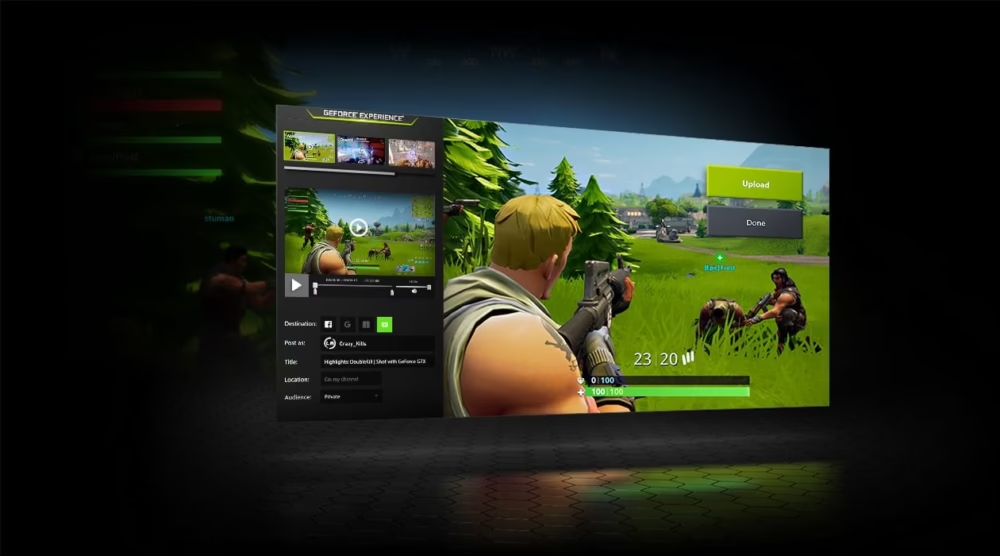
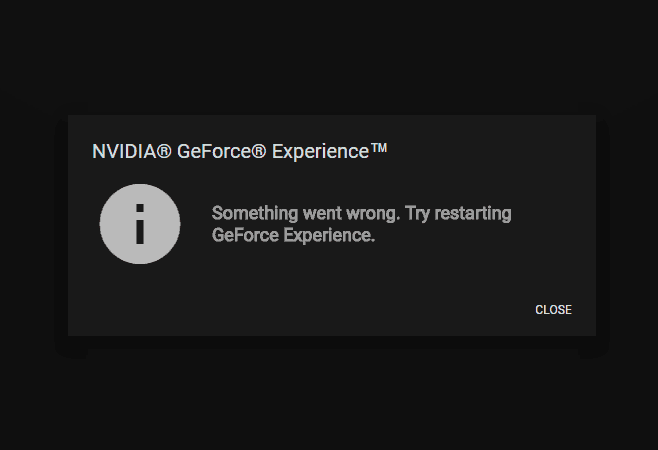
The NVIDIA GeForce Experience is a companion application to NVIDIA’s Graphics Cards. It keeps your graphic card drivers up-to-date, optimises your gaming settings automatically, and makes sharing with friends simpler for you. If you were searching NVIDIA GeForce Experience Not Working, you’re on the right place, in this article we’ve listed some tried and tested troubleshooting tips to fix this issue.

What Are the Causes of Nvidia GeForce Experience Problems?

For various people, the reason of the error pops up may be different. This issue may be caused by a variety of factors. The error may be caused by faulty files or applications, or by a hardware problem

Another common explanation of this problem is that you do not have a driver for the GeForce version you have installed. There is an easy fix to this. So, keep on reading to find out how you can troubleshoot this problem all by yourself!

NVIDIA GeForce Experience Not Working Issue

Solution 1: Is Your Operating System Up-To-Date?

First things first, you need to check if your Windows is Updated. To do this simply follow the instructions below:

  • Press the Windows key.
  • Go to Settings and look for “Update and Security”
  • Once you’re there, Secret “Check for Updates” Or “Install Now Option”
  • Simply restart your system and launch Geforce To see if the error is fixed.

Solution 2: Is your anti-virus software preventing you from using NVIDIA software?

Your anti-virus software is supposed to safeguard you, but it isn’t always accurate. It may mistakenly classify the GeForce Experience as a hazardous application at instances and blocks it from being used.

to fix this, just disable your anti-virus software and attempt to open it again to see whether this is the case.

If it still opens after removing your anti-virus, you’ll need to add a rule to it to permanently whitelist the GeForce Experience program to avoid future issues. However, this is different for every anti-virus software. To find out how to do this, you’ll need to see the instructions for your particular anti-virus software.

Solution 3: Is Your GeForce Experience No Longer Available?

There are instances when software malfunctions and shuts down. It doesn’t always notify you when this occurs, so double-check to make sure it’s turned on.

Verify by following these steps:

  • By hitting the Windows and R keys on your computer keyboard, access the Run Menu.
  • In the textbox that appears, type “services.msc” and hit Enter.
  • In the menu, look for “NVIDIA GeForce Experience Service” and choose it.
  • Once the option has been chosen, Right-click it and choose either the Start or Restart.
  • In the services list, look for “Nvidia Telemetry Container.”
  • Select the Properties option with a Right-click.
  • Changing the starting type from Manual to Automated.
  • Reopen the software after completing these steps to check whether the issue has been resolved.

Solution 4: Have you Updated Your Graphic card Drivers?

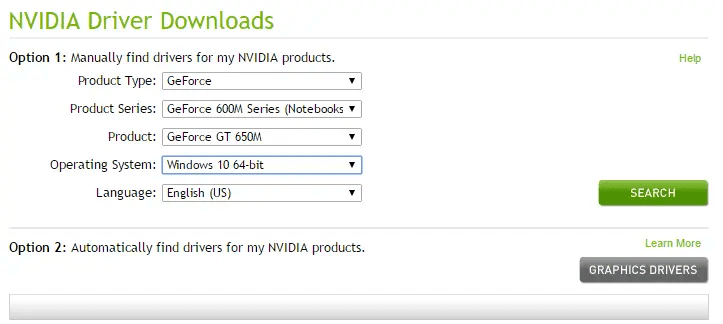
NVIDIA releases driver updates on a regular basis, and you must install them. These patches include various bug fixes and software updates that make your burdens lighter. They ensure a smooth flow of work so you don’t have to worry about a thing.

You may either manually download the drivers when they become available or use a service like Driver Support to handle your updates for you. SOftware like driver support helps its user keep track of various updates and patches that companies release so that the user is hassle-free.

To get Driver Support up and running in no time, here’s what to do:

  • Install Driver Support and Run the Program.
  • To identify all of your components, open the program and conduct a scan.
  • Use Driver Support to get your driver reinstalled for you.
  • And it’s as easy as that! you’re all set up.  You can relax knowing that all of your driver updates will be handled automatically and without your involvement.
NVIDIA GeForce Experience Not Working Issue

Solution 5: Download And Install The GeForce Experience Software Again.

Fixing any lost data or computer files that were corrupted during an install will solve the issue. If a faulty program is the cause of GeForce Experience not opening, you will need to reinstall it.

To finish the procedure, follow these instructions:

  • By hitting the Windows and R keys on your computer keyboard, access the Run Menu.
  • Type “control panel” into the input box.
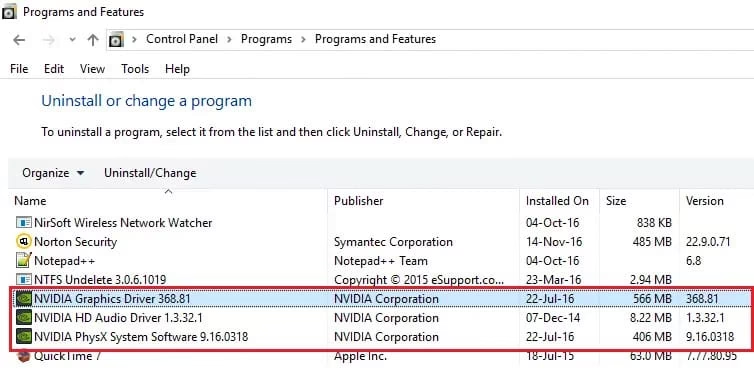
  • Select “Programs” from the drop-down list.
  • look for the uninstall option.
  • In the menu, look for “NVIDIA GeForce Experience” and choose it.
  • To remove it from your computer, go to the menu and choose to uninstall.
  • To redownload the installation, go to the official NVIDIA webpage by clicking here.
  • Open the file you just installed.
  • Follow the installation instructions.
  • Open the GeForce program once it has been reinstalled to ensure that everything is working properly.
Fix NVIDIA GeForce Not Working Issue

End Note

We’ve looked into how to fix the Nvidia GeForce experience not functioning problem, and now, you on your own can fix it! (hopefully). Nevertheless, after executing the abovementioned troubleshooting techniques, this post will help non-technical people in dealing with Nvidia GeForce experience problems. Therefore, check out these solutions one by one till your problem is fixed. That’s all for now, see you next time!