Home Blog Page 148

How to Free up Storage Space on Windows PC

Sometimes storage space looks like the most important aspect of your computer and this you realize only when you must save some important files and you find that the storage space is almost full. At that point of time it becomes difficult to decide that which files you should delete and which you should keep. To avoid such situations, you need to perform some regular cleaning tasks on daily basis. In this article we will discuss some effective ways of making your disk free without losing important data and which you can practice on daily basis or quickly when you critically require disk space.

Free up Storage Space on Windows PC

Clear temporary files and schedule to clear Automatically:

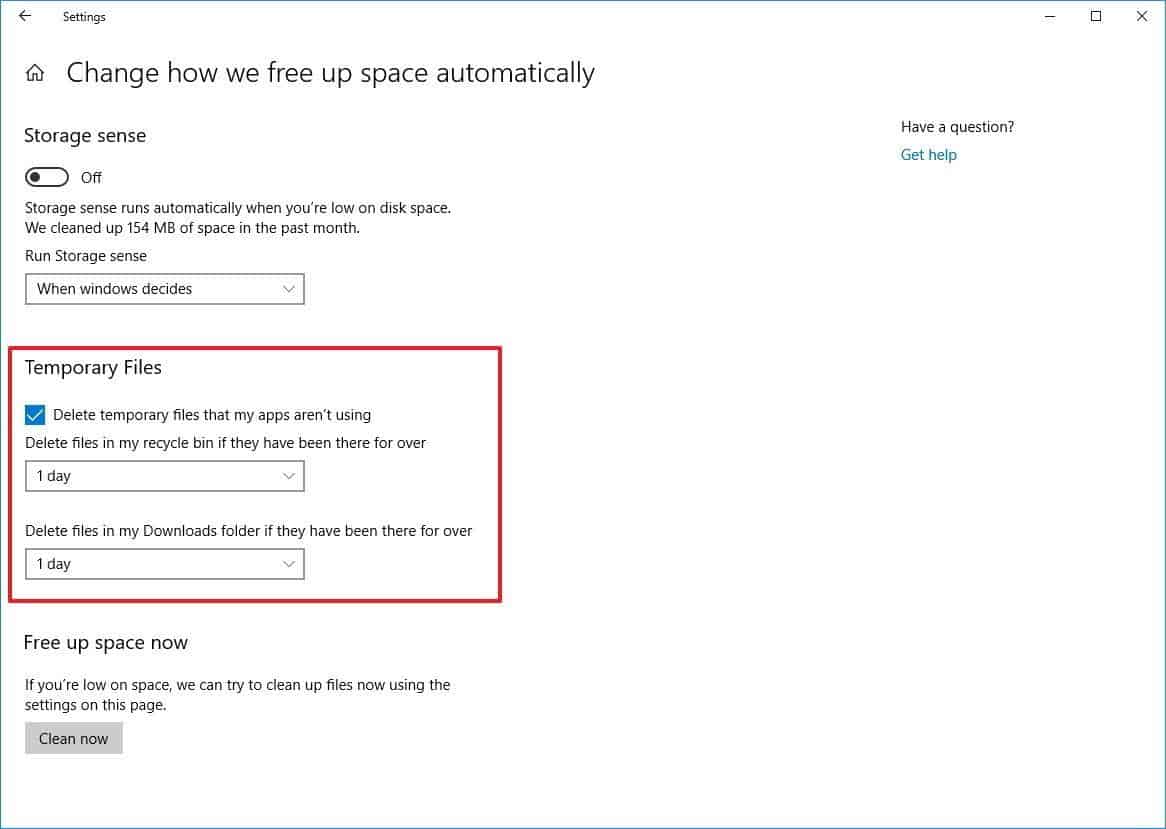
Temporary files are those files which are there on your computer because they are created or downloaded to run a specific program or for a specific website. They can be cleared by clearing browsing data or temp folder on your computer. Luckily windows10 is having a feature by default to clear temporary files automatically after a scheduled time. To enable these settings type storage in windows search bar and then click on “Change how we free up space automatically” Now check “Delete Temporary files that my apps aren’t using. Next from a drop down you can choose to clear temp automatically in 1 day, 14 day, 30 days or 60 days.
Removing unused programs using control panel:

If you have not checked what all programs are installed on your computer, then this is the right time to do so. You can check the list of programs installed on your computer by going to control panel and clicking on uninstall program. You will surprise to see that there are so many programs which you have installed for one time use but they are still there on your computer. with the help of control panel, you can completely remove all such programs and can recover lots of space in just few minutes.

Use disk clean up Wizard:

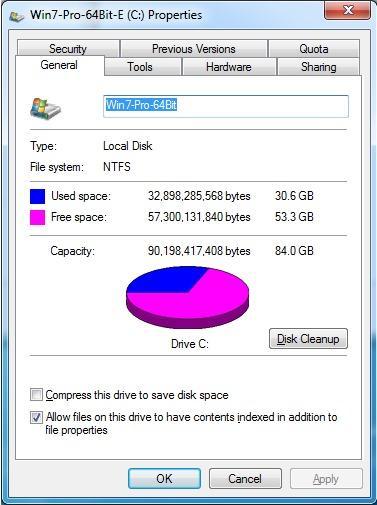
If you are still relying on the older version of windows, then you can use inbuilt Disk clean up wizard to quickly free up disk space. You should do this with drive C: because this is the drive which mostly requires cleaning time to time. To run disk, clean up wizard you need to right click on C: drive and then go to properties. Next you will see a disk clean up button and then you can choose what all temporary files you want to clear. Disk clean up wizard may take some time but if you are using the same computer from a long time then you will be surprised to see amount of the disk recovered.
Delete duplicate files:

Removing all the duplicates from your computer can also spare some free disk space for you duplicate files are the result of saving or downloading same files multiple times or saving the same file to multiple locations. Though it is hard to find duplicate files on your computer manually but still if you want to do this then you can try your luck to find them by sorting files with the same name and type. It is always a better idea to find and remove duplicate files using third party duplicate remover tool. These tools can get you out of the trap of duplicates in just couple of minutes.

This is how you can free up storage space on your windows computer because upgrading the hardware is not always a better idea. These small tips and tricks can save both time and money for you.


11 Productivity Hacks Every Remote Worker Needs

Working remotely can be great, but it can also come with its own unique set of challenges. When working remotely, it can be tough to know whether you’re actually being productive, or whether you’re just busying yourself with tasks that aren’t all that important. It’s all too easy to procrastinate on what truly matters and instead focus on secondary tasks, all the while convincing yourself that you’re getting things done.

Motivation and self management skills don’t come naturally to everybody. This is why you need to be honest with yourself, and start taking the steps to improve if you need a little help getting things done. Below, we have 11 productivity hacks that every remote worker needs. Take a look and your working day might just change for the better.

1. Work Somewhere You Won’t Be Disturbed

Remote workers need to be able to work somewhere they are not going to be disturbed. It’s going to be difficult to get things done if you’re being spoken to every few minutes by a bored child or a partner that needs help finding something. Having your own room for doing work is a good idea, as well as setting guidelines with friends and family for the working day so you can get stuff done. They need to understand that you still have to work, even if you are at home.

Things can still disturb you once you have set guidelines with your loved ones. You might suddenly get distracted by realizing you don’t have a safe internet connection. For peace of mind, get a VPN – this is important if you use a public internet connection occasionally and want to protect yourself. It’s also easy to be disturbed by phone notifications and emails, so stay away from these things for a good few hours in the morning.

2. Put On Over The Ear Headphones

Over the ear headphones are pretty much the next best thing if you don’t have separate room to work in, or if your house is particularly noisy, or you’re working in a public space. You can listen to classical music, music from films, or anything that makes you feel more productive. Music without words is usually best.

3. Fuel Your Body With Things that Enhance Productivity

How you fuel your body can make a big difference to the amount you get done on any given day. Make sure you’re staying hydrated by drinking 2 litres of water every day, and get as many fruits and vegetables into your diet as you can. Micronutrients and vitamins are important if you want to perform at your best.

Image source

4. Write An Effective To Do List

To do lists can be an effective way to stay focused on what’s truly important, but only if you write them properly. You should only include things that are essential for that day. Write them out in order of importance, and attempt to do the hardest first. The rest of the day will seem easy in comparison. Anything you get done outside of these things is a bonus. You can end up feeling demotivated if you put too much on your daily list, so bear this in mind.

5. Invest In Gadgets And Apps That Can Help You To Stay Productive

There are many gadgets and apps out there that can help you to stay productive. Timeular is a great choice if you struggle with time management and want to take control of your time once and for all. Do your research and find gadgets and apps that could help you to stay focused on the task at hand.

6. Set Intentions For The Day

Setting intentions for the day should be done first thing in the morning. What will you get done? How will you feel? Doing this before you even get out of bed can be very powerful. Pair it with a few minutes of visualizing having completed everything and you’ll be even more likely to succeed!

7. Start The Day With An Awesome Morning Routine

Starting the day with an awesome morning routine can get you pumped up for the day ahead. It can be anything you like, as long as you enjoy it! For example, read a book, go for a quick run, write in a diary – do anything that makes you feel good.

If you snooze your alarm, get up last minute, and have to rush to leave the house, this theme usually carries on throughout the day.

Image Credit

8. Make Your Bed In The Morning

A very simple task, but it can help you to feel accomplished early on in the day. Make your bed and you’ll feel like you’ve got something done as soon as you get out of bed. If you’re struggling to find the motivation to start work, pick a couple of things that will give you a sense of achievement with the same ‘small win’ theory. Just don’t use them as an excuse to procrastinate!

9. Change The Scenery

If you’re working remotely, this usually means you can change the scenery. Whenever you start to feel sluggish or like you want to procrastinate, change that scenery. Go to a co working space, a library, a coffee shop, or even just another room in your home.

10. Get Active

Another great tip for feeling sluggish. Get active! Many people say that doing this in the morning before they even start the day helps them to have a more productive day. However, if first thing exercise isn’t for you, you can use it to split up your working day. Even just 15 minutes of exercise can get your blood pumping, brain working more effectively, and mood elevated!

11. Know When You Are Most Energetic

People are energetic at different times of day. Being self aware and knowing when your energy peaks and troughs can help you to schedule your higher/lower energy tasks more effectively. If you’re a true night owl and you know you’ll get more done at this time, then don’t be afraid to schedule your day appropriately.

How this Radical New Technology Is Turning Pig Poo Into Fuel

0

If you would like to join a team working to increase the efficiencies of the pork producer world, and address the growing threat of climate change, there are a number of Smithfield Food jobs available to assist you in making an impact.

Up until only a few years ago, if anyone had said “I’m going to turn pig poo into fuel,” they would have probably been laughed out of the room.

Pig poop into fuel technology

Thanks in large part to recent technological advancements, this concept is no longer the punch line of a corny joke.

Large scale companies are going all in on this new method of generating renewable energy. While simultaneously dealing with the massive amounts of waste created during pig farming. It’s a win-win.   

Smithfield Foods and Dominion Energy to Produce Energy from Pig Manure

As reported by the Washington Post in November 2018, the world’s largest producer of pork executed a partnership with an energy company to start turning pig manure into usable fuel.

Smithfield Foods, which is known for its distribution of pork products, forged an alliance with Dominion Energy, an electric and gas company. The purpose of this partnership was to turn methane gas (a by-product of Smithfield’s hog lagoons) into energy that could be used as an effective answer to climate change. And throw a sizeable amount of extra income in both companies’ pockets.

Through these efforts, the pork producer aims to reduce its carbon footprint and help address the imminent threat facing the planet. Climate change is something that has now caused a record number of Americans and world leaders to be concerned with (more so in some countries than others…). As the ramifications on the global economy and the quality of life for people worldwide is affected.

“This effort is focused on the waste aspect in our endeavor to divert an inevitable part of the waste stream into something usable, that has an economic benefit and, in the process, reduces our carbon footprint.” Smithfield’s CEO Ken Sullivan said to the Washington Post in November.

Smithfield along with Dominion Energy plans to spend $250 million over the next decade to cover the former’s hog lagoons in three states, namely North Carolina, Virginia, and Utah.

The plan is to capture the methane gas that is produced by these hog lagoons and channel them into the pipeline network of Dominion Energy, where it will be processed into renewable natural gas and sold back to the grid.

By doing so, both companies aim to reduce the amount of carbon dioxide produced by fossil fuels. As the WP report noted, methane plays a significant role in climate change by being 25 times more potent than carbon dioxide as a greenhouse gas.

This is Not the First Rodeo for Smithfield Foods

Smithfield Foods isn’t going into this project without prior experience. In fact, the company is so dedicated to the cause of renewable energy that it has its own division by the name of Smithfield Renewables.

Under the umbrella of Smithfield Renewables, the company has already been a part of a pilot program in North Carolina that used anaerobic digesters to capture and clean the biogas produced by its hog farms. The processed biogas was then turned to renewable natural gas through a central processing plant.

That project, dubbed as Optima KV, was handled by OptimaBio, LLC, which specializes in turning pig manure to renewable energy and has an associated domain aptly named Pig.Energy.

With the experience gained from its efforts with OptimaBio, Smithfield plans to reduce greenhouse gas emissions significantly by 2025.

The new project will still use OptimaBio’s digester mechanism, but the facility that will be turning the biogas into renewable, natural gas is Dominion Energy’s plant. Which will receive the captured biogas through pipelines or trucks.

Smithfield believes that Dominion’s infrastructure will help eradicate any issues in cleaning and processing the gas that its pilot project faced previously.

Once the project is fully functional, the company hopes to capture more than 85,000 metric tons of methane in a year. The reduction in carbon emissions resulted by this would be equivalent to the carbon emissions of around 700,000 homes.

Whether Smithfield fails or marks this project as a success, it is clear that it will pave the way for other companies to learn a lesson or two from its efforts. Ideally, this sparks and catalyzes more entities to down similar paths and contribute to the reduction of greenhouse emissions, a necessity in this dire time of climate change.

How to Download from Youtube Without Being Spammed

Thinking of how to download YouTube videos online for free without being spammed? To download YouTube videos and convert them into MP3, there are dozens of options available online and it gets really confusing. All these websites that offer free download, later spam you with ads. With YouTubNow you can download videos for free without having to install any supplementary software and paying any fees for premium features. You can quickly find the videos with the search option or paste the URL and download them from YouTube to MP3 or MP4. With this tool you can also convert youtube playlist to mp3.

Download from Youtube

How does YouTubNow work.

  • Paste the video URL or search for the video with a keyword in the built-in search box to download.
  • From the list of results, select the video, format and resolution that you wish to download
  • Select ‘ Download’

YouTubNow Features

Among many other available YouTube Downloaders, YouTubNow is much user-friendly and easy to use with faster service and handy features. The download option is unlimited and YouTubNow offers as much as 1080p MP4 download option with absolutely no ads.  Here are some unique features that YouTubNow offers.

Multiple formats

When it comes to format, while downloading the video from YouTube, you will get a lot of options in YouTubNow. You will also get the option to download just the background audio file from a YouTube video. You can download the videos in different pixel quality from 144p to 1080p. While YouTube itself does not give you the option of formats like MP4 and 3GP, you don’t have such restrictions with YouTubNow.

Search a video with its name

YouTubNow has its own search option where you don’t need to have the video URL in order to download it. You don’t have to go through the trouble of finding the URL; instead you can simply search for the video with its name in the same manner that you do with YouTube.

No ads and unlimited videos

With all the websites and software available online to download and convert YouTube video, you go through the hustle of unnecessary ads as well. However, the official website of YouTubNow is completely free of ads and you can download as many videos as you want.

Faster download

YouTubNow gives a faster transfer speed services as compared to its competitors as it’s server is highly responsive. With such servers from both YouTube and YouTubNow, downloading becomes pretty quick.

No need for registration

With YouTubNow, you don’t need to waste any time on the registration and logging in. You don’t have to link your YouTube account too. This website doesn’t need any authentication or personal information in order for you to use the services.

Additional benefits

  • Supports all browsers- Safari, Chrome, Firefox, etc
  • Doesn’t need any browser extensions, add-ons and plugins.
  • No payment is required.

YouTubNow allows you to download your favourite TV shows, music videos, movies, etc hassle free without any charges.

AR Games Are Incorporating Pandemic Guidelines

0

There is no doubt that the compound noun social-distancing ranks among the top words of 2020, competing against contenders such as pandemic and normalcy for the number one spot. Though everyone has heard it, few can define it. Regarding public health, its definition entails a set of non-pharmaceutical measures intended to prevent the spread of a contagious disease through physical distance. Now, in a time where such guidelines are in place, where governments advise citizens to avoid public gatherings and stay at home, these measures spell disaster for real-world exploration games, forcing developers, like everyone else, to adapt.

Ar-games-pandemic

Niantic’s Pokémon Go led the way, and Microsoft’s Minecraft Earth followed, as both titles implemented new features that made it easier for players to enjoy these games during the ongoing pandemic. Minecraft Earth introduced new adventures that spawn in a player’s vicinity so that they no longer have to go out and seek them out. Pokémon Go limited the number of gifts players can get while increasing daily bonuses. Naturally, these new features will not be enough to emulate the previously available experience both titles provided. They represent a necessary measure to encourage people to be responsible while having fun from home.

Both companies claim to have developed these features per the Center for Disease Control and World Health Organization guidelines. Developers are now in a situation where they alone are not responsible for creating their game’s rules. Extraneous circumstances and organizations also play a role.

augmented reality -games-pandemic-

AR Technology Set to Hit Online Casinos

Playing games of chance for real money on the internet is slowly becoming a super-popular leisure activity. The industry’s stance on adopting new technologies is essential to why this sector will continue to grow. New software and hardware innovations are seemingly developing month-on-month, and today, everyone wants to be up-to-date. Nowadays, attention spans are lower than ever, and most people need constant stimulation to remain involved in an activity. Thus, quality licensed casinos online are looking into implementing AR technology options that further immerse players.

As mentioned, these gaming platforms are hitting record peaks year-on-year. However, the online sector is still trailing behind the land-based one. Online operators think that by investing in developing AR technology, they can tip the balance in their favor. AR will enable players to see the croupier and everyone else at their table. It will provide a detailed 360° environment accompanied by realistic sound effects. Players will not only be able to see what is going on at their table, but they can freely look around the virtual venue, visit a lounge, or sit at the bar. Once these options become available, online casinos will deal a massive blow to their real-life counterparts, sending their revenues plummeting. Until that moment comes, players can still enjoy thousands of virtual reel-spinners and live table games, going up against a dealer situated in a casino-like setting.

Augmented Reality Technology Application in Business

Though AR and gaming seem like a logical fit, the number of its business-related applications is plentiful. Shopping is the first sector that comes to mind, and it has already made strides reading the use of AR. Sportswear brand Lacoste has an app that lets retail shoppers place their foot at a designated spot in a Lacoste store to see how a specific shoe will fit. Other massive retailers are also developing similar dedicated software. 

However, experts believe that AR capabilities are super-applicable for workforce training. In 2019, virtual assistance software TeamViewer launched a pilot app that incorporates AR technology, advertising it as a crucial solution for equipment repairs.  New factory employees do not have the experience of older ones, and often it is hard to retrain people that have done a specific job for a long time. AR solutions can incorporate a rich informational ecosystem that can empower new workers during training and provide logistical assistance and guidance. Using these solutions, experienced workers will equip younger ones to perform complex tasks quicker, which would lead to reduced costs and increased on-time delivery.

How to Install YouTube TV on Amazon Fire TV stick

0

In 2018 beginning Google banned the YouTube TV app from the Amazon Fire TV stick. As YouTube is the most popular video streaming platform, it makes absolute sense that everyone wants access to YouTube on Amazon Firestick. There is a way to how to install youtube tv on firestick via Silk Browser; however, that is a lot to work on.

how to install youtube tv on firestick

Here is a step by step guide on how to install youtube tv on firestick with easy methods which include Firefox, ES File Explorer and Downloader app.

Get how to install youtube tv on firestick with Firefox

Here is how to install youtube tv on firestick with Firefox.

Fire TV Stick has an official version of Mozilla Firefox and within the browser, you can find access to YouTube. This is by far the easiest method available at the moment where you can access YouTube in the browser itself. There are various ways to get the Firefox browser in the Amazon Firestick. Here is the simplest process to install Firefox and eventually get YouTube on your Amazon Firestick.

  • Start Fire TV and click on ‘search’.
  • Search for Firefox, click on the icon and select ‘get’.
  • Click on ‘Download’
  • Launch Firefox for your Fire TV, once the download and installation is finished.
  • Click on YouTube bookmark and sign in with your Google account.
  • Select ‘youtube.com/activate’ and type in the code that you got from for Fire TV screen.
  • Post this process, YouTube app will be launched via Firefox on your Amazon Firestick.

Get how to install youtube tv on firestick with ES File Explorer

With ES File explorer, even though the steps are little complicated but the result is worth it. Follow these steps.

  • Enable options for Unknown Sources by going to ‘Device’ option.
  • Click on ‘Developer Options’
  • Tap on the ‘Allow apps from unknown sources’.
  • In the Amazon Firestick main menu, click on ‘Search’ and type in ES Explorer’.
  • Once the download and installation are done, launch the ES Explorer app.
  • In the ES Explorer menu, go to ‘Tools’ and then the ‘Download Manager’.
  • In the bottom menu, select ‘+New’.
  • Type in  http://bit.ly/2DwAApm and click ‘OK’
  • In the name section, type ‘YouTube’ and select ‘Download Now’
  • The YouTube installation file will get download by this process and by selecting ‘Open File’ you can install it in your youtube tv amazon fire stick.
  • Now from the main screen in your Firestick, launch the YouTube app.

Get how to install youtube tv on firestick with DOWNLOADER

Here is how to install youtube tv on firestick with Downloader.

  • In your Fire TV, go to the ‘Settings’.
  • From there select ‘Device’ and then ‘Developer Options’.
  • Tap on ‘Allow apps from Unknown Sources’.
  • From the main menu, select ‘Search’.
  • Type in ‘Downloader’, click on the app and install it.
  • Once you launch the Downloader app, in the menu type in http://bit.ly/2DwAApm and select ‘Go’.
  • You can now download the YouTube installation file.
  • Once the download is done, install it on your Fire TV and click on ‘Open’ to launch the YouTube app.

There are a few more methods to install YouTube on Amazon Firestick; however, they need a little more time and are a bit complex. With these easy methods mentioned in this guide, you can stream YouTube TV amazon fire stick the same way you used the app before it was blocked.

How to Give Your Website Credibility

0

If you’ve spent more than a few minutes on the internet, then you’ll know that there’s, well, plenty of sites that are good for nothing other than occupying digital space. They have zero credibility, and, as such, no recurring visitors. They are failed websites. With your website, however, things are going to be different. You’re going to make sure that your website does have credibility, and that people do want to visit more than once. This will be your first step toward building a successful site. We take a look at five ways to do this below.

Source: Pexels.com

Visual Design

There might be something funky about having a site that looks like it’s from the mid-nineties, but if you’re going to go for the dated look, you better make sure that everyone knows you’re being ironic. If not, you’ll have your visitors believing – rightly – that you’re not in touch with internet culture. It doesn’t just have to be modern, either, it should also look like it’s been put together professionally. Experienced internet users will be able to tell if things aren’t quite right, which in turn will hurt how they see you. Don’t let that happen!

Lack of Errors

Every site on the internet has an error here or there, but they should always be the exception, not the rule. If you’ve got too many spelling errors or broken URL pages, then it’s going to look like you’re not putting as much care into your website as you ought to. And if you don’t care about your website, then why would anyone else? It’s always worthwhile having someone else look over your website before it goes live, as they’ll spot errors that you, since you’re too “close” to your site, couldn’t have spotted.

Contact Information

There’s always something suspect about a website that doesn’t have any contact information listed. And it goes from “suspect” to “a big red flag” if the website is selling things. The most suspicious aspect of all of it is that it couldn’t be simpler to have all the contact information listed; it’s more of a hassle to not include it than it is to put it online. You should include your email address, phone number, and address. If you don’t want to give out your personal information, get a virtual address and work with a phone answering service. It’ll look the same to your visitor, but your privacy will be intact.

Handle Data Securely

We live in an age where data is a big concern for internet users. And can you blame them? Plenty of companies large and small have not been playing the ball the correct way. Make sure you’ve got all the latest security locks and that you’re handling data correctly. It’s important.

“About Us”

Finally, you can gain credibility by showing the world who you are, the people behind the website. A photo and a short blurb about everyone involved in the site will create an instant connection between you and your audience.