Home Blog Page 68

How to fix “The default gateway is not available” error?

0

A default gateway provides the access point for other networks when one of the networks tends to share or communicate the data packets with the other network. It is a node in a computer network that provides a leap to the other networking system when no successive IP address is specified on the routing table for transferring the data packet to the destination host.

The process includes the transfiguration of the following :

  • IP addressing
  • Subnet mask
  • Network Topologies

What is The default gateway is not available error?

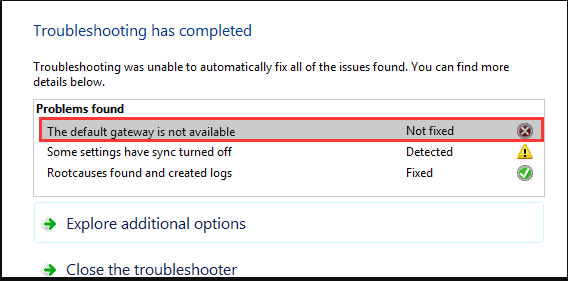
While trying to connect our system to the internet we often face an error prompting “The default gateway is not available”. Before understanding this error let’s get a brief on the default gateway.

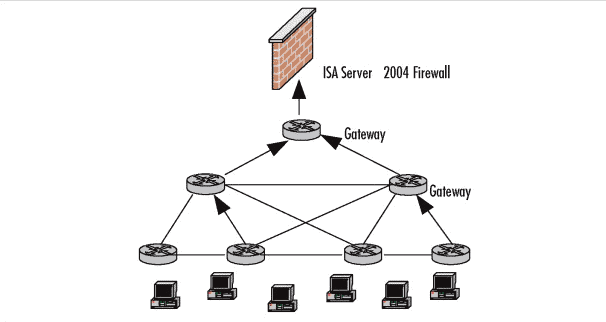
At times the IP packet at a certain occasion of the node is unable to find the route to transfer the data to the destination. In that case, the IP packet follows the default gateway for the routing procedure.
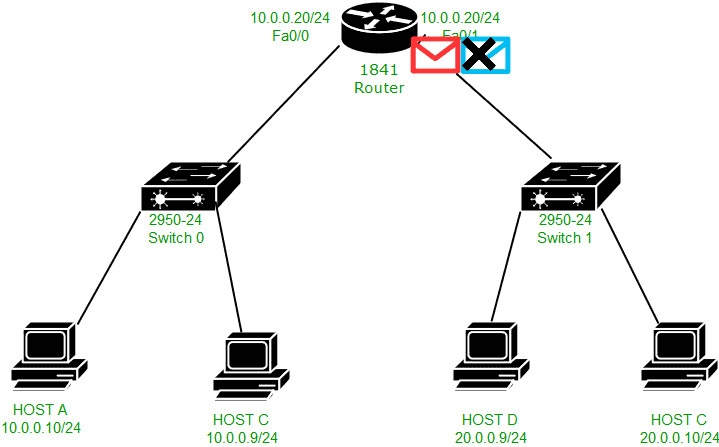
The Best Example of a default gateway is the router that couples LAN(local area network) to the internet in an office’s network.
the default gateway is not available,default gateway not available windows 10,the default gateway is not available windows 10,default gateway address,what is my default gateway

However when the default gateway is unavailable then the above-stated error occurs.

Following are the possible causes for this error:

  • The IP settings might be incorrect
  • The faulty ISP configuration settings 
  • Incorrect router settings
  • Outdated drivers 
  • McAfee solutions often reported blocking the internet connection 

the default gateway is not available,default gateway not available windows 10,the default gateway is not available windows 10,default gateway address,what is my default gateway

We’ll be discussing various solutions to do away with the “Default gateway not available” error in this article. 

Let’s check them out!

Remove any or all the McAfee Programs from your system

One of the prime reasons causing the “ The default gateway is not available” error is the McAfee security program on your system. You need to remove this from your system to get rid of this error.

Following are the steps to remove the McAfee programs from your system:

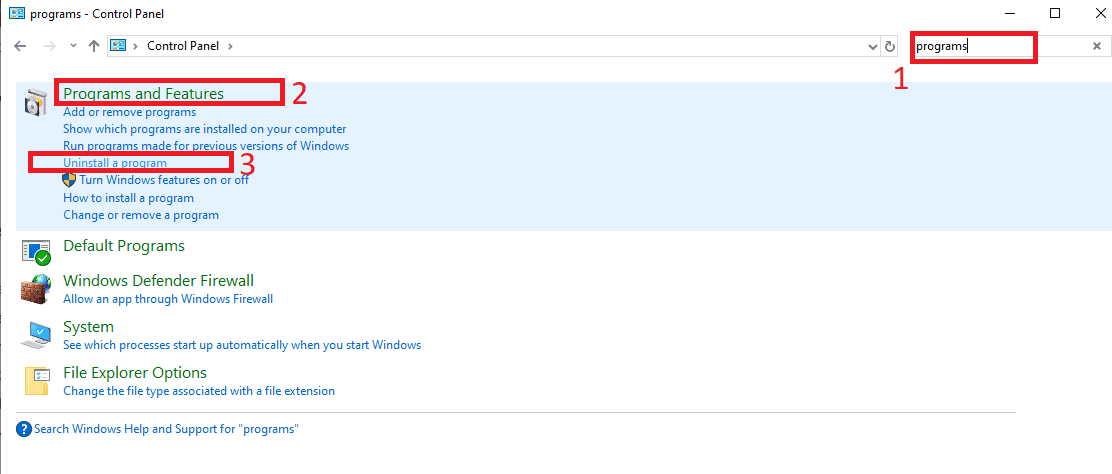
  • Go to the Control Panel on your PC
  • Type programs in the search bar present at the top-right corner of the control panel window
  • Select uninstall a program under Programs and Features.
the default gateway is not available,default gateway not available windows 10,the default gateway is not available windows 10,default gateway address,what is my default gateway
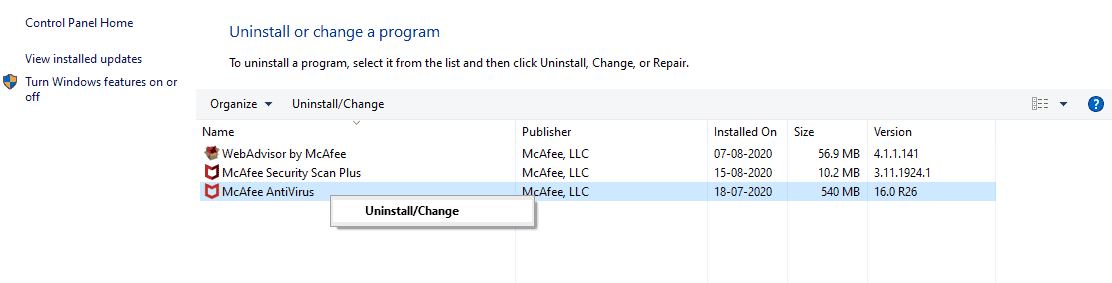
  • Locate McAfee from the list of programs. Right-click on the icon and select Uninstall.
the default gateway is not available,default gateway not available windows 10,the default gateway is not available windows 10,default gateway address,what is my default gateway

Once the program gets uninstalled, the issue gets fixed. You can switch to any other Anti-virus software to protect your system against any possible malware/threat.

Reset the WiFi adapter

Following are the steps to reset the ethernet adapter and fix the “The default gateway is not available” error:

  • Right-click on the network caption
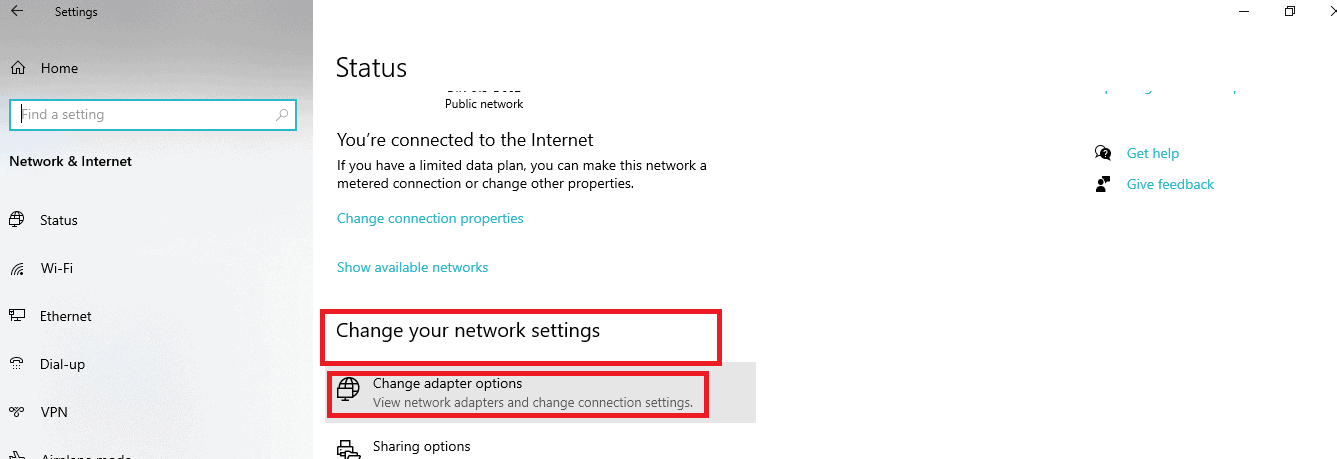
  • Go to Open network Internet settings > change your network settings
the default gateway is not available,default gateway not available windows 10,the default gateway is not available windows 10,default gateway address,what is my default gateway
  • Click on change adapter settings from the menu. This will show your wifi connection adapter which can be chosen later.
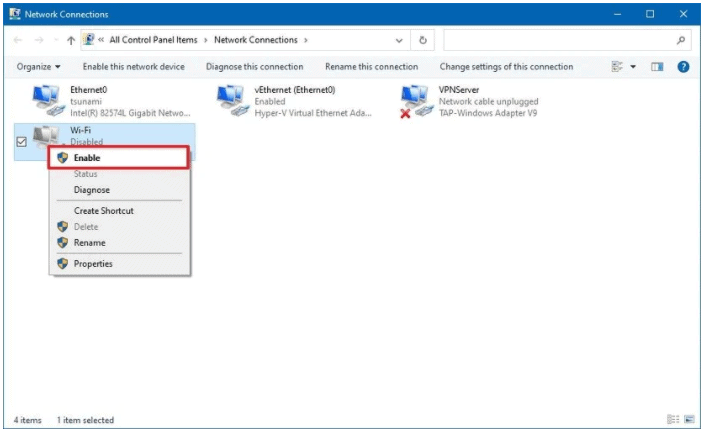
  • Right-click on the adapter and choose “Disable” option
  • Keep waiting for a few minutes and then choose Enable from the menu. Close the menu once done.
the default gateway is not available,default gateway not available windows 10,the default gateway is not available windows 10,default gateway address,what is my default gateway

Update your network adapter drivers.

Updating your network adapter drivers to the latest version to do away with the  “ The default gateway is not available” error.

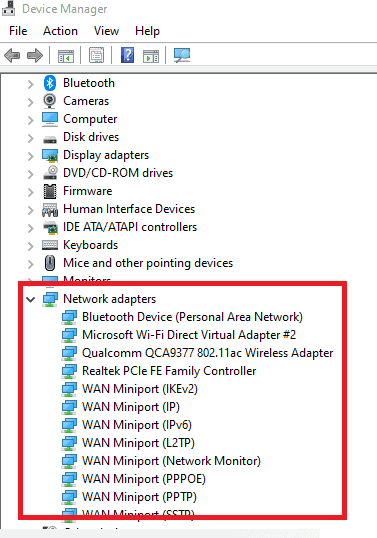
  • Press Win+X and select Device Manager from the pop-up menu.
  • Right-click on the Network adapter option to expand it. This would display the version of the current drive of your system.
the default gateway is not available,default gateway not available windows 10,the default gateway is not available windows 10,default gateway address,what is my default gateway
  • Select update driver software from the context menu.
  • Locate the automatically updated driver software option. Download the apt software for your system.

The driver software must be downloaded and then installed  from the authentic site of your hardware manufacturer to ensure that the issue is completely resolved

Uninstall your network adapter drivers

This is yet another effective method to resolve the  “The default gateway is not available” error. 

Check out the following steps to perform this:

  • Press Win+X and select Device Manager from the pop-up menu.
  • Right-click on the Network adapter option to expand it. This would display the version of the current drive of your system.
  • Click uninstall
  • Once done, reboot your system.

Note- You shouldn’t be concerned about the drivers not existing on the system once you uninstall them because they are automatically detected and reinstalled by Windows when you reboot your system.

Change the network adapter drivers.

This is a bit lengthy and complicated method to fix the “the default gateway is not available” issue. Here the network adapter drivers  are exchanged with some previously installed drivers on your system

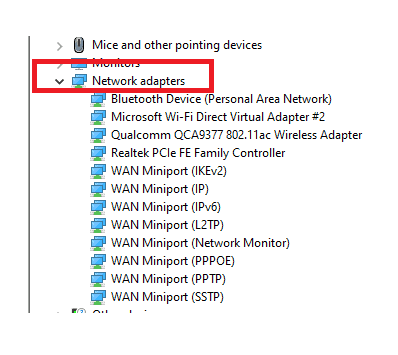
  • Press Win+X and go to the device manager
  • Right-click on the network adapter option and expand it. This would display the version of the current drive of your system.
the default gateway is not available,default gateway not available windows 10,the default gateway is not available windows 10,default gateway address,what is my default gateway
  • Select update driver by right-clicking the connection you’re using to access the internet from the context menu.
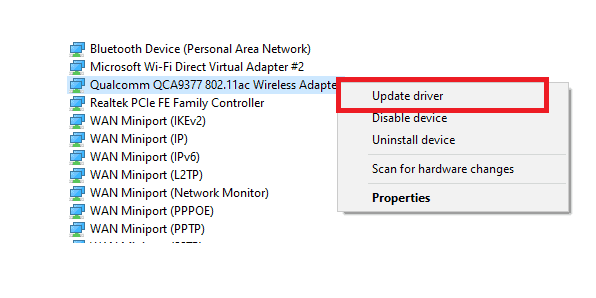
the default gateway is not available,default gateway not available windows 10,the default gateway is not available windows 10,default gateway address,what is my default gateway
  • Select “Browse my computer for driver software” from the two options that are displayed on the window
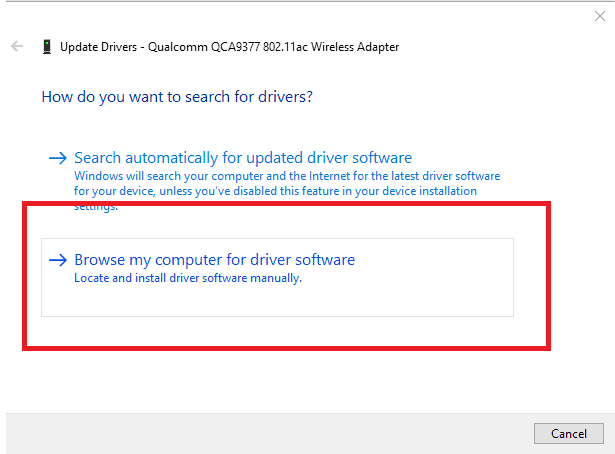
the default gateway is not available,default gateway not available windows 10,the default gateway is not available windows 10,default gateway address,what is my default gateway
  • Go to “let me pick from a list of device drivers on my computer”.
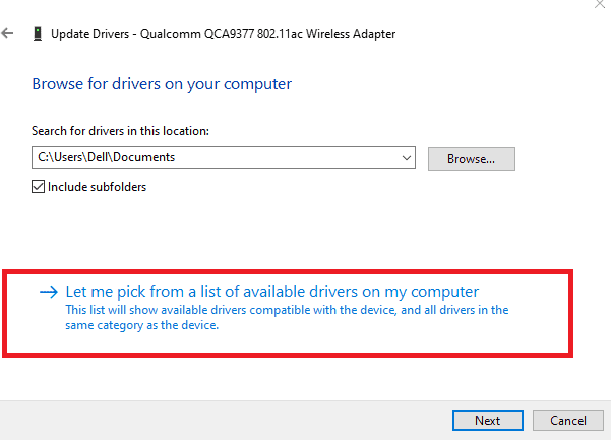
the default gateway is not available,default gateway not available windows 10,the default gateway is not available windows 10,default gateway address,what is my default gateway
  • Uncheck the box next to Show compatible hardware.
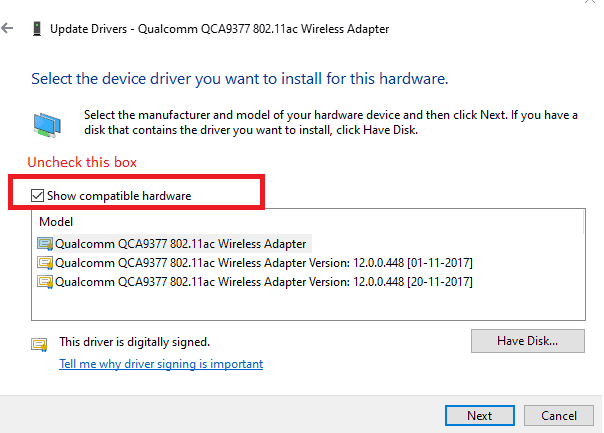
the default gateway is not available,default gateway not available windows 10,the default gateway is not available windows 10,default gateway address,what is my default gateway
  • You can continue fixing the adapter with other sets of network adapters available on the list until the issue is resolved.

Reset TCP/IP through the net-shell command:

So far we’ve discussed various methods related to network adapters to fix the “The default gateway is not available”  error. 

The TCP (Transmission Control Protocol) and IP (Internet Protocol) refer to various attributes and setups which are required to establish the internet connection properly.

Resetting the TCP/IP setups method has a great success rate when it comes to resolving the “The default gateway not available” error. 

Following are the steps to reset TCP/IP through netshell:

  • Open the command prompt window by typing “command prompt” in the search bar next to the windows icon at the bottom right corner of your screen
  • Type netsh int ip reset in the command window. (Typing netsh winsock reset command is optional)
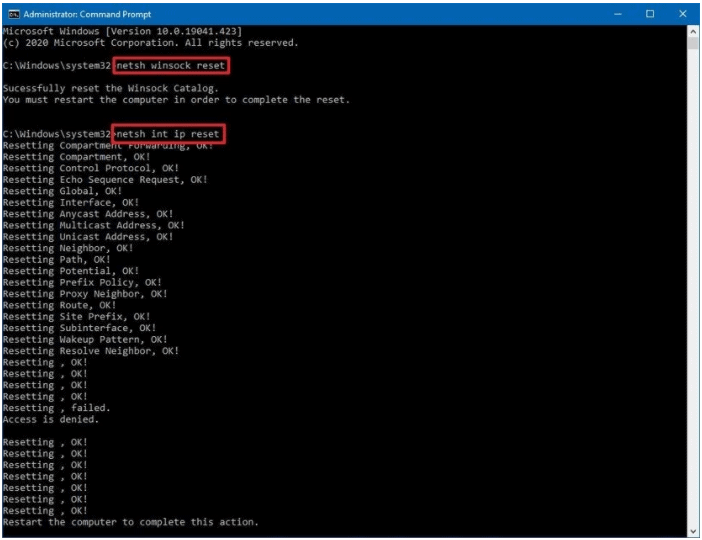
the default gateway is not available,default gateway not available windows 10,the default gateway is not available windows 10,default gateway address,what is my default gateway
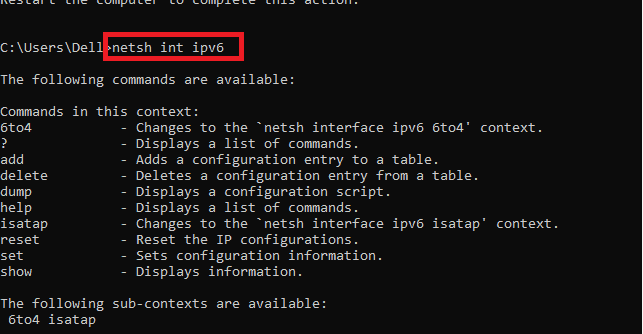
  • Run one of the following commands (You can even run both the commands in case you aren’t aware of the IP version your computer)
  1. netsh int ipv4 ( for IPv4)
  2. netsh int ipv6 (for IPv6)
the default gateway is not available,default gateway not available windows 10,the default gateway is not available windows 10,default gateway address,what is my default gateway
  • Close the command prompt window.

Try connecting to the Internet to check if the “Default gateway not available” issue persists. If it does, jump to the next method.

Manually fill in the gateway details

In case the previous method fails to resolve the “The default gateway is not available” issue, then the user is not left with a choice but to configure this manually. Here we manually enter the required gateway settings by following the steps discussed below:

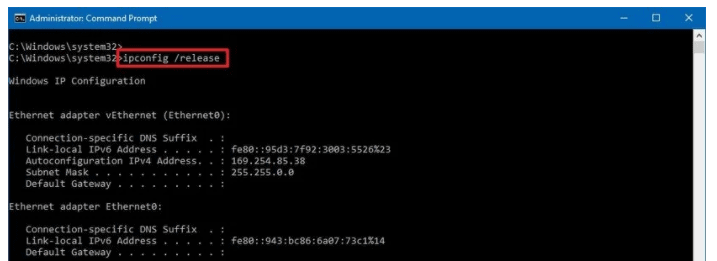
  1. Get the IP address subnet mask and default gateway. For this open the command prompt window by typing “command prompt” in the search bar next to the windows icon at the bottom right corner of your screen.
  2. Run ipconfig in the window.
the default gateway is not available,default gateway not available windows 10,the default gateway is not available windows 10,default gateway address,what is my default gateway
  1. Of the fields and values displayed, note down the:  values for your IP address, subnet masks, and default gateway
  2. Close the command prompt window
  3. Now go to the Control panel by typing “control panel” in the search bar next to the windows icon at the bottom right corner of your screen on your system and perform the following steps:
  • Click on the Network and Internet option
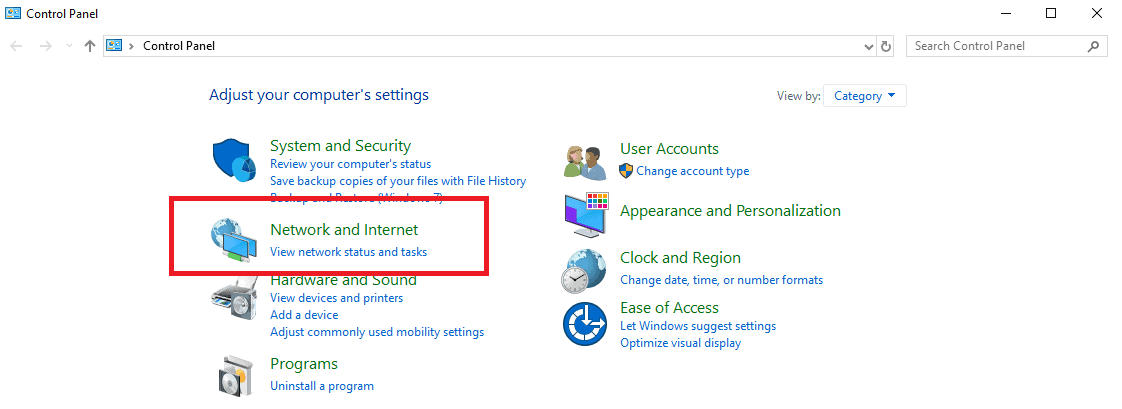
the default gateway is not available,default gateway not available windows 10,the default gateway is not available windows 10,default gateway address,what is my default gateway
  • Select Network and Sharing Centre from the following window
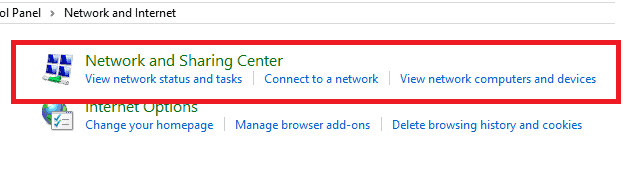
the default gateway is not available,default gateway not available windows 10,the default gateway is not available windows 10,default gateway address,what is my default gateway
  •  Click on Change Adapter Settings from the top left region of the window
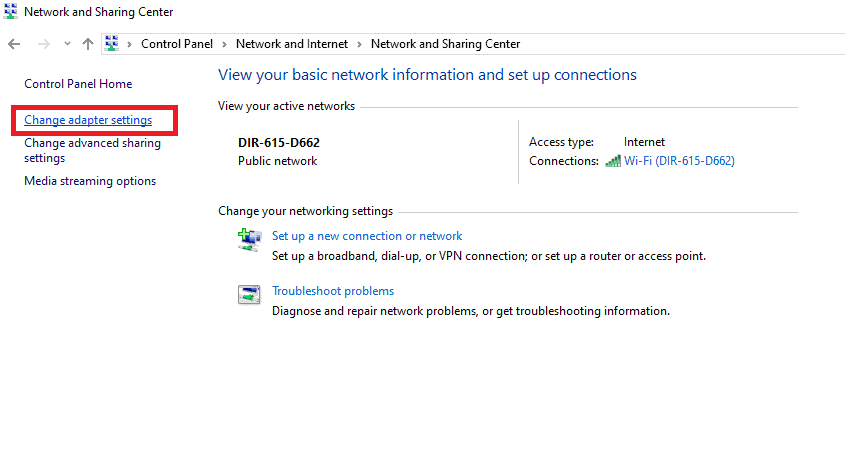
the default gateway is not available,default gateway not available windows 10,the default gateway is not available windows 10,default gateway address,what is my default gateway
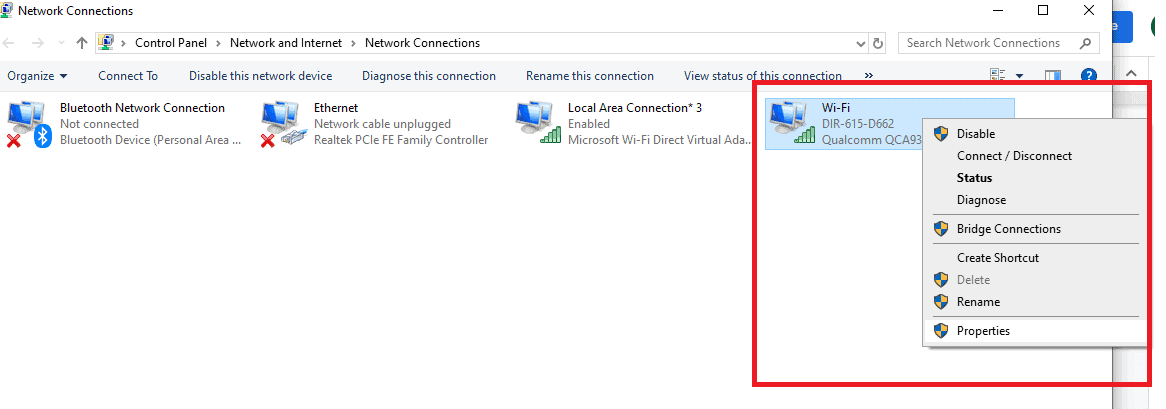
  • Right-click on the option via which you connect to the Internet( Ethernet or Wifi) and then select Properties
the default gateway is not available,default gateway not available windows 10,the default gateway is not available windows 10,default gateway address,what is my default gateway
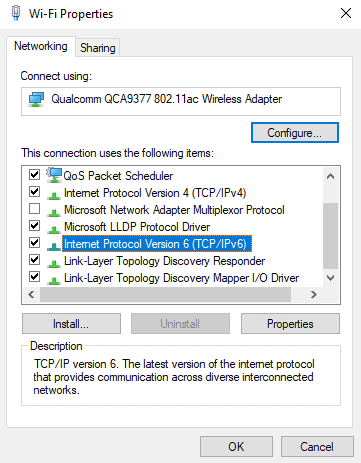
  • In the properties, window locate Internet Protocol Version 4 (TCP/IPv4), which is likely to be the IP protocol that your computer is using and double click on it
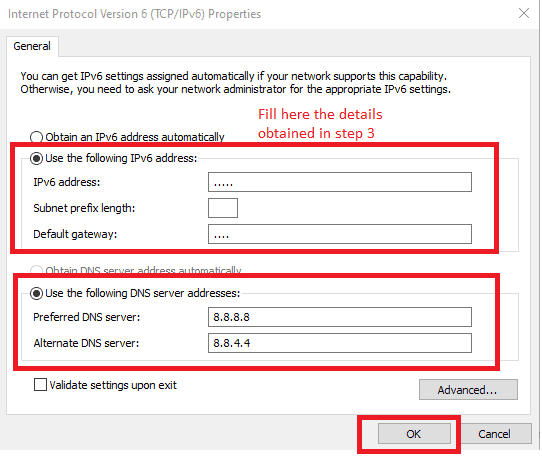
  • However, if you’re sure about your system using the Internet Protocol Version 6 (TCP/IPv6), which is the newer protocol then double click on this.
the default gateway is not available,default gateway not available windows 10,the default gateway is not available windows 10,default gateway address,what is my default gateway
  • Check the box next to Use the following IP address and fill in the details you got in step 3 from the command prompt.
  • In the DNS section, check the box next to Use the following DNS server addresses
  • Fill in the following details in the given fields: >Preferred DNS SERVER:8.8.8.8 > Alternate DNS Server:8.8.4.4
  • Click OK to save the changes
the default gateway is not available,default gateway not available windows 10,the default gateway is not available windows 10,default gateway address,what is my default gateway
  • Close the Control panel and other windows 

Connect your system to the internet to check if the web is being accessed normally and check whether or not the “The default gateway is not available” issue is resolved.

Conclusion

So far we’d discussed the 7 easiest methods to fix “The default gateway is error not available” error. To add on to these, we can even try changing our system’s power or battery plan to get rid of this problem. 

The new age routers are designed to operate at a frequency of 5Ghz. However, there’s a possibility that your adapter is not supporting this frequency. Therefore you should alter the router frequency to 2.4Ghz with the help of the router manual. 

7 Amazing Websites for Royalty-free Sound Effects

We cannot think life without sound effects, from early morning birds chirping sounds till cricket singing at night. Music helps us to connect and understand things even before visualizing it. For the same reason, big enterprises use different sound effects in advertising of their product as it leaves a lasting impression on the audience. A highly engaging video, podcast, or publication can be generated by amalgamating proper sound effects in it.

What exactly royalty-free sound effects mean?

Many websites offer you vivid sound effects to complete your video efficiently. It becomes absolutely pain-staking when you find some sound suitable for your production, and you have to pay every time you use it. It just unboundedly increases your budget. Royalty-free sound effects are a saviour in such a situation and help you to take benefit of sound at minimum cost. Royalty-free should not be misunderstood with free. Every free sound file can be royalty-free but not vice-versa. It means that you have to pay one time and buy a license of the sound file, then you can use it free of cost for the lifetime as per license agreement.  You have to be cautious about the license agreement of the audio file on which it will depend on how you can use it without any legal hassles.

We are trying to optimize your searching time by enlisting the best website to download royalty-free sound files. For each website its pros, cons, and other attributes are highlighted below, which can help in choosing the best option.you can also try Youtube as it also provides you some great sound effects for free and you can directly download it

Storyblocks

  • Pros:
  1. All sound effects files can be downloaded in both formats MP3 or WAV.
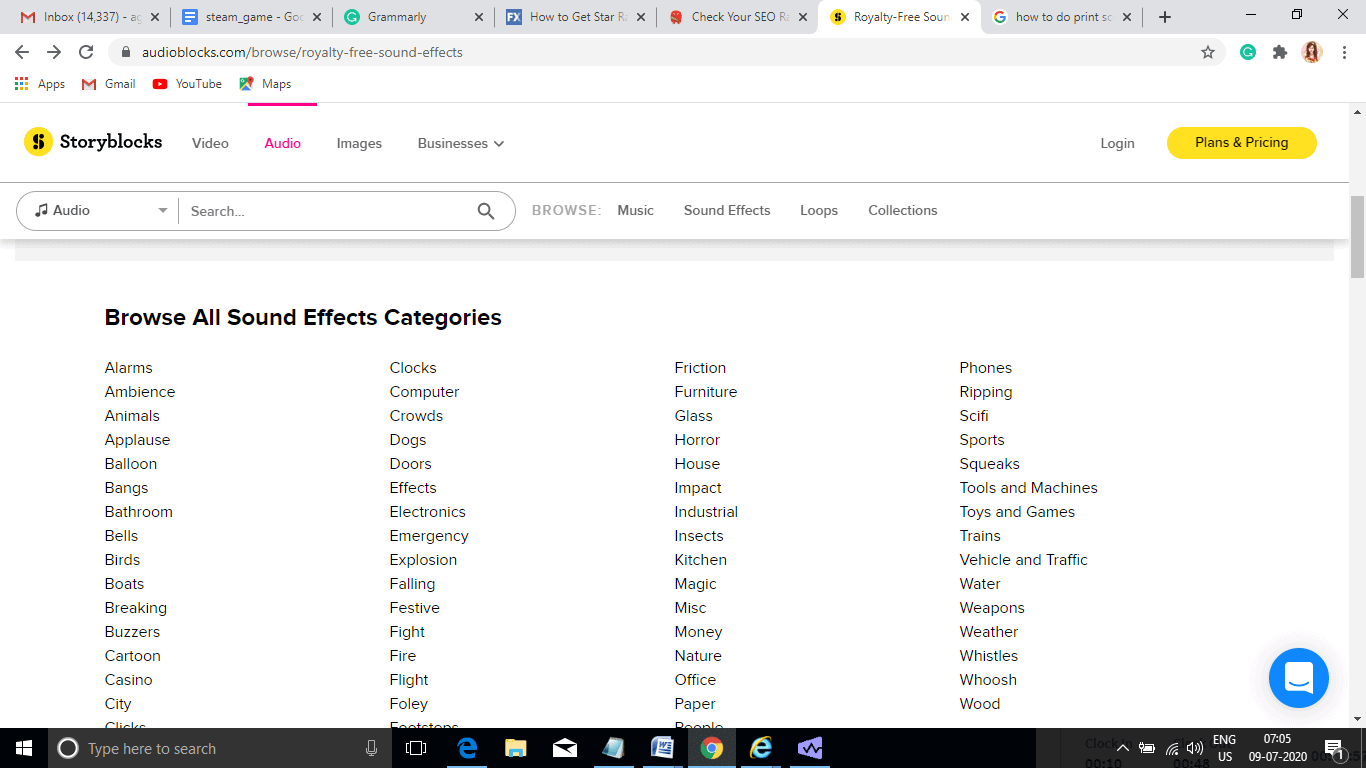
  2. Wide-range of sound effects categories are available.
  3. It has subscription plans for unlimited downloads per month. 
  • Cons:
  1. Before downloading any file, you need to create an account.
  2. Even if you wish to download only 1 file, you have to subscribe to a minimum plan of 600rs per month.

                      Library size: 10,000+ different pre-loaded computer sound effects are available.

  • License:
  1. It offers a royalty-free license for all sound files.
  2. The standard license for individual use and there is no restriction on distribution and production budget.
  3. Enterprise license for business use.
  • User-Interface:
  1. It is simple to use.
  2. Precise details about license and prices are given.
  3. Sound effects are precisely classified in different categories making it easy to search.
download royalty-free sound effects from storyblocks

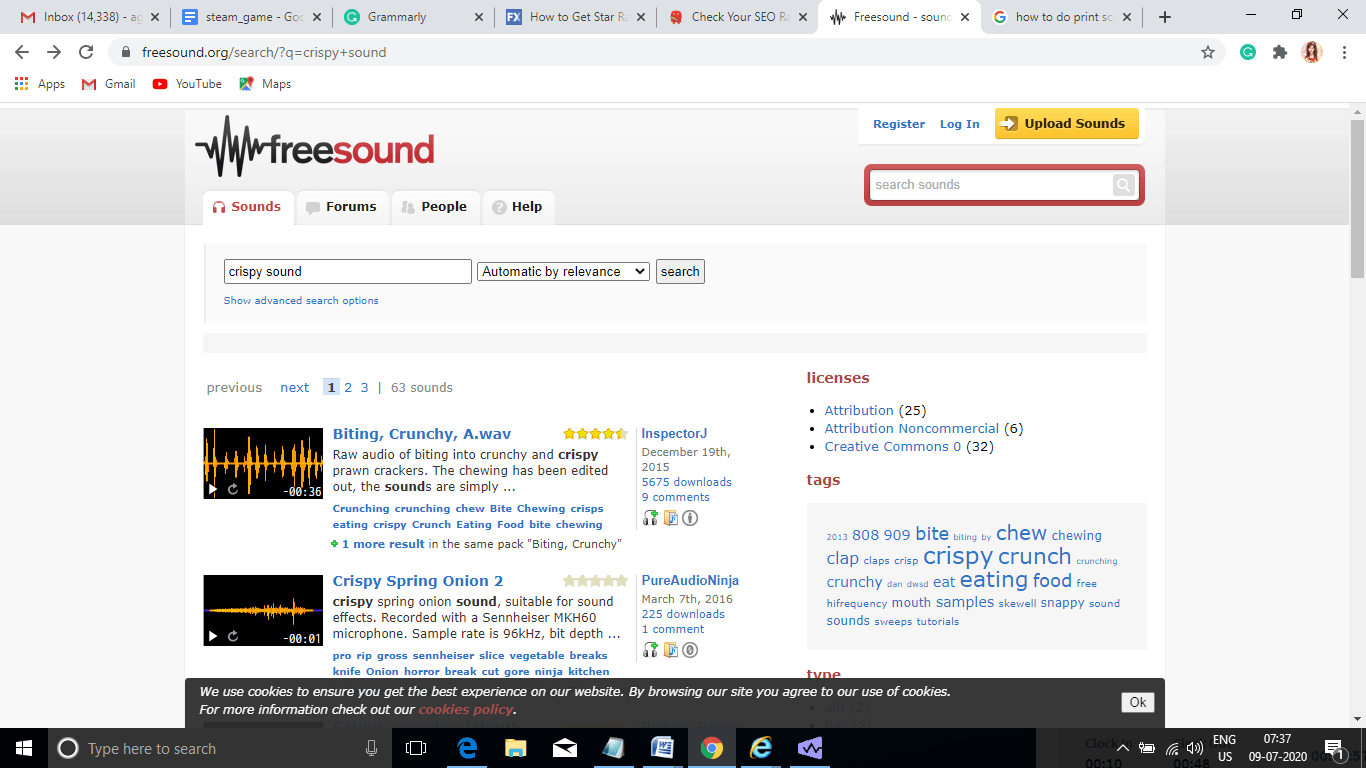
Freesound

  • Pros:
  1. As the name suggests, maximum royalty-free sound effects can be downloaded free of cost.
  2. It is an open platform where users can even upload sound effects.
  3. Sound effects are categorized in the form of packs.
  4. It supports four types of files that are mp3, FLAC, Ogg, AIFF/WAV.
  • Cons:
  1. You have to create an account even for downloading free files.
  2. User-interface is a bit messy.
  • Licenses:

It offers three types of creative commons  licenses:

  1. zero: http://creativecommons.org/publicdomain/zero/1.0/
  2. attribution: http://creativecommons.org/licenses/by/3.0/
  3. attribution-noncommercial: http://creativecommons.org/licenses/by-nc/3.0/
  • User-Interface:
  1. It gives detailed information about sound files like rating, duration, description, which helps in selecting the best file.
  2. User comments are highlighted throughout the site, which helps the user to decide efficiently.
Freesound

Zapsplat

  • Pros: 
  1. Broad classification of sound effects, packs, and music tracks is given on the first page, making this site very convenient to use.
  2. Files can be downloaded in both mp3 and WAV formats.
  3. High quality of sound files is available, which makes this site more appealing.
  • Cons:
  1. There are limited options for royalty-free sound effects files for non-subscribers. 
  2. Maximum files can be downloaded in .wav format only by users who took their gold membership.
  3. All files are copyrighted, and a petite section of sound files comes under a common creative license.
  • Library-size: It has a vivid collection of 69,000 sound files.
  • Licenses:
  1. Offers a Standard license where attribution/credit is required.
  2. CCO 1.0 universal license.
  • User-interface:
  1. It has a luxurious and elegant user interface.
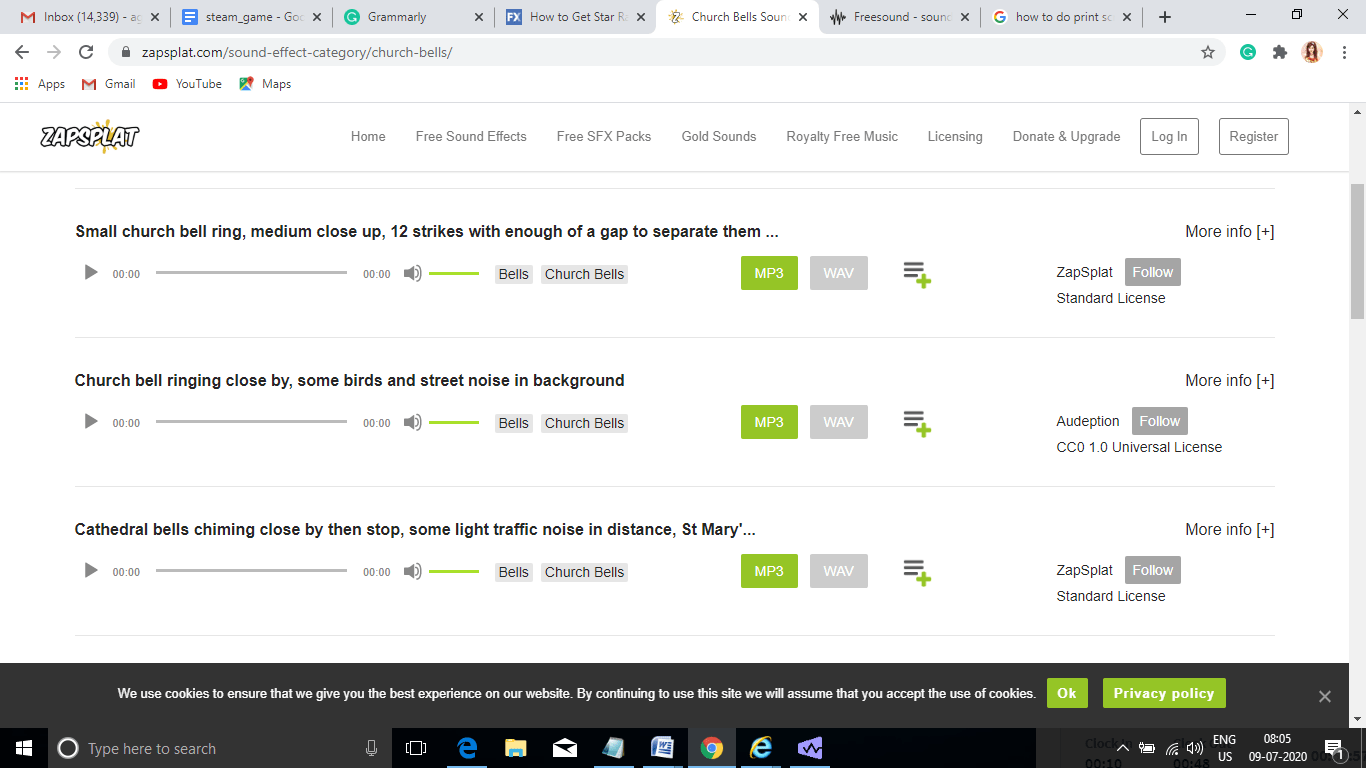
  2. In the figure below you can see that only essential details are highlighted on the main screen, and for detail view ‘More info’ link is added, this makes this site appear very clean and presentable. 
Zapsplat

 Freesoundeffects

  • Pros:
  1. Free royalty-free sound effects files can be downloaded directly without making any account.
  2. Free Sound files can be downloaded in both mp3 and wav format without subscribing to any membership plan.
  • Cons:
  1. The quality of the free sound effect is compromised.
  2. A legal license is offered only for royalty-free sound effects and not on entirely free sound effects.
  • Library size: 100,000
  • Licenses:  custom license agreement of Freesoundeffects.
  • User interface:
  1. Sound effects are divided into broad categories and displayed on the same page, hence there is no need for hovering from page to page for downloading files.
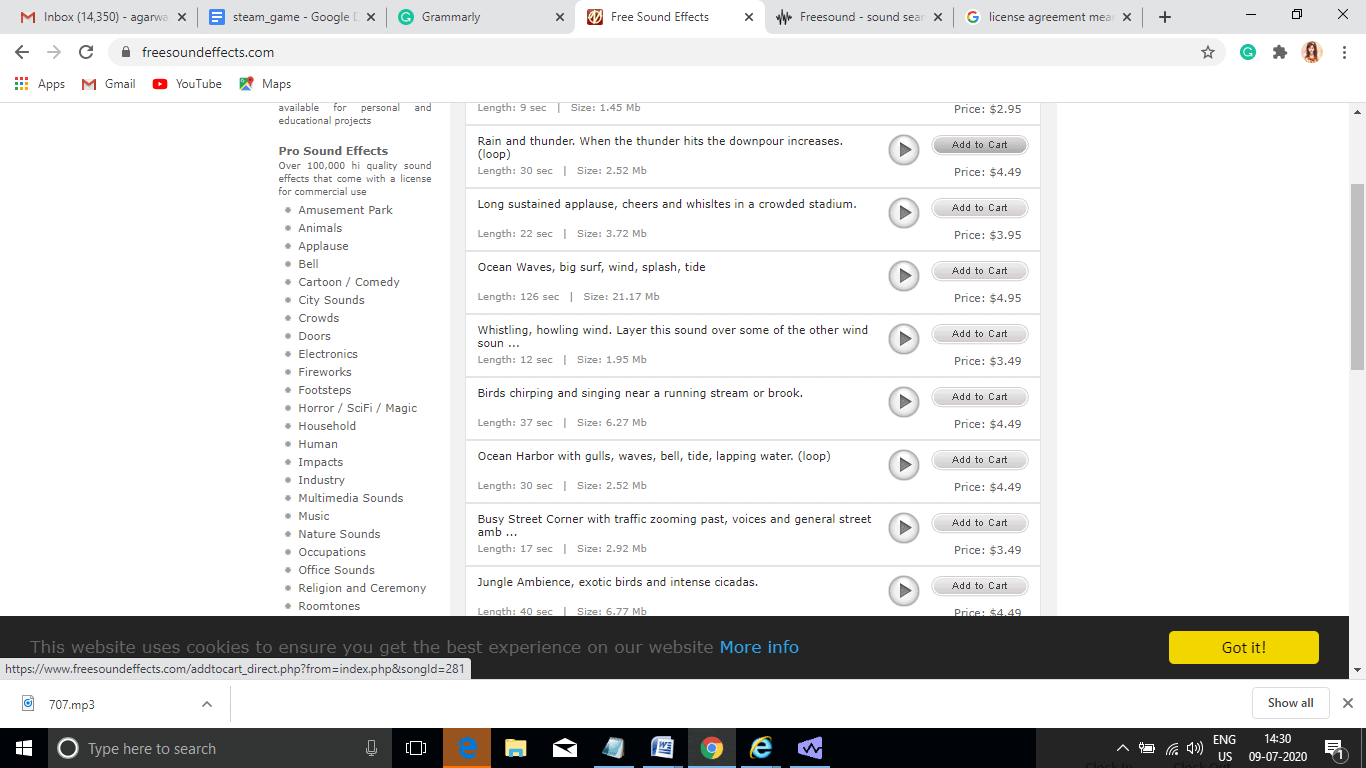
  2. As displayed in the below figure, add to cart option, and the rate of each sound effect file is clearly mentioned, simplifying the purchasing process to a great extent. 
Free sound effects.

Epidemic sound

  • Pros:
  1. You can create your own playlist of sound files.
  2. High-quality sound effect files are available.
  3. Highly safe and secure site to download files.
  4. The best filters are available to search required sound effect files.
  5. A 30-days free trial is provided to test and use sound files.
  • Cons:
  1. You have to create an account before downloading any file.
  2. A minimum one-month subscription is required before downloading any royalty-free sound file.
  3. Very few files come under the free of cost category.
  • Library size:64000 sound effects and 32000 tracks are available.
  • License: Standard, social media, online ads, all media, and custom licenses are available. 
  • User interface:
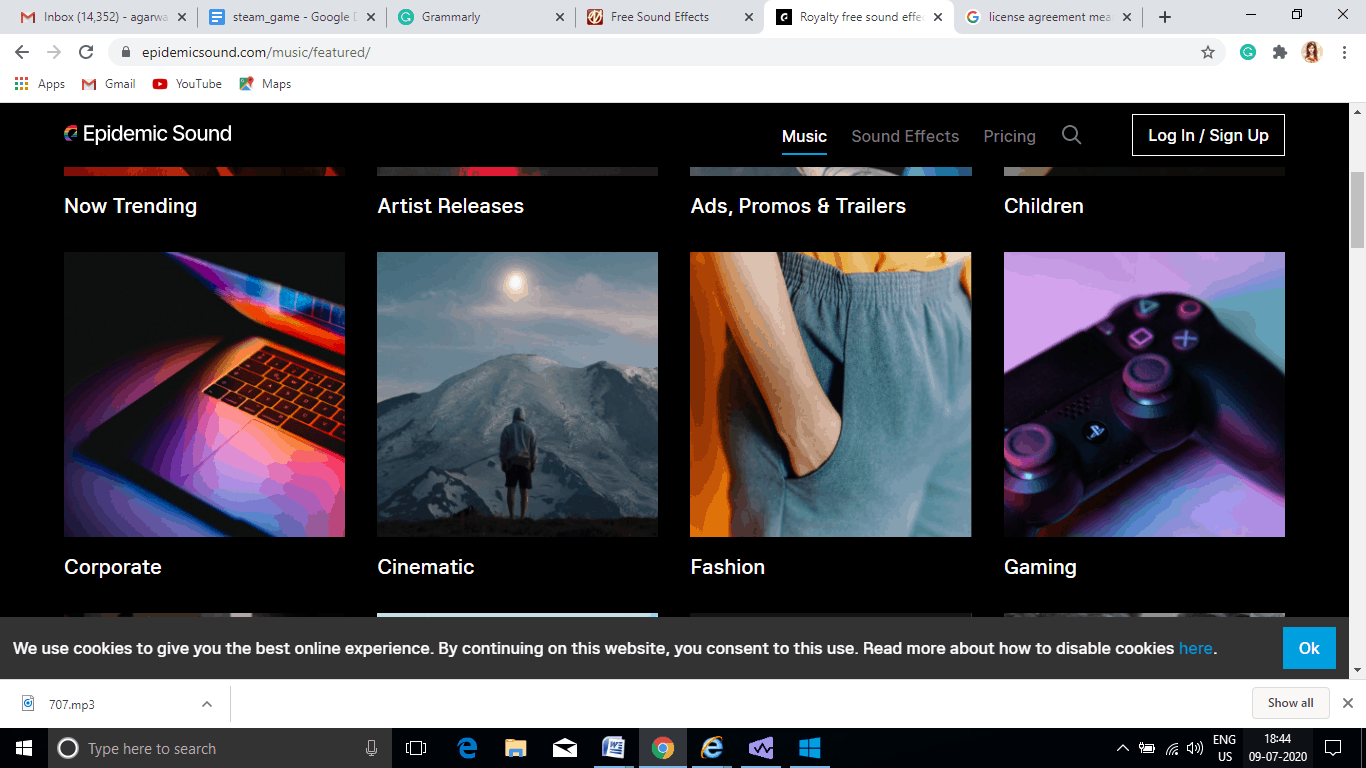
  1. The eye-catching factor is sound files are categorized based on different business sectors like corporate, cinematic, fashion, Gaming, etc.
  2. It helps a lot to search, decide, and purchase the accurate sound effect file of your interest.
royalty-free sound effects

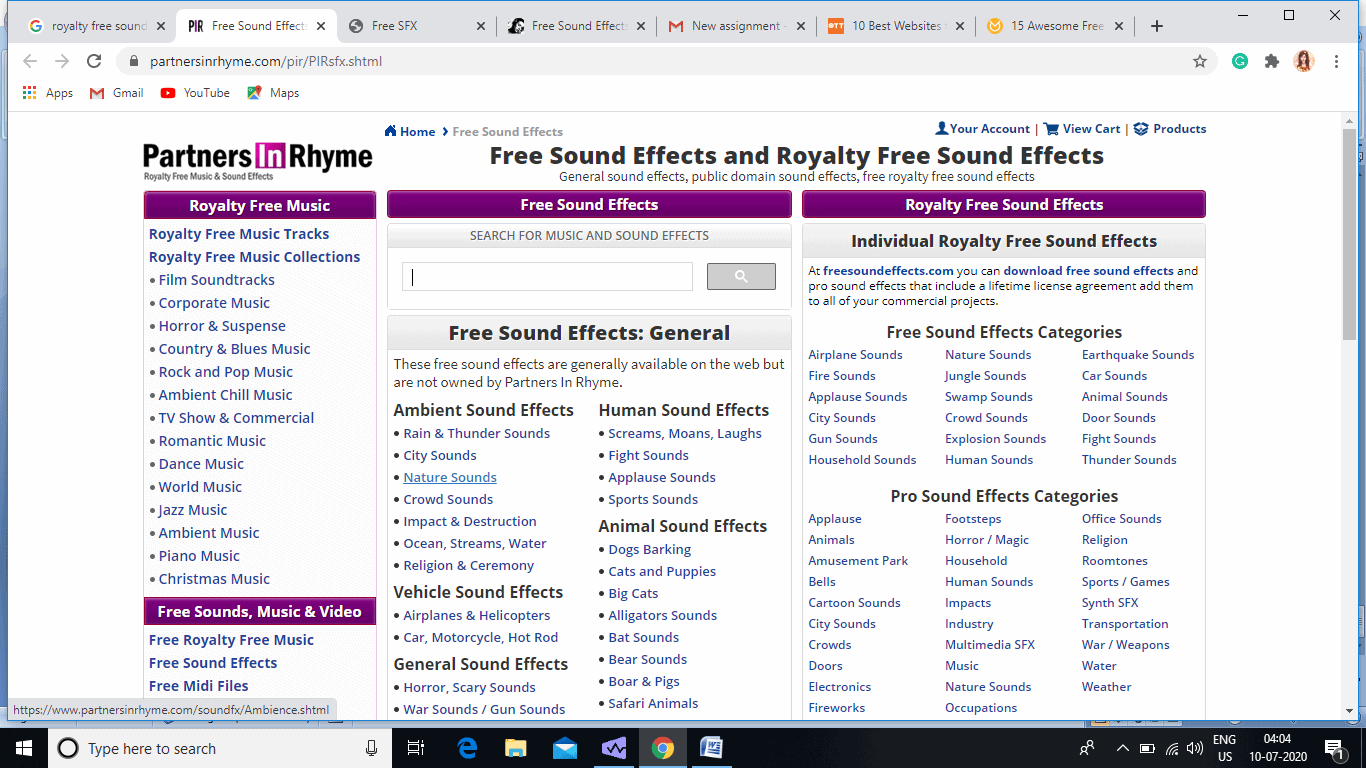
Partners In rhyme

  • Pros: 
  1. No sign-ups are required to download files on any website linked to Partner In Rhyme. 
  2. Professional level royalty-free sound files are provided with a very flexible license agreement where there are no restrictions once paid.
  • Cons:
  1. Opens a new tab for every sound effect file, which is time-consuming.
  2. Some useful files are paid and not free as claimed on the website.
  • Library-size: over thousands.
  • License: Royalty-free custom license.
  • User-interface:
  1. It has very sophisticated logical divisions of sound effect files, which help a lot in quick production.
Partners in  rhyme.

Soundbible

  • Pros:
  1. Separate column for royalty-free sound effect files is given, which avoids confusion.
  2. To download files, account creation is not required.
  3. Royalty-free sound files can be downloaded in both formats mp3 and wav.
  • Cons:
  1. Proper filters are not made available, which makes searching difficult.
  2. Most attractive & awesome sound effects files come under the attribution license type. 
  • Library-size: more than thousands
  • Licenses: Creative Commons Attribution 3.0, non-commercial, public-domain.
  • User-interface: 
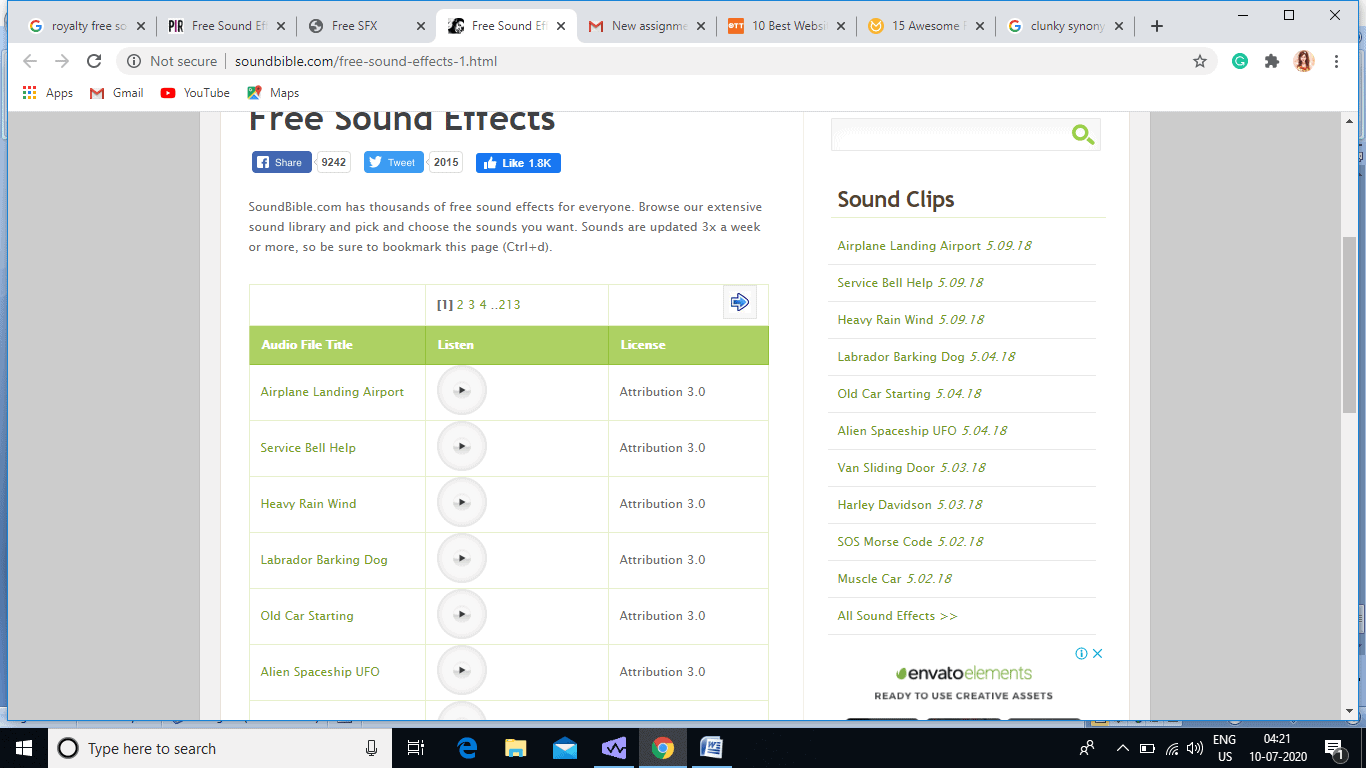
  1. Searching for clips can be improper sometimes due to the clunky search bar. 
  2. The license is clearly mentioned for each sound file, which helps immensely in sorting.
soundbible

Bottom line:

  • We think the seven websites mentioned above offer you amazing royalty-free sound effects files to enhance your podcast, videos, games, movies, etc. 
  • Most of them even give you these files without charging an extra penny.
  • Hence, it is really worth visiting these websites to get the highest quality, royalty-free sound effects files.

Tips to Help You Set Up Your Next Conference Call

0

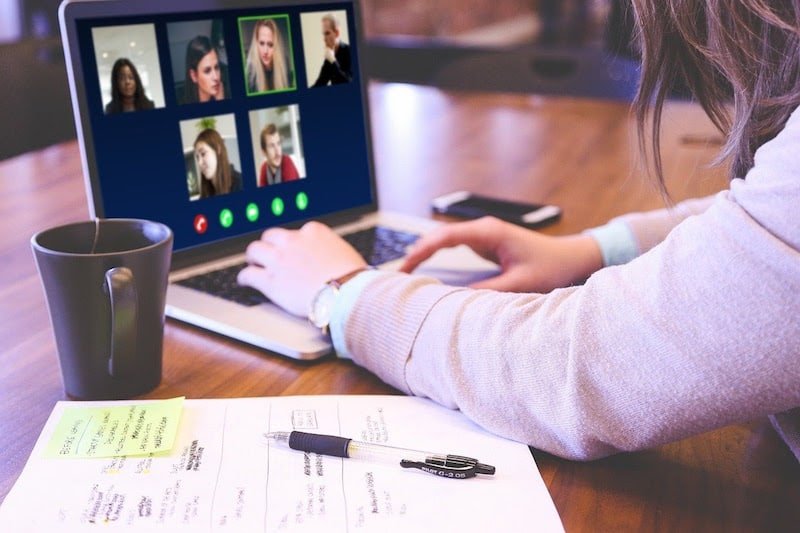
Virtual meetings and video conference calls have been a part of both professional and social communication for quite some time now, however, only recently did they see a spike in popularity due to the coronavirus pandemic that is currently shaking the world. While some have used the technology more than others, it can still seem a little daunting to suddenly move all your communication to the online medium. In an effort to help make things easier, below are a few tips to help you set up your next conference call.

conference call software tricks

Test your setup

By now you have most likely attended a few virtual conference calls and because of this, you have undoubtedly seen someone experiencing technical difficulties that have either delayed the meeting or have led to a less than ideal start. To avoid any issues, it is vital that you thoroughly test your setup well in advance and we recommend that you advise any other participants to do the same.

Internet connection

First and foremost is your internet connection, without a stable internet connection you will neither be able to broadcast yourself or view an online meeting so it is essential that you perform speed tests around your home to find where you can get the best connection. Ideally, you would want a hardwired connection to our router, but if that is not possible, try to at least have a line of sight with it as anything in the way can affect your WiFi signal. If you live with others, we also recommend that you ask them to refrain from downloading or streaming anything for the duration of your meeting.

Camera and lighting

Next up you will need to test your camera, be sure to test it in the same place you will be sitting for your meeting as lighting can drastically affect the quality of your video. As for lighting, natural light is best, but above all try to avoid having a light directly above or behind you as they can cast shadows over your face and make it hard to properly see you.

Audio

Finally, you need to consider your audio. While most modern laptops and some computers come with built-in microphones and speakers, we recommend that you purchase an external microphone and a pair of headphones. The external microphone will help to prevent background noise from being picked up, and the headphones are essential because without them it is likely that echoes from your speakers can be fed back into your mic for the rest of the meeting to hear.

You can test all of these aspects via your computer settings alone, but if possible, we always recommend jumping into a quick test call with a co-worker or friend to make sure everything is working properly in a live environment.

Update your background

One great advantage that comes with applications like Zoom, is the ability to use a virtual background to prevent anyone from seeing what is behind you, for zoom virtual background images – Hello Backgrounds provides hundreds of choices for any occasion. Whether you want to hide sensitive information behind you, avoid distractions caused by people or pets walking around, or even if you simply want to hide an untidy room, virtual backgrounds are a must-have for any virtual meeting.

Make a plan

Planning ahead is important for any meeting, but even more so for virtual ones due to the fact that it is far easier for participants to get distracted and go off track. While it may seem a little old fashioned, creating an agenda is a great way to ensure things keep moving forward. Your agenda can be time-sensitive or not, but it should at least include the reason for the meeting, the main points you wish to discuss, and the overall goal you want to achieve. We also recommend that you forward the agenda to any other participants so everyone can prepare themselves accordingly.

Use the tech available

In addition to virtual backgrounds, there are also plenty of other tools you can use in virtual meetings to help share information and make your life easier. For example, screen sharing is a great way to effortlessly share information, virtual whiteboards are a great way to discuss topics and brainstorm ideas, and cloud-based storage solutions are the perfect way to collaborate on files with other co-workers.

Record your calls

Finally, one of the best advantages that virtual meetings offer is the ability to record your meeting at the touch of a button. While this may not be the best idea in situations where privacy is important, for everyday team meetings it is a great way to keep people updated if they were unable to attend the meeting live.

11 Unique Futuristic Face Masks, 6th Is Awesome

The face mask has become a daily necessity amid pandemic. To comply with the future needs many big brands are trying to use technologies like voice-assistant, cooling techniques, and Bluetooth to enhance the existing masks. We have listed 11 different face masks, which are unique and can change your way to see masks.

1. Jabbermask

Tyler Glaiel’s Jabbermask gives a new, trendy touch to the regular dull face mask.

What makes it stand out in the list of unique face masks is the way it is made interactive by voice-control technology. You can effectively communicate with your friends now as they can see your smile and common messages like ok, no, like, dislike by the Jabbermask you are wearing. Based on its functionality, Jabbermasks has three types given below

Jabbermask voice-assistant face mask

JabberMask Lite :$29, JabberMask Deluxe: $49, JabberMask Pro: $69.

You can book your unique Jabbermask on Kickstarter.

2. C-Face

Donut Robotics has come up with an extremely innovative face mask C-Face, its cool-design can change the way you look at the mask completely.

c-face smart face masdk

This Japanese startup has added a translation feature in its face mask to comply with the social distancing rule of the pandemic. This C-Face mask fits over your regular mask and translates your speech to the other eight different languages by transmitting audio or text to a smartphone. This mask will connect to the phone using Bluetooth and it has an inbuilt microphone to record your speech. This smart mask is already gaining a lot of crowds’ attention and will be soon available in the market at around $37.

3. Care Beats Bluetooth Mask

This North Republic’s face mask can serve as the ideal outdoor essential. This mask has the inbuilt Bluetooth mic and headphones. It can be reused and washed easily as you can readily remove the embedded headset. It offers an advanced filtration system of 6 layers. You can get this stylish and convenient to use a mask on Flipkart.

care beats

4. Breeze: the cooling face mask with gold and silver filters

As its name suggests this face mask is designed to relieve us from the suffocating, hot feel of the regular mask. Artech Inc has engineered this mask with the face-cooling technology and Galvanic filters of silver and gold. It comes with the optional, magnetic eye-shield. You can pre-order this product from the Indiegogo website.

face mask with cooling technology

5. ACTIVE//SHIELD – Hybrid Face Mask

Active shield mask unlike others gives ultra protection to your full face by its HEPA-11 filter equipped face shield. It has anti-fog technology and very easy to maintain. 

active shield

You can order this light-weight and stylish face mask from Vinta’s official website.

6. LIUP – The fashion mask

LIUP is the fun LED face mask that can take care of both your health and style. It is a multi-layer mask with an adjustable band, PM2.5 filter, face mask, removable circuit-board, and a splash-resistant mesh layer. You can connect this mask with your phone by the LIUP app and customize your mask by picking any of the design from the hundreds of options available. Scrolling text to any images that reflect your personality can be presented on its LED display. They have not officially announced its launch date and rate but this product is the most awaited one for all the party-lovers.

led face mask

Also Read : “The Mask” May Be the World’s Most Sophisticated Malware.

7. BioVYZR: Venture Out & Breathe Easy

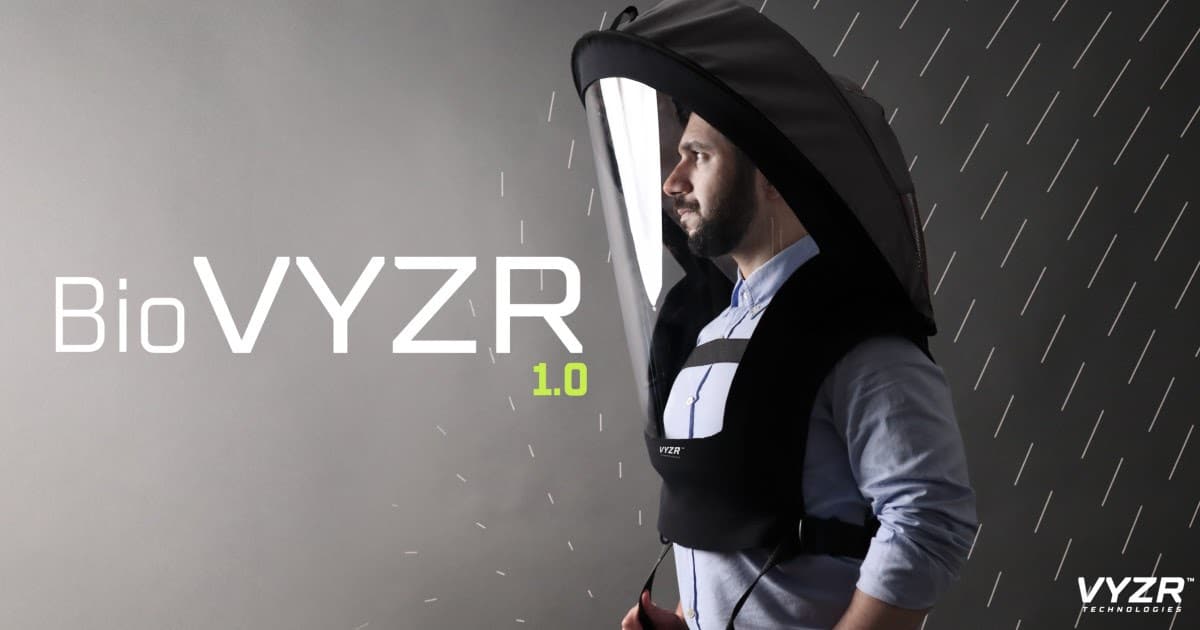
VYZR Technologie’s unprecedented face mask design can offer you self-isolation to combat COVID. It uses N95 air-purifying filtration technology. It gives 360 degrees of face protection and prevents you from directly touching your eyes, mouth, and nose, which is the possible reason to catch infections quickly. You can get one Biovyzr and 10 packets of KN95 air refills by placing an order on the IndieGoGo website.

biovyzr face shield

8. Uvmask

This next-generation face mask gives powerful protection by using UV-C purification technology. It uses UVC light to inactivate allergens and pollutants. Once charged, it can be used for eight hours. It is made up of a skin-friendly soft silicon layer and gives super airtight protection. You can buy this UM System’s trendy mask on the Indiegogo website.

uvmask

9. Civility mask

This transparent face mask allows you to be social and breathe clean air. It is available in different colors and styles. It is an economic, transparent, reusable, comfortable face mask. You can order one for you on Civility’s official website.

transparent face mask

10. Blocc – Face Shield Designed for Style & Protection

Blocc is a lightweight device, which you can wear like normal glasses reducing the extra weight of the face-shield. The best part of this mask is its minimal and ergonomic design. You can easily wear it above your glasses and basic face mask as an extra protection layer. This mask is available for sale on the Indiegogo website.

blocc

11. LG PuriCare Wearable Air Purifier 

LG has recently announced its wearable Puricare face mask. This special ergonomic mask will have dual fans and respiratory sensors qualifying it to be perfect for indoor and outdoor use. LG has given priority to the user’s comfort by designing its mask to comply with all facial shapes. The price of this mask is not disclosed but this future smart mask will be soon available on Shopmask.

Wrapping Up

All the major brands like LG, Xiaomi, Philips are already in the race to launch next-generation smart face masks to ease out discomforts of the regular mask and give premium quality masks equipped with advanced technology. Please let us know by your comments if you come across any other mask, that can be added to the above list.

MediaTek Has Launched New AI-Enabled MT9602 Chip Powered Smart TV’s

MediaTek, a market leader in developing innovative systems-on-chip (SoC) for mobile devices, home entertainment, connectivity, and IoT products, has released a Smart TV SoC MT9602. Backed by  MediaTek AI-PQ (picture quality) and AI-AQ (audio quality), this new SoC is programmed to deliver real-time video optimization with improvisations made in picture and video quality. The revolutionized 4K HDR displays augment its comprehensive features and high-performance. Imbibed with all the advanced features, the Smart TV comes in with HDMI 2.1a, global HDR, and AV1 & AV2 decoders. 

the default gateway is not available,default gateway not available windows 10,the default gateway is not available windows 10,default gateway address,what is my default gateway

On October 9th, the strategic partner of Motorola, Flipkart has launched the brand new range of Smart TV’s in Ultra HD and HD/Full HD resolutions. These new Smart TV’s are powered by MediaTek MT9602.

Since the launch of Motorola’s first smart TV, MediaTek and Flipkart have had a worthwhile association in the Indian market. Then the TV was powered by MediaTek MT5660 chip. The upcoming range of Motorola Smart TVs with the new 9602, now showcases enhanced AI capabilities, superb streaming features backed by great entertainment. This is going to be India’s first smart TVs to be powered by Android 10.

“MediaTek is the number one chip provider for smart TVs, globally. Our advanced chips and smart TV technologies are designed to deliver incredible experiences by making smart TV the center of intelligent homes. The launch of MediaTek MT9602 is a testimony of our commitment to ecosystem partners, to bring the latest technologies to the Indian market. I look forward to the upcoming Motorola TVs, powered by the MediaTek MT9602, which is set to redefine user experience,” said Mike Chang, Corporate Vice President and General Manager of the Smart Home Business Group, MediaTek.

Advanced Features of Motorola Smart TV SoC MT9602

AI Enhancements

The Taiwan-based global fabless semiconductor company, MediaTek’s new smart TV showcases an absolute amalgam of AI-PQ (picture quality) & AI-AQ (audio quality) technologies working together to automatically improve picture and audio quality by real-time video optimization. 

MediaTek a pioneer in voice assistant devices (VADs), has induced its AI voice technologies powered up by four directional microphones allowing brands to integrate voice assistants directly into their smart TVs. This new technology facilitates the users to engage directly to control the TV or other home IoT integration.

Superb Streaming and Great Entertainment

MediaTek MT9602 chip supports up to three HDMI 2.1a compliant ports and a Dolby Atmos surround sound support, which ensures comprehensive global HDR standards, including HDR10+. AV1 and AVS2 codec standards are also induced for streaming video. 

The ultra-high-performance video codec technology AV1 delivers 30% more compression efficiency over VP9. It not only improves the visual quality but also reduces the volume of the file. These features assure a smooth view experience by delivering better-quality content to the customers. 

The MT9602 offers a smart TV primed for high-octane gaming by featuring an efficient Response Time Compensation Engine which helps reduce blurs. Customers get to enjoy fast-paced action movies. Support for dual-band Wi-Fi enables enhanced connectivity in Smart TV.

“With Big Billion Days approaching, each year we strive hard to ensure that our customers have access to industry-best offerings across various product portfolios. We are pleased to bring the new range of Motorola Smart TVs to market, powered by MediaTek’s innovative MT9602 chip – making it one of the most competitive Smart TVs in the country. Through this chip, Indian consumers will be able to enjoy the benefits of superior and advanced specifications, across both 4K and HD/FHD ranges, for the first time – giving them a perfect festive season delight,” said Dev Iyer, Vice President – Private Brands, Flipkart.

Sennheiser Has Launched 2 New Wireless Products – The HD 250BT And CX 120BT

0

German audio giant Sennheiser is commemorating its 75th anniversary and welcoming the festive season early this year with the release of two new wireless products- the HD 250BT and CX 120BT.

The HD 250BT and CX 120BT are priced at INR 5,490 and INR 3,490 respectively.

“SET YOUR SOUND FREE WITH SENNHEISER’S LATEST OFFERINGS”

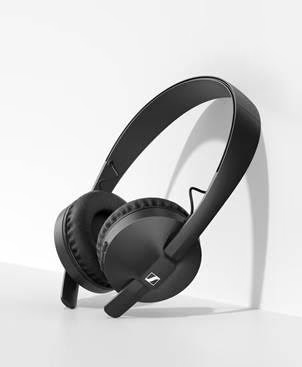
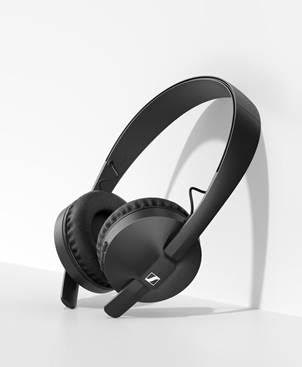
With durable design and state-of-the-art Bluetooth activity, the new Sennheiser HD 250BT headphones are believed to be delivering a thrilling audio experience with dynamic bass. 25-hours battery life backed by advanced codec support at an affordable price adds to the salient features of the new HD 250BT granting the listeners the joy of Sennheiser’s superior audio anytime and anywhere.

The new Sennheiser CX 120BT earphones on the other hand are an amalgam of great sound and wireless freedom. Six-hours battery life and ultra-light design makes the earphone handy and travel friendly.  The audio specialist’s new earphones deliver clear and balanced Sennheiser sound for every occasion be it for playing songs, listening to podcasts, or watching TV shows.

Mr. Kapil Gulati, Director, Consumer Segment, Sennheiser India, said, “We are extremely excited to launch not just one, but two new offerings that are best fitted for our Indian audience. Especially with the festive season right around the corner in the country, we thought this is the perfect way to bring in the festive cheer with a bang! At Sennheiser, it has been our constant endeavor to understand the needs and preferences of the consumers and we remain committed to introducing products that best cater to these evolving needs. Keeping all of this in mind, we are launching the HD 250BT and CX 120BT to offer our consumers here the best everyday audio experience in every price category. India is also the first country for us globally where both these products are being introduced. For the past 75 years, Sennheiser has been shaping the future of the audio industry and is passionate about bringing the best sound quality to our customers. Through these new products, we aim to provide the same quality experience in the affordable category and are looking forward to seeing how our consumers respond to the same.”

Sennheiser’s new HD 250BT headphones – all you need to know!

The new HD 250BT headphones come with an inbuilt audio specialist’s famed transducer technology.  The outstanding feature of this new innovation is that listeners can personalize their audio experience with it.  The Sennheiser Smart Control app’s intuitive equalizer helps to tailor the sound experience as per the individual taste. The aptX™ Low Latency adds to the video experience by synchronizing audio with the on-screen action.

Sennheiser’s new HD 250BT

The headphones are supported with high-quality audio codecs and robust Bluetooth 5.0 connectivity, which ensures the best wireless audio quality with dynamic bass for better experience while traveling.

“Sennheiser’s new HD 250BT headphones deliver a thrilling on-the-go audio experience at an affordable price.

HD 250BT ensures of keeping pace with the busy lives with its 25-hour battery life. The rugged design, noise-isolating soft ear pads, and personalizable controls make the headphones ready to take on life’s adventures.

 Sennheiser’s new  CX 120BT headphones – all you need to know!

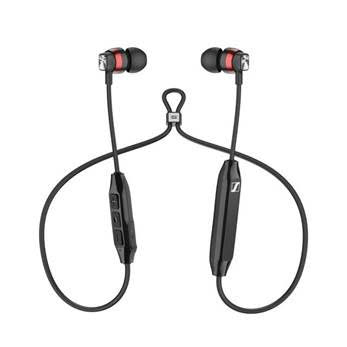
The CX 120BT

“With the new CX 120BT, a world of great sound is always ready. “

With a compact design, these wireless earphones deliver clear audio and flexibility to be taken anywhere. SBC and aptX™ codec compatibility, as well as aptX™ Low Latency, ensures a detailed and balanced audio experience. Reliable connectivity and multi-pairing options delivered by Bluetooth 4.1 deliver fuss-free connectivity. The headphones deliver enough power to get through the day, thanks to the 6 hours battery life and fast rechargeability in just 1.5 hours.

The stylish look with the comfortable around-the-neck design and durable matte-black cable complemented by high-gloss red and metallic silver accents on the earbuds, just amplify the sound experience. An intuitive three-button remote augmenting the multifunctionality of the earphones ensures effortless management of calls and audio. Listeners of CX 120 BT receive an added selection of ear adapters in three sizes, ensuring the perfect fit for optimal comfort and thereby delivering the best audio experience even in the noisiest surroundings.

All the E-Commerce platforms and leading electronic retail outlets in the country along with  shop.sennheiserindia.com  are now selling the Sennheiser HD 250BT CX 120BT.

Samsung Has Launched Its Festive Season With ‘Home, Festive Home’

0

Samsung, India’s largest consumer electronics brand is offering exclusive deals and assured gifts with its festive season campaign “Home, Festive Home.”  All across India, Samsung has extended exciting product offers, coupled with attractive finance schemes including cashback of up to INR 20,000 and easy EMIs of as low as INR 990. All the offers are valid until November 20, 2020.

Give Your Home a Stylish Makeover – Upsize Now with Samsung's Exciting  Offers and Great Products – Samsung Newsroom India

As the pandemic crisis of COVID-19 and the prevalent cautions persist in staying longer, all the festivals and celebrations are estimated to be famed in the safe boundaries of our houses. At Samsung’s festive season campaign, consumers will be able to access unique offers with assured benefits on purchase of Samsung consumer electronics products such as Samsung QLED and QLED 8K TVs, UHD TVs, Smart TVs, Spacemax Family Hub™ Refrigerators, Curd Maestro™ Refrigerators, Side-by-Side and Frost Free Refrigerators, FlexWash Washing Machines, AddWash Washing Machines, Washer Dryer Models, Fully Automatic Front Load and Fully Automatic Top Load Washing Machines, Microwave Ovens and Wind-Free™ Air Conditioners, among others.

Raju Pullan, Senior Vice President, Consumer Electronics Business, Samsung India has said in Samsung Newsroom post, 

“This festive season, celebrations will be mostly at home as consumers continue to be cautious. To help transform their homes into their festive hubs, Samsung is bringing its “Home, Festive Home” offers on its range of consumer electronics products that will help consumers redefine their homes and get ready for the upcoming festive season. We are confident that our unique offers across price points will meet their expectations, enrich their lives and help make their homes ready for the festive season,”

What all are covered in the ‘Home, Festive Home’ festive sale

Samsung’s Diverse Product Line-up

the default gateway is not available,default gateway not available windows 10,the default gateway is not available windows 10,default gateway address,what is my default gateway

Television

On purchase of various models of Samsung QLED Television sets, consumers will get assured gifts like Samsung’s flagship foldable smartphone Galaxy Fold, Galaxy S20 Ultra, Galaxy A21s, Galaxy A31, etc. Consumers are also assured to get a cashback of up to INR 20,000 with easy EMI options starting from as low as INR 990 along with a 3-year warranty (1+2 Year extended warranty) on panels and a 10-year no screen burn-in warranty on QLED TVs.

Samsung is delivering the best of entertainment to its consumers with exciting deals on OTT and DTH platforms on all TV models.

Refrigerators

During this festive season, the purchase of Samsung refrigerators can gift the customers’ Galaxy Note10 Lite free, cashback benefits of up to 15%, and up to 20% cashback, etc. An additional 10% cashback can be availed by the customers on with easy EMI options starting at INR 2490 and INR 990 respectively. All refrigerators with digital inverter technology will be offered with a 10-year warranty on the compressor.

Washing Machines

Customers can avail cashback of up to 15-20% on Samsung washing machines, as well. Samsung will also be offering consumers EMI options starting as low as INR 990.

Air Conditioners

With cashback offers of 20% on Samsung Air Conditioners, consumers will get easy EMI options starting as low as INR 990 on Air Conditioners along with a 5-year warranty on the condenser and PCB controller warranty on convertible range models.

Microwave Ovens

Consumers purchasing select models of Samsung Smart Ovens will get attractive cashback offers up to INR 6000, one EMI off on brand shops, easy EMI options, with a 5-year extended warranty on the Magnetron and a 10-year warranty on the Ceramic Enamel cavity.

Samsung Bangladesh | Samsung Microwave Oven | Cooking Appliances

“Home, Festive Home” offers cover all categories of Samsung Consumer Electronics products.”

Samsung QLED Televisions,  Crystal 4K UHD Televisions, Samsung Spacemax Family Hub™, Samsung Curd Maestro™ Refrigerators, Samsung Side-by-Side and Frost Free Refrigerators, WIND-FREE™ 2.0 SERIES, Samsung Microwave Ovens, Samsung Digital Inverter Air Conditioners, Samsung Digital Inverter Motor Washing Machines, among others are the products on Samsung’s Offers list.