
Home Blog Page 363

How to: Protect Your Eyes From PC Monitor Glare & Radiation

7

beautiful pictures of eyesPeople belong to IT profession and bloggers have to spend long hours in front of PC for official reason. But there are people who also spend long hours in front of PC for leisure and entertainment.
But very less among them will realize the problems which they might have to face in the future, due to carelessness on their own health, no free time, Long hours of busy schedule and work and mainly, Mental stress. Everyone who spends long hours a day in front of a computer screen has to realize that they should not scarifies their eyes behind! Because health is wealth, how good you take care of it, it will take care if you in times when you really need it. Read this article which says about Computer Vision Syndrome and its Symptoms.

Many of the above issues cannot be resolved without having time to spend. But if you can take care of your health along with you work, then it will allow you to work more in future and have a better life.

Get Help From Your PC to Continue Work At the Same Time

flux-icon logo ballToday, I’m going to introduce a tool which will helps every interet user to protect their eyes from harmful radiation from the Computer screen or screen glare. Flu.x is a great software which you can use at work and have better viewing experience even at long working hours. Flu.x is the application which changes the color of your display depending on the time of day. It uses a technique similar to warming or cooling an image.

How this works?

f.lux makes your computer screen look like the room you’re in, all the time. It means that you will not feel the glare in your PC screen when sun goes down. When the sun sets, it makes your computer look like your indoor lights. In the morning, it makes things look like sunlight again. You can configure the location in Flu.x setting to adjust the day time lighting, you can also configure the amount of brightness you need.

How do I use this?

You need to setup your location entering the longitude Flux settings
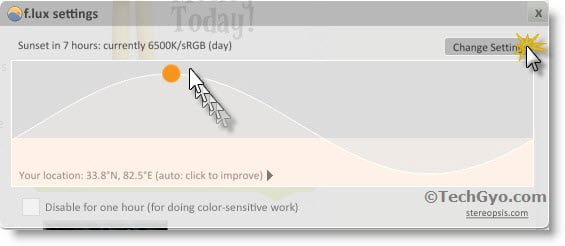
You can click on the Setting option to configure your location, but if you would like to check how it would look like. then you can check the preview.
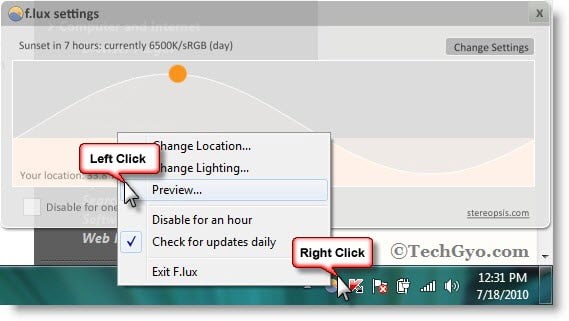
flux eye protect preview

How do i seup my location?

Just right click on the small round icon of Flu.x from the lower task bar of your Windows based PC screen, and then right click on the change location option or click on “Your Location” on the map. Once you’ve clicked on that, a menu will appear where you need to enter your longitude and details. If you don’t know your latitude/longitude, then you can just click on Locate “button” and then it will take you to Flu.x Steropsis website where you can enter the name of your city and find it out.

Step 1:

Right click on the Flu.x icon on the lower bar of your Windows based PC. and then click on LOCATE button.
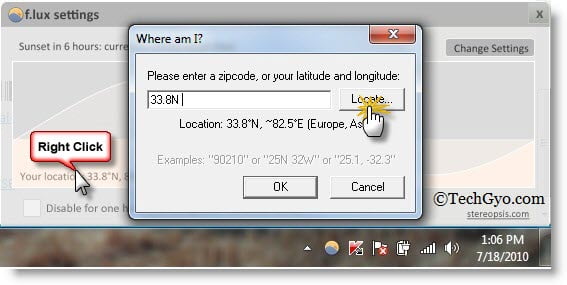
flux location settings

Step 2:

OIf the flu.x location map didn’t open automatically, then click here to open it and once it is opened, enter the name of your city and then click on “GO”.
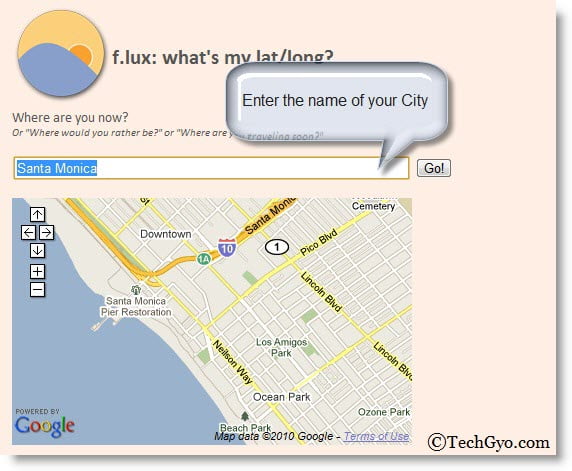
flux location configuration

Once you get a latitude and longitude something like ” 12.971606, 77.594376″ enter it in the Flu.x settings and then click on OK. That’s it.

Where can I download this software?

You can download this awesome software code from Steropsis. Flu.x is currently available for Windows Xp/Vista/7 and Mac Based Computers too.

[ Link : Flu.x ]
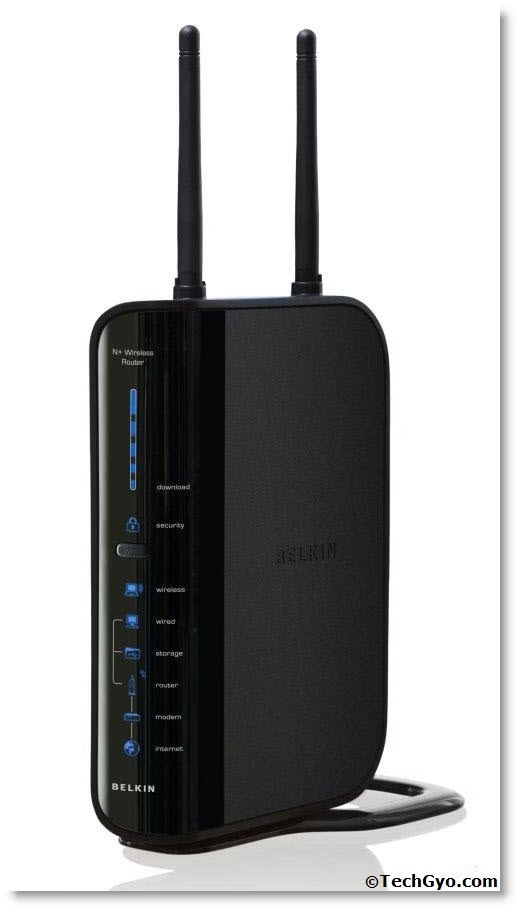
How To: Configure Belkin Wireless N Router With Laptop

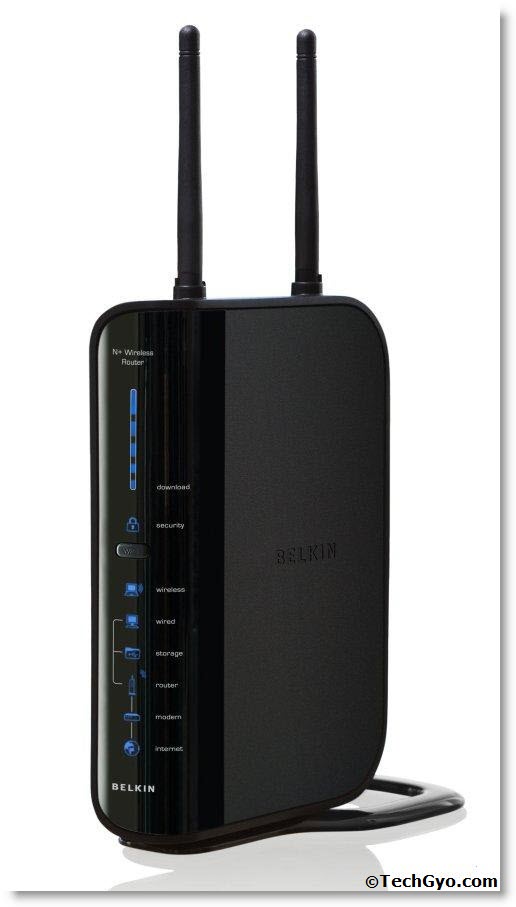
Belkin wireless router SetupToday we are a bit happy and excited to write this post. What happened is that we purchased a Laptop and Belkin wireless N router. However after coming back from the shop and installing the operating system we had a bit of glitch in setting up the wireless internet connection. We had to try a lot of steps to get it done. So I will just give you the correct steps which lead us to success below.
Purchased The Router What Next?

Great, so now you own a wireless router, you have only a few steps to get a wireless internet connection now. First you need to connect the Ethernet cable that is coming out from the Modem to the wireless routers, input point. Generally it would be of different color than the other ports. But before everything make sure that your wireless card driver is installed in your laptop. You can verify it from device manager.

Step 1:

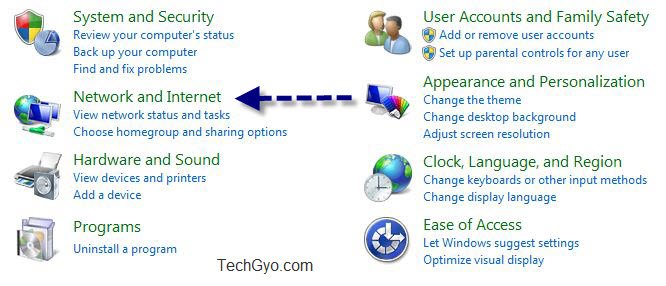
Go to control panel and then goto Network and Internet.

Network And Internet

Step 2:

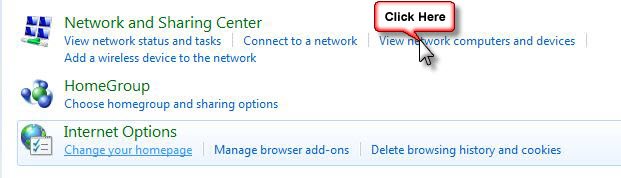
Click On View Network Computers And Devices

Network Sharing Center

Step 3:

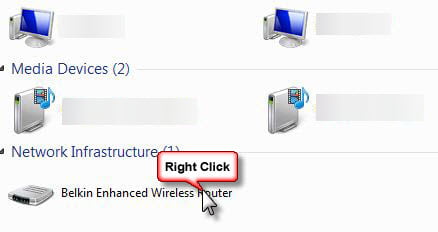
Now Right Click On Your Wireless Device Icon.

Router

Step 4:

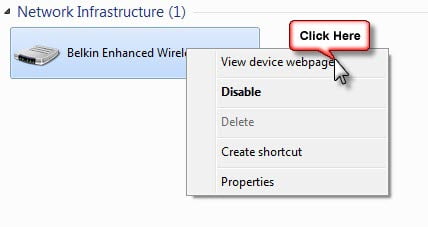
Now click on the “View Device Webpage” on the pop up that comes.
Right Click

Step 5:

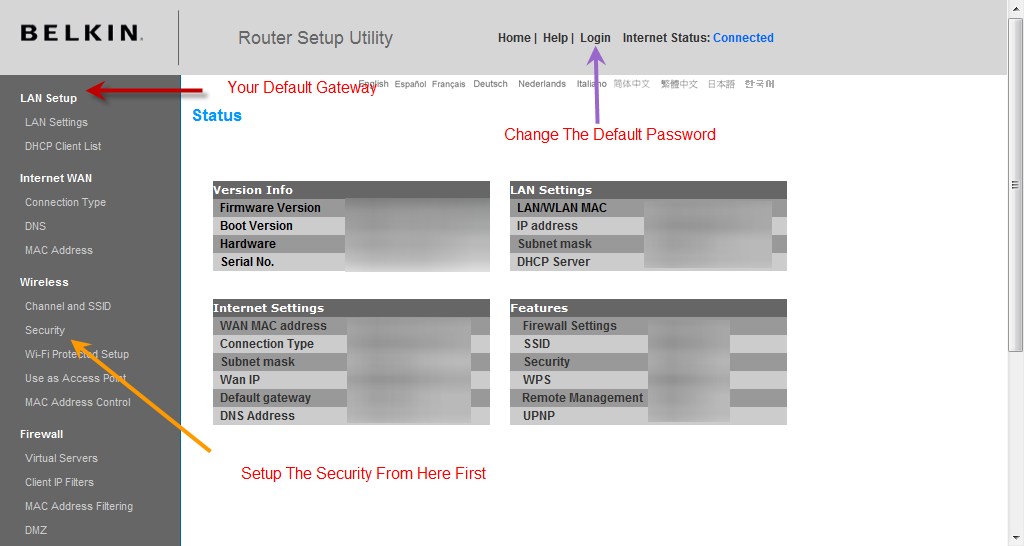
Now You Will Be Taken To The Device Configuration Page. Here you Need To Change The Default Password, Setup The Security And Also Lan Setup.

Router Configuration Page

Step 6:

After this is done double click on the router icon and it will give you option to configure the new wireless device. You can either configure it manually or you can use the driver CD provided by your router manufacturer. The best option is to use the Driver CD.

How To Protect My Wireless Router?

Make sure you have enabled all the security features fro the configuration page and always change the default password. I have already made post on this you can check it how to protect your router more effectively here

Do Share Your Comments and Feedback To Us We Really Appreciate It.

Metaweb Is Acquired By Google To Improve Google Search

0

metaweb and googleGogle the world’s largest search engine has now aquired Metaweb Technologies to further improveGoogle search. Metaweb is a service which helps site owners, bloggers, and developers make their sites richer and more engaging. They keep track of open database of things in the world.
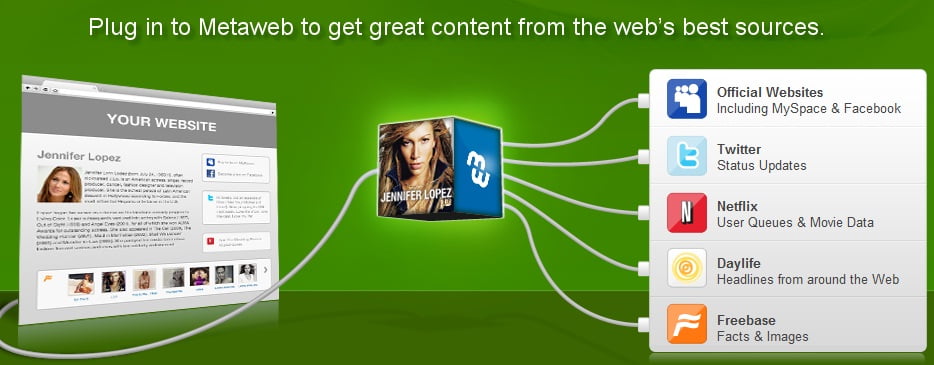


Google is trying hard to improve their ideas for a better Google search. Google will make use of the possibilities for Freebase, it is Metaweb’s free and open database of over 12 million things, including movies, books, TV shows, celebrities, locations, companies and much more. Google will also contribute to and further develop Freebase in the coming days like improving features like rich snippets and search answers,. Google believe that by improving Freebase, it will be a tremendous resource to make the web richer for every internet user and people who are indirectly connected to the internet. So this is really a good news for developers and for users. As of now, Google and Metaweb plan to maintain Freebase as a free and open database for the world.metaweb

Web world is rapidly growing and this is another example of how web continues to expand, and this is the best time for webmasters and bloggers, and publishers to add rich and right content for the users.

Everyone can contribute to add information to the internet. If you like to write for TechGyo, read: Share your knowledge on TechGyo.com and get paid when others use it!

Here’s a quick overview video about Metaweb.’

Do share your comments on this article.

Linkshiftr : A Url Shortener With Conversion Tracking

Update: As of 2025, Linkshiftr has shut down.

This is a guest post by Vishal Sanjay from dumblittleblogger.com. If you like to write for TechGyo, read: Share your knowledge on TechGyo.com and get paid when others use it!

Due to the growing rage in social media, URL shorteners have gained huge demand, especially on sites such as Twitter. And for bloggers and affiliate marketers planning and organizing entirely depends on their analysis of sources and conversions of traffic. In my case I’ve tried everything from Google analytics to Bit.ly, but till now none of them ever satisfied my needs.

For an affiliate marketer even the smallest changes can mean big amounts of money, so accurate information has great importance. I’m sure most of you have heard of similar services with reporting, but Linkshifr takes this to an all new level. I have compiled all of the features and characteristics of Linkshiftr, so all you internet marketers and bloggers make sure to keep your eyes open.

What is Linkshiftr?

Linkshiftr is a small and simple tool which does the work of any other URL shortener, which is convert big links into small ones of just a few characters, but with this it provides an important tool known as the tracking202, which tracks the location and sources and helps determine the conversions by each source, this may seem pretty similar to Bit.ly, but this is a lot accurate and has much more features.

The site boasts about being one of the only services to provide an easy platform for affiliates to create easy campaigns, analyze them, rotate links, split test optimization and conversion tracking across different platforms.

How I analyzed my links and pages?

After you’ve registered with Linkshiftr you can start off with making the maximum use of it, the first thing would be to shift all your links to your control panel. I started off by putting up all of my clickbank links as well as a few of my own landing pages on my blog and I had up to 30 links at the end.

One of the most unique features of Linkshiftr is its ability to change the destination for all of your shortened links, for example, just imagine that you’ve promoted your affiliate link in all places, but now you feel that the particular program no longer has the demand, so instead of forgetting the promotion you’ve done as a bad dream you can change the destination of those links to some other affiliate program.

Split tests and conversion tracking

Split testing is a really important step when it comes to affiliate marketing and even the smallest differences and changes can make huge differences in your bottom line. So the first and most important thing is a good analytics, which Linkshiftr has proven to be.

There are a few pixels and codes which are required to be pasted on your blog, and with all of these even the smallest amount of information can’t go wrong. This also a great way to choose the right affiliate, I’d say that this can be very important for all affiliate marketers and even bloggers who promote affiliate programs on their sites.

How much does it cost and other plans?

I believe in the saying that money can only buy you the best, but this great tool still has a kind heart for those who can’t afford it. The first plan is the free version which doesn’t cost you a single penny and other plan costs $15, which is little more than a few pennies which every internet user can afford these days,

The free plan does have a few restrictions, but the main features such as URL shortening, link redirection, rotation of links, link tracking and location tracking. But this lacks conversion tracking and has a limitation on the number of URLs, but still this is great for small, newbie affiliates.

The pro plan covers all of the features and has no limitations on the usage and are a must for big affiliates and can be just great for the smaller ones. It costs $15 currently, but they are running an offer which allows you to use it for 14 days for free, so you’ll have a great chance of testing out the tool before buying it.

How To: Protect Your Webcam From Getting-Hacked

webcam

Now a days everyone of us use Webcam for our daily life uses ranging from distant conferences to keeping in touch with our loved ones. It has been a need which cannot be denied in today’s global village. However today I am not going to write about the ways it helps us in our day to day life. Instead how it  can change from a boon to a curse in the flick of a moment.

How Can A Webcam Harm Me?

Suppose you gave your laptop to a repair shop for some purpose and it has a webcam built in it. Now you go and collect it from the shop after a few days. Now there can be two cases, either thne repair boy you gave to is nice and he repairs and gives back to you the laptop, or he can do another thing, which is going to turn your life miserable from now on. What he can do is install some malicious code or some remote management tool. So now what happens is that when ever you get online he can virtually do all the things that you can do in your computer.  Including turing on your camera and taking pictures of yours. Guess, what would happen if you kept it on during some private moments of yours.

It could lead you blackmail or even harassment, which is not at a deserved. Even leaving the above technique, there are several ways in which a webcam can be hacked. A major tool to hack webcam is PRORAT.

How To Protect My WebCam From Getting Hacked?

safe web cam bee

The first and foremost thing that you should do if you have a external webcam is to connect it to the computer only when it is needed. It may be a bit frustrating, but trust me it can save you from getting your compromising photo from circulating in the web.

If you own a laptop with a webcam built in with it then you should always be aware after getting it back from a repair shop, or a person you can’t trust fully. Check for any suspicious behavior in your computer, and also check in any new software like logmein or any such kind is installed. If you find something immediately uninstall it and get it checked by a trustworthy technical person.

In all the cases do no forget to keep an updated Antivirus in your system as it really bails you out of many tricky situations.

Another trick you can use to protect yourself is that, in many cameras it always makes a noise or shows a notification when it is being started. Do not overlook it in case you hear or see something in case the process was not initiated by you.

If you want to be 100% secure just put the lense cap that comes with the webcam or just put a nice sticker over it, which can be easily removed when needed.  This blocks the lense and hence never fails.

It is very important to take these precautions and should not be dealt with lightly, once the miscreant gets your photos there would be no way around. Its better to play safe than be sorry later.

Show Author Address Card using Author Exposed Plugin

2

techgyo guest authorsThis is a guest post by Amit, you can contribute here.

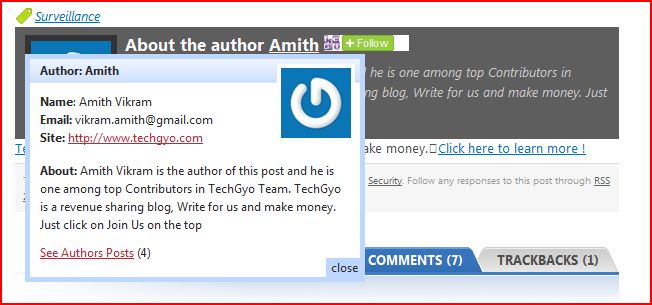
Well here goes another article about wordpress plugins. If you are still using author tags for your blogs, it’s time to move on. This plugin named author exposed, does the same thing as an author tag, displays the author name, only this time it’s linked to a hidden layer which pops up with the author info gathered from the profile page, plus gravatar photo. It is xhtml,css valid and runs on opera and safari too.

You can download the plugin from here:

Installation
Installation is simple and should not take much time:
1. Upload ‘author-exposed’ folder to the ‘/wp-content/plugins/’ directory
2.Activate the plugin through the ‘Plugins’ menu in WordPress
3.That’s it! Although you might need to place (if you haven’t already or if it’s not included in your theme) where you want the author link to appear (must be inside the loop)

Take a look at how it works-


A screenshot from techgyo.com.

How to manually add this box appear blow the post?

Once you install the plugin, go to plugins page and activate it. The add the below short-code in Single.php of your WordPress theme.

<?php the_author_posts_link(); ?>

Every theme will have a single.php folder and you can open it from Cpanel. Then add the above short-code in the appropriate line.

How To: Open Your Locked PDF Files For Free

3

pdfMany a times we receive PDF files which remains locked and many of the functionality remains locked like printing editing etc. These are done so that the receiving party cannot modify anything of the file, or take a printout of it. However, it really becomes a problem many a times, and we are left out with no other option other than hammering our head. However if you really know were to look, no problem is really a problem. Today am going to present you few such  website which can remove all such restrictions from the PDF files . The website FREEMYPDF.COM does the perfect job of removing the restrictions from the PDF files. What you need to do is just upload, your PDF file to their server and it will give you the restriction free PDF for download and you are ready to go. FreeMyPdf

PDF UNLOCK.COM is another similar kind of website which provides the similar features to unlock your locked PDF . Here too you just need to upload your restricted PDF file to the remote server and after uploading it will send you the unlocked PDF file.

PDF UNLOCK

You can also try your hand on www.unlock-pdf.com which provides similar, restriction removal services from PDF files. This site is also chose by most of the Stumble upon visitors for its performance.

Unlock Pdf

How Do I Use It?

To unlock your files just follow the below instructions:

  • 1. Click “Browse…” and select the PDF file you would like to unlock.
  • 2. Agree to the Terms of Service by checking the appropriate check box.
  • 3. Click “Unlock File!” – and you’re done!

Notice: However I would like to inform you that, it would be better for you to first confirm that you are allowed to do what you are doing in case of any sensitive material.

Website: http://freemypdf.com/

         http://www.pdfunlock.com/

         http://www.unlock-pdf.com/