Home Blog Page 329

Top 6 Tech Tools That Every Real Estate Recruiter Should Use

0

If you want to boost the productivity and growth of your real estate brokerage, then you need to be able to recruit the best real estate agents. Indeed, investing in hiring quality candidates is good for business because of the overall value they provide to your organization.

As such, it’s important to beef up your recruitment programs so that you can gain an edge over the competition. Fortunately, this is an achievable goal thanks to real estate recruitment technology. With the help of these tools, you can streamline your processes and improve your strategies so you can more easily find top-performing agents.

That said, here are some tech tools that you definitely need to invest in as a real estate recruiter:

Recruitment CRMs

A recruitment CRM or candidate relationship management system/software is one of the foremost technological tools that a real estate recruiter needs. It’s a little similar to an ATS or an applicant tracking system; however, while an ATS is focused mainly on the current applications, a CRM is like a central database of past, present, active, and passive candidates.

You can learn more about how real estate recruiters can maximize a CRM and help brokerages achieve success in the given link. The bottomline here is that with the help of a CRM, real estate recruiters can be more strategic and proactive in finding and hiring real estate agents.

Job Aggregators

If you want your job ads to be found, then you need to advertise in job aggregators. You usually have two choices in this: industry-specific job sites or the more “general” job boards. Each type of job aggregator has its own pros and cons; study them carefully in order to maximize each platform. You should also be aware of how each site’s algorithm works, so that you can create optimized job ads.

The bottomline is that many job seekers—real estate agents included—often start their search online. Thus, you need to be present on these websites if you want to be found and capture the attention of potential recruits.

Finally, do note that while a job aggregator isn’t a tool that you can buy (unlike, say, a CRM software), it’s an absolute must to know how to use it. By mastering how to utilize a job aggregator’s features, your job ads can be found by the best candidates.

Video Interviewing

The COVID pandemic made video conferencing and online meetings the norm, not just for work-related purposes but also for recruitment. Indeed, thanks to video interviewing tools and chat apps, real estate recruiters can save precious time when it comes to evaluating candidates.

Most real estate recruiters prefer live video interviews, but there’s also merit in implementing pre-recorded video interviewing. This is where you send the questions to the candidates, and then they respond by sending you a video of their answers. It’s an ideal process if you have plenty of candidates for a single position. 

Of course, nothing beats the in-person interviews if you want to gauge a person’s body language and get a good “feel” if a candidate will be a good fit or add to the brokerage’s culture. Nevertheless, video interviewing is a good compromise.

Digital Sourcing Platforms

One of the biggest challenges in real estate recruitment is finding candidates in the first place. Where do you search? Networking through industry events is a great place to start, but depending on this sourcing method is severely limiting. You’re going to need to cast a wider net if you want to catch the attention of the best real estate agents in the market.

This is where digital sourcing platforms come in. Through social media, digital job boards, and community forums, you’ll have a bigger pool of potential candidates to work with. A particularly good avenue is social media, simply because millions of people are already using these platforms. Because the presence of an audience is no longer that much of an issue, you can then focus your efforts on optimizing your content to appeal to your target section of the market.

Reference Checkers

Checking your candidates’ references is a time-consuming but necessary task. After all, you want to be as sure as possible that you’re hiring the right person for your brokerage. Fortunately, there are now tools that can automate this process.

The way reference checkers work is that they cross-reference readily available information with the information provided by the candidate in their resumes. Some tools also let you input custom keywords, so you can further narrow down your candidate pool. 

Chatbots

Last but certainly not least, chatbots are an important technological solution in real estate recruitment. From cutting down interviewing time to keeping candidates engaged, chatbots can help you streamline your hiring process and find qualified real estate agents that much quicker.

The key is to know how to phrase the default options or questions in the chatbot program so that it will actually be helpful instead of confusing or frustrating.

With these six tech tools, you can considerably improve your recruitment process and find the best real estate agents to join your brokerage.

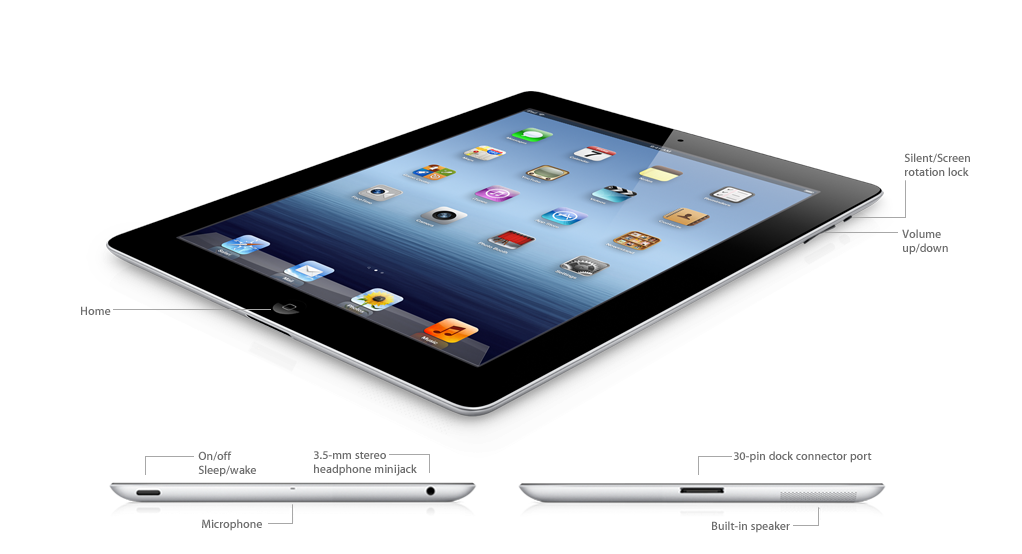
Third Generation iPad- Apple’s Revolutionary New iPad

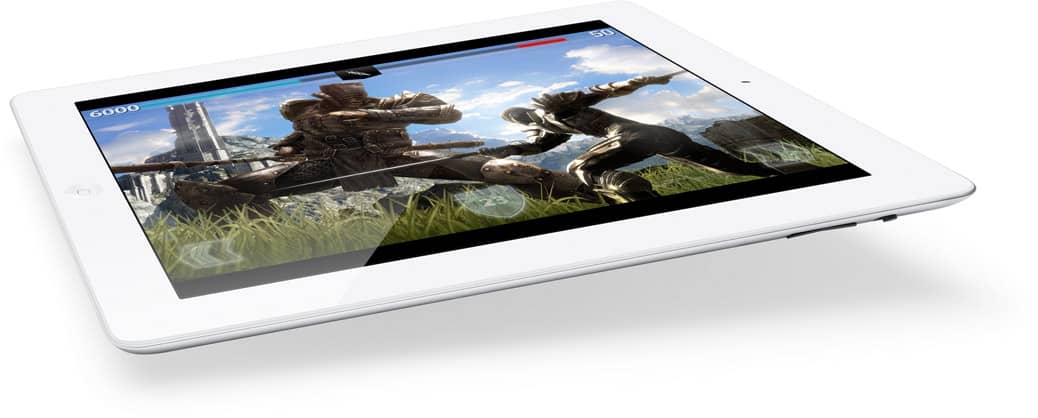
Apple reveals the all new iPad which is getting to be known as iPad 3 or the New iPad. With its all new Retina Display Technology, Apple defines it as “Resolutionary New iPad”. With the Retina display technology one can see more defined and detailed display ever seen before. Colors are more beautiful, text is more clearer, videos with very high definition and much more. With the new iPad’s cutting edge optical technology you can record videos in 1080 pixel HD. And with Wi-Fi and 4G on iPad you can browse through the internet at great speeds. And also you get some amazing inbuilt apps with the new iPad.

iPad Snapshot

iPad Features

Retina Display


Retina Display

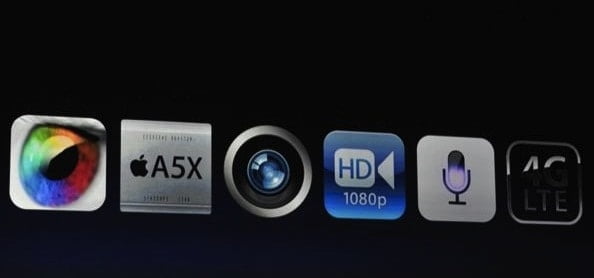
The third generation iPad features the all new Retina Display which is a cutting edge technology of our times. It comes with 2048-by-1536 resolution, 44% greater color saturation, and unbelievable pixel count of 3.1 million pixels in 9.7-inch space. That’s a million times more than in an HDTV! So try imagining that high definition display or just get a new iPad.

5 Mega Pixel iSight Camera

Great moments are hard to come and Apple’s engineers have devised a great camera to capture them. The new iPad comes with a 5MP iSight camera which remarks another great feature of it. You can record 1080pixel High Definition videos with the new iPad. Photos and images are greater than ever before.

Rocking Hardware

With the Apple A5X chip and quad core graphics processing one can get incredibly high speed experience. A5X chip is responsible for driving power to each and every single pixel on the display. That’s how Apple made Retina Display possible. Thanks to A5X! And after all this hardwearing, you still get ten hours of battery backup.

Wi-Fi 4G


iPad Hardware

The new iPad comes with fastest way to browse, download and upload on the internet. It allows you connect to the fastest data networks around the world also up to 4G LTE. This is definitely one of the reasons to buy the all new Resolutionary iPad.

iPad Apps

iPad Apps

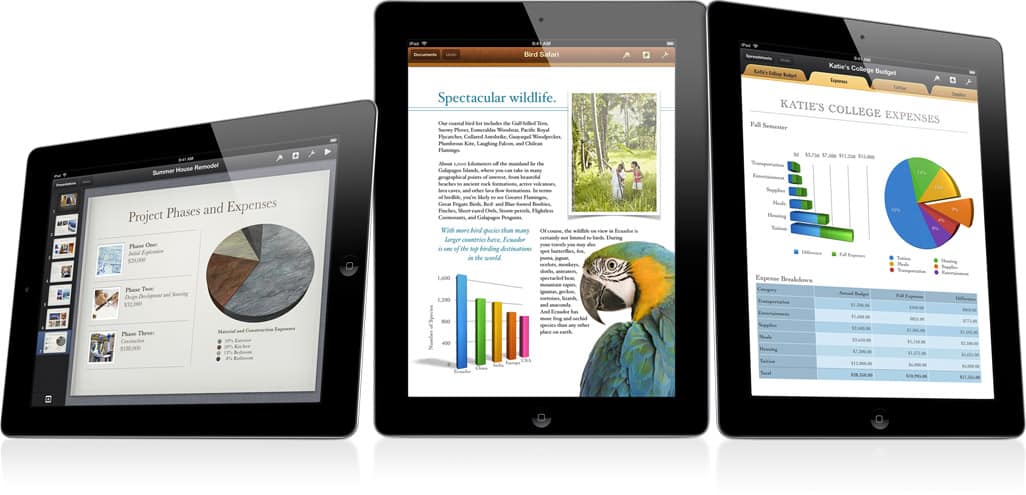
The new iPad comes with several cool built in apps. Send emails, make a video call, read books browse through the internet with great speeds and much more with inbuilt apps. You can make your documents, spreadsheets and presentations come alive with Pages, Numbers and Keynote. For more apps one can always visit the App Store. With iCloud you don’t have to worry about saving your work. Your work is saved automatically.

iPad Price

Apple revealed the Third Generation iPad in the second week of March and is likely to be available in Apple retail stores from 16th march. Or you can Pre Order it online. Its range starts $499 onwards.

For more information visit www.apple.com/ipad/

Five Ultimate Benefits of Remote DBA

0

DBA or Database Administration is one of the most crucial components of IT infrastructure and it impacts every business. Especially in today’s times, where data plays a key role in business success, intelligent database administration is the only way ahead. 

However, database management is not a simple process anymore. With the rapidly expanding industries, technological developments, and increasing customer demands, businesses need to collect and process a vast amount of data and the traditional methods of DBA are simply not efficient enough. That’s the main reason why most successful enterprises are now shifting towards remote DBA administration

Hiring remote DBA services solves many issues in database administration and offers plenty of benefits that can boost business performance significantly. Along with that, it also improves the overall security and efficiency of the business. 

Are you wondering how remote DBA can make such a massive impact? Check out how remote DBA works and what are its benefits. 

How does Remote DBA Works?

Remote DBA is basically the process of outsourcing your database administration process to a professional service provider. Once you contact the service provider, a DBA expert will handle your request and suggest the best path forward. With remote DBA, you no longer have to manage your database. However, you will get full access to your database remotely via software tools. 

With remote access, you can update, manage, and analyze your data at will without having to hire an in-house DBA. There are plenty of other benefits of remote database administration from the business perspective. 

Here are the top five ultimate benefits of remote DBA.

1) Easy And Cost-Efficient Process

When you hire Remote DBA from a professional service provider, you get a highly smooth and cost-efficient hiring process. You don’t have to hire an internal team of experts to manage your database. Therefore, you don’t have to invest your time and money in extensive hiring and training programs for database administration. All you need to do is contact a reliable service provider, and they will assign the best experts for your database administration. 

The entire process will be smooth and fast, and you don’t have to go through the hassles of hiring an in-house team for DBA. 

2) Higher Efficiency 

With Remote DBA, the entire business structure receives a boost. When experts are handling your database, your IT infrastructure will function smoothly, and you will get continued access to your database at all times. With greater control over data and IT operations, you can conduct in-depth analytics and generate valuable insight into customer behavior and employee performances. This information can then be used to enhance the overall productivity of your business. 

Professional DBA services can therefore allow businesses to align their marketing and sales strategies with customer behavior to increase chances of conversion. Similarly, the data can help you provide personalized training and coaching programs to improve employee productivity faster. In short, the overall business operations become smoother and more efficient when you have expert DBA administration for your business. 

3) Remote Access and Support

As the name suggests, Remote DBA provides remote access to your databases via software tools. The professional service provider will handle your data, but you will have full and remote access to your data at any time. The software provided by experts is usually professional-grade software that provides a user-friendly interface for data access. Therefore, you don’t need any technical knowledge to handle your data. You can access your data 24/7, and from any device you choose. 

Professional Remote DBA service providers also have an active support portal. So, whenever you have issues or concerns, you can just contact your services provider, and an expert will immediately address your concern. These features significantly stabilize your IT structure and reduce downtimes and losses for your business. 

4) Backup & Recovery

One of the major benefits of Remote DBA is that your database will be safe at a remote location at all times. The experts regularly update your data and keep it safe at a remote location to support quick recovery during downtimes. 

Cyberattacks like ransomware are on the rise, and every year, hundreds of firms are losing billions of dollars due to cyberattacks. Under such circumstances having a remote and updated backup can save you from massive losses. In case you are experiencing a bug, all you need to do is contact your DBA service provider, and they can initiate a recovery immediately to get your systems up and running again. 

5) Upgrades & Migration 

With professional service providers, upgrades and migrations are not a hassle at all. Over the long run, there can be instances where you need to upgrade your database or migrate the existing data to a new system. If the process is handled unprofessionally, your business will be at risk of data loss, leaks, or security breaches. 

That’s why it is important to contact an expert whenever you need to upgrade your database systems. DBA experts are well familiar with upgrades and migrations, and therefore, they can ensure maximum safety and a smooth transition without data loss. The process will also be much faster and budget-friendly at the same time. +

Importance Of Professional Service Providers

For Remote DBA, businesses can either hire freelancers or partner with professional service providers. At first glance, it seems that hiring freelancers would be a quick option. However, you cannot have that reliability, and you also run the risk of leaking your business data online. 

Hiring professional Remote DBA service providers is the best option for your IT infrastructure. Professional service providers are equipped with the most advanced systems and the best experts in the field. Therefore, with professionals, you can expect maximum care and efficiency. 

Get Remote DBA Now

So, these are the five ultimate benefits of remote DBA. Remote DBA not only improves data management but also enhances the overall productivity of your business. 

So, if you are looking for smoother, more efficient database management, contact an experienced service provider and get Remote DBA now. 

(Sponsored Video) Imagine the world of 2025 with FutureScapes Scenarios

0

futurescapes

This post is Sponsored post by FutureScapes. All opinions are 100% mine.

Just imagine how the technology would change the world by the time of 2025, to think profound in this way FutureScapes has created 4 different scenarios which shows how one person’s life might be like in 2025. These videos depict the actual summary of the potential development with the help of technology. These scenarios are the result of collaborative process by people across Sony and Forum for the Future it also includes the futurologists and experts from a range of fields.

What is FutureScapes?

FutureScapes is nothing but the imagination of the world of 2025 and how the technology will help us in the future, to make it understand and know it deeply FutureScapes has devised four films which shows the potential life of a person. These are not the predictions of the upcoming life, but can help us visualize the possibilities for our future and think about how we might plan for those possibilities from right now. FutureScapes will also consider the potential contribution that technology and entertainment can make in shaping a better and more sustainable future. It allows expert thinkers, designers, futurologists, writers and public to explore the opportunities and challenges of life in 13 years time.

Videos of FutureScapes That Helps Us to Imagine the Future

FutureScapes comes up with 4 different videos or scenarios which depicts the world of 2025. First scenario is about hyper innovation which shows the world with low-carbon created by a rapid and ceaseless process of technological innovation. This scenario shows the growing concern about the long-term sustainability of this “innovation treadmill” approach. Second scenario is about centralized survival which shows the problems of severe climate shocks and the technological measures taken by the governments. Third one is about shared ownership and this one shows the result of program of carbon limitation by global governments which led to high carbon costs and an entirely new perception of ownership. Fourth and final video is about redefining the prosperity which displays the new priorities of “wellbeing” and “quality of life” are bubbling up across the world as more sustainable forms of living become established after an extended recession.

FutureScapes scenarios summary video

This is a Sponsored article, all opinions are 100% mine.

Maintaining a Computer in Good Condition: 8 Hazards to Avoid

0

As a computer owner, you want to make sure that your device is in top condition. Otherwise, you will have to deal with various issues, such as poor performance, hardware breakdowns, or loss of data.

Recovering from a problem takes resources. Most notably, time and money. It is more efficient to create a proper maintenance routine and take proper care of your computer.

Below, you will find a list of 9 potential hazards that should be avoided. Absorb the information and make the most out of it.

Exposure to Sunlight

The first one might sound a bit over the top, but it is still worth noting. Exposure to sunlight is not a thing if you use a desktop computer, but laptop users are likely to spend their time outside with a computer.

The sunlight is not good for the screen. If you are going outside with a laptop, make sure that you use it in the shade to avoid the sunlight. 

Food and Liquid

Eating and drinking in front of a computer are quite common, especially now when we have so much entertainment available to us. From Netflix to Twitch TV, you can find content in a matter of seconds and watch it on a computer’s screen while eating or drinking.

Even if you are careful, food particles can still drop in the keyboard. And there is no need to tell what happens if you spill liquid on a keyboard.

If you cannot help it, at least try to move away from the computer as far as you can while drinking and eating so you reduce the odds of actually spilling liquids or getting food particles in.

Dust Inside

The dust inside a computer is another hazard that you need to maintain. It collects whether you like it or not, and the problem accelerates if you have pets inside the house.

Cleaning the dust inside a computer should be something you need to do regularly, at least once every few months. Otherwise, the amount will snowball and cause problems.

As soon as you notice that the computer is overheating or its internal fans are making a loud noise, the dust inside should be the first thing that comes to your mind.

Poor Cable Management

Poor cable management is a tricky thing because not everyone follows good practices of managing cables. 

Sure, it helps if you have a laptop instead of a desktop computer. The former does not have that many cables, to begin with, especially if you are also not using an ethernet cable and rely on Wi-Fi.

In case you are struggling because you simply have too many cables, then consider looking for alternatives to reduce the number of cables or seek help to get your current setup sorted.

Overcharging Battery

Overcharging a laptop’s battery might not seem like a problem at first, but it can cause some long-term issues.

The longevity of a laptop is closely connected to its battery. Replacing a battery is not that easy, nor is it cheap.

Try to do your best and unplug the charger once the battery reaches 100 percent. Instead of overcharging, pay attention to the percentage and plug the charger back in once the percentage drops to a low number.

Lack of Antivirus Software

Cybersecurity threats are not that common on average, especially if you use a computer for simple things. Nevertheless, it is still possible to run into a random phishware attack or another threat if you are not careful.

As a rule of thumb, a computer should have antivirus software. Having such a tool in the background is one of the best ways to ensure that the device is protected.

Failure to Update the System

There are a few reasons to update your operating system. The first is to benefit from the latest features and security patches. The second, and one that is arguably the most important, is overall performance improvements.

OS developers push new versions to enrich the user experience, so it would be a waste not to prioritize system updates. Not only are these updates beneficial to the computer’s longevity and reliability, but they also help with making the device run smoothly.

Drive Clutter

Ideally, at least 20 percent of a computer’s hard drive or solid-state drive storage should be free. If you are not careful, you will notice that you are running out of disk space. 

One of the simplest options to solve the problem is to look through the files you have on a computer and remove the ones you no longer need. Temporary cache, junk data, old backups, localization files, and so on take valuable space while offering no value in return.

Be sure to visit this article if you are looking for more tips on how to deal with storage problems. Once you solve this issue, you will notice that your computer is performing better.

Learn SQL in 1 Hour – Basic SQL Statement and Clause with Examples

Learn SQLFirst of all let’s have a look at the full form of SQL, SQL refers to Sequential Query Language which is used to access databases, by using SQL statements we can access the data from MySQL, SQL Server, Microsoft Access and Oracle etc. SQL takes the significant rule in dynamic website development which interacts with their database often.

Below is the list of statement, clauses and conditions which can be used together to access the data from database.

“select” statement:

In SQL select, statement is used to get the information from the table. It has 6 clauses and they are-

  • Select – Which Column of data to get
  • From – From which Table
  • Where – Which rows of data to get
  • Group by – Grouping
  • Having – Having
  • Order By – Sorts the column

Example 1: SELECT * FROM adressbook WHERE name=’Krishna’

By using the above statement we can retrieve the entire row (because we are using ‘*’) which contains the name ‘Krishna’ from the adressbook table. Here we are only using SELECT, FROM and WHERE clauses.

Example 2:  SELECT * FROM employeeinfo WHERE salary>5000 ORDER BY firstname

Here we retrieve the entire rows (as we are using ‘*’) from employeeinfo table whose salary is more than 5000 and we get the result in sorted format with employees first name as we are using ORDER BY firstname clause.

Use of “AS” clause:

AS clause is used to change the column header of the result table and it is also used to create new column.

Example1: SELECT firstname AS Name FROM addressbook

Here the firstname column is retrieved from the addressbook table and the column header is changed to “Name” as we used “AS” clause.

Example2: SELECT “Dr.” as Degree, firstname FROM addressbook WHERE profession=”Doctor”

Here the “Dr.” prefix is added to every row of first column and the column name is named as “Degree” (because we have used “AS” clause). Further the first name of addressbook is retrieved whose profession is “Doctor”.

SELECT DISTINCT:

SELECT DISTINCT clause is used to get the unique data from the specified column.

Example: SELECT DISTINCT customer_id FROM addressbook

Here the duplicate customer ids are eliminated.

WHERE Clause:

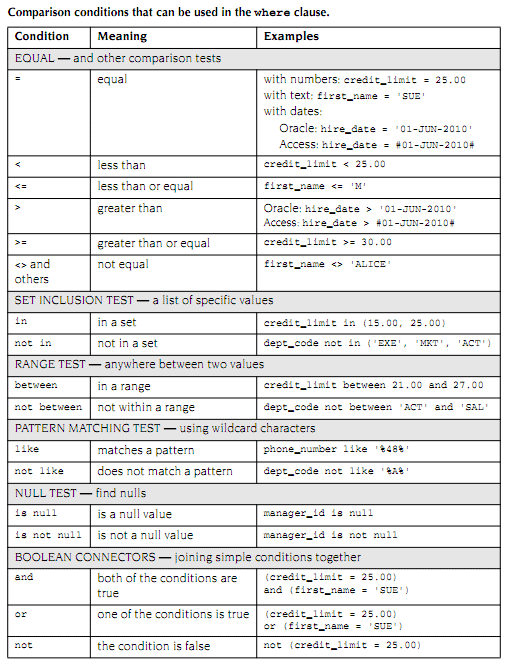
Where clause is used to choose which rows of data is to be retrieved. Here we can mention the conditions to retrieve the rows such as SELECT * FROM addressbook WHERE name=’Krishna’.

sql where clause

Notes:

  • “%” wildcard should be used while using LIKE condition.
  • “#” wildcard should be used for Date data type.

LIKE Condition:

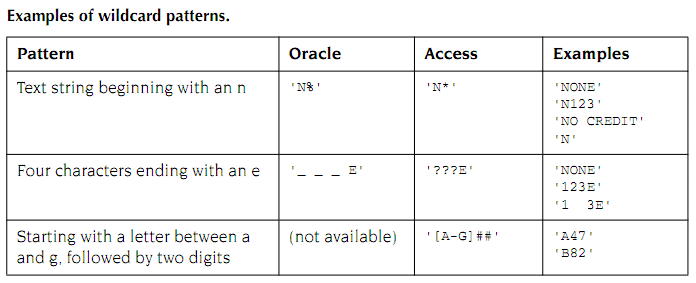
Like condition is used to find the patterns in the data. Patterns are specified by using wildcards such as “*”,”?” and “#”.

using wildcard in sql

Example: SELECT * FROM addressbook WHERE name like ‘*Kr*’

ORDER BY Clause:

Order By clause is used to order the rows in ascending or descending order. By default it is set to ascending order. We have to use “desc” keyword along with “Order By” clause to make it descending.

Example1: SELECT firstname, lastname FROM addressbook ORDER BY firstname

Example2: SELECT firstname, lastname FROM addressbook ORDER BY lastname DESC, firstname

INSERT Clause:

INSERT clause is the second important clause in SQL. It is used to insert the row in the table. It consists of 2 clauses, those are INSERT INTO and VALUES or INSERT INTO and SELECT.

Example1: INSERT INTO Customer (Id, FirstName, LastName)

VALUES (100, ‘Ram’, ‘Krishna’)

Example2: INSERT INTO addressbook (firstname, lastname, phone)

SELECT ‘Ram’,’ ‘Gopal’, 0123456789

UPDATE Clause:

UPDATE clause is used to update the row in the table. It consists of 3 clauses and those are UPDATE, SET and WHERE.

Example:

UPDATE addressbook

SET lastname=’Govardhan’

WHERE phone=0123456789

Here the lastname cell content is changed to ‘Govardhan’ where the phone is ‘0123456789’

DELETE Clause:

DELETE clause is used to DELETE the row in the table. It consists of 2 clauses, those are DELETE and WHERE.

Example:

DELETE addressbook

WHERE phone=01234

Here the row which contains the phone number ‘01234’ will be deleted.

Ubislate7 or AKASH 2 Android Tablet- Features and Price

5

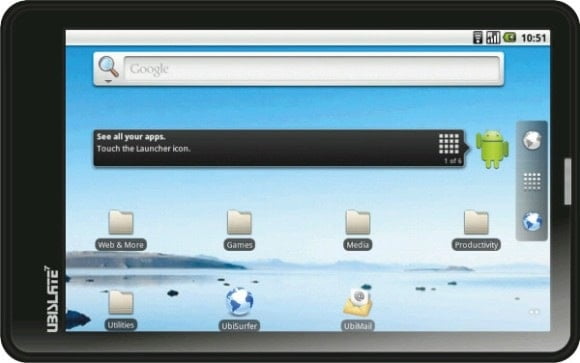
Aakash2 which is also known as UbiSlate7+ is the revised version of Aakash 1. Aakash 2 tablet comes up with a faster processor and 256 MB RAM. Datawind who are the makers of this tablet claims that Aakash 2 is completely tweaked for better performance. Aakash 2 is equipped with Cortex A8, 700 Mhz Processor with HD Video Co Processor. It has the GPRS module ensuring SIM to make phone calls which was not possible with Aakash 1. In Aakash 2 you can also access the internet of 2GB limited usage for only Rs. 98/- per month. According to Datawind, Aakash 2 brings up the rich internet browsing experience with its UbiSurfer browser. It consist standard USB port which allows to connect pen-drives, external keyboards, webcams, dongles and other peripherals.

ubislate 7

Ubislate7Salient Features 

  • Ubislate7 is powered by Android OS 2.3
  • Cortex A8, 700 Mhz Processor with HD Video Co Processor for better performance.
  • 256 MB RAM and 2GB internal memory, external memory can be expandable up to 32 GB
  • 2 USB ports and 3.5 MM Audio jack which can be connected to external speakers or sub-woofers
  • 7″ display with 800×480 pixels with high quality video streaming & HD quality video playback
  • Connectivity with GPRS & WiFi IEEE 802.11 a/b/g
  • Aakash 2 can run upto 180 minutes on 3200 mAh battery and AC adaptor 200.240 volts
  • You can plug-in a 3G dongle and standard pen-drive to Aakash 2 tablet
  • Resistive touch screen

Along with this Aakash 2 (UbiSlate7+) comes up with 1 year warranty and pre-installed GetJar App Store.

Ubislate7 Releasing on 26 April 2012 (update)

Finally here is the answer for “Anybody got ubislate7 tablet?” or “anyone got ubilate7?” questions roaming around various blogs.. According to the recent news Datawind is about to launch the upgraded UbiSlate7+ on 26 April.

Ubislate7 : Pricing & Delivery

Aakash 2 tablet costs Rs.2,999/- and if you wish your tab to access internet then you can have the internet plan at just Rs.98 per month. You can place the order for Aakash 2 (UbiSlate7+) at the official website. http://www.ubislate.com

Ubislate7 : How to check the status of prebooking (Update)

As the company is delaying delivery, many people who have pre-booked ubislate7 are worrying about the status of their order. Here are the links which can be used to check the status of pre-booking order of ubislate7. If you have pre-booked but yet paid then you check the status over here and the people who booked and made the pre-payment for ubislate7 can check the status over here.