Home Blog Page 304

How To Configure Blogger Custom Domain With Bigrock

5

Every newbies start their blogging career with the free blogger blog which is provided by google.Google’s Blogspot is a best blogging platform for the fresh bloggers as it is very friendly to use unlike wordpress which seems to be more complicated for beginners.Most of the bloggers shift their platform from blogger to wordpress as there are plenty of additional supportive tools available for SEO.This post will demonstrate how to configure your blogger custom domain with the bigrock service. Also checkout netfirms vs godaddy

Let us break this tutorial into two sections.

  1. Configuring Bigrock
  2. Configuring Blogger

1.Configuring Bigrock :

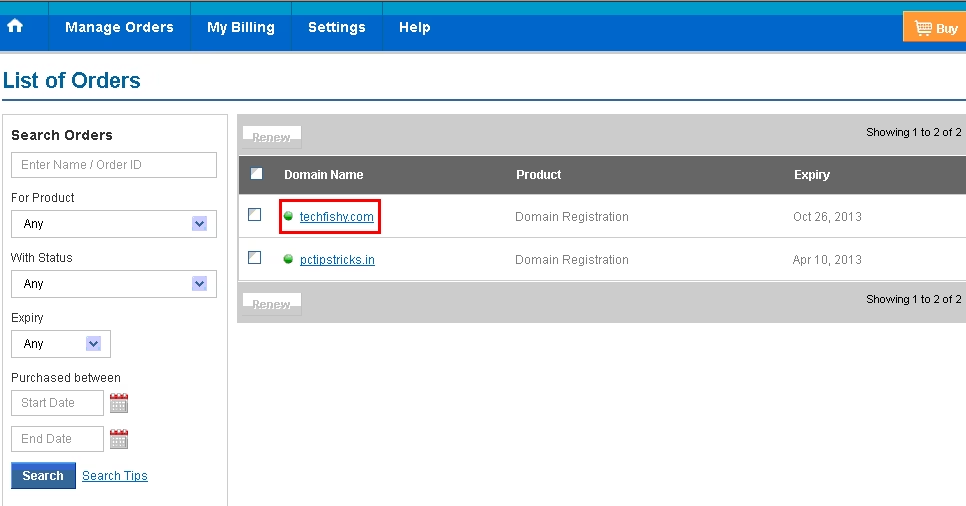
1 : Login to your bigrock account and select the domain that you would wish to configure.
configuring blogger domain name with bigrock

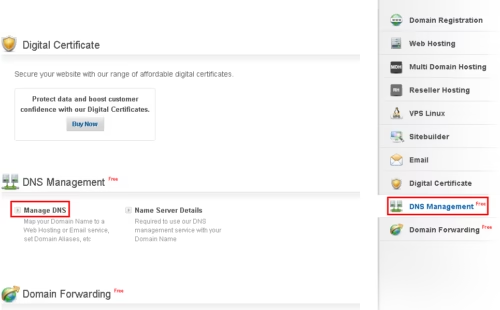
2 : On your domain select the DNS Management from the right pane and select the Manage DNS link as shown in the below image.
domain name bigrock with blogger

3 : You will be redirected to a new window.Now we need to create 2 CName records.To add a CName record click on the “Add Cname records” under “Cname record“.
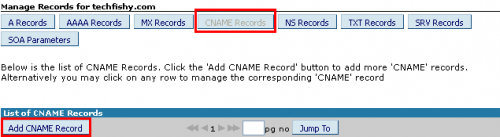
blogger domain name

4 : We are going to create two CName records.Create the first one by entering “www” in the host name and the value as “ghs.google.com” and finally tap on “Add Record“.This configures the bigrock to redirect the visitors to point them on “www.yoursite.com“.
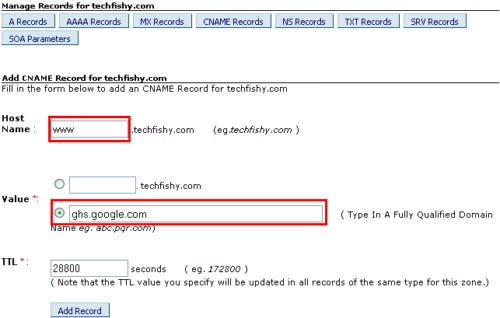
blogger dns bigrock

5 : Create the second record with the same valueghs.google.com” but leave the host name as empty.This allows your visitors to be redirected to  “yoursite.com“.So any user who types in your site’s name without the prefix “www” will also be redirected to the desired page.
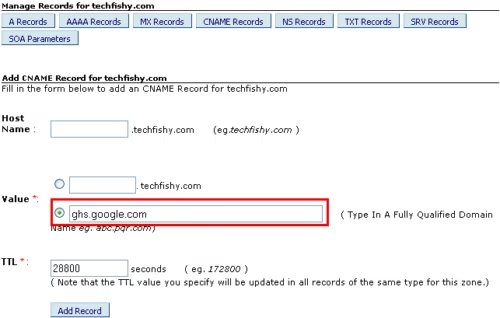
domain naming with bigrock blogger

6 : The next part is to configure the ARecords.For that move to the ARecords tab and click on “Add a record“.
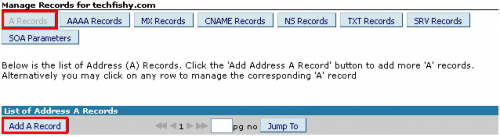
blogger domain name bigrock

7 : We are going to create 4 ARecords with the following ipv4 addresses.

  • 216.239.32.21
  • 216.239.34.21
  • 216.239.36.21
  • 216.239.38.21

Leave the host name as empty and write the first ipv4 address in the “Destination IPv4 address” and click on “Add Record“.
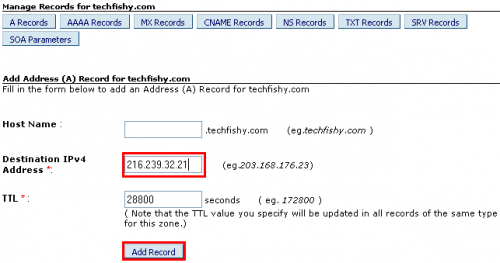
blogger dns domain name

Similarly create the other three ARecords with the remaining IPv4 addresses and finally you must have a bunch of ARecord like the below image.
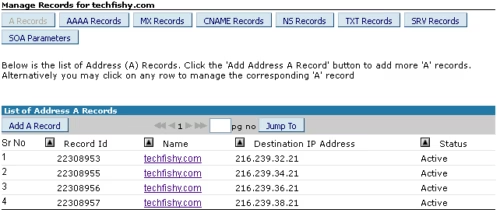
dns mgmt bigrock blogger

We are almost finished at this stage.The only part remaining is to configure the blogger.If you face any difficulties in configuring the bigrock then tell us about it in the comment section.

2.Configuring Blogger :

Step 1 : Open your blogger dashboard and move to  Settings=>Basic.Under the publishing category you would have given a choice to add a custom domain name to your blogger.Check the image if you don’t get it right.
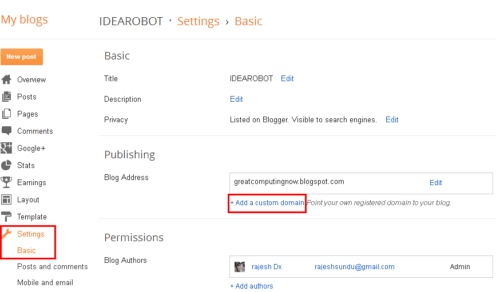
blog bigrock naming

Step 2 : Type in your domain name,press  “check availability” and click save.It will take more than 6 hours for the server to configure the domain address so wait for your turn and when the address is successfully registered click on edit and under advanced settings click on the check box next to “redirect yoursite.com to www.yoursite.com” and finally click on save.
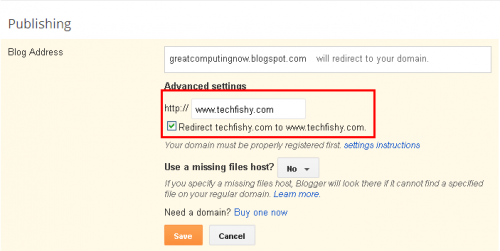
blog dns configure bigrock domain name

END OF TUTORIAL.Now your blog will be redirected successfully to the domain name.If you face any problem in between these steps then let us know about it and we will find you the solution as soon as possible.

Author Bio : This is a guest post by Rajesh of techfishy.com he is and persuing Computer Science Engineering. If you’d like to submit your guest post, check our guest posting page. Guest post written by rajesh

Skitch: Intuitive screen capturing experience on Windows

There are lot of screen capturing tools on Windows but it is pretty difficult to find a software with the right mix of ease of use and being quick, while remaining useful and intuitive. Windows has its own native solution which lets you capture the screen with the prt sc sys rq key on the keyboard but it is a little tiring in my opinion and if you want to be quick then it is surely not usable. Skitch is one of the most loved screen capture software for Macs and recently the developers brought it to Windows desktops and even for Windows 8. Skitch is a simple screenshot tool that makes it easy to edit, annotate, share photos instantly. It’s the favorite screenshot tool for the Mac for many, and it was finally available on Windows on last month.

Skitch

Skitch is truly the most intuitive application one can get to capture the screen and with it available on Windows XP and later and also the brand new Windows 8, Windows users should truly rejoice. Well to be true it does not have all the features some of its rivals have but it makes up with the ease of use, its quickness and its intuitive nature and since it is owned by Evernote, it also offers integration with its services.

Well as am talking about the Windows 7 version of Skitch i am using, i’ll detail this version but not to worry as the Windows 8 version is aslo pretty similar but based on the Windows 8 UI design language previously known as the Metro UI.

Interface

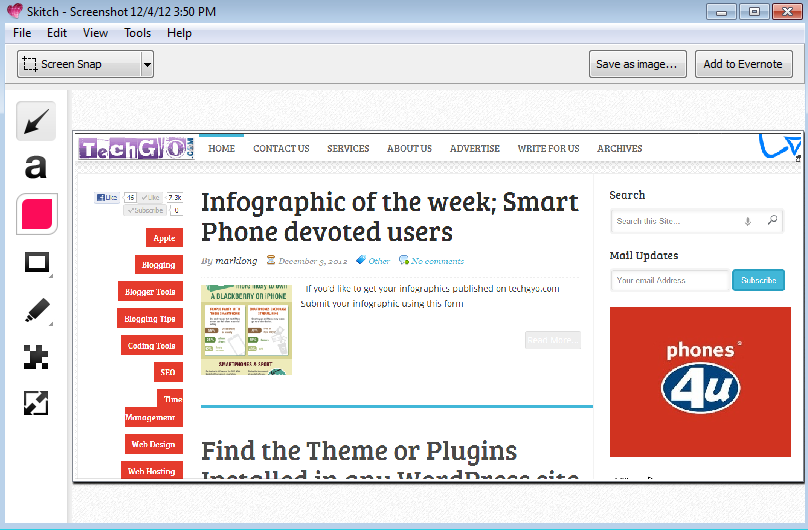
Skitch

The best thing about Skitch is that it employs a very easy to use and simple interface. There are few buttons on the side, some of which open up to a few more options and there is a dropdown menu in the top left corner and two save options in the top right corner. The toolbar buttons offer all of these options as well, while also displaying the program’s keyboard shortcuts next to the command.

You can add arrows, shapes and text to point out something important. Use the marker to draw freehand shapes or outline an object. Crop a screenshot to include only the critical aspects. Then, once you’re done, quickly share your annotated image.

Features

Capturing the screen is easy with Skitch and a lot more intuitive

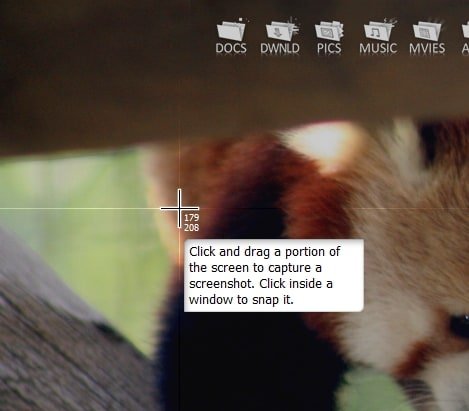
Skitch

Skitch is set to “Screen Snap” by default, which can be accessed through the button or the keyboard shortcut Control+Shift+5. Once it’s initialized, you’re screen will fade and your cursor will become a crosshair.

There are other options too in the drop down menu where you find “Screen Snap” by default like capturing the full screen, loading an image from a specific file or folder, and loading an image from the clipboard. So basically, Skitch is not just for screenshots, but it can load other images to edit and annotate as well.

Annotating and Editing screen shots and images

Arrows

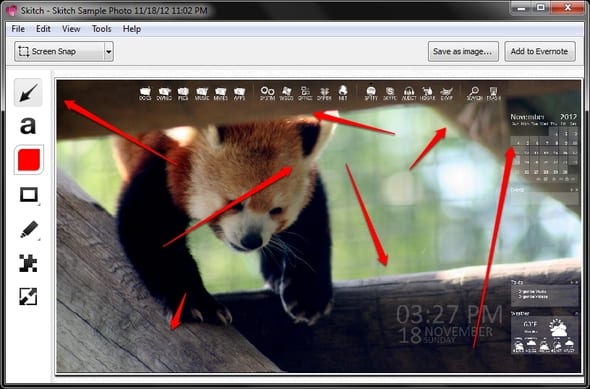
Skitch

There are several annotations you have at your disposal in Skitch. One of them is arrows. Well it just works if you want to pint out something, you can arrow them accordingly.

Text

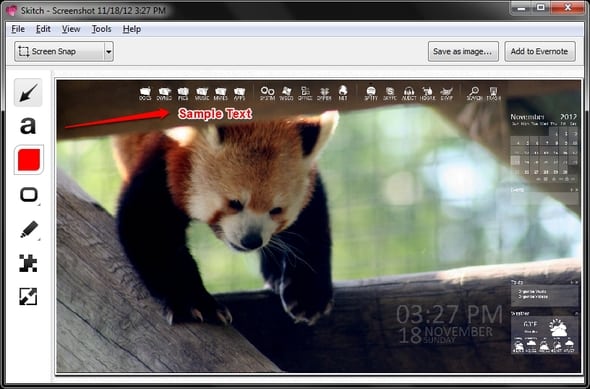
Skitch

You can add text to your screen shots or images but only one font is available but it is still likeable because its clean and beautiful if you love simplicity. As long as you don’t need a specific type of font for your images, you should be satisfied with Skitch’s text tool.

Color and Size

Skitch

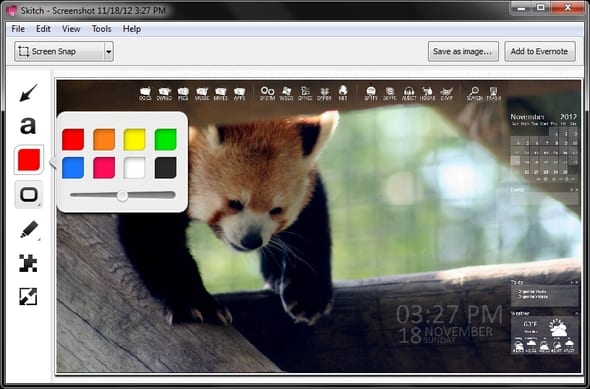
You can change the color or thickness of the highlighter, or any of the tools and shapes, using the styling options. This ensures that your annotation stands out against the background image and adjust the font and line size for the various annotations such as the arrows and shapes.

Shapes

Skitch

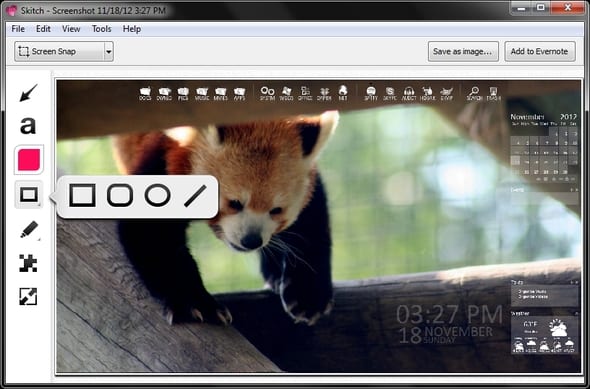
Skitch includes four types of shapes: a rectangle, a rounded rectangle, an ellipse and a line. Fancy shapes such as the stars and pentagons have been left out but thankfully we have the popular ones at our disposal.

Pixelate

Skitch

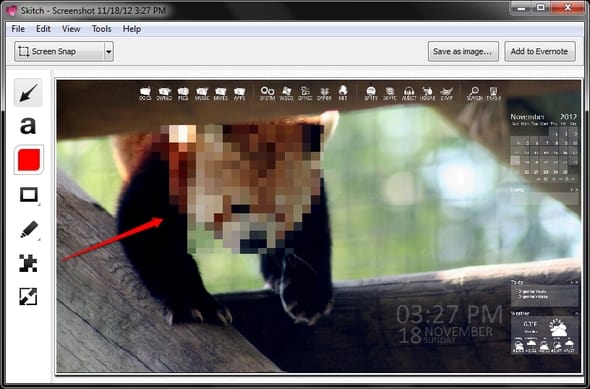
The new Pixelate feature is a useful tool to obscure sensitive or personal information in an image. When you’re working with a photo, snapshot, or screenshot, just tap the Pixelate button and click and drag your mouse across the part of the image that you would like to obscure. The selection will become unreadable, allowing you to share your Skitch note with others without revealing any unwanted information. It can be pretty useful if you want to hide something private from your images.

Marker and Highlighter

Skitch

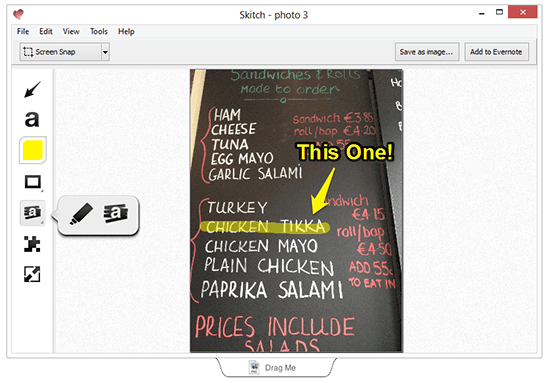
The highlighter tool helps you call attention to important content within photos or screenshots just like a physical highlighter. If you want to doodle or add a little creativity to your screenshot or imported image, this tool is great. You can also use it as a highlighter.

ESG Data: Definition, Uses, and Collection

0

ESG is shorthand for ‘environmental, social and governance.’ ESG Data is fast becoming highly relevant in the corporate world. Global warming and many other social and corporate governance-related issues are becoming more concerning. Corporate institutions recognise the role they have to play in mitigating the ESG issues. Hence, companies have been paying more attention to ESG data. 

Global organizations like the World Bank invest resources into collecting and making ESG data available in the public domain. In the same vein, companies are investing in collecting data to adapt their businesses. Now, making business product and investment decisions with adequate consideration of the ESG is vital. 

The earth’s sustainability has been a major discussion topic for the past few years. Hence, sustainability has become an imperative core to business, economy, and consumption – ESG Data. 

esg data

WHAT IS ESG DATA? 

ESG data revolves around evaluating sustainability practices and ethics within an organization. Companies hoping to remain relevant and in existence long into the future need to consider their business’s environmental and social aspects. Hence, the need for ESG data gives insights into how a business’s activities impact the world. 

Regarding environmental impacts, the considerable here include; carbon emission index, renewable energy usage, or resultant water stress level. In a similar context, the social aspect of ESG data considers the human capital and labor standard of a company. Finally, governance data examines the leadership of institutions and the guiding ethics. Each aspect of ESG data measures up to a standard, which investors now consider before dealing with a company. 

Furthermore, emphasis on the 2050 zero-emission cracked a novel marketing strategy for capitalist organizations. Companies fulfilling the criteria of ESG include the info in marketing copies and pitch decks.

The Environmental, Social and Governance (ESG) Criteria

The details of the ESG criteria are summarized below: 

Environmental

  • Companies publishing sustainability or carbon documentation and reports
  • Reduction in use of dangerous pollutants and chemicals
  • Deliberate efforts to reduce greenhouse emissions
  • Renewable energy sources usage

Social

  • Use of ethical supply chain
  • Active support of the LGBTQ rights and encouragement of diversity
  • Enacting policies protecting against sexual misconducts
  • Adherence to minimum wage

Governance

  • Diligent efforts to diversify the company’s board
  • Embrace corporate transparency
  • Presence of a CEO independent of the board chair

These criteria inform the insights data vendors, NGOs, companies, etc., collect. Thanks to technology, several infrastructures make it easy to collect company data. Companies not staying ahead of these sustainability-aimed details are prone to poor branding or investment opportunities.

USES AND IMPORTANCE OF ESG DATA IN BUSINESS

More often than not, companies don’t collect their ESG data. Such companies rely on ESG data providers and vendors. The trend of third-party collection consequently results in debates examining the trustworthiness of sustainability reports. Despite these issues, ESG data continues to have its relevance in core business aspects.

Investment

Beyond product offerings and potential year-on-year revenue, leading global business investors now consider ESG criteria. Though the concept of ESG investment is still new, it’s fast becoming something businesses should pay attention to. 

ESG focused investments now walk through standardized ESG score measurements. The measurements predict the expected financial returns and impact of an investment. As a result, ESG investments have proven to be low-risk with high returns for investors. Hence, the soaring popularity. 

Marketing 

The new generation of adults heightened environmental consciousness. The improved consciousness of the effect of business on the world births a unique niche in marketing – ESG Marketing. 

With much information available freely, it has become easy to consider the impact of every product from numerous perspectives. Due to the powerful influence of young adults empowered by the social tools available, a company not taking the ESG criteria seriously risks a colossal blowback. 

Working hard on the ESG criteria and expertly positioning a company with ESG marketing has proven to be a good move. For capitalists, riding on the trend for profit is a win; the same goes for young adults hoping to leave the world a better place. 

HOW TO COLLECT ESG DATA

ESG reporting has also risen to become a vital niche. The niche has seen experts leverage technology to collect ESG data transparently, focusing on making it internally and externally relevant. The ESG data collection process is similar to other data collection processes. However, there are some factors to consider in the process:

  • Accuracy: The data must not be collected based on assumptions; a standardized approach must be used
  • Completeness: The data must include all relevant data points; the scope should be extensive
  • Timeliness: ESG data should be collected frequently
  • Lineage: the sources of the data must be clear and transparent. 

CONCLUSION

ESG data can make or break a company. Therefore, business and marketing decisions shouldn’t only consider firmographic or demographic data; ESG criteria must underline every activity within and without the company. 

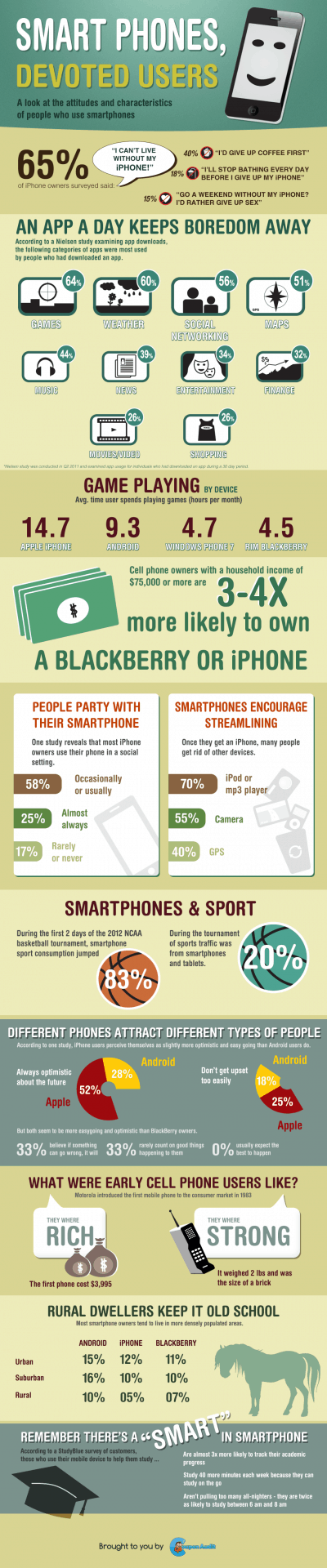
Infographic of the week; Smart Phone devoted users

0

SmartPhones, Devoted Users


If you’d like to get your infographics published on techgyo.com Submit your infographic using this form

Find the Theme or Plugins Installed in any WordPress site

Have you visited a website with attractive theme and wanted to install the same template in your website? Searching through the page source to detect installed WordPress theme in a CMS driven website? Here is a right way to know the installed theme of desired wordpress website.

Usually web developers or coders go through the source code and try to search for any scripts and style sheets that might be associated with themes or plugins but practically this is not a good practice and also consume your valuable time. Then how to detect the installed WordPress Theme and Plugins? Don’t worry whatwpthemeisthat.com will help you to know the theme and plugins used by a wordpress website.

detect Installed WordPress Theme

Also read:

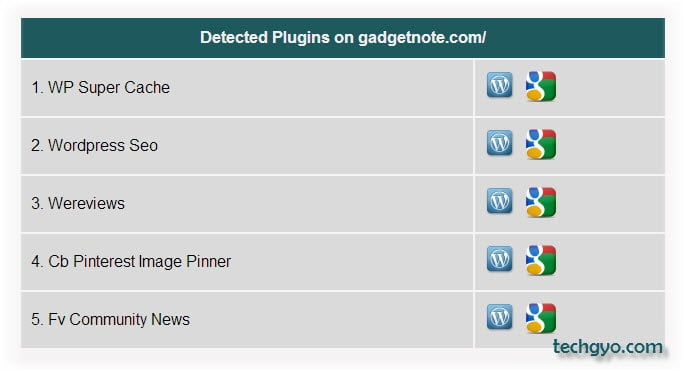
whatwpthemeisthat.com is a free online tool developed by ultimate marketing strategies that let you know the installed theme and plugins on a specified wordpress driven website. Not only the theme name but here you will also come to know about the description, version, author and also the screenshot of the theme installed. Not only the theme but whatwpthemeisthat also lists out the installed plugins. This makes you easily understand the entire framework of the WP website, you can use the same plugins on your website to make it more user friendly.

How to detect installed WordPress theme and plugins using whatwpthemeisthat online tool?

To know the installed wordpress theme and plugins using whatwpthemeisthat is easy, just go through the steps below-

  1. Navigate your browser to www.whatwpthemeisthat.com
  2. Specify the desired WP site name in the box and press “Check site” button
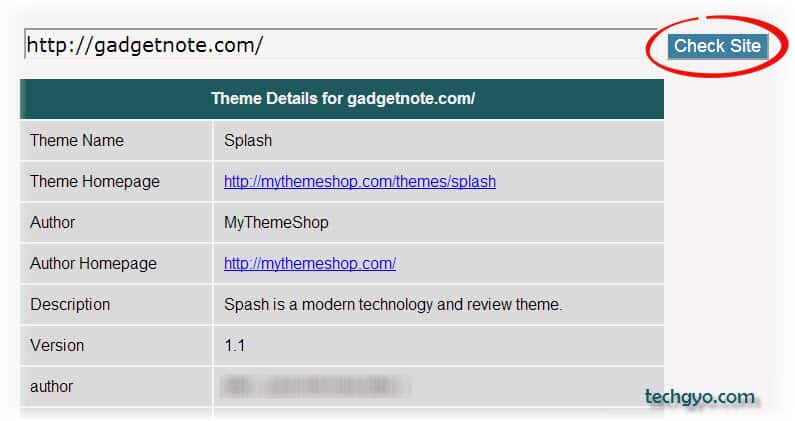
  3. Once you hit the “Check site” button you will get two panels, in the first box you will get theme details and installed plugins in the second box.
  4. In the screen shot below I have specified the gadgetnote.com website which is the part of our CreativeInfomedia.
    detect Installed WordPress Theme
    detect installed wordpress plugins

Whatwpthemeisthat will not detect the WP themes that are hidden by their website owners due to security reasons.

So what are you waiting for? Hunt for the unknown attractive wordpress theme at www.whatwpthemeisthat.com

Add Custom Default Text in WordPress Post Editor

3

Writing a good content can be difficult, and sometimes confusing to get started , but I knew this can be simplified with a checklist or framework. I wanted to maintain a very  basic and simple blog post framework for myself and something which I can ask my team and guest authors to follow for all future posts. And today I came across a nice article “Anatomy of a good blog post” by Eric Binnion, in his post he shared his framework for writing a good post.

Yes the lightbulb moment, I found it very useful and bookmarked the page, but then I thought I should do something even better.

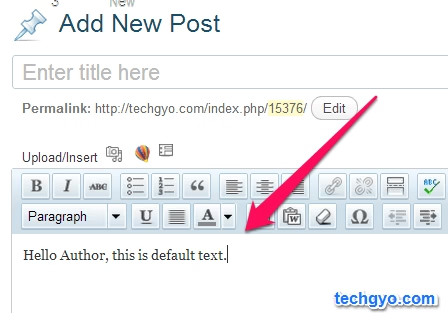
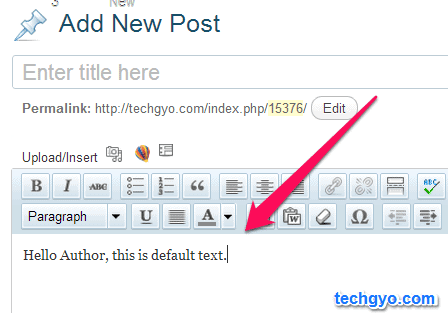
I had some number contributors and guest authors who might have missed the editorial guidelines. I can’t ask them to refer it every time they write a new post. So I decided to find a way to add guidelines or post framework  text as the default content in WordPress Post Editor, so every time someone click on “add new post”, they see the post framework text by default.
default text wordpress
I found the trick and below is the trick to add your own custom pretext to WordPress Post Editor.

To do this, simply open WordPress theme’s functions.php  file and paste the following code.

// Default post editor text //
function diww_default_post_content( $content ) {
	$content = '<p>Enter your default text in here. This will show up when you add new post.</p>';
	return $content;
}
add_filter( 'default_content', 'diww_default_post_content' );

Replace the text between $content = ”with your custom text, you could even add XHTML code or link codes if you want. Once you are done, save the file and try creating a new post, you should see the default text there.

Let me know if this tip was helpful and if you know any other way to do the same.

AirDroid: Control & Backup your Android smartphone From your Computer

2

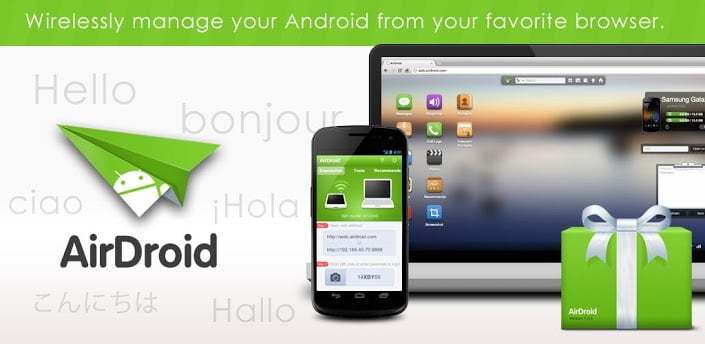
Did you ever wished you could control your Android smartphone on your Laptop or PC? Well i guess you did since i always wished so. It has been pretty hectic for me when am working on my laptop and i want to send a text from my phone, i wished i could somehow wirelesslessly connect my phone to my laptop and do all the work on the laptop. Well AirDroid gives me that choice. AirDroid is a fast, free app that lets you wirelessly manage your Android from your favorite browser. I can are install new apps, read messages, transfer photos, files, and many more without even lifting my smartphone.

AirDroid

AirDroid replaces your USB cable with your web browser. You can transfer files back and forth, send text messages, play music, view your photos and manage applications — all without installing anything on your computer which is pretty darn impressive and brings great ease of use if you want to control your Android smartphone on your computer.

The best thing about AirDroid is that it is completely free, it doesn’t even contain ads. It functions as a web server, allowing your Android device and your computer to communicate over the network.

AirDroid

AirDroid

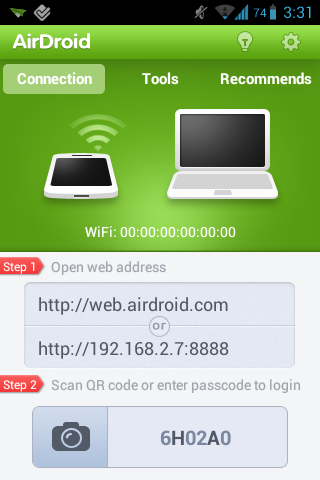
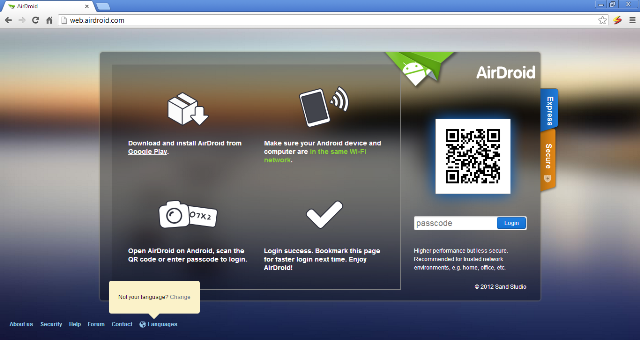
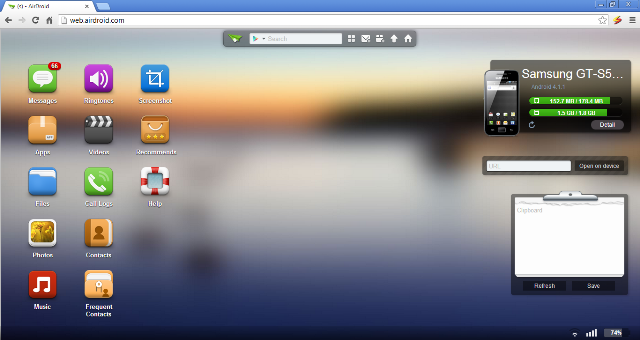
After installing AirDroid on your Android smartphone, you need to open the app and press start to start the AirDroid server and then you control your Android smartphone through your web browser by hitting the address http://web.airdroid.com or the ip code the server presents, the you need to scan the QR code through your smartphone or else enter the passcode you get in the app on your phone. Once you are done, it loads which takes seconds and then you’ll see AirDroid’s homescreen which contains links and statistics about your device. At the bottom right corner, you’ll see the Wi-Fi connection strength, bars of cellular coverage and battery level of your Android device.

AirDroid

AirDroid Features

There are so many features that you can use after you installed it and you don’t even need to remove your eye from your monitor just to see the status of your Android smartphone or if there’s an unread SMS – you can now do that while your hands are busy on the keyboard.

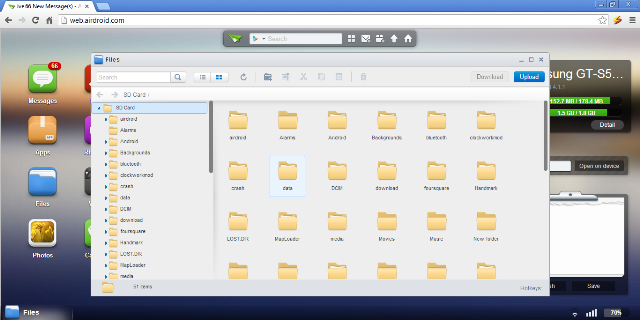
  • You can then use you web browser to transfer files between Android devices and computers and there is also drag & drop support. You can even get basic options cut, copy, paste, search, rename or delete files on the SD card.
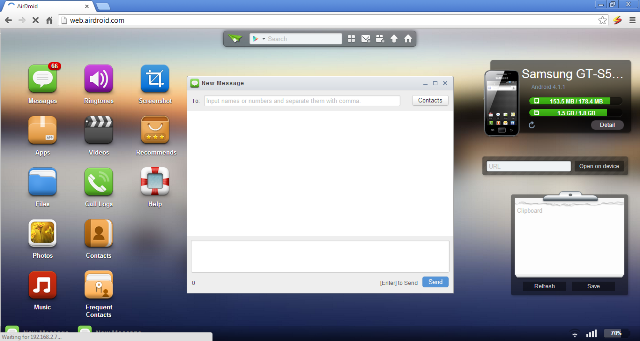
  • You can receive, send, forward or delete SMS messages.
AirDroid
  • Installing and uninstalling apps, backup, search apps and do batch processing can be done easily right through your web browser without even touching your smartphone.
  • The photos on your smartphone can be previewed, deleted, uploaded, downloaded and even set as wallpaper> you can also watch your photos slide show from desktop.
  • Share clipboard text between desktop and device.
  • Contact managing is also pretty easy with AirDroid, you can group, search, create contacts, check and delete call logs.
  • You can search, preview, upload, download, delete and customize ringtones for phone calls, notifications and alarms.
  • If you are an avid music listener like i am and you have you favourite tracks on you Android smartphone, you can play, search, upload, download, delete, or set as phone call, notification and alarm ringtones
AirDroid
  • You can QR code login via web.airdroid.com if you are tired of the long IP address 192.168.xxx.xxx?  You can scan the QR code on web.airdroid.com and you are all set to go.
  • AirDroid uses Https connection which makes sure you stay safe even on a public Wi-Fi network.
  • If you wished to display your realtime Android screen, you can do so with AirDroid although as the developers mention it is an experimental feature and root permission required. This is truly great for geeks, you can view your Android’s screen, take a screenshot, or even record a screencast.
  • With AirDroid you can now manage multiple virtual desktops as AirDroid is designed for multitasking, you can move apps between desktops to better organize your work.
  • We know mobile devices as with the ever increasing display sizes of smartphones are great for videos shooting, but the big screen computer may be better for viewing these clips, isn’t it? So you can watch the videos you have on your Android smartphone but you need to have a QuickTime plugin to do that.
AirDroid

There are several other useful features with AirDroid such as device photo match for most devices, various widgets (calendar, weather, url transfer, clipboard, etc.), frequent contacts…

AirDroid is now available for various different languages such as English, ???, Español, Italiano, Français, Deutsch ,Português (Brasil), Português (Portugal), Magyar, Polski, ?esky, Türkçe, P?????? and ???.

Some inbuilt useful features for your phone are present on AirDroid such as:

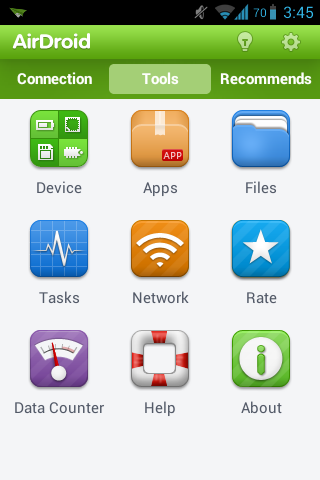
  • Device Status

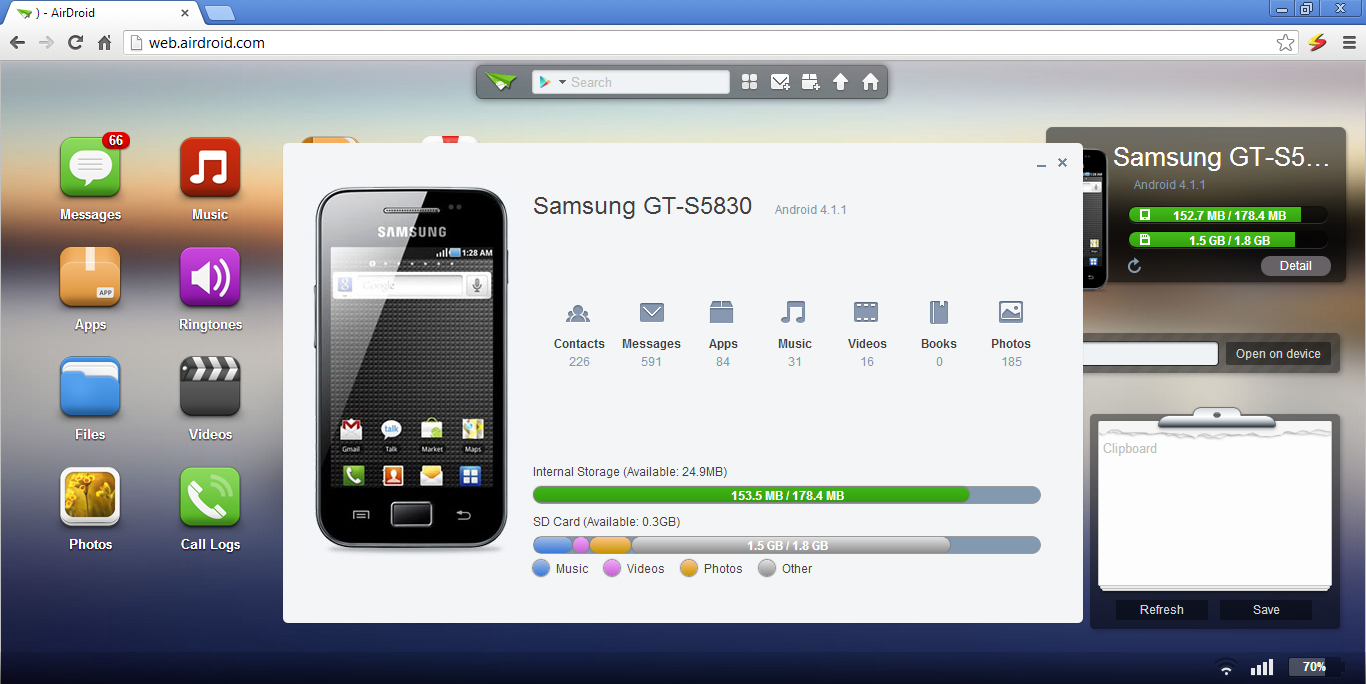
Real-time ROM, SD Card, Battery, CPU and RAM status report & monitor with charts to demonstrate available/used/total resources, and one-tap memory boost.

  • Tasks Manager

Kill or uninstall running apps, batch operation supported.

  • Apps Manager

Uninstall, share or check details of user and system apps.

  • Files

Control Cut, copy, rename, send/share, delete, sort and create visible or hidden folders and files.

AirDroid

AirDroid is surely an amazing application if you want to manage your phone stuff from your computer. It works fast enough and is pretty easy to use thanks to the really clean interface. Although from a personal point of view, i would love to see a feature to get WhatsApp or other apps on the interface, that would be amazing to be able to use WhatsApp while on the computer.

AirDroid should be compatible with most Android devices running Android 2.1 or later. The Web Desktop should be compatible with most modern web browsers, including Chrome 12 or later, Firefox 3.6 or later, Safari 5.0 or later (Although the developers suggest that for best performance IE is not recommended).

And yeah to use AirDroid, your Android smartphone and the computer you are using should be on the same WIFi network. So you better go ahead and experience the amazing application by first getting it on your Android smartphone from the Google Play Store.