Home Blog Page 284

Metrolia- Premium Metro UI HTML Template by TechGYO.com

Hi friends.. We have already released MetroUI free template and now we are unveiling the premium version of it i.e. Metrolia HTML Template. Metrolia HTML theme is completely rebuilt with cool features and greater compatibility to support all modern browsers.

Introduction to Metrolia HTML Template

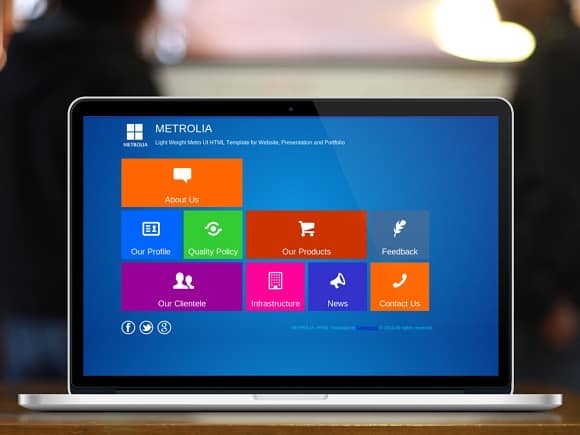
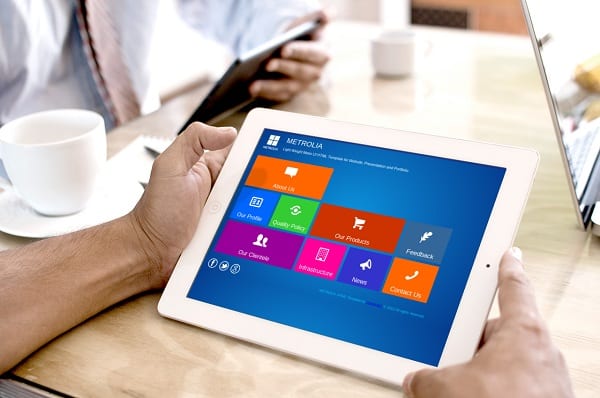
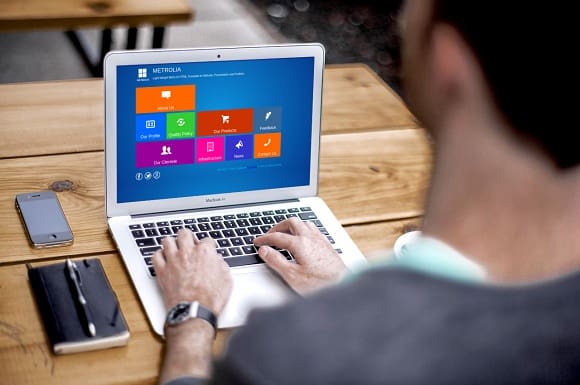
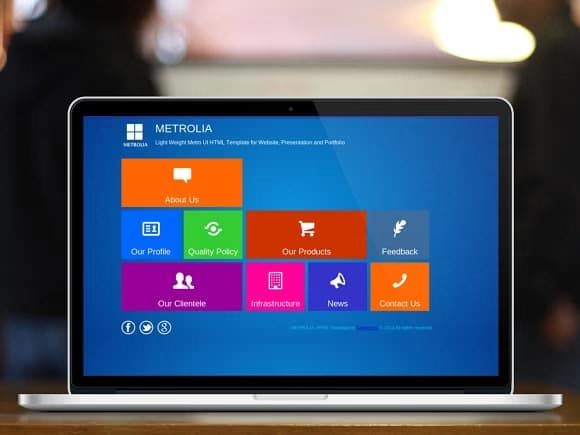
Wanna give the metro look to your website? Here is the right template for you. Metrolia Metro UI HTML theme is a light weight Windows 8 metro style theme which is built with HTML/CSS and jquery. The template comes up with 9 tiles on home page and each tile loads respective webpage inside it with stunning animation.

metrolia html template

Where can I use Metro Style Website?

Metrolia metro UI HTML theme can be used for website, presentation, portfolio and self-introduction site etc.

Features incorporated with Metrolia HTML Template?

banner

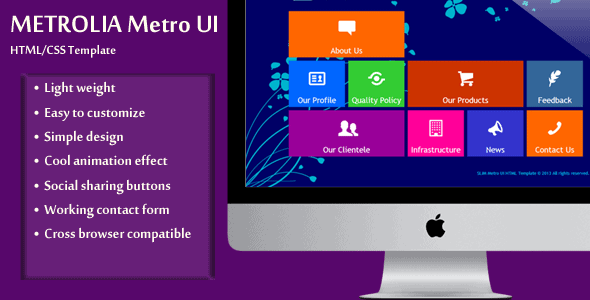
  • Light weight– Metrolia is a light weight HTML template that is just 269 KB in size.
  • Easy to customize:  Metrolia metro UI HTML theme is easy to customize, it comes up with complete documentation that covers almost all the topics to customize the template.
  • Simple design: The template has clean and simple design which fits perfectly in the most popular screen resolutions of PC/laptop.
  • Cool animation effect: Metrolia uses nice animation effect while showing/hiding the tiles.
  • Notification bar: The theme has a  notification bar to display website notification or events.
  • Social sharing buttons: Metrolia metro UI HTML template has Facebook, Twitter and Google+ sharing buttons.
  • Browser compatibility: This theme is cross browser compatible that runs perfectly in Internet Explorer, Firefox, Chrome and Opera browsers.

Screenshots of Metrolia Metro UI HTML Template

metrolia windows 8 style theme

metrolia metro UI template

Buy Metrolia HTML Theme

For more details check the Metrolia website.

The Ultimate Desk Organisation Guide For Home and Office

0

Whether at work or at home, having a desk cluttered with wires, cables, documents, and the link can be pretty counterproductive. If you spend a lot of time on your computer, you’re probably all too aware of how quickly things can go wrong when there’s no level of organisation.

So, why not nip things in the bud and crack down on organising your technology, so you can get on with what you need to get on with.

desk organization guide

All tied up

If something needs unplugging or you’re trying to work out which cable feeds which piece of tech, navigating through a mess of wires and cables can be a real chore. Many people choose to drill holes in their desk in order to accommodate and separate tangled wires, but there’s no need to do anything quite so extreme.

Cable ties are perfect for arranging wires for different parts of your computer, and when arranging multiple power supplies. It’s worth getting colour-coded cable wraps so you can tell exactly what wire is for what at a glance.

Keeping tabs

Many workers these days take their mobile devices to work, sometimes to actually complete work on. Asset labels are thus essential for you – able to save a great deal of hassle; they offer protection of the warranty and can help locate items if they go missing.

They’re also great for differentiating between similar types of equipment by scanning the code they display.

Label experts Seareachltd point out that asset labels aren’t just for computers and the like in the workplace; they are often used for servers, printers, computer keyboards etc.

What’s the charge?

If you’ve got a mobile phone, iPod, iPadetc., then there is a great deal of chargers to keep handy for them. All those wires seem to get tangled no matter what you do, and isn’t it annoying when you just can’t remember where you put your phone?

Charging pads are perfect for charging multiple devices at once, and you can easily get into the habit of leaving your gear on it.

It’s not all about the desk…

Likelihood is, your computer desktop could do with some organisation.

If you often work on multiple programs at once, switching between them can be frustrating – especially if you can’t find the file you want amongst a desktop peppered with them.

Now you’ve all you need to get your desk organised.

How To Monitor A Mobile Device With Cell Phone Spy

4
If you wish track someone’s smart phone without their notice then here is the detailed explanation of how to do so.
cell phone spy gadgets

Image credit: mycellphonespy.com

Why to track other’s mobile phone?

Whether it may be love of parents on their children or suspicion of a wife or husband on their spouse, they will definitely wish to spy their mobile phone. Similarly there are several such reasons to track other’s mobile device and these activities can be easily done with mobile spying application. Here’s a best mobile number locator you should try. With the best results by these applications resulted in huge increase in their demand. Every individual is planning to use such software applications to know the activities of their dear ones and the best thing about them is this entire activity can be done from everywhere.

What to do to track?

The process involved is very simple. It includes a simple registration with the organization that developed it – like this mspy.com – which is followed by a mail about user id and password. Download the tracking application and then install on the device that you wish to spy. This application runs without the notice of the user and they don’t even know that a shortcut icon is created on their mobile’s home screen. It is created virtually and none can identify it. The only option to uninstall the software is to format the mobile phone or reset the settings to factory mode.

Functionality of mobile spy

Every smart phone developed today has the option of Global positioning system called GPS module. It is the one that helps to tack the exact location of the target mobile. Immediately after installing spying app, it starts locating the position of the mobile and all these information is stored in the online account of the user. These details can be viewed by the actual user after logging into their account. This tracking activity can be done whenever and from wherever they wish to do. All the data stored on the target device can be viewed. The only criterion for the proper functionality of cell phone tracker is the mobile should be in coverage area and connected to internet every time.

Best mobile spying application

With the increase in popularity of these mobile spying applications, there are several companies who developed these types of applications. Many spying apps are available in current day market. So, before purchasing any product it is important to go through the reviews of previous users and their suggestions. For example, you can check mSpy review; mSpy is one of the developed and trusted brands in this field. There are some tracking apps with great features that are available at a very affordable price. They are also well known for their high quality and continuous customer support. If you are planning to purchase a standard spying application, without any doubt you can go for some of them and all their services are guaranteed. They work completely invisible without the notice of the user of target mobile phone. You will definitely enjoy the best results.

MobileGO: Ultimate iTunes Alternative to Manage your iPhone, iPad and iPod

0

Wondershare MobileGO for iOS is a must have application for every one of you who ever want to do more than just iTunes sync with their iOS device. Maybe you must have seen a lot of Mobile to Computer sync softwares around the web but might not heard of something which does everything and more than what you can do with iTunes.

Things MobileGO can do better than iTunes

Here are few instances where you’d find this wonderful software can put a smile on your face:

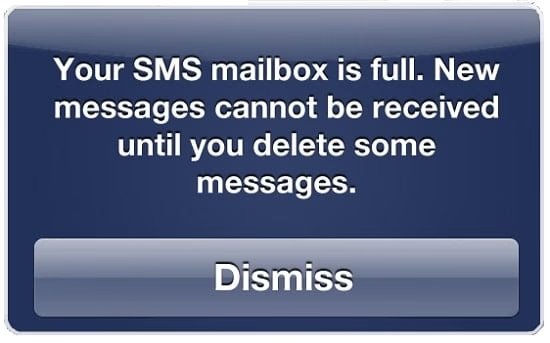
  • Backup iPhone messages when sms inbox is full.

iphone sms full backup computer


Many of us send and receive lots of good memories via SMS text messaging, and they mean and lot to you, but you can’t receive any further messages once your SMS inbox is full, and you don’t want to delete them. Here’s the perfect instance where MobileGo can be life changing. With help of MobileGo you can free some space by backing up SMS messages to your computer  and then deleting from your phone.  Not just SMS, it also saves, MMS, iMessage with all the attachments you had.

If that’s not enough, it also lets you backup Contacts from your iOS devices with just few clicks and you will never lose contact with your friends and colleagues.

Even more it also backups up Gmail, iCloud and Yahoo to an excel CSV file or a VCard. Once you have backed them up, you also get to edit the from your Computer.

  • Backup Songs from iPod / iPhone /iPad to your Computer

ipod transfer

Everybody loves Music, some can;t live without it, what if you don’t want to delete the old ones and load new songs but yet don’t want to delete your music collection. Just backup to your computer with MobileGo.

Not just Songs, you can transfer Videos, Podcasts, iTunes U, and playlists with just few clicks. Talking about playlist, MobileGo also give you another advantage while backing you songs from your iPhone, iPod or iPad, it also includes ratings play counts and skips. So next time when you load them back, you’ll no need to worry about the most and the least favorite ones. In some cases where you forgot to back up iTunes library and re-installed your OS, well then you know you’ve lost everything from the library and its empty now. Either you know or not but your computer knows, so when you connect and sync any of your iDevice with the empty iTunes library, next thing you know all data on your Devices are too now gone. Scary isn’t it?

But if you have MobileGo, you don’t have anything to worry about, because even if you lost everything from iTunes library, you can get them back on library with one click and Wondershare MobileGO is so Wonderful that it makes sure the empty library is never synced with your iDevice and hence you don’t lose your music, songs and videos on your iPhone, iPod or iPad.

  • Transfer or Backup Sweet Pictures.

Images can speak a lot more than words, so this is so true with iPhone, with the super HD quality cameras you would have lots of good memories to keep. iTunes can do this function, but when you try MobileGo, you’ll know this is even more than what iTunes can do.

transfer ios photos to computer

  • Get Videos onto iDevices in formats that iTunes doesn’t support

Many of you might have had issues trying to transfer video to iPhone but having hard time to move it to iTunes because of the file format limitation. WIth MobileGo, you can do this and additional to this is Audio and Video converter tool that makes things easier to get any video play on your iDevice. It’s stunningly simple, because video conversion just happens automatically as you transfer.


  • Direct Transfer Between iDevices.

Transferring Data between iDevices has never been so easy and simple, with MobileGo, you can simply drag and drop the files to your iPhone, iPod or iPad or even an External hard drive with ease. Not just that, you can also bulk delete images from your iPhone or iPad after saving, so you can free up some space to capture more pictures for your memories. This feature is compatible for iPhone, iPad, iPod (touch, nano, shuffle and classic).


Interface:

Talking about the interface, the developers at Wondershare are Wonderful in making user-friendly and convenient experience to its user to get going with the software in just few clicks.

Connecting to Wondershare MobileGo.

You can get your iPhone, iPad or iPod connected with normal USB connection with USB debugging enabled or connect via a local Wifi network.

To enable USB debugging, go to General>> Settings>> Applications>> Development.


For Wifi connection, open the Wondershare MobileGO software on your computer and on the Home screen of the software on the left, click on Wifi connection Guide.

Connectivity over Wifi involves a little steps which will be easy to follow based on the instructions.
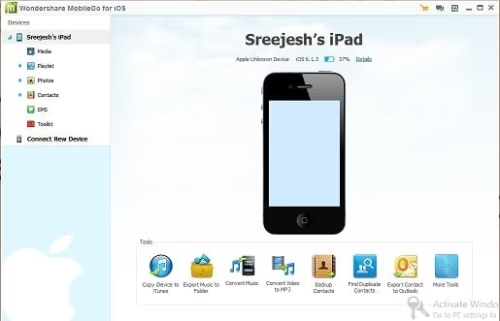
wondershare mobilego


Get your copy of Wondershare MobileGO

Hope you like the review of Wondershare MobileGO. Let us know in comments, how you rate this software.

 

Why Bundled Internet Plans Are So Popular

0

You’ve probably gotten a phone call – or a live visit – from a cable representative before. They call you (or come straight to your door) and pitch you their company’s bundled services. You’ve heard it all before. You get cable, Internet, and phone for “one low price.” You’re not sure how good a deal it really is, so you pass on it. You might be passing up the best entertainment deal ever.

Bundling internet plan

You Only Have To Manage One Bill

When you buy your phone service from one provider, and your Internet from another, and your cable from yet another, you end up paying three separate bills. On top of that, if you ever have a problem, you have three different customer service departments to call.

Since most T.V. service now runs through an Internet connection, you might find that your cable company wants to control both the T.V. service and the Internet. However, even if you are able to get just the T.V. service, don’t count on the customer service to be all that helpful. You know the drill. Call the cable company, and they say it’s a problem with the Internet service.


Call the Internet service provider, and they tell you it’s the cable company’s problem. With one bill, you get continuity and you only have to manage one bill.


You Get More Variety

Paying for online services like Hulu, Netflix, HBOGo and other similar live streaming services has its drawbacks. You only get one, or a handful of, channel(s). If you want more, you have to buy more individual services. If you’re a sports buff, if you love movies, or if you like to channel surf, then al la carte is not for you.

With bundled services, cable and phone companies often offer more than “standard” channels, and load up the phone service with “unlimited” features like long-distance, call-waiting, and pretty much everything you’ve come to expect from modern telephone service.

With cell phone providers selling tiered rates now, the phone service might be attractive – especially if you love to talk.


You Save Money

In the end, it often comes down to money. Bundling your services often saves you between 40 and 60 percent on your bill. Some of the packages end up much less than the individual price for each service. Why discount? Because service providers really want your business.

Save money

Hulu, Netflix, and other streaming services pose a real threat to cable’s business model. If they can get you signed up for all three of their services, then a phone and cable provider doesn’t have to worry about losing your business to another provider.

You see, most other streaming services like Netflix and Hulu simply replicate cable offerings with one major difference – T.V. shows are usually a season or two behind the cable’s airing. This is where cable still has an advantage.

A word of caution: exact pricing on these deals vary by provider, so be sure to check with the company’s official website before you get too excited. Companies such as Frontier offer anywhere from 80 to 200 channels. On top of that, you’ll end up with super-fast Internet (in the 25 Mbps range), and unlimited phone service. In many cases, bundles work out to under $30 per service and that is hard to beat when ordering the services separately.


About Author:

Bill Nixon is a salesman. He loves to write about sales techniques on business blogs.

How you can Benefit from Proper Email Management

1

Are you one of those people who just can’t wait to get to your business email inbox in the morning? Do you enjoy checking and using your email? If so then you are lucky, the majority of people don’t enjoy it at all, especially when their working lives seem to be dominated by it.

benefits of email management

For many of us email is a major distraction that really kills our productivity. It grounds our energy and creates a general feeling of frustration. For some people it can be a cause of anxiety and depression. However email is an essential part of every business, and for many email is their lifeblood, so really it should be a way of increasing productivity rather than diminishing it.

One of the problems with email is that there is so much of it. There is so much that we can’t really decide what to do with it. Which emails should be dealt with straight away, which ones can be left to later, and which ones should be deleted?  And what would happen if we deleted an email that should have been saved? Not only the individual but also the business could be in trouble. Email management is far too important and difficult to be left to individuals.

Today many organizations are turning to third party service suppliers to deal with their business email.  For instance Mimecast is a SaaS business that specialises in cloud solutions for email management, and although there are many other solutions, here we will look at what can be achieved by adopting theirs.

The Mimecast Unified Email Management system combines tools that provide email security, email continuity, email archiving and email compliance. The service is cloud based and highly integrated. One of its important benefits is that it is easy to administer from a central console that is web based.

The system is able to keep email management simple. It achieves this by removing the requirement to manage several disparate third party systems and replaces these with one single high performance platform.

Mimecast provides two alternative solutions. These are the UEM Express, which provides email security and continuity, and UEM Enterprise which includes an email archive. Both integrate security and continuity along with data loss prevention even during outages.

The cloud based archive stores all internal and external email in a secure archive. The end result is reduced storage costs and a reduced server load. This also means that employees are able to access email in the archive in real time without any help from IT, including through mobile devices, thus improving employee productivity. Another productivity improvement is that employees no longer need to make retention and deletion decisions nor do they need to hoard emails.

The cost model for the Mimecast Unified Email Management system is based on the number of employees, which makes budget planning simple.

If you really hate email, then any management system is unlikely to make you love it, but it will certainly improve your productivity and reduce your stress levels.

The Most Spy-worthy Gadgets and Gizmos

0

Have you ever wanted to live like a spy? Uncovering secrets and keeping a close watch on your neighbourhood. With hundreds of spy devices now available to buy online, anyone can try their hand at private detection. Here’s a look at the most spy-worthy gadgets and gizmos on the market:

Digital Voice Recording Desk Calculator –

calculator voice recorder

We all know that with smartphone technology we can take audio recordings at the touch of a button, but when you need real discretion you don’t get more secretive than a desk calculator turned voice recorder. It can sit covertly on any office desk and record the conversations of credulous suspects without them ever knowing a thing.

Reading Glasses with Video & Stills Camera –

spy glass video recorder

Much of the tech you’d associate with James Bond is now a reality – reading glasses with an inbuilt and discreet camera is a brilliant example of this. The camera is hidden in a stylish and modern glasses frame, so onlookers would never guess, and the camera can take colourful video footage and photos with storage space of up to a whopping 2gbs.

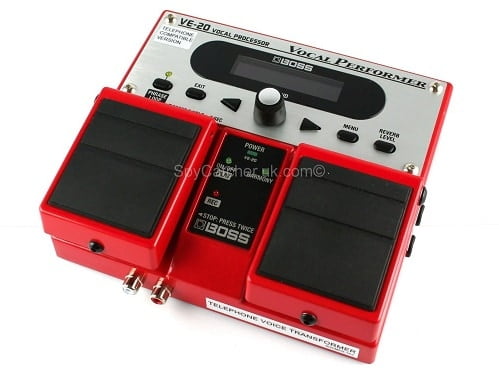
Telephone Voice Transformer –

Telephonic voice recorder

Some of the spy gadgets currently on the market are a little worrying if you imagine them in the wrong hands, and the latest and most advanced telephone voice transformers are certainly amongst them. Previously only used by law enforcement agencies, you can now own technology which will completely transform your voice to sound like someone else’s; adjusting tone, octave, pitch and reverb to make your voice unrecognisable yet realistically human. You can store combinations for later use, so you can have a bank of different voices to choose from!

Smoke Alarm Wi-Fi Camera –

smoking alarm spy cam

You’ll never look at a simple smoke alarm again when you realise that they could be a secret Wi-Fi camera unit. Inside a traditional ceiling mounted smoke alarm you can now find a Wi-Fi camera that remote video and audio surveillance from anywhere, controlled using a tablet, smartphone or PC. You can even schedule the camera to work durum certain times of the day or on a certain date. Motion detection can also be activated so you are sent a picture when activity is detected in the room in which it’s installed.

Night Vision Binoculars

binoculars spy cam

Though expensive, now anyone can get their hand on night vision equipment to conduct surveillance in the dead of night. Night vision goggles (which look more like binoculars) come with in-built infrared illumination modules which allow them to be used in zero or very low lighting conditions.

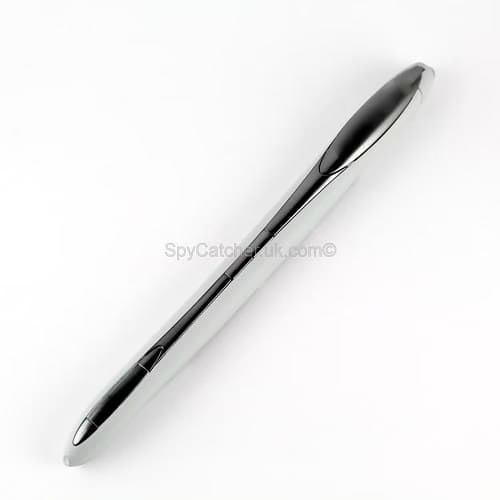
Document Scanning Pen –

document scanning spy pen

Another gadget straight from the movies, document scanning pens are handheld portable scanners which look just like normal pens but can be held over paper documents to quickly take a digital copy. They can scan and store around 200 pages, with a page being scanned in just 4 seconds. Aside from private investigators and police officials, documents scanning pens are gaining popularity with professionals including: lawyers, architects, teachers, scientists and researchers.