Home Blog Page 154

Top 20 OnePlus 6T Tricks You Didn’t know

0

One plus has been in the market just recently, but the way it’s phones are picking up is quite commendable. It has become quite a trend to own a One Plus phone, especially with the newest model, One Plus 6T. With its CPU of Snapdragon 845 chipset, the phone functions faster than light. And the Oxygen OS, comes with a bundle of new features and functionalities. There are so many of them and we don’t want you to miss out on any. So here are some of the best One Plus 6T tricks that you may or may not have discovered yet.
  1. QuickSearch

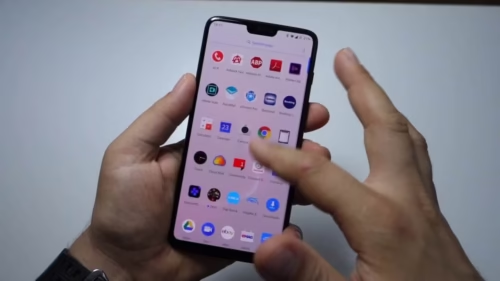
To open the App Drawer, you have to simply swipe up from the home screen. But if you are one of those people who have a million apps on their phone and looking for a particular one, can become quite a pain. The Oxygen OS feature called Quick Search comes in handy here. If you want to enable it, go to your app drawer, on the top right corner you will see a menu icon. Tap on the third option called ‘enable quick search’ and you’redone. You can now search your apps through quick tags, finding the tiny icon becomes much easier this way.

2. Finger-print Sensor Animation

The fingerprint scanner already has a sleek animation design. But you can also change it to a more simpler animation. To do that, you have to go to the ‘Security & Lockscreen’ option from the Settings Menu. Then click on ‘Fingerprints’ and after that click on ‘FingerprintAnimation’ effect. That’s it, now choose an option that suits you. Another thing you can do with the Fingerprint settings is, you can make the finger print icon pop-up even when you lift your phone up. If you don’t like the Face Unlock feature, you can definitely go for this. All you have to do is, (in the same settings) click on ‘Pick your phone to show.’  

3. DND Mode Customization

Are you a fan of the DND mode and never like being disturbed by your gadget every now and then? Then this tweak is for you. On One Plus 6T model you can customize the DND mode, by turning it on only for a specific time of the day, everyday. Here are the steps to do this:

Go to Sounds, click on ‘Do not disturb’ and then click on ‘Turn on automatically.’ That’s it, no one’s going to disturb you now, on your most important hours of the day. The DND mode will automatically turn on and off based on the time that you have specified.

4. Navigational Gestures

Another cool feature that Oxygen OS 9 brings in is their navigational gestures. It is the best way to make use of every inch of your screen. You can navigate around as you like. To enable this feature, go to the ‘Buttons and Gestures’ option from the Settings menu. Now put a check on ‘Navigation gestures’ and that’s it. Now, the following gestures would have been unlocked for you.

  • Swipe up from the bottom = Go to home screen
  • Swipe from left lower bottom to the right lower bottom= Go back

Didn’t things just become so much simpler?
5. GamingMode

With the Snapdragon 845 chipset, gaming has already become one of the perks of this phone. But have you not experienced the most irritating thing ever, when you are playing a really exciting game, both teams are on fire, but boom! The phone rings. Don’t worry you won’t ever haveto face this again! One Plus 6T has a special ‘Gaming Mode’ on the phone whichdisables both notifications and calls while you’re busy playing.

To enable this, go to ‘Utilities’ under the’Settings’ menu. Check the Gaming mode option you will find there. After that, click on the ‘Add Apps; button and select all the games you want this feature to work on. So next time, you play your favorite games, you will not be disturbed by anyone.

6. Multitasking

Android Pie has introduced a new navigation system based on gestures. It is very intuitive and makes the User experience a lot better. There is no navigational bar as such on the One Plus 6T. You can go to Settings and open the ‘Buttons & Gestures’ tab. From there, Click on the circle beside ‘Back, Home’ option. You can do two things now.
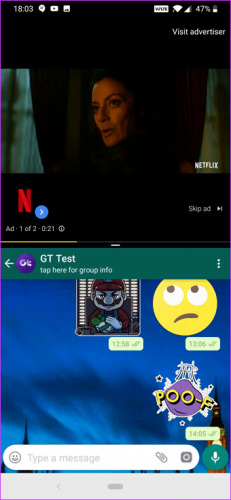
  • If you want to open recent apps, just drag the circular button a bit up and slide it to the left. You will get a zoomed out view of all the recent apps.
  • You can even work on two windows side by side. From one of the recent apps, just tap on the menu (intuitive) and select ‘SplitScreen’ now select the second window you want displayed.

7. Hidden Apps

Are there any sneaky apps in your phone that you do not want anyone to see? There is a secret hidden space in the Android App Drawer. To access it just slide your finger very gently from the left corner and it will open up a new window called Hidden Space. To add hidden apps, just click on the ‘+ ‘ sign on the top corner. However, it is important to know that this feature does not completely lock these apps, it just creates a separate secret space for them. But if anyone who knows this trick will be able to get access to the Hidden Space.

8. Easier way to take screenshots

Customizable gestures have become quite a theme of this listicle. One Plus 6T has a lot of new things related to gestures, and there are so many fun ways to explore them. You don’t have to scroll down the notification bar, find the screenshot icon and click it to take a screenshot, or even do finger gymnastics but clicking various buttons together. All you have to do is just swipe down the screen with your three fingers and voila! The screenshot has been taken. To make sure this gesture is enabled, go to Settings, click on ‘Quick Gestures’ and tick mark the box called three-finger screenshot.’ 

9. Ambient Display Tweaks

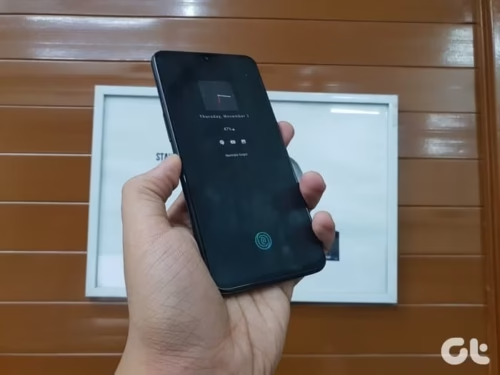
The ambient screen of your phone is quite a friend to all of us. It’s a quick fix. You don’t have to unlock the phone, but it’s like a great sneak peek to check your notifications quickly, check the battery, the date or the time. The One Plus 6T has a lot of customizable options for you even on the ambient screen. You can change the way your clock looks. To do so, go to your Display settings, click on ‘Ambient Display’ and then ‘Clock Style.’ You can even get a look at your notifications and messages just by tapping on the screen of your phone.
10. Quick Unlock

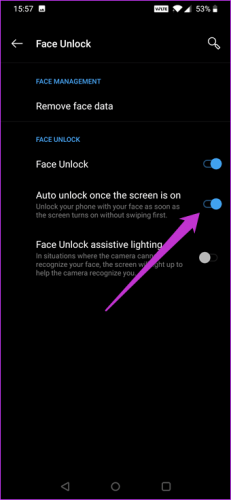
With the Snapdragon 845 chipset, the speed of unlocking your phone with just your face is phenomenal. But because of that, it gets almost impossible to check your lock screen notifications without accidentally unlocking it with your face. This can be a little irritating if you are one of those quick peekers, but don’t worry that can be changed too. To do so, go to Face Unlock Settings and disable the ‘Auto unlock after the screen is on’ option. With this you will have to just swipe left to go to the home screen.
11. Smart Boost

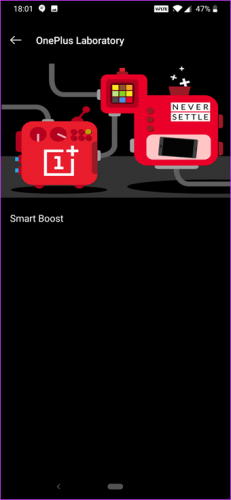
This is another cool feature that OnePlus 6T brings you. It’s called the Smart Boost feature meant specifically for gamers.  What it does is, it boosts the performance of your phone by 20%. To enable this mode, go to ‘Settings’ then find ‘Utilities’ and then click on OnePlus Laboratory. From there just activate Smart boost and you’re done. Now have a better gaming experience on your phone! This feature was introduced on the OnePlus 6T launch.
12. Change Accent Colors With Hex Code

When it comes to choosing an accent color for your phone, you only have a few limited options. But not with the OnePlus 6T. You can choose your accent color with the hex code. You can input the exact hex code of the color you want, or even choose from a wide range of colors. To make this happen, Go to ‘Display’ in the settings option, then click on ‘Accent color.’ Tap on the Paint icon and below you will see a space to enter the code.

13. Lock Apps

Do you know how irritating it is when you accidently kill an app that you intend to use. What if we tell you, you can lock it, and not have it get killed. The OnePlus 6T has arranged for a small trick for the same. Just go to recent apps, find the app that you want to lock and then press the 3-dot menu (…) From there select the first option i.e. ‘Lock.’

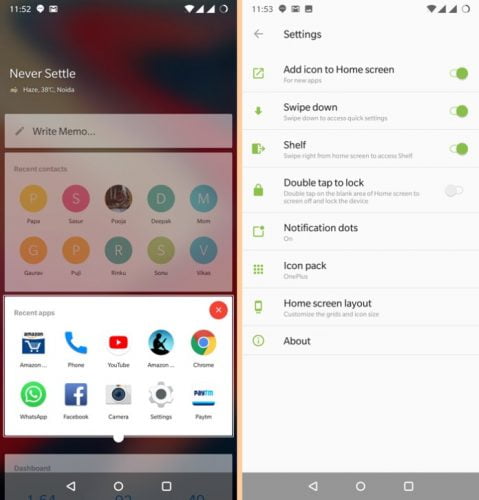
There’s an alternative way to lock the screen as well. Just double tap on your screen, choose an empty area. And that’s it, your phone will be locked. To set this, just pinch in the homescreen> Tap on Settings > Tick mark the switch for double tap to lock. And done!

14. Customizeyour Shelf

Shelf is the leftmost pane of your home screen which displays the temperature, area, etc. There are a lot of other things you can do with this space. You can keep 10 of the most used apps here. You can even add 10 of your frequently dialed contacts. These are separated in sections, which you can drag and arrange as you want. You can also add any membership cards you have so basically it is like your digital wallet. If you do not want this shelf, just long press on the home screen and select ‘Home Settings’and turn off the shelf from there.
15. Call Recording Settings

OnePlus 6T has a lot of call recording options built in. You can turn on the call recording or turn it off as well. You can decide to record calls only of a particular contact. You can also choose to get a pop-up asking you if you want to record this call every time you ring someone. To access these settings, Open the Phone icon in the menu, click on ‘Call record’ option which is placed at the top. From there you can customize your settings as per your liking.

16. Dual/Parallel Apps

If you are one of those people who have multiple accounts across various social platforms like WhatsApp, Facebook, etc. This feature is meant for you. You can run all your accounts smoothly and separately with the same feature. To access this feature, go to Settings, then click on ‘Apps’ followed by ‘Parallel Apps.’ Now just turn the switch for the apps that you want this feature to work on. And done! Now you can access multiple accounts through your phone.

17. Customize LED colors

The OnePlus 6 also has a lot of customization options. One of which is for the LED light of the phone for notifications. You can set different colors for different notifications. So you can prioritize just by looking at the light if you really need to pick up your phone to check what’s it about or not. You can even turn off the LED light completely for certain notifications. To enable this, open Settings, go to ‘Display’ and then select ‘LED notifications.’ You should be able to figure out further options yourself.

18. Finger-print as a shutter

What a surprise, here’s another gesture trick. Often when we try to click pictures from the normal button on the screen or even the volume button, the pictures can be quite shaky. Another way you can click pictures is just by pressing your finger on the finger-print scanner. To enable this go to ‘Settings’ then click on ‘Gestures’ and tick mark on the button that says ‘Long press to take a photo’ and done! You can even select other options if you want double tap to wake up the screen, etc.

19. Quick Pay

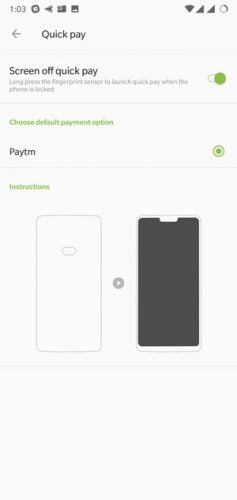
With the rise of phone payments and apps like Paytm, PhonePe, and RuPay on the rise, people have stopped using cards or cash. Instead of having to find your payment app in the app drawer you can directly open the Paytm payment window. This is one of the newest features of Oxygen OS. To do this you only have to long press on the fingerprint area. You can enable this setting by going to Security & Lockscreen.
20. Face Unlock

If you are facing any problems with the’Face Unlock’ feature you can go to Settings > Security & Lock screen and then click on Face Unlock. There just click on Face Unlock assistive lighting. Now your face unlock will be fast as ever even in low light situations. Anyway, with the Snapdragon 845 chipset, everything the phone does is pretty fast! 

About One Plus 6T

The phone is available in 3 colors, Mirror Black, MidnightBlack and Silk white. It is a part of the Qualcomm Snapdragon 845 chipset (OctaCore) which is quite a powerful chipset out there in the market as off now. The phone comes with 6/8 GB RAM. The storage ranges from 64 to 128 GB depending on the model you want to go for. The phone has two back cameras (16 MP and 20 MP)and one front camera (16 MP) The battery in this phone is 3300 mAh. The android version which supports the phone is 8.1. One Plus 6T also facilitates dual Nano sim. The screen is spacious 6.28 inches AMOLED with a full HD display and the screen has a 19:9 aspect ratio.

So those were all the tricks we had in our bag! We hope you enjoy the phone a little more with these tweaks.  If you know any more tricks that we missed out in the article do let us know in the comments.
Asus Zenfone Max Pro M2 X01BDA Review – This All round performer won’t disappoint.

0

The Asus brand has been aggressively building up momentum in the Indian smartphone market, with releases ranging from the budget division going upto the higher price variants. The toughest competition it faces is in the form of Xiaomi, which is clearly as it stands today, the leading smartphone manufacturer in India – in terms of popularity, sales and the ability to appeal to consumers of both the budget and the higher range.


Asus is now aggressively eyeing to take over Xiaomi and it’s most recent release in Zenfone Max Pro M2  – is it’s direct answer to Xiaomi’s Redmi Note 6 Pro – but does it actually manage to put up a valiant fight? Read on to find out.

Asus Zenfone Max Pro M2 – Design & Display

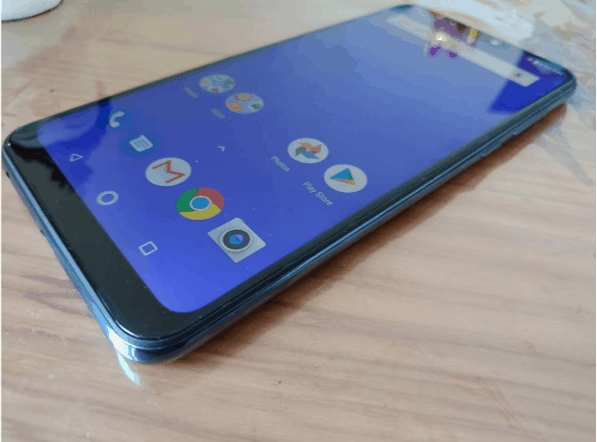
Being a smartphone over the range of 10,000 – it is always expected that such a smartphone and from a brand like Asus will stand true to a quality build and not a cheap finish. The clear difference from it’s predecessor in M2 is that while M1 came with a metallic finish, the M2 has a more vibrant laminated finish. This however does mean that the smartphone is quite prone to finger smudges but we overall are quite satisfied with it’s look.

The Max Pro M2 comes in two color variants – Blue and Titanium. Our personal pick of the two is the blue one, which gives a more royal look to the phone and matches well with the metallic back but the titanium one isn’t a bad choice either. It’s totally upon one’s personal choice.

The LED light along with the camera’s is placed on the left side of the back cover, while the finger print scanner can be the found in the usual spot – right at the center of the back. In terms of M2’s back design – it’s quite simple and we like how the 2 cameras, along with the LED light are placed straight in line on the left – it just makes the smartphone look more stylish.

The smartphone comes with a Micro USB port, along with a 3.5 MM headphone jack. USB-C port that we usually find in smartphones these days is missing from Asus Zenfone Max Pro M2 but that isn’t a deal breaker. Probably some would have preferred it over Micro USB but it isn’t a big criterion for success in this segment.

With a 6.3 inch IPS display, the resolution of Asus Zenfone Max Pro M2 is Full HD – which is perfect for those that want a smartphone to deliver on quality resolution and picture quality to detail. The notch is there, in case you’re wondering and gives the typical classy look because of which you feel like you’re holding a quality smartphone in your hand.

As opposed to it’s predecessor, the Max Pro M2 has vastly improved display. We found that reading in extreme light or direct light onto the screen didn’t pose much problem. Therefore, in terms of display and colours, the Asus Zenfone Max Pro M2 delivers satisfaction.

The Specifications

The Asus Zenfone Max Pro M2 is backed by a Qualcomm Snapdragon 660 SoC which is clocked at 1.95 ghz. RealMe 2 Pro – which we feel is the greatest rival to Max Pro M2 is also running on the same processor, so that’s one aspect where both the smartphones are at a similar point and not much to differentiate between them really.


The storage and RAM have the following variants in Max Pro M2 – 3GB Ram and 32 GB Storage, 4GB Ram and 64 GB storage and 6 GB Ram and 64 GB of storage. The storage in all of these is expandable upto a massive 2TB via the micro SD card slot.

What is an ideal term to define massive battery in a smartphone? Is it 4,000? Perhaps 4,200. Well, that is set to change. The Max Pro M2 comes with a massive 5,000 mAH which is absolutely fantastic news for smartphone lovers out there. Not only is the Max Pro M2 delivering on processor, it is also delivering on battery.

However, a big disappointment is that Asus has given 10W charger with the phone, which means that fast charging isn’t an option on this and with a battery as big as 5,00 mAH – charging time can be really long. But once fully charged, be assured to have it going for well over 1 and a half day to even 2 days.

Camera

This is a segment in every smartphone that can truly drive customers or push them away to other brands. Good camera quality is something that customers in this range have been accustomed to – and Max Pro M2 doesn’t disappoint but doesn’t impress highly either.


With a 12 MP and 5 MP camera at the rear and a 13 MP camera at the front for selfies – the Asus Zenfone Max Pro M2 hasn’t failed to give attention to the camera quality.

The photos, well, are not exceptional – we’d admit that. But, they aren’t too bad either. Don’t be expecting camera quality of a quality DSLR or anything as such, it wont be a professional photographer’s delight but the camera does deliver to the needs of a casual photographer.

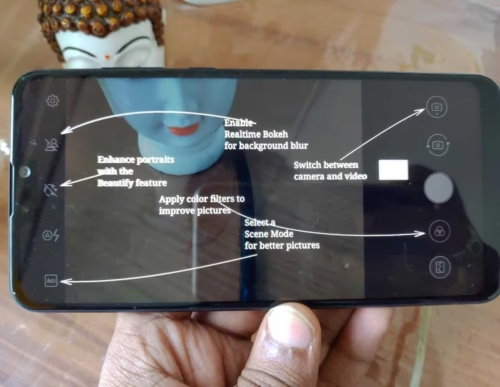
The Pro Mode in the camera allows you to feel involved in what you’re doing and gives you the power to change settings as per your preference. This is obviously not a territory for casual photographer’s to step in but is nonetheless an option that will satisfy those who look for this kind of stuff in smartphone camera’s.

The camera is a clear winner in broad daylight but fails to grasp any attention in low light – even indoors. The sharpness goes missing and you feel wanting for a better performance but hey – that’s what you get at this price. The camera does what it’s supposed to do – selfies in broad daylight are quite good and so is the rear camera. We really aren’t left complaining after our usage.

Video recordings can be done in 4K with the rear camera and 1080P with the selfie camera at the front.

PRICING & Verdict

The Asus Zenfone Max Pro M2 has been priced at 12,999 (starting version) and goes upto 14,999 (for the higher end version).

While at this price, Max Pro M2 is priced a little higher than it’s competitors, it offers plenty to be a good choice in this segment. Battery life, performance and display deliver massively in Max Pro M2 but the camera is a slight disappointment. If that’s your priority, you’re likely to find a better alternative in this price segment. But if not, Max Pro M2 is a really good choice at this price point.

Gihosoft iPhone data recovery- An overview

0

Well, to begin with, Gihosoft iPhone Data Recovery is an excellent option for recovering all your data from your iPhone or any other iOS device.

What makes Gihosoft iPhone Data Recovery stand apart from the rest of the services in the genre is the considerably huge number of file types that it can support. It can recover your data either from the device directly or from iTunes/ iCloud backup. The tool is capable of handling different conditions old data deletion or corruption including accidental deletion, data loss during iOS update, jailbreaking, device broken or lost and a host of other data recovery conditions.

gihosoft iphone data recovery
Gihosoft iPhone data recovery

What makes Gihosoft iPhone Data Recovery an excellent performer?

Well, the data recovery software comes with a host of features that would make it a great choice in almost every respect. Understanding a few salient features can help us evaluate the data recovery software in better detail.

Let us check out a few features that the Gihosoft iPhone data recovery software offers you.

It supports a wide range of Data Loss Situations

The Gihosoft data recovery software lets you recover data from your iPhone from any of the data loss situations. It can handle the data loss situations like accidental deletion, data loss as a result of iOS upgrade or jailbreaking, or other reasons. It can even be used to recover data from your lost iOS device. In fact, it can also recover your data if your iPhone is broken or damaged.

Faster and Easier Functionality

The interface is quite simple and easy to use. That would ideally make it an excellent choice for you if you are not much into technology and a beginner. It can connect to your iOS device, scan the system and recover the data rather instantly.

Support for multiple file types

The Gihosoft iPhone data recovery is capable of recovering a wide range of file types. It can recover the basic file types like images and videos – but in addition, it can also recover more discrete data like the calendar events, messages, and message attachments and call history.

The Data recovery tool can work with almost all iOS device models

The software supports nearly all iOS devices right across iPhone, iPad, and iPods. The list of iPhone supported includes iPhone 7/7 Plus, SE, iPhone 6S/6S Plus, iPhone 6/6 Plus, iPhone 5S/5C/5, iPhone 4S/4, iPhone 3GS, while the iPad devices include iPad Pro, iPad Air 2, iPad Air, iPad Mini 4/3/2, the New iPad, iPad/iPad 2/3/4.

How to Recover Lost data on iPhone using Gihosoft Data Recovery?

Well, as we stated in the beginning, the Gihosoft iPhone data Recovery works seamlessly in aiding you to recover your lost data from your iPhone. The steps are rather smooth and easy to follow –

·         Download and install Gihosoft iPhone Data recovery. You can go with the free version so that you can get a feel of the software. You can always go Pro later on.

·         Launch the program and choose the file types you want to recover.

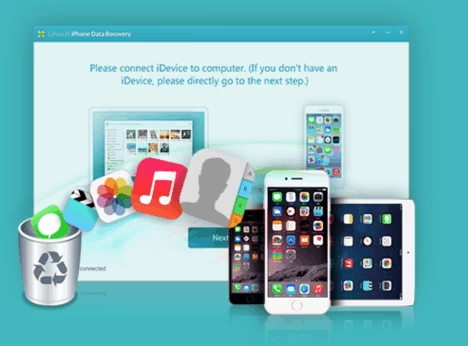
·         Connect your iOS device to your computer and let the software scan and detect the connected device.

·         Choose the backup you would want to restore from among iCloud or iTunes backup.

·         If the tool does not find any iTunes backup, it will prompt for the same, click on Next.

·         The software will now begin scanning for your data. The time taken for the complete scanning will depend upon the items you have chosen to restore and the total data available on your iOS device. In our case, it took close to one and a quarter hours to complete scanning.

·         Once the scan is completed, you will be presented with the recoverable data. You can choose to preview the data before you actually recover it, or recover it straightaway.

The tool can help you recover a great deal of data efficiently and offers a significant degree of success. The fact that it can recover almost every kind of file will make it a great choice.

Are there any issues we found?

Well, the Gihosoft iPhone data recovery comes with a few issues that may need attention from the developers. Not that the issues are huge enough and not addressable though, but can create issues at times.

The software does not let you deselect the option for iTunes and iCloud backup. If you have an older backup and have not been regularly taking a backup on iTunes, restoring the old backup can make your phone get all the existing data erased and replaced with an older backup. If you some data on your iPhone or any other iOS device that you have not backed up to iTunes as yet, it may not be a good option. We tried deselecting the check box for iTunes backup but found it not working.

Another issue we observed with the Gihosoft iPhone data recovery software is the time it takes for scanning. Especially when the iTunes and iCloud backup is involved. In fact, a single item like Messages can take anything around 50 minutes to complete the scan. That can be one of the huge issues in comparison to the other alternative options available for iPhone data recovery.

The Concluding Thoughts

Well, during our usage and experience with the Gihosoft iPhone Data Recovery software is a good option for a reliable data recovery functionality in many respects. It comes with a host of options and features that are comparable to most of the competing products. Ability to recover almost all types of data can help you achieve the best results.

We just hope to find the improvements with respect to a couple of issues we outlined above; we would definitely treat it a good alternative for the Gihosoft iPhone data recovery.

If you use Android phones, please choose Gihosoft Android Data Recovery.

Gihosoft Android data recovery Free is a super awesome software specialized in Android file recovery. With this program, you are able to recover deleted photos, music, videos, messages, contacts, call logs, WhatsApp messages, Viber chat history and more from Samsung, Huawei, LG, HTC, Motorola, Google, Oneplus, Sony, Lenovo, ZTE and other Android devices directly.

Gihosoft RePicvid Free Photo Recovery Software provides a free photo recovery software for windows to help users recover the deleted or lost photo for free.

Gain Exposure for Your Business through Technology

0

Over recent years, there have been huge advancements in technology, and this has impacted our lives in many different ways. We now turn to technology like the internet for all sorts of things. This includes purchasing all types of goods, accessing entertainment, socializing with people, public record lookup services, and more. Another great way in which modern technology has affected us is in helping us more efficiently run and operate our businesses.     

One thing that businesses need to do in order to compete effectively in today’s world is to achieve more exposure and market themselves more effectively. With businesses now competing on a global basis, this is something that has become increasingly important. However, the good news is that you can do this with far greater ease and convenience by turning to modern technology. Whether you run a business working from home or you operate it from dedicated premises, modern technology can make life far easier when it comes to marketing your business.

Using the Most Effective Digital Solutions for Marketing Your Business

It is important to develop a proper strategy when it comes to marketing your business, and this includes incorporating digital marketing methods. There are various digital solutions you can use to gain greater exposure for your business. You want to make  sure you find the most effective one–or all of them–for your business in order to get the most impact.

Social media marketing is an excellent way of marketing your business using today’s digital technology. One of the best things about this type of marketing is that it is extremely cost effective and does require you to  use up a lot of resources. In addition, it means that you can reach out to audiences on a global basis, so you can compete more effectively with businesses not just in your area but around the world.

Another very effective method of marketing your business online is by setting up a blog. This is something that more and more businesses are doing these days. Not only can you market your business and brand through blogging, but you can also gain the confidence of your audience and become seen as a leading authority if your blogs are insightful, accurate, and engaging. Also, you can drive more traffic to your site by setting up a blog, as you can post a link to every fresh post on social media to encourage people to click through. One final benefit is that search engines like to see websites add fresh, high quality content on a regular basis. Therefore, you can get on the right side of the search engines and improve your rankings by doing this.

Finally, email marketing provides you with a great way of connecting with your audience and providing them with information. You can promote events, new lines, and provide information via this method. For the highest rate of return, make sure all of your email marketing materials are high quality, engaging, and eye-catching (rather than being too corporate, or plain).

These are some of the key digital methods that you can use if you want to boost exposure for your business.

IOTransfer – Ultimate Tool for File Transfer, Download and Convert videos on iPad and iPhone

0

We all have gone through the extremely miserable situation of regretting not to have backed up our phone memory (or most important items) just because we felt that nothing will go wrong. And then it did. It’s rightly said – better to be safe than sorry. Let’s check out the features of IOTransfer iPhone Manager.


In today’s world of mobile phones, where we’re constantly adding new photos, movies and files to our mobile system – it’s only expected that our mobile will eventually drain out and pose up some problems. In such a time, having made a backup can truly be a life-saver. In this review, we look at one such backup manager solely for iphones and ipads – the IOTransfer.

IOTransfer – what is it?

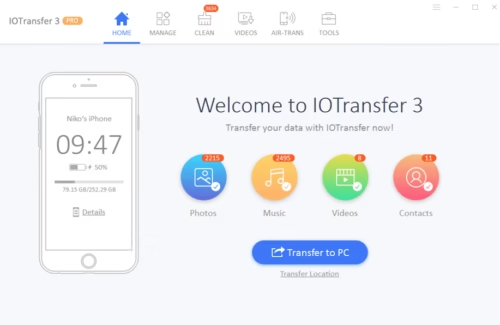
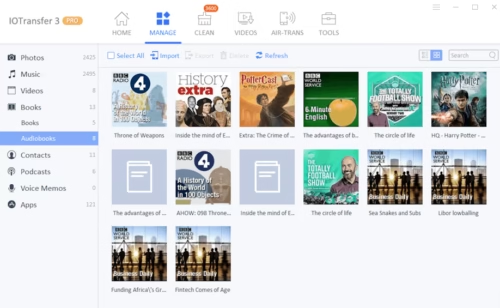
The IOTransfer is an easy to manage backup system for your iphones and ipads. It allows you to easily transfer music, videos, photos & documents from your apple device. All of this works at an extremely easy mechanism of just one click – making the rather redundant otherwise job of backing up quite easy.


The application is quite easy to use and has no technical jargon. In terms of accessibility of your files upon backup, that is absolutely instant. As soon as the application is done with the backing up, the user can access the files on the software.

What are the main features of IOTransfer?

The application is so easy to use because in the rarest case scenario that you’re without a USB cable and need to backup your files in utmost emergency – the transfer via wifi option is simply incredible.


The software also comes with a free video downloader – that works with over 100 websites. If for instance you need a reliable video downloader for youtube, IOTransfer is the way to go. With just copy pasting the youtube link, your video will be downloaded in matter of couple of minutes.

.Heic file type is one that constantly bothers iphone and ipad users because it’s often not supported. Converting the same to jpeg file type is the only option to access it but that should never be done via  a 3rd party non-trustworthy software. IOTransfer helps in this regard as well. You just need to select your .Heic filetype and convert it to jpeg file format – at click of a button.

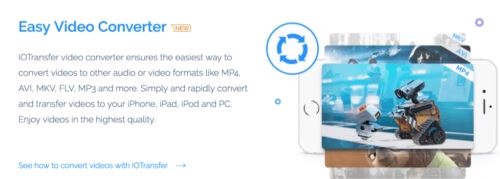
Video conversion in IOTransfer from your iphone and ipad can be converted into any format that you like. Therefore, any limitations that you felt which were result of the constrained working of iphone and ipad is sorted via the use of IOTransfer.


Further, if in case you feel that you’re running out of space on your ipad or iphone, there’s also provision of disk cleanup (without deleting crucial files) via IOTransfer. But it’s always advisable to always cleanup after making a backup, which IOtransfer allows you to do. Upon which, the software also helps to cleanup unnecessary files.

IOTransfer – simply a game changer

The very idea of using itunes as a mediator poses great troubles to a few users of iphones and ipad. This is where IOTransfer acts as a mediator and doesn’t even require for you to install itunes. You can easily use IOTransfer to not just delete files but also make backup.

In our experience,we felt that the whole experience of the software is quite straightforward and isn’t very technical. The features it provides are the basic ones that every apple user looks for. Be it the conversion of the photo’s and videos file format to the software’s ability to download videos in matter of seconds – which can then be watched offline, in case of non-availability of net.

The software comes in support of more than 7 languages – English, Chinese, German, Dutch, Italian, Japanese & Spanish. Therefore, the reachability of the software is quite global oriented and has a proven track record of customer satisfaction across these languages.

You can check the latest price and offers over here.

How Smartphones Have Changed the Gaming Industry

0
mobile-gaming-2690100_960_720.jpg

Mobile phones have become an irreplaceable part of our daily lives, for everything from work to play. In fact, with most people downloading multiple games on their smartphones, they have pretty much taken over the ‘play’ part of things!

Mobile gaming has come a long way from the days of Snake and Tetris, despite not really becoming a mainstay until the 2000s. As phones become even smarter and more powerful, so do mobile games. Consider Pokemon Go, the augmented-reality sensation that recently swept the globe.

Here are some stats and trends that define the way smartphone technology has affected mobile gaming:

  1. New Features for Immersive Gaming – There has been a growing trend of game developers implementing features that encourage social gaming, especially real-time interaction and participation in live activities. Add augmented and virtual reality to the mix, and you have a level of immersion that could only have been imagined in the past. With cloud-based games and apps that work offline, gamers are guaranteed constant entertainment through their smartphones.
  2. Development of Gaming-Focused Smartphones – It isn’t only smartphones that have affected the gaming industry, but vice versa as well. With newer game technology such as AR and VR (Augmented Reality and Virtual Reality) becoming the next big thing, mobile phone manufacturers have taken notice. Many devices under development or already on the market are designed with extra features or higher performance processors, keeping the needs of mobile gamers in m
  3. Market Growth and Revenue Generation – Mobile gaming isn’t restricted to smartphones alone, but these devices are certainly growing at the fastest pace compared to other mobile devices. Newzoo reported that by the end of 2018, the revenue from mobile gaming apps will be valued at over $70 billion, claiming a 51% shareof the worldwide gaming market. Smartphones will account for 41% of revenue from mobile games, with tablets bringing in just 10%.
  4. Introduction of New Mobile Gaming Genres – Constant evolution and innovation in the mobile gaming sector has led to changes in the way games are categorized. It’s no longer easy to place them in one genre or another, since they often overlap and fit equally well in multiple categories. Today, you may have an RPG that’s also a puzzle-based or builder-strategy game. The flexibility offered by smartphones may be one reason for this diversity.
  5. How the Future Looks for Mobile Gaming – Ever since the first iPhone launched in 2007, there has been a consistent growth in the mobile gaming industry. Newzoo predicts that the industry will cross the $100 billion mark in 2021, outpacing the PC and console market without taking revenue away from it. In addition, just under 60% of total revenue generated by the gaming market is expected to come from games designed for smartphones and tablets.

It’s safe to say that the future of mobile gaming looks bright, especially when you consider that we’re becoming more dependent on our smartphones all the time!

About the Guest Author

Dev Bhatt is the head of digital marketing at OnlyMobiles. Being a tech enthusiast, he also blogs to help his readers make informed decisions like when to buy mobiles on EMI without credit cards, when to choose a different payment method, or what to look for in the latest models.

4 Things You Need To Do After Installing WordPress

0
Source: Pixabay.com

The fact that WordPress is the world’s most popular CMS tells you all you need to know about its versatility. While WordPress comes with numerous helpful features out-of-the-box, installing it doesn’t necessarily mean it’s automatically ready to go live. You need to apply additional measures that improve security, efficiency and functionality.

We look at some of the most important steps you need to take to ensure your WordPress website is ready for production.

Setup SEO

Google.com is the world’s most popular website. The overwhelming majority of traffic to your website is likely to come from this search engine behemoth as well as its competitors like Bing. This is why search engine optimization (SEO) is so crucial. SEO refers to the techniques used to increase your site’s search engine visibility. SEO ensures your site is among the first results when someone searches for certain keywords.

The higher up your website appears in search results, the higher the volume of traffic you are going to receive. WordPress has plenty of inbuilt SEO capabilities. Nevertheless, you need to go further if you want to really grow your site’s prominence. SEO is always work in progress but getting it right from the get go is vital.

One of the most advanced tools for WordPress SEO is the Rank Math plugin. It’s fairly easy to use even for persons with no knowledge of SEO.

Also Check: Grow Your Business with These Simple SEO Tips

Install Caching

Getting your website highly ranked on Google Search results is not just about creating the right content and embedding the right backlinks. Since 2010, Google’s search algorithm also takes into consideration how fast your website loads. Nevertheless, speed isn’t just relevant for search engines.

Few visitors will have the patience to wait for your website to load when they have faster options elsewhere. One study found that about a quarter of first time visitors will abandon a website that takes more than 4 seconds to load. That abandonment rate grows rapidly with every additional second of delay.

Installing caching allows your website to quickly serve cached copies of pages to visitors as opposed to generating them afresh each time a user sends a request for them. There are numerous caching plugins available to do this but WF Super Cache has built a reputation for reliability. For best results, caching should be accompanied by infrastructure monitoring just to be certain the underlying hardware isn’t stifling the website’s performance.

Install Google Analytics

Most traffic to your WordPress website will come from Google Search. However, you can’t fully harness the power of Google if you do not keep tabs on what techniques work and what don’t as far as getting your site highly ranked is concerned.

Google Analytics will help you understand your audience, what appeals to them and how you can meet their need. It allows you to see not just the number of people that visited your WordPress site but also which countries they came from, what keywords led them to you and where they went after they left your site.

There are several ways to install Google Analytics but one of the best is via the MonsterInsights plugin.

Add a Contact Form

Whether you are building an elaborate ecommerce site or are creating a platform for sharing information with the public for free, you must have a way through which visitors can make enquiries or submit feedback. One way to do that would be to provide your email address.

The problem with email though is that the sender has to leave your website to compose their message.

Contact forms are much more effective since they keep users on your website and ensure they linger on even after they submit their enquiry. WordPress doesn’t come with a contact form by default. You’ll need to download a plugin for that. WPForms is the most popular.

The above tips will help you create a working, user-friendly WordPress website fairly quickly without the need to go through a costly and time-consuming process of trial and error.