Home Blog Page 116

How to Choose the Right Intranet Solution for Your Business

The tech market is inundated with helpful products that offer a technical solution to a human problem. One such product is an intranet. Offering a private digital platform to share resources and streamline communication within a company, the advantages of intranet variations extend beyond the technical features at the surface level. Many businesses utilize intranet systems to maximize performance by enhancing employee engagement and improving communication. Beyond recognizing the value of an intranet, it is critical for companies to select which intranet system is right for them. This process requires conscientious decision-making to align the human aspects of a company’s unique identity with the technical aspects of the digital product. This article offers key tips to ensure you choose the intranet system that best fits your company’s needs.

Know Your Audience 

To effectively evaluate the potential value add of a new product, you must know what you’re working with, or more accurately, who you are working with. Knowing the needs of your employees, as it relates to the communication and collaboration functions of an intranet, will ensure you customize the intranet platform and user experience to enhance productivity and engagement. Things to consider:

  • What are the technical skills and abilities of your employees and can the product be customized to meet their needs?
  • What challenges does your current system present for users and will those be eliminated in the prospective intranet?

Know Your Goals

Image via Flickr by verchmarco

Many companies will seek an intranet to maximize productivity. Knowing how to align the unique objectives of your company with the varying features offered by competing intranet systems represents the difference between offering something helpful and offering something transformative. This requires specific analysis of your company’s goals and the underlying employee patterns or behaviors that, if shifted through intranet functionality, will alter your company’s trajectory. In other words, how can a technical shift in function or format produce an adaptive shift in employee habits that impact the big picture? Things to consider:

  • How can this platform consolidate the functions that currently live across a variety of applications so that employees can work more efficiently and reinvest that recovered time into achieving your company’s goals?
  • Are there distinct aspects of your company that require specific collaboration and communication structures? If so, can the product be customized accordingly?

Consider The Aesthetics

Engagement and productivity might drive the bottom line but structure and content are not the only factors driving engagement. The look and style of a product also determine ease of access and are important considerations when comparing intranet systems. Ask yourself: would I want to look at this every day? If the answer is not a resounding yes, keep searching until it is.

Just as your company has its own unique strengths and challenges, so too do the variety of intranet platforms available on the market. Being able to discern the option that best suits your needs is a critical but manageable step. Leveraging the tips in this article will ensure you are on the right track!


5 Best Security Apps for Android

0
C:\Users\Suzuni\Downloads\security-4038173_1920.jpg
Image source: Pixabay

Mobile devices and applications have come to the point where they dominate our lives. One of the most popular forms of phones, the Android, has millions of apps to download. These apps can range from games to social media apps, to T.V network apps. Some apps can even be used to better your life or make it easier, ranging from fitness and lifestyle apps to important budgeting apps like a home value calculator or monthly income planner. However, with more and more of our data being placed on our phones we are increasingly opening ourselves up to security breaches. Security breaches can result in a lot of personal information being damaged or stolen, something that can be irreparable. Thankfully there are even apps that you can use to better protect your phone from hackers, scammers, and thieves. Here are the five best security apps for Android.

Security Master

Privacy and antivirus technology are two major concerns for people with any type of electronic device. Thankfully, Security Master can put both of these concerns and more to rest. The app includes an intelligent diagnosis that can identify viruses, clean junk, and even save some of your battery usage. If you’re worried about internet security then this app can provide you with a VPN proxy or can even scan Wi-Fi networks for potential threats just to ensure that they’re safe. Finally, this app can even physically protect your phone, by sounding an alarm when it is used without your knowledge and can even take a picture of the culprit. If you’re looking for a great Android security app, then you can’t go wrong with Security Master.

AppLock

If you’re someone that’s concerned with someone breaching a specific application on your phone, then AppLock is the perfect app for you. Any app can be locked, protecting you from a wide range of embarrassing scenarios. Perhaps you don’t want people accessing your social media so you can place a locked password on your Facebook, Twitter, or Snapchat. You may also have personal messages or pictures that you don’t want others to see so you require a password to open your Messaging and Gallery apps. The app can even be useful for things outside of privacy and security. For example, if you have a child that wants to use your phone for games, you can use the app to ensure that they don’t enter any apps they’re not supposed to and don’t use a large amount of data.

Secure Call

If you ever worry about your phone calls being compromised, then Secure Call may be the app for you. Secure Call can provide you with encrypted voice calls, adding a great deal to the security of your calls. If you’re worried about the quality of the calls suffering then you shouldn’t fret, as the calls will still be crystal-clear. On top of this, the app doesn’t need to access your phone number or other sensitive information. It simply needs to be able to send you notifications and have microphone and internet access. Finally, the app is extremely easy to use and has a user-friendly interface, allowing you to get comfortable using the app in no time. 

Avast Mobile Security

There are so many ways that your devices can pick up viruses or malware that you can never truly be too safe from them. This is where Avast Mobile Security can step in and help. This mobile application can help secure your phone from phishing attacks and other methods of getting spyware on your phone. The app will send you alerts when it detects suspicious software being downloaded onto your device, allowing you to react quickly before your privacy is compromised. If you’re worried about malware on your device, then do yourself a favor and shore up your devices’ defenses by downloading Avast Mobile Security. 

Signal Private Messenger

If you’re worried that your private messages might end up into the wrong hands, then Signal Private Messenger might be the app for you. The app uses an advanced encryption protocol to keep your messages private and fend off hackers. Additionally, the app is extremely simple to use. It doesn’t require you to create a new account, phone number, or anything of the sort. This allows you to enjoy your private messaging and socializing without any interruptions, just with added security.

10 Advantages Of GPS Tracking That Can Work Wonders For Your Business

0

Global Positioning System or GPS tracking technology has come a long way from simply being dots-on-the-map to advanced software with multiple capabilities. It has emerged as a crucial business tool to enhance visibility and offer detailed insights into each aspect of your fleet operations.

Four types of GPS trackers are available – personal trackers, asset trackers, vehicle trackers, both cell-based and satellite-based, and cellular trackers. 

It is a solution that can help you in accomplishing the business objectives by improving efficiency and providing savings that directly add revenue to the bottom line. 

On that note, here are the top ten advantages Of GPS tracking that can work wonders for your business.

1. Reducing Fuel Costs Through GPS Tracking

GPS tracking can reduce fuel costs in several ways, though the foremost among them is to curtail idle times. 

You can use the software to send alerts to your driver to shut down the engine after a specific amount of time has passed when the vehicle hasn’t moved.

It will help you in actively training the drivers on techniques that can significantly reduce your fuel costs. Your GPS tracking system will also keep an eye on the amount of fuel used by the driver.

2. Increasing Productivity And Eliminating Distractions

Repeated calls to the drivers for simply asking, “where are you right now?” is not only distracting to the driver but also means a major headache for your staff. Imagine the amount of time you will waste this way if you have a large fleet of vehicles.

A much easier way to solve this issue is to learn more about GPS tracking and implement the necessary software. You can keep track of the vehicles in real-time without calling the drivers.

3. Enhancing Customer Services With Vehicle Tracking

Giving approximate times to your customers is never a good idea because it just ends up irking them. It’s much better to respond with “the driver will reach within 15 minutes” rather than “the driver will reach sometime around afternoon.”

You get to track your vehicles’ movement in real-time and pass that information directly on to the customers. So, your customers know when to expect deliveries, and this accuracy of time gives you a competitive advantage.

4. Faster Vehicle Recovery And Reduced Insurance Costs

In the unfortunate event that one of your fleet’s vehicles is stolen, the GPS tracking software will help you pinpoint the exact location of your vehicle. Thus, you can recover your valuable asset in time before it gets damaged or vandalized. 

Even your insurance companies know the benefit of faster vehicle recovery, so you can expect them to offer you a discount on your insurance premium. Assuring Samsara safety could also help your case and bring down the premiums drastically. 

5. Consistently Improving Driver Accountability

It would be wrong to assume that fleet tracking solely benefits just the company. GPS tracking can also be instrumental in improving employee retention and rewarding good driver behavior

You can use telematics to track driver behavior and reward them accordingly to reduce idle time and avoid rash behavior.

Telematics is the merger of informatics and telecommunications, which is enabled through the GPS systems. You can read more about telematics on Samsara.com to understand the ways of improving driver accountability.

6. Improving Back-Office Efficiency And Saving Time

Most GPS tracking services also come with robust APIs that allow them to communicate easily with other important business platforms. It is this functionality that lets you monitor and manage all your data from one convenient location. 

This kind of integration includes timecard management, parts management, vehicle maintenance software, and so on.

As a result, you get enhanced visibility into your business operations, increased revenue, and better control over your personnel costs. You will also get to manage salaries and vehicle specs more effectively.

7. Monitoring The Health And Safety Of Your Staff

The whereabouts of your drivers and other field staff are a major cause of concern during adverse weather conditions. Being unable to contact a driver for a long time when the weather goes bad to worse gets you worried about their health and safety.

Thankfully, by looking at their location on the GPS tracker and knowing how long they have been stranded at a place, you can understand their situation and send help.

8. Receiving Automatic Notifications 

Your vehicles can now be left safely in the depot, yard, work premises, or other frequent parking areas. After all, you can heave a sigh of relief by knowing that you will get automatic, instant notifications by email or SMS text if the vehicle leaves its designated spot. 

You can quickly inquire if your staff has moved the vehicle for some reason or if it has been stolen.

9. Reducing Administrative Paperwork 

The GPS tracking software sends frequent location logs at intervals of three to four minutes. Keying on and off information is rather easy, thanks to the report function. 

It lets you know about the distance covered each day. It effectively replaces the need for those conventional paper logbooks.

You can get all the reports, such as long stops, speeding, total hours traveled (daily, weekly, or monthly), and mileage at the click on a button.

10. Lessening Liability And Risk 

GPS tracking helps in supporting new or current policies that come with real consequences for not following them. 

Your safety policies have to include the data used from GPS tracking devices and a clear outline of the behavioral expectations. You can even include speeding violations, harsh braking, and rapid acceleration norms tracked by the GPS software. 

Gathering crucial data such as these will help you take prompt action and set disciplinary regulations within your organization.

The Bottom Line

With this information, you can go ahead and implement a GPS tracking system at the earliest to begin enjoying its benefits and solving your business challenges. 

By instantly offering improved visibility into the operations and improving productivity and efficiency, GPS ensures a competitive edge for your business. So, start using GPS tracking software now if you have not already! 

How to Create Outstanding Resume – The Professional Guide

0

Find out how to prepare yourself for job vacancies and create exciting resumes in a few simple actions

The Proper Resume: How to Create it

Found a great job? The first step is to interest the employer, emphasizing their best qualities. We have prepared a guide for you on how to write a resume that will at least lead you to an interview, and at the maximum – will help you get a dream job!

On average, it takes 5-10 seconds to view one resume. That is why it is so essential to make a positive impression immediately. A resume is self-promotion, which should present you with the best side for the employer. Therefore, your task is to make all points of the resume “catchy.”

The Main Structure of Your Resume

When writing a resume, it is vital to adhere to a particular structure so that the information is clear, orderly, and easy to read. We recommend sending it in PDF format so that no problems are opening the file.

Write simple sentences of 5-7 words. Avoid obscure contractions. Be sure to divide the text into paragraphs, choose a clear font. Use italics or bold to highlight headings. Remember that a resume should not exceed two pages — ideally, 1 page. If you some trouble by writing it, then it is better to hire professionals from resume writing service – resumeget.

A big plus, especially for representatives of the creative industry, will be the graphic design – so you stand out against other candidates and immediately demonstrate your creative skills. Be sure to attach a photo if requested by the employer.

Now let’s take a look at the blocks on how to write a resume and describe key points.

Name/Surname + Your Contacts

Everything is straightforward here. Do not use your work email for communication – specify a personal one or create a separate one for job search. Be sure to check that your email address matches the format [email protected], and does not offer to write some fluffy bunny.

Add links to Facebook, LinkedIn, or other professional networks, such as Quora or Medium. When specifying personal profiles on social networks, carefully check their contents so as not to get into an awkward situation.

Summary

This paragraph should answer the questions of why you should be invited for an interview and whether it makes sense to delve into the resume at all. Its goal is to focus the attention of the employer/recruiter, immediately highlighting your professional goals, experience, expertise, and personal qualities. If you do not make it clear how companies will be useful, you are doomed to failure.

Professional Experience

Start with your current or last job, moving to the first one. Remember: only experience relevant to the vacancy you are applying for is worth pointing out. If you don’t have one, consider writing a functional resume and focusing on skills rather than places of work.

Briefly, indicate the name and scope of the company. Then – your position and role, as well as the main tasks. Give a list of the main achievements, and do not forget to back them up with arguments and evidence. Remember that successes must be measurable, concrete, impressive, and must be consistent with the position.

Main Skills of Yours

This block should be approached very responsibly because it is for your skills that they will pay you money. Indicate your essential qualities and abilities necessary precisely for the position for which you are applying. Here, in which programs you work and which languages ??you speak.

It is not superfluous to mention your interests. They will help the employer understand what kind of person you are and how you will join the team. An important point: it is better to indicate hobbies that are directly or indirectly related to the desired position, or your interests must be truly unique.

Avoid Using Templates

According to a survey, ? employers consider it a mistake to use ready-made resumes from the Internet because they are usually too general and do not give a complete picture of the candidate. But a personalized and moderately detailed resume will show you the winning side.

Best Robot Vacuum for Thick Carpet in 2020

0

Undoubtedly a very convenient gadget, a robot vacuum can make your life a thousand times easier by keeping your house clean on its own and alleviating your chore burden. Especially, if you have pets at home then it is quite usual for their hair to gather evidently overnight and in such cases a robot vacuum can be a great assistance. However, the biggest issue is that most of the robot vacuums in the market are designed for hardwood floors only. So, when it comes to cleaning those nasty rugs, picking up the right robot vacuum becomes a rather difficult task in itself. It is rather disappointing to see the number of vacuums that fail in cleaning a rug.

A robot vacuum is autonomous and equipped with all the features to navigate around your house without any support. Ever since the first robot vacuum was released, the product has come a long way. There had been an enormous change in the designs and many competing brands have come out with a smattering number of new models. 

What to consider before buying a robot vacuum?

The robot vacuums are designed to navigate easily around furniture, however, a few stumble if they have to switch over different floor types. Such robot vacuums do a great task in cleaning but they usually get stuck on carpets and rugs. While picking up a robot vacuum, you have to ensure that you consider the battery according to the size of your house. 

Aside from these important factors, a robot vacuum must have good motor, lasers, brush roll, sensors, and Wi-FI to be self-sufficient. The latest robot vacuums can operate with apps on your smartphone and some even work with voice commands using Amazon’s Alexa and Google Assistant.

An essential factor that all pet owners should consider here is that the perfect robot vacuum for their house must have a proper filtration system, so that instead of pummelling up the dust, the vacuum can actually capture it in the designated dustbin.

If you are someone who has a lot of carpets at home, then you might be looking for a product that doesn’t get jammed and can clean your carpets or rugs efficiently to keep them in a good shape. Fortunately, there are a handful of such robot vacuums which can actually dig in those dirty thick carpets and eradicate all the dirt at once. These vacuums can clean the smallest dust particles which lead to a cleaner and fledgling condition within your house.

The Best 3 robot vacuums for thick carpets

If you have a lot of carpets and rugs in your house, then it is crucial to pick a vacuum which is best for you. The fabric on the carpets can make vacuuming a bit tricky, that is why it is important to select a robot vacuum which is specially designed to clean thick fabrics. 

Here are the three best robot vacuum cleaners that you can get particularly for thick carpets in your house in 2019:

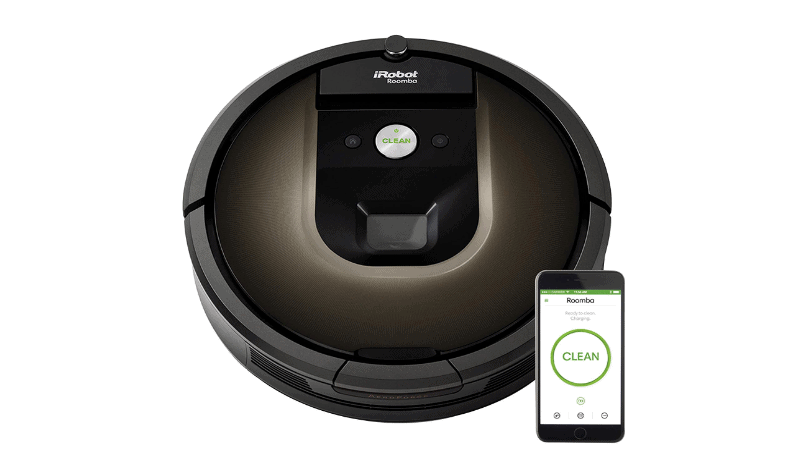
iRobot Roomba 980

The iRobot Roomba 980 is an upscale robot vacuum with some top-of-the-line premium features that justify the price. Considered as the best vacuum cleaner for thick carpet in the Roomba series, this device is designed to provide the best all-around house cleaning. The vacuum’s power-lifting suction delivers 10 times the suction power to collect all the dirt, dust, and pollen from your floor. Additionally, it increases the performance in carpets and rugs automatically with Power Boost. iRobot Roomba 980 has dual multi-surface rubber brushes which ensure that the vacuum stays in constant touch with the carpet.

The vacuum is perfect for houses with pets as its premium triple stage Cleaning System ensures that your floor is free from all the pet hair and even the allergens which are not visible to you.  The manufacturers claim that this vacuum can clean up to 99% of your pet’s allergens.

The iRobot Roomba 980 can operate for 120 minutes non-stop and recharges itself automatically before finishing the rest of the cleaning. Even if you are not at home, your Wi-Fi connected vacuum will do the work whenever you give a voice command with either Google Assistant or Amazon Alexa.

Pros:

  • Low-profile design
  • Efficient battery
  • AeroForce 3-Stage Cleaning system
  • Clutter free dual multi surface brushes

Cons:

  • Pricey

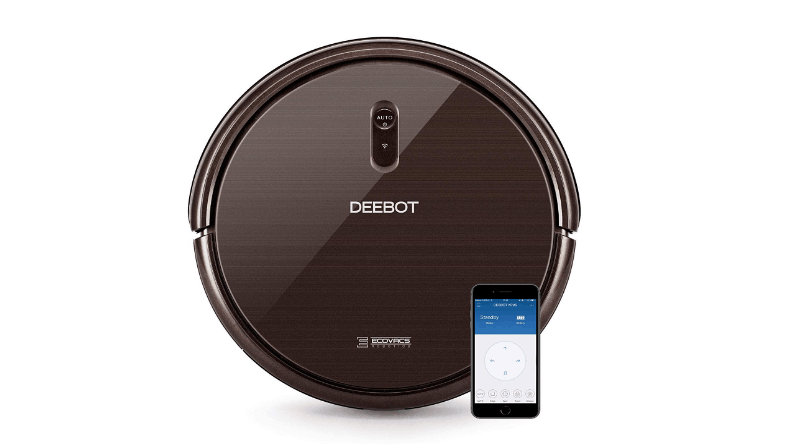
Deebot N79s

Screenshot_6.png

This newer version of the Deebot N79 comes with two side brushes and another main brush. The robot is created specifically to clean carpets. The device has three modes for cleaning: auto mode- to clean entire floor, spot mode- to clean a smaller area; and an edge mode- to clean the edges of the floor. To increase the performance, this variant has been outfitted with up to 2 times’ suction power for very irksome messes.

To ensure that the device has more lifting power, it comes fitted with v-shaped central brush system to clean the in-depth areas of your rugs and carpets. Once fully charged, this robot vacuum will run for 110 minutes.

Pros:

  • Comes with max power mode for carpets
  • Doesn’t create much noise
  • Accepts Google Assistant and Alexa voice commands
  • Economical pricing

Cons:

  • Unseemly navigate 

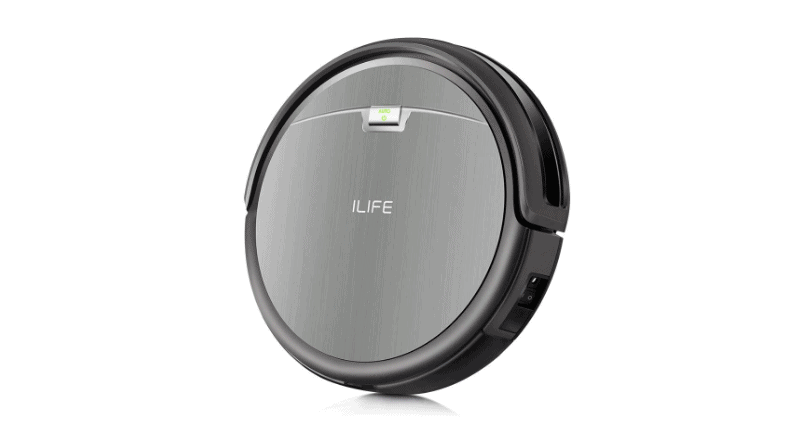
iLife A4s

Screenshot_7.png

 iLIFE A4s is one of the best running models from ILIFE. The brand is known for continuously creating impressive robot vacuums which have premium features and are highly cost-effective.

The device uses Gen 3 CyclonePower cleaning system with combination of high suction to ensure a comprehensive and overall cleaning. This 3 inches tall vacuum can easily navigate under your furniture and adjust to different floor types. The extended battery offers up to 140 minutes of usage at once.

It also comes with an LCD and remote, so that you can smoothly operate the robot. You can easily schedule the cleaning hours and preset the vacuum for up to seven consecutive days. Once the device needs charging, it will automatically return to the charging dock.

Pros:

  • Compact size
  • Support for multiple cleaning modes

Cons:

  • Improper navigation

These were few of the best models in the market. However, the list isn’t exhaustive. You can find some great options in other brands. There are several brands which offer some exclusively features robot vacuums for carpets.

Additionally, if you are a pet owner and want something that works well for all the dog hair that gets accumulated around the house then, you can check these robot vacuums which are particularly designed for pet hair.

Wrapping up:

No matter how powerful they are, it’s certainly a fact that no one likes to drag around a huge, clumsy, and corded upright vacuum in their house. Even though a robot vacuum cannot substitute a manual cleaning completely, but it can be a great help when you are sinking in your pet’s hair or just want to keep your favorite rug clean and fresh without even lifting a finger. Such robots can limit the build of up dirt in your house between regular clean ups.

Even if you are not at home, this friendly device will go about its business and you will end up saving a huge amount of time that you usually spend struggling to take care of the dirt and dust. Now, you don’t have to hesitate before buying a heavy carpet. 

7 Tips for Buying Your Next Computer

0

Buying a computer can be an extremely stressful process. With a variety of options relating to brand, type, and style, it can become complicated and overwhelming to make a decision. 

Unfortunately, some people will simply choose the cheapest option or the most popular brand; however, this often leads to making the wrong decision for your needs, wasting your money, and regretting your overall purchase. 

https://techedged.com/best-amd-graphics-cards/

So, how do you ensure that you choose the best computer for you. Below are 7 tips to consider before purchasing your next computer:

Consider Your Primary Purpose

Why are you buying a new computer? Before you begin browsing the internet for types and brands of computers, determine your primary purpose. 

Will your new computer be used for business, school, or pleasure? If you need a computer to surf the web and manage your emails, you would make a much different purchase than if you needed a computer for gaming

In fact, according to Psychology Today, people who invest in computers for gaming have a better quality of life, just from all the mental health benefits it brings.

But ultimately, understanding the reason behind your new buy will greatly influence different factors of your purchase.

Assess your primary needs and wants for a computer and keep these points in mind as you shop. Determining whether speed, storage, or screen resolution are important components for you will help you grasp what computer will best suit your needs. 

Processing Power

The CPU (Central Processing Unit) serves as the traffic control tower of any computer. It assists in running programs and carrying out certain functions. Processing controls how information is interpreted and how it interacts with your computer’s abilities. 

The more processing power a computer has, the larger and more complex programs it will be able to run.

The level of processing power needed for your computer will depend on your specific needs. If your new computer will be used to run sizable and difficult programs, you will need more processing power. Otherwise, spending more money on a stronger CPU may be unnecessary. 

Memory Size

Memory functions as temporary storage for your computer’s CPU. By quickly saving and retrieving data and information from a computer’s memory, the CPU and overall computer is able to run smoother. 

CPUs can become overwhelmed by information and lock up if they are being overworked. Memory helps lighten the load of a CPU, so it can function more efficiently. 

If you know more processing power is necessary for your needs, purchase a laptop with ample memory to ensure that your work and activities will not be hindered. However, if running sizable programs will not be done on your computer, it is not vital that you pay attention to the amount of memory on your next purchase. 

Storage Space

Storage sizes vary significantly between different computer hard drives. It is important to identify how much storage will be necessary for you before you buy, so you can avoid having to spend money on additional storage devices later. 

If you will be installing large programs or storing massive amounts of information, you will need a computer with greater storage space. However, if you will primarily be using the internet and small programs, ample storage may not be as important. 

There are two different types of storage devices: Mechanical (HDD) and solid state (SSD). HDD is typically the cheaper option, but it can take longer to boot up; whereas, SSD are usually more expensive, but they can start up and run faster. 

Consider the amount of storage you will need and how valuable speed is for you when looking to buy a computer. 

Graphics Card

A graphics card controls the visuals that are displayed on your monitor. It works with your computer’s CPU to process and project images. 

A graphics card can alleviate the amount of work your CPU must do for imaging, so a quality graphics card will lead to a computer with an overall better performance. In addition, a decent graphics card will boost the quality of the graphics on your monitor. 

If visuals are important for your next computer, then pay attention to the graphics card component. 

Physical Size

While size is not the most important factor, it can help you make an ideal purchase. 

Evaluate where your computer will be placed. Do you have space for something larger, or do you need to focus on more compact options? If you have space, a larger computer tower allows for more ventilation which is beneficial; however, a small space may require you to look at smaller towers. 

Additionally, you should consider the size of the monitor you will purchase to accompany your laptop. Do you need something bigger for better visibility, or would you rather go for something smaller in size and price?

Determine what will work functionally in your space to get a better idea of the size for your new computer.

Price Points

Now that you have determined what is necessary for your next computer purchase, make sure to evaluate your price options. Including all the bells and whistles can become pricey if you are not careful. 

You want your money to be put towards a quality computer that will last you a long time, but you also want to watch your budget. Getting a popular brand will cost you, but buying the cheapest option may not last. 

Take your time to browse different options and remember the aspects that are most important for you. This will help you decide how your money should be spent. 

When buying a new computer, it is important to evaluate your needs and wants. Do not rush into a purchase that is bound to disappoint you. Think through what you value and research your options to ensure you make the perfect computer purchase for you. 

How to Disable Chrome Software Reporter Tool

0

The Chrome Software Reporter tool is pre-installed in the Chrome browser. The tool monitors all the add-ons and other software that are interfering with Chrome browsing experience. It also reports any malfunctioning or inconsistent processes. It is scheduled to run once in a week and sends the results to Google. Based on such reports, Chrome sends instructions to the users to run the Cleanup tool which is a part of the scanning process.

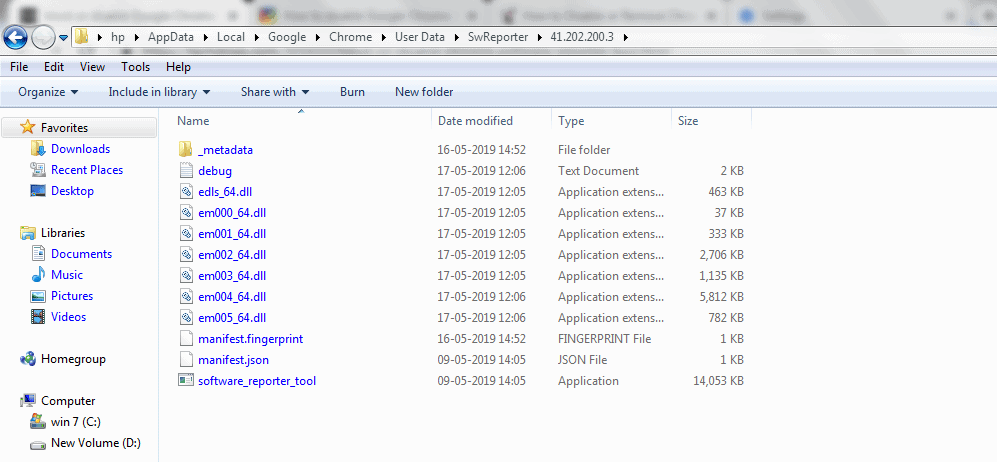
Software reporter tool is an executable file which is present in Chrome app data folder named as Software_reporter_tool.exe visible under the SwReporter folder. Even though it is a useful tool but it does hog enormous memory and many users wish to disable it. If the tool is using more CPU while running or if you are having privacy concerns as it informs Google about the scan results, you can easily block or disable it by removing the permissions it requires perform a scan.

How to Disable Chrome Software Reporter Tool using Registry Editor

  • Press Windows + R and enter  %localappdata%\Google\Chrome\User Data\SwReporter
  • Click “Ok”
Screenshot_5.png
Screenshot_6.png
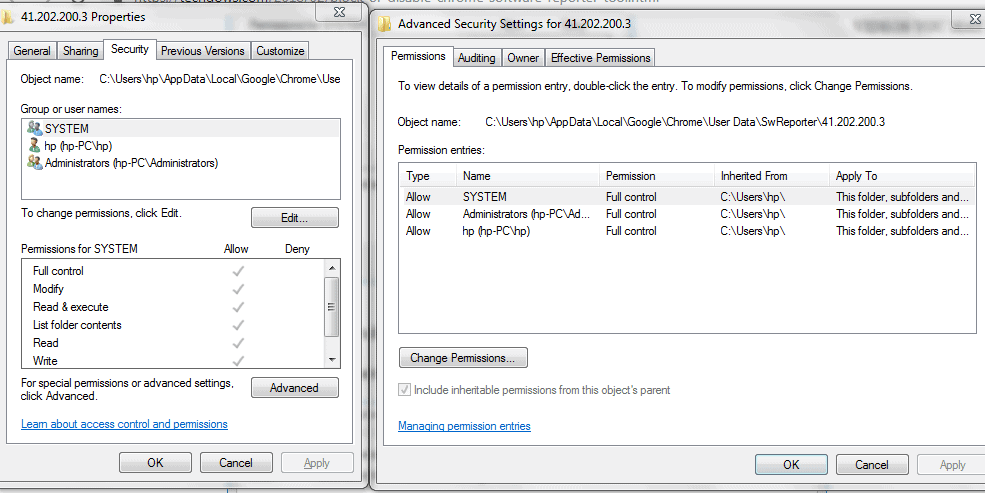
  • Right-click on “SwReporter” and select “Properties”
Screenshot_7.png
  • Click on “Security” and then “Advanced”
Screenshot_9.png
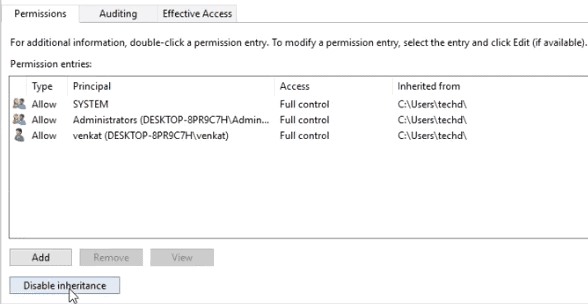
  • Next, click on “Disable inheritance”
Screenshot_10.png
  • Select “Remove all inherited permissions from this object”
Screenshot_11.png
  • Click on “Apply” and then “Ok”

Now, no user will have access to this tool.

The Software Reporter tool wouldn’t be able to run anymore and any updates would not be applied to it either.

Disable CHrome Software Reporter Tool Using Google Chrome Settings

Alternatively, you can also disable Software Reporter Tool using Google Chrome Settings. Just follow these steps:

  • Open Google Chrome and click on this icon on the top right hand side corner of the window.
  • In the main menu, go to “Settings”
Screenshot_13.png
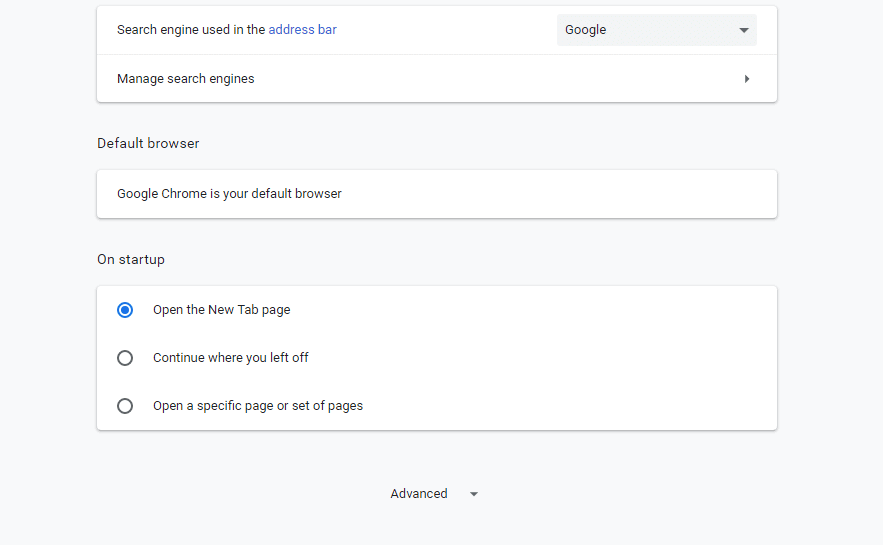
  • Now, in the Google Chrome Setting page, scroll down and click on “Advanced”
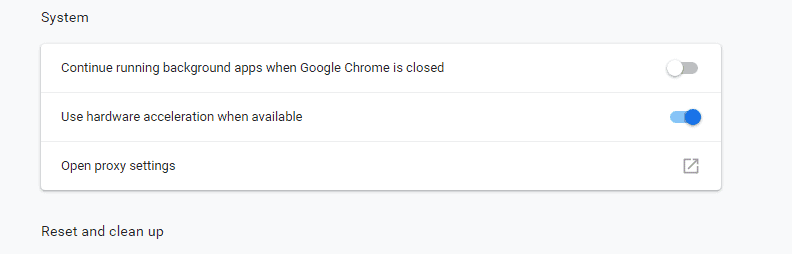
  • Click on “System” at the bottom of the page and turn off “Continue running background apps when Google Chrome is closed”
Screenshot_14.png
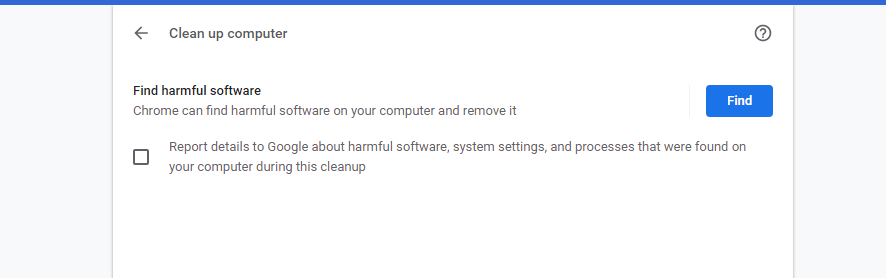
  • Go to Reset and clean up” and click on “Clean up computer” 
Screenshot_15.png
  • You will be taken to the Chrome Cleanup tool page. Turn off Report details to Google” 
Screenshot_16.png

This method will prevent Software Reporter Tool from sending any scan results to Google. This method is useful when you are concerned about your privacy.

Wrapping Up:

These two methods would be useful to disable or remove the Software Reporter Tool if you are facing high CPU usage or if you frequently get a notification saying Google Chrome Software Reporter Tool has stopped working”. However, it is worth stating that until and unless you run multiple third party softwares that may cause regular issues, Software reporter tool may not be a source of interference. The tool only works to report Chrome about the softwares which aren’t working properly with the browser. It is completely safe and doesn’t have any network communication.