Home Blog Page 275

With your Head in the Clouds: An Overview of Cloud Computing.

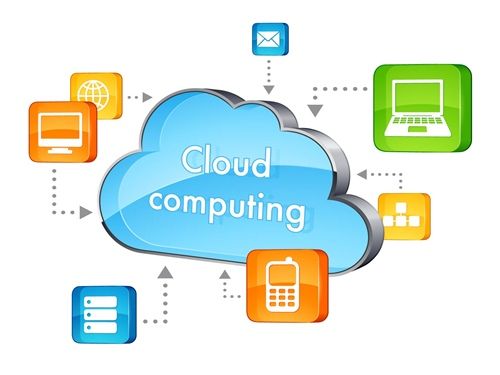
“The Cloud” is one of the biggest current buzzwords in the IT industry- everybody wants it, everybody talks about it and it’s become a necessity for every blogger and business out there. However, very few people have taken the time to answer a very fundamental question: What is the Cloud?
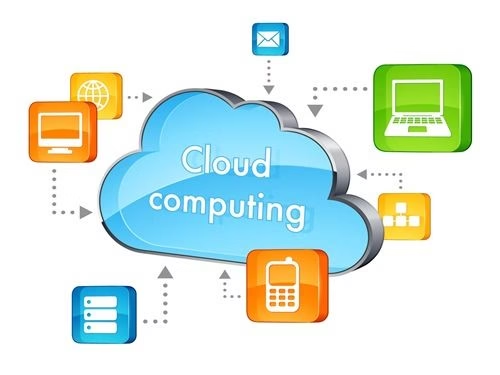
cloud computing

Back in the olden days of floppy disks and magnetic media your computing and data processing companies were limited by the hardware you had inside your computer case. The capability to deal with data was limited by what you physically had; then along came broadband internet and other key innovations in tech and that is no longer the case.

The Cloud is a service. Computers (that could be millions of miles away from yours) can take care of your heavy lifting and data processing, regardless of your physical hardware. This decreases the barrier of entry for many things. Previously, if you needed more memory or better video rendering you had to go out and buy expensive hardware and maybe even pay for someone to install it. Shopping for said hardware was a bit of a mess too, since you had to ensure it was compatible with the rest of your computer rig. Which one is better, a SATA drive or an SSD drive? With a good cloud services provider, you don’t have to worry about that at all.

Think about Smart TVs for a second- how does a TV with minimal storage capability and memory deal with the incredibly huge library of movies from a service like Netflix? It’s simple- it doesn’t. The video and audio compression are done by Netflix and then simply streamed out to your TV. Remote data processing has opened the door for a million new business possibilities and made life easier for all of us.

But aside from helping us watch The Godfather II for the umpteenth time without having to get up and put in the disk, what else can the cloud do?

Well, there’s a whole spectrum of things.  If you have a website, the cloud can help you make sure it is always up. In the past if lighting struck your server, your site would be down for as long as it took you to replace it. With the cloud, if one server fails…you just take its tasks at hand to another. It takes minutes instead of days to get back up and hardware failure becomes just a minor obstacle, instead of a titanic hurdle. The same goes for storage; we all have lost a thumb drive, a CD-R, or maybe even a five and a quarter inch floppy (if you’re a veteran of the computer wars). Losing data can result in loss of time, loss of money and even loss of sanity in the worst of cases. The cloud allows us to have our data available everywhere. Since there’s no tangible object, losing data is a much less common occurrence. You can access your files anywhere from every computer, as long as you have an internet connection.

Finally, having remote processing power increases our ability to run software. Let’s say you need to edit a video using Adobe Premiere but you’re not home and all you have is a borrowed laptop that has seen better days. It barely has enough ram and the sound card leaves a lot to be desired. None of this is an issue with the cloud; you can take advantage of a virtual machine in a remote location that has everything you need. The required amount of power for the physical hardware is minimal and, within reason (a Commodore 64 is not an option), you can run your stuff on any machine you have.

“Anytime, anywhere, with any equipment”. That is the philosophy of the cloud and it can change the way you operate, saving you time, money and helping you be more efficient in everything you do with the internet.


Using the Internet to Save Money on Trips with the Kids

0

As summer approaches, it’s great to get the kids outside more and encourage them to be active; but finding places to take them outside your own neighborhood can put a strain on finances. Even relatively comfortable families struggle as kids always want to do more and the prices of many things just seem to keep going up. Fortunately there are still free and low-cost activities out there and the Internet makes it easier than ever to find them. What’s more, by using the Internet you can find many other opportunities to reduce your costs, making it easier to give your kids the fun summer they want – something the whole family will benefit from.

Early bird and last minute bookings

Many municipal and community events offer very low prices on early bird tickets as a way to tempt people in, because they need this early money in order to make sure they can go ahead. You can track down tickets like this online by visiting local events listing sites and looking several months in advance. Good planning means that you and your kids can attend the same events as other people for a fraction of the price. It’s also worth checking just a day or two ahead to see if any suitable events are selling off their last few tickets cheap to avoid having unused places. Sometimes you can even get into seated events for free because the organizers want them to look full.

Special ticket deals

Even high profile events like Major League Baseball games and high profile theater productions usually let a few of their tickets go cheap – the trick is knowing where to find them. A good place to start is fan bulletin boards online, which routinely track down and advertise deals, even though many of their members have season tickets or book as early as possible so can’t use them. You’ll find boards like this for everything from Florida diving lessons to Philadelphia Concert tickets are easy to source this way, plus you can get expert advice on how to get the best out of events when taking kids. Many people who are passionate about a sports team or a band love to help others with the same interest.

Find free events

Another advantage of having the Internet is that you can look on your local town or city website for free events happening in the area. As well as those that are completely free, you’ll find ones where only adults have to pay, and there are often quite a few of these in the summer months – in most big cities you can find something to take your kids to every week. Look out for summer concerts in parks and for food festivals in restaurant districts, where there are often free snacks available for kids.

Some venues like zoos and even theme parks have free access days early in the season, which you can find on their websites. These are designed to make kids want to go again and to get them talking, tempting their friends to do the same. The trick is to have plenty of other fun things planned so your kids don’t have time to worry about that.

Plan your own events

The only thing kids really need to have fun is other kids. Using Internet discussion forums, you can get together with other parents to plan your own events in public parks or other open areas near your home. This is particularly useful over the summer when you might not see as much of other parents because your children aren’t going to school.

When schools are closed, you can sometimes arrange to use facilities like sports fields for your own events. Local bulletin boards and social media sites like Facebook make it easy to advertise these and get other families involved.

Eating when out and about

It’s a lot easier to afford family days out when you don’t have to worry about the cost of feeding kids in the places you visit. If you search online restaurant guides and sites like Yelp, you can find places where kids get to eat for free, or you can find voucher codes that substantially reduce the cost of dining. Look out for multiple bargains like days out that offer free food as an extra. Using the internet makes it easier than ever to find free and reduced-cost ways to treat your kids, so you can look forward to a summer of family fun.


Health Tips for Long Hours of Computer use

It can be difficult to enjoy using a computer when you aren’t comfortable while doing it. For this reason, it is a good idea to find some ways of being more comfortable while using your PC. The following are things that every computer user should do in order to get more out of their time using their machine.

Maintain a Good posture

Sitting the right way makes a lot of difference when you stress your muscles for long hours.  Good posture will save you from back pain and other muscle pains. Avoid twisting or bending your trunk or neck. Wake up from your sitting position every 1 hour. Maybe you can try to get some coffee of water every few hours so your muscles can stretch.

Choose the Chair Carefully

If you are going to be sitting in front of the computer for long spells then the chair you choose is vitally important. Choose the wrong one and you could end up with back pain after a while. The best computer chairs are ergonomically designed so that you get support in the right places all the time. There are even special chairs for gamers that you might be interested in if you play a lot of games. Some users prefer highly adjustable chairs that they can adapt to their needs, while there are other options such as kneeling chairs and ball chairs that other people are happy with.

Get the Right Furniture in the Right Place

Apart from the chair you also need to think about any other computer equipment and furniture you use. The most obvious item in this respect is the computer desk you buy. You should think about things like the height and the accessibility of the storage areas when you choose one. You may also use other items of furniture when using the PC, such as cabinets and CD units. In this case, you will want to find a way of having what you need close to hand but without getting in your way.

Think about Light and Warmth

A big part of being comfortable while using a computer is about being warm enough and having enough light. When you sit in front of a computer for a long time you can lose body heat without even noticing it. This is especially true if you are engrossed in something on screen and forget about everything else around you. This means that it is very important to have the machine in an area that is well heated. When it comes to the light issue, you won’t want to strain your eyes too much by trying to see the screen when it is too dark in the room. On the other hand, you don’t want to make the room too hot or too bright either.

Remove Distractions

If you are going to fully enjoy using your PC then it is best to remove distractions. This means not having the TV on at full volume at the same time and not trying to hold a conversation while you are working or playing. This isn’t always easy to do, of course, but if you can manage to remove all the distractions from around you then you will be able to concentrate on what you are doing a lot more. If you are working from home then this is going to be essential at times, while for leisure use it is simply preferable to have a quiet and peaceful environment.

Top Free Screenshot Software for Windows 8

When you happen to see something valuable or funny on your screen, the first thought that comes into your mind is probably making a screenshot for it. This means not only lets you record the crucial or memorable things straightly, but also makes it possible to share your stuff with others. With the quick development of internet which connects people together, the default way of simply building a screenshot via keyboard can no longer satisfy people. Most of us also need to touch up the illustration and share it to friends, relatives or others. Although there’re many more Windows tools in the market as compared with Mac’s, only a few of them really work with satisfaction. To fulfill the requirements of people on more comprehensive screenshot utilities, we have evaluated and reviewed the best software to take screenshot on Windows 8.

#1 Free Online Screenshot

Given the name like that, you may think it might be a web-based solution, but there’re actually Window and web versions available with identical functions. This tool provides one-stop solution from capturing screenshots to editing images, delivering those to social channels and more. The intuitive interface and intelligent wizard will guide you through the usage of each part.

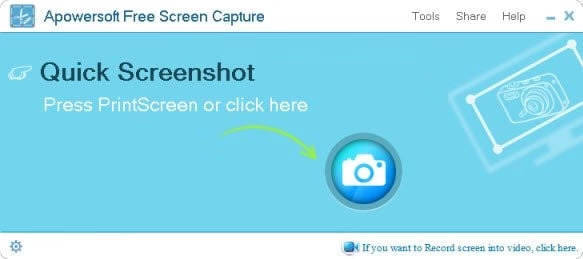
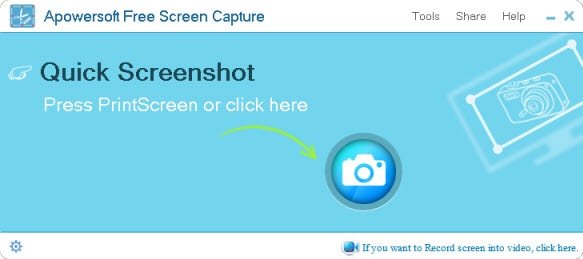
To start with, you just visit screenshot.net, click on “Take Screenshot” and activate Java Applet to run the web version (You may also download a desktop program for offline usage). When the interface pops-up, simply hit the “Quick Screenshot” and you’re good to go. You can use the cross-hairs to drag a region on screen, or hover your mouse over an activate window followed by clicking the mouse – either way will result in a screenshot. Before saving the screenshot, you can use the toolbars to edit it along with texts, lines, shapes, arrows, color styles and more.

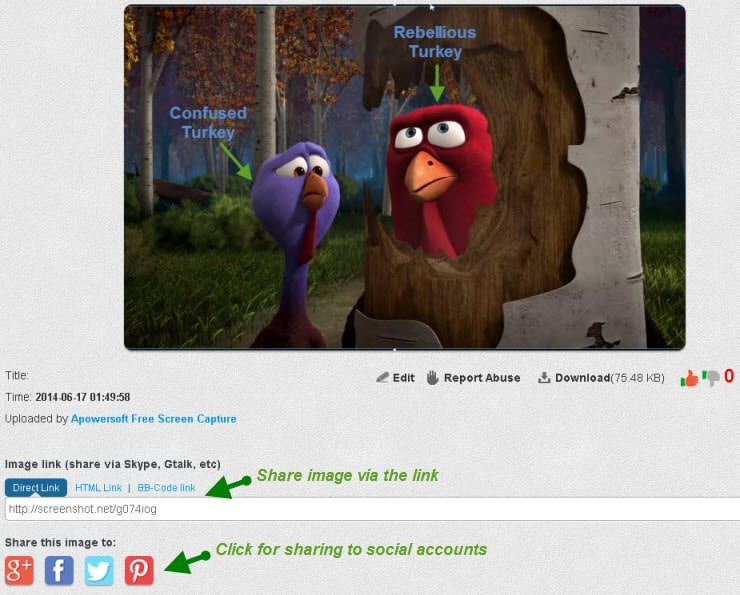
Once you’re done with it, just hit the “Cloud” icon on vertical bar to host the image on free web space. You will get a webpage with your image on it later. You will be given several types of links for posting the cloud-stored image to social accounts, forums, websites and more. On the contrary, if you prefer not to save your image to web, you can also click the “Disk” icon at the end of horizontal bar to save it to local drive.

Tip! Download teamviewer or Use Teamviewer without installing.

#2 Microsoft Snipping Tool

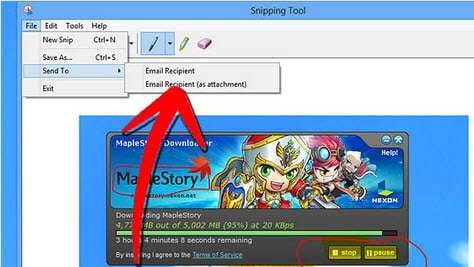
This one actually comes with Windows 8 as default, so there’s also no need to install additional things on your computer. It’s a capable tool that produces screenshots from open windows, free-form areas, the entire screen or others. It also enables users to edit and store images in multiple formats.

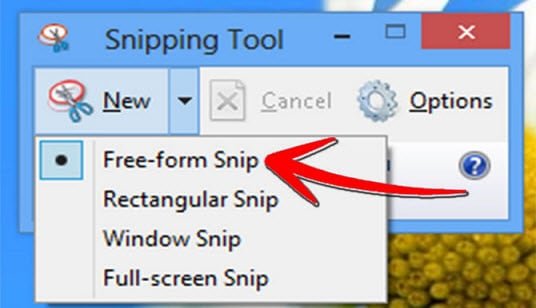
In order to access to this tool, just forward to “Start ” – “All Programs” – “Accessories”, and then click “Snipping Tool”. On the pop-up interface, expend the list of capture options by clicking the down arrow next to “New”, and then you can select the area that you need to capture.

Once done, you will be taken to the clipboard while there’re some simple editing options available to use. After that, you can click “File” menu to preserve your image file or send it via email. That’s it.


#3 PicPick

This tool offers more comprehensive options as compared with the last one. Though it places rich options for different purposes on the interface, they’re well categorized on the ribbon that you can easily navigate to the option you need. PicPick is not a freeware but it does offer free trials. Still, it provides abundant editing options that you may find them take time to learn. You can get it from the official site by visitng picpick.org.

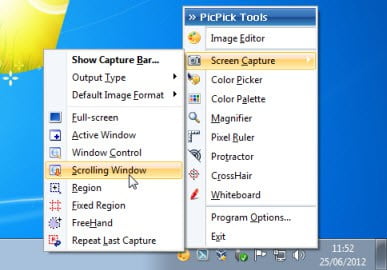
If you decide to use this program and install it properly on your computer, you will find it appears in the task bar, now just right-click on it and navigate to the “Screen Capture” option. Choose a mode you like and click “Ok” to confirm it.

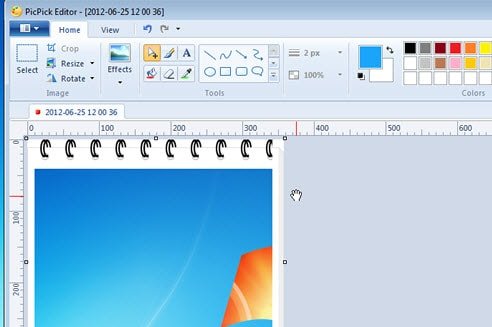
After that, drag an area to produce the screenshot and you will forward to the editor panel. As said, you could see all options available on the ribbon, while you can make full use of them to polish your screenshot. Once it’s complete, just forward to “File menu” besides “Home” to save your image.

As you can see, we have reviewed 3 reliable and efficient screenshot tools for Windows 8 users, they actually also work for other Windows versions. You can pick up the one you like and use it following the instructions. At last, if you still wonder some other good Windows 8 screenshot freeware, please click the link and explore more.

The true cost of web development

Web development is a broad term that refers to the tasks and processes involved in making websites functional. The process mainly consists of a series of coding or programming tasks undertaken to develop websites that can be hosted via the Internet.

Web development also refers to the creation of both websites and web applications. The two are used interchangeably in some circles but their functions and designs differ. Websites consist primarily of static pages with limited functionality. They are informational in nature, displaying the same data to every visitor. Content variations on websites are rare although advanced sites may have more dynamic content on their pages.

By contrast, web applications are designed to do more than display data to users. They are intended for business functions and transactions as well as user interactions. Web applications can be websites by themselves or they can be presented as part of existing websites. The most popular examples of such applications include Facebook, eBay or PayPal.

Websites and web applications can range from simple plain text pages to complex e-commerce sites, electronic business or social network applications. Although web development can be the work of one individual (as in the case of a simple webpage), more often than not, it takes a team of people with various skills to come up with a detailed website. Some of the processes involved in web development include:

  • Web design – Web designers are concerned with the look and feel of a website. Their work deals with the customer-facing part of a website i.e. the fonts, colors, sidebars, page structure and navigation. They are mainly involved in shaping the website’s user interface to improve client experience and interaction.
  • Web programming or development – Web programmers focus their work on how websites work and how customers can get things done on the sites. They may convert designs into code that controls how sites function.
  • Content development – This process deals with what is displayed on the main part of a webpage. Content can be presented in text, video or audio format, or a combination of any of these.
  • Flash development – Flash developers use Adobe Flash software to produce interactive websites featuring graphics, animation, movement and sound.

The cost of web development

With increased competition, individuals and businesses need effective ways of advertising and marketing their services to potential clients. Websites are the best ways of promoting businesses by increasing their market reach and customer base.

The cost of a website is relative to a company’s needs and no two sites are exactly alike. Due to this, prices vary across the board. Generally though, the cost of web development is dependent on the website’s purpose, functionality, appearance, design and customization.

If an individual needs a customized, feature-rich site with add-ons, integration with social sites as well as security features, he or she will have to pay more cash. This is because developing the site will require a lot of analysis, research, consultation, site quality assurance, testing and support. The web development process is often time-consuming and labor intensive requiring input from a team of different professionals.

Basic websites that serve as brochures to advertise company functions cost between $1,000-5,000, while more complex and fully customizable websites can go for $30,000 to $100,000.

The cost of building a mobile application also varies from one developer to another. App developers charge according to the apps’ complexity, features, functionality and integration. The price will vary according to the hosting platform, which can be Android, iOS or Windows. Developing apps for tablets, phones and other mobile devices involves a slightly different process from that employed in developing web applications. This difference is reflected in the cost.

The future versus the past

The cost of web development has gone up over the years. These prices are expected keep increasing as more people find their way online, fuelling demand for better websites. Businesses have also taken competition to new levels on the Internet. Companies are continuously looking for novel ways to attract clients to their sites and to convert this traffic to sales. This has led to the creation of more online shops and marketplaces. Banks and other financial institutions have not been left behind as mobile banking picks up steam. The high demand for websites, applications and web developers shows no signs of abating soon.

Furthermore, the gradual shift from desktops to mobile devices has stimulated the demand for mobile apps as businesses try to bring their services and products closer to their clients. The mobile app sector is quite dynamic and innovation is the name of the game. This makes it difficult to forecast the future prices of apps in mobile markets.

Your guide to data management software

It is well known that employees can spend a lot of their time filing paperwork or searching for files, time that would be put to better use by focusing more on other important aspects of their daily work load. Additionally, many organizations lose important documents through misfiling, misplacement or through accidental file damage.

Due to this, more companies are striving to banish paper from their offices. This would automatically eliminate the arduous process involved in printing, copying, delivering, filing and retrieving paper documents.

However, a solution is at had – companies can simply go paperless by installing data management software.

Data management software or a document management system (DMS) is specially designed computer software that allows businesses to organize, edit, store and manage all of their paperwork in digital or electronic format. The DMS enables users to scan documents, store them in a database and easily retrieve them when needed. They are the perfect solution for businesses looking to increase their efficiency while improving staff productivity and saving on costs and time.

Functions of data management software

The right data management software lets businesses combine their paper and digital documents into a single cohesive unit. This innovative software is mainly used for the following functions:

  • Scanning, capture and conversion of documents – The DMS usually comes equipped with a scanner to capture and convert emails, invoices, PDFs, pictures and other documents to a digital format. This is helpful for businesses since electronic information consumes less space compared to paper documents.
  • Secure storage of business documents – Once documents are scanned and uploaded into the DMS, employees can assign unique file names, keywords or other tracking codes before they are stored on the company database. These can be password-protected to only allow access to authorized employees.
  • Organization and integration of data – The DMS provides a simple way to organize and integrate all business documentation into one system. This way, there is less chance of misplacing or losing important files.
  • Easy access to company information – When the DMS is installed all business information is stored in a centralized repository. This makes it easier for employees to access the information anytime, wherever they are. The documents can be viewed, accessed, modified and shared among different employees within the organization, increasing productivity and efficiency.
  • Provision of data backup – The database can be stored and backed up on in-house or off-site servers eliminating the risk of losing key business information.

Implementing a document management system

When installing a DMS, it is important to select software that meets the unique needs of the business. For a smooth implementation, the following should be taken into account:

  • The software’s storage capacity – Before installing a DMS, business owners should be aware of the system’s storage capacity and they should match this to the size of the organization. Larger companies typically produce more paperwork and require large storage space.
  • Features of the DMS – The features of the DMS should suit business needs. A basic document management system ought to have the ability to capture different file types. Additionally, it should have optical character recognition capability for hassle free file retrieval.
  • System backup and security – Businesses ought to go for software that provides maximum security for their documents.  Password-protection, user identification and data encryption functions all ensure that sensitive company information does not fall into the wrong hands.
  • Integration into the business structure – For a problem-free implementation, the software package should be compatible with the firm’s pre-existing infrastructure. The system must be accessible from all other existing business applications such as fax software or email.
  • Convenience of use – For a seamless adoption among employees, the software should be user friendly with a comprehensible user interface.
  • Company’s IT environment – Business owners ought to put their firms’ IT environment into consideration. It is important to know if the company has the right staff to manage the system and to provide technical support.
  • The company’s budget – A business will also need enough finances to cover the cost of software installation and maintenance plus the purchase of user licenses, among other expenses.

Advantages of data management software

Businesses can achieve these benefits through the implementation of a good DMS:

  • Savings on time and cost – The software eliminates the need for paperwork, enabling companies to save on printing or copying costs as well as storage space. Moreover, the search for documents will only take seconds, saving valuable time.
  • Enhanced data security – Crucial business information is securely stored in the company database and passwords can be used to ensure that only specific employees have access to the information.
  • Easy data access and retrieval – The system allows staff members to retrieve, audit and disseminate documents with minimum difficulties. It is also possible to access the database remotely from different locations.
  • Data backup and recovery – Since the database can be backed up on off-site servers, business information can be recovered and restored in case of accidental document loss.

Data management systems will help a company’s employees save time, money and increase efficiency by erasing mistakes.


Vodafone Campaign to save Ayapaneco Language

0

Language is not just a set of symbols that came into existence whilst it is the entity that united people around the world and helped humanity prosper in countless ways. Many languages are spoken throughout the world, few widely used and many used regionally. Ayapaneco, a language that dates back millennium is at the verge of extinction. As of today, only two people Manuel Segovia and Isidro Velazquez are still able to speak it. However, due to some personal discord they don’t speak with each other for decades.

Vodafone is helping to save Ayapaneco from extinction. Ayapa, Tabasco a little town in Mexico is the origin of Ayapaneco. Vodafone is giving a home to Ayapaneco where Manuel Segovia and Isidro Velazquez can teach Ayapaneco and pass it on to future generations.

What we as individuals can do to save Ayapaneco?

In an ocean every drop counts similarly every effort however small makes a difference. One can learn Ayapaneco by following simple steps as suggested on Ayapaneco.com.

The following steps will help you learn Ayapaneco.

Step 1:

Learn how to use basic social media terms in Ayapaneco.

Step 2:

Learn greeting in Ayapaneco.

Step 3:

Learn to say basic musical terms in Ayapaneco.

Step 4:

Learn to say compliments in Ayapaneco.

This way one adopts a word every time they chat, greet, sing etc. Every time you try using Ayapaneco you are giving life to it.

Adopting Ayapaneco words, it’s easy!

Adopting Ayapaneco words is easy. On Ayapaneco.com use the “Adopt a word now” link to learn words their meaning, pronunciation and if you wish register it. One can either receive a word in random or search for a word in specific. Once the word is selected you can learn its translation, pronunciation and meaning in Ayapaneco. If you want to do more, record and register your word to the world.

Vodafone “Ayapaneco” is providing an opportunity to the worldwide online community to learn and cherish and pass on a dying language. Prof. James Fox, an expert in Linguistics and Anthropology at Stanford University brought the project to pace. He is currently looking after the project.

Good things are missed only in their absence and if good things are not left to perish the fate to miss them never occurs. Vodafone “Ayapaneco” is a noble initiative to save a piece of our world’s culture. Let’s all do our part in saving this dying language and soon we may see its not dying anymore. Let’s wish Ayapaneco a great future. Viva Ayapaneco!

Check out Ayapaneco website:

Follow on twitter and facebook.
This post is brought to you by Vodafone. All opinions are mine

Exit mobile version