Home Blog Page 276

Tool Recommended for Outlook users – Stellar OST to PST Converter

OST to PST Converter aims at converting your Outlook OST file to its corresponding Outlook PST file. Well, the term OST is an acronym for Offline Storage Table, which refers to the offline Outlook data file created by Microsoft Office Outlook, when used in collaboration with Microsoft Exchange Server. In other words, when you set up an Exchange account on Outlook client on your Windows-based computer, your mailbox contents are saved in an OST file (i.e. Outlook.ost) on your computer.

As long as the Internet connectivity is available, the OST file synchronizes with your mailbox stored on the Exchange Server.

Needs to Perform OST to PST Conversion

The OST file, being on your computer, provides you offline access to your mailbox. You can use all the contents in your mailbox exactly how you do it being online. In case you are offline (i.e. no Internet connectivity is there), every single change done in your mailbox (i.e. in the OST file stored on your PC) is also synchronized with the mailbox contents on the server, as the Internet connection is reestablished. As Outlook can now synchronize your local mailbox with the original one stored on the server, you can access all your recently received emails once they download in your Inbox.

In contrast, Microsoft Outlook creates a PST file to store your mailbox contents when collaborated with an IMAP/POP3 based email account, viz. Gmail, Yahoo! Mail, and more, which is portable as well. You can keep it as a backup of your mailbox, and then import it into Outlook whenever required. You can convert your Outlook OST file to its corresponding Outlook PST file to attain features, such as mailbox backup and portability. In fact, both these in-demand features make users convert the OST file to its corresponding PST file. Tips to find the best JPEG to word file converter

About Stellar OST to PST Converter

Stellar OST to PST Converter alleges for the systematic conversion of your Outlook OST file to its corresponding Outlook PST file that you can keep as a backup of your mailbox as well as an import into Outlook client installed on any computer (including Outlook for Mac 2011 and 2008). Remember, Outlook OST file is not portable; no email client can import OST files. Thus, keeping OST file as mailbox backup is not worthwhile.

This Windows-based OST to PST converter thoroughly scans your OST file for all its contents, viz. Emails, Contacts, Calendar, Tasks, Notes, etc., and then generates a preview of all these items in its Outlook-like interface. You can also switch to different Outlook-based themes. The software enables the entire as well as selective mailbox items conversion, aiming at keeping only required items in the backup.

When it comes to select an output format, you get multiple options, viz. EML, MSG, RTF, HTML, and PDF, in addition to the PST file format.

Key Features

  • Reliable and efficient conversion of OST to PST
  • Preview of all contents in the mailbox in 3-pane window
  • Entire as well as the selective conversion of mailbox items
  • Multiple output formats, viz. PST, EML, MSG, RTF, HTML, and PDF
  • Option to save converted PST to a network drive
  • Added support for Windows 8
  • Added support for Outlook 2013 (32 and 64-bit)

How it works

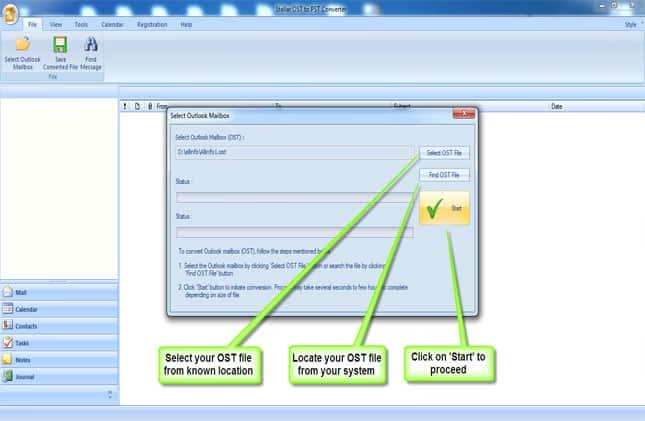
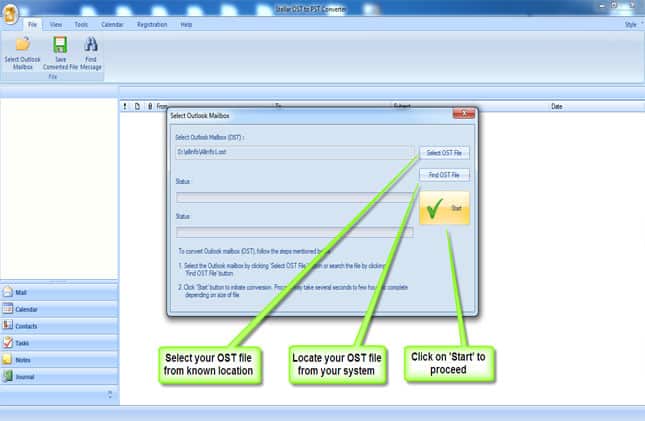
The offline Outlook data file (i.e. Outlook.ost) is stored on your PC, at a specific location that is not the same in each version of Windows. Thus, you should know where the OST file is located on your PC. Well, it does not really matter, especially when the tool to practice is Stellar OST to PST Converter, as you can search for the OST file(s) stored on your computer. You simply need to choose a drive to look in for the OST file(s), and the software will search you the available ones listed in the scan result. This surely eases the conversion by a bit, as you do not have to waste your time looking for the OST file on your computer. In fact, the Find OST option is convenient for laymen, as they may not know the location of the OST file.
ost to pst converter

An option for manual selection of the target OST file is also provided, which is more convenient and recommended if you know the exact location of the OST file, which is to be converted.

With the right OST file selected, I suggest going for the mailbox preview. Well, the software first will scan the data file selected and then lands you at a three-pane preview screen. You can watch a preview of each item in the mailbox right there, in the preview screen. For this, you need to select a folder in the folder hierarchy shown to the left, which reveals its contents to the right.
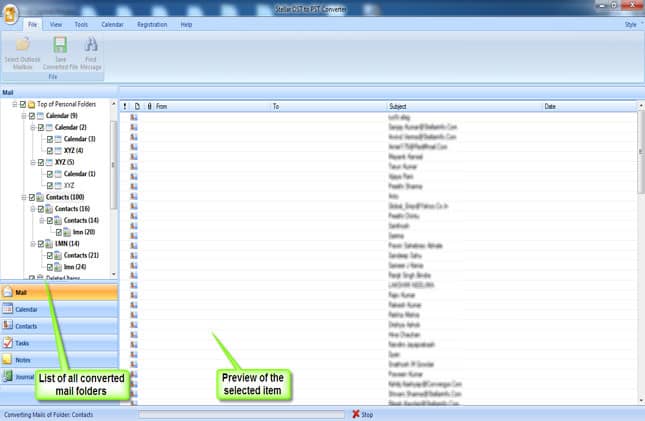
Select these items individually for the preview at the bottom. Searching for an individual message in the mailbox is also enabled. If you want to convert only a few folders in the mailbox, the software enables you doing it. For the same, you need to check the checkboxes in front of the respective folders.
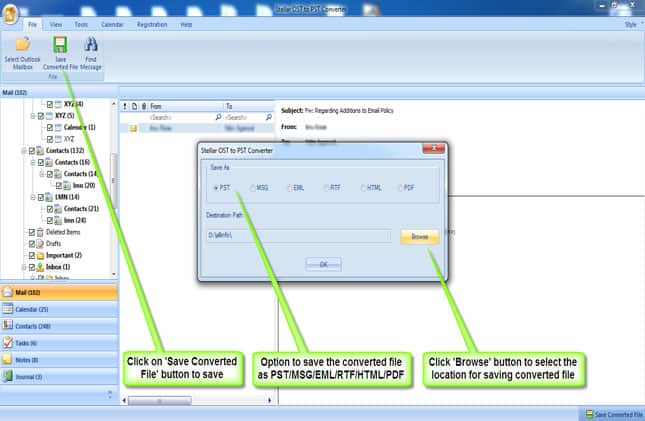
With the required folders selected in the folders hierarchy, click the Save Converted File option in the software toolbar, and then choose PST as the output file format. Another key feature of the software is that it lets you save the converted PST file at the desired location.

You may choose any of the other available file formats, in case you need any of them at a later time.

Pros

  • Simple and Intuitive interface
  • Outlook-like interface
  • Easy to convert OST to PST
  • Preview of the mailbox items
  • Selective conversion of the mailbox items
  • Multiple output formats
  • Well-arranged emails

Cons

  • Costly for individuals

Availability

  • The Administrator license of the software is available for $99.
  • The Technician license of the software is available for $275.

You can download the demo version here and/or purchase the full version here.

Why Use Stellar OST to PST Converter?

Stellar OST to PST Converter is blessed with the brand name Stellar – ranked #1 organization that specializes in data recovery software and services. The organization has a strong presence across the globe from over two decades and has more than 2 million satisfied customers worldwide.

This ISO 9001:2008 certified organization deals in multiple domains, viz. data recovery from various types of storage media, email conversion and recovery/repair tools, database recovery and repair tools, media files recovery and file-format conversion, password recovery, and more.

Stellar OST to PST Converter is proficient in the conversion of Outlook OST file to its corresponding Outlook PST file in a systematic and reliable way. The software quickly searches for the OST file(s) on your computer and scans it thoroughly. While running on Windows-based computers, it performs efficiently and generates a preview of the mailbox items.

Note: The software is based on three key steps, i.e. Scan, Preview, and Convert.
The selective conversion feature of Stellar OST to PST Converter makes it more suitable for your needs, as you can convert only required items in the OST file to make them available in the PST file. Thus, the software is recommended for such tasks and worth to have.


ASUS MeMO Pad 7- A Super Tablet for Super Family

0

ASUS a leading brand in consumer notebooks, desktops, all in one PCs, optical drives and many other products presents a brand new value tablet ASUS MeMO Pad 7. This 7 inch device comes with Android 4.4 KitKat OS, ZenUI and a dashing 64-bit Intel® Atom™ quad core CPU. ASUS MeMO Pad 7 loaded with such awesome features at an affordable price can turn your family into a family with super powers!

What’s new in the ASUS MeMO Pad 7?

ZenUI Improved User Experience

The ASUS MeMO Pad 7 is equipped with a brand new User Interface (UI) ZenUI a technology built to match your needs. ASUS What’s Next reminds you about the important tasks ahead and helps you focus. Adding tasks that are to be done at a time in future can be added to Do It Later feature for proper organization.

PixelMaster

A technology that combines optical, hardware and software design to deliver high quality imaging. With a 5MP rear camera and 2MP front camera this ASUS built technology is available at your fingertips to capture professional quality images.

Beautiful Thin and Light Design

With a very thin and light design the ASUS MeMO Pad 7 weighs only 295 grams. Comprising a brilliant 1280 x 800 HD 10 point multi touch display and a narrow bezel the tablet provides an amazing user experience.

Apart from the above features, ASUS MeMO Pad 7 comes with Miracast and aptX CSR Bluetooth technology for data transfer and stereo speakers with Sonic Master technology for high quality audio. ASUS MeMO Pad 7 can endure upto 9 hours of battery life for video playback and web surfing. Adding ASUS MeMO Pad 7 to your life will help you organize better, enjoy your life to the fullest and turn your family into a Family with super powers!

Specifications

  • 5 MP rear and 2 MP front camera.
  • 64-bit CPU Intel® Atom™ Z3745 quad-core processor.
  • 7 inch HD 1280 x 800 IPS display.
  • Brand new thin and light 295g design, narrow bezel.
  • Brand New Zen UI Improved User Experience.
  • Up to 9 hours battery life.

ASUS MeMO Pad 7 comes in white, black, yellow, red, blue and will be available in mid-June, 2014.

Post brought to you by Asus. All opinions are mine.

The Rough Guide to Wearable Tech

Amazon is getting ahead of the wearable tech curve – the online shopping retailer recently unveiled a store dedicated to Wearable Technology. So if you’re still trying to wrap your head around what exactly constitutes wearable technology and why it’s suddenly on the lips of so many people, then you’re reading the right article.

Here are the things you need to know about the market that Credit Suisse believes will be worth $50 billion by 2018:

What is Wearable Technology?

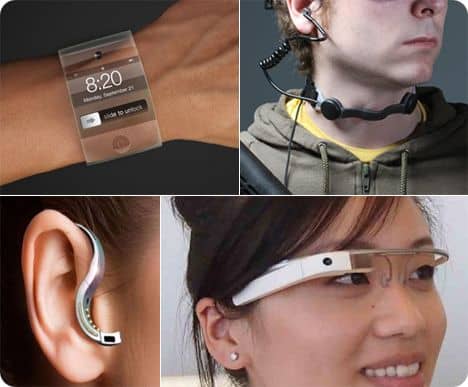
Wearable technology is any kind of electronic what that calculates or processes information and can be worn by the user. Most commonly, that includes accessories such as watches and glasses, but has also been expanded into jewellery, clothing, and even tattoos.

The History of Wearables

Even though the term has only recently been coined, wearable technology is not a new concept. The medical field has been using wearable technology since the 1960s when Seymour B. London invented the automatic blood pressure cuff. Calculator watches and Bluetooth earpieces are also examples of wearable technology that existed before the name came into common parlance.

In 1981, Steve Mann attached a computer to a backpack to help him control photographic equipment. He began a field of study known as computational photography and wearable computing, which is slightly more complicated than what we refer to as wearable technology.

In 1994, the University of Toronto released a wrist computer with a half-QWERTY keyboard, which paved the way for IBM researchers to create a belt computer. That same year, Steve Mann developed a head-mounted webcam that wirelessly transmitted video to the Internet in near-real-time.

What are the benefits of wearable tech?

Technology is general enhances the capabilities of humans, improving communication, memory, sensing or computing. Being able to wear it gives the user more control and consistent interaction with the technology.

You may have worn a pedometer (basic wearable activity-tracking) or even a Nike FuelBand could we substitute FitBit as Nike’s disbanded its FuelBand team (more advanced biometric tracking). In the medical field, wearable insulin monitors constantly screen the blood sugar levels of diabetics and automatically dose them with insulin when necessary. These machines help people keep track of their health and then processes that data into actionable information – whether it’s not walking enough or preventing the dangers of high blood sugar.

Surgeons have also started using Google Glass during surgery to share their methods with students and other surgeons, without affecting the procedure.

Well-designed pieces have the advantage of not interfering with everyday activities and even augmenting them. Imagine you need directions – instead of looking down at your phone, Google Glass may be able to superimpose the directions into your field of vision.

What are the disadvantages of wearable tech?

There are a few issues that have been raised as wearable technology becomes more ubiquitous.

Social

Technology has already changed the way we interact with people and constantly wearing it may mean we will have even more distractions in social situations. Now, people can put their phones away or shut down their computers. Tomorrow, watches or contact lenses may constantly be worn making consciously disconnecting all the more necessary.

Security and privacy

People are concerned about being continually surveilled and recorded by cameras that are mounted on wearable technology.

Wearable technology, as they are always in the public space, will be easy targets for hacking. If they carry sensitive data, this can easily lead to identity theft and other security issues.

Size and price

Most wearable pieces aren’t actually that aesthetically pleasing to wear. They are often large, heavy and expensive which is likely a major reason they haven’t been widely adapted. The ones that have found traction are inconspicuous pieces like the Jawbone? and the Fitbit.

The Future of Wearables

Wearables are still considered a new area of consumer electronics so innovations are going to continue coming. Wearable technology is going to continue becoming smaller and more adapted to specific needs. Here are some interesting developments in Wearables:

Tattoos

Researchers in the United States have developed a device that can embed patients’ medical information into their skin. It can even release medication.

Printed Electronics

In the same vein as tattooed technology, Cambridge tech company Plastic Logic recently worked with ISORG to develop the first plastic image sensor. Printed tech is still in its early stages, but it has a number of wearable applications. Indro Mukerjee, CEO, Plastic Logic: ‘This confirms the real excitement and focus on technology breakthroughs to enable new ways to interact with consumer and industrial electronics devices.

Bio-security

These are the sorts of technologies that are meant to help deal with the security issue that Wearables face. Nymi, a wristband developed by a Toronto start-up, confirms the wearer’s identity using their heartbeat. The user’s heartbeat is measured using an electrocardiogram and reads the signature that is unique to every person. This biosignature is then used to lock and unlock multiple devices.

Wearable technology still has a long way to go before mass adoption occurs. It needs to be unobtrusive, affordable and assuage the numerous concerns consumers have related to security and social interaction. But the technology is coming and it’s exciting to see where it goes.


About the author

Alyssa James is a freelance writer with over four years of research and writing experience. Her work has appeared in the Globe and Mail, Travel + Escape, Matador Network, peer-reviewed journals and local newspapers. For more information, check out her website Alyssa Writes.

F-Secure “Looking for Freedom” – A Movement for Digital Freedom

0

The whole world is moving ahead on the internet, the new generation relies upon technology for almost all the regular tasks, whether it is to communicate with others through online chat or check social media updates, paying bills or transferring the money. But what about the privacy? Anybody tracing our footprints? The answer is “Yes”, our private data is being gathered without our permission, Mikko Hyppönen and David Hasselhoff together started a crowdsourcing project to take some action against this and i.e. Looking for Freedom.

Looking for Freedom a Keynote, a Movement, a Manifesto

If you are privacy concerned and strongly hate getting spied then here is a good opportunity to take some against it. Mikko Hyppönen and David Hasselhoff have just initiated a crowdsourcing project regarding digital freedom at re:publica n Berlin on May, 6th 2014. All they want to you to participate in this editing of international manifest for digital freedom at the public wiki www.f-secure.com/digitalfreedom.

Looking for Freedom project will focus upon 4 themes namely mass surveillance, digital persecution, digital colonization and right of access, movement and speech.

F-Secure, which provides the best security solutions has made a platform for this project which is the part of Creative-Commons license, Looking for Freedom project is treated as a global initiative for digital movement to support digital freedom and hence the participant’s opinion matters much to fight against digital information tracing.

Looking for Freedom- A Keynote

Well-known security and privacy expert of F-Secure Mikko Hyppönen along with David Hasselhoff who is a Freedome ambassador of F-Secure presented a joint keynote on privacy and digital freedom and began the “Looking for Freedom” project. Watch the keynote presentation on YouTube.

Looking for Freedom- The Movement

The project “Looking for Freedom” has been initiated and now it’s your turn to write a manifest to be a part of this movement. The movement has already started from May 6th and will receive manifestos till 30th June. Check out “Looking for Freedom” homepage for more details, you can follow the movement via Twitter and share your opinion.

Using the Power of Internet for first time investments

0

Many people mistakenly believe that learning how to invest is a skill reserved for a few special individuals. This fallacy is coupled with the assumption that investing money is a difficult, arduous and laborious process.

The truth is that anyone can reap the great benefits that come with investing. The key is to learn and master all the tricks of the trade. Thanks to the Internet, individuals can easily acquire the necessary skills and learn how to put their money to work for them. The Internet has simplified this process by making it easy to open brokerage accounts as well as providing access to free information.

Where to start

Prior to embarking on the investment journey, first-time investors need to spend some time learning the ins and outs of the trade.

The initial step should be getting a good grasp of the investment jargon. An Investment has its own language and it can be hard to understand the common terms unless an individual spends time learning them. Websites such as InvestorWords and Investopedia are crucial allies for those who are just starting out with investing online. The Securities and Exchange Commission also has an excellent website offering invaluable tips and tools to investors.

It is crucial for new online investors to open brokerage accounts with trusted brokers. The Internet is full of unscrupulous people who are always ready to con novice investors. Before giving money to anyone over the Internet, individuals should run the brokerage firm or broker through the Financial Industry Regulatory Authority’s online BrokerCheck tool to verify their validity. Alternatively, investors should conduct their own research or ask for advice from friends, relatives and financial advisors before investing with a broker.

Those who want to get started on online investment should first practice trading with fake money. This allows them to get a feel of how trading works while eliminating the risk of losing cash. Once investors grasp basic trading skills and gain enough confidence, they can graduate to using real money. Several online brokers give beginners the chance to first practice trading with fake money. Alternatively, investors can make use of online trading simulators such as Icarra.

Investment opportunities available on the Internet

The most common investment opportunities available online include:

  • Bonds. When individuals purchase bonds, they are lending their money to particular governments or companies who in turn agree to give interest on the investor’s money. Bonds are attractive due to their relative stability and safety. However, since they are low-risk investments, returns are normally minimal.
  • Shares or equities. When trading shares, individuals become part owners of certain companies and as such, they can receive any profits paid out by the businesses (dividends). Shares are quite volatile and can fluctuate wildly making them high-risk investments albeit with high returns.
  • Mutual funds. New investors can decide to pool their money with other investors then appoint financial managers to manage those funds. These are referred to as mutual funds. The group of investors can then decide to put their money in equities, real estate, bonds or in other investment opportunities.

Don’t miss: Digital Money and the Future of Payment

What to avoid when investing online

As mentioned before, the Internet is home to some fraudulent investment promoters, and investors should always be on their guard. First-time investors should be careful not to make the following mistakes:

  • Investing all their savings online. Before investing, individuals should first set aside substantial emergency funds to cushion them should disaster strike.
  • Putting all eggs in one basket. Diversification of the investment portfolio is crucial since it spreads risk while offering better chances of cashing in on returns.
  • Being ignorant about market changes. First time investors should take the time to keep informed about company stocks and market behavior. This information can come in handy when buying or selling stocks.
  • Careless online behavior. It is very important to be careful when trading online. Care should be taken to only use trustworthy brokers and secure websites. A good antivirus is also a crucial tool for investors to have.

Investment planning and its benefits

Novice online investors ought to take advantage of investment planning to maximize their investments. They should also consider engaging the services of investment advisors to guide them through the investment planning process.

Investment planning can help both novice and experienced investors to clearly define their financial goals and objectives. Additionally, it helps individuals to determine their risk comfort levels and build comprehensive investment portfolios. In a nutshell, investment planning is vital for those who wish to effectively manage their wealth investments while obtaining maximum returns.

Why are Book Clubs Moving Online?

0

The traditional book club gives off a number of images, most commonly those of groups sitting in

uncomfortable chairs discussing the latest book over a cup of tea and some biscuits, discussing why certain characters were so horrible or how they wished the ending had been slightly different. The thing is, the traditional book club – like most traditions it seems these days – appears to be changing from the printed book to the online alternative in the form of eBooks.

The e-reader has become one of the latest must-have devices, allowing book lovers to download as many titles as they like quickly and easily and providing opportunities for people to find the latest copies from their favourite authors or genres online just by logging on to their preferred website, like the eBooks by Sainsbury’s account for example, and they can be reading their new book in a matter of seconds – ideal for the modern non-stop members of the public who only find the time to read during their commutes to and from the workplace where a slimline, lightweight device is much more practical than the traditional paperback.

Non-stop lifestyle

Is just one of the reasons why the traditional book club is changing. Previously, people had the spare time to invite people round to their homes to discuss the latest copy in their living room or over the dining room table; but today they simply don’t have the time to tidy up their homes, arrange alternative plans for their children’s extracurricular activities and even to actually read the book itself because they just can’t find the time to sit back and relax with this week’s title.

Convenience of time

Having been given the title of this week’s book, it can be difficult to find the time to go to the local bookshop to find a copy, especially if you work on the other side of town for example, but having access to eBooks has taken away this issue when all you need is an Internet connection on your device or a lead to connect it to a machine that does. This Internet connection also allows readers to expand the traditional book club into the wider world, enabling more people to get involved in discussions about specific titles, genres and authors than ever before thanks to social media sites and the ability for readers to post on their own accounts when they’ve finished reading their latest book to tell their friends how great that book is.

Social Networking

The likes of Facebook and Twitter have opened the doors to new book club members, as such, with people now able to like the page associated with a certain publication or author or to use a specific hashtag to get into a discussion; or even to find out more about certain characters from the book they’ve read or to try and clear up any confusion over what happened to a character or why the plot panned out the way it did.

Recommendations and review

These social networks can also be used as a form of discovery for readers on the hunt for something new to get their teeth into. If you search through the pages, comments and Tweets, you’ll find some opinions, both positive and negative, from experts as well as people just like you so you can find out what other people think of the publication before you commit to buying it.

Ease of use and privacy.

You get some funny looks from staff when you stand in a shop flicking through the pages of a book you’re thinking about buying, trying to establish whether it’s for you or not, but many eBooks allow readers to download a sample of the book for free without an obligation of buying so you can either hit the button if you’re a fan or give it a go without downloading if you realise it’s not the book for you.

The Changing Face of Social Media Marketing

0

It’s taken a few years for businesses to realize the potential in marketing on social media platforms and, though momentum is gaining, we’re still trying to find the way to use this medium to it’s maximum advantage for business. Social media and consumer behavior are in a constant state of flux, but there are some time-tested guidelines that can help you ride the sea of change, wherever it may flow.

Keep it Simple

People are bombarded with information every day. In order for you to stand out and get your message across in a meaningful way, it pays to keep it simple. Focus your efforts with concise content that’s augmented with visual images like short video, infographics and relevant photos that tell viewers at a glance what you’re about.

Diversify

As the saying goes, never put all of your eggs in one basket. Consumers interact differently with different platforms. Learn what methods work best with each medium and coordinate a campaign that encompasses the full spectrum. Some examples are: using email to inform current customers of new products and promotions, using social media profiles to encourage direct interaction and using business networking platforms to gain industry-specific contacts.

Be Diligent

Setting up a social media marketing campaign isn’t a one-shot deal; in order for it to work, you have to learn to work with it. Analyze data using an algorithm on a regular basis, check your social media feeds and inbox several times a day and respond in a timely manner, especially when receiving negative feedback.

Adapt

Make an attempt to keep abreast of the latest developments in the advertising industry, then retool and redirect your efforts as necessary to stay ahead of the competition. 

Keeping up with marketing trends in the Information Age is challenging for the average business owner. Luckily, there are professionals who track these trends and make it their business to help you optimize your website to be more competitive in an electronic global market. For example, you can visit UnifiedSocial.com or a similar website to get professional help implementing the latest industry best practices for utilizing social media effectively in your overall marketing campaign.

Exit mobile version