Home Blog Page 161

Acquire: All-in-One Multichannel Communication Platform to Enhance Customer Engagement

The world of human-to-human interaction has resulted in a rapid change over the last two decades. In the 1990s, it was unheard of to be able to make video calls or indulge in online chats. This changed with a major messaging app and only strengthened through the years.
Acquire

In the early 2000s, a major video calling app made way for person-to-person interaction. Since then, human interaction via the web has never looked back. This article will cover one of the most popular all-in-one communications apps used by some of the world’s topmost brands, like Acquire.

What is Acquire?

Acquire, as opposed to other messaging apps, is different. It attracts a corporate audience. Other apps are more casual-oriented, i.e. usually used for family and friend-chat purposes. It is more detail-oriented in terms of official business usage.

The AI-based sales bot can derive action to customer queries instantaneously. It’s something that will aid in customer-enquiry and make your business more responsive. Chatbots are an aspect of this modern-day app which ensures that when agents are not available 24/7 to solve customer queries,  an auto-bot is. The chatbot can be designed to answer basic queries.

Training the bot is relatively-easy and any sales expert can create basic Q&A’s, usually addressed by sales. Bots are available 24/7. It’s an extension of your company. You can make a sales pitch, regardless of the time of night.  Chatbots resolve the hindrance of working hours restrictions.

Co-Browsing

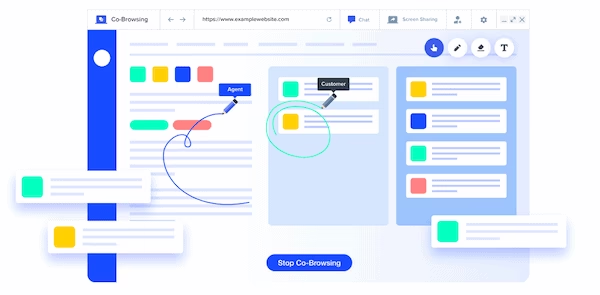
Co-browsing is a state-of-the-art feature from Acquire. Whenever you’re handling a customer’s field questions, there may arrive a time when the customer has something on his screen that he’s unable to explain.

In such times, there’s the option of cobrowse – meaning that you’re able to see your customer’s screen and help him decode the problem. It’s something you don’t find in other messaging apps because they’re not oriented for business purposes.  Acquire’s problem-solving does just that. It’s problem-solving of this extent that makes Acquire Cobrowse stand out in terms of its easy-to-use navigation and helpful list of features for any business.

Campaigning

Campaigning is a truly important aspect of 21st-century business. Today’s times are not about hoardings that attract customers but rather, require a personal touch. You need people to open their mobiles and emails to see your sales pitch.

Campaigning on Acquire can be tailor-made for your business. You can deliver relevant content to potential customers, thereby enabling the extension of your business via Acquire.

If you’re unable to read customer behaviour, then you cannot cater campaigns that convert. With Acquire, you can segment customer-based behaviour and thereof create campaigns that will look most relevant to the customer you’re targeting and thus will have greater chances of converting.

Analytics

The most important aspect of any sales-oriented company is the result of their daily practices. Analytics to Acquire the help you understand whether your sales campaigns are working or not; moreover, you can also keep track of whether your Autobot is able to satisfy potential customers with automated messages prepared in advance. If certain questions pop up frequently, their answers can be added to the chatbot, thereby making it a much stronger platform to gain customers.

Customer Engagement – Problems and Delivery

Acquire Live Chat is an option that enables you to deal with customer queries when they themselves don’t know how to approach you. The biggest problem in online business is that unlike physical shops, the customer often hesitates to approach you. However, with options like Live Chat  – you can reach out to the customer rather than the other way around.

Multiple employees can be enabled to deal with one single customer. This is something that is totally unique to Acquire. Often businesses are unable to deal with more than one customer query when the customer has questions pertaining to different departments. However, with Acquire – multiple team members can help solve customer enquiries.

It provides a timeline for helping to seek team notes and customer interaction – laid out in detail to get a sense of how engaging your business is with clients.

It makes work easier because it doesn’t require you to engage data analytics from an outside source but rather does that for you. Customer engagement and effectiveness data is custom-prepared by Acquire – which helps you study how satisfied your customers are and what are your go-to problem areas.

Keeping track of your agents is also plausible since they’re truly the heart and soul of your business- what they communicate returns back into whether the customer is retained happy or decides to move on. Live monitoring on agent’s reverts to customer queries is made possible via Acquire – allowing you to be in the front seat and know about every possible error on part of the agent in customer engagement. Once you know the problem areas, it’s easier to work upon them and sort it out since you have a laid-out analytical study of how your business is doing on Acquire.

Conclusion – Is Acquire right for your business?

It is the perfect go-to application to enhance the customer’s engagement with your business. It’s not merely a helpful app that helps rather efficiently enables you to keep a track on customer’s behaviour, reach out to them at the right time, study customer satisfaction stats through attractive graphs and improve your basic business sales.

The unique abilities like co-browsing and campaigns are just icing on the cake – always putting yourself a step ahead in tapping potential customers to your business. Acquire is not merely an application to engage with customers, but it has a science which allows your business to improve by leaps and bounds.

The problem-solving part of applications like Acquire or, in the same domain, is not remotely close to what Acquire has been able to provide and consistently improve upon. Thus, it has become the no.1 choice for some of the world’s most renowned and trusted brands. It is without doubt the most efficient multichannel communications platform currently available for your business.

Check out: Acquire.io

4 Great Little-Known Online Games

0

Well, maybe little-known in regards to the general public. Aficionados of their particular genre are surely well-aware of their existence. However, if you’re a casual player, and are looking to embark on new gaming experiences, but aren’t too sure as to what kind of game you should endeavor to master, maybe this article will prove to be useful. It lists 4 different games in 4 different genres that you might not know about. And, we all know that new things are often exciting, so why not give something novel a try.

There is no question that smartphones have changed the gaming industry. They’ve probably had a lesser impact than consoles and personal computers, but their impression is one that shouldn’t be underestimated. Because, while these other methods of playing games focus on stunning graphics and complex gameplay, games that can be played on your phone are intended to be easy and fun.

And, while that might be true for most games available for mobile phones, some can be intricate and multifaceted. Below we offer a selection of games from both worlds.

Book of Dead – Online Casino Game

Perhaps, one of the most popular slots in existence. That’s not a small feat, as there’s allegedly close to five thousand of them in the digital sphere. This 2014, Play’n Go release is a staple at most online casinos, and is tied in with many bonuses, due to its notoriety.

It’s similar to Book of Ra, one of the more popular physical slot machines, so much so that some have called it a rip-off. There are also similarities to the game – Lord of The Ocean. But, its resemblance to these classics doesn’t take away from the fact that the game itself is terrific. If you’ve never played a modern slot game, this is a great place to start. The game can be found at platforms such as Wildz Indian Casino, one of the best places to play games for real money.

Letter Quest: Grimm’s Journey – Puzzle Game

If you are a fan of word-forming puzzle games and loved the highly-popular Bookworm or its sequel Bookworm Adventures, then you’ll likely enjoy this title as well. You spell words to fight through more than 30 levels in this super-addictive romp.

Join the two title characters, Grimm and Rose, on their amazing journey through a world filled with treasures and monsters. There is little to no story to be found here, and the dictionary could be bigger, but it’s free, you can play each level in four different ways, and it allows for character customization. All in all, it’s a great time-waster.

Ticket to Ride – Board Game

Perhaps you remember or have played this one throughout the years. It came out 16 years ago and was known under a few different names. It’s a German-style board game that was created by Alan R. Moon, one of the more famous board game designers. And, as soon as it hit the market it began winning major awards left and right and selling in huge quantities. Today, the number of copies sold is over 8 million. 

Now, the game is available in mobile form for both Android and iOS. You can travel the world from Europe to India while going through China and tackling challenges at every step by purchasing cards, each with their specific set of rules. You can play against players from all over the globe and no game is ever the same.

World of Kings – Mobile MMORPG

Set in the fantasy realm of Ideon, World of Kings is a World of Warcraft-inspired game that was developed by Chinese studio ZLOONG and released in 2019. The game features an impressive open world with a variety of playable races.

Everything in this game has a very obvious and deliberate World of Warcraft feel. Even the soundtrack is created by the same composer, Russell Brower. But that aside, it has good gameplay, top-notch production value, varied PvP options, and many more things to like. It’s also excellently optimized for mobile play. If you crave some outer-worldly action, this one’s for you.

Bitcoin Forks Explained: A Short Guide to Bitcoin Forks

0

Forks are a big deal for cryptocurrencies like Bitcoin. They can split communities, play havoc with prices, and determine the future path of a cryptocurrency. Software ‘forks’ are a completely new concept for most of us and go against our intuition of how traditional software products develop. This can leave you at a disadvantage in the Bitcoin market.

So, what exactly is a Bitcoin fork? For most of us, knowing the technical details of hard forks and soft forks probably isn’t necessary. But having a clear picture of what forks are, what they mean for the Bitcoin price, and how they might affect you will come in very handy.

Upgrading Software

Software applications need upgrading regularly. Sometimes bugs need to be fixed, updates are required for new innovations, or core changes are needed for better performance. These upgrades require changing the source code of the software. For traditional software systems, this is quite straightforward. Whoever is running software just upgrades their system. Or, in the case of a consumer software application, sends an upgrade to all their customers (e.g. updating your phone).

Upgrading a Network Protocol

With Bitcoin, it’s a little more complicated. Bitcoin is a protocol, meaning it is a set of rules that a network of Bitcoin users should follow in order to come to an agreement about who owns how much Bitcoin on the network. Upgrading the Bitcoin software means upgrading this set of rules.

As Bitcoin operates as a decentralized network with no central authority, things get complicated pretty quickly. As soon as you think about upgrading the protocol, some difficult questions quickly arise. Things like:

  • Who writes the code for the upgrades?
  • Does everyone have to upgrade at the same time?
  • What if they don’t?

When it comes to Bitcoin, these questions don’t have easy answers. Firstly, anyone can, theoretically, write a code for Bitcoin upgrades (even you!). Lots of people have done it. As long as you have a great idea and can get it out to the community, you can be a part of the process.

The difficult task, though, is getting everyone to agree to the upgrade. Bitcoin has around 3-6 million users. Getting large groups of people to agree on anything is extremely difficult.

In practice, the best the Bitcoin Network can do is get ‘some’ or ‘most’ people to upgrade their Bitcoin protocol. When they do, you end up with two groups of users: those who have upgraded their software, and those who haven’t.

Tip! Use this tool to self-destructing create picture messages

Fork in the Road: Bitcoin Forks

This point is where the Bitcoin Forks happens. Some proportion of the users has upgraded their Bitcoin software, and the rest haven’t. You can imagine the network as splitting, or forking, at that moment in time, from one group with everyone running the same version of the software, to two groups running different versions.

Hard Fork

If the new software upgrade is incompatible with the old software, a hard fork occurs. The two groups can no longer reach an agreement on valid Bitcoin transactions. The computers running the old software see transactions from the upgraded ones as invalid. This essentially leaves you with two separate networks that share a history up until the point of the fork, then never agree with each other again.

An example of a hard fork is the Bitcoin Cash. Some section of the Bitcoin community believed that it was necessary to increase the number of transactions the Bitcoin network could handle by increasing the size of each ‘block’ in the Bitcoin blockchain. Some developers created a patch and proposed it to the wider Bitcoin community. Most of the Bitcoin network disagreed and thought increasing the block size was a bad idea for a number of reasons. They refused to upgrade, and when the update happened, there was a hard fork in the Bitcoin network.

Soft Fork

Not all protocol upgrades make the new and old versions of software incompatible with one another. If the new changes restrict or tighten the rules, then transactions from newly upgraded nodes will be within the bounds of the old, more relaxed rules.

For example, imagine an upgrade that’s the opposite of Bitcoin Cash, where the network tries to decrease the block size from 1MB to 0.5MB. All new blocks created by the upgraded nodes will be under 0.5MB, which is also under 1MB, and valid under the old rules too. Even if you haven’t upgraded, you can still participate in the network.

The only catch is that blocks generated by the old nodes will be rejected by the ones that have upgraded. This is why you still need a majority of miners (a miner-generated soft fork) or users (a user-generated soft fork) to have a successful soft fork.

In general, soft forks are less risky and easier to pull off than hard forks, but hard forks have more potential to make big changes to the protocol.

Why Forks Are Necessary

Upgrading the rules of the Bitcoin network is a difficult but necessary process. New ideas come along, better technology is developed, and the needs of users change. When they do, these changes need to be implemented in the form of forks. Otherwise, the Bitcoin protocol would never change and never update. We’d be stuck with the same transaction rate, the same scalability and the same features forever.

What Forks Mean for Regular Users

Forks have all sorts of effects on Bitcoin. Firstly, they affect price. When a big fork is coming up, there’s always a risk it might fail and buyers get nervous. You can never be sure that enough users or miners will upgrade to ensure success.

Then there’s the fact that hard forks create two parallel versions of the Bitcoin blockchain, and anyone that owns Bitcoin will end up with two different coins. If you owned Bitcoin before the Bitcoin Cash hard fork, you ended up with equal amounts of Bitcoin and Bitcoin Cash after the fork.

Forks are extremely important to Bitcoin’s development. Don’t be afraid next time you hear of one, you may well end up with a new type of cryptocurrency for free!

6 Amazing Features of Charter Spectrum Services

0

Charter Spectrum always struggles to assist its customers in every aspect. It offers many deals which are made by keeping in consideration every type of the customer. The demand of the family consisting of parents and children would be far different from the demand of the multinational company. Charter Spectrum does not only facilitate local public with its services but they also deal with bigger industries and business. A family containing parents and children would want to avail small internet packages.  A hotel would prefer to avail of packages offering unlimited internet data to deliver their customers with the best services. Therefore, Charter Spectrum is unique in this way by offering deals according to the diverse types of the customers. Its amazing services are discussed below along with astonishing features

Charter Spectrum Landline

Charter Spectrum landline services are well-recognized for their affordable rates and it also offers up to 28 amazing features which you can’t find in any other landline service. By availing Charter Spectrum voice services, you can make calls without having any stress of hidden taxes or charges.

Accept selected calls

Receive calls only from those callers you want to talk; rest of the callers will get the message that you are not receiving the call.

3-way calling

This feature will allow you to simultaneously make calls to other users.

Call waiting with caller ID

This feature lets you know that who is caller while you are on another call.

Voice online manager

This feature will assist you in managing your home phone.

Readable voicemail

Get your messages in an audio and full transcript of your voice messages by availing this feature.

Charter Spectrum Internet

Charter Spectrum internet provides incredible internet bundles which will be appropriate for all the devices in your home. Charter Spectrum internet offers 20 times better service than any other old internet service provider. It provides unlimited data usage. It is data-cap free. It costs starts 29.99 dollars per month for the period of one year when bundled.

Charter Spectrum Cable TV

You can enjoy more channels with incredible HD quality by getting Charter Spectrum Cable TV. You just need to subscribe the amazing Spectrum Cable TV and get entertained by the amazing features which you can’t find in any cable provider. You can get the chance to watch your favourite movies, TV shows, seasons, music, photos, and HD videos by getting the amazing Charter TV services. Charter Spectrum cable provides more than 1500 HD channels on-demand.

Best Bundle Packages are the authorized reseller which facilitates people by offering the incredible and high-quality services of necessary IT services of the modern time. It has always been their first priority to facilitate their customers with the best services and fulfill their demands and needs. We believe that there is always room for improvement; therefore we always try to improve our services and update our technologies which make our services unique all over the USA.

Top 5 Telemarketing Software to Increase Lead Generation and Conversion

0

Telemarketing remains one of the most popular types of digital marketing today. For example, 68% of B2B custom software development companies use human interactions, such as telemarketing, in their marketing activities because prospects respond better to human-based outreach. Almost 60% of Fortune 500 marketing executives believe telemarketing is a “very effective” way to generate leads, while 90% believe it is “effective.” To avoid missing out on this lead generation channel and maximize its ROI, FortySeven47 IT professionals recommend implementing appropriate custom software developer to enable automated telemarketing. To maximize lead generation and conversion, you can reply on the expertise of Hanna Shnaider who has helped several companies and agencies receive better returns.

Telemarketing Software Capabilities

Telemarketing software is intended to assist telemarketing specialists like FortySeven specialists in making outbound calls to find prospective customers, convert them, and persuade them to purchase the products or services of a software development company. Properly chosen and implemented telemarketing software development aids in increasing call volume, decreasing call time, and increasing telemarketing conversion rates for development companies. Some of the crucial features you ought to have in telemarketing custom software development includes:

  • Lead management
  • Auto dialers
  • Telemarketing script management
  • Callback management, etc.

Top 5 Telemarketing Software

  1. Dynamics 365 Marketing

Dynamics 365 Marketing is a customer relationship management (CRM) platform that you can use for telemarketing. It has lead scoring capabilities that help with lead generation, 360-degree prospect views, and prospect segmentation.

Key features:

  • Lead scoring: It is a process that involves making ranks of leads based on demographic information, company information, interactions with your custom software development firm, and other factors to determine how likely they are to purchase your product or service.
  • Prospect segmentation: It is creating segments based on specific characteristics such as demographics, territory, and previous interactions with the brand to tailor a communication program accordingly.
  • 360° prospect view: entails recording and storing all data gathered during phone conversations in one location.
  • Phone call management entails scheduling a call and documenting the pertinent information about it.

Limitations: There is a limited number of integrations with third-party services.

Pricing:

  • As a standalone app: from $1,500 tenant per month
  • As an add-on to your Dynamics 365 apps suite: from $750 tenant/month

Salesforce Marketing Cloud

Salesforce Marketing Cloud offers tools for successful telemarketing calls, such as automated lead management and prospect management. It has a B2B tool called Pardot that combines marketing and sales features to help you track and nurture the best leads and close more deals.

Key features:

  • Data Studio gives telemarketers access to new lead lists.
  • A suite of Email, Mobile, and Web Marketing:
  • Lightning Dialer enables one-click calling as well as automated call logging.
  • Lead management entails tracking leads, routing and assigning them to the appropriate agent, and so on.
  • Pardot is a B2B tool that includes the following features:
  • Lead management entails prioritizing leads using AI-powered lead scoring and grading, creating lead segments for better targeting, and so on.
  • Prospect management entails tracking prospects, conducting prospect audits, automatically assigning prospects based on their information and actions, and so on.
  • Einstein Behavior Scoring: An AI-powered tool that alerts your agents when prospects are ready to buy based on their behavior, allowing your custom software agency telemarketing specialists to call them at the right time.

Limitations: Tools have separate pricing packages.

Pricing:

  • Data Studio costs $20,000 per month per organization.
  • The Basic edition of the Email, Mobile, and Web Marketing Suite costs $400 org/month (billed annually)
  • Pardot’s Growth edition starts at $1,250 per month for up to 10,000 contacts (billed annually)

Bitrix24

Bitrix24 can be used as a telemarketing CRM because it automates both outbound and inbound telecalling processes with features such as an automatic dialer system and an interactive voice response. Furthermore, it offers a wide range of real-time communication tools such as video calling, video conferencing, and so on.

Key features:

  • Lead management entails creating new leads automatically during a phone call or after a missed call and using lead scoring.
  • Prospect assignment is the process of automatically assigning a prospect to an appropriate telemarketing specialist (for example, based on geographical factors or a product/service type).
  • Calling customers from a CRM contact list using an automatic dialer.
  • Click-to-call refers to making a phone call directly from a platform with a single click.
  • Script management entails writing scripts to handle both incoming and outgoing calls.
  • Call scheduling entails automatically scheduling and sending a notification to your telemarketing specialists to contact the prospect.

Limitations: Reporting capabilities are limited.

Pricing:

  • Start+ Edition costs $24 per month for two users.
  • CRM+ Edition costs $69 per month per user for a total of six users.
  • Project + edition: $69 per user per month for a total of 24 users.
  • Standard Edition: $99 per month per user for a total of 50 users.
  • Professional Edition: $199 per month per user for an unlimited number of users.

PhoneBurner

PhoneBurner is telemarketing automation software development that provides your agents with telemarketing tools such as a power dialer and automated lead distribution, among other things.

Key features include:

  • Power dialer allows you to call up to 80 leads per hour.
  • LeadStream is used to automatically distribute leads to the appropriate telemarketing agent through automated lead distribution.
  • Automatic Local ID identifies the country to which your customer’s phone number belongs and dials them using a local telephone number.
  • Zoom integration entails starting a Zoom meeting with potential clients to conduct a conversation.

Limitation: 

  • This product is only suitable for small software development companies.
  • There is no mobile app development for smartphones

Pricing:

  • Annual pricing is $126 per user per month.
  • Monthly pricing is $149 per user per month.
  • All plans include unlimited dialing, and there are no per-minute charges.

Myphoner

Myphoner is cold calling custom software that includes various features to help your agents organize leads, automatically create lead lists, scheduled callbacks, and so on so that they can easily connect with leads and focus on converting them into customers.

Key features include:

  • Power dialer calls the next lead in the queue after dialing through a list of leads.
  • Lead management entails gathering and categorizing leads in lists, performing advanced lead segmentation, and so on.
  • Intelligent queuing entails selecting the most relevant leads, deciding which ones to dial next, and avoiding dialing leads that other agents are already dialing.
  • Callback management is the process of scheduling a callback.

Limitations: There are only a limited number of CRM integrations.

Pricing:

  • Lead Plan: $11.67 per user per month
  • Prospect Plan: $17.5 per user per month
  • Opportunity Plan: $23.33 per user per month

Conclusion

Telemarketing software will enable your marketing department or call center to transition away from time-consuming manual cold calling and toward auto-dialing and tailored communication with prospects, allowing your agents to increase the number of calls and improve productivity.

If you’d like to profit from telemarketing custom software or have problems that require assistance, FortySeven software professionals is here to assist.

Promodag review – A must have Reporting Tool.

0

The world of corporates is moving at a rapid pace and with it, so is the world of technology. The combination of the two started in the 1990’s, when Microsoft launched Windows 1995 and work shifted from manual to automation (computers).

Since then, the job of an office manager has become relatively easier. The growth of IT industry has surged, providing easy tools to ensure smooth functioning of corporate communications. A corporate company today without usage of Office 365 (an extension of which is Outlook) is unimaginable. It’s a tool that simplifies the way you engage in emails and is very easy to use.

What if Office 365 became more analytical and more corporate-oriented, if you will! The Promodag tool does just that. For those who are unaware of what Promodag is and what are it’s usages, we intend to shed some light on the same through this piece.

What is Promodag?

Promodag is essentially a reporting tool that simplifies your corporate emails and makes your email system more accurate and easier to research through.

The tool is compatible with Exchange Online and Exchange servers. The e-mail auditing process helps the corporates to keep an eye on whether the compliance of emails is with regards to the business operations.

Reporting

The Promodag reporting tool helps you to seek data which is otherwise short lived on Office 365. The Promodag tool is a complete powerhouse in it’s features that enable you to keep a tap on certain key aspects of business e-maling.

Through it’s reporting tool, Promodag allows you to check for exchanges of any unprofessional messages from your network. This can ensure that your company’s name isn’t tarnished via emails that are irrelevant to your business.

Adherence to the usage of company email during office hours is reported. If any employee is disrespecting the usage of the mailing system outside working hours, the tool will notify you of the same.

Further, the keyword research system allows you to navigate directly to the emails you’re looking for, without much technical jargon. Email exchange history is also maintained, to enable you in checking messages that were exchanged long back.

Traffic statistic giving you a report on which user has generated most emails can easily be curated. Further, the reports can have your own company logo which makes for effective presentation report from Promodag. Moreover, Outlook mailboxes reports can automatically be sent to managers or their supervisors.

Tracking Logs

The Promodag tracking log can be used as a messaging tracking file checker to seek subject, sender, recipient & time for mails through the exchange system. If you’re looking to search for older emails to prepare data reports or have an obligation to serve from a really important email delivered long back. This is just the feature for you.

With tracking logs, you can generate daily based data to allow your company to function more smoothly. Each message is received is thereafter broken down into name, subject, time, recipient & sender.

In case you’d want to create more comprehensive data from your tracking logs, you can use Promogade’s reports for exchange.

Promodag Reports for Exchange Server

This tool allows a very significant upgradation to business emailing. Via this report for exchange server, you can lock protect your organization from data leaks to unknown recipients.

The tool also enables you to keep a bird’s eye view of users that are using the email server for their personal use, via diverting emails on the server to their own personal ID.

You can get a detailed synopsis of every email exchanged on the server and who were the parties that corresponded in the emails.

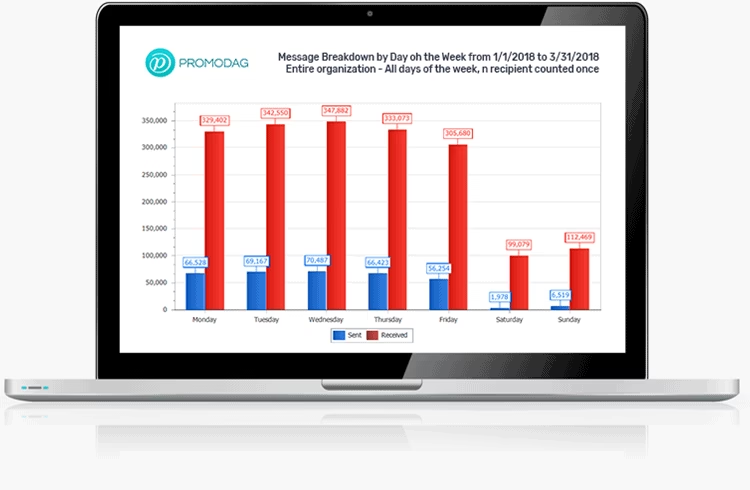
Traffic analysis for internal and external messages can be broken down via this tool. A traffic sysnopsis via days, weeks and months can be curated – to check whether the email traffic has an upward or downward shift.

Further, the messages can be broken down by time of day, month, recipients & size. Users can also be counted based on their daily traffic usage.

If you’re preparing to create analysis that has clusters like department or supervisor, you can make these groups and calculate their traffic accordingly. This allows breaking down of data to simplify it’s analytical understanding.

If you’ve a business that deals directly with consumer messages, you can seek action-driven data on average time by your employees in responding to consumer emails via this tool. The average time taken to deliver internal messages is also plausible, to get a sense of how efficient the internal mailing system is.

Conclusion

This in essence is what Promodag tool does. It’s a one stop solution to all of your corporate emailing desires and requirements, providing various features to aid you in it. The Promodag analytical tool has been around for more than 20 years and helps corporates extensively across the globe.

visit Promodag.com

6 Lightweight Go apps for Android Go Phones

Its been a while after Google has launched Android Oreo Go edition. This has confused people with Android Oreo and Android Oreo Go edition is the same. Before starting with the list, I would like to clarify the midst of confusion in the atmosphere. Let us understand Go apps for Android Go Phones.

Like Opera browser has a lite version as Opera Mini, Google’s browser has a lite version known as the Google Go similarly Android Go edition is a Lite version of Android Oreo. With this being said, its a part of Android Oreo that is the Go edition. The Android Go edition has been launched a while ago but Go enable phones might take time to kick-in the market. The Go edition of Android is designed to suit-in with your phone easily even if your device is not very powerful.

Since its a lighter version does not misunderstand that Google will not provide you with the privileges that you had in the main version. You will enjoy a lot of features in this edition blended in it perfectly to match the motive of creating it. This means all the core apps will be levelled down a bit to provide you with the best performance. Apart from that, it consumes fewer resources of your phone which is why it runs efficiently in smartphones on the lower-end.

Also Read: iOS 12 Beta Preview- What’s In It For You?  

Google my most favourite company is very thoughtful. The Go edition was mainly targeted to the audience from developing countries. So, people who cannot afford to change their phones regularly can use this edition in their phones and enjoy the latest privileges. AW! Google, that’s so sweet of you! But any curious or performance-oriented android user can download and make use of the Go apps developed for the Android Go edition.

Benefits of Go Apps:

The lower-end smartphones are equipped with very finite storage and RAM capacity. Keeping this in mind the Go apps are designed in a manner that they programme productively even in handsets with a RAM of 512 MB to 1 GB. Moreover, these core apps are lighter by almost 50 per cent of the original versions.

All high-end smartphones get pumped up with long term usage which slows your phone’s performance even if it has the best specifications. Which is why you can also take the benefit of its performance-oriented features.

After clearing all the possible doubts, I will start with the 5 most lightweight Go apps for Android Go phones. All the list contains not only Google’s core applications but also some additional application which are of utter importance.

Note: These apps can be downloaded from  Playstore. If in any case, your device is incompatible to the application then you can always download an APK from APKMirror links or you can always use Google for additional help.

1. Gmail Go:

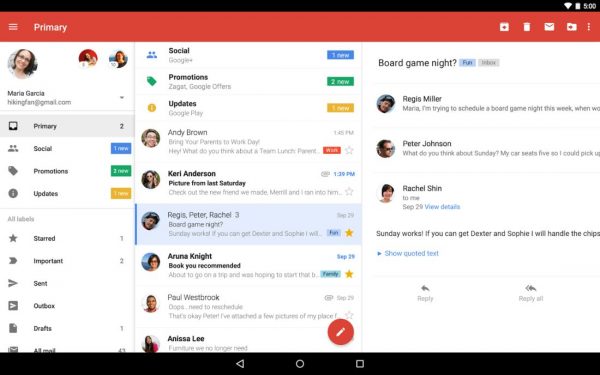
Gmail Go is the lite alternative of the Gmail app. Well, we all know how important Gmail is to us, so it had to have a light version. Fortunately, you will have an access to a lot of current features in the Gmail app including shortcuts to launch Gmail, use your swipe to delete, archive, etc your mails, multiple accounts, notifications when you receive a new mail, and few more.

Image Courtesy: Pinterest

Surprisingly it has all these features in it that left me wondering what takes up so much in the original Gmail app. I noticed that there were a few glitches when scrolled through the mails but it can be counter fixed by their updates. To get more out of this app make sure you don’t give up your Gmail Id to every third party website. This will fill your app with spams and will leave you with less space for your important mails.

Gmail Go is currently unavailable in the form of an open beta. You can install its APK and sideload it into your handset.

Download: Gmail Go for free

Download: APKMirror

2. Yahoo Mail Go:

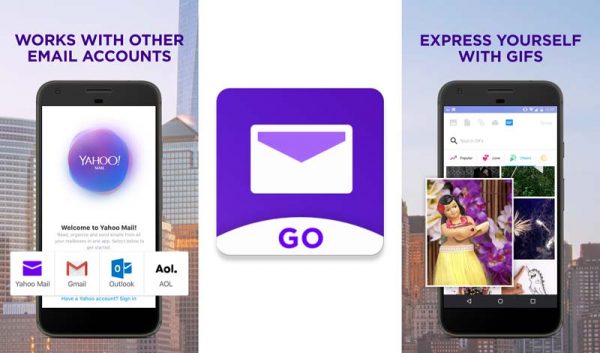
Yet another important electronic mailing app with a Go version. Well, we all know Yahoo has been very popular over the years and most of the users still use it. This lightweight version of Yahoo allows you to arrange all you Outlook (Hotmail), Gmail, AOL and Yahoo accounts. Moreover, the improved design and simple user interface in Yahoo Mail Go allows you to enjoy an enhanced speed of its functions.

Image Courtesy: GizArena

The users are offered with various features like any account (Outlook (Hotmail), Gmail, AOL) can be used to sign up, so you don’t have any boundaries to use Yahoo Mail Go. Also, you can customize your swipes according to your comfort; users will be notified about new mails only when it is sent by a person excluding companies or automated emails, etc, attaching multiple attachments to send someone, Ditch password – you can set up an account key to sign-in securely without password, and many other interesting features.

Moreover, users are enabled with free 1000 GB cloud storage which is very secure to use. But before installing Yahoo Mail Go, make sure you have uninstalled the Yahoo Mail app. Also, you’ll have to optimize your account to use it with TalkBack.

Download: Yahoo Mail GO

Download: APKMirror

3. Maps Go:

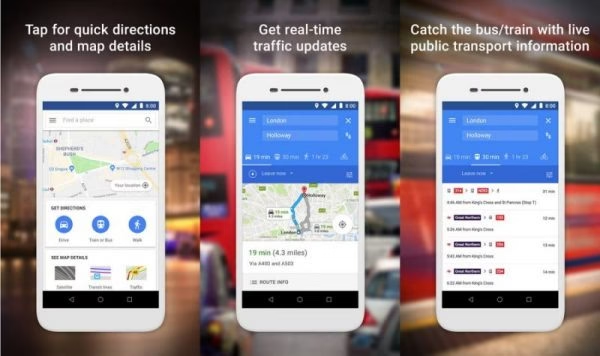
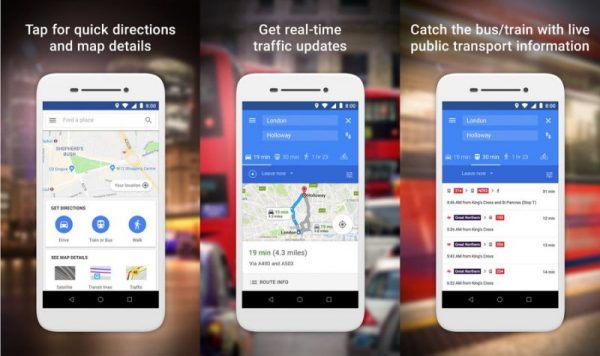
Navigation is a must no matter where ever you go! So Google Maps has made sure to optimize this feature to include in the future Go Phones. Maps Go possesses a lot of features from the main app, like for instance the directions, real-time traffic update, information on the businesses residing nearby, and others.

Image Courtesy: Yahoo

If you ask me how my experience was using it, I think it could’ve been much better.

Make note that, this app is a Progressive Web App (PWA) so you will have to install Google Chrome for it. It does fulfil the criteria of being a light version of Google Maps which might be a reason for using less of your data as well. Major missing is you cannot use it in offline mode. Living in a developing country has limited internet connectivity, so I hope Google thinks about it.

That is not its features like real-time location sharing, turn-by-turn GPS navigation and setting home and works addresses are also not available for now. If you are very curious to test it then, join the beta testing group without forgetting and download it from below.

Download: Maps Go for free

Download: APKMirror

4. YouTube GO:

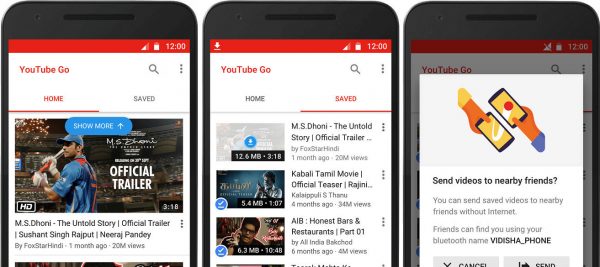
The Go apps took its first step with YouTube Go. It was launched in the year 2016. This version of YouTube was to minimise the data consumption keeping your internet bills pocket friendly.

You can preview the video to peek inside and know what’s in it as a summary. Users also have the privilege to download videos for viewing your favourite videos offline. These controls exist in the parent application too but the YouTube Go app gives more hold on the controls. For example, you can download these videos at your preferred resolution and it notifies you with the file size before you download it.

Image Courtesy: Neowin

You have the access to video-sharing feature which makes it easier for you to share videos using Bluetooth. YouTube Go released in almost 130 countries, except a few countries where it is yet to release. By using the APK file you can install it any device if it’s not available there. You’re welcome!

Download: YouTube Go for free

Download: APKMirror

5. Google Go:

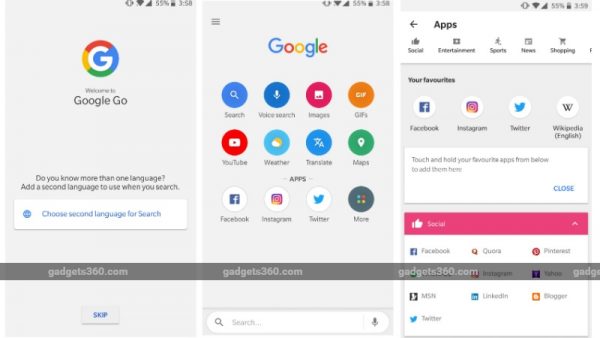
Google Go was launched in 2017 as Google Search Lite. It was then rebranded to Google Go. It has inherited a lot of features from its parent application Google Search. Users have the basic features like searching through google, sharing images, downloading, search information using your voice and all the other features.

Image Courtesy: NDTV Gadgets

It’s very similar to the Google search application, although it provides you with more options to control the interface. That is, you have the option to enable or disable features like the scores updates, movies updates, news updates, sports updates, etc. Moreover, websites open in lightning speed because of the light mode.

In terms of all the aspects, I would say so far this is the best version of Google Search keeping the app size and data usage at the minimum.

Download: Google Go for Free

Download: APKMirror

6. Gboard Go:

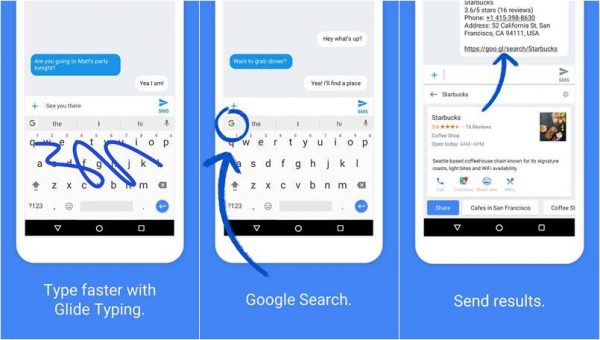
Just like the other Go apps, Gboard Go possesses loads of features coming from its original app. It supports many features like the glide typing, voice inputs and an integrated search on Google and many more. Moreover, the keyboard also has support for themes which is very overwhelming and unexpected.

Image Courtesy: BGR India

In addition to this Gboard Go also contains features to search GIF, one-hand mode and stickers. This is the best android keyboard you can ever have. However, this app requires Android Oreo 8.1. So, the device you own should get the update first before downloading it. In fact, currently, it is not available in Playstore also but we have the solution to this problem in the form of APK file.

Download: APKMirror

Android Go apps is a very useful idea overall. Users can actually use these to use less space in their phones. They can replace the existing apps to make some extra space for other apps or games like PUB-G. If you already have a Go phone then Playstore will suggest you with variety of Go apps. Let us know, how was experience your using these Android Go applications in the comment section below.

Exit mobile version