Home Blog Page 258

How Managed Printer Services Benefit Your Business

0

While choosing the right printing equipment for your business is all well and good, it’s also of significant importance that you receive the best customer service from the company where you purchased your printer. Whether it be an advice on making the most out of your purchases or general maintenance thereafter, you surely need them.

It might be obvious but you’d be surprised how many companies out there neglect to provide proper training for its employees when it comes to implementing new or updated office equipment. Correct use of these equipment as well as how to monitor and maintain different aspects of any new technology can benefit any business.
benefits of printer for business

Printer Services

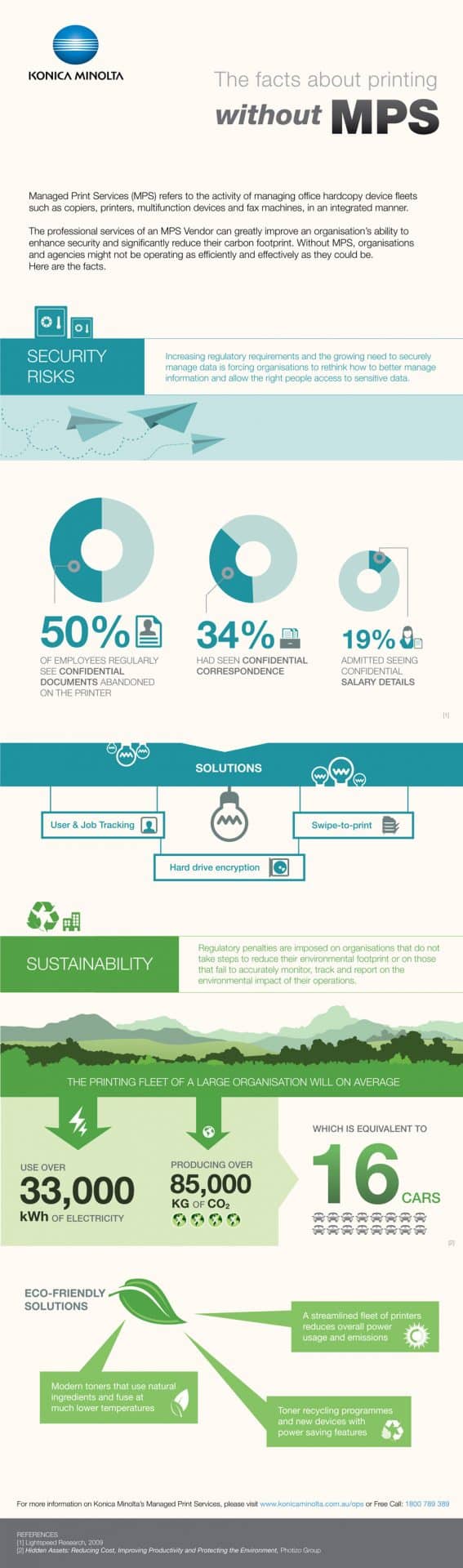
As previously mentioned monitoring your printers can be tough when not provided with the adequate tools. Fortunately there are providers out there who can offer such services with their printers helping make the workplace far more efficient. This is usually through remote applications that can automate monitoring for you as well as meter readings or even toner levels. As you can imagine this puts less pressure on you to complete these tasks saving you both time and money. Konica Minolta for example offer such a service to its customers.

Linked in some way with the previous feature, a company might also benefit from automated reports. These sorts of reports can inform a company of a number of things – cost per print, usage of each printer the company owns in including frequency and even the age of any equipment. This may all sound like data you can obtain yourself, but as is the case with anything, having it delivered to you when you need it can save you a lot of time.

Any time wasted can equate to potential costs for a business and this applies to any sector out there. I’m sure many of you readers out there have heard the phrase, “Time is money”. Any provider who can also offer day to day support following a purchase is definitely worth considering. Problems with any of your printers can bring things to a grinding halt for some businesses so you can imagine how valuable it can be to have experts visit you on site in a timely manner. The same applies to situations where consumables need to be replenished such as toner and certain parts. Rather than wasting time attempting to solve these problems yourself, having someone do it for you who knows the systems is not only quicker but a money saver.

Security Features

Whether for personal or professional use, security is always important. With printers being able to hold input data as well as output, you’ll likely require security capabilities in order to protect this data. This could be simple things like password protection or even the automated deletion of files.

An environmentally friendly company is one with a good image toward both its customers and businesses. While it’s never a bad thing to take the necessary steps to improve your green rating, it could also save your business money as well. Some providers out there can offer advice in this field too.

Hopefully reading this article has given you a better idea that buying printers isn’t all you need to focus on. Rather it’s the after-sales services that accompany it.


Related infographic
Content Curation Is Everywhere, But How Has It Been Useful To Marketers?

1

No matter how much Google’s algorithms change, one thing has remained the same in the last few years of major Google updates: the need for top quality content.

Apart from the well-known aspect of content creation in the form of blog posts, articles, white papers, tweets and Facebook posts, content curation is another online marketing approach you could implement.


The Benefits of Content Curation

Content curation is more than choosing and putting together a bunch of links.

Establish your brand’s authority and leading status in your industry

It’s a cognitively demanding process of picking and choosing relevant, newsworthy, and trending topics that have a single underlying theme.

What is more, apart from presenting these themed findings into a single piece of text, you need to also set your own point of view or attitude, so that it’s not merely a copy and paste task but a critique or a discussion of whatever might be emerging out of the curated content. The ultimate goal of content curation is to produce new knowledge and insights, not to repeat what’s been argued already.

Easier, cheaper and equally effective to original content creation

Marketers were the first to make the shift, and the first to realize the multifaceted benefits of content curation. Apart from being cheaper and easier than original content development, content curation can be as effective as any other piece of original thought for two reasons:

  • It offers new points of view to ponder
  • It encourages users to join the conversation and offer their own take on the matter


Setting a tone and establishing an attitude

When done right, content curation lets you establish a voice and present your mindset in a rigorous, professional manner.

Curated content expects that you establish your opinion and set the tone on a given subject, and it’s a great way to provide an inside look at your brand’s culture and priorities.

People are more keen to trust a brand or business that is not afraid to boldly state their viewpoint on a matter. Content curation is your chance to comment on trends and critique what’s wrong in the industry – and most importantly, to offer solutions.

Content curation as a strategy is an irresistible engagement opportunity for your audience

Curating content offers you an opportunity to present your readership with a kaleidoscope of points of view.

The more varied the discussion is, the more intrigued your clients and readers will be. In addition, they will want to join in the conversation, pushing the discussion even further and deeper.

How do you curate content for valuable, quantifiable results?

  1. Find an effective content curation tool

Find a content curation tool that will help you tap into relevant and trending topics, the topics people will care about.

Some prefer RSS, other opt for visually-based bookmarking services like DragDis, Pinterest , Reddit, Scoop.it, and StumbleUpon.

  1. Decide what type of content you will curate

Make up your mind whether content curation will be external, internal, or both.

Many companies that create content daily and for various channels find it useful to curate their own content and repurpose it for different audiences and media. For instance, curated content can be repurposed for Facebook posts, an email newsletter, or even a live event.

You can exclusively curate content created by others and also curate your content from different platforms and media to build something new of value that your readers will benefit from.

  1. Classify and then filter your options to ensure you narrow down your breadth of content curation opportunities

It’s easy to get lost in the multitude of options available. You have thousands of topics and issues to curate content for, so how do you decide where to start? What’s a priority, and what isn’t really essential?

Do your research in order to prioritize the most shareable content with your readership.


  1. Promote your curated content

Just like any other type of content, curated content needs a push. Promote your curated content on social networks, or through friends and individuals that support you, so that it can reach the right audiences.

  1. Make content curation part and parcel of your marketing strategy

If you use content curation only once, you cannot possibly expect any quantifiable results.

Content curation should be a steady and integral aspect of your content marketing efforts. If you don’t go the extra mile to offer high-quality curated content over the long haul, people won’t pay much attention.

But if your content curation initiatives are informed by quality, passion, and a drive to offer valuable insights, then it has viral potential. Some companies choose to offer curated content once a month, others do so on a daily basis.

Is content curation really that important?

Your business will do just fine without content curation.

However, given the insatiable appetite online readers have, voraciously consuming new content nonstop, it’s important that you have more resources to give them valuable content in different forms.

Content curation is an effective and relatively easy-to-implement way to give more to your online community – and it’s cost-effective, too.

Implement content curation in your marketing strategies and your audience will reward you with increased engagement and more leads.

To improve your vocabulary for a better content, you can quickly download a vocabulary software that would surely build your vocabulary knowledge.


About the Author: Chassie Lee is the Content Expert for eReflect – creator of Ultimate Vocabulary which is currently being used by tens of thousands of happy customers in over 110 countries.

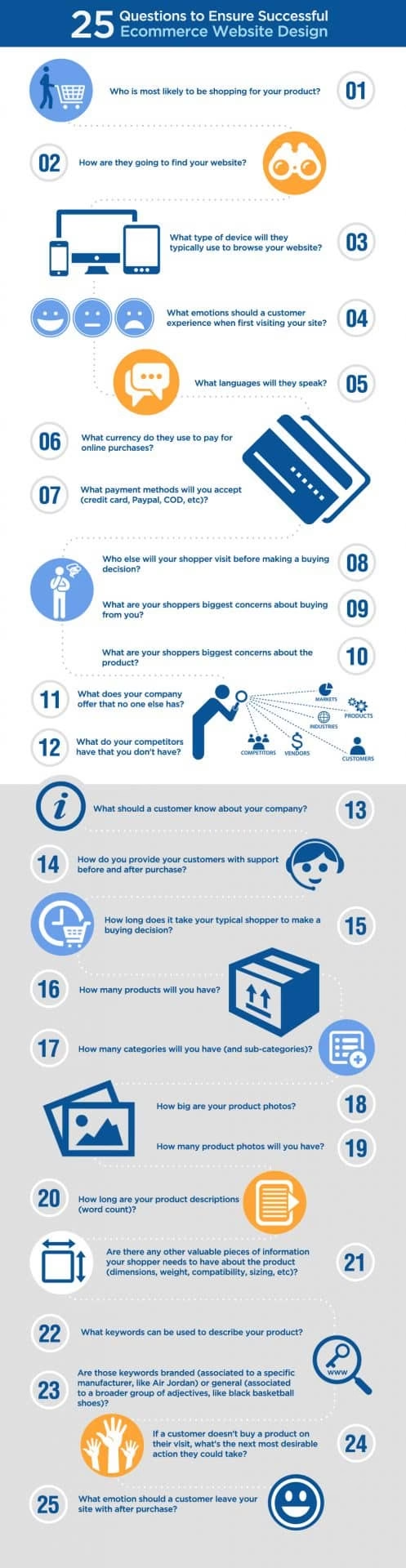
Infographic – Factors for Successful E-Commerce Website Design

0

A well thoroughly considered and superbly designed E-commerce site is an insurance of achievement. Anyhow it requires a great deal of exertion, learning and attention to give an awesome shopping experience to your customers.

When you begin the saga of designing your E-Commerce store, there are lots of things to consider and set up like:

And a whole lot more while keeping in mind that your main focus is on products – the deeper you get, the more issues you confront. It is not one of the easiest things to do, isn’t it?

 Also check: 6 Ecommerce Tips For New Ecommerce Startups

So, if you are thinking of launching a brand new E-commerce website? Or planning a redesign for the old one you’ve relied on for the past few years? Then, you need to checkout this great infographic drafted by the team of Coalition Technologies, listing 25 important questions which you need to ask yourself because answering those questions will definitely help you in successfully designing your E-commerce website.


Wrike – An Essential Project Management Software for Teams

0

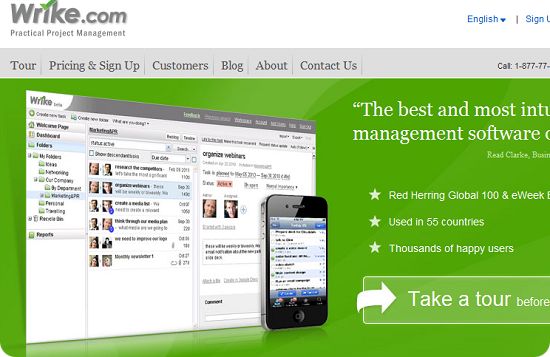
Project management is an important task which needs to be executed properly for better output. The result of the team’s work is completely dependent upon how your team collaborates. There are a number of project management tools on the web, but Wrike stands out among all of them.

Introduction to Wrike Project Management

Wrike is an advanced yet easy-to-use project and task management software which helps your team collaborate on projects effectively  to save time and increase productivity.

Assigning Tasks Made Easy for Team Leader

As a team leader, your task is to divide the project into segments and assign them to your team. With Wrike team leaders can seamlessly accomplish this. Wrike makes it easy to create tasks and assign them to individual members of your team with no more than a few clicks.

Wrike comes with a well-organized user interface and better options for assigning tasks to team members. It is also possible to attach important files to assigned tasks and set schedules to complete every task on time. You can prioritize all tasks using Wrike’s drag-and-drop feature and use the ‘@’ tag tell your teammate about a task.

Awesome Features of Wrike Project Management Tools

Transform your Email into a Task

Did your client send you a job or task via email? With Wrike you can simply add it the email to your task list with a click of the mouse. A hassle-free escape from copying and pasting the message.

Wrike integrates with your email account to let you easily send emails to your task list. If you’re a Gmail user, you will get a new button labeled “Create task in Wrike” just below the body of your email. One click turns your email into a Wrike task. There are also email add-ins for Apple Mail and Outlook, as well as smart email integration if you use other email clients. With this feature, you will never lose  important tasks sent by your client via email.

Activity Stream

Wrike’s live activity stream keeps you updated with the latest activity on any tasks and projects you choose to follow. The activity stream updates automatically, so you always have recent work news at the top.

Collaborative Document Editor

Wrike’s collaborative document editor let you edit and save attached documents online without downloading them to your desktop. And the live task editor within the tool shows changes other teammates are making in real time, so you always have the latest version of a task in front of you.

My Work

Wrike’s My Work feature is a personal space that no one else can access. It makes it easy to arrange your task priorities by dragging and dropping them to today, this week, next week, or later, and only you will see how you have organized your work.

Check Performance and Manage Workloads

With Wrike you can easily track the performance of your team members using the burndown chart and review their current workloads to assign new tasks according to availability.

Integrate Wrike with your Favorite Apps

Wrike can be integrated with a wide range of apps such as Microsoft Office documents, Google Drive, Evernote, Outlook, iCal, Dropbox, Github, and more.

The best example of Wrike’s integration is the ability to sync your Google Calendar with your task list.

Wrike – Online Collaboration Software Available From Any Device

With Wrike you can stay connected with your team from any location, on any device. Along with their full-featured web application, Wrike also offers free Android and iOS apps for managing work. Wrike also created a Google Chrome extension to make creating tasks and sharing links easy when you’re anywhere on the web.

Final Words

Wrike is one of the best and most feature-packed online project management software. Their tool is being used by well-known companies such as PayPal, Adobe, MTV and HTC..

Now it’s your turn to learn more and check out www.wrike.com.


The Importance of a Good User Interface Design

Apple recently released new details of their Apple Watch. While far from being the first to enter the wearables space, many are expecting the Apple Watch to do exceptionally well. Why? Part of this is due to the company’s amazing ability to brand and market their products. They have a raving fan base that will buy anything with Apple’s name on it.

There’s more to it than that though. Apple is known for its ability to design a simple, intuitive user interface. UI design is paramount in a wearable device. With extremely limited screen real estate a clunky UI makes the device practically unusable. Terrible UI design is debatably the primary contributor to the long list of smart watch failures.

Companies have learned from this. The most notable of which is Samsung, who’s Gear S smartwatch landed on the list of top trending gadgets of the season. The reason it’s so notable is that they have failed at the smartwatch game more than once, again primarily to poor UI design.

What Makes for a Good UI?

First of all, you should know your user. What kind of information is important to them? Frequently accessed information should be accessible in a few interactions as possible. Information should be organized in a way that is intuitive for your users, which may be different than the designer or programmer would expect.

Follow common design patterns. Within your space, there are existing applications that your users interact with on a daily basis. If you design is significantly different, it causes confusion for your users.

Use their vernacular. On Facebook you don’t send connection requests. You send friend requests. You don’t install packages or applications on your Apple device, you install apps. Don’t give into the temptation to use the “proper” name. Use the language that your users use.

Be as invisible as possible. A good UI means that you don’t even know that it’s there. A fancy transition between menus make look pretty, but is it necessary? Your users may get irritated if they have to wait for it every time they open the menu.

Simple User Interfaces Aren’t Just for the Consumer Market

Even large, commercial and industrial applications needs to consider UI design. A good design isn’t just about looking good. It’s about usability and efficiency as well. Good user interfaces allow users to access key information in the most efficient way possible. This reduces user frustration and increases productivity.

Designers and developers should be cognizant of the screen real estate available. Designing for a large touch panel PC used in an industrial application is entirely different than a consumer smartwatch. An industrial application likely needs a dashboard that displays key stats to users. The UI designer should take this into consideration. Use all available screen real estate to display this information. A failure to do so certainly leads to inefficiencies and could potentially cause a dangerous situation.

For example, a petroleum engineer may rely on an application to display whether certain metrics are within safe ranges. A poor UI may cause the engineer to miss an item that’s out of range, putting people and equipment at risk.

Good UI Design is Always Applicable

There is never a case where you shouldn’t put resources into designing a good UI. Even the government has created information on user interface design.

No matter your industry, no matter your audience, you need a good User interface. At best, a poor user interface will lead to frustrated users. At worst, a poor UI will drive your product to failure.

10 Great Apps to Get You Started with Your Android Tablet

Your Android device is one of the coolest tablets on the market right now. It can play music, video, and display any image that you throw at it. But, it’s new, and you don’t know exactly what to do with it yet beyond the basics. Here are some apps that will change the way you think about your device.

DashClock

Dash Clock is the app that lets you put widgets on your lock screen. While you can download multiple individual apps for things like the weather, time, and battery life display, this app is much simpler to use and it gives you the customizability that other apps don’t have.

Vuze

The Vuze Torrent Downloader app for Android allows you to search for, download, and share files with other users directly, without having to upload anything to a third-party website. So, that stellar video you shot last weekend while hiking can now be shared with all of your family members in seconds. Just remember to respect IP.

The app also lets you set up categories for the files you download. Those files can then be auto-transcoded to another device you own. So, once it’s all set up, you can sort videos, documents, and images automatically.

Pocket Casts

Pocket casts makes it much easier to download and organize podcasts on your Droid. Unlike many Droid apps, this one doesn’t feel like an iOS copycat. It’s good in its own right with useful sorting options, a clean and uncomplicated layout, powerful search features, and syncing and backup support.

Swype and Swiftkey

You’ve probably seen people do that fast type/swipe thing on their keyboards before. This app is how they’re able to do it. Android’s keyboard has gotten better over the last few generations, but it’s still lacking in some key areas. These apps are great replacements for the stock keyboard. The strong suit is their improved auto-correction, letter, number, and symbol prediction, and gesture-typing.

Google Keep

Google Keep is made for quick-and-dirty notes – like post-it notes. But, unlike paper post-its, you can do lot with this program. Make to-do lists, set location reminders, and use fast-searching to find that one note you made last week about that thing, with that man, in that place. Yeah.

Netflix

If you’re not part of the Netflix cult – err ecosystem – you’re missing out. If you already know about this awesome service, then you probably don’t need much urging to get this app. It basically puts the power of Netflix on your Droid. So, once you’re signed up and logged in, you can surf around the site, load up your favorite show or movie, and start watching.

Flixter

Let’s say you’re tired of staying in. You want to go out. OK, there’s an app for that, and that app is called “Flixter.” This movie app tells you what’s in the theater right now, but it does so much more than just throw up a bunch of movie titles and show times. It uses your Droid’s GPS to locate the theater closest to you, gives you the option of several other theaters, shows you what’s new, what’s coming to DVD, and what’s already out on DVD. It also tells you what’s on Netflix, which is handy if you have the Netflix app.

It will show you the obligatory show times and locations, but it also cues up movie previews. This app really slow-rolls you. At first, it doesn’t look like much, and it’s easy to write it off. But, click over one tab and all of the sudden, this becomes your Friday-night go-to app.

Flipboard

Flipboard should be more popular than it is. It takes your favorite news sites, and even social networking sites, and arranges them in a flip-board/magazine style arrangement. You “flip” through the app to get to the news stories you want. For the most part, the news and social media is divided up into major subject or themes, like “science,” “business,” “technology,” and so on. You can add or delete these subscriptions at will and even create your own custom collection of stories and news pieces that you find exceptionally interesting.

Pandora

Pandora is the premier music app. If you haven’t used this thing yet, get it. It’s totally free music, put together in a radio-style format. You choose the genre you want, and Pandora puts together the music for you. You can vote specific music tracks up or down, and tell Pandora what you want to hear more of as well as what you never want to hear ever again.

Android Tuner

When you want to be able to do something with your Droid, but you don’t have the patience to wait for a software upgrade, this is your app. The Android Tuner is a free app that lets you fine-tune your tablet’s performance. Kill background processes and change memory settings. You can even tweak the CPU settings.

The interface is in a multi-page format. There are five pages of settings you can change. The pro version gives you more customization options.

Leonor McGowan is a music industry legal analyst. With an eye on current court cases and new laws, she often writes about the relationship between the music industry and consumers on a legal level.


Take a Selfie! The Effect of Instagram on Mobile Marketing

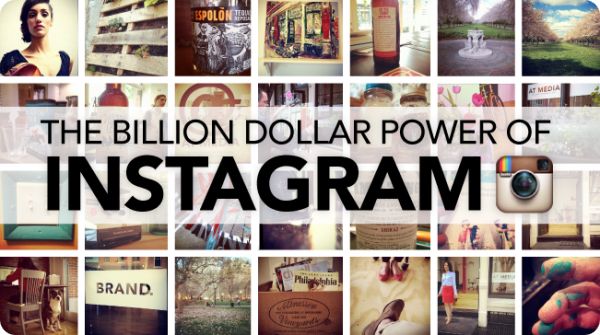
Using social media effectively has helped companies enter a new era of interactive marketing. Social media is all about engaging your audience, instead of passive ads like those on TV and in newspapers. By using apps like Instagram, companies can involve their followers in a whole new way while at the same time targeting a younger crowd that increasingly is looking for visual appeal. Here are some effects Instagram has had on mobile marketing.


Instagram Is Highly Visual

According to Mashable, posts on Facebook that include photos get 39 percent more interaction than average, higher than text-only, video, or link posts. If you’ve ever been on Twitter and scrolled past thousands of posts from the hundreds of Twitter accounts you follow, then you know that the ones with images are more likely to make you stop than the typical 140-character posts.

That’s what makes Instagram such a great option. Images draw up emotions and striking images make you stop and find out what they’re all about. Provide that on Instagram, and Instagrammers will click follow in a heartbeat.

Share Your Brand Worldwide

There are Instagrammers all over the world—about 300 million—so if you’re looking for a global audience, Instagram is a great way to reach them. One effective way to share the brand love is through contests. Require all participants to follow your company’s account and use a hashtag that includes your brand’s name. This will make it easy to find all those that posted for the contest while increasing the awareness of the contest and your company’s name, leading to more followers.

Create Positive Image of Your Business

Through Instagram, you can show another side of your business. With millennials graduating now having serious purchasing power, they want to see that the companies they buy from are as cool and modern as they are. They’re a jeans-wearing generation that enjoys organic coffee and cares about Klout scores. They don’t want companies that are conservative, stiff, or old school. So you have to ask yourself, does your Instagram account have the Klout? You can increase your Klout score by making your company feel casual and accessible through Instagram, which will increase the number of followers and interaction.

Learn More About Your Customers

Recently, Taylor Swift made headlines for not just giving her fans free things, but for actually taking the time to find out about her fans and give them items that she feels they would like most. One fan, Rebekah, received a check for $1,989 to go towards her student loans, which Taylor knew she needed help with. It was a smart move, gaining exposure for her album while showing her likeability.

Companies could choose to do similar things with Instagram, learning about what their customers’ interests are, which may help them to provide goods or services that will help customers the most. Or, like in the case of Taylor Swift, provide a way to give back to their customers in a personalized way.

Instagram is a great tool if you use it to its best abilities. Connect with your customers, and change the world.


Exit mobile version