Home Blog Page 149

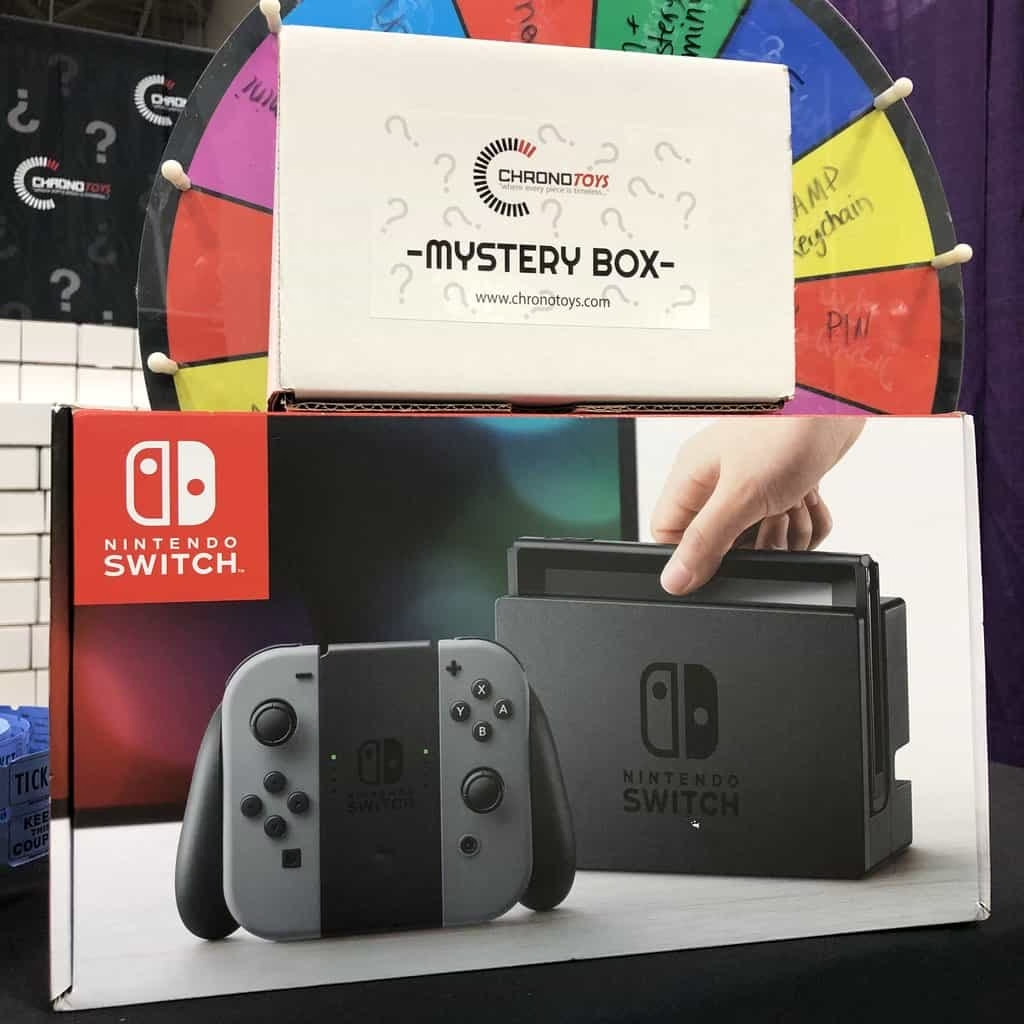
How to get Nintendo Switch from a Mystery Box: Best Mystery box review

0

It is difficult to find a person who would not like to play video games. This is a fascinating world that gives people incredible emotions. If earlier it was the prerogative of teenagers, now people of all ages play video games. Sometimes you can even see an older person playing a game console. DrakeMallis a service that is ready to make your dreams come true. Of course, there are many classic shops offering various equipment game consoles.

Our store offers a different option to purchase items. The whole principle of operation of this service is the ability to win a valuable prize by paying for a small amount of money. Specificity of services consists in mystery boxes that have a certain set of things inside.

Drakemall mystery box nuances

All this is known in advance by each user. In order to open one of the boxes you need to activate a voucher for a certain amount of money. There are several types of boxes that can be opened by paying from 0.99 to 99 dollars. Gift cards can be purchased at Kinguin or Gamivo. Choose the required amount of the card and purchase it. You will receive a 12-digit code that can be used on the site. You can replenish your personal account on the site thanks to Visa, MasterCard, Skrill and Neteller credit cards. In each of the boxes there are standard products corresponding to the original cost and expensive. Users get a chance to win good stuff. And it’s not a fake.People can try to win a Nintendo Switch console. The chances are high, because all mystery boxes are real. It’s a great choice for the portative gaming. Try to win it if you are a fan of Nintendo games. The Legend of Zelda: Breath of the Wild and Super Mario franchise are waiting for you!

Nevertheless it’s a cheapest Nintendo console; you can play games and enjoy your time. The website guarantees fast Nintendo Switch delivery and a lot of drakemall surprises. The service does not guarantee one hundred percent chance of winning, but the percentage for each item in the box is the same. This means that you have some chances to win a regular thing and a game console. It’s marked on every box page. The service works according to a random number selection algorithm. This means that the management of the site does not affect the results of the loss of various things. Take a gift card or replenish your account another way and go ahead! You can consider this your move to a new life with quality gifts and great prizes.

Honest review of legit system

Thanks to the gift cards you can win the game console and get it, and then you can give this thing on the internal trading platform of the site or arrange delivery. Our company arranges the delivery of things to the rightful owners through third-party transport services. We guarantee that your winnings will come to you safe and sound. This is the main prerogative of the site and the basis of our reputation.

All you need is PayPal account and Nintendo console can be yours.

On various Internet sites there are many reviews that confirm the legality of services. Many users shoot a whole broadcast where they show the whole process of drawing prizes and delivery design. Moreover, users show the games and packages that come to them thanks to this service.

This is one of the most reliable confirmations that the service really works honestly. Absolutely all users have the chance to win prizes. It all depends on your luck and perseverance. Try your luck and you can become the owner of valuable prizes today.

Advantages of using predictive modeling analytics in business

0

Change is inevitable, so they said. This means that as things continue to change, we have no option but to embrace the change and adapt to the new environment. Even in business as the technology continue to change so are the business trends and the methods used to spot the patterns from different resources just to find new market opportunities.

 For this to happen, they usually use both the unstructured and structured data, and that’s what makes the predictive modeling analytics. This is the new technique used in business nowadays as it helps when trying to achieve certain outcomes of the business and improve the customer satisfaction and efficient collaboration within the organization.

 Predictive modeling analytics is a trend that has been adopted by different departments within a business organization just to achieve a particular result in terms of business performance. With that being said, let us quickly look at some advantages of using this technique.

Improving the business advantages

When recessions happen, it usually affects a lot of businesses and most of the times if not all the time, the impact is usually on the negative side. Anyway, when these businesses finally recover, they often use their huge amount of data that they have collected in the past.

 But, when using predictive analytics, you need not rely on your experiences to get the insights or to understand the new trends. However, for your business to remain competitive, you can choose to implement the use of predictive analytics.

Revenue opportunities

A business that uses predictive analytics can use the technique to go through the history of their customers activities and study their buying patterns. This in turn will help them in making the rich informed decisions to try to improve the business in terms of the revenues gained.

 Based on what they find out, they will often come up with things like coupons, discounts or even give out promotional offers.

Elevating to new heights

This technique can also help your business to improve and take it to a totally new level. This is because the business can use the technique to try to find out what their customers might need hence using that to improve their customer experience.

 When your business delivers a better customer experience, you will always stay ahead of the competition and that’s how you get your business to grow over your competitors.

Understanding the users

You know that people can also influence each other, right? On several occasions, you’ve seen some people being ranked as the most influential persons of the year or something like that. Either way, this usually happens whether knowingly without the person being aware.

 Whatever they say or suggest can actually have some impact on the business. When you have any unprecedented data at your disposal, your marketing team can use the metrics of social value and perhaps throw in some predictive analytics techniques to bring some influence in the business.

 When the analysis is done properly, you can also have the ability to focus on how you can retain the customers you already have.

Detecting useful insights

With the right experience on how you can use predictive analytics, you can find a way in which you can provide a customized customer experience. Well, gone are the days when the sales and marketing team were the only people left with the task of getting to know the customers.

 This doesn’t seem to be the case anymore as everyone in the organization is nowadays involved. This goes as far as also identifying the potential customers. With a good and timed analysis, you will be able to identify any emerging trends from the customers.

 This will make your business to come a long way by identifying the hidden customer insights thus helping you to grow.

Usage of all the data you have

Well, since the cost of using cloud storage is seen to be reduced as time goes by, more companies and businesses are quick to take this advantage to store more and more data.

 The big question however is, are they really using all the data that they possess? It is often said that most companies only use like 1% of all the data they have.

 Anyway, when you incorporate the use of predictive analytics, you can be able to use the large amount of data available to better your business. As your competitors will still be using only one percent of their data, you can simply use all of it and improve your business performance. See here for more advantages of this technique.

Identify the areas of weakness

This seem to be quite obvious right? But you will get surprised when you find out that most business organizations don’t actually use this opportunity.

 Applying the use of predictive analytics can help you identify the areas of weakness within the business and make the necessary improvements.

 This way, you will be able to keep your customers and also win back the ones you had already lost. This can also help you build a healthy relationship between the business and the customers.

 Conclusion

When you do everything correctly, all the other things will fall perfectly into place even without trying. As you have seen, these are just a few advantages that your business can be able to enjoy when you introduce the use of predictive analytics. You can check the link: https://searchenginewatch.com/2018/05/29/five-ways-to-use-predictive-analytics/ for more information.

As said earlier, change is inevitable, and if this is the new trend in business, you might as well try it out and see how far your business will go.

6 Routes To Take When Your Business Is Struggling

There are many reasons why a business might struggle, and in many respects it is likely to be considered one of the rites of passage of having a business at all that at some point there is going to be some difficulty. But when you are actually going through such a situation, it can be extremely difficult to know what your best next step should be. Having some kind of a forward plan for such emergencies is clearly a very wise move to make, so that is what we are going to take a look at in this post. What follows is a list of some of the most plausible and useful routes which you might care to take if you are hoping to get your business to rise out of a poor or dire situation and get back on track as soon as possible. Any of these are likely to help in the majority of such situations, so they should all be considered equally worthy.

Pic Source

Rebrand

This is one of the first things that most entrepreneurs will consider if their business is in dire straights, and that is with good reason, as it is one of the most effective means of turning things around for any company. A rebrand can very often ignite a new phase for a business, and is obviously especially effective when customers have fallen away or the marketing does not appear to be as effective as it once was. If you are thinking about a rebrand, there are a number of things you will probably want to pay attention to, to ensure that you are actually going to make it worthwhile.

Firstly, any rebrand you undertake should not completely ghost the previous incarnation. In other words, if your brand is made to be completely new to the point where it is entirely unrecognisable, then you will probably be going even more damage than good by following along with it. If you instead aim to alter your branding in such a way as though it retains some of the qualities of the original, it is much more likely to be effective. Similarly, you should make sure to make a big point about the rebrand, so that nobody can be in doubt as to which business it applies to, and why it is happening. This will ensure that you are much more likely to get customers returning to your business’ services in droves.

With any rebrand, you should also consider the customer and whether the core customer base for your business has shifted or altered. In many cases, it will have, which will have been the reason for the downturn in the first place, and you will need to make sure that you work to bring those people back on board while playing to the new crowd too.

Pic Source

IT

Sometimes, you are able to bring your business out of the dark days simply by changing the way in which you use your technology. All businesses use technology in a number of ways to ensure that they are running efficiently, and indeed there are probably many examples of processes in your business which are utterly impossible without the help of some kind of IT systems. As it happens, you can also often use those systems – or, more likely, new ones – to bring your business back to a better mode of performance. Let’s look at some of the things you might need to consider if you do decide to go down this route towards making your business function a little better.

If you do decide to solve your business challenges with IT, you will need to be sure that you know the exact nature of what those challenges are. That requires that you look deeply into what is going on, and what is going wrong, in your business, so that you know what actually needs looking at. Doing this is likely to help you take the right approach, use the technological system that is actually bound to help in some way, and ultimately get out of the other side intact. As long as you approach this sensibly, you should be able to find it a great way to solve your business issues and stop struggling.

Pic Source

Feedback

It’s amazing how often your customers know what is going on with your business much better than you do. This is certainly the case when it comes to your business tanking in some manner or other. By asking your customers what they think, you can effectively get to a point where you know what the best move to take is, and this is absolutely something that you should look into if you are keen to move fast. Ask your customers for feedback, as you should be doing at all times anyway, and you can then analyze that data to discern whether or not there are any specific problems which might need addressing. You might be surprised at just how helpful this can be, and it is something that is always worth considering if you feel it is necessary.

Downsize

For most business owners, this is one of the last things that they ever want to do. But at some point or another for many businesses, it is the necessary route to take, and when you feel that you have reached that point, you might even be a little relieved to have to follow it. Downsizing is frightening, but it can often be a highly effective means of ensuring that your business gets back on track again in good time. If you are to consider downsizing, you will want to make sure that you don’t do it haphazardly, but rather in a logical and determined manner, so that you are not going to run the risk of completely botching your business instead. That means knowing what you can get rid of first, and how to do it – something which can take a long time to understand, but which is necessary in order to ensure your business not only survive the change, but thrives from it in the end.

Pic Source

Budgeting

Sometimes all that you need to do to save a business is look once more at what the budget is doing and whether it can be improved. A common situation for relatively new businesses is that they continue to blindly follow the budget laid out at the start, despite the business having grown and the fact that there are constantly changing marketplaces going on which affect the business internally. If you feel that you could probably do with taking another look at the budgeting in your business, then don’t be afraid to do so – it will ensure, if nothing else, that you are not wasting any money anywhere at a time when it is especially important to keep hold of all the funds you can. This move alone can often signal the start of a much healthier period of growth in the near future, and it is something you should always be aware of whatever it might be necessary to carry out.

Partnering

Finally, remember that there are many occasions in which you can find a way to partner up with another business, in such a way that it might even help you to overcome any problems you currently have going on in that business. Partnering up with a more successful business can often be a great way to come out of any troubles you are having, so it is something you will want to consider. Find the right partner, and all could be solved.

How To Monitor Windows PC?

0

Anything that comes in the way of your loved one’s safety should be taken care of as soon as possible, be it some physical risk or the online risks that pertain on the internet.

But when you think about online safety, you sadly give all your attention to the cell phone of kids. And you tend to forget that their PC and desktop devices have the same potential as their smartphones.

And the moment you realize the potential of their PC, you are willing to spy on their PC at all costs.

Now that you have got this realization, we are also ready to help you know how one of the best Windows monitoring app, pcTattletale works, what features you get, the price, and everything else.

Monitoring Windows PC With pcTattletale

Setup Process On Your Device

For starting with the monitoring of the target Windows PC with pcTattletale, you need to set up the software on your PC and then on your partner’s PC. With this their laptop is ready to get monitored.

1. To start with the setup, go to the official pcTattletale website. On the home page, scroll down and select Buy Now.

Monitor Windows PC

2. After clicking on Buy Now, enter the desired email and password to create your account with pcTattletale. After that, select CREATE FREE ACCOUNT.

3. On the next page, you need to purchase the services of pcTattletale. Enter the necessary details like name, card number, city, address, and finally click on Buy Now.

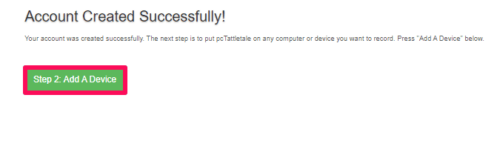
4. Once you have purchased the services of pcTattletale, it’s time to further continue with the setup process. Select Add A Device option that you see on the next page.

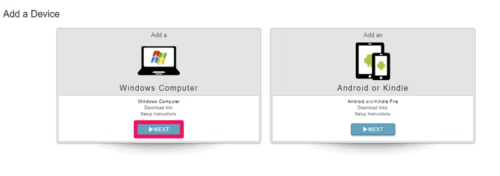
5. Time to select the device that you want to monitor using pcTattletale. Select Windows and select Next to proceed.

6. After that, you will receive a download link that will come in handy for the successful installation of the app on the target PC.

The setup process is complete on your device. Now, it’s time when you require physical access to your teen’s computer.

Setup Process On The Target Computer

Once you have physical access to your lover’s PC, you can start with the setup process on their PC. This is how you can setup pcTattletale software.

1. Using any browser on their device, search for the unique downloading link that you got in the last step of setup on your device.

2. The software will automatically start to download on your spouse’s PC or you simply need to tap on the Download option.

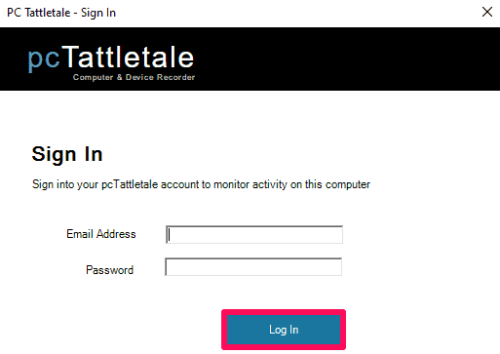
3. Once the app is downloaded, start with the installation setup by providing the email id and password that were used to create an account on pcTattletale. Click on Log In after proving credentials.

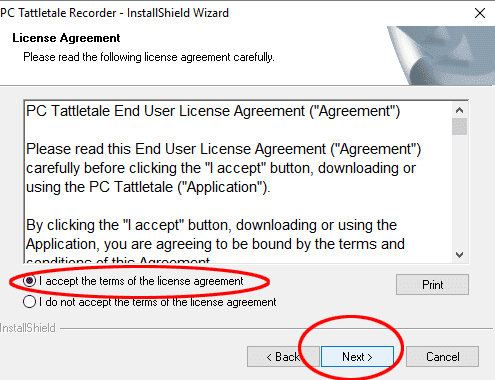
4. Read the license agreement if you want, that you see on the next page, and click on Next.

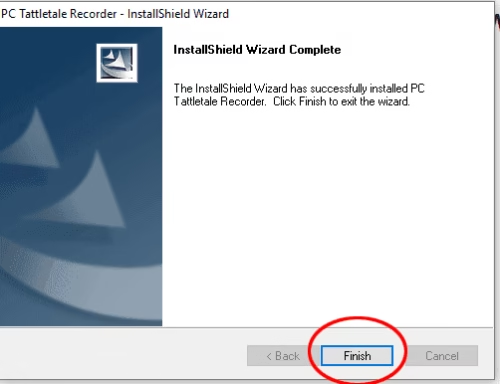
That’s it. You are done with the installation process on the target laptop and now it’s time to track its activities from your device by getting remote access to their PC.

You don’t need to worry about getting caught after the installation of the software. The target person won’t be able to figure out the installation of pcTattletale, as it works in the hidden mode. Nor the app will give any notifications to the target user.

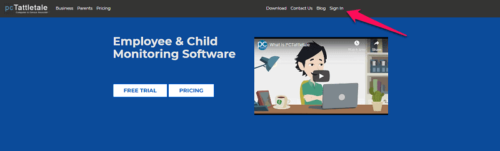
Now on your device, click on the Sign In option. Provide your details on the next page and click on Sign In to finally start with monitoring.

You are done with the installation process and now it’s time to discuss the features of the app.

pcTattletale Features

Activity

This feature keeps a track of all the activities done on your employee’s PC. Or you can say, the Activity section is the accumulation of everything that is done on the target PC.

The Activity section is present on the right-hand side, and you can use the search option to extract all the activities from a particular section.

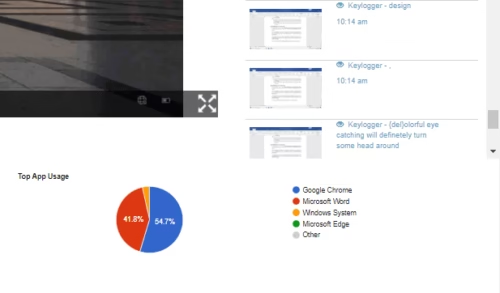
For example, if you want to know all the keystrokes made by the kid, you need to write Keylogger in the search. This will present all the keystrokes typed by the kid in the various sections on their PC.

The keylogger of pcTattletale worked just perfectly. Everything that your spouse types in any app like Chrome, Amazon, Youtube, etc, you will get updates for all.

The accurate timestamp with each keystroke makes the tracking of keystrokes even better.

Similarly, you can extract the details about other activities like Chrome, Amazon, Youtube, etc.

Live Video Recording

Yes, that’s right, you can actually see the live streaming of the target PC remotely with pcTattletale. It’s like you are watching their PC screen while sitting beside them.

With the help of the Live Video Recording feature, you can know if your spouse is using the dating apps like Tinder on their PC, or if your teen is opening some adult sites.

But there are some limitations to the Live Video Recording feature as well. The thing that you won’t like about the feature is that it won’t work properly while the user is playing a video.

Let’s say your wife/husband is watching a YouTube video and you are watching their PC live. Now you won’t be able to see the complete YouTube video that is going on. You will just see a few screens from that video.

But, yes, that few screens and the video title might be enough for you to figure out what kind of video they were watching.

Well, this was the case of YouTube videos, what about streaming services like Hulu, and Netflix? For streaming services, not even a few screens can be seen, just a black screen.

The reason for a black screen is that streaming services are highly secure to prevent piracy. So they don’t allow any app to record their screen.

Another downside of Live Recording is related to audio. pcTattletale does not record audio going on in the target PC, so it’s not possible to hear what all they listen to or the audio going in a video.

Recorded Videos

Can you sit in front of your PC all day long just to watch the activities of your lover? No, it’s not at all possible. You possibly have to do other things as well. But it doesn’t mean that you have to give up on tracking their activities for that time being.

pcTattletale automatically records all their PC activities, no matter if you are tracking them right now or not. Once you are ready to track them again, you can view the video that pcTattletale recorded. You just need to click on the play button to view the recorded video.

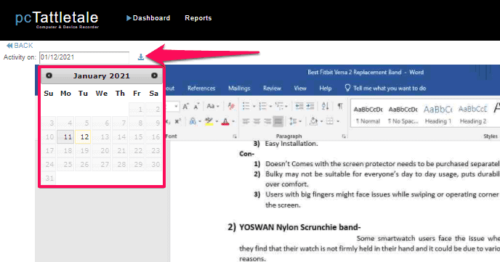
Now suppose you were not able to watch their PC activities for 2 days straight, what then? Just go to the calendar option that you see on the top and select the date for which you want to watch the activity. Downloading the activity for a particular day is also possible.

Click Activity

Are you using pcTattletale for monitoring your teen? Then this feature will come in handy. Kids tend to get addicted to their PC or cell phones, and it’s not acceptable.

pcTattletale will let you know about the clicks that your child makes on their PC every hour. So basically, Click Activity will help you know if your child uses their PC at night or not. And based on the number of clicks, you will know if the child is addicted to PC or not.

Top App Usage

Just as you want to be aware of their PC usage, you should be equally aware of the apps that they mostly use on their computer.

With the Top App Usage option, you can be aware of the apps that the target person mostly use. Like in our case, you can see that the target person likes to use Chrome a lot, followed by Microsoft Word.

pcTattletale Pricing

Till now, you might have made your mind if you want the service of pcTattletale or not. So let’s see how much does the software costs.

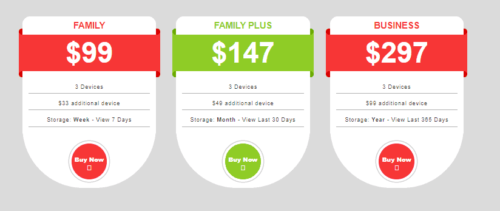
Basically, there are a total of 3 plans that the app offers. The FAMILY plan will cost you $99 and gives the access to monitor 3 devices. The storage that you get in the FAMILY plan is 7 days

FAMILY PLUS plan will cost you $147 with access to 3 devices. The storage capacity with this plan is 30 days.

The BUSINESS plan costs $297 which has everything that Family plan has but here you get a storage capacity of 365 days.

PC Monitoring With pcTattletale: Conclusion

With this, we would like to put an end to this article. Although there are limited options for monitoring Windows PC, pcTattletale is the best option that you can opt for.

The working of the software is quite appreciating and its monitoring style is different than other tracking apps.

So if you are thinking to spy on the PC of your kids, choosing pcTattletale for that purpose will be a good idea.


7 Best Music Players for Windows 10

Image Courtesy: Apple

Two pre-installed Best Music Player for Windows 10 are Media player and Groove Music application. But with the kind of requirements and choices, you might not be very satisfied with these windows 10 music player. Also, these software’s support a very limited number of audio formats. These might be satisfactory for us, but not for our power users who like take over controls on their software.

Their cravings for such best music player for windows 10 are taken care of here! After all tech geeks are our favourite! And we love to produce content for them! This doesn’t mean that customization of tools and advanced tools are needed by everyone. Some users like to keep it simple. All they want is a feather-like windows 10 music player which can play a various number of audio formats smoothly.

Accordingly, we have enlisted best music player for windows 10 which will help our user to choose the best. Hold on tight to this list of Best Windows 10 music player:

1. Dopamine:

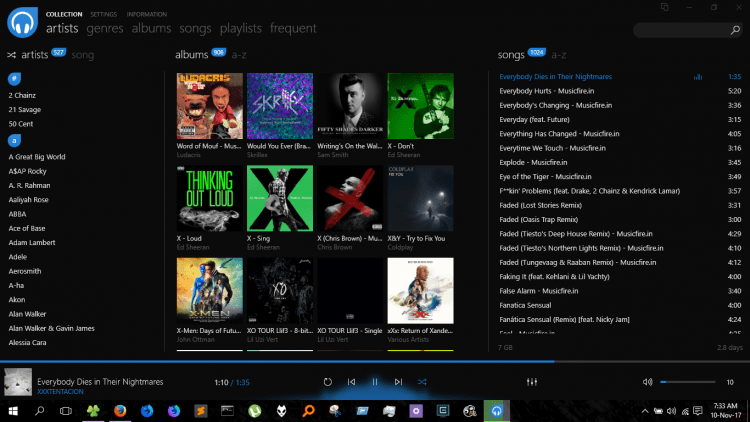
Dopamine in best music player for windows 10, if we look in terms of biological present in our brain which sends signals to our nerve cells. Let’s see if it can activate your nerve cells with its features! Personally I am in love with this software to the core. The blue and light coloured combinations of this best music player for windows 10, sets a favourable environment for you to play all your favourites. Its design will surely impress you. All the tools are perfectly placed without having to put extra efforts. Usage of best music player for windows 10 is very easy.

Image Courtesy: GitHub

This best music player for windows 10 works for almost all the formats including WAV, MP3, OGG Vorbis, FLAC, WMA, APE, and M4A/AAC. It enables you to access the settings of this player to change its appearance applying different colours and set it according to your preferences. You can set the notification system of this system with or without the start/stop, volume, etc controls. Dopamine well equipped with tools to control audio latency, background adjustment tools and many more. This best music player for windows 10 enhances the Last. FM integration and assists you with lyrics download tool enabling you to download lyrics from sites like MetroLyrics, LyricWiki, etc which can be accessed from the settings menu.

Compatibility: Windows 10, 8. And 7

2. Foobar2000:

Foobar2000 has gained a lot of popularity in the books of best music player for windows 10. I think the first impression is created by its interface itself. As soon as you run this software you will notice a very clean and tidy design. This player is more sophisticated than Dopamine. Power users hear up, it contains a lot of customization tools. So, don’t get fooled by the simplicity of this software. Foobar has its own ReplayGain Tool, DSP Manager, FTP and media library viewer tool etc.

Image Courtesy: FileHorse

Foobar2000 best music player for windows 10 is now available for Mac users as well! It is a freeware music player for the Windows users. It can support a wide range of audio formats like FLAC, MP4, Opus,AAC, Opus, WMA, Vorbis, MP3, Opus, etc. Users are also offered with facilities for advanced searching options with tools like automatic library monitoring system which keeps track of the files which have been added/removed.

Compatibility: Windows 10, iOS, Android

3.Music Bee:

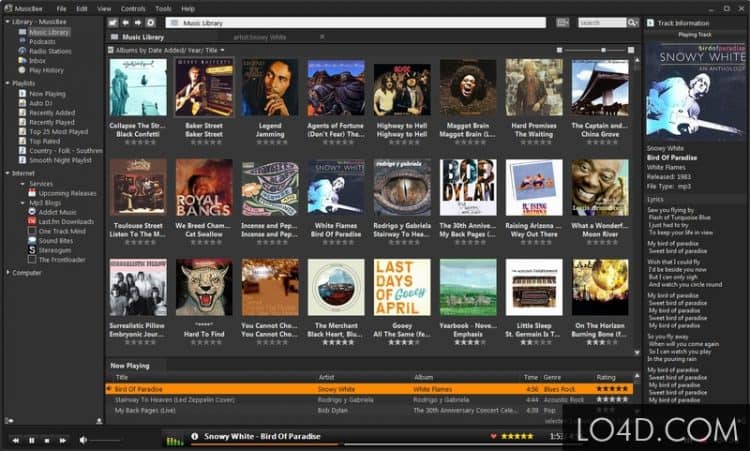
Music is not just defined as audio files but also other audio media aspects like radio, podcast, etc. Music Bee will not limit your love for enjoying music to the audio files. Users are offered with a wide array of engagement with radio shows, podcasts, and locally stored songs.  This best music player for windows 10 provides you with a variety of options like managing your audio library; files can be organized automatically, detailed playback controls, etc.

Image Courtesy: LO4D.com

Apart from the audio formats like MP3, Musepack, Opus, FLAC, WavPack M4A, it can also support audio files like ASIO and WASAPI. Uniqueness of this software is the Tag update feature, this feature has the ability to recognize the tracks with missing tags automatically and update them. That is not all, it can support the plugins of WinAmp and syncs the songs and playlists with your Android handsets too.

Compatibility: Windows 10, 8 and 7

4. AIMP:

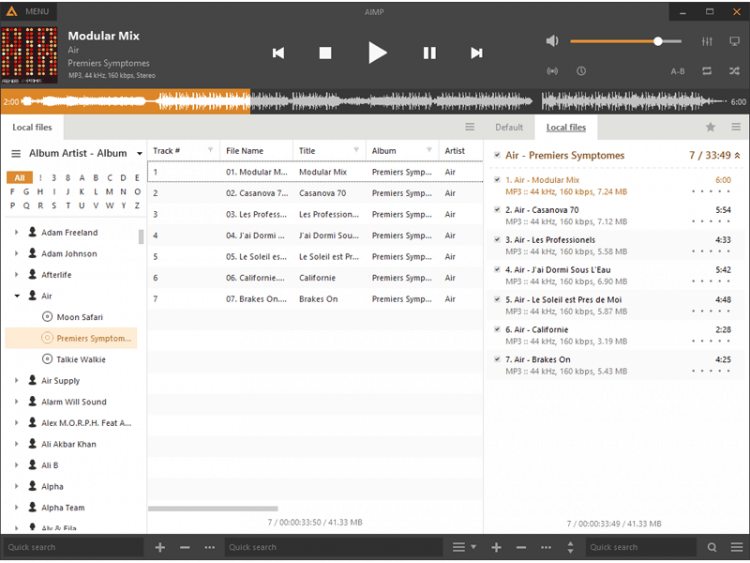
If you are a user who likes to make the windows 10 music player work on your beat the AIMP is for you. You can wiggle around this software with options for sound mixing and with the sound engine where users can access the 18-band equalizer and various sound effects. Sound effects like Enhancer, Reverb, Flanger etc are available.

Image Courtesy: CNET

It features Audio CD Grabber which enables you to make a copy-paste the audio files from a CD.  You can play a large number of audio formats. Apart from the codecs CDA, DTS, FLAC, AAC and AC3 it supports output for formats like ASIO, WASAPI and DirectSound. You will notice a tool for system shutdown feature, it allows you to set a timer to shut down your PC after playing a particular song. Another feature has an advanced tag editor that supports APE, WMA, ID3v1 and ID3v2.

Compatibility: Windows 10, 8.1, 8, 7 and Vista

5. Media Monkey:

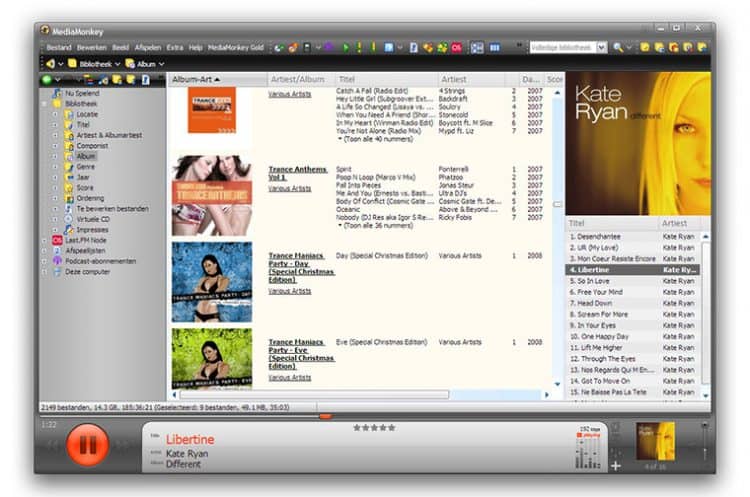
Media monkey gives you a very detail of their audios the software’s on the main page itself. For people who don’t think columns and rows filled with tools and details are clutter should surely look forward to this windows 10 music player. This best music player for windows 10 features automatic organization algorithm which arranges all your audios order-wise into folders according to the artists, albums, series, numbers, etc. In addition to it possesses a CD burner encourages the users to transfer the audio files into this software. This is not it! It consists of a Podcatcher facility which makes you eligible to download podcasts.

Image Courtesy: Neowin

You don’t have to be worried about which audio format you are downloading as it supports a variety of audio formats like MP3, WMA, FLAC, OGG, etc. Moreover, you can even style an analytical data of your music collection and synchronise it with your Android and iOS handset. Media Monkey windows 10 music player enables you to share your media files to televisions and other devices via DLNA and UPnP. It also consists of a jukebox mode which plays a particular genre of songs to keep your emotions inflow.

Compatibility: Windows 10, 8, 7 and Android

6. Winyl:

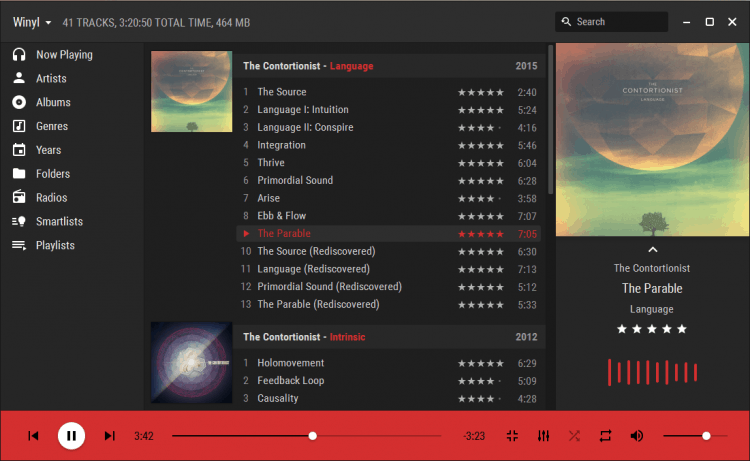
If you only need the best music player for windows 10 which gives you the best performance being light on your system, supporting a various number of audio formats, good interface, clean design then Winyl is for you. You might not believe that this windows 10 music player can handle more than 1,00,000 songs for all types of mood. It has a separate radio section which enables you to listen to your favourite radio channels and sync in with your favourite shows and music. The software also features a ‘Smartlist’ which enlists a songlist of 50 most played songs, 7 Random albums, etc.

Image Courtesy: Pep0 – DeviantArt

It can support variety of formats like: WMA, MP3, MPC, FLAC, M4A, OGG, APE, etc. This best music player for windows 10 also supports outputs in the formats like ASIO and WASAPI. You will not be disappointed with the annoying pause between the songs before playing the other song. It provides you with back-to-back playback with no pauses in between. So don’t worry! You can let all your emotions flow.

Compatibility: Windows 10, 8, 7 and Vista

7. Clementine:

Clementine is the best music player for windows 10 and very popular player because of its simplicity and its versatile nature. It interface is very simple which looks pretty ages as compared to the other players mentioned here. However, it is instilled with a lot of features and tools connecting it to the online world. You get the options to sync into you kind of music with SomaFM, Spotify, Grooveshark, etc. You also access audio files through cloud (Google Drive, OneDrive, Dropbox,).

Moreover it supports audio formats like MP3, FLAC, AAC etc. It can convert audios into outputs like OGG Vorbis, FLAC, OGG Speex and MP3 etc. It can also be controlled separately with the help of the Android using the companion app. It consists a proficient good library manager which can fill up missing details of the songs like album cover, artist etc by automatically downloading them from internet.

Compatibility: Windows, Linux and Mac OS

VPS or Cloud Hosting: Which One Should You Choose?

0

Source: Pixabay

Choosing the right hosting package can be pretty time-consuming. In the end, you don’t change it every other day, and are stuck with it for some time. And if you’re just starting out, you most likely just want to focus on building your website, and not the technical side of owning a website.

The latter, together with a few other things, is an important point which you should consider when choosing between a VPS and cloud hosting. So, which one is the way to go?

Consideration #1: Support & Technical Issues

When speaking of focusing on your business instead of server management, cloud hosting is definitely a better choice. Unlike a VPS, a managed cloud offers a complete, hassle-free hosting environment, in which you don’t have to do anything on the server-side. This means less room for error, and a higher chance that you keep close to 100% of uptime.

On top of requiring less work upfront, a cloud hosting offers much better support compared to a VPS – where the scope of help tends to be quite limited. Naturally, unless it’s a managed VPS – in which case, you can count on the same level of support as on a decent cloud hosting.

Winner: Cloud Hosting

Consideration #2: Setup Time

Source: Pixabay

The second thing to take into consideration, especially if you’re just starting out is the setup time of your server. While technically both servers are available within a few minutes from ordering, if you get an unmanaged VPS, it requires that you set it up yourself from scratch. Of course, you don’t have to touch the hardware (that’s what you’re renting), but you’ll have to deploy the admin panel, firewall, and the CMS of your choice. Not to mention that you will be responsible for the server security.

What about cloud? If you choose a reputable company, all that you’ll have to do is sign up, log in, and hit the one-click installation button of your favorite content management system. Once that’s done, you’re free to play with your website. And if you come across any problems during this simple setup, you can just reach out to support, so that they can fix it for you.

Winner: Cloud Hosting

Consideration #3: Available Resources

The third thing worth paying an extra attention to are the available resources. The exclusive access to resources is a significant advantage of both the cloud and VPS hosting packages. This means that no matter what other people do on the other instances of the server, your sites will never get affected.

Naturally, it’s hard to speak about the actual amount of RAM, disk space or CPU power without looking at the specific hosting plans. But, considering that cloud hosting includes extra support in the package, most of the time a virtual private server offers more power (but less help) for the same price. This means that if you don’t mind the extra work required to set up an unmanaged VPS yourself, it’s a better choice than cloud hosting resource-wise.

Winner: Virtual Private Server

Consideration #4: Customization

If all you need is a reliable, fast, and secure environment where you don’t have to do anything and can just host a simple website, you can ignore this point. But if you are interested in the technical side of things, would like to deploy extra applications, experiment with software, and have a full control over your server, it’s important to note that a VPS gives you a lot more freedom.

This is because, unlike a cloud hosting package, a VPS doesn’t come with a pre-installed admin panel (unless you ask for it – what usually costs extra anyway). All you get is a virtual server with just the OS (the two most popular ones being CentOS and Ubuntu – 9/10 times, you are free to choose whichever you want). This allows you to customize the server to your needs – from the OS, and admin panel to all the additional software that you want to install. Naturally, this is only beneficial if you actually know what you’re doing.

Winner: Virtual Private Server

Consideration #5: Scalability

Source: Pixabay

The last thing which doesn’t matter that much when you’re starting out but becomes critical once you start growing is scalability. Basically, what it means is how easy it will be for you to add resources to your hosting once your website and traffic start growing. In the end, you can’t stay on the basic package forever.

Thankfully, as long as you choose a quality hosting company that’s working with both small and big businesses, you should be able to add extra RAM/CPU power or upgrade the whole tier in just a few clicks. And that’s regardless of whether you’re using a VPS or cloud hosting. No website migration, no downtime, no business problems for you or your customers.

This makes both hosting types an excellent choice for anyone interested in building a sustainable long-term business. Just make sure that you check out the available hosting packages – so that you don’t have to switch companies too soon.

Winner: Draw

As you can see, the choice of hosting packages will depend mostly on your experience and expectations. If you value freedom, love to experiment, and want to set up the server the way you want it to be, then a VPS is the way to go.

But, if all you need is a secure and reliable place to host your website, and you don’t want to have anything to do with the technical side of things, you can’t go wrong with cloud hosting. Just sign up, create your site, and focus on building your business.

8 Best Bluetooth Wireless Headphones for Running That Do Not Fall Out.

0

Music is food for the mind, but if you have a low-quality headphone, even the best of your favourite music track can sound boring. And if you’re a fitness addict, you need earphones for running that don’t fall out while working out or jogging at the same time offer you a high-quality audio experience. We feel your pain, and so we compiled the best range of Bluetooth wireless headphones, earphones and earpods your money can buy. You can buy most of them from Amazon, or you can also shop Bluetooth wireless headphones at your nearest Walmart.

Best Bluetooth wireless headphones For Running And Gym

1. xFyro-Wireless and Waterproof Audio

The award-winning engineers at xFyro audio created the most advanced pair of Bluetooth wireless headphones for running on the market, bringing next-generation technology today’s active listener.

2. Jabra Elite Active 65t

The Jabra Elite Active 65t are the best Bluetooth wireless headphones in the market. They sit in your ears while running. The HearThru app seems to allow some external noise but only after you lower the volume. These earphones for running that don’t fall out have Amazon’s A.I Alexa enabled in them. Check out the prices

3. Monster iSport Victory

Monster iSport Victory earphones are among the best Bluetooth wireless headphones for running because they fit your head perfectly. These are the earphones for running that don’t fall out and give comfort to the ears. Monster headphones are sweat-resistant and weigh about 15g. With 10-hour battery life, these are the best buy.

4. 66 Audio BTS Pro Wireless Headphones

Charging the headphones every other hour will never be a problem with BTS Pro bluetooth wireless headphones as they run for 40 hours on a single charge. Not only this, the BTS Pro outdoes itself by providing a 100 feet wireless range. Control the sound with the Motion Control app and cancel the noise in the microphones.

5. RHA True Connect

All the runners need the best Bluetooth wireless headphones to sit on their ears without falling. RHA TrueConnect earphones are exactly what you wished for. They are sweat-resistant with 5-hour battery life. RHA headphones come with 15 billion choices of the ear tip.

6. Bose Sound Sport Wireless

Bose is a huge brand name in the electronic market. The Bose SoundSport earphones come with a short wire making it the best earphones for running that don’t fall out. The fit is smooth, the sound quality is high, and are sweatproof.

7. Urban Ears Stadion

Urban Ears Stadion has neckband with coiled cables to hook with the earbuds. It fits nicely, and these are earphones for running that don’t fall out. It lets you hear the surroundings and traffic while on the run. Expect 7 hours of battery life per charge. The negative about these earphones is the control buttons located on the back of the neck.

8. AfterShokz Trekz Air Headphones

AfterShokz wireless bluetooth headphones build especially for runners and are perfectly fit. What amazes us is the bone-conducting technology used in these best headphones for running. The sound travels through cheekbones and keeps the ears open to raise awareness of the surroundings. Here is the link.

These are some of the best wireless Bluetooth headphones for running. Write to us in the comments section whenever you buy earphones for running that don’t fall out from the list. Share your feedback/ suggestions. We’d love to hear from you!

Exit mobile version