Home Blog Page 131

Chrome Running Slow? Disable Hardware Acceleration with These 2 Methods!

0

Hardware acceleration is a technique wherein a program or application forces various hardware components to perform faster that the standard computing architecture to accomplish their job efficiently. One very common application which uses hardware acceleration is Google Chrome browser.

When hardware acceleration is enabled in Google Chrome it allows the browser to access the device graphic hardware to boost the process and improve the surfing experience. It passes most of the graphical intensive tasks such as games, playing video, etc. within the browser to the graphics processing unit. Bypassing such tasks that require faster mathematical calculations to the graphics processing unit, the CPU gets a chance to work on other tasks. It does sound promising, but many times users have reported that hardware acceleration is making their device run slower. There are unlimited numbers of software configurations and every system is different. Sometimes, hardware acceleration can cause the browser to crash and often causes the system’s battery to drain faster. That is why it is important to know if hardware acceleration is doing anything good for your computer or not.

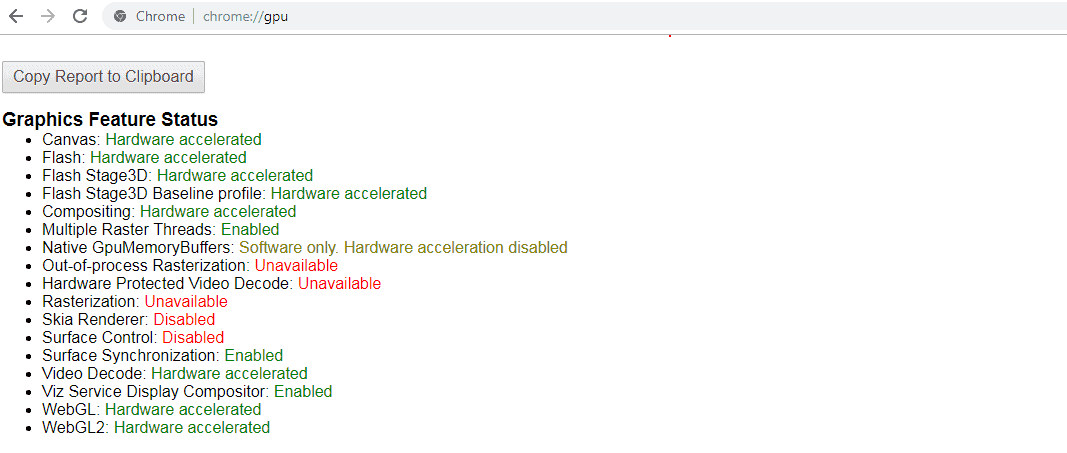
You can also check if hardware acceleration is enabled in Google Chrome by typing chrome://gpu in the address bar.

You will get a result similar to this:

PIC: HOW TO DISABLE HARDWARE ACCELERATION IN CHROME

You can see that a majority of the items in the list above have hardware acceleration enabled.

If you are facing problems in displaying visual elements correctly or the cursor lags across the screen in the Google Chrome browser, then disabling hardware acceleration can probably fix it. You have the option to turn off hardware acceleration in Chrome. Here is how you can do it with a few simple steps:

Disable Hardware Acceleration through Google Chrome Settings

  • Launch Google Chrome and go to the Menu by clicking on the three dot icon
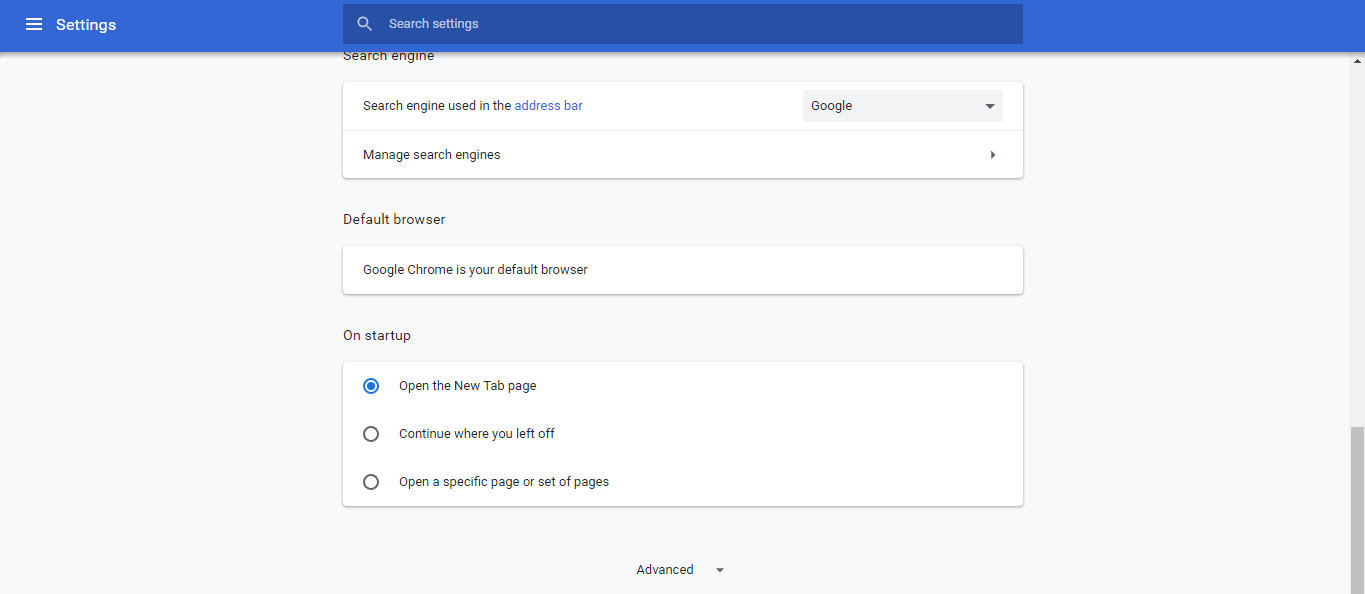
  • Go to “Settings and scroll down to the bottom of the page to click on “Advanced” option
PIC: How to Disable Hardware Acceleration in Chrome
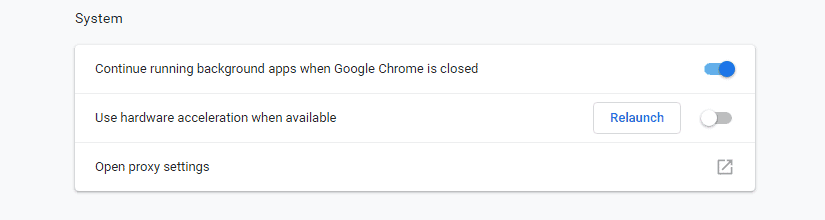
  • Now, scroll down to the “System” option.
  • There you can toggleUse hardware acceleration when available” on or off
PIC: How to Disable Hardware Acceleration in Chrome
  • Once done, restart your computer

**You can repeat the above steps to turn hardware acceleration back on.

How to Disable Hardware Acceleration in chrome via Registry in Windows

  • Hit Windows + R to bring Run window
  • Type in  regedit in the box and hit “Enter”
  • Now navigate to HKEY_LOCAL_MACHINE —-SOFTWARE —-Policies —- Google —-Chrome
  • Right-click on “Chrome”
  • Choose “New”—- “DWORD 32-bit value”
  • Keep value name as “HardwareAccelerationModeEnabled”
  • You have to set value data to “0” to turn off Hardware Acceleration ( to turn in on-again, set the value to “1”)
  • Restart your computer

Conclusion

Disabling hardware acceleration can improve your system’s battery life and the performance of the cursor too. If you had been facing constant issues with your browser, hopefully disabling hardware acceleration can make it perform better. If you notice a boost in the browser’s performance after turning off the hardware acceleration, then it means that it worked.

5 Critical Features a VPN Must Have

0

In the late nineties, virtual private networks were used in the international corporations that wanted to protect their data from hackers. However, once our world became digital, single users also became interested in the idea of installing a VPN. 

At this point, every fourth American uses a virtual private network on a daily basis. A lot of people want to keep their data private, protect themselves from IP address hacking, and possibly access content that is not available in their region. 

If you don’t have your own virtual private network yet, here is what you need to know in the first place:

Advantages of using VPN

Once you install a VPN to your computer and phone, you will be able to access articles and movies from Netflix, BBC, and Youtube that, for some reason, are not available in your country. A quality virtual private network comes in handy in case you travel abroad. 

When connecting your phone to a VPN, you can use multiple Internet connections at the same time. It will allow you to stream live video on the Internet or have uninterrupted business calls. 

Also, VPN can help to prevent a ransomware attack. You’d be surprised, but these days a lot of people’s data get stolen. Moreover, hikers can lock your phone and try to extort money from you. According to experts at Security Gladiators, a VPN service can create an encrypted tunnel between your device and a remote server and prevent an attack. 

Other than that, it is very convenient to use a VPN on your mobile phone while working remotely. In case you need to access or send some confidential files, you can use a virtual private network to prevent leaks. 

The best thing is that you can use a VPN on many divides simultaneously. Once you find a great deal, you will be able to connect your phone, PC, and tablet without compromising on quality and functionality. Some VPN providers allow connecting up to six devices at the same time. 

How to choose the best VPN 

Your ideal VPN provider should have features listed below:

Strong encryption

Without powerful encryption, you put your personal data at risk. If you don’t want hackers to steal your personal data such as credit card information or intimate photos, use a VPN that has AES – the encryption standard that is used by Apple, NSA, and Microsoft. The thing is that AES has never been officially broken yet, which makes it the best feature that your VPN provider can offer you.

Instant customer support chat

Another critical feature that your virtual private network provider should have is instant customer support chat. You never know when the problem can occur, so email or phone support would not be enough. All professional VPN companies offer customer support 24/7. 

No log policy

Every VPN service has its own logging policy. When looking for a VPN provider, make sure to choose the one that has a “no log” policy. Unfortunately, some providers tend to lie about having this feature available. To ensure there are no pitfalls, read the VPN provider’s privacy policy. 

Router support

If you don’t want to install a VPN on every single device in your house separately, look for a VPN provider that has router support. This feature will allow you to save some time and prevent data leaks. 

Integrated kill switch

You should be aware of possible IP leaks when using a virtual private network. If you don’t want your IP address to be exposed while you are online, choose a VPN provider that has a kill switch. This feature can prevent unencrypted data from being transmitted. In the IT world, it is considered a luxury. Since you are going to pay for your VPN plan some money, you deserve to have the best of the best. 

Good price 

As you can understand, there is plenty of available VPN plans these days. Some of them cost nothing literally, but it doesn’t make them better than the other. To the contrary, they might miss some important features listed above. 

It is recommended to pay upfront for a year plan since some providers can give you some bargain-basement deals for such a commitment. 

However, if you decide to take this step, make sure to read about all features carefully. Otherwise, you might sign up for something that is not worth it. 

Permanently Delete Your Yahoo Account – A Simple How-To Guide!

0

A decade ago, Yahoo was considered one of the best email services available. However, over time the newer email services have replaced Yahoo as the default emailing platform.

Yahoo had suffered from massive data breaches in the last ten years where almost a billion Yahoo accounts were compromised. So, if you are worried about your internet privacy due to security breaches and illegal spying and wish to opt-out of the Yahoo email services, then you can permanently terminate yahoo account page.

There are some critical things that you should be aware of before we begin to terminate yahoo account. You should know that terminate yahoo account means that not only you will lose all your emails but also everything related to your Flickr account and other data will also be erased which includes:

  • HotJobs
  • Yahoo! Address Book  
  • Yahoo! GeoCities
  • Yahoo! Briefcase 
  • Yahoo! Small Business 

If you had been paying for any Yahoo services, then make sure that you have cancelled all the paid subscriptions and saved the Flickr photos if possible before terminating your Yahoo account page.

How to terminate yahoo account permanently

Terminating your yahoo account page is pretty simple. Just follow this easy guide:

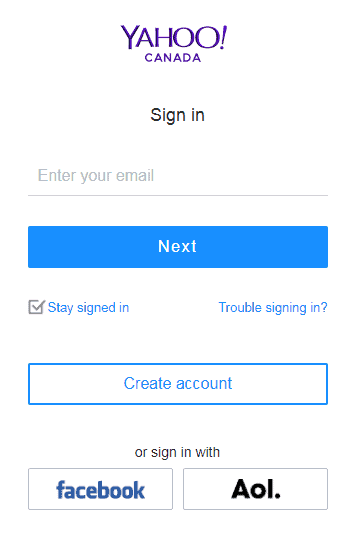
  • Sign in with your Yahoo credentials and if you have an account key set up, then you will get a verification code on your mobile number to authenticate you.
  • Once you log in, you will be able to see the Terminating your yahoo account page.
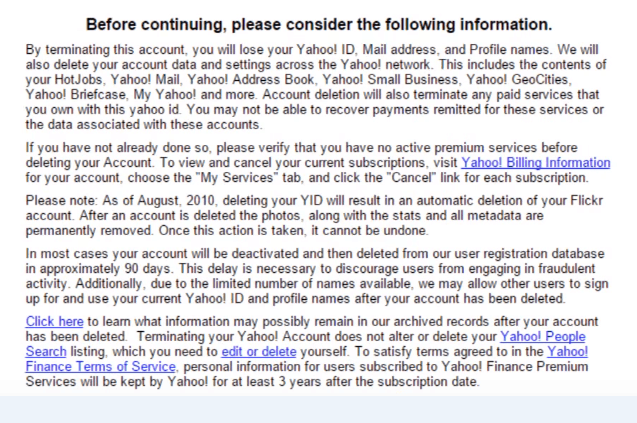
  • Review the account deleting warning as it details all the data which you will lose when you terminate yahoo account
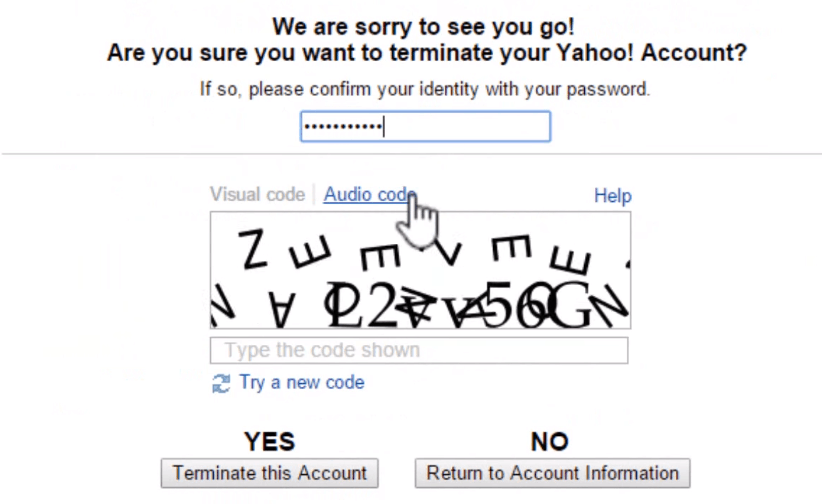
  • After reading the text, enter your Yahoo password at the bottom of the page
  • Scroll down further and enter the CAPTCHA code and click “Yes” to Terminate yahoo Account
  • You will get a confirmation page that your account is deleted.

That is it! Your Yahoo Account will be scheduled for permanent deletion within 90 days. If you want your Yahoo data to be erased immediately from the Yahoo servers, then you can delete all your emails, contacts, Flickr Photos, etc. before starting the termination process.

Wrapping up:

Post terminating your yahoo account page, your username and email address will still be available for others to use. However, anyone who tries to send an email to you will get a delivery failure message.

You have the option to reactivate your Yahoo account after you have marked it for termination within a 40 days period. To get your account active again, all you have to do is go to the Yahoo Mail web page and enter your sign in details. Post reactivation, you can start receiving emails once again, but the emails that were sent while your account was deactivated will not be accessible for you. Also, all the data that you had deleted before terminating your yahoo account page will be permanently erased and will no longer be available.

How To Turn ON Bluetooth in Windows 10

0

It gets extremely baffling when something as simple as turn on Bluetooth Windows 10 becomes a hurricane task. If your Windows 10 device is giving your troubles with the Bluetooth, then keep reading.

All Windows 10 devices have a Bluetooth chip available and in order to connect a Bluetooth device to your PC, you can turn on Bluetooth Windows 10 first.

How to turn on Bluetooth on windows 10

How to turn on Bluetooth Windows 10 with the following steps:

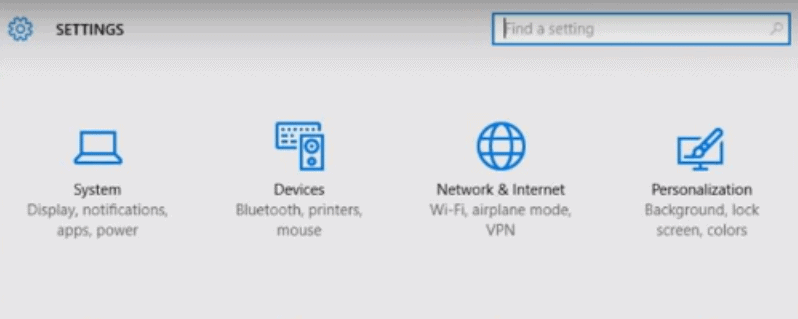
  • Hit Windows + I to open the “Settings” app
  • Click on the “Devices” option
  • On the left side of the Devices page, click on the “Bluetooth on pc & Other Devices” tab
  • And, on the right side of the page, turn on the “Bluetooth” switch
  • You will get a message stating “Your PC is searching for and can be discovered by Bluetooth devices”
  • You can turn on bluetooth on windows 10, now select the device that you want to connect with and click “Pair”

It is very simple, you can turn on Bluetooth on Windows 10 PC. Hopefully, that worked out for you. However, if you do not see the turn-on switch, then there is an issue with Bluetooth in your system.

How to find the missing Bluetooth on pc Icon

If you can’t see the Bluetooth section in the Devices tab,then how to turn on bluetooth on windows 10? There is a possibility that there are some issues with your Bluetooth driver.

Here is what you can do to fix this problem:

The first thing that you need to do is check if your computer supports Bluetooth.

  • Click on the “Start” button and then select “Device Manager”
  • Find out if you can see a Bluetooth tab or a Bluetooth Adapter listed in the Network adapters or other devices section.

If you see a Bluetooth adapter, then continue with the solutions to resolve the problem. But, if you don’t find Bluetooth adapter in Device Manager, how to turn on bluetooth windows 10 then you have to download and install the latest version of Bluetooth driver from your PC’s manufacturer support website.

Now, that you know for a fact that you need Bluetooth access in your system, once that is conformed try the following solutions to fix it:

1: Update the Bluetooth on pc Driver

If you have confirmed that your system supports Bluetooth but it still doesn’t work, then you need to update your Bluetooth driver.

You can update the Bluetooth driver manually going to your computer manufacturer’s website and downloading the most recent correct Bluetooth driver for your version of Windows.

2: Re-enable the Bluetooth Driver Software

  • Go to the “Start” button and navigate to the “Device Manager”
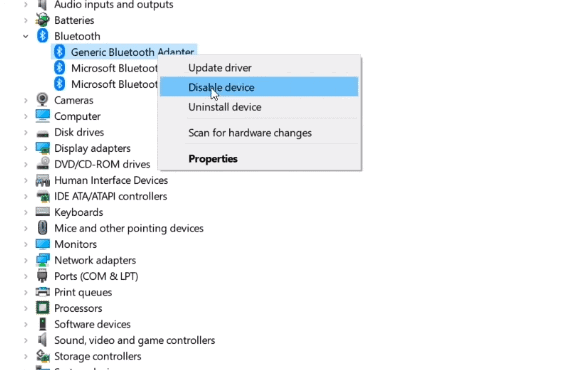
  • Right-click on the “Bluetooth on pc device” option and select “Disable device”

turn on bluetooth windows 10,bluetooth on pc,can turn on bluetooth windows 10,how to turn on bluetooth on windows 10,turn on bluetooth,how to turn on bluetooth

  • Click “Yes” to confirm
  • Now, right-click on “Bluetooth device” again and select Enable device”

Restart your system and hit Windows + I to go to Settings and Devices again.

The Bluetooth switch should appear in the window now.

3: Get the Bluetooth on pc Support Service Running

You can turn on bluetooth windows 10 If re-enabling the Bluetooth driver software didn’t work out for you, then the Bluetooth Support Service might not be active.

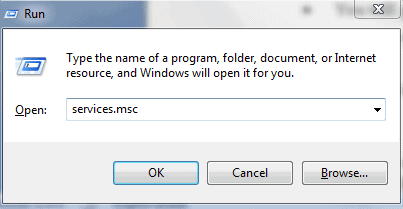
  • Hit Windows + R to open the Run box
  • Type in services.msc and hit “Enter”
  • Right-click on “Bluetooth on pc Support Service” and then “Start”
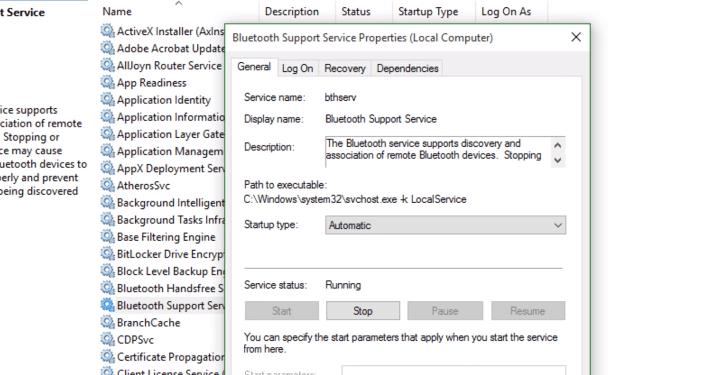
  • Again right-click on “Bluetooth Support Service” and select “Properties”
  • You will get a pop-up window, in the “Startup type” drop-down menu, select “Automatic”
  • Click on “Apply” and then “Ok”

Again, restart your PC and go to the Settings window to confirm that Bluetooth switch has appeared.

We hope that this guide was helpful in letting your know how to turn on Bluetooth Windows 10 and how you can fix it if it doesn’t turn on.

Does Your Current Hosted VoIP Solutions Provider Meet These High Standards?

0

Your company deserves more from a phone system than to ring, have someone answer it, or take a message. Your telecommunications network must also provide the capability to enable voice communications with all your employees at their desks, support a call center for sales and technicians in the field, and connect with a host of other communication channels such as fax machines, video conferencing, conference calling, mobile communications, wireless handsets, and text messaging. If it doesn’t, you could be missing out on new business. Your phone system is expected to provide more advanced functionality, like shared meeting collaboration, voicemail to email transcription, and call recording. 

Can a public switched telephone network (PSTN), commonly known as a good old-fashioned telephone, do that? Jason Simons, business phone systems professional with ICS in Houston, San Antonio, and Austin shares his insights.

Benefits of VoIP for Your Business

Digital is at the heart of most telephone networks today making Voice over Internet Protocol (VoIP) the preferred telephone system for most companies. VoIP is a digital telephone service that uses the Internet for transport, as well as private IP networks. In order for calls to originate and terminate from regular telephones, connections to the PSTN are still required. If your telephone system is already in the digital space, the burning question is whether your current VoIP solution provider meets the following high standards.

Reliability

If a VoIP provider is not reliable, it doesn’t really matter what features they offer or what special price they quote you, the relationship won’t work. It is crucial that your current provider can ensure ongoing and exceptional customer service. Find out how quickly they respond to service calls and their level of expertise on staff and compare if this currently suits your needs.

Features

Although VoIP comes with a choice of different options and features, it’s important you know what features are most important to you. Your specific needs will always be different from other companies as not all companies or all VoIP systems are equal. Make sure you are not paying hidden fees for features you don’t need. In some cases, providers may charge more for specific features that other providers include at no cost.

Integration

One of the great things VoIP offers is its ability to integrate with other applications. A great VoIP provider should be able to integrate their software with other applications such as customer relationship management platforms (CRMs) and offer good mobile calling functionality — particularly if many of your employees are working remotely.

Flexibility

Ensure your VoIP provider offers the flexibility to work in a wide range of environments from analog desk phones to softphones piggy-backing on a cell phone. These systems can often also integrate all or part of their softphone clients into other back-office applications, like your customer relationship management system (CRM) or IT help desk platforms. Consider the standard interface of an app supporting a dial pad and a pop-up screen and you’ll have a very good idea of how some of this technology works. In addition, these cloud-based systems support a variety of phone numbers in global locations, so that your customers can have free access to your phone at little or no charge.

Security

The security of any technology company is first and foremost and your hosted VoIP solution is no exception. Does your current hosted VoIP solution provider offer secure systems? If not then it’s time to reassess and find out how they source their connection. The idea is to find out if they are providing a circuit to your business location or if they are leasing a circuit from larger vendors. Leased circuits carry risks of diminished quality and information security if they rely on lines that share facilities with public internet traffic.

Determining the Ideal Setup for System Control of Your VoIP

It’s difficult to manage the quality of a VoIP system that’s completely outside your control. Your provider should always maintain control over its own network and equipment. Some hosted VoIP solution providers own, operate, and manage their own equipment whereas others rely on a patchwork network of equipment and solutions leased from other providers. Still other VoIP providers are merely resellers, with little-to-no control over the actual network or service they’re offering. For organizations of all sizes, one of the most important factors to understand is that cost doesn’t always translate into value when it comes to hosted VoIP solutions. Going with a cut-rate VoIP provider can lead to risks such as hidden costs, mismanaged implementations, and poor post-implementation support.

No matter how large your organization is or what your technical requirements are, finding the right VoIP solution for your needs is to always focus on quality first. Delve deep into a provider’s business practices, find out how long they have been in business, what level of customer support they provide, and all post-implementation factors that will impact the customer experience. Making informed decisions means you can unlock the full scope of benefits of a cloud-based phone solution that will stand the test of time. Reach out to your local IT managed services provider to help understand the full range of benefits for VoIP solutions. When you partner with a technology services vendor, you’re gaining a new realm of expertise beyond your internal understanding as well as implementation best-practices and ongoing support.

Unlock More Content! 13 Must-Know Stremio Addons

Stremio is a relatively new but easy-to-use media centre which allows you to watch movies, series, live sports, and YouTube channels instantly. It gives you recommendations for content that you may like and notifies you for new episodes and movies. You can watch the videos in HD and cast them to the TV through AppleTV, Chromecast or DLNA with just a simple click. Stremio has lesser configurable options but it excels in many features that its rivals lack.

The content in Stremio is so wide that it has an ultimate stremio addons system which allows various sources such as Netflix, Amazon, Filmon, etc. It also has a default third party addons which stream from torrent websites. Even though Stremio has a very limited number of ultimate stremio addons but most of them are for well-established streaming platforms.

Best Stremio addons

Here are the best Stremio addons which will let you watch a lot of free content. These add-ons provide licensed content from the official sources and don’t involve any risk.

OFFICIAL ADDONS FOR STREMIO

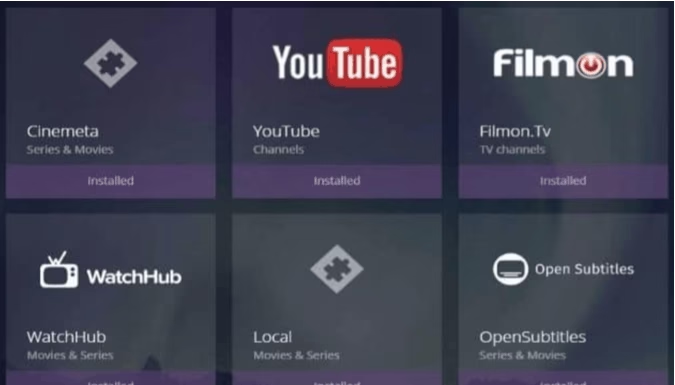
YouTube

YouTube is the biggest streaming platform, so it has to be present on stremio addons. You can watch any YouTube videos without the annoying ads with this best Stremio addons. The add-on gives you the usual integration option and you can add a channel section which lets you browse new and trending content from an accessible grid. You can subscribe and get notified when your favourite YouTubers post new videos. However, there are some limitations in Youtube best stremio addons such as you can’t watch any live streaming content or comment on the videos.

Netflix

Netflix is best Stremio addons allows you to stream Netflix movies and series without facing buffering issues. You can browse all the content in Netflix, but you need a subscription and have to login first. Also, you will be directed to the Netflix official website, if you are reluctant in sharing login information.

Open Subtitles

The last and best stremio addons in our list, Open Subtitles is an official stremio addons which is perfect for those who like subtitles in their videos. You can add subtitles to French, Korean and Spanish movies and the best part is that it is completely legal.

DTube

DTube is a decentralized video streaming platform which is designed as an alternative to YouTube.  Similar to YouTube, this addon allows you to view a lot of videos and you get rewards for creating original content in the form of crypto currencies.

ThePirateBay

The Pirate Bay which is the biggest torrent website is now available as an ultimate Stremio addons that allows all the latest TV series and movies on your application. You can watch all the content that is there in the PirateBay website with this best stremio addons.

FilmOn

Another official Stremio addons, FilmOn streams almost 600 TV channels, thousands of movies, documentaries, and a lot more. It also exclusively features social television which by far is not available in any other ultimate Stremio addons.

Zooqle

With the wide range of video content, Zooqle is considered one of the best Stremio addons. It can stream TV shows, documentaries, and movies from various Torrent websites like RARBG, MegaTorrents, KAT, etc.

Twitch

Those who like eSports might already know about Twitch. It has become popular and ultimate stremio addons as the go to destination for both sports and live video games.

Twitch allows you to watch live IPTV channels specifically the sports channels so that you can stream live sports. You can watch people playing every kind of game online and subscribe to their feeds. Twitch best stremio addons allow you to watch both live and on-demand content.

WatchHub

WatchHub is another official best stremio addons that search multiple sites at once. If you are looking for a movie, all you have to do is search for the title in Stremio and WatchHub will show all the options to buy or rent that specific movie. Also, if your choice of movie is still in theatres, it will show you the link to buy tickets.

Vodo

Vodo allows you to watch Indie movies absolutely free of cost. This official best stremio addons is ideal to watch and promote independent movies which are produced by independent entertainment companies.

UNOFFICIAL ADDONS FOR STREMIO

Juan Carlos

Juan Carlos gathers content from a large variety of sources and gives alternative links for popular content. It specializes in TV series and movies, all you need to do is look for the content that you wish to watch and if there is a free source available, you will be able to find it in the sidebar.

RARBG Add-on

This stremio addons pulls content directly from RARBG torrent website so that you can watch it just like a streaming service. You don’t need to download and launch any video. With RARBG add-on, you can watch the same content in the exact quality as present in the torrent site.

Popcorn Time

With Popcorn Time, you can enjoy unlimited number of TV shows and movies streamed directly from various torrent websites such as EZTV and YTS. This ultimate stremio addons offers you various choices on the video quality and recommends the latest media content. If you want some exceptional HD content, then you should consider the Popcorn Time add-on.

Are these Addons for Stremio safe?

The ultimate stremio addons are far safer as compared to other media centres such as Kodi. The official stremio addons have been approved by the Stremio team and wouldn’t allow access to any illegal content. These add-ons pull content from the torrent sites directly, therefore you can watch the copyrighted content from anywhere on your device.

However, to secure your online privacy you should use a Stremio VPN so that you can spoof your online locations. The VPN will provide you security and anonymity, also it will give you access to content and streams that would not otherwise to able to access.

Conclusion

Stremio focuses on ease of use and you just need a click to get access to even the biggest video libraries. It surely seems to have a lot of potential when you look at the advanced features and range of addons.


A Guide To Choosing A Good Broadband Provider

0

Having a good internet connection is important at all times, and it’s particularly the case at the moment. With a lot of people being stuck in their homes throughout the day and plenty having to work from home, having a good connection is vitally important and that all starts with having a good broadband provider. Now, there are a lot of broadband providers out there and that therefore means that it can be easy to make a poor decision. Try not to worry too much, though, as that’s why I’m here today. Plenty of people are in the same situation as you, so to make sure you choose a good broadband provider continue with my quick guide. 

Check out some comparison sites

When you’re going to be choosing a new broadband provider, there are a number of ways to start. One of the first things you should do is compare the companies that you’re thinking of signing a deal with. Now, it is possible to do this yourself. However, it usually means sifting through lots of different websites and writing a lot of data down so you can look back over it later. To make things a lot easier for yourself, just look for a good, reliable comparison site. If you do find a good version of these, it’ll help you a great deal. There will be a list of different providers, all underneath one another, with all the relevant numbers at your disposal that you need to make a well informed decision. Use these guides to enhance your knowledge, and check some bredbandsleverantörer here.

Think about the price

One of the most important things to think about when choosing a broadband provider is the amount of money they’ll charge you. There are a lot of broadband providers out there for you to choose from and there are therefore always going to be a range of prices. Remember, however, that choosing the cheapest broadband won’t always be the best decision for you as it could result in you getting poor connection speeds. Instead, you should be looking for the best speeds for the most competitive prices. There will be broadband providers with very similar speeds out there who differ in prices, so try and find the cheaper ones in those scenarios. 
Take the broadband speed into account

Now, as I’ve already mentioned and as you already know, there are many important things to look for when you’re choosing a broadband provider. Out of all of these, and especially in todays coronavirus situation, your broadband speed is vital. The last thing you want is to be working from home and find yourself being hindered by a slow network speed. You won’t be able to do your work as quickly and effectively as usual and will find it much harder to work for your wages. By finding a good broadband provider who provide fast speeds and connections, you’ll avoid this. Make sure you do some good research to ensure you aren’t left disappointed. 

Exit mobile version